
Prime business IP communications
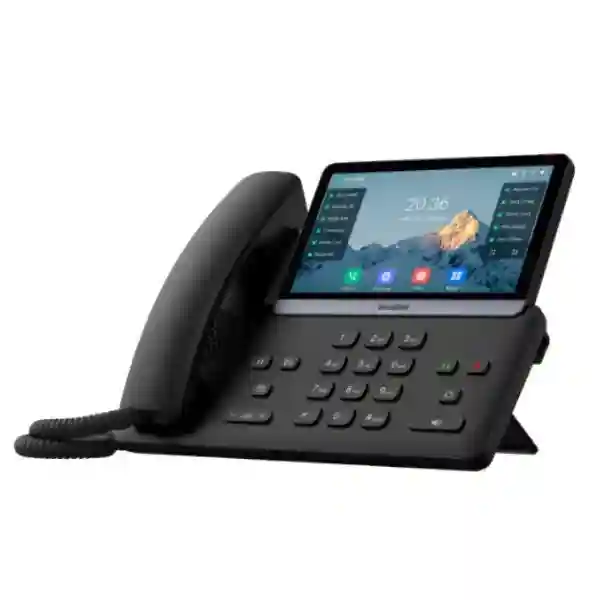
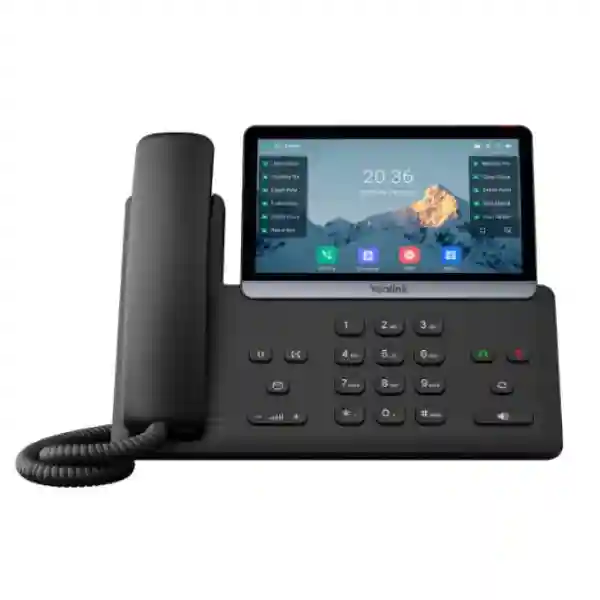
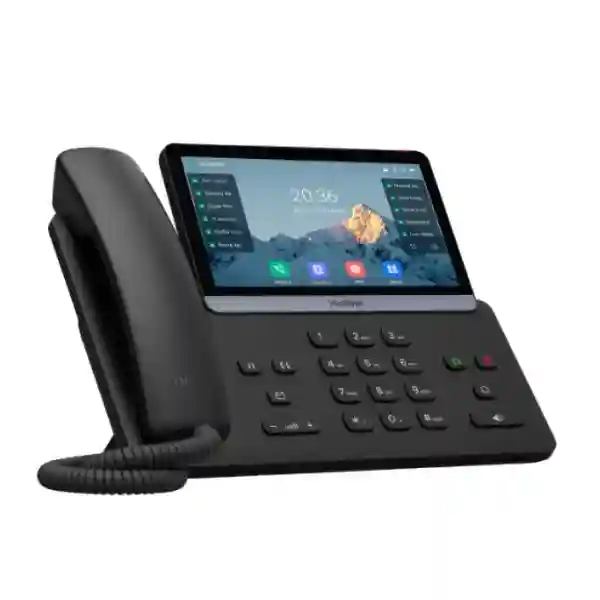
Yealink SIP-T77U Business Phone
The Yealink SIP-T77U is a touch-enabled SIP desk phone for executives, professionals, reception environments and other users who need a rich call-control interface. Yealink specifies a 7-inch 800 × 480 adjustable capacitive touchscreen, up to 16 VoIP accounts, dual-port Gigabit Ethernet, IEEE 802.3af PoE support, dual USB ports, 84 one-touch DSS keys, 10-way conferencing, HD audio features and support for up to three EXP55 expansion modules. These capabilities make the phone suitable for organisations that want a high-visibility desktop endpoint without abandoning standard SIP-based telephony architectures.
Quick fit check
Consider the SIP-T77U when the user needs a large touch interface, many programmable functions, multiple SIP identities, Gigabit desktop networking, PoE, USB accessories or expansion keys. Before purchase, confirm PBX compatibility, provisioning method, headset requirements, PoE availability and whether optional Wi-Fi or Bluetooth adapters are needed.
7-inch touchscreen
The 800 × 480 capacitive display provides a larger visual workspace for call handling, directories, DSS functions and everyday navigation.
16 SIP accounts
Up to 16 VoIP accounts help support multi-line roles, executive users, service desks and shared communications workflows.
Dual Gigabit + PoE
Two Gigabit Ethernet ports and IEEE 802.3af PoE simplify desk connectivity and can reduce the need for a separate local power adapter.
Dual USB flexibility
USB-A and USB-C connectivity can support accessories such as headsets, recording media and supported Yealink wireless adapters.
What the Yealink SIP-T77U solves
Business telephony is often less about making a basic call and more about handling several conversations, extensions, queues, directories and collaboration devices without slowing the user down. The SIP-T77U addresses that requirement with a large touch interface, numerous programmable DSS functions and support for multiple SIP accounts. For an executive assistant, receptionist, departmental coordinator or busy manager, the phone can place frequently used call controls where they are easier to reach than on a basic desk phone.
Audio quality is another key concern. Yealink lists HD handset and HD speaker support, Acoustic Shield, Smart Noise Filtering and full-duplex hands-free speakerphone operation. These functions are designed to improve clarity in normal office environments, although practical call quality still depends on LAN design, WAN conditions, codec selection, PBX configuration and the quality of the remote endpoint. For organisations moving from legacy telephony, that distinction matters: a premium phone performs best when the network is engineered for voice.
Security and maintainability also affect procurement. The phone supports TLS 1.3, SRTP, HTTPS certificate management, AES256 configuration-file encryption, secure boot, 802.1X, VPN functions and a trusted execution environment hardware encryption approach. Yealink also supports auto-provisioning methods including FTP, TFTP, HTTP and HTTPS, together with PnP and other management options. This gives IT teams several ways to standardise deployment and reduce repeated manual configuration.
Verified Yealink SIP-T77U specifications
| Display | 7-inch 800 × 480 adjustable capacitive colour touchscreen |
| VoIP accounts | Up to 16 SIP / VoIP accounts |
| Ethernet | Dual-port Gigabit Ethernet |
| Power | IEEE 802.3af PoE, Class 3; optional external power adapter |
| USB | Two USB 2.0 ports: USB-A and USB-C |
| Programmable functions | 84 one-touch DSS keys; support for up to three EXP55 expansion modules |
| Conference | 10-way conferencing |
| Directory | Local phonebook up to 1,000 entries; XML/LDAP remote phonebook support |
| Security | TLS 1.3, SRTP, HTTPS certificate management, AES256 configuration encryption, secure boot, 802.1X, TEE hardware encryption solution |
| Mounting | Adjustable stand; optional wall mounting |
Deployment, compatibility and accessory planning
The SIP-T77U is a standards-based SIP endpoint, but a successful business deployment still starts with compatibility checks. Confirm that the intended PBX or hosted voice service supports the required SIP registration, BLF, transfer, voicemail, provisioning and security features. Yealink identifies interoperability with platforms such as 3CX and BroadSoft BroadWorks, but individual service-provider certifications, firmware requirements and feature mappings can differ. When replacing an existing phone estate, document which functions employees use today rather than assuming every legacy key or PBX feature maps identically.
For wired networks, the dual Gigabit ports allow the phone to sit between the access switch and a workstation where this architecture is appropriate. Voice VLANs, QoS and PoE budgets should be planned at switch level. The phone supports 802.1p/Q tagging and Layer 3 DSCP mechanisms, yet effective prioritisation requires matching switch, router and WAN policies. If the office uses PoE, verify available switch wattage across the entire phone count. If not, account for optional local power adapters and socket availability at every desk.
Wireless connectivity is accessory-dependent on this model. Yealink lists Wi-Fi support through the WF50(V1) USB adapter and Bluetooth headset connectivity through supported adapters and accessories. Do not specify the SIP-T77U as having integrated Wi-Fi or integrated Bluetooth without checking the exact bundle. The two USB ports are valuable because a user can combine supported USB functions, but accessory selection should be validated against current Yealink compatibility information and the firmware in use.
For higher call volumes, the EXP55 expansion module can extend the number of visible programmable functions. Yealink states support for up to three expansion modules, enabling large sets of monitored extensions or speed-dial functions. Reception desks, executive assistants and service teams should define how many BLF or DSS targets are genuinely useful, because an expansion module adds value only when the call workflow is organised and the PBX is configured accordingly.
Yealink SIP-T77U Business Phone Tanzania
For organisations searching for the Yealink SIP-T77U Business Phone in Tanzania, the main purchasing question should be whether the endpoint matches the intended call workflow and network environment. Tanzania-based deployments can range from a few executive desks to larger PBX estates covering administration, sales, customer care, hospitality, professional services or multi-branch operations. The SIP-T77U is particularly attractive when users need a touch-based interface, several SIP identities and a large number of programmable keys rather than a simple single-line handset.
Before requesting a quotation, identify how many phones are required, which users genuinely need the T77U tier, and whether lower-tier endpoints can be mixed with it for general staff. A role-based model strategy is usually more economical than specifying the most capable handset for every desk. Receptionists, directors, assistants and call-intensive managers may benefit from the 7-inch display and DSS capacity, while standard users may have different requirements. Also identify the existing PBX or hosted SIP platform, extension count, call queues, hunt groups, voicemail requirements and branch links.
Network readiness matters across Tanzania because voice quality depends on LAN and WAN design, not only on the phone. Check PoE switch capacity, VLAN configuration, router QoS, internet stability, firewall rules and SIP traversal policies. For multi-site deployments, document the connectivity between offices and whether phones register locally, centrally or to a cloud service. Power resilience should also be considered where business continuity is important: PoE switches, routers and the PBX or internet equipment can be placed on suitable UPS infrastructure so phones remain usable through short power interruptions.
FourTeck Tanzania provides an integrated technology context covering IP phones, PBX, switching, Wi-Fi, firewalls and related infrastructure. Buyers can review the wider FourTeck Tanzania technology portfolio when the phone forms part of a broader office project. For regional projects that cross borders, the FourTeck Kenya and FourTeck Uganda sites provide related regional context. A quotation request should state exact model, quantity, deployment city, PBX platform, PoE availability and desired accessories so the requirement can be assessed without relying on assumptions.
Yealink SIP-T77U Business Phone Dar es Salaam
Dar es Salaam organisations often operate busy front offices, headquarters, professional practices, logistics teams, hospitality sites and customer-facing departments where call handling is more complex than basic extension-to-extension dialing. In that environment, the SIP-T77U can be considered for personnel who need rapid access to multiple lines, monitored extensions, transfer destinations and conferencing features. Its large touchscreen and programmable DSS functions can reduce the number of menu steps involved in repetitive call tasks when the PBX is configured around actual user roles.
A Dar es Salaam deployment should begin with an extension and traffic map. Identify reception positions, executives, assistants, departmental queues, shared lines and remote branches. The phone supports up to 16 SIP accounts, but that does not mean each user needs sixteen accounts. Define the number of identities, line appearances and BLF targets required by each desk. If a receptionist monitors many extensions, assess whether one or more EXP55 modules will make call supervision easier. If the requirement is primarily a single extension and occasional calls, a different Yealink model may provide better value.
Network planning is equally important in dense commercial environments. Check whether access switches provide sufficient Gigabit ports and PoE budget, whether voice traffic is separated using VLANs, and whether WAN connectivity has suitable latency, packet-loss and jitter characteristics. The SIP-T77U supports QoS tagging, but switch and router policies must be configured consistently. Where internet-based SIP trunks or cloud PBX services are used, firewall behaviour, NAT traversal and provider requirements need to be validated. Security policies should cover phone administration credentials, HTTPS management, firmware control and network access.
For quotations in Dar es Salaam, include device quantity, current PBX or hosted voice platform, number of branches, headset preference, optional Wi-Fi or Bluetooth requirements and whether PoE is already available. If the deployment forms part of a wider UAE-linked or multinational procurement programme, the FourTeck UAE technology site can provide additional regional context, while the Tanzania team can focus the discussion on local site requirements. The objective should be a correctly scoped endpoint deployment rather than simply purchasing handsets before the voice network and provisioning method are understood.
Yealink SIP-T77U Business Phone Mwanza
Mwanza businesses evaluating the Yealink SIP-T77U should consider how the phone will support branch operations, management users and customer-facing communications. The model is most useful where users benefit from a large touch display, multiple SIP registrations or a substantial set of programmable functions. A branch director, front-office coordinator or operations supervisor may need quick visibility of internal extensions and call states, while ordinary desks may require fewer features. Segmenting the phone estate by job role keeps the project aligned with real operational needs.
For organisations connecting Mwanza with Dar es Salaam or other branches, the design of the PBX architecture is important. Determine whether extensions register to a central IP PBX, a cloud platform or a local system. Centralised designs can simplify management but depend heavily on WAN availability; local survivability may be relevant where continuity requirements are strict. The SIP-T77U supports call-server redundancy capabilities, but the complete solution depends on the PBX, network and service-provider design. Document failover expectations before choosing endpoints so resilience is planned end to end.
Power and switching should also be reviewed. PoE can simplify the desk by carrying both power and data through Ethernet, yet the access switch must have enough power capacity for the full phone count. Connecting the switch and network edge to an appropriate UPS can improve continuity during short interruptions. The phone’s dual Gigabit ports can be useful where a workstation shares the desk network connection, but VLAN policies and endpoint security should be implemented carefully rather than treating the phone as an unmanaged pass-through device.
A useful Mwanza quotation brief includes the number of executive or reception-grade phones, total extension count, PBX brand, SIP trunk details, PoE switch model, branch connectivity, call recording expectations and headset needs. If Wi-Fi is required because cabling is unavailable at a specific desk, confirm the supported WF50(V1) accessory and assess whether wired Ethernet would still be preferable for predictable voice performance. Procurement should also allow for spare units, standardised firmware and documented provisioning templates where the deployment is business-critical.
Yealink SIP-T77U Business Phone Arusha
In Arusha, the SIP-T77U can fit organisations such as hospitality groups, tour operators, professional offices, administrative sites, education environments and multi-department businesses where phone users handle many internal and external calls. The phone’s seven-inch touchscreen can make directories and call functions easier to navigate, while its 84 one-touch DSS keys provide extensive programmable capacity. Those capabilities are most valuable when configuration reflects actual workflows, for example placing frequently transferred departments, manager lines and service contacts within easy reach.
Hospitality and service organisations should pay particular attention to PBX feature compatibility. Room extensions, reception queues, night service, voicemail, call pickup, transfer behaviour and integration with existing platforms may differ by PBX. The SIP-T77U uses SIP standards and supports several PBX-oriented functions, but procurement teams should confirm exact compatibility rather than assume every feature will operate identically. If a property or office already has a telephony system, provide model and software-version information when requesting a quotation.
Arusha deployments can also benefit from standardised provisioning. Yealink provides auto-provisioning over common protocols and supports deployment tools intended to reduce repetitive setup. This becomes useful when several phones need identical security settings, codecs, VLAN parameters, directory sources or function-key templates. Establish who owns the provisioning server or PBX templates, how firmware updates are approved and how credentials are protected. Device management is part of the operational lifecycle, not merely an installation task completed on day one.
When comparing prices, ensure quotations cover the same scope. Check whether power adapters are included or optional, whether Bluetooth or Wi-Fi adapters are needed, whether headsets are part of the request, and whether expansion modules are required. Installation, provisioning and PBX configuration may also be separate services. A clear Arusha request should specify quantities by user type, the desired delivery or project timeline, networking readiness and any requirement for branch integration. This produces a more meaningful comparison than looking only at the handset unit price.
Yealink SIP-T77U Business Phone Dodoma
Dodoma organisations considering the Yealink SIP-T77U may include administrative offices, institutions, professional services firms and organisations that coordinate activity across several departments or sites. The model’s combination of a large touch display, multiple SIP accounts and programmable DSS functions is well suited to users who need to manage more than a single extension. For procurement teams, the right first step is to identify which positions are call-intensive and how many functions must remain visible without navigating through layers of menus.
Security should be part of a Dodoma deployment from the beginning. The T77U supports secure SIP transport and media mechanisms, HTTPS management, certificate handling, secure boot, configuration-file encryption and network authentication technologies. These functions are useful only when the surrounding PBX and network are configured to use them. Develop a policy for administrator passwords, management access, firmware updates, provisioning credentials and unused services. If phones are placed on a dedicated voice VLAN, ensure that routing and firewall rules permit only the required management and call flows.
For offices with centralised IT, the phone’s auto-provisioning capabilities can simplify rollout across departments. Templates can standardise time settings, directory access, DSS layouts and security parameters, reducing manual differences between devices. It is still important to test a pilot group before mass deployment. Verify call transfer, conference, voicemail, BLF, caller identification, emergency dialing rules and SIP-trunk behaviour. A pilot also helps determine whether users need optional accessories such as USB headsets, wireless adapters or expansion modules.
A complete Dodoma quotation request should therefore include more than the model name. State the phone quantity, user roles, PBX platform, SIP provider if applicable, number of monitored extensions, network-switch model, PoE capacity and any desired accessories. Also state whether configuration, installation or integration assistance is needed. FourTeck Tanzania’s verified contact guidance specifically asks telephony buyers to include extension count, reception, queue and branch requirements, so preparing this information in advance helps turn the enquiry into a practical deployment discussion.
Yealink SIP-T77U Business Phone UAE
UAE businesses searching for the Yealink SIP-T77U often operate in communications-heavy environments such as corporate headquarters, trading offices, hospitality groups, professional services, contact-oriented teams and multi-site enterprises. The T77U’s seven-inch capacitive touchscreen and large DSS capacity suit executive and reception workflows where many extensions, lines or transfer destinations need to be visible. Up to sixteen SIP accounts also provide flexibility for users who handle several identities or services from one physical phone.
When deploying the T77U in a UAE network, confirm compatibility with the selected PBX, cloud voice platform or managed communications provider. SIP interoperability is broad, but hosted providers can impose particular firmware versions, provisioning systems or feature restrictions. If the organisation has existing numbering, call recording, call queues or compliance requirements, map those functions during the design stage. Security settings should also align with corporate policy, especially where phones are managed centrally or connect to services across the public internet.
Large UAE office floors can benefit from PoE-based deployments because power and data are consolidated at the network edge. The switch design still needs enough PoE budget for every endpoint, suitable VLAN segmentation and QoS. Where phones share network connectivity with desktop computers, use the dual Gigabit interfaces in a controlled architecture. For continuity, the network switch, firewall, router and voice platform may require UPS protection; protecting the phone alone does not preserve service if upstream network components lose power.
Buyers can use the FourTeck UAE site for UAE-focused IT and telecom enquiries. When comparing quotations, check whether optional power adapters, Wi-Fi adapters, Bluetooth accessories, headsets and EXP55 modules are included. Also clarify provisioning, configuration, installation, testing and support scope. A structured bill of materials should distinguish core handsets from optional accessories so procurement teams can compare like with like instead of treating different bundles as equivalent offers.
Yealink SIP-T77U Business Phone Uganda
For Uganda-wide deployments, the Yealink SIP-T77U can be used as a higher-tier desk phone within a mixed endpoint estate. Headquarters users, branch receptionists and managers may benefit from its touchscreen and programmable DSS capacity, while other employees can use models matched to simpler roles. This approach can control cost while keeping one SIP architecture. The key is to define each user profile before ordering so premium features are assigned where they create operational value.
Multi-branch Ugandan organisations should document whether telephony is centralised, cloud-hosted or distributed. The endpoint supports standard SIP and redundancy-related functions, but site-to-site voice availability depends on connectivity and PBX architecture. Where branches depend on a central data centre or cloud PBX, assess ISP resilience, routing, firewall policies and backup connectivity. If uninterrupted calling is critical, discuss survivability and alternative routing at solution level rather than assuming an endpoint feature alone guarantees continuity.
The T77U’s PoE capability can simplify installation in offices with managed switches. Evaluate switch capacity, UPS runtime and VLAN segmentation across all sites. Standardised provisioning is particularly useful when phones are spread across several locations because configuration changes can be applied consistently. Create templates for codec policy, time zone, directories, security and programmable keys, then pilot them on a small group before wider rollout.
For Uganda-focused context, buyers can review FourTeck Uganda. A quotation request should include locations, quantities per site, PBX details, extension ranges, expected call queues, PoE availability and accessory needs. If the same project covers Tanzania and Uganda, standardising on a common endpoint family can simplify training and spares, but local connectivity and site conditions should still be assessed separately rather than assuming identical deployment requirements in every office.
Yealink SIP-T77U Business Phone Kampala
Kampala offices often combine headquarters functions, customer service, sales, administration and management in one site, making role-based phone selection important. The SIP-T77U suits users who need a broad call-control surface, multiple identities or quick access to many colleagues. The touchscreen can present directories and call information clearly, while programmable DSS keys can be organised around departments, branches or frequent transfer targets. For reception desks, optional EXP55 modules can extend this visibility further.
A Kampala rollout should be tested against the actual PBX feature set. Verify BLF, pickup, transfer, conference, voicemail, call park and any executive-assistant functions required by users. If an organisation is migrating from analogue extensions or another IP phone brand, build a user acceptance checklist because button behaviour and terminology may differ. Training a small pilot group is usually more effective than replacing every phone at once and discovering workflow issues after cutover.
Network preparation should cover Ethernet availability at each desk, PoE budget, voice VLANs and quality-of-service design. The dual Gigabit ports can support a workstation connection through the phone, but policy decisions about device authentication and segmentation should be made by the network team. Where cloud PBX or SIP trunks are used, test internet performance during busy periods, because consistent packet delivery matters more for voice than headline bandwidth alone.
For procurement, list the exact number of T77U phones required and identify which desks need optional accessories. USB headsets may suit users who spend long periods on calls; Bluetooth or Wi-Fi needs should be checked against supported adapters; reception roles may require EXP55 modules. Separating these accessories in the bill of materials avoids over-ordering. Also clarify whether the quoted scope includes provisioning and PBX integration, because an unconfigured handset and a fully commissioned endpoint are not equivalent deliverables.
Yealink SIP-T77U Business Phone Arua
Arua organisations considering the Yealink SIP-T77U may be connecting a regional office to a central PBX or cloud communications platform. In a branch setting, the phone can serve managers, reception personnel and coordinators who need easy access to colleagues across departments or locations. Its support for multiple SIP accounts and large DSS capacity can help consolidate several communication roles, provided the PBX and provisioning design supports the intended layout.
Branch connectivity should be evaluated carefully. If calls depend on a WAN link to another city or cloud service, measure not only bandwidth but also latency, jitter, packet loss and service stability. Voice VLANs and QoS can protect calls inside the local network, yet they cannot correct an unstable internet circuit beyond the site. Organisations with strict uptime needs should examine backup connectivity and understand how the PBX handles failover. These are architecture decisions that should be resolved before a large handset order.
Power planning is also relevant. With PoE, the phone can draw power from a central switch, which makes it easier to protect several endpoints by placing network equipment on a UPS. Calculate switch PoE budget for all phones and other powered devices such as access points or cameras. Avoid assuming that a switch labelled PoE can necessarily power every port at maximum load simultaneously. Check the actual model specifications and expected connected device mix.
For an Arua quotation, provide phone quantity, PBX location, branch connectivity type, user roles and any required headset or expansion accessories. If phones will be shipped preconfigured, confirm how extension credentials and security information will be handled. If they will be provisioned on site, make sure the network can reach the intended provisioning service. A small pilot phone can validate registration, audio, transfer and directory behaviour before the full branch deployment proceeds.
Yealink SIP-T77U Business Phone Mbarara
Mbarara businesses can consider the SIP-T77U for positions where call visibility and fast interaction matter more than the lowest possible handset cost. The phone provides a large touchscreen, multiple accounts and extensive DSS programmability, features that can help managers and front-office teams work with queues, branches or frequently contacted departments. A practical deployment can combine T77U units for these roles with simpler SIP phones elsewhere, keeping the platform consistent while aligning spend with user needs.
The local network should be treated as part of the voice system. Managed switching allows VLAN separation and QoS policies, while PoE can simplify cabling. If one Ethernet drop serves both phone and workstation, document how VLAN assignment and endpoint authentication will work. When voice travels over a VPN or routed connection to a central PBX, check firewall and NAT behaviour. The phone supports security and VPN-related capabilities, but organisational policy should determine where tunnels terminate and how devices are managed.
User experience depends on more than display size. Configure directories, time settings, feature keys and headset behaviour around the job. For a receptionist, BLF layout may be the priority; for an executive, assistant functions and quick access to conferencing may matter more; for a supervisor, several SIP identities could be important. Building these role templates before rollout reduces inconsistent device configurations and makes training easier.
When requesting pricing for Mbarara, separate essential items from optional enhancements. The core phone includes its standard handset, Ethernet cable, stand and guide according to Yealink documentation, while the external power adapter and wall-mount bracket are optional. Wi-Fi, Bluetooth and expansion requirements may also involve accessories. Ask for a bill of materials that makes these distinctions clear, and state whether installation, provisioning, testing or PBX configuration should be included in the project scope.
Yealink SIP-T77U Business Phone Gulu
In Gulu, the Yealink SIP-T77U can support regional management, administrative teams, reception points and organisations coordinating with other branches. Its touchscreen, multiple SIP registrations and programmable keys can make high-frequency call workflows easier, especially where staff transfer calls between teams or monitor colleague availability. The phone should be selected because those functions are needed, not merely because it is a premium model. Role-based endpoint planning produces a more efficient and supportable phone estate.
If the Gulu office connects to a central communications platform, test the WAN path under realistic conditions. Voice traffic is sensitive to delay and packet loss, so an internet connection that works well for email may still need policy changes for telephony. Configure voice VLANs where appropriate, prioritise real-time media across managed network devices and confirm firewall rules with the PBX provider. If remote management is required, restrict administration interfaces and use secure protocols.
Centralised provisioning can reduce support effort for remote branches. Yealink’s supported auto-provisioning mechanisms let administrators standardise configuration, but the process should be secured and documented. Keep firmware versions controlled, test updates before broad release and maintain a record of extension assignments. If a phone is replaced, a predictable provisioning workflow helps restore service without rebuilding settings manually from memory.
A useful Gulu procurement brief includes the number of users, number of T77U units, branch-to-headquarters connectivity, PBX or hosted platform, SIP-trunk provider, PoE availability and any optional USB accessories. Specify whether the site requires remote installation guidance, on-site configuration or only hardware supply. Clarity at quotation stage prevents uncertainty over what is included and helps the buyer compare complete project scope rather than unit pricing alone.
Yealink SIP-T77U Business Phone Kenya
Kenyan organisations looking at the SIP-T77U may be planning executive communications, reception systems, PBX upgrades or multi-site standardisation. The phone is a strong candidate where a user benefits from a seven-inch touchscreen, many DSS functions and multiple SIP registrations. Its dual Gigabit Ethernet ports and PoE support fit modern managed LANs, while its USB connectivity allows supported headsets, recording media and wireless adapters to be added according to workflow.
For Nairobi headquarters or distributed Kenyan branches, decide how extensions are hosted and managed. A cloud PBX may simplify central administration, while an on-premises or virtual PBX can provide different control and integration options. The endpoint choice should follow that architecture. Confirm provisioning, codec policy, call recording, voicemail, BLF and queue requirements with the chosen platform. If the phone is part of a migration, verify the old system’s important user functions before cutover.
Networking remains central to call quality. Gigabit connectivity is useful, but real-time voice performance depends on congestion control, QoS, switching, routing and ISP stability. PoE simplifies power distribution, particularly when access switches and routers are protected by UPS systems. At large sites, calculate the aggregate PoE load and keep capacity for other devices such as wireless access points. Document voice VLAN IDs and DHCP or provisioning options so deployment teams can commission phones consistently.
Kenya-focused customers can review the FourTeck Kenya site for regional technology context. For cross-border East African projects, keeping the same handset family across Kenya, Tanzania and Uganda can reduce training and spare-parts complexity, but each office should still be assessed for PBX reachability, power, cabling and local network design. A complete quotation should therefore include quantities per location, accessory requirements, configuration scope and project staging.
Yealink SIP-T77U Business Phone Kuwait
Kuwait businesses evaluating the SIP-T77U typically need a premium desktop endpoint for executives, reception users or other staff who manage frequent calls. The seven-inch touchscreen and programmable DSS functions can make a busy call workflow easier to operate, particularly when the user monitors extensions or needs quick transfers. Up to sixteen SIP accounts also support multi-line configurations where the PBX or hosted service is designed to present several identities to one desk.
Office network design should be reviewed before rollout. The phone supports Gigabit Ethernet and PoE, enabling a clean desk installation when suitable managed switches are available. Voice VLAN and QoS settings should be consistent across access switches, routers and WAN connections. If the handset shares an Ethernet connection with a workstation, confirm corporate security policies for network segmentation. Secure administration through HTTPS and controlled provisioning should be part of the configuration standard.
For organisations using headsets heavily, test the exact headset and adapter combination required by the user group. Yealink lists support for USB and various Yealink headset options, while Bluetooth connectivity can depend on a supported adapter. Wi-Fi is also accessory-based on the T77U. These details should appear explicitly in the procurement list to avoid receiving phones that require additional accessories before they can satisfy the intended desk setup.
Kuwait buyers should compare complete scope rather than only handset price. Ask whether configuration, PBX registration, extension mapping, firmware standardisation and user training are included. For a larger installation, define a pilot, acceptance tests and rollout sequence. Test inbound and outbound calling, transfer, conferencing, voicemail and any receptionist functions before broad deployment. This staged approach reduces the risk of discovering PBX-specific behaviour after every desk has been replaced.
Yealink SIP-T77U Business Phone Ghana
Ghanaian organisations can use the SIP-T77U as an executive or high-activity endpoint within an IP telephony solution. The phone’s display and DSS capacity are particularly useful for roles that need visual call management, multiple transfer destinations or access to several SIP registrations. Before specifying the model across an entire organisation, categorise users by role and call volume. This helps reserve premium endpoints for positions that benefit from them while maintaining a coherent SIP platform elsewhere.
For multi-site Ghana deployments, standardised provisioning and network documentation are valuable. Record VLANs, DHCP options, provisioning server addresses, firmware versions and PBX credentials using a controlled administrative process. The T77U supports several auto-provisioning methods, allowing IT teams to reduce repetitive setup. However, automated deployment must be secured; provisioning credentials and configuration files should not be exposed unnecessarily, and management access should be limited to authorised administrators.
Power-over-Ethernet can make a business phone estate easier to operate because the access switch becomes the central power point. Check its total PoE budget and consider UPS protection for the switch, router and PBX or internet equipment. If a site experiences an upstream connectivity failure, phones registered to a cloud service may lose calling even when the handset remains powered, so resilience planning should include the full communications path.
A Ghana quotation brief should state exact model and quantity, PBX type, expected SIP accounts per phone, monitored extensions, headset requirements, optional Wi-Fi or Bluetooth needs and whether EXP55 modules are required. Also identify whether phones are to be supplied only or fully provisioned. For cross-regional procurement, maintain a common configuration standard while still allowing site-specific network and numbering details. This balances operational consistency with the practical differences between locations.
Yealink SIP-T77U Business Phone Nigeria
Nigeria’s large and varied business environments can create a strong need for scalable IP telephony, particularly in headquarters, service organisations, multi-branch companies and communications-heavy departments. The SIP-T77U can be positioned for executive, receptionist and supervisory roles where a large touch interface, multiple SIP accounts and programmable DSS functions improve call handling. It should be considered as one component of a complete voice architecture rather than as a standalone productivity upgrade.
Branch and internet connectivity can vary considerably between sites, so voice design should be based on measured conditions. Test latency, packet loss and jitter on the paths used by SIP signaling and media. Apply QoS where managed networks allow it, and evaluate backup internet links where call continuity is business-critical. The handset supports network and security features such as VLAN tagging, TLS and SRTP, yet the surrounding PBX and network equipment must be configured coherently for those capabilities to provide practical benefit.
For large deployments, central provisioning can save significant administrative time. Build validated configuration templates and rollout by user profile. Reception users may receive extensive BLF layouts and optional EXP55 modules, executives may have assistant features and preferred directories, and ordinary power users may need only a subset of functions. Maintain firmware consistency and test updates before applying them widely, especially when the phone is integrated with a hosted provider or custom PBX configuration.
Procurement teams should ask vendors to identify every optional item. Power adapters, wall-mount brackets, Wi-Fi adapters, Bluetooth accessories, USB headsets and expansion modules may not be part of the base phone package. Clarify warranty terms from the seller rather than assuming a standard period, and avoid relying on unverified stock or delivery claims. A detailed bill of materials, implementation scope and acceptance checklist create a clearer basis for comparing offers across Nigerian sites.
Yealink SIP-T77U Business Phone Seychelles
Seychelles organisations in hospitality, professional services, administration and tourism-related operations may need IP phones that support front-desk visibility and executive call control. The SIP-T77U’s touchscreen and high DSS-key capacity can fit these roles, especially where staff frequently transfer calls between departments or properties. The model can also support multiple SIP registrations, providing flexibility where a user handles several numbers or business identities through one endpoint.
Island and multi-property environments place extra emphasis on WAN design. If telephony is hosted centrally or in the cloud, evaluate the reliability and performance of each site’s connection. Consider how the business should operate during internet outages and whether alternative links or local survivability are required. These decisions are primarily functions of the PBX and network architecture. The phone itself provides SIP and network capabilities, but end-to-end service availability depends on every component between the handset and call platform.
PoE is often useful in hospitality or office installations because it simplifies desk power and can centralise backup through UPS-protected switches. Confirm the switch budget and account for other PoE devices sharing the same infrastructure. Where structured cabling is not available, the phone can support Wi-Fi through the specified optional adapter, but wired Ethernet is generally easier to control for fixed voice endpoints when cabling can be provided. Any wireless design should be tested for coverage and capacity at the actual desk locations.
For a Seychelles quotation, provide property or office count, quantities per site, PBX platform, extension plan, call-queue requirements and accessory needs. Hospitality buyers should identify front desk, reservations, administration and management roles separately because they may require different key layouts and headset options. A pilot at one site can validate configuration before replication across other locations, reducing deployment risk and creating a reusable template for the remaining phones.
Buying guidance: who should choose the SIP-T77U?
Choose the SIP-T77U when the user’s daily job benefits from a large touch display, extensive programmable keys, several SIP accounts and flexible accessory connectivity. Typical candidates include receptionists, executive assistants, senior managers, departmental coordinators and users who supervise multiple extensions. A large feature set does not automatically make it the best phone for every employee. For users who only need basic calling, directory access and a small number of programmable keys, a less complex endpoint may be easier to support and more cost-effective.
Also consider lifecycle consistency. Standardising on a Yealink T7 family can simplify firmware policies and user training, while the T77U can occupy the premium tier. Yealink’s unified T7X firmware approach is relevant for organisations that want a family of related models. Even so, procurement teams should confirm current firmware compatibility and platform certification at the time of deployment, because software and hosted-provider requirements can change.
For broader telecommunications projects, the FourTeck Tanzania portfolio, Uganda solutions site, Kenya solutions site and UAE technology site can provide regional context where the same organisation operates in several markets. Keep technical standards common where practical, but validate PBX, connectivity and deployment details per site.
Quotation checklist for the Yealink SIP-T77U
Phone quantities
State the total number of T77U units and, if relevant, quantities of other phone models in the same project.
PBX or hosted platform
Provide the PBX brand, software version, hosted provider or SIP service so compatibility and provisioning requirements can be checked.
Network readiness
List PoE switch models, voice VLAN requirements, branch links and whether each desk has structured Ethernet cabling.
Accessories
Specify USB headsets, wireless adapters, EXP55 modules, wall mounting or local power adapters where required.
Call workflow
Explain reception, queue, BLF, executive-assistant, call recording, conferencing or branch requirements that affect configuration.
Services required
Clarify whether you need hardware supply only, provisioning, installation, PBX configuration, migration assistance, testing or training.
Frequently asked questions
Does the Yealink SIP-T77U have built-in Wi-Fi?
Yealink specifies Wi-Fi support through the WF50(V1) USB adapter for the SIP-T77U. Treat Wi-Fi as accessory-based for this model and confirm the exact bundle before ordering.
How many SIP accounts does the SIP-T77U support?
Yealink lists support for up to 16 VoIP accounts. The number actually configured should reflect the user’s job and PBX design rather than using the maximum by default.
Can the SIP-T77U use Power over Ethernet?
Yes. Yealink lists IEEE 802.3af PoE Class 3 support. Confirm that the network switch has enough PoE budget for the total number of phones and other powered devices.
Is the power adapter included?
Yealink lists the external AC adapter as optional. If the office does not use PoE, include the required adapters in the bill of materials and confirm local power requirements with the supplier.
Can the phone connect to expansion modules?
Yes. The SIP-T77U supports the EXP55 and Yealink states that up to three expansion modules can be connected. This is useful for reception and monitoring-heavy roles.
Does the T77U support secure voice communications?
The phone supports technologies including TLS 1.3 for signaling and SRTP for media, together with HTTPS and other security features. End-to-end use depends on PBX, provider and network configuration.
Is the SIP-T77U suitable for reception?
It can be a strong reception option because of the large display, DSS programmability and EXP55 support. Confirm the number of extensions to monitor, queue functions and PBX feature compatibility before choosing the final layout.
What should I provide when requesting a quotation?
Provide the exact model and quantity, PBX or hosted platform, extension count, reception or queue needs, branch requirements, PoE availability, headset preference and any optional Wi-Fi, Bluetooth or expansion-module requirements.
Decision recap
The Yealink SIP-T77U is best understood as a premium SIP endpoint for users who need more call visibility and control than a basic desk phone provides. Its verified strengths include a large 7-inch touchscreen, up to 16 SIP accounts, dual Gigabit Ethernet with PoE, extensive DSS programmability, dual USB ports, enterprise-oriented security capabilities and support for expansion modules. These features are relevant to executive, receptionist and power-user environments.
A good purchase decision depends on the surrounding system. Confirm PBX compatibility, provisioning method, network QoS, PoE capacity, accessory needs, security policy and user roles before ordering. For multi-site organisations, standardise where useful but validate each branch’s connectivity and power environment independently.
Consultation panel
For a more accurate Yealink SIP-T77U quotation, prepare your device quantity, deployment location, PBX or cloud voice platform, extension count, PoE status, headset requirements and any reception or branch workflows. FourTeck Tanzania’s verified contact process is designed to collect this practical context so product selection and project scope can be discussed around compatibility and capacity rather than model name alone.




Reviews
There are no reviews yet.