
Yealink SIP-T85W Prime Business Phone
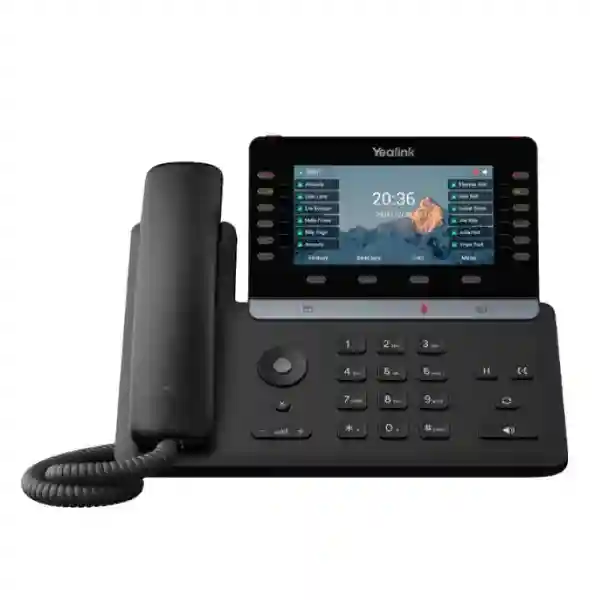
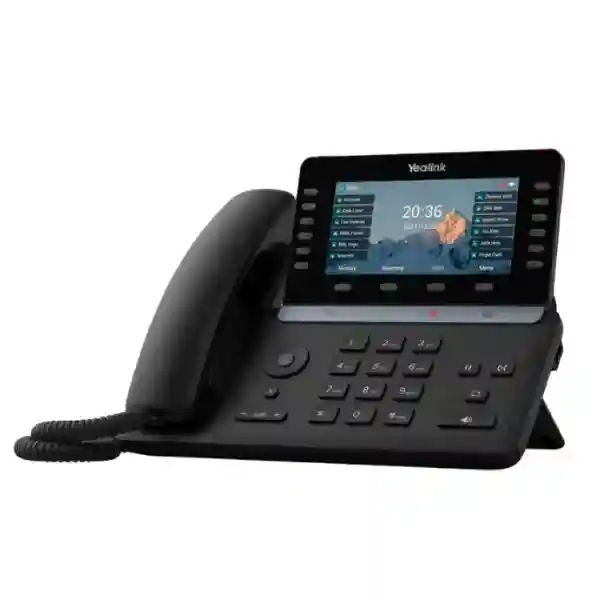
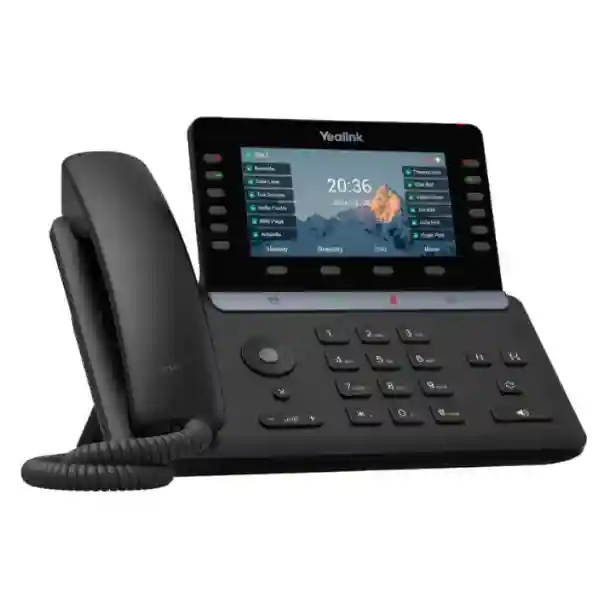
The Yealink SIP-T85W is designed for busy executives, managers, reception teams and other professionals who need a premium SIP desk phone with strong call handling, modern wireless connectivity and a larger visual workspace. Its adjustable 5.5-inch 960 × 480 color display, support for up to 16 SIP accounts, built-in Wi-Fi 6, Bluetooth 5.0, dual-port Gigabit Ethernet, PoE, two USB interfaces, programmable DSS keys and expansion-module support make it suitable for both individual executive desks and structured enterprise rollouts. For buyers in Tanzania, the most important purchasing question is not simply whether the phone has a long feature list, but whether it matches the PBX platform, SIP service, PoE design, VLAN policy, headset requirement and daily call workflow of the intended user.
Best suited to users who need many line appearances or programmable keys, frequent transfers, executive calling, headset use, wireless connectivity, or expansion capability without moving to a full touchscreen smart phone.
Why the Yealink SIP-T85W stands out
The SIP-T85W sits in Yealink’s newer T8 family and is positioned as a prime business phone for demanding office users. The 5.5-inch color screen is larger than a basic desk phone display and can be adjusted to improve viewing comfort. The phone supports up to 16 VoIP accounts and provides 12 physical line keys that can be organized across multiple pages for up to 60 DSS functions. This matters for users who handle several extensions, shared lines, BLF monitoring, one-touch transfers, speed dials or service-team workflows. Up to three compatible color-screen expansion modules can be added when an even larger number of programmable functions is required.
Audio quality is another major reason to consider the T85W. Yealink combines HD voice, Acoustic Shield technology, Smart Noise Filtering and AI-based noise cancellation to help reduce distracting background noise. For open offices, reception desks and shared work areas, these functions can improve intelligibility and reduce the need to repeat information. The hearing-aid-compatible handset also supports more inclusive day-to-day use.
Connectivity is deliberately flexible. Dual-port Gigabit Ethernet allows the phone to sit within a standard wired desk setup, while PoE can power the device through a compatible network switch and reduce adapter clutter. Built-in dual-band Wi-Fi 6 can be useful where cabling is difficult or where a flexible desk location is needed. Bluetooth 5.0 supports wireless headset connectivity and mobile-device pairing scenarios. USB-A and USB-C interfaces can support approved headsets, recording to USB flash media in supported configurations, expansion modules and selected Yealink accessories.
5.5-inch color display
A 960 × 480 adjustable screen gives users a clearer view of call information, menus, directories and programmable functions.
16 SIP accounts
Suitable for multi-line business use, executives, shared-line workflows and users who operate across multiple SIP identities.
Wi-Fi 6 + Bluetooth 5.0
Built-in wireless connectivity reduces reliance on extra dongles and supports flexible desk placement and headset workflows.
PoE + Gigabit Ethernet
Dual Gigabit ports and PoE support integrate well with managed business LANs, voice VLANs and structured office networks.
AI noise cancellation
Acoustic Shield and noise-management features help make conversations easier to follow in active business environments.
Expansion-ready
Supports color-screen expansion modules for users who need additional BLF, speed-dial and call-handling keys.
Verified technical highlights
| Display | 5.5-inch 960 × 480 color LCD, adjustable viewing angle |
| SIP capacity | Up to 16 VoIP accounts |
| Programmable keys | 12 line keys, up to 60 DSS keys across five pages |
| Ethernet | Dual-port Gigabit Ethernet |
| Wireless | Built-in dual-band Wi-Fi 6 and Bluetooth 5.0 |
| Power | PoE supported; compatible Yealink AC adapter is optional depending on package and deployment |
| USB | USB-A and USB-C interfaces for supported accessories and peripherals |
| Audio | HD handset and speaker, full-duplex speakerphone, Acoustic Shield, Smart Noise Filtering and AI noise cancellation |
| Conference calling | Local 10-way conferencing |
| Directory | Local phonebook up to 1000 entries plus XML/LDAP remote directory options |
| Security | TLS 1.3, SRTP, 802.1X, WPA2/WPA3, HTTPS certificate management, AES256 configuration encryption, secure boot and TEE hardware encryption |
| Management | Browser, phone and auto-provisioning with FTP/TFTP/HTTP/HTTPS, PnP, TR-069 and Yealink management-platform support |
Who should choose the Yealink SIP-T85W?
The T85W is most valuable where the user’s daily calling pattern is more complex than a basic office extension. An executive who works with several assistants, departments or branch lines may benefit from the larger screen and programmable keys. A receptionist or service coordinator may use BLF keys to see extension status and transfer calls quickly. A sales manager may prefer Bluetooth headset connectivity and a wireless network option. A support supervisor may need multiple SIP accounts, fast access to call functions and an expansion module. These are role-based reasons to choose the phone; buying it simply because it is a newer model can lead to unnecessary cost if the user only makes occasional calls.
Before ordering, confirm the PBX or hosted voice platform, SIP registration details, VLAN design, PoE availability, switch capacity, headset model, required number of DSS keys, expansion-module requirement and whether wired Ethernet or Wi-Fi will be used. Organizations rolling out many phones should also define a standard provisioning template, naming convention, firmware policy and user-role profile. These decisions make a large deployment easier to support.
Compatibility, deployment and network planning
The SIP-T85W uses standard SIP and is designed to work with third-party SIP devices and leading SIP platforms, but compatibility should still be confirmed against the exact call-control environment and required features. Basic registration can be straightforward, yet advanced functions such as BLF, shared lines, visual voicemail, server-based recording, call park, executive-assistant features or remote directories may depend on PBX support and configuration. A quotation should therefore include both the hardware requirement and the intended telephony platform.
For wired deployments, dual-port Gigabit Ethernet can simplify desk cabling by allowing a computer to share the desk network path where the network design permits it. Voice VLANs and QoS policies can help separate and prioritize voice traffic. PoE is useful because it removes the need for a separate adapter at each desk and can be backed by a UPS at the network rack. For Wi-Fi use, assess signal strength, roaming behavior, channel utilization and whether voice traffic will share the same wireless network with high-volume data users. Built-in Wi-Fi 6 gives the T85W a modern radio platform, but good RF design remains important.
Security planning should include strong administrative credentials, encrypted management, secure SIP signaling and media where supported by the platform, certificate handling, firmware maintenance and network access control. The T85W includes a strong collection of device-side security functions, but those capabilities deliver the most value when they are integrated with a well-managed switch, firewall and identity policy.
Related FourTeck resources
Yealink SIP-T85W Tanzania
For organizations searching for the Yealink SIP-T85W in Tanzania, the phone is a strong fit for executive offices, professional services firms, financial teams, hotels, service desks, corporate headquarters, branch networks and other environments where voice communication is still a core operational tool. The most useful procurement approach is to define the intended user role before deciding quantity. A standard employee may not need 16 SIP accounts or dozens of programmable keys, while an executive assistant, receptionist, sales manager or operations coordinator may use those capabilities every day. This role-based approach prevents over-specifying every desk while still giving heavy users the right tools.
Tanzania deployments should also be planned around the existing network. If the office already has managed PoE switches, the T85W can be powered from the LAN and integrated into a voice VLAN. If the building has limited Ethernet cabling, built-in Wi-Fi 6 can provide another deployment option, but the wireless network should be checked for coverage and congestion before voice traffic is moved onto it. A business with several floors or branches should standardize VLANs, DHCP options, firmware and provisioning templates so phones behave consistently across locations.
When requesting a quotation in Tanzania, include the number of phones, intended user types, PBX platform, SIP provider, whether PoE is available, whether power adapters are needed, headset requirements, expansion-module needs and any installation or configuration scope. These details help separate the device price from the broader deployment requirement. Buyers should also confirm package contents and warranty terms in the final quotation rather than assuming that optional accessories are automatically included. FourTeck Tanzania can be used as the starting point for a broader IP telephony discussion that also includes switching, Wi-Fi, PBX integration, structured cabling and network security.
Yealink SIP-T85W Prime Business Phone Dar es Salaam
Dar es Salaam organizations often operate in busy offices where reception, sales, finance, logistics and management teams handle significant call traffic. In this setting, the Yealink SIP-T85W is particularly relevant for users who need fast transfers, multiple line appearances and visible programmable keys. The adjustable 5.5-inch screen gives more space for call information and menu navigation than compact desk phones, while up to 60 DSS functions can be organized across pages. For reception or executive-assistant workflows, that can reduce the time spent searching for extensions and improve the consistency of call handling.
A Dar es Salaam deployment should be designed around the office LAN rather than treated as a standalone phone purchase. Multi-tenant buildings, shared network cabinets and mixed wired/wireless environments can create voice-quality problems when switching, QoS and cabling are not planned carefully. Where PoE switching is available, phones can be powered centrally and protected by a rack-mounted UPS. Where desks move frequently or cable access is limited, the T85W’s Wi-Fi 6 capability can offer flexibility, but a wireless survey or at least a practical signal test is advisable before large-scale deployment.
For companies with branches outside Dar es Salaam, centralized provisioning is useful because IT teams can standardize extension naming, SIP profiles, directory settings, firmware and security. The phone supports browser, device and automated provisioning methods, which can reduce manual configuration when dozens of units are deployed. Buyers should specify whether the requirement is device-only supply, pre-configuration, PBX integration, network preparation, headset pairing, user training or a complete voice solution. Defining those boundaries in advance makes the quotation easier to compare and helps avoid hidden dependencies such as missing PoE, incompatible SIP features or insufficient switch capacity.
Yealink SIP-T85W Prime Business Phone Mwanza
In Mwanza, the Yealink SIP-T85W can suit growing companies, branch offices, hospitality operations, service centers, distributors and management teams that want a capable desk phone without moving to a video-focused or Android smart-phone format. Its value comes from a combination of call-handling capacity and connectivity: 16 SIP accounts, programmable keys, Gigabit Ethernet, PoE, Wi-Fi 6 and Bluetooth 5.0. Those capabilities make it flexible for offices where some desks are permanently wired while others may need different connectivity options.
For branch-office procurement, it is worth deciding whether every user needs the same endpoint. Managers and front-desk teams may benefit from the T85W, while lighter users can often be served by simpler models. Creating a small set of role-based phone standards reduces cost and makes spares, training and support easier. The T85W can then be assigned to users who need expansion, headset support or frequent access to multiple lines. If an organization operates several sites, the same provisioning and security policy can be reused across them.
Network readiness is important in Mwanza just as it is in any business environment. Voice performance depends on stable LAN connectivity, correct VLAN and QoS design, reliable DNS and time services, appropriate firewall policy and a suitable SIP or PBX platform. Wi-Fi should not be treated as a substitute for network planning; it is an additional transport option that still needs good coverage and capacity. When requesting a quote, include the branch location, user count, desired extensions, existing PBX, switch model, PoE status, internet links and any headset or expansion needs. This gives the supplier enough information to recommend the correct accessories and identify whether installation or configuration services should be added.
Yealink SIP-T85W Prime Business Phone Arusha
Arusha businesses in hospitality, tourism, professional services, NGOs, education and regional administration often need dependable desk communication between front offices, reservations, management teams and remote sites. The Yealink SIP-T85W is well suited to higher-responsibility users in these environments because it combines a large, adjustable color display with extensive programmable-key capacity and modern headset connectivity. A reservations or front-office user can map frequently contacted extensions, service departments and external numbers to DSS keys, while a manager can work with Bluetooth headsets and multiple SIP identities.
Organizations with guest-facing operations should pay particular attention to call routing and PBX design. The phone itself can handle many functions, but IVR, hunt groups, queues, voicemail, recording and after-hours behavior are primarily platform decisions. The T85W becomes more productive when those workflows are defined clearly and exposed through the keys and menus users actually need. A deployment project should therefore include a short call-flow workshop rather than focusing only on the handset specification.
Arusha sites may also need a mix of wired and wireless connectivity because offices can span different buildings or renovated spaces. The T85W supports both Gigabit Ethernet and dual-band Wi-Fi 6, giving planners options, yet critical high-use desks are usually best placed on whichever network path is most stable and supportable in that building. PoE can simplify power at fixed desks, while Wi-Fi can help in locations where new cabling is difficult. Buyers should request a quote that clearly identifies optional accessories, installation responsibilities, PBX compatibility, firmware and support scope. For multi-site businesses, ask for a repeatable configuration profile so new phones can be added without recreating the setup from scratch.
Yealink SIP-T85W Prime Business Phone Dodoma
The Yealink SIP-T85W is relevant for Dodoma organizations that need reliable office telephony for management, administration, reception, project teams and service coordination. Government-facing suppliers, consultancies, institutions and growing enterprises often require phones that can support several extensions, shared lines or frequent call transfers without relying entirely on softphones. The T85W’s 5.5-inch screen, 16-account capacity and programmable keys provide a practical physical interface for those workflows.
For new office fit-outs in Dodoma, include the phone system in the network design from the beginning. Structured cabling, PoE switch sizing, voice VLANs, DHCP, QoS, firewall policy and UPS protection should be considered together. This is especially important when the same switching infrastructure also supports cameras, access points and user computers. A switch may have enough ports but still lack enough PoE budget or uplink capacity. Planning these dependencies before the phones arrive reduces rework and gives the IT team a cleaner environment to manage.
The T85W’s built-in Wi-Fi 6 and Bluetooth 5.0 are useful where flexible workspaces or wireless headsets are part of the requirement. However, they should be treated as capabilities to use selectively rather than reasons to avoid a structured wired network. For a stable executive or reception position, wired PoE may remain the preferred path. For temporary desks, meeting support areas or offices where cabling is impractical, Wi-Fi can provide a sensible alternative. A Dodoma quotation should identify whether devices will be supplied unconfigured, provisioned to an existing platform or delivered as part of a complete IP PBX project, because those options have different labor, licensing and support implications.
Yealink SIP-T85W Prime Business Phone UAE
For UAE businesses, the Yealink SIP-T85W is a strong premium desk-phone option for executives, reception teams, customer-service supervisors and other users who prefer a dedicated SIP endpoint with advanced call handling. The device is especially relevant in offices where multiple SIP identities, shared lines, BLF monitoring, headset use and fast transfers are part of everyday work. Its 5.5-inch display provides a comfortable visual interface while retaining physical line keys and a familiar desk-phone workflow.
UAE deployments frequently span head offices, branches, warehouses and hybrid workspaces, so standardization becomes important. The T85W’s automated provisioning support can help IT teams maintain common firmware, directories, security settings and key layouts across multiple locations. Built-in Wi-Fi 6 adds flexibility for offices with hot desks or constrained cabling, while Bluetooth 5.0 supports modern wireless headsets. For permanent desks, PoE and Gigabit Ethernet can simplify installation and keep the endpoint connected to the managed network.
Procurement teams should confirm exact PBX compatibility and accessory requirements before placing an order. The phone supports standard SIP, but advanced features depend on the call-control platform. If expansion modules, EHS adapters, specific Yealink headsets or external power supplies are required, they should be included explicitly in the bill of materials. Businesses coordinating Tanzania and UAE sites may benefit from a common endpoint policy so user training, provisioning and support remain consistent across regions. The FourTeck IP phone specialist site provides additional context for multi-brand IP phone selection, while the Tanzania site can be used for local project discussion and deployment planning.
Yealink SIP-T85W Prime Business Phone Uganda
Uganda buyers considering the Yealink SIP-T85W should evaluate it as a role-specific business phone rather than a universal endpoint for every desk. Its strongest fit is with managers, front desks, contact points and staff who deal with frequent calls, several SIP identities or many internal extensions. The 12 physical line keys and up to 60 DSS functions can make daily navigation faster, while expansion modules allow even more monitored lines or shortcuts when required.
A Uganda deployment should include a basic voice-network assessment. Check whether the switch provides PoE, whether voice traffic has its own VLAN, whether the firewall permits the required SIP traffic securely and whether internet links are stable enough for hosted PBX or SIP trunking. The T85W can connect over Gigabit Ethernet or Wi-Fi 6, but the best option depends on the building and network design. Wireless can be convenient in flexible spaces; wired PoE is often easier to control for fixed high-use desks.
If the phone will be used across multiple branches, centralized provisioning and a standardized key layout can reduce support effort. Define which keys are reserved for BLF, transfer targets, queues or shared lines, and document the configuration so replacement phones can be deployed quickly. Procurement requests should specify whether the requirement includes only phones, or also PBX, SIP configuration, PoE switches, cabling, headsets and support. Buyers can also review FourTeck Uganda for wider business communication and IT requirements, particularly where the same project involves IP PBX, networking or branch infrastructure.
Yealink SIP-T85W Prime Business Phone Kampala
Kampala offices often combine high-density business activity with a mix of newer and older network infrastructure. The Yealink SIP-T85W is well suited to modern executive and call-handling desks where users need a large display, headset flexibility and many programmable functions. Receptionists can use BLF keys to watch extensions and route calls efficiently, while managers can keep several SIP accounts or direct lines available from one endpoint. Bluetooth 5.0 and USB headset support also make the phone suitable for users who spend long periods on calls.
Before deployment, review switch capacity and PoE budget rather than assuming that any managed switch can power the full phone count. Where the phone shares a desk connection with a PC, Gigabit Ethernet helps avoid creating a slower link in the path. A dedicated voice VLAN and QoS policy can provide clearer separation from bulk data traffic. If Wi-Fi 6 will be used, test signal levels at the actual desk locations and make sure the wireless network can handle voice latency and roaming requirements.
Kampala procurement teams should also check the user workflow. Some employees may only need basic call, transfer and voicemail features, while others need dozens of monitored extensions. Using the T85W selectively for the second group can create a better balance of cost and capability. A good quotation should therefore map phone models to user roles, identify optional accessories and state whether configuration, installation and PBX integration are included. For businesses with branches elsewhere in Uganda, repeating the same provisioning standards can make future expansion more predictable and reduce the time required to support each location.
Yealink SIP-T85W Prime Business Phone Arua
For organizations in Arua, the Yealink SIP-T85W can provide a capable central desk phone for branch managers, administration desks, reception points and coordination teams. In smaller or remote offices, one high-function endpoint can sometimes serve as the primary call-handling position while simpler phones support general users. The T85W’s 16 SIP-account capacity and programmable DSS keys give that primary user a clear way to manage several lines, extension shortcuts and transfer targets.
Branch sites should pay particular attention to resilience. If the voice system depends on a hosted PBX, stable internet and power become part of the telephone design. PoE can be helpful because the phone can receive power from the network rack, and that rack can be protected by a UPS. If the site uses Wi-Fi instead of wired Ethernet, make sure the access point and internet link are themselves protected and reliable. The phone’s Wi-Fi 6 radio is capable, but it cannot compensate for weak coverage or an unstable upstream connection.
For procurement, state whether the phone is intended to replace an existing SIP model or to form part of a new system. Replacement projects need confirmation that the current PBX supports the desired features, while new projects require a full review of extensions, call routing, SIP trunks, network design and training. Accessories should also be specified rather than assumed. If a headset, external power adapter or expansion module is needed, include it in the request. This keeps the bill of materials accurate and makes comparison between quotations more meaningful.
Yealink SIP-T85W Prime Business Phone Mbarara
Mbarara businesses can use the Yealink SIP-T85W where a premium voice endpoint is needed for management, hospitality, healthcare administration, education, distribution or customer-facing operations. The phone is particularly useful when the user needs frequent transfer keys, several SIP identities or direct visibility of other extensions. Its large adjustable screen and physical function keys make it easier to operate quickly than a software-only calling application for some roles.
A good Mbarara deployment plan should connect the phone choice with the LAN. PoE availability, switch capacity, VLAN design and internet stability all affect user experience. If a branch uses a centralized or cloud PBX, network interruptions may affect calling even when the phone itself is working correctly. Providing a stable network path and documenting the configuration is therefore as important as choosing the handset. Built-in Wi-Fi 6 is useful for desks where Ethernet is unavailable, while Bluetooth 5.0 can simplify wireless headset use for staff who need to move around a work area.
When purchasing several units, define a standard profile for each user type. Managers may receive a specific set of DSS keys, reception staff a different layout, and general staff a simpler model. This structured approach avoids configuring every phone manually and makes replacements easier. A quotation should state whether provisioning, firmware preparation, PBX registration and user orientation are included. If the project includes network upgrades, request the phone and switch design together so PoE budgets, port counts and VLANs are aligned before installation.
Yealink SIP-T85W Prime Business Phone Gulu
The Yealink SIP-T85W can serve Gulu offices that need a premium fixed phone for executives, reception desks, service coordinators and branch administrators. Its main advantage over entry-level phones is the combination of a larger screen, many programmable functions and built-in wireless connectivity. Users who regularly transfer calls, monitor extension status or work with several SIP identities can benefit from having these controls visible on the desk rather than hidden inside software menus.
In branch and institutional settings, planners should review both network and power conditions. A PoE switch can centralize endpoint power and simplify desk cabling, especially when protected by a UPS. The T85W also supports Wi-Fi 6 for locations where structured cabling is difficult, but voice should only be placed on Wi-Fi when coverage and capacity are suitable. Separating voice traffic with VLANs and applying QoS can improve manageability and reduce interference from large data transfers.
Gulu buyers should define the required call features before confirming a model. If the PBX needs BLF, shared lines, call recording, visual voicemail or executive-assistant functions, verify that those features are supported end to end. The phone itself may provide the user interface, but the call platform must also support the service. Include PBX type, extension count, SIP provider, headset preference, expansion requirements and installation scope in the quote request. This produces a more accurate bill of materials and helps avoid paying for accessories that are not needed or discovering missing components after delivery.
Yealink SIP-T85W Prime Business Phone Kenya
Kenya organizations searching for the Yealink SIP-T85W can position it as an executive and high-call-volume endpoint within a larger VoIP deployment. Its support for 16 SIP accounts, a 5.5-inch screen, Wi-Fi 6, Bluetooth 5.0, PoE and a large number of DSS functions makes it suitable for managers, front desks and service teams that need more control than a basic two- or four-line phone. A mixed-model deployment is often the most economical approach, with the T85W reserved for users who can make practical use of its extra capacity.
For Nairobi or multi-branch deployments, automated provisioning can help standardize the configuration. IT teams can define extension settings, directories, key layouts, firmware and security once and repeat them across many units. Network design should include voice VLANs, QoS, PoE, stable uplinks and firewall rules that match the selected PBX or hosted voice service. Built-in Wi-Fi 6 can support flexible workspaces, although wired Gigabit Ethernet remains attractive for fixed desks where predictable network performance is a priority.
Procurement teams should request clear confirmation of the exact T85W package, optional adapter requirements, headset compatibility and expansion modules. The final quote should also state whether configuration or installation is included. Businesses operating in both Tanzania and Kenya may prefer common handset standards across branches because training and support become easier. FourTeck Kenya provides a related regional resource for VoIP and IT solutions, while FourTeck Tanzania can coordinate the Tanzania-side requirement. Cross-border standardization should still respect the local telecom and PBX arrangements used at each site.
Yealink SIP-T85W Prime Business Phone Kuwait
In Kuwait, the Yealink SIP-T85W is a practical option for organizations that need a high-end SIP phone but do not require a large Android touch-screen device. The combination of physical keys, a 5.5-inch adjustable color screen and extensive DSS capacity suits executives, reception desks, call-handling staff and administrators who value fast access to common functions. Bluetooth 5.0 and USB connectivity also support modern headset workflows, while Wi-Fi 6 adds placement flexibility.
Enterprise buyers should consider the phone as part of a full communication environment. SIP registration, call routing, shared lines, BLF, recording and voicemail depend on the selected platform. The T85W can expose many of these functions, but the PBX must be configured correctly. For large sites, centralized provisioning and management reduce the time required to deploy phones individually. A standard configuration can also simplify user moves and replacement units.
Network readiness includes PoE budget, VLAN design, QoS, DNS, NTP and secure access to provisioning servers. Because the T85W supports Gigabit Ethernet, it can fit into modern high-speed desktop networks without forcing a slower PC pass-through connection. Wireless use should be planned with the same care as any other voice-over-Wi-Fi deployment. Kuwait buyers should request explicit confirmation of accessories, power method and support scope in the quotation. If the phone is part of a multi-country project, document the common configuration and then adjust only the regional SIP, numbering and carrier requirements.
Yealink SIP-T85W Prime Business Phone Ghana
Ghana businesses can use the Yealink SIP-T85W for executive desks, reception areas, professional service teams, customer support and branch coordination where staff need a dependable physical endpoint with advanced call handling. The phone’s larger screen and programmable-key capacity are especially useful when users handle multiple internal extensions or external lines. Built-in Bluetooth 5.0 supports wireless headset workflows, while Wi-Fi 6 can help where office cabling is constrained.
For Accra and regional branch environments, it is useful to decide whether the deployment will be cloud PBX, on-premises PBX or hybrid before ordering hardware. That decision affects provisioning, network policy and potentially the feature set available to users. The T85W supports standard SIP, but advanced capabilities should be tested or confirmed with the exact platform. A small pilot can be worthwhile for larger rollouts, especially when the organization relies on BLF, shared lines, recording, remote directories or executive-assistant functions.
The network should provide a stable path for voice. Managed PoE switching, VLANs, QoS and UPS-backed infrastructure can improve reliability and supportability. Wi-Fi should be used where it solves a real placement issue and where radio coverage is dependable. A Ghana quotation should include phone quantity, user roles, PBX platform, SIP provider, PoE status, accessory requirements and deployment services. Stating these inputs helps the supplier recommend the right combination of T85W phones, simpler user models, expansion modules and network components rather than quoting the handset in isolation.
Yealink SIP-T85W Prime Business Phone Nigeria
Nigeria organizations with busy reception, sales, operations and executive teams may find the Yealink SIP-T85W useful because it combines substantial line capacity with a traditional desk-phone interface. Up to 16 SIP accounts, a 5.5-inch adjustable display, 12 line keys and up to 60 DSS functions provide room for complex call handling without depending entirely on a PC softphone. For users who spend much of the day transferring calls or monitoring extensions, this can improve speed and consistency.
Multi-site businesses should take advantage of centralized provisioning. A common configuration can define line keys, directories, security, firmware and network settings for each user role. This is particularly helpful when offices are spread across different cities and the central IT team needs predictable endpoint behavior. The T85W’s dual-port Gigabit Ethernet and PoE fit structured corporate LANs, while Wi-Fi 6 can support locations where cabling or desk flexibility is an issue.
Reliability planning should include power and internet, especially for cloud-hosted voice. A UPS-backed PoE switch can keep phones and networking equipment running through short interruptions, while redundant internet may be appropriate for sites where calling is business critical. The phone itself includes strong security capabilities, but encrypted SIP, certificate management and network segmentation must also be configured on the surrounding systems. When requesting a Nigeria quote, specify hardware, PBX integration, accessories, installation, training and support separately so the total project scope is clear. This makes comparison between proposals more accurate and reduces unexpected costs after devices are delivered.
Yealink SIP-T85W Prime Business Phone Seychelles
For Seychelles hotels, resorts, professional offices, government-facing organizations and service businesses, the Yealink SIP-T85W can be positioned as a premium endpoint for managers, reception desks and other users who need advanced call control. Its 5.5-inch screen and programmable keys can make it easier to handle transfers, internal extensions and multiple SIP identities. In hospitality, that capability can be useful at front-office or administrative positions even if guest-room phones use a different, simpler model.
Island and multi-building environments often make network design especially important. If the phone is deployed on wired Ethernet, confirm PoE and switch capacity. If Wi-Fi 6 is used, ensure the wireless design provides stable coverage at the desk and does not rely on an overloaded guest WLAN. Voice networks should be segmented appropriately, and management access should be restricted. For cloud PBX environments, internet resilience and firewall configuration are part of the overall phone-system design.
Seychelles procurement teams should specify whether the requirement includes only endpoint hardware or a wider solution with PBX, SIP services, switching, Wi-Fi, configuration and support. The T85W supports many enterprise features, but each advanced function must be checked against the call platform. For example, BLF, shared lines, recording and remote directories can require specific server-side support. A role-based deployment is usually efficient: use premium phones like the T85W where the user needs them, and standardize simpler models for routine extensions. Documenting that model policy also makes future replacements and expansions easier.
Quotation checklist for the Yealink SIP-T85W
Frequently asked questions
How many SIP accounts does the Yealink T85W support?
The Yealink SIP-T85W supports up to 16 VoIP accounts. The practical number you configure depends on the user’s role and the PBX or hosted voice platform.
Does the Yealink SIP-T85W have Wi-Fi?
Yes. It includes built-in dual-band Wi-Fi 6 supporting 2.4 GHz and 5 GHz networks. Use it where wireless deployment makes sense, but confirm signal quality and network capacity for business voice.
Does the T85W support Bluetooth?
Yes. Bluetooth 5.0 is built in and can be used with compatible Bluetooth headsets and supported mobile-device functions.
Can the T85W use PoE?
Yes. PoE is supported, allowing a compatible PoE switch to supply power and network connectivity over Ethernet. An external adapter may be optional depending on the deployment and package.
Is the 5.5-inch display a touchscreen?
The T85W uses an adjustable 5.5-inch color LCD with physical navigation and line keys rather than positioning itself as a full touchscreen smart phone. Buyers wanting a larger touch interface should compare other Yealink models before deciding.
Can I add expansion modules?
Yes. The T85W supports compatible color-screen expansion modules and can cascade up to three modules for users who need many additional DSS or BLF keys.
Is the T85W suitable for reception use?
It can be a strong reception choice because it supports many programmable keys, multiple SIP accounts, expansion modules and headset options. The final decision should depend on the number of monitored extensions, call volume and PBX features.
What should be confirmed before ordering?
Confirm PBX compatibility, quantity, PoE, accessory and headset requirements, power method, Wi-Fi or Ethernet use, expansion modules, installation scope, provisioning and support. This avoids incomplete quotations and reduces deployment surprises.
Decision recap
Choose the Yealink SIP-T85W when the user needs a premium physical desk phone with a large non-touch color display, extensive programmable-key capacity, 16 SIP accounts, built-in Wi-Fi 6, Bluetooth 5.0, Gigabit Ethernet, PoE and strong headset and expansion options. For lighter users, a simpler model may be more economical. For touch-centric collaboration, compare higher models. The best purchase decision comes from matching the endpoint to the role, PBX and network rather than buying the same phone for every employee.
Consult FourTeck Tanzania
For a Yealink SIP-T85W quotation, provide the phone quantity, office location, PBX platform, SIP provider, PoE status, user roles and accessory requirements. FourTeck can then place the phone requirement in the context of IP PBX, switching, Wi-Fi, structured cabling and broader business communication planning rather than treating the handset as an isolated purchase.




Reviews
There are no reviews yet.