
Yealink T8 Series • Executive SIP Communications
Yealink SIP-T88 Smart Business Phone
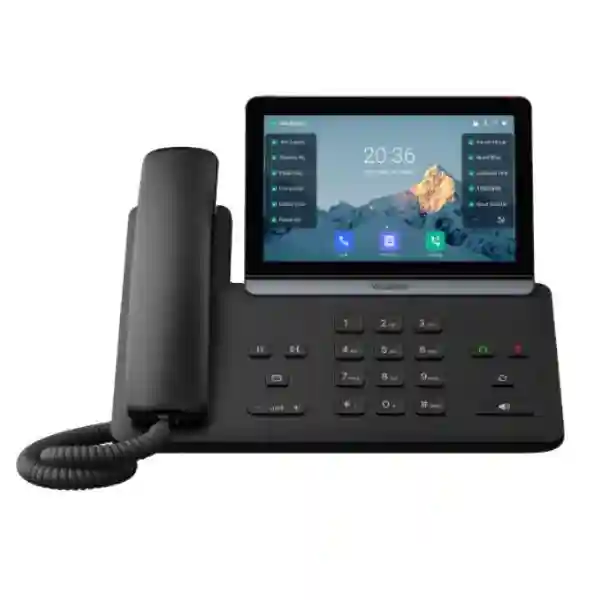
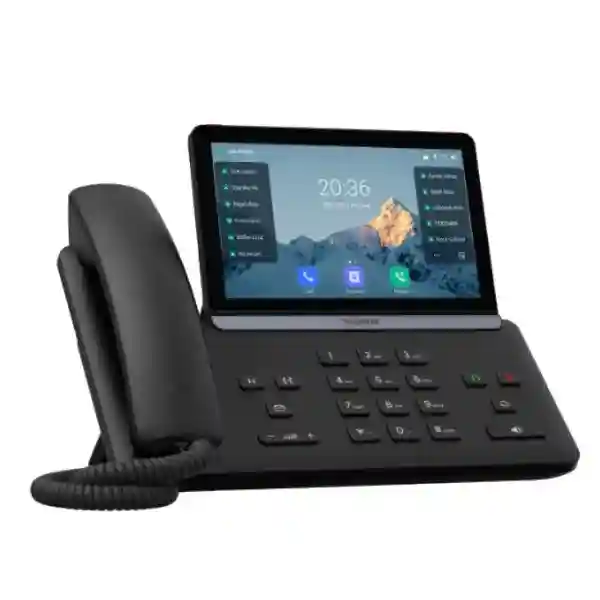
The Yealink SIP-T88 Smart Business Phone is the search name commonly used for Yealink’s T88 Series smart business desk phones. Yealink’s current official T88 family comprises SIP-T88W, SIP-T88W Pro and SIP-T88V Pro models, so a business quotation should identify the exact variant rather than treating every T88 configuration as identical. Across the family, the design is aimed at professionals who want a richer desk-phone experience built around a 7-inch adjustable capacitive touchscreen, Android 13, HD audio technologies, integrated wireless connectivity and enterprise SIP calling.
What is the Yealink SIP-T88 Smart Business Phone?
Yealink positions the T88 Series as a new generation of smart business phones for professional communication. The family combines a modern desktop form factor with a large touch interface, SIP telephony, Android-based flexibility and network features suitable for business environments. The official T88 Series page identifies SIP-T88W, SIP-T88W Pro and SIP-T88V Pro as members of the range. This distinction matters during procurement because options such as the BTH88 Bluetooth handset and video capability vary by model. A purchaser searching simply for “SIP-T88” should therefore treat the family name as the starting point and confirm the exact unit that matches the intended user role.
For executive offices, reception positions, team leaders and users who handle frequent calls, the value of a smart desk phone is not merely the screen size. The practical benefit comes from faster access to line information, contacts, call controls, programmable functions, headset choices and PBX features without turning every task into a desktop-computer workflow. The T88 Series also supports up to three Yealink EXP55 expansion modules, giving businesses a path to add more visible keys for line appearances, BLF monitoring and frequent call-handling actions where the chosen platform supports them.
Verified T88 Series Features and Business Value
7-inch Touch Interface
Yealink specifies a 7-inch 1024 × 600 capacitive adjustable touchscreen with a 30-degree vertical tilt. This provides a spacious interface for call handling, contacts and status information while allowing users to adjust viewing angle at the desk.
Android 13 Platform
The T88 family is built on Android 13. Yealink describes the interface as streamlined for business use, while the SIP-T88W documentation also identifies support for third-party Android applications and Yealink SDK capabilities.
AI-Oriented Audio Processing
The official T88 Series material highlights Acoustic Shield and AI Noise Cancellation, while SIP-T88W documentation also describes Optimal HD Voice, Noise Proof Technology, full-duplex speakerphone functions and a hearing-aid-compatible handset.
Flexible Connectivity
Built-in Bluetooth 5.0 and dual-band Wi-Fi 6 give the T88 family wireless flexibility, while wired deployments can use dual-port Gigabit Ethernet and PoE on the SIP-T88W. This makes the platform suitable for both structured office cabling and selected wireless desk locations.
Technical Planning for SIP-T88 Deployments
A smart IP phone should be selected as part of a voice system rather than as a standalone appliance. The SIP-T88W official datasheet lists 16 VoIP accounts, dual-port Gigabit Ethernet, IEEE 802.3af PoE Class 3, two USB 2.0 ports using Type-A and Type-C, Bluetooth 5.0, dual-band Wi-Fi supporting 802.11a/b/g/n/ac/ax, wall mounting and support for up to three EXP55 modules. It also lists common SIP telephony functions such as hold, forward, transfer, call waiting, DND, voicemail, BLF, call pickup, intercom, paging and conferencing. Exact function availability in a real deployment can depend on the PBX, provisioning profile and service configuration.
| Area | Verified planning point |
|---|---|
| Display | 7-inch 1024 × 600 capacitive adjustable touchscreen; 30° vertical tilt. |
| Operating platform | Android 13 with Yealink business-oriented interface. |
| Wireless | Built-in Bluetooth 5.0 and dual-band Wi-Fi 6 across the T88 Series. |
| Network | SIP-T88W lists dual-port Gigabit Ethernet and PoE support. |
| Expansion | Up to three EXP55 expansion modules. |
| Variant check | Confirm SIP-T88W, SIP-T88W Pro or SIP-T88V Pro and included/optional accessories before ordering. |
Compatibility, PBX Integration and Network Readiness
The T88 is a SIP-based business phone family, but SIP alone does not guarantee that every PBX feature, key layout or provisioning method will behave identically on every platform. Before purchase, confirm SIP registration requirements, authentication, transport and encryption policies, supported codecs, BLF behavior, voicemail indication, call transfer method, corporate directory integration, provisioning method and any vendor-specific templates. Yealink documentation supports auto-provisioning through common protocols including FTP, TFTP, HTTP and HTTPS for supported phones, and current management documentation includes SIP-T88W and SIP-T88V in Yealink management support lists.
Network design is equally important. Voice devices benefit from predictable addressing, DNS and time services, suitable VLAN design, Quality of Service and stable paths to an on-premises or hosted PBX. If PoE is used, verify switch power budget and the class required by the selected phone. If Wi-Fi is used, check coverage, signal quality, authentication method and whether wireless voice is appropriate for the location. A premium endpoint cannot compensate for packet loss, poor WAN stability or a badly configured voice network.
For broader Tanzania telephony planning, the FourTeck Tanzania technology solutions overview explains how IP phones, PBX, switching, Wi-Fi and security fit together. Buyers comparing multiple endpoint and infrastructure categories can also review the FourTeck Tanzania business technology shop, while organisations that need design and implementation support can use the FourTeck Tanzania services page for the wider solution context.
Who Should Consider the Yealink SIP-T88?
Executives
A large touch interface, wireless connectivity and headset choices make the T88 family relevant for managers who want a desktop endpoint with direct access to business calling functions.
Reception & Assistants
Expansion-module support can be valuable where users monitor extensions, handle transfers or need many programmable call-control keys, subject to PBX capability.
Customer-Facing Teams
HD audio, noise-handling features and headset support can suit users who spend substantial time on calls and need a consistent desk-phone workflow.
Multi-Site IT Teams
Standardized provisioning, network policy and endpoint profiles can help organisations keep branch telephony consistent while still selecting the correct T88 variant for different roles.
T88 Variant Selection: What to Confirm Before Quotation
The safest purchasing approach is to quote the exact suffix, not only “SIP-T88.” Yealink’s official family page shows SIP-T88W, SIP-T88W Pro and SIP-T88V Pro. The BTH88 Bluetooth handset is optional for SIP-T88W and standard for SIP-T88W Pro and SIP-T88V Pro according to the official family overview. The SIP-T88V Pro is the video-oriented model in the family. If a project does not need video, do not assume the video model is automatically the best choice; compare user role, call volume, required accessories, platform compatibility and budget.
A quotation should therefore state the precise model, quantity, required power arrangement, headset needs, expansion modules, wall-mounting requirements, PBX or hosted service, desired provisioning method and whether users need Wi-Fi, Bluetooth handset mobility or video. This prevents a procurement team from receiving a technically correct T88 product that does not match the intended workflow.
Yealink SIP-T88 Smart Business Phone Tanzania
For organisations evaluating the Yealink SIP-T88 Smart Business Phone in Tanzania, the best purchasing decision begins with the existing voice and data environment. A new phone may be intended for an executive office, reception desk, branch manager, customer-service user or a standardized enterprise rollout. Each role can place different emphasis on touch-screen usability, programmable keys, Bluetooth mobility, headset integration, Wi-Fi, wired Ethernet and expansion modules. Rather than selecting the T88 family only because it is a premium endpoint, map the user’s daily call pattern first: number of lines, transfer frequency, BLF needs, conferencing habits, headset preference and whether the employee regularly moves away from the desk while staying on calls.
Tanzania deployments should also be checked against network and power realities. If the phone will use PoE, verify that the access switch has sufficient available PoE capacity and that the switch is protected by an appropriate UPS if business continuity during short power interruptions matters. If the phone will use built-in Wi-Fi 6, evaluate actual coverage and congestion at the desk rather than assuming that a Wi-Fi signal automatically means reliable voice. Voice VLANs, Quality of Service, DHCP, DNS and firewall policy should be documented so support teams can distinguish PBX issues from network issues when troubleshooting.
Businesses with offices in Dar es Salaam, Mwanza, Arusha or Dodoma may also be integrating phones with branch connectivity, hosted PBX services or centralized call handling. In those cases, WAN stability and SIP service design deserve the same attention as the endpoint. The T88 Series can provide a modern desk experience, but call quality still depends on the complete path between the phone and the voice platform. For procurement, request the exact T88 model suffix and state whether BTH88, EXP55 modules, a power adapter, headset or other accessories are required. This avoids ambiguity between SIP-T88W, SIP-T88W Pro and SIP-T88V Pro configurations.
A Tanzania quotation should include the number of users, PBX brand or hosted platform, current switch model, PoE availability, preferred wired or wireless connection, required headset style and any reception-console requirement. Those details allow the phone choice to be reviewed as part of a practical communication system rather than an isolated hardware order.
Yealink SIP-T88 Smart Business Phone Dar es Salaam
In Dar es Salaam, the Yealink SIP-T88 Smart Business Phone can fit organisations upgrading executive desks, corporate offices, professional-service firms, hospitality administration, logistics teams and multi-department call environments. The city’s mixture of modern offices, mixed-use commercial buildings and branch operations makes installation context important. A premium SIP phone performs best when the desk network is already organized around managed switching, predictable addressing and clearly defined voice services. Before purchase, identify whether the phone will connect directly to a dedicated switch port, share connectivity with a workstation through its Ethernet ports, or operate over Wi-Fi 6. Each method has different operational implications for VLANs, cabling and troubleshooting.
Reception and executive users in Dar es Salaam may particularly value the 7-inch touchscreen and the ability to extend visible call controls with EXP55 modules. However, the number of monitored extensions and BLF behavior depends on the PBX platform and provisioning profile, so the requirement should be tested against the actual phone system before a large rollout. If users need to move within an office while remaining on calls, the BTH88 Bluetooth handset option may be relevant; remember that Yealink identifies it as optional on SIP-T88W and standard on the Pro variants noted in the T88 family.
For organizations occupying multiple floors or operating from a headquarters with branch connectivity, voice quality should be assessed end to end. Switch congestion, oversubscribed uplinks, poorly configured QoS or inconsistent internet connectivity can undermine the experience even when the endpoint itself is capable. A rollout plan should include firmware policy, provisioning templates, extension naming, emergency-calling procedures where applicable, headset standards and documented replacement steps. Centralized configuration also reduces time spent manually setting up phones when staff move between desks.
When requesting a Dar es Salaam quotation, provide quantities by user role rather than one total number. For example, separate executives, reception staff, power users and standard desks. This makes it easier to decide where SIP-T88 functionality is justified and where another Yealink model may be more economical. The objective is a consistent communication experience without paying for capabilities that particular users will not use.
Yealink SIP-T88 Smart Business Phone Mwanza
Businesses searching for the Yealink SIP-T88 Smart Business Phone in Mwanza may be planning a new office, replacing older analog or basic SIP handsets, or standardizing communications between a Mwanza site and other locations. For these projects, the most useful first question is whether the existing PBX and network can support the intended T88 features. SIP registration may be straightforward, but enterprise functions such as BLF, transfer behavior, corporate directories, call recording triggers and provisioning depend on the system behind the phone. Confirm these items before purchasing a large quantity.
A Mwanza deployment can also benefit from careful power and network planning. SIP-T88W documentation lists PoE support, which can simplify desk installations by avoiding separate local power adapters when a suitable switch is available. Centralized PoE also allows the voice infrastructure to share UPS protection at the network rack. Where adding new cabling is difficult, built-in dual-band Wi-Fi 6 provides another connectivity option, but voice over Wi-Fi should still be validated for signal quality, interference and roaming expectations. Wired Ethernet remains attractive for fixed desks where stable cabling is already available.
For managers and customer-facing users, the large touch display can make frequent calling functions easier to reach. For reception or dispatch-style positions, expansion modules may be useful when many extensions must be monitored. The T88 family’s Bluetooth support can also accommodate wireless headsets or the compatible handset options described by Yealink, which can help users who need to work with documents or move within a nearby workspace while speaking.
Procurement teams in Mwanza should request the exact variant and accessories on the quotation and document the target PBX, network connection, PoE availability and extension count. If the site will be linked to other branches, include WAN details and call routing requirements. A well-specified purchase reduces configuration surprises after delivery and helps the IT team create a repeatable profile for future devices.
Yealink SIP-T88 Smart Business Phone Arusha
The Yealink SIP-T88 Smart Business Phone can serve Arusha organisations that need a modern executive or professional SIP endpoint for offices, hospitality administration, tour operations, NGOs, corporate branches and other communication-heavy environments. The product family’s combination of Android 13, a 7-inch touch display, HD voice processing, Wi-Fi 6 and Bluetooth makes it suitable where desk users expect more than basic dial-and-answer functions. Yet the practical success of deployment depends on matching the model to the call workflow and existing infrastructure.
Arusha buyers should begin by confirming the PBX or hosted voice platform and how phones are provisioned. If the organisation uses centralized auto-provisioning, define device naming and extension templates before rollout. If the phone will connect through PoE, verify switch capacity and UPS planning. If users prefer wireless placement, carry out a Wi-Fi assessment around the desk areas. Voice traffic is sensitive to packet loss and inconsistent latency, so a strong-looking signal bar is not a substitute for testing under real office load.
The T88 family may be especially relevant for senior staff or reception users who want quick visual control over contacts and calls. For sites that handle frequent supplier, guest or customer communication, a compatible headset can reduce fatigue and leave both hands free. Where front-desk personnel monitor many internal extensions, the optional EXP55 expansion approach can add capacity for visible keys, but the PBX must support the intended feature mapping. Businesses should also decide whether the Bluetooth handset mobility offered in the T88 range fits the role or whether a conventional corded handset is enough.
For quotations in Arusha, state the exact T88 variant, number of phones, required accessories, network method, power method and existing phone system. If the project also includes switches, Wi-Fi, cabling or an IP PBX refresh, quote those dependencies together. Coordinating the endpoint and network reduces the risk of discovering after purchase that desks lack PoE, voice VLANs are not configured or the chosen PBX profile needs adjustment.
Yealink SIP-T88 Smart Business Phone Dodoma
For organisations in Dodoma, the Yealink SIP-T88 Smart Business Phone offers a modern option for professional desks where clarity, touch-based call management, wireless flexibility and SIP integration matter. Potential users include administrative offices, professional services, project teams, institutional environments and branch offices that want a consistent business-telephony platform. The T88 family should be evaluated by user role: an executive may value the display and Bluetooth flexibility, a receptionist may need expansion keys, while a standard desk may not require the same level of capability.
Network preparation is central to a Dodoma deployment. The SIP-T88W’s dual-port Gigabit Ethernet and PoE support can help keep desk wiring simple, particularly where one data drop serves both the phone and a workstation. The exact topology should still be checked against the organisation’s security and performance policies. Voice and data can be separated logically with VLANs on managed networks, while Quality of Service can help prioritize time-sensitive traffic. A central UPS supporting the PoE switch may also improve continuity during brief power interruptions, subject to the wider site power design.
Where fixed cabling is unavailable or office layout changes often, the integrated Wi-Fi 6 option can be useful, but wireless voice should be assessed carefully in relation to access-point placement and congestion. Bluetooth support adds flexibility for compatible headsets and handset options. The T88 touchscreen can simplify daily navigation, while Android 13 provides a more app-capable environment than a conventional embedded desk-phone interface. Any third-party application requirement should be reviewed with the organisation’s security policy before deployment.
Dodoma procurement teams should request a model-specific bill of materials. Include exact T88 suffix, BTH88 requirement, EXP55 quantity if needed, headset type, power approach, PBX details and desired provisioning method. This creates a clear deployment scope and prevents accessories or platform dependencies from being discovered only after the phones arrive.
Yealink SIP-T88 Smart Business Phone UAE
Businesses sourcing the Yealink SIP-T88 Smart Business Phone for UAE operations often need the handset to fit a larger unified communications or IP PBX standard used across corporate offices. The T88 family’s Android 13 interface, large touch display and integrated Wi-Fi 6 and Bluetooth are relevant for executive desks, reception positions and customer-facing teams that value a premium hardware endpoint. Because UAE projects can include multiple branches, centralized provisioning and consistent network policy can be as important as the individual phone specification.
Before deployment, identify the SIP platform, extension count, call-routing requirements, headset standard and whether the phone must connect through wired Ethernet or Wi-Fi. For PoE designs, confirm the access switch’s available power budget and whether UPS protection is part of the network design. For Wi-Fi, assess coverage and authentication policies. In larger offices, voice VLANs, QoS and controlled firewall rules can make troubleshooting easier and reduce the impact of unrelated data traffic on call quality.
The T88 Series also gives procurement teams several variant choices. Buyers should state whether they require SIP-T88W, SIP-T88W Pro or SIP-T88V Pro, since included accessories and video capability differ. The BTH88 Bluetooth handset is optional on SIP-T88W and standard on the Pro models in Yealink’s family overview. If a receptionist needs many monitored extensions, check EXP55 support together with PBX compatibility. If video is unnecessary, compare the non-video options rather than paying for functionality that will not be used.
For businesses coordinating East Africa and UAE offices, a standard endpoint policy can simplify support, while still allowing local network and service-provider differences. FourTeck’s regional ecosystem can support this broader project perspective, but each site should be specified around its own PBX, internet and infrastructure. A useful quote request includes quantities, site count, current phone system, network switches, voice VLAN plan, wireless requirement and accessories.
Yealink SIP-T88 Smart Business Phone Uganda
For Uganda-based organisations considering the Yealink SIP-T88 Smart Business Phone, the purchase should be tied to the way staff actually handle calls. Executive users may prioritize the 7-inch touchscreen and wireless flexibility, while reception and administrative teams may need programmable functions, line monitoring and expansion modules. Companies moving from older handsets can use the project as an opportunity to standardize extension naming, provisioning, headsets and network policy across multiple offices.
Uganda deployments should assess both LAN and WAN conditions. A SIP endpoint relies on stable connectivity to the PBX or hosted voice service, so call quality depends on more than the handset. Packet loss, overloaded uplinks, weak wireless coverage or inconsistent internet paths can cause audio issues even when the phone is correctly configured. Managed switching, voice VLANs, QoS, reliable DNS and appropriate firewall rules make the environment easier to operate. Where PoE is available, the phone can be powered centrally through compatible switching, reducing desk adapters and enabling shared UPS protection at the rack.
The T88 family’s built-in Wi-Fi 6 can help when office layout makes new cabling difficult, but wireless placement should be verified rather than assumed. Bluetooth 5.0 can support compatible headsets and handset choices, useful for employees who move around a nearby work area while remaining on calls. For large reception or attendant positions, up to three EXP55 modules can expand visible key capacity, subject to the selected PBX and configuration.
Customers with regional requirements can also review the FourTeck Uganda IP PBX, VoIP and networking overview when planning a Uganda-based deployment. For quotation accuracy, provide the exact T88 variant, phone quantity, required accessories, current PBX, connectivity method and branch count. This keeps the procurement conversation focused on compatibility and implementation rather than only unit price.
Yealink SIP-T88 Smart Business Phone Kampala
In Kampala, organisations evaluating the Yealink SIP-T88 Smart Business Phone may be supporting busy corporate offices, service desks, professional firms, hospitality operations or multi-branch teams. A premium phone is most useful when assigned to roles that benefit from rapid call control, a large display, wireless headset options or expansion keys. Begin by defining whether the user is an executive, receptionist, supervisor or high-volume caller, because those profiles drive the accessories and PBX features that should be included.
For office networks, decide whether the phone will use wired Gigabit Ethernet and PoE or its built-in Wi-Fi 6 capability. Wired deployment is often simpler to monitor at fixed desks, while Wi-Fi can solve cabling constraints in selected locations. Either way, the voice service needs a stable route to the PBX or cloud platform. If the office uses a firewall with restrictive outbound policies, verify SIP signaling and media requirements during the design stage rather than after installation. If multiple VLANs are used, document DHCP options, routing and QoS settings so phones receive consistent configuration.
For front-desk or assistant roles, the T88 family’s EXP55 support can add significant key capacity. For managers, Bluetooth can make compatible headsets or a BTH88 handset attractive. Android 13 and the touch UI can offer a more familiar interaction style than older button-only phones. However, third-party application deployment should be controlled through IT policy because a business phone remains an enterprise endpoint with access to network and communication data.
When requesting a Kampala quote, include the current PBX or hosted voice provider, extension quantity, phone variants, headset requirements and whether central provisioning is already in place. If the office is part of a wider Ugandan or regional network, include branch connectivity and call-routing requirements. A structured bill of materials makes it easier to compare complete deployment cost rather than comparing handset prices without the switching, cabling or accessories needed to operate them.
Yealink SIP-T88 Smart Business Phone Arua
For businesses and institutions in Arua, the Yealink SIP-T88 Smart Business Phone can be considered where a professional desk endpoint is required for management, administration, customer interaction or branch coordination. The phone’s value should be measured against the complete communications environment. If the branch connects back to a centralized PBX in another city or country, the WAN path and local internet resilience can matter just as much as the phone model. A modern endpoint cannot eliminate problems caused by unstable connectivity, excessive latency or poorly managed network congestion.
A practical Arua deployment starts with a site inventory. Record the number of desks, network outlets, PoE switch ports, available UPS capacity and wireless coverage. Determine which users genuinely need the T88’s touchscreen, Bluetooth flexibility or expansion capability. It may make sense to deploy T88 units for executives and reception while using simpler SIP phones for standard desks. This role-based approach keeps the solution consistent without forcing every user into the same hardware cost.
Where structured cabling is available, the SIP-T88W’s dual-port Gigabit Ethernet can support a clean fixed-desk design. Where cabling is constrained, Wi-Fi 6 offers an alternative, but test call quality under normal site load. If a wireless headset or the BTH88 handset is planned, confirm exactly which T88 variant is being ordered and what is included. For reception-style use, check EXP55 modules and PBX BLF support before finalizing quantities.
The quotation should also identify configuration ownership: who will provision extensions, maintain firmware, manage passwords and troubleshoot voice-network issues. For sites where local IT resources are limited, centralized provisioning and good documentation can reduce support overhead. Include extension maps, switch port assignments, VLAN IDs, PBX details and the exact T88 model in the handover record so later changes do not depend on individual memory.
Yealink SIP-T88 Smart Business Phone Mbarara
Mbarara organisations considering the Yealink SIP-T88 Smart Business Phone can use the procurement process to modernize both endpoint experience and voice-network standards. The T88 family is designed for business professionals, so it is most compelling where users manage frequent calls, value a large touch display or need flexible Bluetooth, Wi-Fi and expansion options. Assigning the phone according to job role helps prevent over-specification while still giving key users the productivity features they need.
A local branch may connect to an on-premises PBX, a hosted service or a central system located elsewhere. Each model changes the network path and support responsibility. For hosted voice, internet quality and firewall configuration become critical. For central PBX systems across a WAN, branch routing and QoS need careful design. For an on-premises PBX, local switching and backup power may be more important. In every case, document SIP settings and provisioning methods so devices can be replaced or reset without lengthy manual reconfiguration.
PoE can simplify desk installations and centralize power protection when suitable switching is available. Wi-Fi 6 provides more flexibility for desks without Ethernet, though voice traffic should be validated for signal stability. The T88’s Bluetooth 5.0 capability can be useful with compatible headsets or handset options, while up to three EXP55 modules can support call-heavy positions that need more visible keys. Remember that exact features and included accessories depend on the T88 variant, so the purchase description should never stop at the family name.
For a Mbarara quotation, specify the number of executives, receptionists and standard users; current PBX; network switch type; PoE availability; wired or wireless connection; required headset; and whether extension monitoring is necessary. This allows the project to be sized around real use instead of a generic device count. It also makes future expansion easier because the initial deployment has a documented standard.
Yealink SIP-T88 Smart Business Phone Gulu
In Gulu, the Yealink SIP-T88 Smart Business Phone can be a strong fit for managers, administrative staff and communication-intensive positions that benefit from a large touchscreen and enterprise SIP functions. The business case should be based on workflow: how many calls the user handles, how often calls are transferred, whether BLF monitoring is needed, whether a headset is preferred and whether the user requires mobility around the desk. Matching those needs to the correct T88 variant gives procurement teams a clearer reason for the investment.
Branch connectivity deserves attention when Gulu offices communicate with a PBX located in Kampala, another Ugandan city or a regional data center. Voice is sensitive to delay variation, packet loss and outages, so the network design should identify the primary path and any realistic failover strategy. Locally, managed switching and PoE can simplify phone deployment. A voice VLAN can separate telephony from general user traffic, while QoS policies can help preserve call quality when the network is busy.
The T88 family’s Wi-Fi 6 capability can support selected desks where adding cable is difficult. Bluetooth 5.0 can connect compatible wireless accessories. For teams that need many line appearances, the EXP55 expansion option should be reviewed with the PBX platform. The large 7-inch 1024 × 600 touchscreen can improve visibility of call and contact information, but deployment teams should still provide a simple user orientation covering transfer, hold, voicemail, directory access and headset operation.
A Gulu bill of materials should identify exact model suffixes, quantities, accessories and network dependencies. Include whether power adapters are required, whether PoE is available, whether Wi-Fi will be used and who manages the PBX configuration. For multi-site rollouts, maintain one documented provisioning standard where possible. That reduces time spent diagnosing differences between sites and makes replacement phones easier to configure consistently.
Yealink SIP-T88 Smart Business Phone Kenya
For organisations sourcing the Yealink SIP-T88 Smart Business Phone in Kenya, the product can support executive, reception and high-call-volume roles in modern IP telephony environments. A useful evaluation compares the phone’s premium capabilities with the business process it will support. The 7-inch touch interface, Android 13 platform, Bluetooth 5.0 and Wi-Fi 6 are attractive, but they create the most value when they simplify daily call handling, headset use, line monitoring or mobility rather than being purchased solely for specification.
Kenyan deployments may range from single offices to multi-site corporate networks. If a centralized or cloud PBX serves multiple sites, confirm internet and WAN performance along with security policies for SIP signaling and media. At the LAN layer, managed switches can provide VLAN segmentation and PoE. Where the phone shares a network drop with a PC, confirm the intended VLAN behavior and access-switch configuration. Wireless installation is possible with the integrated Wi-Fi 6 capability, but call testing should be performed under real network load, especially in dense office environments.
Procurement should also distinguish the T88 variants. SIP-T88W, SIP-T88W Pro and SIP-T88V Pro share the broader family design but do not have identical included components or media capabilities. State whether a BTH88 handset is needed, whether video is required and whether EXP55 expansion modules will be used. If the phone is replacing an older Yealink model, review provisioning templates and key mappings rather than assuming the configuration can be copied without adjustment.
For Kenyan organisations that share technology standards with Tanzania, Uganda or UAE branches, consistent endpoint and network policies can simplify user training and support. Build the quotation around user classes, not only total quantity. Include PBX platform, extensions, accessories, switches, PoE, Wi-Fi, branch connectivity and deployment responsibility. That gives decision-makers a more realistic picture of total implementation requirements.
Yealink SIP-T88 Smart Business Phone Kuwait
Kuwait businesses evaluating the Yealink SIP-T88 Smart Business Phone may be looking for a premium desktop endpoint for executives, reception areas, professional offices or teams handling frequent customer communication. The T88 family offers the kind of interface and connectivity expected from a modern smart phone while retaining familiar business desk-phone operation. Android 13, the 7-inch capacitive touchscreen, Bluetooth and Wi-Fi 6 can make daily calling more flexible, but model selection should still begin with the PBX platform and user workflow.
In structured office networks, dual-port Gigabit Ethernet and PoE on SIP-T88W can reduce desk wiring complexity and centralize power delivery. Managed switching can separate voice using VLANs and apply QoS policies where needed. In offices where cable changes are difficult, Wi-Fi 6 can provide an alternative, but wireless call quality should be validated against access-point capacity and interference. For any cloud or remote PBX deployment, check firewall and internet-path requirements before rollout.
The T88 family also supports expansion through EXP55 modules, which can benefit attendants or assistants who monitor many extensions. Bluetooth 5.0 can support compatible headsets and handset options. Buyers should distinguish SIP-T88W, SIP-T88W Pro and SIP-T88V Pro so the quotation reflects the correct feature and accessory package. If the organization requires video at the desk, the video-oriented variant should be evaluated specifically rather than assuming every T88 is a video phone.
For quotation preparation, list the exact model, user count, required accessories, current PBX, network switch, PoE availability, Wi-Fi requirement and any expansion-module need. For businesses operating across Kuwait and East Africa, use one consistent naming and provisioning convention where possible, while respecting local network and service-provider differences. This approach improves supportability and gives procurement teams a clear basis for comparing complete solutions.
Yealink SIP-T88 Smart Business Phone Ghana
For organisations considering the Yealink SIP-T88 Smart Business Phone in Ghana, a successful deployment depends on aligning the endpoint with both business calling needs and network readiness. The T88 family is aimed at professional users who value a sophisticated desktop interface, HD voice, wireless connectivity and expansion options. It can suit managers, receptionists, customer-service supervisors and teams that work with multiple lines or frequent call transfers, but not every desk necessarily requires the same premium feature set.
Start with the phone system. Confirm whether the organization uses an on-premises PBX, a hosted SIP platform or a central system serving multiple branches. Review registration, codecs, call transfer behavior, voicemail, BLF, directories and provisioning support. The SIP-T88W documentation lists 16 VoIP accounts and extensive IP-PBX features, but actual service behavior depends on platform configuration. For a large rollout, test a representative unit with the target PBX before finalizing every desk.
Network design should include voice VLANs, switch capacity and PoE budget where wired deployment is used. Wi-Fi 6 provides another option for selected locations, but coverage and call stability should be measured. Bluetooth can support compatible headsets and handset mobility. Receptionists who need many visible extension keys can use EXP55 modules where the PBX supports the intended BLF or line-key functions. The 7-inch touchscreen helps make these functions easier to navigate than on small-display phones.
When preparing a Ghana quotation, separate requirements by user role, include exact T88 suffixes and identify all accessories. Also state whether configuration, deployment and user orientation are required. If the project is part of a regional phone standard, document firmware, provisioning, extension naming and network settings so the Ghana office can be supported consistently alongside other locations.
Yealink SIP-T88 Smart Business Phone Nigeria
Nigeria-based businesses evaluating the Yealink SIP-T88 Smart Business Phone may be supporting headquarters, branch offices, contact-heavy departments or executive teams that need a modern SIP desktop experience. The T88 family combines a large touchscreen and Android 13 with familiar business calling features, which can make it easier to manage contacts, lines and programmable functions. The strongest use case is where those capabilities improve a real workflow, such as executive communications, attendant functions, frequent transfers or headset-based calling.
Network resilience can be a major design consideration in multi-site telephony. If the phone registers to a cloud PBX or a system in another location, review primary internet performance, backup connectivity and how SIP sessions behave when WAN links change. At the LAN level, managed switching, voice VLANs and PoE can create a more controlled environment. UPS-backed PoE infrastructure can keep phones and network equipment powered during short interruptions, though overall continuity depends on the PBX, internet equipment and wider power design.
The T88’s Wi-Fi 6 capability can help in spaces without convenient Ethernet, while Bluetooth 5.0 supports compatible wireless accessories. The 7-inch 1024 × 600 touch display provides room for call information and controls. For reception teams, up to three EXP55 modules can add programmable key capacity. Buyers should still identify the exact SIP-T88W, SIP-T88W Pro or SIP-T88V Pro variant because accessory inclusion and video capability differ within the family.
For Nigerian procurement, ask vendors to quote a complete deployment scope rather than a bare handset price. Include phone quantities by role, expansion modules, headsets, power requirements, PBX compatibility, provisioning, switching and any network changes. A small pilot can be valuable before a large rollout, particularly where advanced PBX features or third-party Android applications are important to the business process.
Yealink SIP-T88 Smart Business Phone Seychelles
For organisations in Seychelles, the Yealink SIP-T88 Smart Business Phone can fit executive offices, hospitality administration, corporate teams and professional environments that want a premium SIP endpoint with a modern touch interface. The family’s combination of Android 13, HD audio processing, Bluetooth and Wi-Fi 6 provides flexibility for locations where the phone must support both traditional business calling and more mobile desk workflows. As with any IP phone, the surrounding voice platform and network determine how well those features translate into day-to-day reliability.
Hotels, offices or multi-building environments may have different network conditions from a compact headquarters. For fixed desks, wired Ethernet and PoE can provide predictable connectivity. For selected locations where cabling is impractical, Wi-Fi may be useful, but voice performance should be tested across the expected coverage area. If the phone is connected to a hosted PBX over the internet, document firewall requirements and evaluate the quality and resilience of the WAN path. A premium phone cannot correct upstream packet loss or an overloaded link.
The T88 family is especially useful where users need more visual information or accessories. Bluetooth headsets can help frequent callers, and the BTH88 handset can provide nearby mobility where supported by the chosen variant. EXP55 modules can expand key capacity for reception or administrative positions. The large touchscreen can reduce dependence on nested hardware-button menus, while Android 13 provides a richer platform for managed business functions.
Seychelles buyers should request a precise model-specific quotation, including suffix, quantity, power arrangement, headset or handset options, expansion modules and PBX integration. If the business has several islands, properties or remote sites, include branch calling and centralized management needs from the beginning. A consistent provisioning standard and documented configuration can reduce support complexity when replacement or expansion is required later.
Related FourTeck Tanzania Resources
The SIP-T88 works best as part of a complete voice-ready environment. Use the FourTeck Tanzania shop to review the broader business technology categories that can sit around an IP phone deployment, including switches, Wi-Fi, firewalls, IP PBX hardware and supporting infrastructure. This is useful when the telephony project also needs PoE switching, cabling or network upgrades.
For planning and implementation context, the FourTeck Tanzania services section covers wider technology support. The FourTeck Tanzania home solutions overview explains the relationship between IP phones, IP PBX, switching, Wi-Fi and other business infrastructure. For customers with Ugandan operations, the FourTeck Uganda regional solutions site provides a related regional reference for IP PBX, VoIP and networking requirements.
These links are intended to help buyers define the complete solution before requesting a quote. A handset order can be simple, but a multi-user deployment may need voice VLANs, PoE, PBX licensing, SIP trunks, headsets, expansion modules, configuration and user training. Treating those dependencies as one project reduces rework.
Yealink SIP-T88 Buying and Deployment Checklist
1. Confirm the exact variant. Specify SIP-T88W, SIP-T88W Pro or SIP-T88V Pro rather than ordering only by the family name.
2. Verify the PBX platform. Confirm registration, supported features, BLF, directories, call transfer, voicemail and provisioning.
3. Choose the network method. Decide between wired Gigabit Ethernet and Wi-Fi 6 based on the actual desk environment.
4. Plan power. Check PoE switch availability and budget, or identify any separate power requirement in the chosen package.
5. Define accessories. State BTH88, headset and EXP55 needs so the quote reflects the complete desk setup.
6. Document deployment. Keep extension, MAC address, switch port, VLAN, firmware and provisioning details for future support.
Frequently Asked Questions
Is the Yealink SIP-T88 one single phone model?
Yealink’s official T88 Series page presents SIP-T88W, SIP-T88W Pro and SIP-T88V Pro as the current family. When buying, specify the exact suffix because accessories and media features differ.
Does the SIP-T88 use Android?
Yes. Yealink identifies Android 13 as the operating platform for the T88 family, with a business-oriented user interface.
Does the Yealink SIP-T88 support Wi-Fi and Bluetooth?
The official T88 family specifications identify built-in Wi-Fi 6 and Bluetooth 5.0. Wireless deployment should still be checked against the site’s security, coverage and voice-quality requirements.
Can the SIP-T88 use PoE?
The SIP-T88W official datasheet lists IEEE 802.3af PoE Class 3 and dual-port Gigabit Ethernet. Confirm the exact model and the available PoE budget of your network switch.
How many SIP accounts does SIP-T88W support?
Yealink’s SIP-T88W datasheet lists 16 VoIP accounts. For other T88 variants, verify the current model-specific datasheet before procurement.
Can the T88 use expansion modules?
Yes. Yealink states that the T88 Series supports up to three EXP55 expansion modules. The usefulness of expansion keys depends on the PBX feature set and user role.
Is the BTH88 Bluetooth handset included?
Yealink’s T88 family page indicates BTH88 is optional for SIP-T88W and standard for SIP-T88W Pro and SIP-T88V Pro. Confirm packaging with the quotation because regional bundles can differ.
What information should I provide for a quotation?
Provide the exact T88 variant, quantity, PBX or hosted platform, number of extensions, PoE availability, wired or Wi-Fi preference, BTH88 or headset needs, EXP55 requirements and deployment location. This allows compatibility and accessories to be reviewed before pricing.
Quotation Checklist for the Yealink SIP-T88 Smart Business Phone
To receive a useful quotation, include enough information to distinguish a simple handset purchase from a complete telephony deployment. State the exact model variant, quantity and city or country. Then identify the existing PBX or hosted SIP service, current extension count, call-flow requirements and whether phones need BLF or reception-console functions. Add the network details: managed switch model if known, PoE availability, voice VLAN status and whether Wi-Fi will be used.
Accessories should be explicit. Mention whether users need the BTH88 Bluetooth handset, a wired or wireless headset, EXP55 expansion modules or wall mounting. If this is a replacement project, include the current phone model and explain what users want to improve. For a new office, include the expected number of desks and whether cabling and switches are already installed. These details reduce ambiguity and help create a bill of materials that can be implemented.
For multi-site projects, list each branch separately and note whether call control is centralized or local. A consistent endpoint policy can simplify support, but the network and connectivity of each branch still need review. The quotation should therefore reflect both the phone and the environment that allows it to operate reliably.
Decision Recap
Choose the Yealink SIP-T88 family when users need a high-end SIP desk phone experience with a large 7-inch touch display, Android 13, integrated Wi-Fi 6 and Bluetooth, HD audio technologies and room to expand call-control capacity. The family is best suited to professional roles where those capabilities support a measurable workflow such as executive calling, reception duties, frequent transfers, headset use or centralized business communications.
Do not treat “SIP-T88” as a complete purchasing specification. Confirm SIP-T88W, SIP-T88W Pro or SIP-T88V Pro; identify included and optional accessories; validate PBX compatibility; and plan the wired or wireless network, power and provisioning approach. A model-specific, infrastructure-aware quotation is the most reliable path to a successful deployment.
Talk to FourTeck About Your T88 Requirement
Before ordering, prepare your model preference, quantity, PBX platform, site location, network connection method and accessory requirements. FourTeck can use those details to discuss product selection and the surrounding IP telephony environment. If you are comparing models, describe the user roles and call-handling requirements instead of choosing only by headline specifications. That gives the technical discussion a clear objective and helps avoid unnecessary features or missing dependencies.




Reviews
There are no reviews yet.