
Business DECT desk telephony for fixed-position users
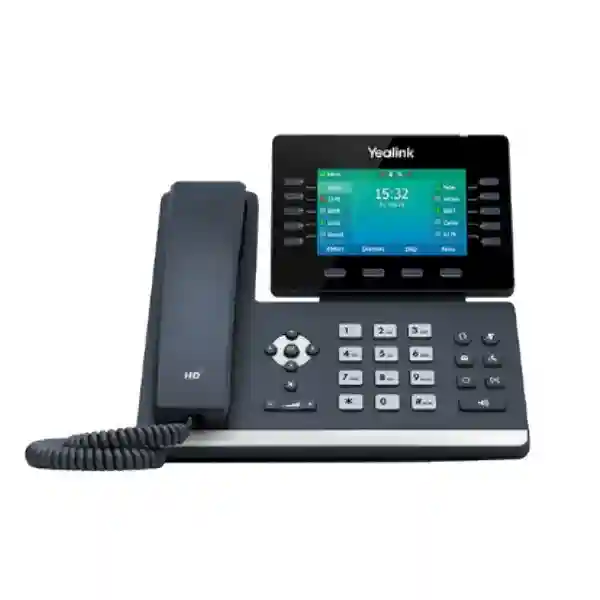
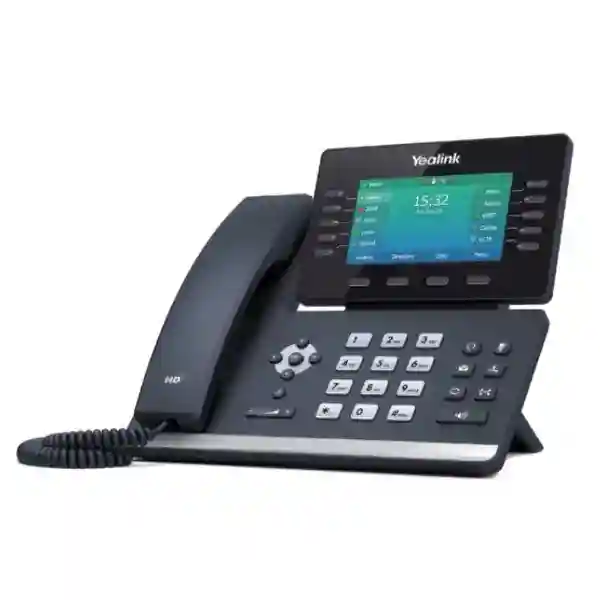
Yealink T54W with DD10K DECT Desk Phone
The Yealink T54W with DD10K is a practical way to bring a full-size business desk phone into a Yealink DECT environment. The solution combines the SIP-T54W desk phone with the DD10K USB DECT dongle. When configured in DD Phone mode and registered to a compatible Yealink DECT base or multi-cell system, the T54W can operate as a DECT desk endpoint while retaining the large color display, programmable line keys and familiar desktop call-control experience preferred by reception, supervision and fixed-position operational staff.
For organisations in Tanzania, the strongest reason to consider this combination is not simply wireless connectivity. It is the ability to place a capable desk phone where extending dedicated voice cabling may be inconvenient, while still providing the user with a stable desktop form factor. The right deployment should confirm the selected Yealink DECT system, firmware, radio coverage, PBX or SIP platform, user role, PoE or local power needs, call capacity and future growth before quantities are finalised.
Quick fit check
Best suited to fixed desks that need DECT connectivity plus advanced desk-phone controls.
Verify DECT base compatibility, firmware and radio coverage before deployment.
Plan voice VLANs, QoS, SIP configuration and PBX features as part of the complete solution.
What is the Yealink T54W with DD10K?
Yealink describes the T54W with DD10K as a DECT desktop phone solution formed by the SIP-T54W desk phone and the DD10K USB DECT dongle. In a supported configuration, the desk phone can register into a Yealink DECT system rather than depending only on a conventional wired SIP endpoint connection. Yealink documents compatibility with its W70B base and current multi-cell environments including W75, W80 and W90 system families, subject to model and firmware requirements. Each DD Phone is registered to one base or DECT manager environment at a time. This architecture is especially useful where staff remain at a fixed workstation but the telephony design benefits from DECT radio connectivity.
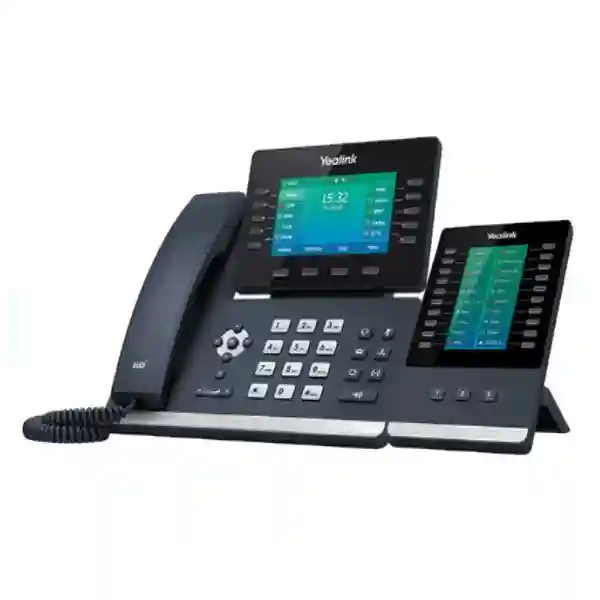
The phone itself remains the SIP-T54W platform, providing a 4.3-inch 480 × 272 pixel color display, ten line keys, support for up to sixteen VoIP accounts in standard IP-phone operation, dual-port Gigabit Ethernet, IEEE 802.3af PoE, built-in Bluetooth, built-in dual-band 2.4 GHz and 5 GHz Wi-Fi and a USB 2.0 port. Yealink also lists HD voice, Acoustic Shield, Smart Noise Filtering, a hearing-aid-compatible handset, full-duplex speakerphone and support for common SIP codecs and call features. The USB port can also be used for compatible headsets, call recording to a USB drive or EXP50 expansion modules in supported standard T54W deployments; when the DD10K occupies the USB port, accessory planning should be checked carefully.
The DD10K adds the DECT function. Yealink publishes a DECT transmission rate of 1152 kbps for the dongle, with frequency bands depending on the regional model. Published range figures for compatible DECT systems are environment-dependent and should never be treated as guaranteed building coverage. Walls, shelving, reinforced concrete, metal racking, floor separation, radio interference and base placement all affect practical performance. For this reason, a quotation for multiple T54W with DD10K endpoints should include a coverage and capacity discussion rather than assuming that one base suits every site.
Verified business features and benefits
4.3-inch color display
The adjustable 480 × 272 pixel color screen provides a larger desktop interface than compact DECT handsets, helping users view line information, directories and call status more comfortably.
Programmable line keys
Ten line keys support programmable functions. In supported DECT desk-phone scenarios, BLF and quick-access keys can help fixed-position staff handle transfers, pickup, speed dial and monitored extensions efficiently.
Built-in Wi-Fi and Bluetooth
The SIP-T54W includes dual-band Wi-Fi and Bluetooth 4.2, giving organisations additional connectivity options for supported deployments and compatible Bluetooth accessories.
Gigabit Ethernet and PoE
Dual-port Gigabit Ethernet and IEEE 802.3af PoE support fit conventional enterprise voice networks. PoE can simplify power at desks when the phone operates in standard wired IP-phone mode or when Ethernet connectivity remains part of the site design.
HD voice technologies
Yealink lists HD Voice, Acoustic Shield and Smart Noise Filtering on the SIP-T54W, supporting clearer conversations in busy office environments when network and endpoint configuration are also correct.
DECT desk integration
The DD10K enables the T54W to participate in compatible Yealink DECT environments. This allows organisations to combine a fixed desktop user experience with DECT radio connectivity where that architecture better suits the premises.
Technical planning checklist
| Display | 4.3-inch 480 × 272 pixel color display with backlight and adjustable viewing angle. |
| VoIP capability | Up to 16 VoIP accounts on the SIP-T54W in standard IP-phone operation; actual DECT desk-phone behaviour depends on the registered DECT architecture and PBX configuration. |
| Network | Dual-port Gigabit Ethernet, IPv4/IPv6 features, VLAN and QoS capabilities documented by Yealink. |
| Power | IEEE 802.3af PoE Class 3 support; optional external 5V/2A Yealink power adapter depending on package and deployment. |
| Wireless | Built-in Bluetooth 4.2 and dual-band 2.4/5 GHz Wi-Fi on the T54W, plus DECT connectivity through the DD10K. |
| DECT mode | DD10K enables compatible Yealink desk phones including the T54W to work in supported DECT scenarios. Confirm base, firmware, region and system capacity before ordering. |
| Audio | HD handset and speaker, full-duplex speakerphone, Acoustic Shield, Smart Noise Filtering and HAC handset. |
| USB | One USB 2.0 port. In a DD10K deployment, the dongle uses this interface, so any additional USB accessory requirement should be evaluated before design approval. |
Where this configuration makes sense
Yealink positions the DD Phone concept for fixed-position workers in environments such as supermarkets, warehouses and restaurants, but the logic extends to many business settings. A supervisor at a warehouse desk may need a full-size phone with BLF keys while the site communication architecture is built around DECT. A front-office user in hospitality may need a stable desktop endpoint within a wider cordless system. A service desk in a retail environment may benefit from the visual interface and programmable keys of the T54W while other staff carry mobile DECT handsets. The key is to match the endpoint to the user role rather than treating every person as either fully mobile or fully wired.
For a new installation, start by mapping users into fixed, semi-mobile and mobile roles. Fixed users may justify T54W with DD10K desk endpoints. Mobile staff may be better served by dedicated Yealink DECT handsets. Reception or operations teams may need programmable keys, monitored extensions and transfer functions. The DECT base or multi-cell system must then be sized for both device count and simultaneous calls, with radio coverage validated across the intended areas. The PBX design should define extension numbering, ring groups, queues, voicemail, call pickup and emergency-call behaviour before phones are provisioned.
Compatibility and deployment guidance
Compatibility is the most important buying question for the T54W with DD10K. Yealink documentation states that the DD10K can convert the SIP-T54W into a DD Phone and that current guidance supports registration to the W70B and Yealink multi-cell systems such as W75, W80 and W90 families. Firmware requirements apply. Yealink’s current quick-start guidance states that the T54W firmware should be later than version 85 for the documented setup process, while earlier documentation references minimum firmware generations for different product combinations. The safest procurement approach is to confirm the exact phone hardware revision, DD10K revision, base or DECT manager model and current Yealink firmware guidance at the time of deployment.
A DECT desk-phone design also needs a radio plan. Do not assume that published open-space range values translate directly to a multi-floor office, reinforced building or metal warehouse. Radio coverage can be reduced by dense walls, elevator cores, metal shelving, machinery and building geometry. In larger or segmented facilities, multi-cell systems may be more appropriate than a single base. Capacity should be checked independently from coverage, because a base may have adequate signal in an area but still be unsuitable for the required number of endpoints or simultaneous calls.
Yealink T54W with DD10K DECT Desk Phone Tanzania
For organisations in Tanzania, the Yealink T54W with DD10K can be considered when a business wants the interface and control of a premium desk phone within a DECT-based communications design. Typical buyers may include corporate offices, logistics operators, hotels, retailers, hospitals, education institutions and distributed operational sites. The purchasing decision should start with the existing or planned phone system. Confirm whether the PBX supports the required SIP features, whether the Yealink DECT base or multi-cell platform is already installed, and whether the network team has a clear voice VLAN and QoS design for the call platform.
Tanzania deployments can vary significantly between a central office, a warehouse, a hospitality property and a branch location. For a single-floor office, a compact DECT design may be sufficient if coverage is validated. For a warehouse or large property, coverage planning should consider construction materials, shelving and operational zones. For organisations with several branches, standardising extension plans, provisioning methods and approved phone models can simplify support. The T54W is especially useful for fixed users who need line keys, directory access and a larger screen, while mobile users can remain on dedicated DECT handsets within the same broader system where supported.
Before requesting a quotation, define quantity, number of fixed users, number of mobile handsets, simultaneous-call expectations, PBX make and version, existing Yealink DECT base model, building layout and any headset or expansion-module requirement. Power design also matters. If PoE is planned, check switch port capacity and PoE budget. If local adapters are needed, confirm that adapters are included or quoted separately. For assistance with the broader environment, see FourTeck Tanzania’s business technology shop, which explains compatibility and infrastructure checks for IP phones and PBX purchases, and the technology services page for deployment-oriented support.
Yealink T54W with DD10K DECT Desk Phone Dar es Salaam
Businesses in Dar es Salaam frequently operate from office towers, commercial buildings, retail sites, logistics facilities and hospitality properties where telephony must fit around an existing network. The T54W with DD10K is relevant when a fixed desk user needs a professional phone but running a dedicated endpoint connection is difficult or when the organisation already has a Yealink DECT architecture. In a city office, reception, management and service counters may benefit from the T54W display and programmable keys, while mobile colleagues use compatible cordless handsets.
The strongest implementation method is to assess the building before finalising quantities. In multi-floor premises, stair cores, concrete structures, lift shafts and enclosed service areas can create radio shadows. A DECT system that performs well on one floor may need additional base infrastructure or a multi-cell design for another. The project team should identify fixed desk locations, movement zones, expected simultaneous calls and the PBX call flow. Voice quality also depends on the wider network and internet or SIP trunk path, so the telephone endpoint should not be evaluated in isolation.
Procurement teams in Dar es Salaam should request a quotation that clearly separates the T54W handset, DD10K dongle, DECT base or multi-cell components, any required power adapters, PBX licenses or SIP services, installation and configuration. Ask whether firmware upgrades are needed and whether the existing Yealink environment is supported. If the project includes new switches, confirm PoE capacity, VLAN support and uplink design. This creates a cleaner implementation record and avoids discovering missing infrastructure after delivery. For larger projects, FourTeck Tanzania’s guidance on integrated IP telephony, switching and Wi-Fi planning is useful because the phone system depends on those layers working together.
Yealink T54W with DD10K DECT Desk Phone Mwanza
For Mwanza businesses, the T54W with DD10K may be a good fit where communication needs span offices, warehouses, service counters or hospitality areas and the organisation wants a consistent Yealink DECT platform. A fixed-position supervisor can use the full-size T54W interface while mobile colleagues carry cordless handsets, allowing endpoint types to match actual job roles. This is generally more effective than forcing every user onto a small mobile handset or installing premium desk phones where mobility is the primary requirement.
Site conditions should drive the radio design. Warehouses can contain metal racking and large open spaces; offices may have concrete partitions; hospitality sites may include multiple buildings or floors. These factors alter DECT coverage. A practical design identifies all areas where the T54W DD Phone and mobile handsets must remain registered and then validates coverage and capacity accordingly. The PBX side should also be mapped: departments, ring groups, transfer paths, voicemail and after-hours handling determine how much value users get from the programmable keys and call controls.
When buying for Mwanza, include future expansion in the quotation request. If the organisation expects more extensions, additional buildings or more mobile staff, the DECT system should have a growth path. Ask for the exact base or multi-cell components, compatible handset models and firmware assumptions. Network administrators should document the IP PBX, SIP trunk, DNS, VLAN and firewall requirements used by the solution. The T54W’s built-in Wi-Fi and Ethernet options are useful capabilities, but they should be selected intentionally rather than enabled by default. A well-documented deployment makes troubleshooting easier when the business expands or adds another site.
Yealink T54W with DD10K DECT Desk Phone Arusha
Arusha has a diverse mix of offices, tourism and hospitality operations, education facilities, service businesses and organisations that coordinate across branches. The Yealink T54W with DD10K can support fixed-position staff in these environments when the communication design benefits from DECT. A hotel front desk, reservations office, administrative desk or operations point may need a larger display and programmable call keys, while housekeeping, maintenance or supervisors use mobile handsets. The value comes from combining endpoint types within a planned communications system.
For hospitality and multi-building environments, coverage testing deserves special attention. Guest-room corridors, back-of-house areas, kitchens, landscaped spaces and separate blocks can create different radio conditions. Rather than assuming a single base will cover the property, identify critical communication zones and plan the DECT architecture around them. Multi-cell options may be appropriate for larger sites. If the T54W desk phone is used at a fixed location, confirm stable power and the preferred network path for management and provisioning.
A business quotation should state whether the requirement is a new system or an expansion of an existing Yealink deployment. For expansion, provide the current base model, firmware, PBX platform and handset list. For a new system, provide user counts, simultaneous calls, desk locations, mobile coverage areas and call-flow requirements. This information helps avoid compatibility assumptions and allows the DECT system to be sized around real operational needs. Integration with a PBX should also consider extension numbering, reception functions, business hours, call queues and emergency contacts. The T54W with DD10K is an endpoint within that architecture, not a complete phone system by itself.
Yealink T54W with DD10K DECT Desk Phone Dodoma
In Dodoma, the T54W with DD10K can suit corporate, institutional and administrative environments where a fixed desk phone must integrate into a Yealink DECT solution. The model is especially relevant for users who handle calls frequently and need a larger color display, dedicated feature keys and clear access to monitored lines or call functions. Where mobility is not required at the desk but cabling flexibility or consistency with a DECT estate is valuable, the DD Phone approach offers a different architecture from a conventional Ethernet-only handset.
Planning should begin with the communication workflow. Identify which users need direct lines, shared lines, BLF, pickup groups, call queues or transfer keys. Then verify that the PBX, DECT system and T54W operating mode support the required behaviour. Firmware should be standardised across devices, and configuration should be backed up or centrally provisioned where possible. For government, education or larger institutional environments, documentation is important because support may be handled by different teams over the life of the system.
The physical deployment should include power resilience and network readiness. Even when a phone uses DECT for its endpoint connection, the base infrastructure, PBX and network still require stable power and connectivity. UPS protection for switches, routers, firewalls, DECT base stations and PBX equipment can help maintain service during short interruptions. If a new voice network is being built, review VLANs, QoS, DHCP, DNS, firewall policies and SIP trunk behaviour. A quotation for Dodoma should therefore capture not only phone quantity but also the supporting components required to make the system reliable and supportable.
Yealink T54W with DD10K DECT Desk Phone UAE
For organisations operating in the UAE, the T54W with DD10K is relevant to offices, warehouses, hospitality properties and retail environments that already use or plan to use Yealink DECT infrastructure. The combination gives fixed workers a full desk-phone interface while allowing the endpoint to participate in a DECT design. This can be useful in layouts where desk locations change, where voice cabling is constrained or where an organisation wants a consistent Yealink DECT platform across fixed and mobile roles.
UAE deployments should verify the regional hardware versions and permitted DECT frequency profile for the supplied equipment. Do not assume that a unit sourced for one geographic market is automatically the correct version for another. The exact DD10K and base-station variants, firmware and regulatory region should be checked with the supplier. Large warehouses and hospitality properties also need radio surveys or practical coverage validation because metal structures, dense walls and long corridors can affect performance.
For multi-country companies, configuration standards are useful. A common extension plan, approved firmware level, handset profile and provisioning process can reduce support complexity across branches. However, regional telephony rules, SIP providers and hardware variants may differ, so standards should define architecture without ignoring local requirements. FourTeck’s UAE IT and telecom solutions site provides a regional point of reference for IP PBX, VoIP and business communications projects. When requesting a quote, include DECT coverage needs, PBX platform, user roles, handset quantities and any requirement for reception or monitored-line features.
Yealink T54W with DD10K DECT Desk Phone Uganda
Uganda businesses evaluating the T54W with DD10K should first decide whether DECT is the right architecture for their site. The combination is strongest for fixed users who want the usability of a desk phone while participating in a Yealink DECT environment. Retail, logistics, hospitality, healthcare and office environments can benefit when fixed desks and mobile users need to coexist in one communication plan. The base system, PBX and endpoint roles should be selected together.
For branch environments, network reliability and power continuity should be part of the design. The DECT base or manager, PBX, switches and internet gateway all affect the ability to place calls. If the site depends on hosted SIP services, internet resilience may be as important as DECT radio coverage. If it uses an on-premises PBX, LAN design and backup power remain critical. Voice VLANs and QoS can help keep call traffic organised when data, cameras and Wi-Fi share the same infrastructure.
A procurement request should state whether the customer already owns W70B, W75, W80 or W90 family components, along with firmware versions where known. It should also identify the number of T54W desk endpoints, mobile handsets and simultaneous calls. This makes it easier to verify capacity and avoid mixing incompatible assumptions. For regional context, the FourTeck Uganda communications and IT site covers IP PBX, VoIP and networking solutions that may form the wider environment around the desk phone.
Yealink T54W with DD10K DECT Desk Phone Kampala
Kampala offices, hotels, retail businesses and service organisations can use the Yealink T54W with DD10K where a fixed desktop user needs DECT connectivity and richer controls than a compact cordless handset. Reception and operations teams often need visual line status, speed-dial targets and quick transfer functions. The T54W’s large display and programmable keys make it better suited to these workflows, while the DD10K allows it to join a supported Yealink DECT environment.
Because Kampala deployments may occupy multi-storey buildings or dense commercial spaces, radio planning should not be skipped. Interior walls, elevator shafts and neighbouring radio systems can influence coverage. A site with one or two fixed endpoints may have simple requirements, while a large office or hospitality property may need multi-cell design and documented handover between coverage zones. The design should also account for total registered devices and simultaneous call capacity.
Procurement teams should request clear line items for the phone, DD10K, base or DECT manager, any required licenses, power accessories, installation and configuration. If the project includes a new IP PBX, define call queues, auto attendants, recording requirements, business hours and remote extensions before hardware is finalised. If the system already exists, provide the PBX version and current Yealink devices. This reduces surprises during commissioning and helps ensure that the planned BLF, transfer and directory functions behave as expected.
Yealink T54W with DD10K DECT Desk Phone Arua
For organisations in Arua, the T54W with DD10K can be considered when a branch, service counter, warehouse or institutional site needs a dependable fixed desk endpoint within a DECT-based phone system. The main advantage is architectural flexibility: users who remain at a desk can have the larger T54W interface, while colleagues who move around the site use cordless DECT handsets. This creates a more role-based deployment than supplying the same device to every employee.
Connectivity and support planning may be particularly important for branch locations. The installation should be documented well enough that remote support teams can identify the DECT base, PBX address, extension mapping, firmware and network settings. Configuration backups and labelled network ports can shorten troubleshooting time. If the branch relies on a central PBX over a WAN or VPN, test latency, packet loss and failover behaviour rather than focusing only on local radio coverage.
Before buying, count fixed desk users, mobile users and expected concurrent calls. Identify whether the site needs one DECT base or a multi-cell design. Check the building layout, especially if there are separate blocks or outdoor operational areas. Also confirm whether each T54W needs a headset, expansion module or USB recording, because the DD10K uses the phone’s USB interface and accessory combinations should be validated. A complete quote should therefore cover the endpoint and the infrastructure dependencies instead of listing only the phone model.
Yealink T54W with DD10K DECT Desk Phone Mbarara
Mbarara businesses can use the T54W with DD10K in offices, hospitality operations, healthcare environments, education campuses and warehouses where fixed and mobile telephony needs overlap. A manager or reception user may need the stable desktop layout and programmable controls of the T54W, while floor staff use mobile DECT handsets. When designed correctly, both endpoint types can form part of a consistent Yealink communication environment.
A good design begins with coverage and call-flow maps. Coverage mapping identifies where users need reliable DECT service. Call-flow mapping identifies how incoming calls reach departments, how unanswered calls are handled, who monitors shared lines and how transfers are completed. The T54W’s programmable keys are most valuable when those workflows are clearly defined in the PBX. Without that planning, an advanced phone can end up being used only for basic dialling.
For procurement, provide the existing PBX and DECT models, or state that the project is a new installation. If new, estimate current and three-year user counts so the system can be sized with sensible growth. Confirm power and network resilience for the base stations and PBX. Where a hosted PBX is used, review internet reliability and firewall rules. Where an on-premises system is used, document backup and maintenance responsibility. The T54W with DD10K should be quoted as part of that complete operating model.
Yealink T54W with DD10K DECT Desk Phone Gulu
In Gulu, the Yealink T54W with DD10K can serve fixed-position employees who require advanced desk-phone controls but operate in a site where DECT is preferred for endpoint connectivity. This can be useful for administration offices, reception points, logistics facilities and service environments. The larger display supports easier navigation, while line keys can be configured for functions such as speed dial, monitored extensions and call pickup where the PBX and DECT system support those features.
The design should account for the entire communication path. A strong DECT signal does not guarantee a good call if the PBX, SIP trunk or WAN is poorly configured. Network administrators should review DNS, DHCP, voice VLANs, QoS and firewall policies, and they should make sure that firmware is kept at a supported level. If the organisation connects Gulu to a central office, test the WAN or VPN path under real traffic conditions so voice remains usable when other business applications are active.
When preparing a quote, include the exact number of T54W with DD10K endpoints, mobile handsets, base stations and any multi-cell components. Specify whether installation, provisioning and user training are required. For organisations with several Ugandan branches, standardise naming, extension ranges and device templates where practical. This makes it easier for IT teams to support multiple sites while still allowing each branch to have the coverage and capacity it needs.
Yealink T54W with DD10K DECT Desk Phone Kenya
Kenyan organisations considering the T54W with DD10K can use it to bridge the gap between conventional desk telephony and a DECT communications environment. The product combination is particularly relevant where fixed users need a sophisticated desk interface but a site already uses Yealink W-series infrastructure for mobile staff. This can reduce the need to maintain separate endpoint strategies for departments that have different mobility requirements.
For offices in Nairobi or other major commercial centres, multi-floor radio planning and network readiness are important. For warehouses, manufacturing and logistics sites, metal shelving and open operational areas can change the DECT design. For hospitality, guest areas and back-of-house zones may need different coverage priorities. The correct approach is to define critical call locations, test or model coverage and then select the base or multi-cell architecture. Concurrent-call requirements should be sized independently from coverage.
Cross-border companies operating in Kenya and Tanzania can simplify support by standardising approved Yealink models and PBX features while respecting regional hardware requirements. The FourTeck Kenya business communications site covers VoIP phones, IP PBX and networking solutions for the Kenyan market. For quotations, provide the PBX platform, number of users, number of DECT handsets, fixed desk endpoints and any expected branch integration. This helps the supplier evaluate the T54W with DD10K as part of a complete communication system rather than an isolated handset purchase.
Yealink T54W with DD10K DECT Desk Phone Kuwait
The T54W with DD10K can be relevant to Kuwait offices, retail operations, hospitality properties and warehouses that require a full-featured desk endpoint within a Yealink DECT environment. Buyers should focus first on regional model compatibility, DECT frequency regulations and the exact base-station version. Hardware intended for a different regulatory region should not be assumed to be suitable without confirmation from the supplier or manufacturer documentation.
For larger commercial facilities, radio planning is essential. Thick walls, service corridors, storage areas and building layout can reduce practical coverage. If users move between zones, a multi-cell design may be appropriate, while isolated fixed desks may have simpler requirements. The PBX integration should also be tested for required functions such as BLF, transfer, queues, voicemail and call recording. The endpoint should be provisioned with consistent firmware and security settings.
A Kuwait quotation request should include quantities, PBX platform, DECT base architecture, expected simultaneous calls, floor plans or coverage descriptions and any accessory requirements. If the project forms part of a regional rollout, create a standard configuration template but allow local SIP provider and regulatory differences. Procurement teams should also clarify power adapters, PoE, installation, testing and warranty terms before purchase. The goal is to approve a complete deployable bill of materials rather than only a phone SKU.
Yealink T54W with DD10K DECT Desk Phone Ghana
Ghanaian organisations can evaluate the T54W with DD10K for offices, hospitality, retail and operational environments where fixed desk workers and mobile staff share a communication system. The desk endpoint provides a larger interface and programmable keys, while the DD10K gives it a role in compatible Yealink DECT architectures. This can be useful when the organisation wants consistent call handling without wiring every fixed endpoint in the same way.
The wider telephony design should include the PBX, SIP trunk or service provider, LAN, internet connectivity and power protection. A DECT deployment still depends on base stations and back-end infrastructure, so resilience planning remains important. UPS-backed network equipment, documented firewall rules and standardised firmware can reduce avoidable outages. For multi-site organisations, a central provisioning and numbering strategy can improve support, but each site’s radio environment must still be assessed separately.
Procurement teams should ask for compatibility confirmation against the exact base or multi-cell system. State whether the project is new or an expansion, and list current Yealink handsets where relevant. Include expected call concurrency, user count, desk locations and mobile coverage areas. If the phone will use a headset or other USB accessory, verify how that requirement works with the DD10K occupying the USB port. Clear requirements at quotation stage reduce the risk of accessory or capacity gaps during deployment.
Yealink T54W with DD10K DECT Desk Phone Nigeria
In Nigeria, the T54W with DD10K can fit companies that want advanced desk-phone control within a DECT-based communications environment. Enterprises, hotels, logistics operators, retail groups and professional offices often have a mix of stationary and mobile users. The T54W is better suited to workers who need a screen, programmable keys and frequent call handling, while dedicated DECT handsets remain appropriate for employees who move around the site.
Large buildings and operational facilities should plan both coverage and capacity. A multi-cell system may be needed where a single base cannot provide practical coverage or enough concurrent calls. Internet and PBX resilience should also be considered. If the business uses hosted voice, dual internet links or failover policies may be relevant. If it uses an on-premises PBX, local network availability and backup power matter. Quality of Service and VLAN separation can help protect voice traffic from congestion on shared networks.
For purchase requests, provide the exact quantities of fixed and mobile endpoints, the selected or existing Yealink DECT platform, PBX details and call-flow requirements. Ask for firmware compatibility confirmation and clarity on included accessories. Where a regional IT team supports offices across Africa, maintain standard device templates and naming conventions but document local differences. This approach gives procurement a repeatable framework while avoiding the mistake of assuming that identical physical sites have identical radio or telecom conditions.
Yealink T54W with DD10K DECT Desk Phone Seychelles
The Seychelles market includes hospitality, tourism, administration and service environments where reliable internal communication is important. The T54W with DD10K can be useful for fixed positions such as reception, reservations, administration and operations desks when the broader site uses Yealink DECT for mobile staff. This allows user roles to share one communications architecture while keeping the endpoint experience appropriate to the job.
Hotels and multi-building properties require careful radio planning. Separate wings, reinforced walls, outdoor paths and back-of-house spaces can affect coverage. A multi-cell Yealink DECT system may be more suitable for larger properties, but the exact architecture should be selected after reviewing the site. The call system should define front-desk workflows, transfer destinations, hunt groups, voicemail and emergency procedures so the T54W’s programmable controls reflect the real operation.
Procurement should consider logistics and lifecycle as well as the initial purchase. Standardising spare units, approved firmware and configuration backups can be useful for island deployments where replacement logistics may take longer than in a major mainland city. Ask the supplier to confirm regional hardware compatibility, included power accessories, base-station requirements and any PBX licenses. If the site uses central IT support from another country, remote management access should be secured and documented rather than improvised after installation.
Network, PBX and DECT design considerations
DECT base capacity
Count registered devices and concurrent calls separately. Coverage alone does not prove that a base or multi-cell system has sufficient capacity for the required user population.
Voice VLAN and QoS
Where voice shares switching and WAN links with data, VLANs and QoS can help organise and prioritise traffic. Exact settings depend on the network and PBX design.
Firmware standardisation
Keep supported firmware levels consistent across phones, DD10K devices and DECT infrastructure. Document upgrade procedures and test critical call features after changes.
Power resilience
Protect the PBX, switches, routers and DECT base infrastructure with appropriate power protection where continuity is important. The phone system is only as resilient as its dependencies.
Related FourTeck resources
A DECT desk phone is part of a wider communications and network environment. Use the FourTeck Tanzania shop to review business technology procurement considerations including IP phones, IP PBX, switches and supporting infrastructure. The FourTeck Tanzania services page explains implementation-oriented support that can be relevant when telephony, switching and network configuration need to be coordinated. For organisations operating across borders, FourTeck Uganda, FourTeck Kenya and FourTeck UAE provide regional references for IP PBX, VoIP and IT infrastructure requirements.
Quotation checklist for Yealink T54W with DD10K
Providing these details helps separate endpoint requirements from infrastructure assumptions. It also gives procurement teams a clearer bill of materials and helps technical teams confirm whether the existing PBX and DECT environment can support the required features.
Frequently asked questions
What does the DD10K do with the T54W?
The DD10K is a USB DECT dongle. In a supported configuration it enables the SIP-T54W to operate as a DECT desk phone and register to compatible Yealink DECT infrastructure.
Which Yealink DECT systems can the T54W with DD10K use?
Current Yealink guidance documents support for W70B and multi-cell environments including W75, W80 and W90 family systems, subject to model, firmware and regional requirements. Compatibility should be reconfirmed for the exact deployment.
Does the T54W support Wi-Fi and Bluetooth?
Yes. Yealink lists built-in dual-band 2.4/5 GHz Wi-Fi and Bluetooth 4.2 on the SIP-T54W.
Can I use PoE with the T54W?
The SIP-T54W supports IEEE 802.3af PoE. The actual power design depends on the deployment mode, network connection and whether a compatible PoE switch is available.
Is the T54W with DD10K suitable for warehouses?
Yealink specifically identifies warehouse scenarios for the DD Phone concept. Practical suitability still depends on radio coverage, building materials, user workflow, concurrent-call demand and the selected DECT architecture.
Does the DD10K use the phone’s USB port?
Yes. The DD10K connects to the T54W USB port. If another USB accessory is required, such as a USB headset, recording storage or an expansion-module connection, validate the accessory plan before purchase.
What information should I send for a quotation?
Send the required quantity, PBX platform, existing Yealink DECT base or manager model, number of mobile handsets, expected simultaneous calls, building or coverage description, power method and any headset, installation or configuration requirement.
Decision recap
Choose the Yealink T54W with DD10K when the user needs a full desktop calling experience and the site benefits from a compatible Yealink DECT architecture. It is particularly relevant to fixed-position workers in mixed environments where other users may rely on cordless handsets.
Before ordering, verify the DECT base or multi-cell platform, firmware, regional hardware version, PBX features, concurrent-call capacity, coverage and any USB accessory needs. For multi-site purchases, standardise configuration where practical while validating each site’s radio and network conditions independently.
Talk to FourTeck about your Yealink DECT requirement
A useful quotation should do more than list a phone and price. Share your user count, current PBX, DECT infrastructure and site layout so the proposed solution can be checked for compatibility and capacity. FourTeck Tanzania can discuss the T54W with DD10K as part of a broader IP telephony requirement that may include PBX configuration, switching, PoE, VLAN design and deployment planning.




Reviews
There are no reviews yet.