
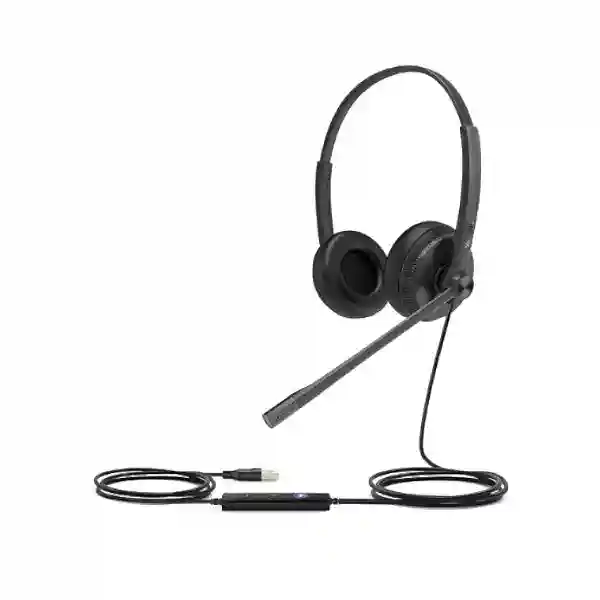
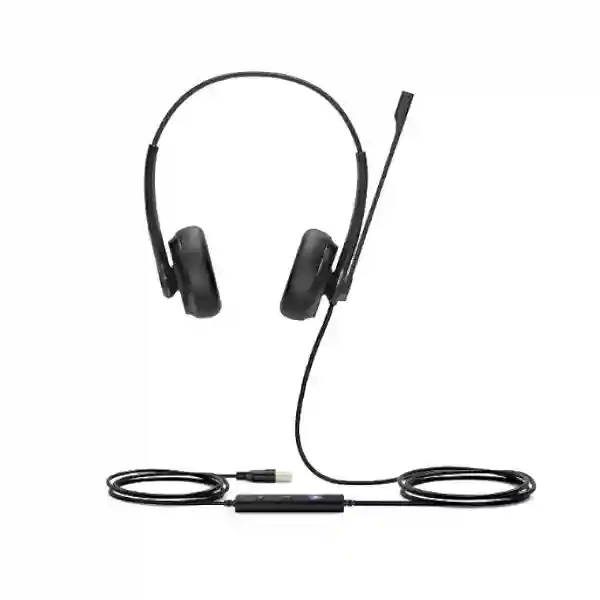
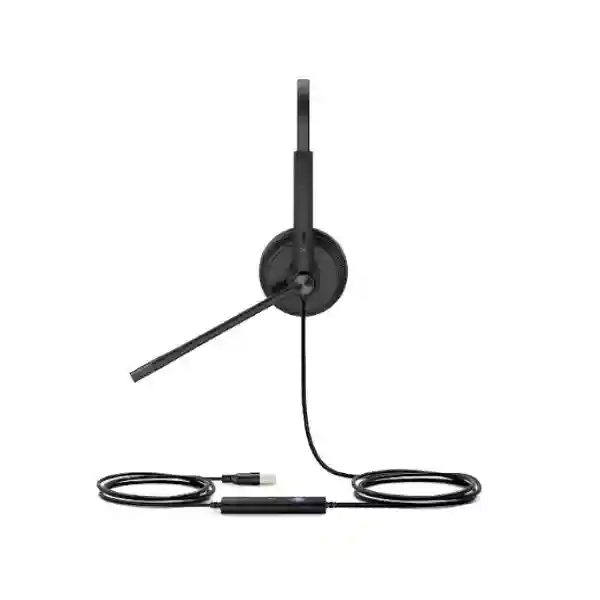
Yealink UH34 USB Headset
The Yealink UH34 is a professional USB wired headset created for people who spend substantial time on voice calls, online meetings and softphone conversations. It is available in Mono and Dual versions, with the UH34 using leatherette ear cushions and the UH34 Lite using foam ear cushions. Yealink positions the family for daily office and call-centre use, combining plug-and-play USB connectivity, wideband audio, a noise-cancelling microphone, passive noise reduction, an adjustable boom microphone and simple inline call controls. For organisations in Tanzania, the important buying question is not only whether a headset connects to a computer, but whether the chosen edition matches the user role, calling platform, required connector and existing Yealink telephone environment.
Choose the UH34 when you need a lightweight wired headset for reliable desk-based calling with straightforward USB setup. Confirm Mono versus Dual, UH34 versus UH34 Lite, Teams versus UC edition, USB connector requirement and endpoint compatibility before ordering.
What the Yealink UH34 USB Headset is designed to solve
A business headset has to do more than produce sound. In a call centre, customer-service desk, reception area, hybrid office or remote-work position, employees may wear a headset for hours while moving between calls, browser-based applications, Microsoft Teams sessions and IP telephony. The UH34 addresses that workflow with a wired design that avoids battery management, a lightweight frame intended for prolonged wear and a controller that places core call functions close to the user. The noise-cancelling microphone is designed to reduce unwanted background sound reaching the far end, while the ear-cup design provides passive noise reduction for the wearer. This combination can be useful in open offices where complete acoustic isolation is neither practical nor desirable.
Yealink lists USB plug-and-play connectivity to PCs and support for a range of compatible Yealink IP phones. The official specification also identifies HD Voice and wideband speaker performance, an integrated LED indicator and warning tone, a 320-degree bendable boom arm, digital signal processing and hearing-protection functions. The UH34 family can therefore serve both simple single-user deployments and larger headset estates where administrators want to use Yealink USB Connect or the Yealink Device Management Platform/Cloud Service to view device information and perform firmware updates.
For procurement teams, model selection matters. The family includes Mono and Dual formats, standard UH34 and UH34 Lite comfort variants, and Teams or UC versions. Some UH34 editions also provide different connection options such as USB-C or 3.5 mm. Exact connector, certification and included components should be matched to the requested SKU rather than assumed from the family name. FourTeck Tanzania can help structure that requirement before quotation so that the ordered headset variant fits the computer, phone or communications platform it will be used with.
USB plug-and-play
A wired connection keeps setup straightforward for supported PCs and compatible Yealink phones and avoids charging routines associated with wireless headsets.
Voice-focused microphone
The uni-directional noise-cancelling microphone is intended to make spoken communication clearer by reducing pickup of surrounding office noise.
Mono or Dual choice
Mono can suit roles that need awareness of nearby colleagues, while Dual can help users focus more closely on calls and media.
Central device management
Yealink USB Connect and Yealink management platforms can assist organisations that need visibility and firmware management across multiple compatible headsets.
Verified Yealink UH34 technical highlights
| Area | Officially published UH34 family information |
|---|---|
| Use scenario | Daily office use and call-centre communication. |
| Audio | HD Voice / wideband speaker performance, passive noise cancellation and integrated DSP. |
| Microphone | Uni-directional ECM noise-cancelling microphone; current Yealink support data lists a 100 Hz–10 kHz response range. |
| Speaker | 28 mm speaker, 20 Hz–20 kHz published frequency-response range and 32-ohm impedance. |
| Call controls | Answer, end, reject, hold, volume adjustment, microphone mute and last-number redial where supported by the platform. |
| Comfort versions | UH34 with leatherette ear cushions; UH34 Lite with foam ear cushions; both offered in Mono and Dual formats. |
| Published weights | UH34 Mono 88 g, UH34 Dual 118 g, UH34 Lite Mono 84 g and UH34 Lite Dual 110 g in the current detailed technical data. |
| Management | Yealink USB Connect software and Yealink Device Management Platform/Cloud Service support device information and firmware-management workflows. |
Specifications can vary by UH34 edition and product revision. Procurement should therefore identify the required exact model before comparing connectors, certification, accessories or platform behaviour.
Choosing between UH34 Mono, UH34 Dual and UH34 Lite
A Mono headset covers one ear and can be a practical choice for receptionists, supervisors and office users who need to remain aware of nearby conversations while handling calls. A Dual headset covers both ears and can provide a more focused listening experience for call-centre agents, sales teams, support desks and users who spend long periods in online meetings. The decision should reflect the working environment rather than an assumption that one format is universally better.
The difference between UH34 and UH34 Lite is primarily the ear-cushion material identified by Yealink: the standard UH34 uses leatherette cushions while UH34 Lite uses foam cushions. This can influence user preference, comfort and replacement strategy across a fleet. Larger deployments may benefit from issuing a small evaluation batch to representative users before standardising the model across dozens or hundreds of seats.
Teams and UC variants should also be selected deliberately. A headset can often deliver basic audio on a communications application even when advanced call-control integration is not certified, but button behaviour and application integration can differ. If native Microsoft Teams interaction, a specific USB connector or compatibility with a Yealink desk phone is important, include that requirement in the quotation request. This is especially important for organisations buying multiple headsets for mixed environments.
Compatibility, integration and deployment planning
Yealink publishes compatibility with a range of its IP phones and identifies the UH34/UH34 Lite/UH34 SE family in its current wired USB headset compatibility information for newer business phones. Earlier UH34 specifications also list connectivity to models including T41S, T42S, T46S, T48S, T42U, T43U, T46U, T48U, T53, T53W, T54W, T57W, T58A and VP59, with firmware requirements noted for some earlier S-series phones. Compatibility should always be checked against the exact phone model, firmware and UH34 edition before bulk deployment.
For PC users, the deployment process is typically simple because the headset is designed around USB plug-and-play operation. Even so, an enterprise rollout should consider whether users connect directly to desktops, laptops, docking stations or USB hubs; whether USB-A or USB-C ports are available; whether the preferred calling application supports full hardware controls; and whether endpoint policies allow Yealink USB Connect to be installed. Call-centre environments may additionally need workstation labelling, spare cushions, cleaning procedures and a defined process for replacing damaged headsets without changing the approved configuration.
If the headset is part of a broader voice project, it is useful to review the wider environment through FourTeck Tanzania’s integrated technology solutions overview, the business technology shop, and the services page. These pages help connect headset purchasing with IP telephony, conferencing, endpoints, network readiness and lifecycle support rather than treating the headset as an isolated accessory.
Yealink UH34 USB Headset Tanzania
For organisations buying the Yealink UH34 USB Headset in Tanzania, the strongest procurement approach is to start with user roles, calling platforms and device connections. A small office may need only a few headsets for reception, sales and management, while a contact centre, customer-support operation or shared-services team may need dozens or hundreds of consistent endpoints. In both cases the product decision should document whether each seat needs Mono or Dual listening, whether the standard leatherette UH34 or foam-cushion UH34 Lite is preferred, and whether Teams or UC integration is expected. This reduces the chance of receiving a technically similar but operationally different variant.
Tanzania deployments often combine laptops or desktop computers with IP telephony and cloud collaboration. In that environment, a wired headset can be attractive because it removes the need to charge batteries and gives users a predictable desk-based connection. The UH34’s lightweight design, inline controller, wideband audio and noise-cancelling microphone are relevant to people who handle repeated calls throughout the day. Organisations should still test the target application and computer build, because button functions can vary between certified and non-certified platforms even when basic audio works correctly.
For larger rollouts, procurement should consider spare units, replaceable cushions, workstation assignment, user hygiene, firmware management and a simple inventory method. Yealink USB Connect and Yealink device-management tools can help administrators standardise supported devices and updates. If the headset will connect to Yealink IP phones, include the exact phone models and firmware levels in the enquiry so compatibility can be checked before quantity is committed.
FourTeck Tanzania’s solution-led approach is useful when the headset purchase sits inside a wider voice or workplace project. A quotation request should state quantity, preferred edition, connector, calling application, computer or phone endpoint, delivery location and whether the requirement includes broader telephony or conferencing work. That makes it easier to distinguish a simple accessory purchase from a coordinated communications deployment and helps keep the recommendation aligned with actual business use.
Yealink UH34 USB Headset Dar es Salaam
Dar es Salaam organisations evaluating the Yealink UH34 commonly include corporate offices, financial and professional-services teams, logistics companies, customer-service departments, hospitality groups and growing businesses that rely heavily on voice and online meetings. The practical advantage of a wired USB headset is consistency at the desk: users do not have to manage wireless pairing or battery charge, and IT can standardise a familiar connection across workstations. For busy teams, that simplicity can make onboarding and replacement easier than maintaining many different personal headset types.
A Dar es Salaam contact-centre buyer should separate acoustic needs from connectivity needs. Dual-ear models can help agents concentrate when several colleagues are speaking nearby, while Mono models can suit supervisors and reception staff who need situational awareness. The UH34’s noise-cancelling microphone is intended to reduce environmental pickup on outbound speech, but it does not turn an acoustically poor room into a silent booth. Desk spacing, soft furnishings, room treatment and workforce layout may still affect conversation quality. For large teams, an evaluation with real call traffic is more informative than choosing solely from a specification sheet.
Businesses using Yealink desk phones should provide the exact phone model, firmware and preferred headset connection when requesting a quote. Businesses that use Microsoft Teams, softphones or browser-based contact-centre applications should state the software platform and whether hardware call-control integration is required. This is important because the UH34 family includes Teams and UC editions and some variants provide different connector options. USB-A remains common on desktop hardware, while USB-C may be more suitable for newer notebooks and docks.
For organisations planning an integrated voice environment, FourTeck Tanzania’s verified Dar es Salaam enquiry route can be used to provide quantity, user type, current phone or laptop model, collaboration platform and target timeline. Those details allow the quotation to focus on fit rather than simply listing a headset name. If the project also includes IP phones, PBX, switching or meeting-room devices, placing those requirements in the same enquiry can help expose shared dependencies early.
Yealink UH34 USB Headset Mwanza
Businesses in Mwanza looking for the Yealink UH34 USB Headset may be supporting branch offices, service desks, sales teams, healthcare administration, education, retail operations or regional support functions. In a branch environment, standardising a wired headset can simplify support because users have a predictable device with physical call controls and no battery lifecycle. The UH34 is particularly relevant where employees spend sustained periods on softphone conversations and need a headset that is light enough for routine daily wear.
Mwanza procurement should begin by identifying whether the headset is being purchased as an isolated endpoint or as part of a wider voice standard. A branch that already uses Yealink phones may want headset compatibility checked against each telephone model. A business using laptops and cloud calling should check the available USB ports and required application integration. A mixed environment may need two approved UH34 variants rather than one universal SKU. Documenting that distinction before quotation reduces substitutions and makes future replenishment easier.
User comfort should also be treated as an operational requirement. Mono and Dual headsets create different listening experiences, and the UH34 versus UH34 Lite cushion material may influence preference in warm offices or long shifts. A limited pilot can help determine which option employees accept best. For teams with shared desks, hygiene and cushion replacement should be included in the operating procedure so the headset remains a managed business asset rather than an unmanaged personal accessory.
When preparing a Mwanza quotation request, include the number of users, intended application, whether calls are mostly internal, external or conferencing, the type of PC or Yealink phone, and any requirement for Teams-oriented controls. Also identify whether deployment will happen at one Mwanza site or across several Tanzanian locations. A multi-site requirement benefits from consistent naming, spare ratios and firmware policy so an employee receives the same calling experience wherever they work.
Yealink UH34 USB Headset Arusha
In Arusha, the Yealink UH34 can fit organisations that manage frequent customer, partner and internal calls, including hospitality administration, tourism operations, professional offices, education and regional coordination teams. Many of these users move between voice calls and online meetings during the same day. A wired USB headset offers a stable desk-based connection and avoids the risk that a battery is depleted just before an important call. The UH34’s inline controller also lets users reach common controls without switching attention constantly to the screen.
The most useful configuration depends on how the employee works. A booking or customer-service agent may prefer Dual ear coverage to concentrate on conversations, while a front-desk user may choose Mono so they can still hear colleagues and visitors. The standard UH34’s leatherette cushions and the UH34 Lite’s foam cushions provide another practical choice. Rather than buying by price alone, organisations can evaluate which combination supports comfort, hygiene and the expected duration of daily headset use.
Arusha businesses with cloud collaboration should name the platform in the enquiry, particularly if Microsoft Teams control is important. If the headset is to be connected to Yealink IP phones, the phone models should be listed so current compatibility and firmware requirements can be checked. USB connector availability is equally important for organisations that have shifted from traditional desktops to thin laptops and docking stations. A small connector mismatch can delay an otherwise simple deployment.
FourTeck Tanzania’s public site confirms an Arusha office contact route, and the broader services portfolio covers voice, conferencing, computers and network infrastructure. A useful request therefore includes the headset quantity plus any associated endpoint or communication requirement. If an Arusha branch is being opened or refreshed, planning headsets together with phones, PCs, network ports and collaboration software can create a cleaner standard than buying accessories independently after users arrive.
Yealink UH34 USB Headset Dodoma
Dodoma organisations can use the Yealink UH34 for routine business calling, help desks, administrative teams, online training and hybrid meetings where dependable voice capture matters. The product family is particularly suitable for desk-based users because its wired USB approach is straightforward, while the noise-cancelling microphone and passive acoustic design focus on speech clarity. For institutions with repeatable workstation builds, a standard headset can become part of the approved desktop configuration alongside the laptop, monitor, dock and collaboration software.
Public-sector departments, associations, education organisations and companies with structured procurement often need an exact bill of materials. For the UH34, that means writing the complete variant rather than only “Yealink headset.” Specify Mono or Dual, UH34 or UH34 Lite, Teams or UC orientation, connector requirement and quantity. If an official manufacturer SKU is required in the purchase order, verify it against the exact model because Yealink publishes separate product codes for the different variants.
Rollout planning should also identify who owns firmware updates and user support. A headset issue may result from the physical device, USB port, driver, calling application, operating system, dock or IP phone. Standardisation makes troubleshooting faster because IT can reproduce the same combination. Yealink USB Connect and management tools can assist organisations that want a repeatable administration process rather than treating every headset as a standalone peripheral.
FourTeck Tanzania’s contact information includes a Dodoma office entry. When requesting a quotation, provide the expected number of seats, deployment date, device types, target application and any need for IP phones or wider unified communications. If the organisation has branches in other regions, identify whether a single headset standard should be used everywhere. That allows procurement to compare the cost of one consistent fleet against the complexity of supporting multiple headset families over time.
Yealink UH34 USB Headset UAE
UAE businesses considering the Yealink UH34 often operate in highly connected offices where Microsoft Teams, softphones, IP telephony and customer-service systems overlap. The UH34 can serve as a practical wired endpoint for users who value consistent desk connectivity more than wireless mobility. Its low-weight design, inline controls, noise-cancelling microphone and wideband audio are relevant to sales floors, contact centres, service desks and administrative teams that spend substantial time communicating with customers and colleagues.
A UAE buyer should pay particular attention to connector and platform standardisation. Modern notebook fleets may provide mostly USB-C ports, while desktop PCs and older docking stations may still use USB-A. The UH34 family includes editions with different connection options, so procurement should align the headset with the actual endpoint standard. Teams-certified and UC-oriented variants should also be separated in the bill of materials where advanced platform controls matter.
In large UAE deployments, the cost of support can exceed the cost difference between headset variants. A simple approved-device matrix that maps employee role, endpoint type and software platform to the correct UH34 edition can prevent inconsistent purchases. Keep spare units available according to operational criticality, document cleaning and cushion-replacement procedures, and use device-management tools where they add value. These steps make the headset fleet easier to maintain across headquarters, branches and shared desks.
For UAE-specific technology sourcing and broader communication projects, organisations can also review FourTeck UAE. When asking for a UH34 quotation, include quantity, exact user scenario, connector preference, Teams or UC requirement, and whether the headset will connect to PCs, Yealink desk phones or both. The more precise the endpoint information, the easier it is to identify the suitable edition without relying on assumptions.
Yealink UH34 USB Headset Uganda
Ugandan organisations evaluating the Yealink UH34 may be supporting Kampala headquarters, regional offices, service desks, schools, NGOs, healthcare administration, financial operations or customer-facing teams. A wired business headset can be a sensible standard when the priority is reliable desk communication rather than mobility. The UH34’s plug-and-play USB approach, inline controls and lightweight design make it suitable for repeatable workstation deployments where users frequently move between calls and online meetings.
Procurement should consider the acoustics of the workplace. The noise-cancelling microphone reduces background pickup on the user’s transmitted voice, while passive noise isolation can improve focus, but the headset is not a substitute for a well-planned call-centre environment. Dual models may be better for intensive calling positions, whereas Mono can support roles that need to maintain awareness of the room. Teams should also compare leatherette UH34 cushions with UH34 Lite foam cushions where long-wear comfort is important.
When a Ugandan business already operates Yealink phones, state the exact handset models and firmware in the request. Where staff use computers, state operating-system build, available USB connector and collaboration platform. Larger organisations can benefit from a consistent fleet policy that covers software updates, spare units and replacement cushions. Yealink’s management options can support administrators who want visibility across multiple compatible USB devices.
For local communications and infrastructure context, FourTeck Uganda describes IP PBX, VoIP and networking services for business environments. A UH34 purchase can therefore be discussed as part of an overall voice requirement when necessary. A useful quotation request includes headset count, Mono/Dual split, preferred edition, application, endpoint models and the Ugandan locations where the devices will be used.
Yealink UH34 USB Headset Kampala
Kampala has a concentration of corporate offices, banks, service companies, technology teams, NGOs and contact-centre operations where voice quality directly affects customer experience. The Yealink UH34 can fit these environments when organisations want a professional wired headset that is simple to deploy at fixed workstations. Because it does not depend on a rechargeable battery, it can be ready whenever the computer or compatible phone is available, which is useful for shifts and hot-desk environments with established USB connectivity.
A Kampala contact-centre deployment should be designed around shift length, agent density and application integration. Dual-ear headsets can help reduce distraction for agents, while Mono versions may suit team leads who need to interact with nearby staff. Noise-cancelling microphones help the far-end listener hear the speaker more clearly, but seating layout and room acoustics still influence perceived call quality. A pilot should therefore use real desks and live applications instead of a quiet meeting room.
The UH34 family’s Teams and UC editions should be matched to the organisation’s collaboration stack. Call-control buttons may behave differently depending on the communication platform and certification, even when basic USB audio works. Endpoint diversity is another concern: some laptops expose USB-C only, while office desktops may be USB-A based. A procurement matrix can prevent users from receiving variants that require extra adapters.
For branch rollouts originating from Kampala, define whether the same headset standard will be extended to other Ugandan cities. Standardisation simplifies user training, spares and troubleshooting. The quotation should show the quantity by location and user type, while technical validation should include phone models or PC platforms. If the headset rollout is part of a new IP PBX, VoIP or unified communications project, coordinate the endpoints and network requirements together instead of purchasing them in separate disconnected phases.
Yealink UH34 USB Headset Arua
Arua organisations may need dependable headsets for regional administration, NGO programmes, healthcare coordination, education, logistics, branch offices and customer-support functions. In these settings, a wired USB model such as the Yealink UH34 can provide an uncomplicated communication endpoint that does not rely on battery charging or wireless pairing. That can be valuable where IT teams want a stable standard that can be issued to staff with minimal setup.
Selection should still be deliberate. Mono headsets can help users remain aware of colleagues or visitors, while Dual models can support concentration during longer calls. Standard UH34 leatherette cushions and UH34 Lite foam cushions provide different comfort characteristics. If users wear headsets for much of the day, a short evaluation period can reveal preferences that are difficult to predict from a catalogue description. This is especially useful before a multi-site bulk purchase.
Arua buyers using cloud calling should identify the exact application and computer connectivity. Those using Yealink IP phones should share handset models and firmware. The headset family supports broad business usage, but full button integration can depend on platform certification and device combination. It is therefore better to validate a representative setup than assume that every USB audio function behaves identically across all applications.
For regional supply planning, include Arua quantities separately from Kampala or other branches so spare allocation and delivery coordination can be organised clearly. If a central IT team manages several locations, consider standardising firmware, naming conventions and replacement procedures. The goal is not merely to purchase a headset, but to create a repeatable endpoint standard that remote staff can use and support with minimal ambiguity.
Yealink UH34 USB Headset Mbarara
Mbarara businesses and institutions can use the Yealink UH34 where office users, support personnel, education teams or healthcare administrators depend on frequent voice communication. A wired headset is especially suitable for fixed desks and shared operational areas where reliable availability is more important than walking range. Users can connect the headset to a supported PC or compatible Yealink phone without maintaining a wireless battery cycle, while the inline controller gives convenient access to common call functions.
For Mbarara procurement, the first decision should be role-based. A user who spends most of the day in calls may benefit from a Dual model, while a manager who joins occasional online meetings and needs to hear the room may prefer Mono. Cushion material is another practical factor: UH34 and UH34 Lite are not simply two names for the same physical feel. Including end users in a small trial can improve adoption and reduce later requests for alternative headsets.
Compatibility information should be documented in the purchase file. State whether the headset will connect through USB-A, USB-C or another supported edition, which operating systems and applications are used, and whether Teams-specific controls are expected. For Yealink desk phones, provide the exact models. This information also helps future support staff reproduce the environment if a user reports microphone, call-control or audio issues.
If Mbarara is one location in a national rollout, use the same approved SKU naming and configuration rules across branches. Centralised purchasing can then compare like with like, while local teams receive a predictable headset. Add spare units and replacement cushions based on staffing and operational importance rather than arbitrary percentages. A well-defined standard is often more valuable over the product lifecycle than a small initial saving from mixing several similar headset models.
Yealink UH34 USB Headset Gulu
Gulu offices, institutions and regional teams can consider the Yealink UH34 for structured desktop communication, online training, support calls and collaboration. The headset’s wired architecture is useful for environments that favour simplicity: there is no pairing process to manage and no rechargeable battery to monitor. Staff can concentrate on the call while IT maintains a smaller set of variables than would be present in a mixed wireless fleet.
The microphone and ear-cup design address two different noise problems. The noise-cancelling microphone is intended to limit background sound transmitted to the other party, while passive noise reduction helps the wearer focus. Neither feature eliminates the need for sensible room planning. In a busy shared office, desk spacing, partitions and speaking volume can still affect the working environment. Dual-ear UH34 models may be preferable for intensive call roles, whereas Mono can support users who must remain aware of the room.
Before ordering for Gulu, confirm the software and hardware at the desk. Teams, UC applications, softphones and Yealink IP phones may have different control behaviour. Verify whether the endpoint uses USB-A or USB-C and whether docking stations are involved. This small preparation avoids deploying adapters unnecessarily or discovering that a desired button function is not supported by the chosen platform.
Regional organisations should also think about support logistics. Keeping one tested headset standard simplifies remote troubleshooting and makes it easier to send replacements. If Gulu users are managed from Kampala or another central IT office, document the approved UH34 variant, software version and escalation steps. When requesting a quote, include site quantity, roles, endpoint models and the expected deployment schedule so supply planning is based on operational reality rather than an undifferentiated total.
Yealink UH34 USB Headset Kenya
Kenyan businesses use headsets across customer service, fintech, professional services, healthcare administration, logistics, hospitality, education and distributed corporate teams. The Yealink UH34 is relevant to organisations that want a lightweight wired endpoint for dependable daily communication. Its USB plug-and-play design is straightforward for desktop and laptop deployments, while the Mono and Dual formats allow businesses to match the listening style to the user’s role.
A Kenya-wide deployment should consider whether Nairobi headquarters and regional branches use the same device fleet. If some locations use Yealink desk phones while others rely on cloud softphones, test both environments before approving a single SKU. Teams-oriented and UC variants can be separated where necessary, and connector requirements should be mapped to the computer fleet. Modern ultrabooks may need USB-C, while fixed PCs can still favour USB-A.
For call-centre teams, user comfort and room acoustics are as important as electronic specifications. The UH34’s light weight and cushion options are intended for long-wear use, but each organisation should test real shifts. A noise-cancelling microphone can improve speech pickup, yet a highly reflective room with many simultaneous agents may still require layout or acoustic changes. Selecting Dual headsets can improve focus for some teams, while supervisors may need Mono designs for situational awareness.
Organisations seeking a Kenya-specific technology route can review FourTeck Kenya, which covers VoIP phones, video conferencing, unified communications and related business IT. A headset quotation is most useful when it includes quantity, exact edition, application, endpoint type, site distribution and required delivery schedule. This turns a generic product enquiry into a procurement specification that can be compared and approved consistently.
Yealink UH34 USB Headset Kuwait
Kuwait offices frequently combine IP telephony, cloud collaboration and customer-facing call workflows, creating a need for reliable user audio endpoints. The Yealink UH34 is suited to fixed workstations where wired simplicity is preferred. It can support reception, help-desk, sales, administration and contact-centre roles without the charging and pairing routines associated with wireless devices. The Mono and Dual options help organisations align the headset to how each role interacts with colleagues and customers.
The operating environment should guide the choice. Dual headsets can reduce distraction for intensive calling, while Mono headsets allow the user to hear nearby events. The UH34 uses leatherette cushions while UH34 Lite uses foam, providing another comfort choice for long workdays. In a large project, the procurement team can pilot each option with representative users before standardisation, avoiding the cost of switching models after a bulk purchase.
Kuwait organisations should map connector requirements carefully because desktop computers, notebooks and docks may expose different USB ports. Teams versus UC requirements also need to be documented where hardware call-control behaviour matters. If Yealink IP phones are part of the environment, compatibility should be checked against the exact handset and firmware rather than inferred from the headset family name.
For larger fleets, create a lifecycle plan covering device assignment, spare stock, replacement cushions, firmware and help-desk troubleshooting. A headset is inexpensive compared with a phone system, but an inconsistent headset fleet can create disproportionate support work. A quotation request should therefore include the chosen standard, user quantities, endpoint mix and any wider IP telephony or unified communications requirements so the headset can be evaluated in the context where it will actually operate.
Yealink UH34 USB Headset Ghana
Ghanaian organisations can use the Yealink UH34 in business-process teams, support desks, professional offices, schools, healthcare administration, financial services and multi-site enterprises that rely on computer-based calling. The wired USB design is easy to understand and can support standardisation because users do not have to maintain a charging schedule. The headset’s wideband audio, noise-cancelling microphone and inline controls are particularly relevant to users whose productivity depends on clear, frequent voice communication.
A procurement team should segment users instead of selecting one configuration blindly. Mono can suit front-office and supervisory functions, while Dual can suit high-call-volume teams. UH34 and UH34 Lite provide different cushion materials, which may influence comfort and replacement preference. The Teams and UC variants should also be aligned with the software environment. When large quantities are planned, a small technical and user-acceptance pilot can save time by validating the choice before scale.
Compatibility validation should cover the complete desk setup: computer or Yealink phone, operating system, collaboration application, USB port or dock and desired call-control functions. If the headset is one component in a new VoIP deployment, network readiness, phone provisioning and call flows deserve separate attention. Good voice quality depends on the entire communications path, not solely on the headset.
For Ghana-specific technology enquiries, FourTeck Ghana provides a regional business IT route. A useful UH34 request should state quantity, city or site, Mono/Dual mix, Teams or UC preference, connector requirement and whether users connect to computers or desk phones. These details support an accurate quotation and make future replenishment more consistent across the organisation.
Yealink UH34 USB Headset Nigeria
Nigeria’s large service economy includes contact centres, fintech teams, banks, professional services, logistics operations, education providers and distributed enterprises where headset quality affects daily customer communication. The Yealink UH34 is a strong fit for fixed workstations that need dependable wired audio. Because the headset is USB connected, there is no wireless battery to charge, and IT can standardise a known endpoint across large user groups.
Scale makes variant control particularly important. A large Nigerian deployment may include thousands of seats across different computer models and applications. The procurement specification should distinguish UH34 from UH34 Lite, Mono from Dual, Teams from UC and USB-A from alternative connector editions where applicable. A clear SKU matrix prevents warehouses and branch teams from treating similar-looking headsets as interchangeable when their intended integration differs.
Call-centre managers should validate comfort during a realistic shift and evaluate microphone performance in the actual room. The headset’s noise-cancelling microphone reduces background pickup, but workforce density, desk spacing and acoustics still influence the listening experience. Device-management processes should also be defined so firmware, fault diagnosis and replacement are handled consistently. Yealink USB Connect and supported management platforms can assist with administration of compatible devices.
For regional infrastructure and communication enquiries, FourTeck Nigeria provides a country-focused route. When requesting the UH34, include site distribution, user counts, endpoint models, calling software and any requirement for IP PBX, VoIP phones or unified communication integration. The objective should be a repeatable headset standard that remains easy to procure, support and replace as the organisation grows.
Yealink UH34 USB Headset Seychelles
Seychelles organisations in hospitality, tourism, administration, finance, professional services and customer support may use the Yealink UH34 to improve desk-based voice communication. Hotels and service businesses in particular often coordinate reservations, suppliers, head offices and remote teams through a mix of telephony and online meetings. A wired USB headset gives staff a predictable connection and can be assigned permanently to a workstation without concern for battery charge.
User role remains the best basis for choosing Mono or Dual. Reservation and support staff handling continuous calls may prefer Dual for concentration, while a front desk or supervisor may need Mono to remain aware of people nearby. Cushion preference should also be considered for long periods of wear. The standard UH34 and UH34 Lite differ in ear-cushion material, making a small user trial worthwhile before a larger procurement.
Because island operations often value dependable spares and predictable replacement, procurement should avoid unnecessary model variation. Standardise one or two approved UH34 editions, keep records of the exact connector and Teams/UC orientation, and maintain a practical number of spares based on operational criticality. When the headset is used with Yealink phones, validate the handset and firmware. When used with computers, validate USB port availability and application control.
A Seychelles quotation request should include quantity, site, user role, collaboration platform, endpoint and connector preference. If the requirement spans several hotels, offices or islands, separate quantities by location so deployment and spares can be planned clearly. The result is a headset project that supports business continuity and user comfort rather than simply adding another accessory to each desk.
Use cases by team
Call centres
Standardise Dual or Mono seats according to agent workflow, verify platform controls, plan spare units and establish cleaning and cushion-replacement processes.
Reception and front office
Mono configurations can help staff remain aware of visitors and nearby colleagues while maintaining hands-free call handling.
Sales and support
A wired USB headset can provide a consistent endpoint for softphones, CRM calling and online meetings without battery-management overhead.
Hybrid office users
Employees can keep the UH34 at a regular desk or assigned workstation and use it for scheduled meetings, internal calls and focused voice tasks.
Related FourTeck Tanzania resources
The UH34 often sits inside a larger workplace communication environment. Use the FourTeck Tanzania shop to review broader business technology categories when the requirement includes IP phones, conferencing devices or computers. The services overview is relevant when deployment, configuration or wider integration is needed. The About FourTeck Tanzania page explains the solution-led approach used to connect devices with the systems around them, while the Tanzania technology solutions homepage provides an overview of IP telephony, conferencing, endpoints and infrastructure.
For a product-specific request, the most useful final destination is the verified FourTeck Tanzania contact page. Include the UH34 variant, quantity, endpoint, software platform, connector requirement and deployment location. If the exact variant is not yet known, describe the user role and current environment so the selection can be narrowed before quotation.
Quotation checklist for Yealink UH34
Frequently asked questions
Is the Yealink UH34 suitable for call centres?
Yes. Yealink lists daily office and call-centre use as intended scenarios. The lightweight form, Mono/Dual choice, noise-cancelling microphone and wired USB connection are relevant to agents who spend significant time on voice communication. Real-world comfort and application integration should still be tested before a large rollout.
What is the difference between UH34 and UH34 Lite?
Yealink distinguishes the models primarily by ear-cushion material: UH34 uses leatherette ear cushions, while UH34 Lite uses foam cushions. Both families are available in Mono and Dual formats.
Does the UH34 work with Yealink IP phones?
Yealink publishes USB compatibility with multiple Yealink IP phone models. Exact support depends on phone model, firmware and headset edition, so the specific combination should be checked before bulk purchasing.
Can I use the UH34 with Microsoft Teams?
Yealink offers Teams-specific UH34 variants as well as UC variants. Choose the edition that matches the intended platform and required hardware controls. On an uncertified communication platform, basic audio may work even when advanced controls are not fully integrated.
Does the UH34 require charging?
No charging routine is required for normal wired USB operation. This is one reason wired headsets are often selected for fixed desks and intensive calling positions.
What information should I provide for a quotation?
Provide quantity, location, Mono or Dual preference, UH34 or UH34 Lite, Teams or UC requirement, connector type, the computer or Yealink phone model and the calling application. If you are unsure, describe the user role and current environment so the suitable edition can be identified.
Decision recap
The Yealink UH34 is best considered as a professional wired voice endpoint rather than a generic consumer headset. Its strengths are plug-and-play USB operation, lightweight wearing comfort, Mono/Dual options, voice-focused microphone performance, passive noise reduction, inline controls and Yealink management support. The correct purchase depends on the exact variant, user role, connector, collaboration platform and endpoint. Validate those points before comparing quotations.
Consultation panel
Need help selecting the UH34 edition for Tanzania? Share your quantity, devices and calling platform through FourTeck Tanzania. For larger projects, include IP phone, PBX, computer and branch requirements so the headset is evaluated as part of the full communication environment.




Reviews
There are no reviews yet.