
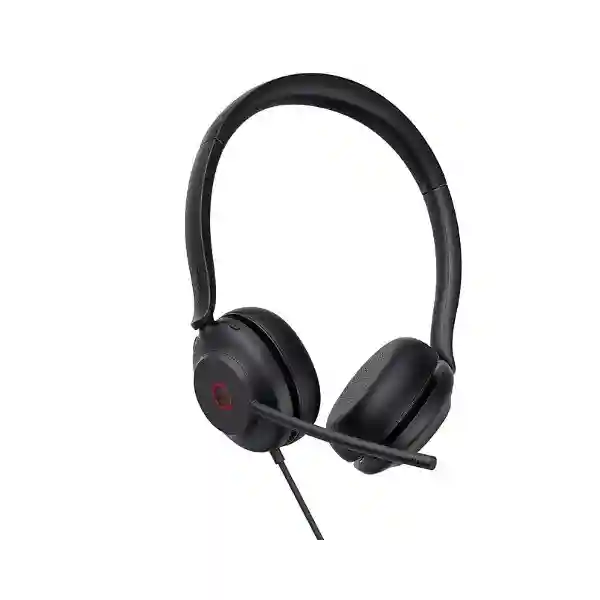
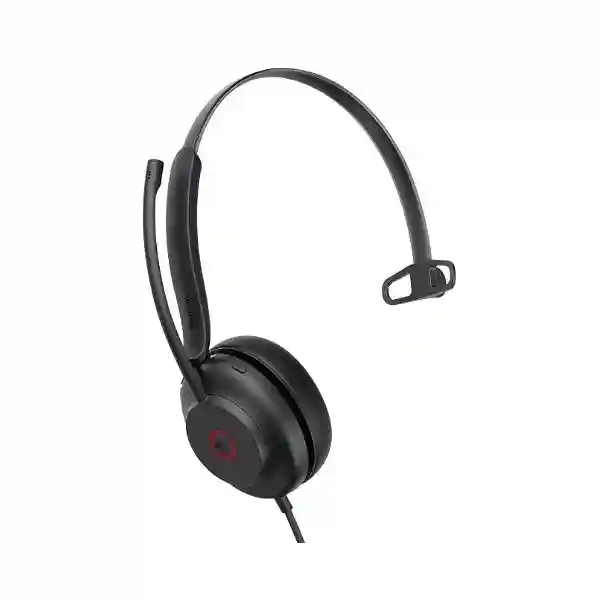
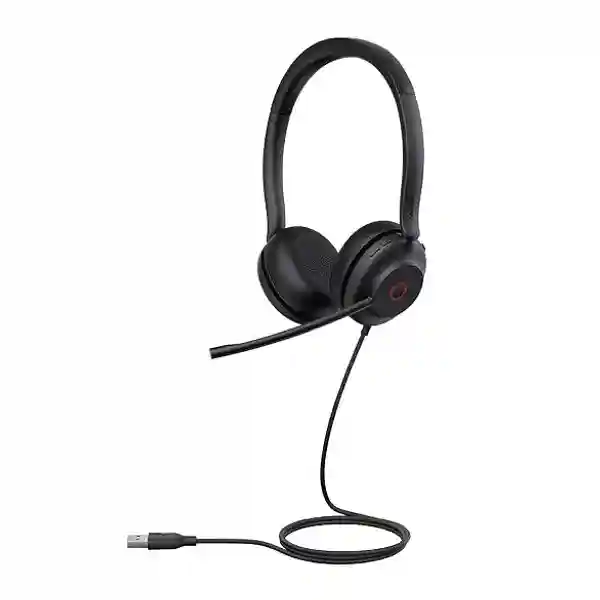
Yealink UH35 USB Headset
The Yealink UH35 USB Headset is designed for business users who need a dependable wired audio endpoint for calls, online meetings and day-to-day unified communications. It is positioned by Yealink for office and call-centre use and is available in Mono and Dual wearing styles, with Microsoft Teams and UC variants. Its core design combines dual-microphone noise cancellation, Acoustic Shield technology, a busylight, professional-grade audio, an adjustable microphone boom and wired USB connectivity that avoids the charging, pairing and radio-management considerations associated with wireless headsets.
For organisations in Tanzania, the UH35 can fit procurement projects where consistency, simple onboarding and clear voice pickup matter more than wireless mobility. The product family includes different connector and platform variants, so buyers should confirm whether they require USB-A, USB-C/A, Teams or UC models and whether the headset will be used mainly with PCs, Yealink desk phones or a combination of endpoints. This page focuses on practical selection, compatibility, deployment and regional procurement considerations without making assumptions about stock, delivery dates or local authorisation status.
Dual-mic voice focus
The UH35 uses two microphones with noise-reduction technology and Yealink Acoustic Shield capabilities to help reduce distracting environmental sound reaching the far end of a call.
Wired USB simplicity
A wired USB design gives organisations a straightforward endpoint for fixed desks, hot desks, training rooms and support teams where fast plug-and-play use is a priority.
Mono and Dual choices
Mono is useful where users need greater awareness of their surroundings, while Dual can support stronger concentration in busier offices and call-handling environments.
What the Yealink UH35 solves for business users
Professional voice work is often affected by inconsistent laptop microphones, background conversations, weak speaker volume, and the friction of employees switching among desk phones, softphones and meeting applications. The UH35 addresses these practical problems with a dedicated headset form factor. Yealink positions it as a professional USB-wired headset for office users and remote workers, with major UC-platform compatibility and native integration with supported Yealink IP phones. For IT teams, this makes the UH35 relevant where the objective is to standardise user audio instead of leaving each employee to rely on built-in computer speakers or consumer earphones.
The headset includes a visible busylight that can illuminate during calls or meetings, helping colleagues recognise when a user is engaged. The microphone boom can be rotated and supports lift-to-mute behaviour in Yealink’s current product presentation. On supported variants, users can also manage common call functions such as answer, end, reject, hold, volume adjustment, mute and redial. These details matter in environments where staff handle repeated calls and need physical controls that are easier to locate than software buttons.
Audio performance is built around a professional speaker system with a published frequency response extending from 20 Hz to 20 kHz, while the dual microphones are specified for a 100 Hz to 10 kHz response. Yealink documentation for the product family also lists user hearing-protection functions, passive noise isolation from the ear cushions and dynamic EQ behaviour that differentiates call and music listening. Specifications have changed slightly across Yealink documentation revisions, so organisations placing larger orders should request the exact current part number and corresponding datasheet in the quotation process.
Verified UH35 feature and specification guide
| Product type | Professional wired USB on-ear headset |
| Wearing options | UH35 Mono and UH35 Dual |
| Platform variants | Microsoft Teams and UC versions are listed by Yealink |
| Microphones | Dual microphones; 100 Hz–10 kHz published microphone response |
| Speaker | Yealink current comparison material describes 35 mm professional-grade speakers; frequency response is listed as 20 Hz–20 kHz |
| Noise management | Dual-mic noise cancellation, Acoustic Shield support and passive isolation from on-ear cushions |
| Connectivity | USB family options are published for USB-A and USB-C/A variants; confirm exact connector by part number |
| Weight | UH35 Mono 96.5 g; UH35 Dual 139.5 g in current Yealink comparison material |
| Management | Yealink USB Connect and Yealink Management Cloud Service are listed in current comparison data |
Specification note: Yealink has published multiple documentation revisions for the UH35 family. Connector format, cable length, part numbers and some hardware details should be matched to the exact quoted model rather than assumed from a generic family name.
Choosing Mono, Dual, Teams and UC variants
The most important buying decision is not whether the UH35 is generally suitable, but which UH35 configuration best matches the user group. A Mono headset leaves one ear uncovered, which can be useful at reception desks, shared service counters, supervisory roles and operational environments where users must remain aware of nearby colleagues. A Dual headset covers both ears and can be a better fit for concentrated call handling, online meetings, inside-sales work and busy open-plan offices. Neither choice is automatically better; the right answer depends on job role, ambient noise and how much environmental awareness is required.
Teams and UC versions should be selected according to the organisation’s collaboration environment and desired call-control behaviour. Enterprises standardising on Microsoft Teams normally benefit from choosing the Teams-designated variant. Organisations using other UC platforms, mixed softphones or broader communication environments may prefer the UC model. Before ordering, IT teams should document the main calling application, operating system, USB connector type, intended desk phone model if any, and whether central headset management is part of the endpoint strategy.
Connector selection deserves equal attention. Current Yealink comparison material describes USB-C cord with a USB-A adapter for newer UH35 versions, while earlier material lists separate USB-A and USB-C variants. Procurement teams should therefore request the exact manufacturer part number instead of relying only on a product title such as “UH35 USB Headset.” This avoids receiving a connector type that does not align with the laptops, docking stations or thin clients in use.
Deployment, compatibility and support planning
A wired USB headset is typically easier to deploy than a wireless fleet, but larger rollouts still benefit from a simple compatibility matrix. Record the computer operating systems, UC clients, desk-phone models, available USB ports, docking stations and user roles. Yealink lists Windows and macOS support in UH35 technical material and describes compatibility with major UC platforms. It also lists plug-and-play USB operation with a range of Yealink IP phones, subject to model and firmware considerations. Those details should be checked against the exact environment before mass deployment.
For contact centres and service desks, supervisors should also decide whether Mono or Dual is the preferred default, whether busylight behaviour is important for floor etiquette, and whether users require standardised mute and call-control procedures. For hybrid workers, cable routing and the USB connector on the primary laptop or dock may be more important. For training rooms, shared workstations and hot desks, easy sanitation, storage and labelling may form part of the rollout plan even though they are operational rather than product specifications.
Businesses already using Yealink desk phones can evaluate the UH35 as part of a broader Yealink endpoint environment. For wider collaboration infrastructure, FourTeck also works across communication and IT solution areas through the FourTeck Tanzania technology portfolio, while organisations with regional requirements can review the FourTeck Africa platform for cross-market solution context.
Yealink UH35 USB Headset Tanzania
Tanzanian organisations evaluating the Yealink UH35 are usually solving a practical business-communications problem rather than buying a headset as an isolated accessory. Banks, professional-services firms, support teams, education providers, healthcare administrators, travel companies, government offices and distributed enterprises increasingly use laptop-based calling, VoIP, video meetings and unified communications throughout the working day. In these environments, a dedicated wired headset can standardise audio quality and reduce dependence on built-in microphones that pick up room noise. The UH35 is relevant because it combines a lightweight on-ear format with dual microphones, noise-reduction technology, a visible busylight and USB operation. Procurement teams can consider it for fixed desks, hybrid users, call-heavy departments and users of compatible Yealink phones.
For a Tanzania deployment, start by segmenting users. Receptionists may prefer Mono so they can hear visitors and colleagues while taking calls. Sales, customer-care and finance teams may prefer Dual for stronger concentration. Teams-standardised organisations should compare the Teams variants, while mixed collaboration environments may be better served by UC versions. The connector must be confirmed because Tanzania businesses may have a mixed installed base of older desktops with USB-A, newer laptops with USB-C and docking stations that expose both. Ordering from a specific Yealink part number is safer than assuming every UH35 package uses the same cable arrangement.
IT managers should also confirm whether the headset will connect only to PCs or whether users need integration with Yealink IP phones. Yealink publishes compatibility with selected phone models and provides management tooling such as Yealink USB Connect and cloud management services in current product material. When the requirement includes a wider phone refresh, a headset purchase can be planned alongside IP telephony, conferencing, LAN readiness and endpoint management instead of handled as a standalone purchase.
A useful quotation request for Tanzania should state the number of users, Mono or Dual preference, Teams or UC requirement, preferred connector, laptop or desktop platform, Yealink desk-phone models if applicable, and whether the order is for a pilot or a broader rollout. FourTeck can then align the request to the exact UH35 variant without assuming stock, price or delivery timing. This approach is especially important for multi-site organisations that want one specification for Dar es Salaam, Mwanza, Arusha and Dodoma users while still allowing role-based headset choices.
Yealink UH35 USB Headset Dar es Salaam
Dar es Salaam businesses often combine head-office functions, customer service, logistics, sales, finance and regional coordination in the same operating environment. That makes headset standardisation useful when employees move between ordinary voice calls, browser meetings, softphones and collaboration platforms. The Yealink UH35 can suit organisations that want a wired professional headset without introducing battery charging or Bluetooth-pairing procedures. The busylight is particularly relevant in shared office areas because it provides a visual signal that a colleague is on a call. Dual-microphone noise reduction can help keep the user’s voice clearer when surrounding conversation is present, although no headset can remove every source of background noise.
For Dar es Salaam contact-centre or service-desk projects, the purchasing team should define whether agents need Dual ear coverage for focus or Mono coverage for awareness of supervisors and nearby staff. It is also useful to test the physical comfort of the selected variant with a representative group before a large procurement. Yealink publishes UH35 weights of 96.5 g for Mono and 139.5 g for Dual in current comparison information, which supports the product’s lightweight positioning, but personal comfort still varies by user and shift duration.
Endpoint compatibility should be documented before quotation. A Dar es Salaam organisation using mixed-generation laptops may need USB-A connectivity at some desks and USB-C at others. Newer UH35 part numbers may include USB-C/A arrangements, while older documentation shows separate connector editions. Requesting the exact part number and confirming the port type prevents avoidable deployment friction. The same applies when the headset will connect to Yealink desk phones: phone model and firmware should be checked rather than assumed.
Businesses expanding beyond one office can use the Dar es Salaam deployment as a controlled standard. Define the headset model, approved variants, cable storage, user assignment, call-control expectations and replacement process, then apply the same policy to branch locations where appropriate. The objective is a repeatable end-user audio experience, not merely a one-time peripheral purchase. A detailed request for quote should include headcount, platform, connector and deployment schedule so the supplier can respond with the correct bill of materials.
Yealink UH35 USB Headset Mwanza
In Mwanza, organisations in commerce, professional services, education, healthcare administration, tourism support and regional operations may need reliable audio for voice and video collaboration between local teams and colleagues elsewhere in Tanzania or abroad. The UH35 is a practical fit where users remain primarily desk based and value stable wired connectivity. Because it does not rely on a wireless radio link or rechargeable headset battery, it can simplify daily routines for staff who spend much of their day at a fixed workstation and want to connect, sign in and begin calling.
The strongest deployment case is role based. A branch manager who moves frequently around an office may be better served by a wireless model, whereas an accounts officer, reservations agent, support representative or remote-training participant may benefit from the UH35’s wired design. Mono can suit users who still need to hear the room; Dual can suit concentrated communication. Yealink’s dual-microphone system and passive ear-cushion isolation are designed to reduce distractions, while the dynamic audio behaviour supports both calls and music playback during ordinary computer use.
For Mwanza procurement, compatibility planning should cover computers and desk phones equally. Verify whether workstations expose USB-A or USB-C ports directly or through docks, whether the organisation uses Windows or macOS, and which softphone or meeting platform is standard. If the headset is intended for a Yealink desk phone, record the exact phone model. This information lets a quotation identify a suitable Teams or UC variant and the appropriate connector configuration without guesswork.
Multi-branch businesses can also use headset procurement to improve support consistency. Standardising a small set of approved variants simplifies user instructions, inventory records and troubleshooting. Instead of allowing employees to choose unrelated consumer headsets, IT can document a default UH35 specification and defined exceptions. For a Mwanza rollout, provide quantities by user role, not just one total number. That makes it easier to determine how many Mono, Dual, Teams or UC units are actually required and reduces the risk of over-ordering the wrong configuration.
Yealink UH35 USB Headset Arusha
Arusha has a broad mix of tourism-linked businesses, professional offices, NGOs, education organisations, conference activity and regional operations that can create frequent demand for online meetings and international calling. In such settings, the Yealink UH35 can provide a consistent personal audio endpoint for reception teams, reservations desks, finance users, project coordinators and administrative staff. Its wired connection can be attractive in managed offices because it reduces pairing complexity and ensures the headset is ready whenever it is plugged into a compatible device.
Arusha buyers should map communication patterns before deciding between Mono and Dual. A front-desk user who interacts with visitors may need one ear free and therefore prefer Mono. A project officer attending long remote meetings or a booking agent handling frequent voice calls may prefer Dual. The headset’s busylight can support office etiquette by showing when a user is occupied, while the microphone boom and physical controls make common call actions easier to perform without searching for on-screen buttons.
For organisations with international partners, platform choice is also important. A Teams-centric business should specify the Teams variant when that is the intended workflow; an organisation using multiple softphones can consider UC models. Because application integration can vary, pilot testing with the actual collaboration software is advisable before a large order. Yealink’s published support for major UC environments provides a strong starting point, but the buyer’s software stack, endpoint policies and call-control expectations should determine the final choice.
A well-prepared Arusha quotation request should list whether users operate from laptops, desktops, thin clients or Yealink phones, the port types available, and any requirement for central headset management. For project-based organisations, include expected user growth so the chosen standard remains suitable beyond the first order. If procurement spans Tanzania and neighbouring markets, organisations can also reference the FourTeck Kenya platform when evaluating cross-border technology needs rather than assuming one country’s commercial terms automatically apply elsewhere.
Yealink UH35 USB Headset Dodoma
Dodoma organisations may use professional USB headsets for administrative coordination, public-sector communication, education, consulting, service desks and inter-office collaboration. The Yealink UH35 is particularly relevant where users work from assigned desks and need a dependable microphone and earpiece for scheduled meetings, VoIP calls and browser-based communication. Wired USB avoids the need to manage charging cycles, while Mono and Dual options let procurement teams match the device to the user’s need for room awareness or concentration.
For structured procurement, the UH35 should be evaluated as an endpoint standard rather than simply an accessory. That means identifying supported computer operating systems, collaboration applications, desk-phone models and connector types in advance. Yealink lists Windows and macOS support and publishes integration with selected Yealink IP phones, but the exact environment should be verified during planning. If an organisation has several departments using different computer generations, a small pilot can reveal whether one connector configuration covers the full estate or whether separate variants are required.
User comfort is another procurement factor. The UH35’s lightweight design, on-ear cushions and adjustable headband are intended for extended business use, yet long working sessions can affect users differently. A pilot group should include frequent callers, occasional meeting users and people who wear glasses so the organisation gets realistic feedback. This is especially useful for public-facing or support roles where the headset may be worn for much of the day.
Dodoma buyers preparing a formal request should include quantities by department, whether each department needs Mono or Dual, Teams or UC, USB-A or USB-C/A, and whether users will connect to PCs or Yealink phones. If internal IT teams need standard operating procedures, add requirements for installation guidance, user handover, firmware or software management considerations and replacement policy. This produces a clearer quotation and helps the organisation compare like-for-like offers instead of looking only at a headline unit price.
Yealink UH35 USB Headset UAE
Businesses in the UAE frequently operate multilingual customer-service teams, regional headquarters, shared service centres, hospitality groups, logistics operations and hybrid offices where collaboration platforms are central to daily work. The Yealink UH35 can be considered when these users need a wired professional headset with predictable plug-and-play behaviour. The Dual model is relevant for busy open-plan environments where concentration matters, while Mono can be appropriate for reception, front-office and supervisory roles that require awareness of nearby staff or visitors.
For UAE deployments, endpoint diversity is often the main technical question. Modern notebooks increasingly use USB-C, while desktops and docking stations may continue to expose USB-A. Yealink has published both dedicated connector variants and newer USB-C/A configurations depending on part number and documentation generation. Procurement teams should therefore request a precise manufacturer code. Teams versus UC selection should also be explicit, especially where an organisation is standardising Microsoft Teams Phone or uses another cloud calling platform across several branches.
Regional headquarters may want a single headset standard that can be replicated across offices. In that case, the UH35’s light weight, call controls, busylight, dual microphones and managed USB approach can be evaluated as part of a wider endpoint policy. The policy should define user personas, approved variants, replacement handling and software-management responsibilities. For organisations operating in the UAE, the FourTeck UAE platform provides a regional technology reference point for broader solution requirements.
When requesting a UAE quotation, state whether the order is for a single site, a pilot, a call-centre floor or a regional rollout. Add the number of Mono and Dual units, target calling platform, required connector, computer operating systems, compatible Yealink phones if any and any need for centralised headset management. Avoid treating all UH35 listings as interchangeable because part numbers can differ across connector and platform combinations. A precise bill of materials is more useful than a generic request for “UH35 headsets.”
Yealink UH35 USB Headset Uganda
Ugandan enterprises, NGOs, financial institutions, service organisations, schools, healthcare administrators and distributed businesses increasingly depend on online meetings and IP-based calling. The Yealink UH35 can support these workflows for users who spend most of their communication time at a desk and want a stable wired connection. Because the headset is designed for professional calling and offers Mono and Dual versions, it can be assigned according to job function instead of forcing one wearing style across every employee.
A Uganda-wide rollout should start with an endpoint inventory. Document how many users connect through laptops, desktops, docking stations or Yealink desk phones. Note whether the estate is mainly USB-A, USB-C or mixed. Confirm the collaboration platform and whether Teams-specific controls are required. Current Yealink material lists Teams and UC variants plus multiple connector configurations, making the exact part number essential. These checks can prevent a technically correct headset from arriving in the wrong version for the user’s hardware.
For call-heavy teams, Dual units can help users focus, while Mono units may suit branch counters or operational desks. The busylight can also reduce interruptions in shared offices by signalling active calls. Organisations with several offices should test the same configuration with a small user group before standardising quantities across all branches. That pilot can verify comfort, software compatibility, mute behaviour, call controls and cable fit with actual desk layouts.
Cross-border procurement should keep local commercial conditions separate from technical standardisation. An organisation can specify one approved UH35 model family but still request country-specific quotations and fulfilment details. For Uganda-focused technology context, buyers can also consult the FourTeck Uganda platform. A quotation request should avoid assumptions about stock or delivery and instead ask for confirmed availability, exact part numbers, applicable commercial terms and any deployment support required.
Yealink UH35 USB Headset Kampala
Kampala offices often combine customer support, sales, finance, administration and regional coordination in busy shared environments. A professional headset such as the Yealink UH35 can help create a more consistent calling experience when teams use cloud meetings, softphones and IP telephony throughout the day. The dual-microphone arrangement is designed to focus on the wearer’s voice while reducing environmental noise reaching the far side of the call, and the busylight gives nearby colleagues a simple visual cue that the user is engaged.
The right configuration depends on the workstation and role. Call-centre agents and inside-sales users may favour the Dual model to reduce distraction. Receptionists and office coordinators may prefer Mono so that one ear remains open. Teams-specific users should compare the Teams model, while organisations with mixed UC clients can evaluate the UC version. Connector choice also matters because Kampala businesses may operate a mixture of new USB-C laptops, older USB-A PCs and docks. The exact manufacturer part number should be stated in the purchase request.
Where the UH35 is being introduced as part of a Yealink desk-phone environment, the phone model and firmware level should be documented before deployment. Yealink publishes plug-and-play support for selected IP phone families, but buyers should not assume every historical device behaves identically. For PC use, test the headset with the actual softphone or collaboration client, particularly if the organisation expects hardware call controls to map to application functions.
Kampala IT teams can reduce support workload by creating a short approved-device standard: model family, chosen variant, USB connection, preferred softphone settings, user handover instructions and replacement procedure. For a larger office, include a pilot phase and user feedback before full rollout. In the quotation, separate quantities by Mono/Dual and Teams/UC rather than giving one combined total. This gives suppliers enough detail to return an accurate offer and avoids later substitutions that might not match the intended workflow.
Yealink UH35 USB Headset Arua
Arua organisations with branch operations, development programmes, education, health administration, trade or service teams may use remote meetings to connect local staff with Kampala, other Ugandan cities and international partners. For employees whose communication happens mainly from a desk, the Yealink UH35 offers a simple wired approach. There is no headset battery to schedule around and no Bluetooth pairing process, which can be useful when devices are issued to users who need a straightforward, repeatable setup.
The selection process should reflect local working patterns. Users who need awareness of colleagues and visitors may prefer Mono. Staff who participate in extended virtual meetings, support calls or training sessions may choose Dual for more focused listening. The UH35’s on-ear design, soft cushions and low published weight support extended-use positioning, while the two microphones and Acoustic Shield technology are intended to improve voice clarity when there is surrounding sound.
For Arua deployments, connectivity planning is especially important when organisations reuse equipment across sites. Confirm whether laptops and desktops have USB-A or USB-C, whether docking stations are present and whether headsets will ever be attached to Yealink IP phones. If equipment is moved between locations, standardising on a USB-C/A version may be attractive where available, but the precise choice should still be matched to the quoted part number and device estate.
Procurement teams should request confirmed availability rather than assuming that a model listed online is immediately in stock. The request should state exact quantities, user roles, preferred wearing style, platform version and connector. If the organisation has central IT staff elsewhere, include requirements for remote user setup and simple troubleshooting documentation. A consistent headset standard can make distributed support easier because the help desk works with known controls and known connection methods instead of many unrelated personal devices.
Yealink UH35 USB Headset Mbarara
Mbarara businesses and institutions may need professional headsets for branch banking, customer care, education, medical administration, consulting, retail operations and remote collaboration with headquarters. The Yealink UH35 is suited to fixed or semi-fixed workstations where consistent wired audio is more important than roaming. It can be considered for users who make frequent calls from computers, join scheduled online meetings or connect to compatible Yealink desk phones.
Role segmentation improves purchasing accuracy. A branch reception desk might use Mono to preserve environmental awareness. A support or finance user could use Dual to concentrate on voice communication. The visible busylight may also be useful in shared back-office environments. Yealink’s published dual-microphone design and passive ear-cushion isolation are intended to reduce distracting noise, but buyers should still evaluate the actual room environment because headset performance is influenced by speaking distance, workstation spacing and background volume.
Mbarara organisations should verify software and connector compatibility before purchasing multiple units. Teams and UC variants are available, and current Yealink documentation shows differing USB options depending on part number. Record the make and model of workstations or docks, standard operating system, calling software and any Yealink desk phones. A small proof-of-concept group can confirm that physical call controls, mute behaviour and meeting audio work as expected.
For procurement, ask suppliers to quote exact part numbers rather than only descriptive names. Include whether a carrying bag, quick-start documentation or other package contents are required to match the current vendor bundle. If units are being distributed to multiple branches, request a clear packing or allocation schedule. Avoid assuming that warranty, delivery or stock conditions are uniform across markets; these should be confirmed in the commercial offer. The technical standard can remain consistent while commercial details are handled separately for each order.
Yealink UH35 USB Headset Gulu
Gulu-based organisations that coordinate with national offices, field teams, development partners or customers can benefit from dependable personal audio for remote communication. The Yealink UH35 offers a professional wired format that is easy to understand for end users: connect the headset to a compatible USB port, select it in the calling application if required and use the built-in controls for common call functions. This straightforward behaviour can be useful in offices where the priority is reliable access rather than advanced wireless mobility.
When choosing the headset for Gulu users, focus on work patterns. Mono keeps one ear open for staff who need to hear their surroundings. Dual can help users concentrate on training sessions, customer calls or project meetings. The boom microphone can be positioned near the mouth, and Yealink’s dual-mic noise-cancellation system is designed to reduce surrounding sound sent to remote participants. The busylight can also provide a visible indication that the user is busy.
Distributed organisations should pay attention to standardisation. If staff in Gulu, Kampala and other sites are supported by one IT team, using an approved headset model can simplify troubleshooting. Document the chosen UH35 variant, connector, supported calling applications, computer setup and user instructions. If there are older PCs at one location and USB-C laptops at another, identify this before procurement so connector choices are intentional rather than handled with improvised adapters after delivery.
A complete request for quote should list the number of users, expected start date, Mono/Dual mix, Teams/UC mix and any Yealink desk-phone integration. Ask for the exact manufacturer part number and current datasheet. For organisations funded through projects or grants, this detail can also support clearer technical comparison between offers. Commercial details such as availability, lead time and warranty should be confirmed in the quotation because they are not universal attributes of the headset itself.
Yealink UH35 USB Headset Kenya
Kenyan organisations use professional headsets across customer contact, BPO, finance, technology, logistics, education, healthcare administration and hybrid-work environments. The Yealink UH35 can be considered for teams that want wired USB reliability, a lightweight form factor, clear microphone pickup and simple physical controls. Its Mono and Dual options make it possible to standardise one product family while still adapting the wearing style to different job roles.
Large Kenyan offices often have diverse endpoint estates, so connector planning is critical. Some users may connect through desktop PCs with USB-A, others through USB-C laptops and others through docks. Current UH35 variants include USB-C/A arrangements, but buyers should verify the exact part number because Yealink documentation has evolved. Teams and UC versions are also distinct. A procurement specification should therefore identify the calling platform, endpoint type and desired physical connector instead of asking for an unspecified UH35.
For BPO or contact-centre use, a pilot should evaluate comfort over typical shifts, microphone performance in the actual floor layout, call-control behaviour and whether Mono or Dual is preferable. The busylight can help reduce interruptions in open offices, while the wired design avoids charging logistics. Where users need to roam away from desks, a wireless Yealink family may be more appropriate; the UH35 is strongest where workers remain close to their workstation.
Kenyan buyers should separate the technical standard from the commercial quote. Define the exact model and variants first, then request confirmed pricing, availability, warranty and delivery terms. Regional organisations operating between Kenya and Tanzania can preserve a common headset policy while purchasing under the appropriate local commercial arrangement. This keeps support documentation and user training consistent without assuming that supply conditions are identical in every country.
Yealink UH35 USB Headset Kuwait
Kuwait businesses in professional services, finance, hospitality, support operations, trading and regional administration often need dependable audio for Teams meetings, softphone calling and collaboration with distributed colleagues. The Yealink UH35 offers a wired business headset option that can reduce daily setup friction because it does not depend on a wireless battery. It is particularly appropriate for staff who work mainly from a fixed desk and need a consistent microphone and listening device.
In a Kuwait office, Mono may be a good choice for reception or coordination roles where users interact with people in the room. Dual can suit users who need greater concentration during calls. The UH35’s dual microphones, passive ear-cushion isolation and Acoustic Shield features are intended to improve call clarity. The visible busylight can also be helpful in open-plan offices where colleagues need an immediate indication that someone is in a call or meeting.
Corporate IT teams should define the exact platform and connector requirement before ordering. Yealink offers Teams and UC variants, and the connector presentation can vary by part number. If the organisation has recently shifted to USB-C laptops but still maintains USB-A docking stations, a current USB-C/A model may be relevant. If the headset connects to Yealink phones, record phone models and software levels for validation. This prevents procurement from treating the UH35 family as a single undifferentiated SKU.
For multi-site businesses, include headset policy in endpoint standards: approved variant, user persona, platform, connector and replacement process. Ask suppliers to quote the exact part numbers and current commercial conditions. Where broader Kuwait technology sourcing is required, the FourTeck Kuwait platform can provide regional context. Availability and delivery should still be confirmed in the specific quotation rather than inferred from a web listing.
Yealink UH35 USB Headset Ghana
Ghanaian enterprises and institutions may deploy USB headsets for customer support, shared services, finance, education, professional consulting and hybrid collaboration. The Yealink UH35 is designed around professional call use, with wired USB connectivity, dual microphones and on-ear Mono or Dual formats. These characteristics make it suitable for organisations that want to standardise a simple audio endpoint across teams without adding charging and Bluetooth pairing processes to daily support.
A Ghana deployment should begin with user personas. Employees who frequently speak with customers or attend online meetings may benefit from Dual. Reception and supervisory roles may value Mono. Teams-first organisations should select the Teams variant if it aligns with their workflow, while mixed collaboration environments may prefer UC models. Connector choice must reflect the actual computers and docking stations in use, especially where older USB-A desktops coexist with newer USB-C notebooks.
IT managers should test a representative sample with the calling applications used in the organisation. The goal is to validate microphone pickup, speaker level, mute controls, call-control mapping and user comfort. If the headset will be attached to Yealink desk phones, check the exact supported phone model and firmware. These checks are more valuable than relying only on a generic compatibility statement because user experience depends on the combination of headset, endpoint and software.
For formal procurement, specify the exact UH35 configuration and quantities rather than a single generic product line. Ask for current manufacturer part numbers, applicable commercial terms, confirmed availability and warranty conditions. If the deployment spans more than one Ghana location, define packaging or allocation by branch. This lets IT keep one technical standard while logistics teams plan distribution separately and gives evaluators a clearer basis for comparing supplier responses.
Yealink UH35 USB Headset Nigeria
Nigeria’s large business-services, finance, technology, support and distributed-enterprise environments create many use cases for professional USB headsets. The Yealink UH35 is relevant where users require reliable wired connectivity for voice and video communication and where IT teams want a manageable standard rather than a mix of consumer devices. Dual microphones, a busylight, an adjustable boom and business-oriented call controls make it suitable for regular call handling, while Mono and Dual options support different roles.
For larger Nigerian organisations, headset standardisation should follow the same discipline as laptop or phone standards. Determine which departments are call heavy, which must retain room awareness, and which collaboration applications are approved. Select Teams or UC versions accordingly. Then confirm connector requirements by reviewing workstation ports and docking stations. This is particularly important in organisations that have grown over several hardware-refresh cycles and therefore operate a mix of USB-A and USB-C equipment.
Contact centres should run a controlled pilot in the real floor environment. Measure user comfort qualitatively over normal shifts, test the microphone around representative background conversation, verify call controls and decide whether Dual or Mono better fits the operating model. Wired headsets can reduce the support burden associated with charging and wireless pairing, but they also limit roaming, so supervisors should confirm that users remain close enough to the workstation for the cable to be practical.
A Nigerian request for quote should list exact user counts, model variant, connector, platform, endpoint type and any Yealink desk-phone integration. Ask for current part numbers because UH35 documentation has changed across revisions. Commercial factors such as availability, delivery windows and warranty should be requested explicitly. If the organisation is planning a regional rollout, use one technical specification but obtain country-specific commercial responses so local supply conditions are not confused with product capability.
Yealink UH35 USB Headset Seychelles
Seychelles organisations in hospitality, tourism services, government administration, finance, professional services and distributed business operations may rely heavily on voice and video links with customers, regional offices and international partners. The Yealink UH35 can be used as a professional wired headset for staff who work primarily at fixed desks and need clear, repeatable computer audio. Its USB design reduces dependence on batteries and pairing, while the lightweight Mono and Dual formats let organisations select different wearing styles for front-office and back-office users.
Hospitality and tourism environments often require different user profiles within one organisation. Reservation and finance teams may benefit from Dual units for focused calling, while reception or operations staff may prefer Mono so they can stay aware of guests and colleagues. The busylight can provide a useful visual signal in shared workspaces. Dual microphones and Yealink’s noise-management technology are intended to improve voice clarity, though organisations should still test the headset in their actual work environment.
Because island organisations may plan procurement carefully around replacement cycles, it is valuable to define the exact headset variant at the beginning. Record Teams or UC preference, USB connector type, operating system and whether Yealink desk phones are part of the solution. A current part number should be included in the quotation to avoid ambiguity. If the organisation uses docking stations, test the headset through the dock as well as directly on the computer.
For a Seychelles rollout, request confirmed commercial terms rather than assuming stock or shipping conditions from another country. If several departments are ordering together, separate quantities by user role and connector type. Organisations can also consider spare units and a documented replacement process as operational planning, while leaving the actual spare quantity to their internal policy. A clear technical specification helps suppliers quote accurately and makes future reorders easier because the organisation knows exactly which UH35 configuration is approved.
Buying checklist for Yealink UH35 quotations
A well-formed quotation request reduces ambiguity and helps purchasing teams compare equivalent offers. Before asking for pricing, document the exact user requirement and technical environment. This is especially important for the UH35 because the family includes several platform, wearing-style and connector variants.
- Required quantity and whether the order is a pilot, department rollout or multi-site standard.
- Mono or Dual quantities by job role.
- Teams or UC variant requirement.
- USB-A, USB-C or current USB-C/A connector preference based on actual endpoint ports.
- Main calling and meeting applications.
- Windows or macOS computer environment and any docking-station models that should be tested.
- Yealink IP phone models if direct phone connectivity is required.
- Any requirement for central configuration or Yealink headset management.
- Commercial request for confirmed part number, current availability, price, warranty and delivery terms.
Frequently asked questions about the Yealink UH35
Is the Yealink UH35 a wired or wireless headset?
The UH35 is a wired USB headset. It is designed for users who want a direct connection to compatible computers and Yealink IP phones rather than a Bluetooth or DECT wireless connection.
Does the UH35 come in Mono and Dual versions?
Yes. Yealink lists both Mono and Dual versions. Mono leaves one ear open for greater environmental awareness, while Dual can provide a more focused listening experience for call-heavy users.
Is there a Microsoft Teams version?
Yes. Yealink publishes Teams and UC variants. Buyers should request the intended platform version by exact part number when placing an order.
Does the UH35 support USB-C?
Yealink has published USB-C and USB-C/A variants as well as USB-A versions across UH35 documentation. Confirm the exact current connector arrangement associated with the quoted part number.
Can the UH35 work with Yealink IP phones?
Yealink lists plug-and-play compatibility with a range of its IP phones, with firmware requirements for some older models. Provide the exact phone model during quotation or deployment planning so compatibility can be checked.
What noise-control features does the UH35 provide?
The UH35 uses dual microphones with noise-cancellation technology and Acoustic Shield capabilities. Its on-ear cushions also provide passive noise isolation. Actual performance depends on the surrounding environment and fit.
Is the UH35 suitable for call centres?
Yealink positions the UH35 for office and call-centre use. For larger deployments, organisations should pilot the selected Mono or Dual variant in the actual working environment before standardising.
How should a business choose between UH35 and a wireless headset?
Choose UH35 when users mainly remain at their desks and value wired simplicity. Consider a wireless model when employees need to move around while staying connected to calls. The decision should be based on workflow rather than feature count alone.
Decision recap
The Yealink UH35 is strongest for organisations that want a professional wired USB headset with Mono/Dual choices, Teams/UC variants, dual-mic noise management, business call controls and integration with selected Yealink endpoints. The most important procurement step is matching the exact variant and connector to the user’s role and device estate.
Consultation panel
When contacting FourTeck, provide user count, Mono/Dual mix, Teams/UC preference, connector requirement, computer platform and any Yealink IP phone models. This gives the sales team enough information to identify an appropriate configuration and return a more precise quotation.




Reviews
There are no reviews yet.