
Professional USB communications headset
Yealink UH42 USB Headset
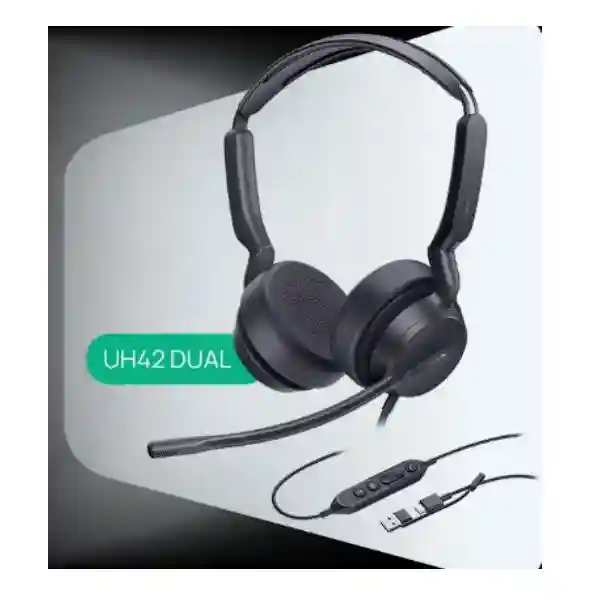
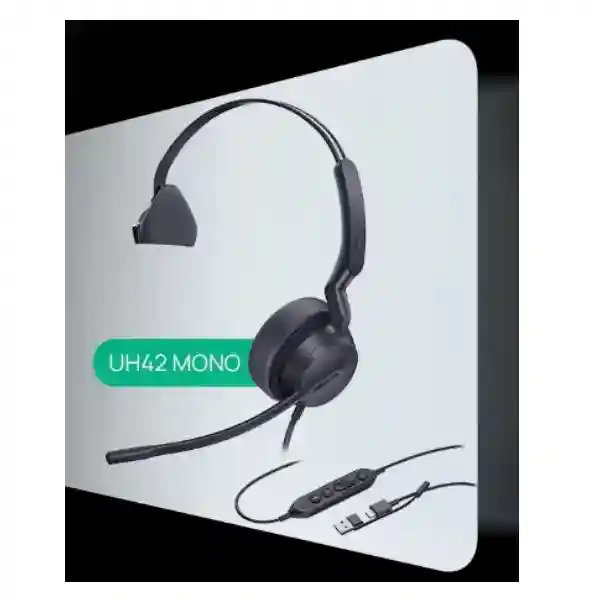
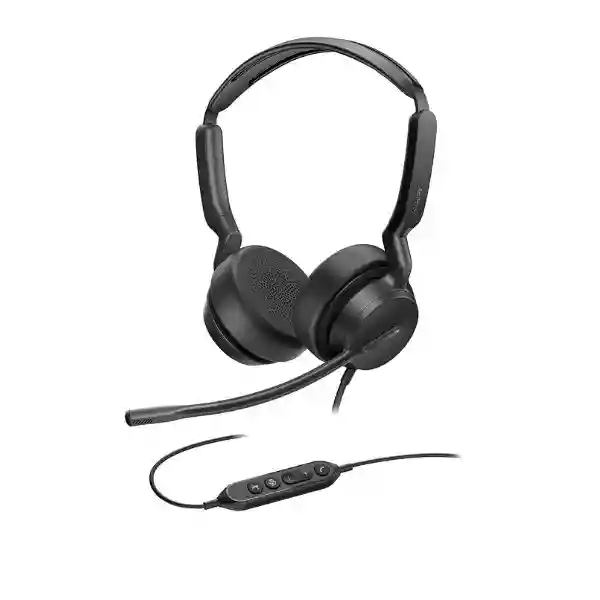
The Yealink UH42 is a wired on-ear business headset built for people who spend substantial time on calls, online meetings and customer conversations. It is available in mono and dual versions, connects through USB-C with a supplied USB-A adapter, and uses a single microphone with Yealink Acoustic Shield and AI-based noise cancellation to reduce distracting background sound in the outgoing voice path. For procurement teams in Tanzania, the UH42 is especially relevant when the priority is predictable plug-and-play operation, no battery management, straightforward workstation standardisation and a choice between single-ear awareness and dual-ear concentration.
Official Yealink information lists a 35 mm speaker, 20 Hz–20 kHz speaker frequency response, 100 Hz–14 kHz microphone frequency response, in-line answer/end/reject, volume and mute controls, Windows and macOS support, Yealink USB Connect management on PC, and Yealink Management Cloud Service support. Yealink also publishes separate Teams and UC part-number options for the dual model plus a mono USB-C/A option, so organisations should confirm the required variant before ordering.
Quick fit check
Choose UH42 when users need a dependable wired headset for PC calling, supported Yealink desk-phone scenarios or unified communications without charging or wireless pairing.
For larger rollouts, confirm mono versus dual, Teams versus UC, endpoint model, operating system, calling platform and quantity before quotation.
What the Yealink UH42 solves
Clearer outgoing speech
The single microphone works with Yealink noise-cancellation processing to reduce surrounding office noise in the signal sent to the far end. This is useful for open offices, shared service desks and busy customer-support areas where nearby speech can otherwise make calls harder to follow.
Simple device connection
USB-C is the native wired connection and Yealink includes a USB-A adapter. That gives procurement teams a practical way to serve newer laptops and many existing desktops from the same headset family without introducing a separate wireless receiver.
No battery workflow
Because the UH42 is wired, users do not need to charge a headset, manage battery health or troubleshoot pairing before a scheduled call. For fixed desks and shift-based operations, that simplicity can make standard operating procedures easier.
Role-based mono or dual choice
The 116 g mono version helps users remain aware of colleagues and the room, while the 160 g dual version is better suited to roles that benefit from greater acoustic focus. The correct choice depends on the job rather than a single default for every employee.
Verified Yealink UH42 specifications
| Item | Official specification |
|---|---|
| Wearing style | On-ear; mono or dual versions |
| Connection | USB-C cord with USB-A adapter |
| Microphone | 1 microphone; 100 Hz–14 kHz frequency response; Acoustic Shield support |
| Speaker | 35 mm; 20 Hz–20 kHz frequency response |
| Controls | Answer/end/reject, volume up/down, microphone mute/unmute |
| Cable lengths | 0.65 m headset to controller; 1.5 m controller to USB plug |
| Computer operating systems | Microsoft Windows and Apple macOS |
| Management | Yealink USB Connect on PC; Yealink Management Cloud Service |
| Weight | Mono 116 g; Dual 160 g |
| Published part numbers | 1308195 UH42 Dual Teams USB-C/A; 1308215 UH42 Dual UC USB-C/A; 1308240 UH42 Mono USB-C/A |
Compatibility and call-control behaviour can depend on the exact desk phone, software client and firmware. For Yealink desk-phone use, confirm the specific phone model before standardising a large deployment.
Choosing the right UH42 version
A purchasing team should treat “UH42” as a family rather than a single undifferentiated item. The first decision is mono versus dual. Mono keeps one ear uncovered, which can suit reception, coordination desks and roles where users need to hear nearby colleagues. Dual covers both ears and is typically more appropriate for concentrated call handling, online meetings and customer-service roles. The second decision is Teams versus UC for the dual model. If Microsoft Teams is a core platform, use the correct Teams-oriented part number. For mixed unified communications environments, confirm which variant aligns with the organisation’s application estate and desired call-control behaviour.
The third decision is endpoint compatibility. The UH42 connects by USB-C and includes a USB-A adapter, which makes it practical for many PCs. Yealink also documents UH42 support with selected Yealink desk phones, but exact call control varies by model. Before a multi-seat deployment, list the laptop or desktop operating systems, Yealink phone models, softphone or collaboration applications, quantities and user roles. That list is more useful than simply asking for a “USB headset price” because it helps prevent a mismatch between physical connector, software integration and user workflow.
Related FourTeck resources
FourTeck Tanzania servicesSee how collaboration, IP telephony, networking and user endpoints can be planned together rather than treated as isolated purchases.
FourTeck TanzaniaExplore the broader IT, telecom, collaboration and infrastructure portfolio for offices and multi-site business environments in Tanzania.
FourTeck UgandaUseful for regional teams coordinating communication-device procurement and IT requirements in Uganda.
FourTeck KenyaUseful for organisations comparing cross-border business technology requirements and standardising user devices in Kenya.
Regional buying and deployment guidance
Yealink UH42 USB Headset Tanzania
For Tanzanian organisations, the Yealink UH42 is most compelling where desk-based communication is frequent and the IT team values a repeatable wired setup. Typical buyers include customer-care teams, reception desks, finance and administration departments, shared-service centres, sales teams, help desks and managers who spend a large part of the day in Microsoft Teams, softphone or IP-telephony conversations. The wired design removes charging schedules from daily operations, while the USB-C connection plus USB-A adapter makes it easier to accommodate a mixed fleet of newer laptops and older desktops. That is useful when a business is replacing headsets in phases instead of refreshing every endpoint at once. Before requesting a quotation, separate the requirement by user role: staff who need awareness of the surrounding office may prefer the mono version, while users handling sustained customer conversations may prefer the dual model for a more focused listening experience.
A Tanzania deployment should also account for the communications platform and endpoint mix. If the organisation uses Microsoft Teams, confirm the required Teams variant and whether users need a dedicated Teams workflow. If the headset will be connected to Yealink desk phones, record the phone model and firmware because USB-headset support and call-control behaviour vary by endpoint. For PC users, document the operating system, USB ports, preferred collaboration application and any endpoint-management policies. Yealink lists Windows and macOS support and provides Yealink USB Connect for PC management, which can simplify maintenance where IT wants a consistent method for device configuration. The physical environment matters too: an open office with frequent nearby conversation has different needs from a private office. The UH42 microphone processing focuses on reducing background sound in the outgoing voice signal, so it is a practical choice when call recipients need to hear the user more clearly.
For procurement planning in Tanzania, ask suppliers to quote the exact version, quantity, connector arrangement, included accessories and delivery scope rather than relying on a generic headset description. The official UH42 family includes distinct published part numbers, and a large batch should not mix variants unintentionally. For phased rollouts, keep a small standard of approved models and document which user profile receives mono or dual. That helps reduce support complexity and avoids ad-hoc consumer headset purchases. If the project includes IP phones, network readiness or broader collaboration requirements, review those dependencies alongside the headset order so the communication experience is consistent from device to network to application.
Yealink UH42 USB Headset Dar es Salaam
Dar es Salaam businesses often operate with a mixture of front-office staff, sales desks, call-handling teams and back-office users, so headset standardisation should begin with the actual call pattern rather than a single quantity. The Yealink UH42 can fit companies that want a wired business headset for routine desktop communication, particularly where users should be able to connect quickly without Bluetooth pairing or battery charging. In a busy office, the single microphone with AI noise cancellation can help limit the amount of surrounding speech transmitted to the person on the far end. This matters in customer-service areas, logistics offices, professional-services firms and shared workspaces where multiple conversations can happen simultaneously. The dual version is generally suited to users who need concentration, while the mono version can be preferable at reception or coordination desks where hearing colleagues in the room is part of the job.
For a Dar es Salaam rollout, check workstation connectivity before ordering. The UH42 uses USB-C and includes a USB-A adapter, which is useful across mixed PC estates, but organisations should still audit docking stations, thin clients and desk phones so the connection path is understood. If Yealink phones are already installed, list their model numbers and confirm documented USB-headset support. For software calling, identify whether the business standard is Microsoft Teams, another UC client or a browser-based contact-centre platform. The headset can work across many platforms, but call-control behaviour should be validated on the exact application and endpoint before a large batch is approved. A pilot group of several representative users can verify comfort, call quality and the preferred mono/dual ratio without assuming every department has the same working style.
Procurement teams in Dar es Salaam should also define what they expect after delivery. A wired headset is simple to deploy, but large quantities benefit from asset tracking, user assignment, spare ear cushions where needed and a repeatable test process. A practical handover can include checking microphone and speaker selection in the operating system, verifying mute and volume controls, confirming the chosen collaboration app, and recording any desk-phone exceptions. This turns a headset purchase into a manageable workplace standard instead of a box-by-box distribution exercise. When requesting a quote, provide total users, mono versus dual preference, Teams or UC requirement and the device types that users will connect to.
Yealink UH42 USB Headset Mwanza
For organisations in Mwanza, the Yealink UH42 is a practical candidate when communications equipment must remain straightforward to operate across offices, service desks or branch environments. Its wired USB design reduces reliance on charging accessories and wireless pairing, which can be helpful where IT teams want predictable desk setups that are easy to explain and support. The headset’s 35 mm speakers cover both spoken communication and general computer audio, while dynamic audio behaviour is designed for call and media use. For roles such as customer support, branch administration, reservations, sales coordination and remote meetings, that single-device approach can reduce the need for separate headphones and call headsets. Mono and dual options allow the organisation to adapt the standard to the user’s environment instead of forcing identical wearing styles across every desk.
A Mwanza project should begin with a compatibility inventory. Record whether users connect to laptops, desktops, Yealink phones or a combination. On computers, note Windows or macOS and whether users connect directly or through docks and hubs. On Yealink phones, confirm each phone model because support is model-specific. If the company uses Microsoft Teams, choose the appropriate Teams version rather than assuming every UH42 SKU is identical. For mixed applications, the UC model may be the better procurement path, but this should be confirmed against the actual software environment. The official cable arrangement provides 0.65 m from headset to controller and 1.5 m from controller to USB plug, so desk layout should be considered where desktop towers are positioned below desks or users rely on docking stations.
When ordering for several Mwanza teams, define a small acceptance checklist: verify the correct part number, inspect the connector and adapter, select the headset as the operating-system audio device, test microphone mute, check answer/end behaviour in the approved application, and confirm user comfort after a realistic call period. These simple checks are more valuable than relying solely on headline specifications. For expansion, keep the same documented model family and user-role rules so new staff receive a consistent configuration. If the headset is being introduced alongside IP phones, PBX changes or new collaboration software, plan those elements together because call quality and usability depend on the full communication chain.
Yealink UH42 USB Headset Arusha
Arusha organisations in tourism, professional services, education, administration and customer-facing operations often depend on clear remote communication with clients, partners and teams in other locations. The Yealink UH42 suits users who prefer a fixed wired headset that is ready whenever they sit down at the workstation. The absence of a battery can be an operational advantage for scheduled calls and shift changes because there is no charging state to verify. Its in-line controller gives users direct access to call, volume and microphone-mute functions, while the noise-cancelling microphone is intended to reduce distracting background sound reaching the remote participant. In offices where the user still needs awareness of nearby colleagues, the mono model can make sense; in sustained online meetings or concentrated service work, the dual model may be more appropriate.
For Arusha buyers, the key question is not simply whether the headset has USB. Confirm whether the workstation provides USB-C directly or whether the supplied USB-A adapter will be used, and check docks or thin clients where ports are limited. If the headset is intended for Yealink desk phones, verify the exact phone model and firmware. Yealink publishes compatibility information for selected T-series phones, but a blanket assumption about every phone should be avoided. If Microsoft Teams is central to the workflow, procure the relevant Teams-labelled variant. If staff use several softphones or web meeting tools, test the UC behaviour across those platforms, particularly the in-line answer and end buttons, because application-level integration can differ even when microphone and speaker audio work normally.
A good quotation request from an Arusha organisation should include the number of fixed desks, the number of mobile laptop users, mono versus dual preference, Teams or UC platform, and any existing Yealink phone models. This gives procurement a clearer basis for comparing offers than price alone. For hotels, reservation teams or service desks, consider a small number of spare units so a damaged cable or ear cushion does not interrupt operations. For multi-department offices, retain the same headset family but allow different variants by job role. Standardisation is most useful when it reduces complexity without ignoring how people actually work.
Yealink UH42 USB Headset Dodoma
In Dodoma, the Yealink UH42 can be evaluated for government-facing offices, professional organisations, service desks, education environments and businesses that rely on recurring voice or video meetings. Its strength is operational simplicity: it is a wired USB headset with no battery to monitor, a USB-C connection plus USB-A adapter, and physical controls on the cable. For organisations that prefer controlled workstation standards, these characteristics are easier to document than a mixture of consumer Bluetooth headsets. The UH42’s single microphone uses Yealink noise-cancellation processing to improve outgoing voice clarity, which is useful when a caller sits near colleagues, printers, air conditioning or normal office activity. The dual version can help users focus on long calls, while the mono version preserves one open ear for local interaction.
A Dodoma deployment should also consider governance and support. If devices are assigned to specific staff, label them by asset or desk and record the headset model together with the computer or phone model. Yealink USB Connect can be used on PCs for supported management tasks, and Yealink also lists Management Cloud Service support, which may be relevant for larger device estates. Before scaling, confirm that the approved application recognises the microphone and speakers correctly, test the in-line mute function, and verify answer/end behaviour. For Microsoft Teams users, order the correct Teams variant where required; for general UC environments, confirm the appropriate UC option. If the headset will attach to a Yealink desk phone, do not rely on brand matching alone—check the specific desk-phone compatibility documentation.
For quotation preparation, specify whether the requirement is a new project, replacement programme or expansion. A replacement programme may need a phased delivery plan and a clear mapping from old users to mono or dual. A new office can standardise from the beginning, including cable routing, docking-station use and approved applications. A branch expansion should match existing standards where possible so IT can support one known headset family. The UH42 can fit all three scenarios, but the purchasing decision is strongest when the organisation treats headset selection as part of the communication environment rather than as an isolated accessory.
Yealink UH42 USB Headset UAE
For UAE organisations, the Yealink UH42 is relevant to high-density office environments, contact centres, service operations and hybrid teams that prefer the predictability of a wired endpoint. In a region where businesses often operate mixed laptop fleets and frequent online meetings, the combination of native USB-C and an included USB-A adapter can simplify purchasing because one headset family can cover many workstation generations. The absence of charging requirements is useful in shared desks or shift environments, where the next user needs a working device immediately. Yealink positions the UH42 for office and call-centre use, with an in-line controller and noise-cancelling microphone to support routine business conversations. Mono and dual choices allow the buyer to distinguish between roles that need situational awareness and roles that benefit from stronger listening focus.
UAE procurement teams frequently compare several headset brands and models at once, so the most useful evaluation is a controlled pilot on the company’s actual applications. Confirm Microsoft Teams requirements, UC clients, Windows or macOS use, docking stations and any Yealink desk phones. A headset can provide excellent basic USB audio while some application-specific call-control functions still depend on certification, software and endpoint configuration. The UH42 family includes dedicated Teams and UC dual part numbers plus a mono option. Verify which mix aligns with user roles rather than ordering a single part number simply because it is available. If the company manages devices centrally, assess Yealink USB Connect and the relevant cloud-management workflow as part of the support plan.
For multi-office UAE deployments, create a user profile matrix before quotation: reception, contact-centre agent, standard office user, manager, hybrid worker and shared-desk user may have different needs. Record mono or dual preference, platform, endpoint and expected daily call duration. This helps procurement compare total suitability, not just unit cost. If the UH42 is part of a wider communication refresh, coordinate it with softphone policy, Teams deployment, desk-phone strategy and user training so the final experience is consistent. A well-defined standard also makes later expansion easier because new users can be matched to an existing profile instead of starting product selection from zero.
Yealink UH42 USB Headset Uganda
Ugandan businesses evaluating the Yealink UH42 should focus on where wired reliability creates practical value. Service desks, sales teams, call centres, reception areas and administrative users often spend long periods at fixed workstations, making a cable-based headset a sensible alternative to wireless models that require charging and pairing. The UH42 provides USB-C with a USB-A adapter, a single noise-cancelling microphone, 35 mm speakers and in-line controls for call handling, volume and mute. In open offices, the microphone processing can help reduce distracting background sound sent to callers. The mono version supports users who need to keep one ear open to the office, while the dual version is better suited to sustained call handling or online meetings where concentration is important.
For nationwide or multi-branch Ugandan deployments, standardisation can lower support effort if the organisation first validates the UH42 on representative systems. Test Windows and macOS computers where applicable, verify docking-station connections, and record which calling applications are approved. If Microsoft Teams is a primary platform, specify the Teams variant rather than assuming the UC model provides identical user controls. If Yealink desk phones are involved, confirm the phone models against Yealink’s support documentation. The headset family can be managed through Yealink USB Connect on PC, which may be useful when IT wants a defined process for maintaining compatible USB devices rather than leaving configuration entirely to each user.
An effective Ugandan quotation request should state quantities by location, required mono and dual split, Teams or UC requirement and the device types in use. For branches, include a small spare allocation in the internal deployment plan so a failed cable or worn component does not stop a user from working while a replacement is arranged. Where the project also includes IP telephony or collaboration software, align the headset deployment with the broader communications standard. The main objective is consistent call quality and predictable support across users, not merely supplying a headset that can produce sound.
Yealink UH42 USB Headset Kampala
Kampala offices often combine reception, sales, finance, customer support and management teams in shared premises, creating different headset requirements within the same organisation. The Yealink UH42 offers a useful way to keep the product family consistent while choosing mono or dual by role. Reception and coordination users may value the mono design because they can hear the room while speaking to a caller. Service or support staff may prefer dual for greater listening focus. The headset’s wired USB connection is also practical where users work at assigned desks and IT wants to avoid charging and pairing. With USB-C plus a USB-A adapter, the same model family can serve a mixture of modern laptops and existing desktops when the port configuration is checked in advance.
A Kampala deployment should validate the entire communication path. The microphone uses Yealink noise-cancellation processing, but call quality still depends on the selected software client, network performance, endpoint configuration and the remote side. During a pilot, test the microphone in a representative busy office, check mute and volume controls, and confirm how answer/end functions behave in the organisation’s chosen application. Microsoft Teams users should receive the correct Teams variant where required. Users connecting to Yealink desk phones should be mapped to documented supported phone models. This compatibility work is particularly important before a 20-, 50- or 100-user rollout because small differences in platform behaviour become expensive when repeated across many desks.
For procurement, ask for exact part numbers and record them in the purchase order. The UH42 family has different official part numbers for Dual Teams, Dual UC and Mono USB-C/A, so “UH42” alone is not precise enough for enterprise purchasing. Include quantity, preferred wearing style, software platform and endpoint type in the quote request. For organisations that plan growth, standardise a replacement process and store configuration notes with the IT asset record. This makes onboarding easier and gives support staff a known baseline when troubleshooting user audio issues.
Yealink UH42 USB Headset Arua
For Arua organisations, branch offices and service teams, the Yealink UH42 can be attractive because it keeps headset deployment relatively simple. A wired USB headset does not depend on batteries, Bluetooth discovery or charging stations, so users can connect and begin work with fewer moving parts. The UH42’s USB-C cable and USB-A adapter support a broad range of computers, while the in-line controller keeps basic call and mute controls within reach. The single microphone with AI-based noise cancellation is designed to reduce surrounding noise transmitted to the caller, which can help in offices where several people share a room. Choosing mono or dual should reflect local workflow: mono for people who need ongoing awareness of nearby activity, dual for users who spend longer periods focused on calls.
Arua buyers should pay particular attention to what the headset will connect to. If the requirement is computer-only, identify Windows or macOS systems, USB port availability and the approved softphone or meeting platform. If Yealink desk phones are present, capture the exact model before ordering because headset support is not determined by brand name alone. If Microsoft Teams is in use, specify whether users require the Teams-oriented UH42 variant. A small pilot can establish whether the cable length works with the desk layout, whether the selected wearing style is comfortable for long shifts and whether call-control functions perform as expected in the actual application.
For organisations with a head office elsewhere and a smaller Arua branch, consistency can be more valuable than buying a different local headset for every site. If the UH42 passes compatibility testing, use the same documented part numbers across locations and keep a simple record of who receives mono and who receives dual. Include spare-unit planning, user instructions and a standard troubleshooting sequence for microphone selection, mute status and application audio settings. This type of operational discipline makes a headset rollout easier to support even when technical staff are not present at every branch.
Yealink UH42 USB Headset Mbarara
Mbarara businesses can consider the Yealink UH42 where staff use computers or supported Yealink phones for recurring customer, supplier and internal communication. The design is intentionally uncomplicated: an on-ear wired headset, USB-C connection with USB-A adapter, in-line controller, 35 mm speakers and a single microphone with noise-cancellation processing. That combination suits fixed users who value predictable availability over wireless mobility. Because there is no battery, the device is ready whenever the workstation is powered and the calling application is available. For branch administration, professional services, hospitality reservations or internal support, this can make day-to-day operations more consistent.
The procurement decision should still be role-specific. A mono headset can make sense for users who answer calls while speaking with colleagues or visitors in the same room. A dual headset can be better for sustained remote conversations, training or virtual meetings. If Teams is part of the environment, confirm the correct part number. If several UC applications are used, test the UC variant on the intended software. If the UH42 will connect to a Yealink phone, confirm the exact model and firmware requirements from current Yealink guidance. These checks prevent a common mistake: assuming a headset is fully compatible simply because the connector fits.
For larger Mbarara requirements, organise the quotation around user groups and quantities instead of a single total. For example, separate front desk, support, management and general office users, then select mono or dual and Teams or UC for each group. Request exact part numbers and confirm whether the supplier quote includes only the headset or any rollout services. On delivery, test a sample from the batch before distributing all units. A quick audio check, call-control check and user comfort check can catch configuration issues early and makes later support easier.
Yealink UH42 USB Headset Gulu
In Gulu, the Yealink UH42 can serve organisations that need consistent desktop calling without introducing wireless-device management. Its wired architecture suits staff who normally remain at a computer or supported desk phone during calls. The headset offers a 35 mm speaker system, an AI-assisted noise-cancelling microphone and an in-line controller, while the USB-C cable and USB-A adapter support common business computers. For offices with shared rooms, background-noise reduction in the outgoing voice can improve the experience for remote participants. This is particularly useful for service desks and administrative teams where nearby conversations are unavoidable but the caller still needs to hear the user clearly.
Before purchasing for Gulu teams, establish whether users need mono or dual. Mono is often preferred when the employee has to monitor the physical environment, answer colleagues or interact with visitors while on calls. Dual can make it easier to focus on virtual meetings and sustained customer conversations. Then confirm Teams versus UC requirements and validate the headset on the organisation’s actual endpoint. Windows and macOS are listed by Yealink for computer support, while selected Yealink desk phones support the UH42 through USB. The exact phone model should be verified because call-control functions can differ. For businesses using docks or thin clients, include those in the pilot because USB pass-through and device recognition are part of the real deployment environment.
A procurement record for Gulu should list the model family, exact part number, intended user profile and software platform. This becomes useful when a new branch employee joins or when a replacement is required months later. Rather than buying whichever headset is available at that moment, IT can keep the communication setup consistent. If the UH42 is part of a broader IP-telephony project, coordinate the headset choice with phone deployment, softphone policy and user training so the device behaves the way staff expect from the first day.
Yealink UH42 USB Headset Kenya
Kenyan organisations comparing wired business headsets will find the Yealink UH42 positioned around predictable USB connectivity, all-day comfort and call-focused microphone processing. The model is relevant for customer-experience teams, shared services, professional offices and hybrid workers who spend substantial time on voice and video calls but do not require the roaming range of a wireless headset. USB-C with a USB-A adapter helps accommodate mixed PC fleets, and the in-line controller gives direct access to volume, mute and call functions. For organisations with hundreds of users, eliminating battery charging can simplify user routines and reduce one source of support tickets, although cable management and desk layout should be considered during rollout.
Kenya procurement teams should compare the mono and dual options against job role. Contact-centre agents may favour dual, while reception and coordination users may prefer mono. The official UH42 family also distinguishes Teams and UC variants, so the collaboration platform should be part of the purchase specification. Microsoft’s current device listings include UH42 variants among Teams-certified USB devices, while Yealink publishes its own product and support information. Even with certification, companies should validate the exact user workflow, particularly answer/end behaviour, mute synchronisation and device selection in managed desktop environments. If Yealink desk phones are included, confirm support at the model level before buying large quantities.
For multi-site Kenyan businesses, create one headset standard with documented exceptions rather than allowing every branch to source independently. A simple matrix can map role, mono/dual, Teams/UC, computer type and desk-phone model. This makes quotations more accurate and helps support teams understand what is deployed. If the headset purchase is part of a wider communication refresh, combine it with IP phone, PBX or collaboration-platform planning rather than treating the headset as a last-minute accessory. The user’s perception of call quality depends on every layer from microphone to application to network.
Yealink UH42 USB Headset Kuwait
Kuwait businesses that rely on fixed-desk communication can evaluate the Yealink UH42 as a straightforward professional USB headset for online meetings, customer calls and office telephony. The wired approach avoids charging and pairing, which is valuable for reception desks, service teams and high-use workstations that must be available throughout the day. The UH42 supports USB-C directly and includes a USB-A adapter, reducing the need for separate headset families when an organisation has both modern notebooks and older desktops. Its single microphone uses Yealink noise-cancellation technology to reduce background sound reaching the far end, while the 35 mm speakers cover both voice and general media use.
For a Kuwait rollout, the model choice should be tied to both user role and collaboration platform. Mono can support staff who need awareness of colleagues or visitors; dual better suits users who concentrate on calls for extended periods. Teams and UC variants should be ordered deliberately, and procurement should retain the exact part number in the purchase record. If the company uses managed Windows or macOS computers, include Yealink USB Connect in the evaluation to understand how the headset fits into support procedures. If Yealink desk phones are present, identify the phone models and confirm documented compatibility before standardising, since USB audio recognition and call-control integration are not identical across every endpoint.
When comparing quotations in Kuwait, look beyond unit cost. Check the exact variant, included adapter, quantity, delivery terms, warranty terms from the quoted supplier and any configuration or deployment scope. For a contact centre, pilot the headset in a representative noisy area and ask users to evaluate comfort over a full shift. For an executive or meeting-heavy user, test the device with the approved collaboration software. A controlled evaluation produces better procurement decisions than selecting a headset from a specification table alone.
Yealink UH42 USB Headset Ghana
For Ghanaian organisations, the Yealink UH42 offers a practical wired option where dependable daily calling matters more than wireless mobility. The headset connects by USB-C and includes a USB-A adapter, making it suitable for many office computers without a proprietary wireless dongle. The single microphone with Yealink noise-cancellation processing is designed to reduce surrounding sound in the outgoing voice, while 35 mm speakers support clear call audio and general media. This combination can suit customer-service departments, sales teams, administrative offices, educational institutions and professional-services firms that conduct frequent remote meetings. Users who need room awareness can choose mono, while those who spend longer periods on calls can choose dual.
A Ghana deployment should begin with a small compatibility test. Identify whether users run Windows or macOS, which collaboration client or softphone is approved, whether docking stations are used and whether any desks connect to Yealink phones. If Microsoft Teams is central, confirm the Teams version and validate the in-line controls in the managed corporate environment. If the requirement is broader unified communications, confirm the UC variant and test it across the actual applications used by staff. For Yealink phone integration, check the individual phone model rather than assuming every model supports identical behaviour. This approach is especially important when the organisation wants to order a larger batch for several departments.
For procurement, record exact part numbers, quantities and user assignments. Include a realistic spare policy and a process for replacing worn ear cushions if necessary. In organisations with branches, use the same approved headset family where practical so support teams do not have to maintain instructions for many unrelated devices. If the business is also upgrading IP phones, PBX systems or conferencing software, coordinate those changes so the headset, application and endpoint are tested as one communication workflow. A headset is a user-facing component of a larger system, and consistency across that system is what produces a predictable experience.
Yealink UH42 USB Headset Nigeria
Nigeria has a wide range of contact-centre, fintech, professional-services, logistics, education and enterprise environments where large numbers of employees rely on voice communication. In that context, the Yealink UH42 can be considered as a standard wired headset for users who remain at desks and need reliable USB connectivity. Its USB-C cable plus USB-A adapter supports mixed computer fleets, and the lack of a battery simplifies shift handover. The single microphone with AI-based noise cancellation is intended to reduce background conversations in the voice sent to customers or colleagues. The dual model can be useful for sustained call handling, while mono can support users who must remain aware of activity around them.
For a Nigerian enterprise rollout, scale makes documentation important. Confirm the exact UH42 part number, Teams or UC requirement, mono/dual split, operating systems and endpoint models before requesting pricing. If Microsoft Teams is a strategic platform, standardise the Teams variant where appropriate and test call controls against the organisation’s deployed Teams client. If the company uses a browser-based contact-centre platform or a different softphone, validate answer/end and mute behaviour because application integration can differ. If Yealink desk phones are part of the estate, check the current support matrix by phone model and firmware. A pilot group should represent real user types rather than only IT staff.
For multi-branch operations, use a deployment pack that includes the approved SKU, connection instructions, audio-device selection steps and a basic troubleshooting checklist. This can reduce support calls when a computer chooses the wrong microphone after an update or docking change. The UH42 can also fit a staged replacement programme: departments can move to a common wired standard as existing headsets reach end of life. When comparing suppliers, ask for exact variant confirmation and avoid unsupported claims about stock, warranty or delivery until they are documented in the quotation.
Yealink UH42 USB Headset Seychelles
Seychelles organisations in hospitality, administration, travel, professional services and customer support often depend on remote communication with guests, suppliers, regional offices and international partners. The Yealink UH42 is suitable for users who prefer a wired headset that is available whenever they sit at the computer. USB-C with a USB-A adapter supports many current and legacy business workstations, while the single noise-cancelling microphone helps reduce background sound transmitted to remote participants. In hotel reservations, back-office coordination or business administration, that can improve call professionalism without adding a charging routine. Mono and dual options let the organisation match the headset to the user’s role and need for awareness of the surrounding workplace.
For Seychelles procurement, compatibility planning is especially useful when devices may be sourced as part of broader regional IT projects. Confirm operating systems, meeting platforms, softphones and any Yealink desk phones before choosing the final variant. The official UH42 range includes Teams and UC dual versions plus a mono USB-C/A model. If Microsoft Teams is used, specify the Teams requirement in the quotation. If staff use multiple applications, test the UC version on representative workflows. For desk-phone use, confirm the exact supported Yealink phone model because USB headset compatibility and call controls vary by endpoint and firmware.
A smaller island deployment can still benefit from enterprise discipline. Keep a record of the selected part numbers, allocate a sensible number of spare units, and train users on the in-line mute and audio-device selection process. For hospitality teams with shift changes, wired headsets can be straightforward to hand over, but hygiene and ear-cushion replacement procedures should be considered. For office users, assess comfort over realistic call durations before standardising. If the UH42 is bundled with PCs, phones or collaboration upgrades, test the complete setup before widespread rollout so the communication path works consistently from day one.
Deployment and support checklist
Before ordering
Confirm user count, mono versus dual, Teams versus UC, computer operating systems, USB port types, docking stations, Yealink phone models and the approved calling applications. Record the exact part number rather than only the family name.
During pilot
Test microphone clarity in the real office, volume, mute, answer/end behaviour, comfort after extended use, cable reach and device recognition after restart or docking. Include representative users from different departments.
After rollout
Document user assignments, keep a small spare pool where appropriate, standardise troubleshooting steps, review device-management options and preserve the approved model/part number for future onboarding and replacement orders.
Frequently asked questions
Is the Yealink UH42 wireless?
No. The UH42 is a wired USB headset. It connects with a USB-C cord and includes a USB-A adapter. The wired design means there is no headset battery to charge or wireless pairing process to manage.
What is the difference between UH42 Mono and Dual?
The mono version has one earcup and weighs 116 g, helping users remain aware of the surrounding room. The dual version has two earcups and weighs 160 g, which can be more suitable for users who want greater listening focus during calls.
Does the Yealink UH42 work with Microsoft Teams?
Yealink publishes a UH42 Dual Teams USB-C/A part number, and Microsoft lists UH42 variants among Teams-certified USB devices. Organisations should still select the correct version and test the intended Teams workflow on their managed endpoints before large-scale deployment.
Can the UH42 connect to a Yealink desk phone?
Yealink documents UH42 support with selected Yealink T-series desk phones over USB. Compatibility and call-control behaviour are model- and firmware-dependent, so provide the exact phone model before ordering a large batch.
What should I include in a Yealink UH42 quotation request?
Include quantity, mono or dual preference, Teams or UC requirement, endpoint type, operating system, calling applications and any Yealink desk-phone models. This makes it easier to quote the correct variant and reduces compatibility uncertainty.
Quotation checklist for the Yealink UH42
Before requesting pricing, prepare: total quantity; mono and dual quantities; Teams or UC requirement; computer operating systems; USB-C or USB-A workstation mix; desk-phone model numbers; preferred delivery destination; project schedule; and any need for deployment validation or broader IP-telephony support.
A precise request helps ensure the quotation names the correct UH42 variant and avoids confusion between the standard UH42 family, the UH42 SE and other Yealink wired headsets.
Decision recap
Choose the Yealink UH42 when your priority is a professional wired headset with USB-C and USB-A flexibility, mono or dual wearing options, in-line call controls, a noise-cancelling microphone and straightforward day-to-day operation without charging. It is especially suitable for fixed workstations, contact-centre seats, office calling and unified communications where a repeatable wired standard is preferred.
Before confirming a purchase, identify the exact part number and validate the headset against the organisation’s approved PC, desk phone and software environment. That final compatibility step is the most important part of converting a capable headset into a reliable business standard.
Need help selecting the right UH42 variant?
Share your user count, mono or dual preference, Microsoft Teams or UC requirement, computer operating systems and any Yealink desk-phone models. FourTeck can use those details to prepare a more precise product recommendation and quotation request.




Reviews
There are no reviews yet.