
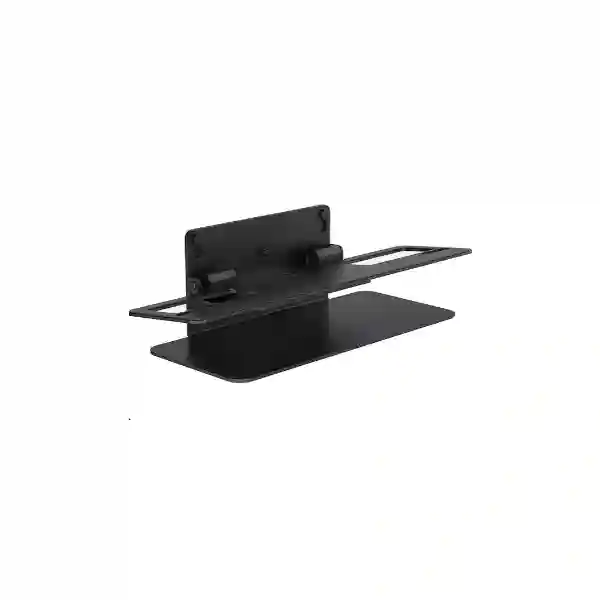
Yealink VB-TabletopMount-02 Tanzania
The Yealink VB-TabletopMount-02 is a dedicated tabletop mounting bracket for the Yealink MeetingBar A50. For organizations that want the A50 positioned on a meeting-room table, credenza or other stable flat surface rather than fixed directly to a wall, this accessory gives the device a secure, purpose-designed base. Yealink specifies a simple no-drill deployment using a buckle design, compatibility with the VB-WallMount-02 bracket and adjustable base screws that allow the mounted A50 to tilt by up to 7 degrees. The result is a practical mounting option for projects where camera height, viewing angle, room furniture and future room changes must be considered together.
Official fit
Designed for the Yealink MeetingBar A50. Confirm the exact room-system model before procurement rather than assuming compatibility with other MeetingBar generations.
No-drill placement
The buckle-based design enables tabletop deployment without drilling into furniture, useful for leased offices, executive rooms and spaces that may be rearranged.
Angle adjustment
Adjustable screws in the base provide up to 7° of tilt, helping installers refine the A50 viewing angle after the mounting position is chosen.
What is the Yealink VB-TabletopMount-02?
VB-TabletopMount-02 is a Yealink mounting accessory, manufacturer part number 3311119, developed specifically for MeetingBar A50 deployment on a flat surface. It is not a generic camera tripod or universal video-bar stand. That distinction is important for business buyers because purpose-built room accessories are selected for mechanical fit, device stability and predictable installation rather than merely for appearance. Yealink also states that the tabletop mount works with the VB-WallMount-02 bracket, so project teams should identify what is already included with their MeetingBar A50 package and what additional mounting components are required for the intended installation.
The practical value is flexibility. A wall installation can be ideal when the display position and meeting-room layout are permanent. A tabletop position may be preferable when walls cannot be drilled, when the front-of-room furniture provides a better camera height, when cable access is easier from furniture, or when the room may be reconfigured later. The tabletop mount does not replace the need for good room planning. Display height, distance to participants, sightline, lighting, cable routing and the stability of the supporting surface all remain important. The accessory simply provides a purpose-designed way to place the A50 on furniture while retaining an adjustable tilt range.
| Item | Verified information |
|---|---|
| Product | Yealink VB-TabletopMount-02 |
| Manufacturer part number | 3311119 |
| Primary device compatibility | Yealink MeetingBar A50 |
| Related bracket | Works with Yealink VB-WallMount-02 |
| Installation concept | No-drill tabletop deployment using a buckle design |
| Tilt adjustment | Up to 7° using adjustable screws at the base |
Buying and deployment guidance
Before ordering, confirm that the room system is specifically MeetingBar A50 and review the available front-of-room surface. A mount can fit the device correctly yet still deliver a poor meeting experience if the furniture position puts the camera too low, too high, off-center or too far from the main display. The 7° tilt adjustment helps refine the angle, but it should not be treated as a substitute for sensible placement.
For a complete collaboration-room requirement, describe the room dimensions, seating count, display size and position, preferred collaboration platform, existing A50 package and any restrictions on drilling or cable routes. Fourteck Tanzania’s video conferencing and integrated IT overview explains how room systems connect with displays, networking, audio and support planning, while the Tanzania enquiry page can be used to request product or project guidance.
Yealink VB-TabletopMount-02 Tanzania
For Tanzanian organizations deploying Yealink MeetingBar A50 systems, the VB-TabletopMount-02 is relevant when a meeting room needs a clean tabletop installation instead of direct wall mounting. This may apply to boardrooms, training rooms, executive meeting spaces, project rooms, hotel meeting facilities and corporate collaboration areas where the room furniture already defines the front-of-room position. Because the mount is designed specifically for the A50, procurement teams can focus on the room and installation details rather than trying to adapt a generic stand. The official no-drill buckle arrangement is particularly useful where furniture cannot be permanently modified or where the organization wants to retain the option of moving the system during future office changes.
A Tanzania quotation should identify more than the mount name. Include the number of rooms, the exact A50 system configuration, whether the related VB-WallMount-02 is already available, the display arrangement and the expected installation surface. If several rooms are being standardized, list each room because furniture depth, display height and participant distance can vary. Camera positioning should support a natural line of sight between local and remote participants. The mount’s up-to-7° tilt provides useful fine adjustment, but the installer should still begin with an appropriate tabletop height and a stable surface.
Network and power planning also matter because the mount is only one element of a complete conferencing environment. An A50 room depends on dependable connectivity, properly positioned displays and organized cables. In a new office fit-out, it can be sensible to coordinate video conferencing with switching, Wi-Fi, structured cabling and power protection so the front-of-room area remains neat and serviceable. In an existing room, buyers should document where the A50 will sit, how cables will reach the network and display, and whether the furniture allows safe routing without creating trip hazards or sharp cable bends.
For procurement, avoid assuming current price, stock or delivery times from international listings because local availability changes. Instead, request a current quotation with quantity and site information. If the project also involves other East African offices, Fourteck’s Kenya technology site and Uganda technology site can help teams coordinate regional requirements while keeping the exact A50 mounting compatibility consistent.
Yealink VB-TabletopMount-02 Dar es Salaam
In Dar es Salaam, many MeetingBar A50 deployments will be considered in offices where meeting rooms serve management, sales, finance, customer teams and regional staff. The VB-TabletopMount-02 can suit rooms that use a front credenza or meeting-room console and where drilling into a finished wall or built-in furniture is undesirable. The accessory gives the A50 a defined tabletop mounting approach, while the buckle design simplifies installation and keeps the room easier to reconfigure. For companies occupying leased floors, this can be especially practical because collaboration equipment may need to move when departments or meeting spaces are reorganized.
A Dar es Salaam buyer should first verify the room layout rather than ordering purely from the accessory name. Measure the surface depth, note the display centerline and confirm whether the A50 will be directly below, in front of or otherwise aligned with the display. The mount’s adjustable base screws allow up to 7° tilt, helping refine the final angle after the device is placed. However, the best result still comes from selecting a surface that keeps the camera reasonably close to eye level and does not introduce visual obstruction from monitors, decorative items or table equipment.
For multi-room offices, standardization can make support easier. The same mounting method across compatible A50 rooms can simplify installation documentation, spare-part planning and room handover. Yet every room should still be checked individually because display sizes and furniture heights differ. Cable management is another practical consideration. The mount should be part of a front-of-room layout that keeps power, network and display connections protected, labelled and accessible for service. Where collaboration traffic shares the corporate network, check wireless and wired capacity, internet stability and room VLAN or security policies as applicable.
When requesting a quotation in Dar es Salaam, include the exact product name Yealink VB-TabletopMount-02, part number 3311119, quantity and confirmation that the target device is MeetingBar A50. Also state whether the requirement is accessory-only or part of a complete conferencing-room deployment. This distinction helps separate a straightforward mounting request from a wider project that may require displays, room controllers, cabling, network preparation, installation and user handover.
Yealink VB-TabletopMount-02 Mwanza
Organizations in Mwanza may use video conferencing to connect regional operations with teams, customers or management in other Tanzanian cities and international offices. Where a Yealink MeetingBar A50 is selected for a meeting room, the VB-TabletopMount-02 provides a specific method for placing the video bar on a stable table or front cabinet. This can be useful for branch meeting rooms where permanent wall work is inconvenient, where the business expects the room layout to change, or where a tabletop position offers a better camera line of sight than the available wall surface.
The accessory decision should be made alongside room planning. Note the number of participants, usual seating orientation and where the main screen will be installed. A tabletop mount placed too far to one side can make remote participants feel disconnected from the screen, while an overly low position may produce an unflattering camera angle. The VB-TabletopMount-02 gives up to 7° of tilt adjustment, but installers should use that range for refinement rather than attempting to compensate for a fundamentally unsuitable surface. Stable furniture is important because vibration or accidental movement can affect the device position.
For branches that rely on cloud meeting platforms, connectivity and support processes should be considered before the room is commissioned. A physical mount does not influence bandwidth, but its location influences cable paths and service access. Plan how Ethernet, display and power connections will reach the A50, keep connectors protected from repeated movement and make the final room easy for local staff to operate. If the A50 will be moved between locations, document how the mount and related bracket are installed so the system can be reassembled correctly.
A useful Mwanza procurement request includes the part number 3311119, quantity, A50 confirmation and the intended room type. Buyers can also state whether they need only hardware supply or support with room assessment and installation. Providing these details makes it easier to prepare a meaningful quotation without making assumptions about stock, delivery time or compatibility with other Yealink models.
Yealink VB-TabletopMount-02 Arusha
Arusha businesses, hospitality organizations, NGOs, project offices and professional teams often need meeting spaces that can support external participants without making the room difficult to use. For a Yealink MeetingBar A50 room, the VB-TabletopMount-02 offers a clean tabletop mounting choice when the front-of-room furniture is a better deployment point than the wall. Because installation does not require drilling into the supporting surface, it can be a sensible option in high-finish spaces, rented facilities or rooms where interior design changes are expected.
The mount should be evaluated as part of the room’s visual geometry. The A50 needs a useful view of seated participants, and the primary display should remain easy to see from the room. Place the unit so that people naturally look toward the camera when speaking to remote attendees. Use the up-to-7° tilt adjustment to fine-tune the image after the physical position is chosen. If a room has unusually high furniture, low seating or multiple displays, test the intended position before final cable management. This avoids finishing the installation only to discover that the camera angle is uncomfortable.
For hospitality and client-facing spaces, tidy installation can be as important as technical function. Cable routes should be hidden or organized without making connectors inaccessible. The supporting surface should remain stable and uncluttered. If the room is frequently rearranged for different event formats, define who is responsible for moving or reconnecting the device so the mount is not handled as an improvised stand. A small amount of installation documentation can protect both the room appearance and the equipment.
When asking for a Yealink VB-TabletopMount-02 quotation in Arusha, provide the quantity, target A50 systems and whether each room already includes the related VB-WallMount-02. If the project includes screens, conferencing infrastructure or wider IT work, identify those requirements together. A coordinated room specification reduces the risk of receiving a mounting accessory before the final display, furniture or cabling layout is known.
Yealink VB-TabletopMount-02 Dodoma
In Dodoma, organizations planning MeetingBar A50 rooms may include government-facing businesses, institutions, professional services, training environments and distributed teams that need dependable hybrid meetings. The Yealink VB-TabletopMount-02 is suitable when the A50 should sit on a conference-room surface rather than being permanently fixed to a wall. Its purpose-built fit reduces the uncertainty associated with generic stands, and the no-drill buckle method can simplify deployment in offices where the room finish or tenancy conditions limit permanent modifications.
The installation should begin with room usability. Determine which wall carries the primary display, where participants sit and whether the intended tabletop position keeps the A50 centered. The official tilt range of up to 7° provides controlled adjustment after placement. In rooms used for training or presentations, consider how people move at the front of the room; the equipment should not block presentation materials or sit where it can easily be knocked. In executive rooms, prioritize a tidy, symmetrical layout and discreet cable paths.
Procurement teams should also distinguish between mounting compatibility and conferencing compatibility. The VB-TabletopMount-02 is specifically associated with MeetingBar A50. Questions about meeting platforms, licensing or room-controller options relate to the A50 solution itself and should be reviewed separately. Likewise, network performance, internet resilience and room acoustics are broader design issues. Keeping these layers clear helps the team identify what the mount solves—physical placement—and what still requires system planning.
For a Dodoma request, provide the exact part number 3311119, quantity, room count and current A50 equipment list. If the organization is planning phased deployment across several offices, state the future room count as well. That gives procurement and IT teams a clearer basis for standardizing mounting, cabling and installation documentation without assuming availability, pricing or delivery dates until a current quotation is prepared.
Yealink VB-TabletopMount-02 UAE
UAE organizations using Yealink MeetingBar A50 systems often design meeting spaces around premium furniture, integrated displays and rapidly changing workplace layouts. The VB-TabletopMount-02 supports a tabletop deployment where fixing the A50 directly to the wall is not preferred. The no-drill installation approach can be valuable in serviced offices, leased spaces and executive rooms with finished surfaces, while the dedicated A50 design keeps the mounting decision tied to the correct Yealink platform rather than to an improvised universal bracket.
For UAE projects, the most useful buying process starts with the room drawing or a clear photograph of the front-of-room area. Identify the display location, cabinet dimensions, available cable outlets and where the A50 will sit relative to seated participants. The mount’s adjustable screws allow up to 7° of tilt, providing a practical way to refine framing. In rooms with large displays or tall credenzas, verify the resulting camera height before final installation. A purpose-built accessory improves fit, but the room geometry still determines whether the remote view feels natural.
Multi-site UAE customers may want a repeatable room standard across offices. Standardization can simplify procurement, support and user training, but it should allow for different display sizes and furniture heights. Document the mounting method, cable routing and approved A50 position for each room type. If the workspace is frequently reconfigured, include a short handover note so facilities teams know which fasteners and bracket components belong with the A50.
For regional procurement or broader infrastructure requirements, the Fourteck UAE technology site provides a relevant regional path for business technology discussions. A quotation request should still specify VB-TabletopMount-02, part number 3311119, quantity and A50 compatibility. Current pricing and availability should be confirmed at the time of purchase rather than inferred from third-party international listings.
Yealink VB-TabletopMount-02 Uganda
For Ugandan organizations deploying Yealink MeetingBar A50 systems, the VB-TabletopMount-02 provides a straightforward option for placing the video bar on suitable furniture. A tabletop approach can help branches, institutions and corporate offices that do not want to drill mounting holes or that need flexibility when rooms are repurposed. The mount is intended for the A50 and works with the VB-WallMount-02, so a procurement check should verify the exact Yealink system and the bracket components already available before accessories are ordered.
The physical environment should guide placement. Meeting rooms with a single display usually benefit from a centered camera position close to the visual focus of the screen. Rooms with dual displays or presentation equipment may require more careful alignment. The VB-TabletopMount-02 offers up to 7° tilt through its adjustable base screws, giving installers room to fine-tune the A50 angle. However, ensure the supporting surface is level, stable and deep enough to protect the equipment from accidental movement.
For distributed organizations, collaboration rooms often depend on the quality of the wider network. When an A50 room is installed, confirm that internet connectivity, LAN switching, wireless design and power arrangements are appropriate for the organization’s conferencing environment. These considerations are separate from the mount but influence the success of the overall deployment. A clean tabletop installation should also include sensible cable management so local staff can identify connections and support teams can service the room without dismantling furniture.
A Uganda quotation request should include the exact mount model, 3311119 part number, quantity, A50 system details and site city. Organizations managing technology across multiple Ugandan sites can also use the Fourteck Uganda site for regional technology enquiries. This supports a consistent procurement conversation without implying that every site has identical installation conditions.
Yealink VB-TabletopMount-02 Kampala
Kampala offices frequently operate as headquarters or coordination points for teams spread across Uganda and East Africa, making practical meeting-room design important. If the Yealink MeetingBar A50 is selected, the VB-TabletopMount-02 allows the system to be positioned on a stable tabletop or cabinet using Yealink’s dedicated mounting design. This can suit boardrooms, management rooms and shared collaboration spaces where a wall-mounted video bar would be difficult because of glass partitions, decorative surfaces, rented premises or changing screen layouts.
Before purchase, assess the front-of-room layout. A camera mounted too far below a large display can create an unnatural downward or upward view, while a position far from the screen can make participants appear to look away from remote attendees. The mount’s 7° maximum tilt provides controlled adjustment, so installers can refine framing after the main position is selected. Where furniture has cable apertures, check that connections can pass without pulling against the A50 or interfering with the mount base.
Kampala organizations with several meeting rooms may benefit from creating a small room-standard sheet. Record the A50 model, mount part number, display size, approved position and cable path. This improves consistency when new rooms are added and makes future moves easier. It also helps procurement avoid confusion between VB-TabletopMount-02 and other Yealink tabletop accessories intended for different MeetingBar models. Compatibility should always be confirmed by exact model rather than product family alone.
For quotation preparation, specify whether the requirement is replacement hardware, a new A50 installation or a multi-room rollout. Include quantities and any known deadlines, but request confirmation of current availability rather than relying on external stock indicators. If installation is required, provide room photographs or dimensions so the tabletop location can be evaluated together with display height, sightlines and service access.
Yealink VB-TabletopMount-02 Arua
In Arua, a Yealink MeetingBar A50 may be used by branch offices, project teams, NGOs, education providers and businesses that need reliable communication with Kampala or external partners. The VB-TabletopMount-02 can make the physical deployment simpler where the meeting room has suitable front furniture but limited scope for wall modification. Because the mount is specific to the A50, it gives the project team a documented compatibility path instead of adapting a generic camera stand.
Room conditions should be reviewed before the mount is treated as a final solution. Check whether the table or cabinet remains fixed during normal use, whether participants can accidentally touch the device, and whether the camera view is clear from the planned location. Adjustable base screws allow the A50 to tilt by up to 7°, helping improve framing. If the room is narrow or participants sit close to the front, even a small change in camera height can make a visible difference, so test the position before securing and dressing cables.
A branch-room deployment also benefits from clear documentation. Label the A50 cables, note the mounting components and keep installation instructions with the site asset record. If remote IT staff support the room, photographs of the completed setup can make troubleshooting easier. The tabletop approach can simplify physical access compared with some wall installations, but cables should still be protected so routine cleaning or furniture movement does not loosen connectors.
For an Arua quotation, include Yealink VB-TabletopMount-02, manufacturer part number 3311119, quantity and confirmation that the unit is for MeetingBar A50. State whether the site already has the A50 or whether the requirement is part of a new conferencing project. This helps separate mount-only procurement from a complete solution that may also need display, network, power and user-experience planning.
Yealink VB-TabletopMount-02 Mbarara
Mbarara organizations using hybrid meetings may want an installation that is easy to support without permanently altering the room. For a Yealink MeetingBar A50, the VB-TabletopMount-02 offers a dedicated tabletop option with a no-drill buckle design. This can work well in meeting areas where the display is already positioned above a stable front cabinet or where the room layout may be updated as the office grows. The product’s purpose is physical placement and stability; selection should therefore be based on the exact A50 device and the room’s furniture arrangement.
When assessing a room, start with the participant view. People should be able to look toward the display and camera naturally. If the A50 is on a tabletop, its position should avoid being blocked by laptops, decorative objects or presentation equipment. Use the mount’s up-to-7° tilt capability after the main location has been chosen. The tilt range provides useful correction, but it is not intended to solve a large height mismatch between the camera and the seating area.
For operational reliability, plan the cables at the same time. A tabletop unit may be easier to access than a high wall-mounted device, which can help local teams during maintenance, but exposed cables can also be disturbed more easily. Route them through furniture openings or protected channels where possible and leave enough service slack for safe access. If the room uses UPS-backed power or managed network infrastructure, include the conferencing system in the local documentation so support teams understand its dependencies.
A Mbarara purchase request should specify the exact Yealink model and part number, expected quantity and the target A50 rooms. If there are future expansion plans, mention them because a standardized mounting approach can be useful across branches. Current commercial terms, availability and logistics should be confirmed in a formal quotation rather than estimated from reseller pages serving other markets.
Yealink VB-TabletopMount-02 Gulu
For meeting rooms in Gulu, the Yealink VB-TabletopMount-02 can provide a practical installation option when a MeetingBar A50 should remain on a flat surface. This may suit project offices, institutions and branch operations that want a dedicated video-conferencing space without undertaking permanent wall work. The mount’s buckle-based installation is designed to avoid drilling, while its direct A50 compatibility supports a more predictable deployment than an improvised third-party stand.
The decision should still be room-specific. Identify the best display location and then determine whether the available cabinet or table keeps the A50 close enough to the screen’s visual axis. A lower position may work well in some rooms, while others need greater height to avoid the tabletop dominating the camera view. The integrated adjustment approach provides up to 7° of tilt, allowing fine-tuning after placement. Use a stable surface that is not routinely moved for other purposes.
In sites supported by centralized IT teams, standardized installation notes are valuable. Record the part number, related bracket, cable connections and final camera position. This information can help support staff distinguish a physical-mount issue from a conferencing-system or network issue. For example, a poor camera view may relate to placement, while call quality may relate to internet or LAN conditions. Treating each layer separately makes troubleshooting faster and avoids unnecessary equipment replacement.
When requesting pricing for Gulu, provide the quantity and whether the mounts are required for existing A50 systems or new rooms. If installation assistance is needed, include room size, photographs and display details. This gives the supplier enough context to discuss a practical deployment without making unsupported assumptions about local stock, delivery timing or service coverage.
Yealink VB-TabletopMount-02 Kenya
Kenyan businesses with Yealink MeetingBar A50 systems may choose the VB-TabletopMount-02 where meeting-room furniture provides a suitable front-of-room position. In offices with glass walls, premium finishes or flexible room designs, avoiding permanent drilling can be useful. The mount’s dedicated fit for the A50 and its compatibility with the VB-WallMount-02 help buyers keep the accessory chain aligned with the intended Yealink device instead of relying on universal hardware.
For a Nairobi headquarters, branch office or other Kenyan site, assess camera sightline before finalizing the furniture location. The A50 should be centered as much as practical with the main participant area and primary display. Adjustable screws provide up to 7° of tilt, offering controlled refinement after the unit is placed. If the furniture is unusually low or high, check the camera view first rather than assuming tilt will solve the geometry. Also ensure the surface is stable enough for routine use and cleaning.
Where multiple rooms are involved, procurement can standardize part numbers while facilities teams document the unique position in each room. This approach offers the benefits of consistent hardware without pretending every room is identical. Include cable routing, display connections and room controller placement in the deployment drawing. A tabletop mount can make service access convenient, but visible cabling should still be organized for a professional appearance.
For Kenyan requirements, the Fourteck Kenya site is a relevant regional resource for wider IT and collaboration discussions. When requesting a quote, identify VB-TabletopMount-02, part number 3311119, quantity and MeetingBar A50. Confirm current commercial terms directly, particularly for projects with fixed rollout dates or multiple sites.
Yealink VB-TabletopMount-02 Kuwait
Kuwait offices that use MeetingBar A50 in executive rooms, corporate collaboration spaces or customer meeting areas can consider the VB-TabletopMount-02 when a tabletop position is preferable to wall fixing. A no-drill mount can protect finished surfaces and provide flexibility in offices where furniture or displays may be replaced during future refurbishments. Because the product is specifically designed for A50 deployment, the purchasing team should verify the exact video-bar model before ordering.
High-quality meeting-room interiors benefit from careful positioning. The mount should sit on a level, stable surface that keeps the A50 visually aligned with the display and participant area. Its adjustable base screws permit up to 7° of tilt, allowing installers to refine the camera angle without changing the furniture. In dual-display rooms, decide whether the A50 should be centered between screens or aligned with the screen most often used for remote participants. The final decision should follow actual room usage rather than appearance alone.
Cable presentation is particularly important in client-facing rooms. Plan the power, network and display cables so they remain hidden where practical but accessible for maintenance. If the A50 sits on a credenza with equipment inside, check ventilation and ensure cable tension does not pull against the mount. For rooms with cleaning or facilities staff, document that the video bar and mount are fixed equipment and should not be moved during routine work.
A Kuwait quotation request should specify product name, part number 3311119, quantity and whether the related A50 and VB-WallMount-02 components are already present. For regional organizations standardizing meeting rooms across Gulf and African offices, use the same compatibility checks in each market while allowing local quotations to confirm availability and logistics independently.
Yealink VB-TabletopMount-02 Ghana
Ghanaian organizations planning Yealink MeetingBar A50 rooms may prefer a tabletop installation when the front wall is unsuitable for mounting or the meeting space must remain flexible. The VB-TabletopMount-02 gives the A50 a dedicated flat-surface mounting method and avoids drilling through its buckle-based approach. It can therefore fit projects where facilities teams want to protect walls and furniture, or where the conferencing system may be relocated as office layouts evolve.
A useful room assessment begins with camera position. The A50 should have an unobstructed view of participants and should sit close enough to the main display to support natural eye contact during remote meetings. The mount’s adjustable screws enable up to 7° of tilt, so installers can fine-tune the final framing. Check the tabletop height before installation; a stable base is essential, and the mount should not be placed where papers, laptops or other meeting materials can regularly block the device.
For Accra or other Ghana deployments involving multiple rooms, distinguish hardware standardization from room standardization. The same mount part number can be used across compatible A50 rooms, but the position and cable route may differ. Record each final installation so future support personnel know the intended setup. This is especially useful when conferencing infrastructure is maintained by a central IT team or external service provider.
When preparing procurement documents, identify the exact mount, manufacturer part number and target MeetingBar model. State whether the project needs only the mount or includes displays, conferencing hardware and network work. For organizations operating across several African markets, consistent product naming and documentation can simplify purchasing while each country’s commercial quotation confirms current availability, taxes and logistics separately.
Yealink VB-TabletopMount-02 Nigeria
Nigeria has a wide range of corporate, financial, technology, energy, professional-services and institutional environments where reliable video conferencing is part of everyday work. For MeetingBar A50 rooms, the Yealink VB-TabletopMount-02 can provide a dedicated tabletop mounting route when wall installation is undesirable. The no-drill buckle approach can be useful in leased offices, modular meeting rooms and spaces with finished walls, while compatibility with the A50 and VB-WallMount-02 keeps the accessory selection tied to Yealink’s documented mounting ecosystem.
In Lagos, Abuja or other cities, room design should determine placement. Large boardrooms may use substantial front cabinetry, while smaller collaboration spaces may rely on compact media furniture. In either case, confirm that the A50 will remain centered and stable. The mount allows up to 7° tilt, giving the installation team scope to refine the angle. If furniture is very low or the display is mounted high, test camera framing before committing to the tabletop position because mechanical tilt has a finite range.
Organizations deploying many rooms should include the mount in their room bill of materials and asset documentation. Record the A50 model, mount part number and installation notes, then keep photographs after commissioning. This makes moves, additions and changes easier. It can also reduce procurement errors where different Yealink MeetingBar generations require different tabletop accessories.
For purchasing, request a current quote with quantity, city and project scope. Avoid using overseas retail pricing as a proxy for Nigerian project cost because freight, taxes and availability vary. If the requirement is part of a regional technology program, coordinate the technical standard centrally but confirm commercial details per country. The objective is a repeatable A50 installation that remains easy to support without making unsupported assumptions about stock or delivery.
Yealink VB-TabletopMount-02 Seychelles
Seychelles organizations may deploy video conferencing in corporate offices, hospitality management spaces, public-sector rooms and professional facilities where interior finish and efficient use of space are important. The Yealink VB-TabletopMount-02 gives a MeetingBar A50 a dedicated tabletop installation method that does not require drilling into the supporting surface. This can be particularly useful where room décor should remain intact or where facilities teams want the freedom to reposition meeting technology during refurbishment.
Because island projects can involve careful logistics planning, compatibility should be confirmed before an accessory is ordered. Verify that the target device is MeetingBar A50 and identify whether the associated VB-WallMount-02 is part of the existing configuration. The tabletop mount supports up to 7° tilt using adjustable screws at the base. This adjustment helps optimize the camera view but should follow a physical check of display position, furniture height and participant seating.
For hospitality or client-facing rooms, a clean result matters. Use furniture that remains stable, route cables discreetly and ensure service staff can access connectors without moving the complete system. Where sea air and climate influence broader electronics planning, follow the equipment manufacturer’s operating guidance for the A50 and related devices; the mount itself should not be used as a reason to make unsupported environmental claims. Good project documentation is still valuable, especially when support teams are remote or equipment shipments require more advance coordination.
A Seychelles quote request should include the exact mount product, part number 3311119, quantity and room count. If additional Yealink equipment, displays or infrastructure are required, list them together so the shipment and room implementation can be planned as one project. Confirm current pricing, logistics and lead times at quotation stage rather than relying on availability shown by overseas retailers.
Compatibility, installation and selection checklist
Confirm the device
Verify that the room system is Yealink MeetingBar A50. Do not assume VB-TabletopMount-02 fits A10, A20, A25, A30, A40 or other video bars.
Check the surface
Choose a stable, level flat surface with enough depth for safe placement, cable access and routine cleaning without disturbing the device.
Check sightline
Align the A50 with the main participant area and display. Use the up-to-7° tilt for fine adjustment after the primary position has been chosen.
Plan the cables
Keep power, network and display cables protected, organized and accessible. Avoid tension that could pull on the A50 or shift the mount.
Related collaboration and infrastructure planning
A tabletop mount is a small part of a meeting-room project, but it affects the finished user experience. Fourteck Tanzania’s main site describes video conferencing alongside audio conferencing, networking, Wi-Fi, commercial displays, structured cabling and integrated IT services. That broader perspective matters because the A50’s physical location determines cable routing and sightline, while the network, display and room environment determine how usable the collaboration system feels. For teams purchasing internationally, the Fourteck network site provides an additional corporate reference point, while Tanzania-specific enquiries should use the local contact page.
When comparing tabletop and wall deployment, ask which option makes the camera easier to align, keeps cables cleaner, protects the equipment from accidental contact and fits the long-term room plan. A wall mount can conserve furniture space and create a permanent layout. A tabletop mount can reduce drilling and offer greater flexibility. Neither is automatically better; the correct choice depends on the physical room, and the VB-TabletopMount-02 is the documented Yealink tabletop choice for MeetingBar A50.
Frequently asked questions
What is Yealink VB-TabletopMount-02 used for?
It is a tabletop mounting bracket for Yealink MeetingBar A50. It enables stable placement on a flat surface and is intended for rooms where the A50 should be deployed on furniture rather than directly fixed to a wall.
Does VB-TabletopMount-02 require drilling?
Yealink describes a buckle-based installation that does not require drilling into the supporting surface. The exact room setup should still be checked for stability and cable management.
Can the viewing angle be adjusted?
Yes. Yealink states that adjustable screws at the stand base allow up to 7° of tilt. This helps fine-tune framing after the A50 has been positioned.
Is VB-TabletopMount-02 compatible with MeetingBar A40?
Yealink’s compatibility information associates VB-TabletopMount-02 with MeetingBar A50, not A40. Buyers should use exact model compatibility rather than assuming accessories are interchangeable across the MeetingBar family.
What is the Yealink part number?
The official Yealink product page lists part number 3311119 for VB-TabletopMount-02.
What information should I send for a quotation?
Include the product name, part number 3311119, required quantity, target city, confirmation that the device is MeetingBar A50 and whether you need accessory-only supply or a complete meeting-room solution. Room dimensions, display details and photographs can be useful when installation guidance is required.
Quotation checklist and decision recap
For a clean procurement request, specify Yealink VB-TabletopMount-02, manufacturer part number 3311119, quantity, MeetingBar A50 confirmation, site location and whether VB-WallMount-02 is already available. For installation projects, add room size, furniture details, display position, cable route and any restriction on drilling. If the room is part of a larger collaboration rollout, list the number of locations and whether a standardized design is required.
Choose VB-TabletopMount-02 when the A50 needs a purpose-built tabletop position with no-drill deployment and modest angle adjustment. Choose the final location based on participant sightline and room operation rather than convenience alone. Confirm current price and availability through a quotation, because those commercial details can change by market and time.
Discuss your Yealink MeetingBar A50 mounting requirement
Fourteck Tanzania can review a mount-only request or a wider meeting-room requirement. Provide the room information you already have, and keep the focus on exact model compatibility, practical placement and a supportable finished installation. For Tanzania projects, use the verified contact page to request a current quotation or product-selection guidance.




Reviews
There are no reviews yet.