
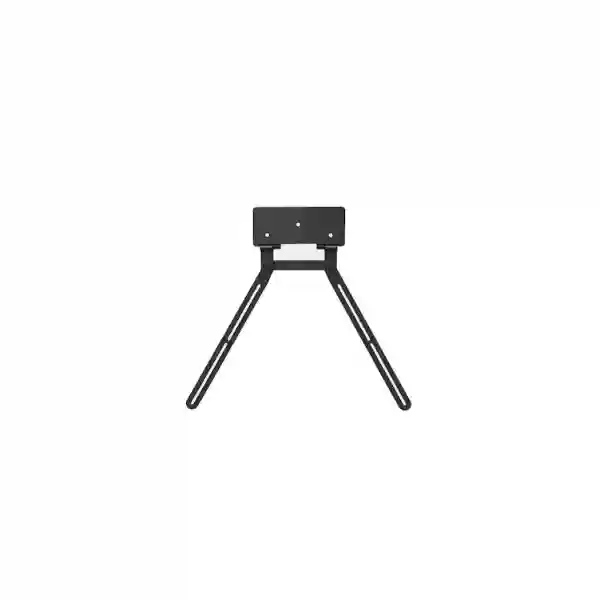
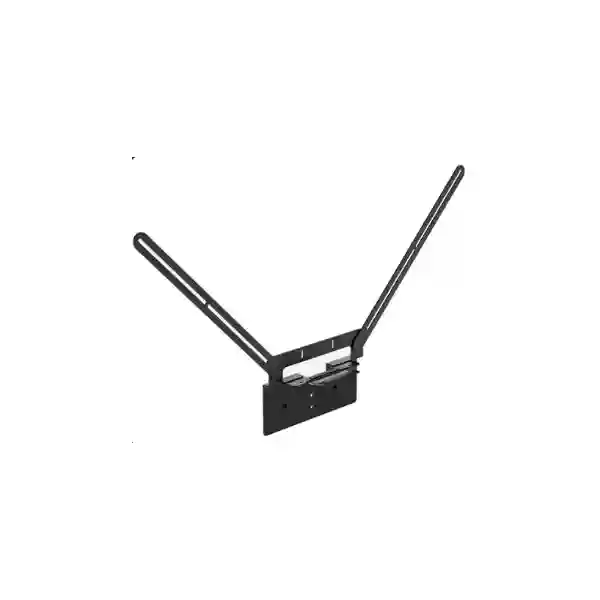
Yealink VB-TVMount-01 Tanzania
The Yealink VB-TVMount-01 is a modular television mounting accessory developed for professional meeting spaces using Yealink video collaboration equipment. Yealink identifies the mount for MeetingBar A50, MeetingBar A40 and SmartVision 40, with the A50 able to be positioned above or below a compatible display and the A40 and SmartVision 40 supported in bottom-mounted deployment. For organizations in Tanzania planning boardrooms, huddle spaces, training rooms or executive meeting areas, the practical value is straightforward: the video bar can be positioned close to the display rather than occupying a separate shelf or forcing an improvised mounting arrangement.
A mounting accessory may appear simple, yet it affects sightline, room appearance, service access and installation consistency. The right mounting method helps the camera remain aligned with the screen, reduces visual clutter and gives installers a repeatable way to finish rooms professionally. FourTeck Tanzania can help buyers confirm the intended Yealink device, display arrangement and installation objective before quotation so the accessory is selected for the correct room design.
Verified product facts
Official Yealink product information lists VB-TVMount-01 as a TV mount for A50, A40 and SmartVision 40.
MeetingBar A50 supports top or bottom positioning with this mount.
MeetingBar A40 and SmartVision 40 are supported in bottom-mounted positioning.
Yealink lists manufacturer part number 311118 for the product.
What the Yealink VB-TVMount-01 solves
Video meeting rooms work best when the display, camera and audio system feel like one coordinated installation. A conferencing bar placed too far from the display can create an unnatural visual relationship between the person speaking on screen and the camera capturing participants in the room. A device left on furniture may also be moved, blocked by laptops or repositioned during cleaning. The VB-TVMount-01 gives installers a purpose-built method for locating supported Yealink equipment directly around the display, creating a more coherent visual system.
Cleaner meeting-room layout
The mount helps keep the supported Yealink video bar close to the screen rather than consuming table, credenza or shelf space. This is especially useful where the room design prioritizes a clean front wall and minimal visible equipment.
Consistent camera placement
Positioning the video device around the display makes it easier to plan participant sightlines and screen alignment. The final height should still be selected according to room geometry, furniture height and the chosen Yealink device.
Flexible A50 deployment
Yealink supports MeetingBar A50 installation above or below the TV with VB-TVMount-01. That flexibility allows the installer to choose a position that fits the room instead of being restricted to one display-edge location.
Compatibility and buying guidance
The key procurement question is not simply whether a room uses a Yealink video device. Buyers should identify the exact model, intended mounting position, television or display installation method, physical clearance and cable route. Yealink’s current compatibility information shows VB-TVMount-01 with MeetingBar A50, MeetingBar A40 and SmartVision 40. Yealink also publishes compatibility information indicating MeetingBar A25 can use VB-TVMount-01 for bottom mounting. Because compatibility tables and product generations can evolve, procurement teams should state the exact room-system model when requesting a quotation rather than relying on a generic description such as “Yealink MeetingBar mount.”
| Yealink device | VB-TVMount-01 guidance | Planning note |
|---|---|---|
| MeetingBar A50 | Top or bottom TV mounting supported | Choose the position after considering display height, camera sightline and room seating. |
| MeetingBar A40 | Bottom mounting supported | Confirm TV clearance and cable routing before installation. |
| SmartVision 40 | Bottom mounting supported | Verify the complete meeting-room arrangement, not just the mount. |
| MeetingBar A25 | Yealink compatibility information indicates bottom mounting | State the exact A25 configuration when requesting compatibility confirmation. |
Installation planning for professional rooms
A good conference-room installation begins with the participant experience. The display should be visible without awkward head movement, and the camera should capture participants naturally. With a video bar mounted too high, remote participants may see a downward-looking perspective; mounted too low, the view may be dominated by the tabletop. The VB-TVMount-01 gives the installer flexibility, particularly with A50, but the accessory does not remove the need for room planning. The final position should account for display height, seating distance, table depth, chair positions and camera framing.
Cable routing is another practical factor. Power, network, USB, HDMI or other room-system connections should be planned so connectors are not strained and cables do not hang across the visible face of the installation. If a display is wall-mounted, installers should also consider how the TV bracket, wall spacing and Yealink accessory interact physically. Yealink’s quick-start guidance includes an adjustable extension-bracket concept and a gasket for situations where additional spacing is relevant. The installation should follow Yealink’s current documentation for the product and the associated MeetingBar model.
Before ordering multiple units for a standard room rollout, a pilot room is often useful. A pilot allows the project team to validate display compatibility, mounting height, cable reach and the user experience. Once approved, the same mounting approach can be repeated across similar rooms, reducing variations between locations and simplifying future support.
Yealink VB-TVMount-01 Tanzania
For organizations sourcing the Yealink VB-TVMount-01 in Tanzania, the strongest purchasing approach is to treat the mount as part of the meeting-room design rather than an isolated accessory. Businesses, government departments, schools, universities, NGOs, healthcare organizations and hospitality operators increasingly rely on video meetings to connect teams, suppliers and customers. When the room contains a Yealink MeetingBar A50, A40 or SmartVision 40, mounting affects both the visual quality of the room and the practical placement of the camera. The VB-TVMount-01 is intended to provide a stable, purpose-built hanging solution around a compatible television or display, reducing dependence on improvised shelves or furniture placement.
Tanzania buyers should specify the exact Yealink system already installed or planned for purchase. For MeetingBar A50, Yealink supports both top and bottom placement using the VB-TVMount-01. For MeetingBar A40 and SmartVision 40, the supported arrangement is bottom mounting. This difference matters during procurement because a request such as “mount the Yealink bar above the TV” is not interchangeable across every model. A quotation should therefore include the Yealink device model, display model where possible, number of rooms, preferred screen position, and whether the display itself is already wall-mounted.
Room conditions in Tanzania can vary significantly. A compact executive office may need a visually discreet installation with minimal furniture. A larger boardroom may prioritize camera sightline across a long table. A training room may require the video bar to remain clear of presenter movement. A hospitality or education environment may need equipment positioned where it is less likely to be moved accidentally. These are not reasons to alter Yealink’s supported installation method; they are reasons to choose the most appropriate supported position and to confirm all clearances before fitting the hardware.
FourTeck Tanzania can assist with product selection and quotation preparation for meeting-room projects. Buyers can also review the broader FourTeck Tanzania IT and collaboration solutions overview, which explains how video conferencing fits alongside displays, networking and other workplace infrastructure. For multi-site regional organizations, the wider FourTeck UAE technology solutions network can support procurement discussions where projects extend beyond Tanzania.
Yealink VB-TVMount-01 Dar es Salaam
Dar es Salaam organizations often manage meeting environments with a wide mix of room sizes, from management offices and client presentation rooms to larger conference spaces. For a Yealink deployment, the VB-TVMount-01 is relevant where the goal is to integrate a supported MeetingBar directly with the television instead of allocating separate furniture for the video device. This can be particularly useful in rooms where front-wall space is valuable and the organization wants the conferencing hardware to visually align with the display.
A Dar es Salaam procurement team should begin by confirming whether the room uses MeetingBar A50, MeetingBar A40, SmartVision 40 or another Yealink model. If A50 is selected, the project has the option of top or bottom placement with VB-TVMount-01. If A40 or SmartVision 40 is selected, buyers should plan for bottom placement according to Yealink’s supported configuration. This distinction should be written into the bill of materials so that installers and purchasing teams are working from the same room standard.
The mounting decision should be coordinated with the television installation. If the display already uses a wall bracket, the installer should review the rear space, mechanical clearances and cable path before work begins. A clean meeting-room finish depends on details such as connector access, cable slack, power outlet position and the ability to service the video bar later without dismantling unrelated equipment. These factors are especially important when organizations are standardizing several boardrooms or branch meeting spaces and want each room to behave consistently.
FourTeck Tanzania’s verified contact page includes Dar es Salaam contact information and provides a route for product-selection and quotation enquiries. When requesting the Yealink VB-TVMount-01, include the quantity, associated Yealink model, display details and installation objective. This reduces the chance of ordering a mount without enough information to confirm the desired room layout.
Yealink VB-TVMount-01 Mwanza
Organizations in Mwanza planning video meeting facilities may be working with branch offices, healthcare sites, education environments, commercial teams or management spaces where remote collaboration needs to be dependable and easy to use. In these rooms, the mounting arrangement is part of usability. A supported Yealink collaboration bar positioned around the display helps keep the visual focus of the room in one place and avoids a situation in which the camera sits far from the people appearing on the screen.
The VB-TVMount-01 should be specified together with the Yealink endpoint rather than after installation as an afterthought. For MeetingBar A50, an installer can plan either a top or bottom position around the display. Bottom placement is the supported configuration for MeetingBar A40 and SmartVision 40. The room designer should select between the supported alternatives based on screen height, seated eye line and how the camera captures people around the table. A mounting position that looks attractive on a drawing still needs to provide useful camera framing in the actual room.
For Mwanza projects involving more than one room, consistency can make support easier. Standardizing display height, mount choice, cable routing and room-system model reduces the number of unique configurations the IT team must maintain. Before a broad rollout, documenting one approved room can provide a useful reference for subsequent sites. The document can include display model, room dimensions, device position, cable route and photos of the completed installation.
When asking for a quotation, provide the exact MeetingBar model and whether the project is new or an upgrade to an existing display installation. If the room already has a TV bracket, include the TV model and installation details so compatibility questions can be addressed before site work begins. This procurement discipline is more valuable than simply searching for the lowest price on a generic “Yealink TV mount,” because the objective is a supported and serviceable meeting-room installation.
Yealink VB-TVMount-01 Arusha
Arusha businesses and institutions often host meetings involving regional teams, international partners, clients, project stakeholders and distributed staff. In a room where video conferencing is used regularly, mounting quality influences the professionalism of the environment. The Yealink VB-TVMount-01 gives supported MeetingBar deployments a purpose-built way to position the video device with the display instead of depending on a table stand or custom shelf. That is useful in rooms designed for client presentation, executive collaboration, training or hybrid meetings.
For MeetingBar A50, the mount supports both top and bottom positioning. This flexibility can help when the display height or furniture layout makes one location more suitable than the other. For MeetingBar A40 and SmartVision 40, bottom placement is the supported use. Buyers should not assume that mounting options are identical across Yealink devices. The exact model should therefore appear on the quotation request, purchase order and installation documentation.
A good Arusha room plan should also consider future maintenance. Cables should be accessible enough for troubleshooting, and the final installation should not make routine service unnecessarily difficult. If a display is replaced later, the team should revisit the mounting arrangement rather than assuming that every new TV has the same geometry. Yealink describes VB-TVMount-01 as compatible with most televisions, but “most” is not the same as “every possible display and mounting scenario.” Physical verification remains sensible for professional projects.
The verified FourTeck Tanzania contact and quotation page includes Arusha contact information and can be used to begin a product discussion. Provide room quantity, Yealink endpoint model, screen information and whether installation assistance is required so the enquiry contains enough detail for practical guidance.
Yealink VB-TVMount-01 Dodoma
Dodoma meeting-room requirements may include government, administration, education, professional services and corporate collaboration environments where a clean and repeatable video-room standard is valuable. The Yealink VB-TVMount-01 supports a more integrated front-of-room layout by locating compatible Yealink collaboration equipment directly around the TV. When used as part of a properly planned system, it can reduce dependency on extra furniture and help establish a consistent visual standard across rooms.
The selection process should start with the supported Yealink endpoint. MeetingBar A50 can be mounted above or below the TV using VB-TVMount-01. MeetingBar A40 and SmartVision 40 use the bottom position with this accessory. A room specification should state this clearly, particularly where procurement and installation are handled by separate teams. Without an exact model and mounting position, installers may arrive on site with assumptions that do not match the intended design.
For formal procurement, it is useful to separate the accessory requirement from broader meeting-room requirements. The VB-TVMount-01 is the mounting component; it does not itself provide conferencing, network connectivity, a display, room acoustics or platform licensing. The complete bill of materials may include the Yealink bar, screen, cables, network switching, wireless or wired access, power protection and collaboration-platform requirements. Treating these elements as a coordinated system helps avoid a room that is mechanically complete but operationally incomplete.
FourTeck Tanzania’s contact page also lists Dodoma details. Procurement teams can use that channel to request guidance or a quotation and should include quantities, deployment schedule requirements and whether the mount is intended for new Yealink rooms or for an upgrade of existing conferencing spaces.
Yealink VB-TVMount-01 UAE
For organizations with offices in both Tanzania and the UAE, a consistent room standard can simplify user training and IT support. The Yealink VB-TVMount-01 is relevant when supported MeetingBar hardware needs to be positioned around the room display. Standardizing the relationship between display height, camera location and furniture layout makes the meeting experience more predictable for users who move between locations.
UAE projects commonly include high-quality fit-outs where visible equipment, cable management and front-wall appearance matter. A purpose-built mount can contribute to a cleaner installation, but the room team should still validate clearances, rear display space and serviceability. MeetingBar A50 offers top or bottom mounting with VB-TVMount-01, while A40 and SmartVision 40 are supported in bottom placement. The final choice should follow Yealink documentation and the actual room conditions.
If a regional procurement team is buying for multiple offices, the quotation should identify quantities by location and specify the exact Yealink endpoint used in each room. This is preferable to treating every room as identical, particularly if one site uses A50 and another uses A40. A rollout plan can then distinguish which rooms may use top mounting and which should remain bottom-mounted.
For UAE-related infrastructure and collaboration discussions, customers can also review FourTeck UAE. The regional link is useful for organizations coordinating projects across Tanzania and the Gulf while still keeping the product specification tied to Yealink’s official compatibility guidance.
Yealink VB-TVMount-01 Uganda
Uganda organizations deploying Yealink meeting systems can use the VB-TVMount-01 as part of a structured approach to room design. Rather than placing a video bar wherever spare furniture is available, the accessory supports an integrated relationship between the screen and supported Yealink device. This matters in executive rooms, customer meeting spaces, training facilities and branch offices where video collaboration is a regular part of daily work.
A regional standard should define device model and mounting position. The A50 supports both top and bottom placement with VB-TVMount-01. The A40 and SmartVision 40 are intended for bottom placement with this mount. Installation teams should also consider screen height, distance to participants and cable routes so the selected position works in practice. Mount choice is one component of the system; network quality, room acoustics, display visibility and platform configuration remain equally important to the meeting experience.
Where an organization operates sites in Uganda and Tanzania, consistent documentation can make maintenance easier. Record which Yealink model is installed in each room, the mount type, display model and cable configuration. This helps remote support teams understand the room before troubleshooting and makes future upgrades more predictable.
Customers with Uganda requirements can also visit FourTeck Uganda IT and communication solutions for regional context. For purchasing, always specify the exact Yealink endpoint rather than only the mount name so compatibility can be reviewed against the intended deployment.
Yealink VB-TVMount-01 Kampala
Kampala offices often need conferencing spaces that support local teams, regional operations and remote participants without requiring users to understand the technology behind the room. A well-finished front-of-room installation contributes to that simplicity. With compatible Yealink equipment, VB-TVMount-01 can position the video bar directly around the TV so the camera and screen feel like one system.
For rooms using MeetingBar A50, planners can evaluate either a top or bottom position. For MeetingBar A40 and SmartVision 40, the supported arrangement is below the display. The decision should account for seated eye line, display height and how much of the table should appear in the camera frame. A camera position that is too high or too low may still function, but it can produce a less natural perspective for remote participants.
In multi-room Kampala projects, standardization should extend beyond the mount. Use the same approach to screen height, cabling, labeling and network connection where room dimensions allow. Document exceptions rather than letting every installation evolve independently. A repeatable standard makes future moves, changes and troubleshooting easier for internal IT teams.
When requesting VB-TVMount-01 pricing, include the quantity, endpoint model, television details and whether installation is part of the requirement. If the TV is already installed, provide information about the existing wall mount and available rear clearance. These details allow the quotation discussion to focus on the actual room instead of assuming that every display behaves the same way mechanically.
Yealink VB-TVMount-01 Arua
Arua organizations setting up meeting rooms may have a different scale from a large metropolitan headquarters, but the underlying design principles remain the same: the camera should be placed intentionally, cabling should be secure, and the user should not need to move equipment before a call. The Yealink VB-TVMount-01 helps achieve a more permanent and organized arrangement for supported MeetingBar hardware around the room display.
For MeetingBar A50, both top and bottom mounting are supported with the accessory. MeetingBar A40 and SmartVision 40 use the bottom configuration. Buyers should therefore confirm the exact endpoint before purchase. If an organization is migrating from one MeetingBar generation to another, the mounting arrangement should be reviewed as part of the upgrade rather than assumed to remain identical.
For sites where technical support may be coordinated from another city, good installation documentation becomes especially valuable. Record the mount model, endpoint model, TV model, cable path and any relevant room constraints. Photographs of the completed installation can help support teams understand how equipment is arranged without needing an immediate site visit. This type of documentation also supports future procurement when another room needs to be matched to the same standard.
A quotation request should describe whether the room is a new installation or an upgrade, how many displays are involved and whether the organization wants the device above or below the screen where supported. That information makes the buying conversation more useful than a simple request for “one Yealink bracket.”
Yealink VB-TVMount-01 Mbarara
Mbarara businesses, education organizations, healthcare facilities and distributed teams can benefit from meeting rooms that are easy to operate and visually tidy. Where Yealink MeetingBar A50, A40 or SmartVision 40 is part of the design, VB-TVMount-01 provides a dedicated mounting approach around the TV. This can free table or cabinet space and reduce the likelihood that the conferencing device is shifted away from its intended position.
The main compatibility detail is the mounting position. A50 can use the accessory above or below the television. A40 and SmartVision 40 are supported below the display. The room owner should not decide the position only on appearance. Camera framing, screen height and participant distance should be reviewed together. In a compact room, bottom mounting may align naturally with seated participants; in another layout, A50 top mounting may produce the better result. The choice should always remain within Yealink’s supported configuration.
For procurement, include enough information to identify the complete environment. State the exact Yealink bar, television model, existing display bracket if applicable, room quantity and installation requirement. If multiple rooms use different screens, note that in the request. A mounting accessory can interact differently with different rear display geometries, so planning should not stop at diagonal screen size.
Organizations with several Uganda sites may find it useful to coordinate standards through the broader FourTeck Uganda context while keeping product compatibility tied to Yealink’s official documentation. This provides a balance between regional procurement planning and manufacturer-supported installation decisions.
Yealink VB-TVMount-01 Gulu
Gulu meeting spaces may support administration, education, field operations, development organizations or commercial teams that collaborate frequently with people in other regions. A reliable conferencing experience depends on more than the conferencing software. Physical room design determines whether participants are framed well, whether the camera remains in place and whether cables are protected from accidental movement. VB-TVMount-01 addresses the mounting part of that room design for supported Yealink devices.
MeetingBar A50 can be deployed above or below the display using VB-TVMount-01. MeetingBar A40 and SmartVision 40 are supported in the bottom position. The installation team should confirm the device model and preferred position before drilling, routing cables or finalizing screen height. If a room uses an existing TV, rear clearance should be checked because the combined display-bracket environment can affect installation access.
For branch-room standardization, the mount can form part of a documented room kit that includes the conferencing bar, display, cabling and network requirements. This helps procurement teams order consistent components and helps installers know what outcome is expected. It also reduces the chance that a replacement room is assembled differently simply because a different technician is involved.
When requesting a price for Gulu, explain whether the requirement is accessory-only or part of a complete Yealink meeting-room deployment. If the organization needs several rooms, list quantities by room type. This gives the supplier enough context to separate identical rooms from those that require a different mounting or display approach.
Yealink VB-TVMount-01 Kenya
Kenya organizations running regional offices can use Yealink meeting-room standards to create a consistent experience between sites. When supported MeetingBar devices need to be mounted with a display, the VB-TVMount-01 offers a purpose-built option. Its most important design advantage is not decoration; it is the ability to place the conferencing hardware in a controlled position around the TV, reducing random placement on furniture and helping keep the camera aligned with the screen.
MeetingBar A50 supports both upper and lower display placement with the accessory. MeetingBar A40 and SmartVision 40 are supported below the display. This should be reflected in room standards and purchase documentation. For organizations using more than one Yealink model, a single diagram should not be assumed to represent all rooms. Instead, maintain a small set of approved room templates by device model and room size.
For Nairobi headquarters, branch sites or cross-border projects, project teams should coordinate screen height, camera line, cable route and maintenance access. The mount should be installed according to Yealink’s current instructions. Where the TV model or wall bracket differs between sites, physical compatibility should be confirmed rather than inferred from screen size alone.
Customers planning Kenya deployments can review FourTeck Kenya video conferencing and IT solutions for regional context. Organizations purchasing for both Kenya and Tanzania can use a shared bill-of-materials framework while still validating each site’s display and installation conditions.
Yealink VB-TVMount-01 Kuwait
Kuwait meeting-room projects may prioritize neat fit-out, consistent device placement and strong integration between collaboration technology and the room interior. The Yealink VB-TVMount-01 supports that objective by providing a dedicated mounting method for compatible MeetingBar equipment around the display. This can be preferable to adding shelves or leaving the video bar on furniture where it may interfere with the room’s visual design.
For MeetingBar A50 installations, the project team can choose a supported top or bottom location after reviewing room geometry. MeetingBar A40 and SmartVision 40 are supported below the screen with VB-TVMount-01. The mount should be specified alongside the exact endpoint model so the installer understands which configuration is intended. Where the meeting room uses a large wall-mounted display, rear clearance and cable access should be checked before installation work begins.
Regional organizations can benefit from standardizing the visible relationship between screen and camera while allowing variations where room dimensions require them. A useful standard defines target display height, camera location, table distance and cabling expectations. This produces a repeatable experience without forcing every room to be physically identical.
For Kuwait procurement, request the accessory by exact model name and state which Yealink bar will be used. Include room quantity, display model where available and whether the requirement is part of a new room or an upgrade. This prevents uncertainty during quotation and gives the project team a better basis for confirming the correct installation arrangement.
Yealink VB-TVMount-01 Ghana
Ghana organizations developing modern meeting rooms can use the Yealink VB-TVMount-01 to integrate supported video collaboration equipment more neatly with the room display. In a boardroom, management office or training space, keeping the camera close to the screen helps create a coherent front-of-room focal point. It also reduces dependence on movable furniture as the permanent home of the conferencing bar.
Compatibility should be confirmed by exact Yealink model. MeetingBar A50 can be positioned above or below the TV using VB-TVMount-01. MeetingBar A40 and SmartVision 40 are supported in bottom placement. The room designer should select the supported position after considering participant sightline and camera framing. If a rollout includes different endpoint models, those differences should be reflected in the installation drawings and bill of materials.
The accessory should also be considered within the broader room system. Network availability, power, cabling, display mounting and platform configuration must all be ready for the conferencing endpoint. A mechanically neat room is only successful when users can start meetings reliably. For this reason, procurement teams should combine the mount request with information about the endpoint and intended room usage.
Customers with Ghana projects can review FourTeck Ghana business communication and IT infrastructure solutions. Cross-border buyers can coordinate room standards regionally while keeping each installation aligned with official Yealink accessory guidance.
Yealink VB-TVMount-01 Nigeria
Nigeria enterprises, professional-services firms, education institutions and distributed organizations often need collaboration rooms that can be deployed consistently across multiple offices. The Yealink VB-TVMount-01 fits into that standardization strategy by giving supported MeetingBar equipment a defined location around the television. This supports a cleaner installation and reduces the chance that a video bar is moved or blocked after the room is commissioned.
MeetingBar A50 can use the mount in top or bottom display positions. MeetingBar A40 and SmartVision 40 are supported below the television. Procurement teams should capture this in the project documentation rather than using one generic description for all Yealink bars. Room standards can then be created by endpoint type, with camera position and screen height documented for installers.
For large organizations, a pilot room can validate the relationship between display size, wall bracket, mounting hardware and meeting-bar position. Once the pilot is accepted, the same method can be repeated where room geometry is similar. Where a site uses a different display or furniture arrangement, the installation should be reviewed rather than copied blindly.
Customers coordinating Nigeria projects can explore FourTeck Nigeria IT services for broader regional planning. When requesting VB-TVMount-01 specifically, state the Yealink endpoint, number of rooms, desired supported mounting position and whether installation guidance is required.
Yealink VB-TVMount-01 Seychelles
Seychelles meeting-room projects can involve corporate offices, hospitality operations, public-sector environments and organizations working with teams across different islands or countries. A well-planned video room should be simple for users and visually organized. The Yealink VB-TVMount-01 helps by providing a purpose-built mounting approach for supported Yealink collaboration devices directly around the TV.
MeetingBar A50 supports top or bottom mounting with VB-TVMount-01, while MeetingBar A40 and SmartVision 40 use bottom placement. That compatibility detail should drive the room design. Buyers should avoid assuming that a mounting position shown for one MeetingBar automatically applies to another model. The exact device and intended position should be confirmed before procurement and installation.
Where an organization has limited on-site technical resources, installation documentation becomes especially important. Record the endpoint, display model, mount, cable routing and final device position. This information supports remote troubleshooting and makes later replacement work easier. It also allows procurement teams to reorder known components for similar rooms without reconstructing the entire design from memory.
For quotation planning, identify whether the mount is being purchased alone or as part of a new Yealink video-conferencing system. Provide display details and room quantity. A clear request allows compatibility and logistics to be discussed before hardware is committed to the project.
How to choose the right mounting position
The decision between top and bottom placement, where the Yealink device supports both, should be made from the perspective of participants. Start by looking at seated eye level and the center of the screen. Then consider where the camera will be relative to faces around the table. The objective is a natural perspective rather than simply placing the bar where there is free space. For A50, having both top and bottom options means installers can adapt the room while remaining within the supported VB-TVMount-01 configuration.
If a display is already mounted unusually high, placing the camera above it may further increase the camera angle. If the screen is low or furniture sits directly beneath it, bottom placement may need additional clearance review. Every room should be assessed as a combination of display, camera, furniture and participant positions. The mount is the mechanical enabler; room geometry determines the best supported result.
Procurement checklist for Yealink VB-TVMount-01
1. Confirm the endpoint
State whether the room uses MeetingBar A50, A40, SmartVision 40 or another Yealink device. Do not purchase only from a generic “TV mount” description.
2. Record the display
Provide the TV or commercial display model where possible, especially for existing rooms. Rear geometry and the current TV bracket may affect installation access.
3. Choose supported placement
For A50, evaluate top versus bottom. For A40 and SmartVision 40, plan bottom placement. Confirm current Yealink guidance before final installation.
4. Plan cabling
Check power, data and video cable routes. Leave sensible service access and avoid placing strain on connectors behind the display.
5. Define room quantities
For multi-room projects, list quantities by endpoint and room type. This helps separate identical rooms from exceptions that need different treatment.
6. Ask for compatibility review
If the display or room arrangement is unusual, request guidance before installation instead of relying on assumptions made from screen size alone.
Use cases for the Yealink TV mount
In an executive boardroom, the accessory can help keep the front wall visually clean and the video bar aligned with the main display. In a huddle room, it can save cabinet or tabletop space and reduce the number of loose devices near participants. In a training room, a fixed position can help prevent the camera from being moved while furniture changes around it. In a branch office, standardizing the mount and room layout can make a remote-support team’s job easier because the physical design is known in advance.
The common theme is consistency. A meeting room should not require users to reposition the camera before every call. Purpose-built mounting contributes to a more appliance-like experience: users walk in, start the room system and focus on the meeting. The VB-TVMount-01 addresses only the physical placement layer, but that layer influences how professional and predictable the overall room feels.
Related FourTeck resources
Organizations building more than one collaboration room often need related network, display and IT infrastructure planning. The Tanzania FourTeck solutions overview provides context on video conferencing, TVs, network switches, Wi-Fi and integrated workplace infrastructure. The Tanzania product guidance and contact page is the appropriate route for compatibility questions and quotation requests.
For organizations operating regionally, the Uganda FourTeck site, Kenya FourTeck site, Ghana FourTeck site, Nigeria FourTeck site and FourTeck UAE provide country-specific context for wider IT and communication projects.
Frequently asked questions
What is the Yealink VB-TVMount-01?
It is a modular TV mounting accessory for supported Yealink video collaboration devices. Yealink lists it for MeetingBar A50, MeetingBar A40 and SmartVision 40, with current compatibility information also showing supported bottom placement for MeetingBar A25.
Can MeetingBar A50 be mounted above the TV?
Yes. Yealink states that MeetingBar A50 can be installed at the bottom of the TV or reconfigured for top mounting with the included top mounting bracket when using VB-TVMount-01.
Can MeetingBar A40 use top mounting with VB-TVMount-01?
Yealink’s current compatibility guidance shows VB-TVMount-01 support for MeetingBar A40 in the bottom position. Buyers should plan the A40 installation accordingly and follow the current manufacturer instructions.
Does VB-TVMount-01 support SmartVision 40?
Yes. Yealink lists SmartVision 40 as compatible, with the mount used in bottom placement according to Yealink’s compatibility information.
Is the mount compatible with every television?
Yealink describes the product as compatible with most TVs or mainstream TV models, but professional buyers should still confirm the actual display, existing wall bracket and rear clearance. “Most TVs” should not be interpreted as a guarantee for every installation scenario.
What should I provide for a quotation in Tanzania?
Provide the number of mounts required, exact Yealink endpoint model, display model where known, whether the TV is already wall-mounted, preferred supported mounting position and whether installation assistance is needed.
Is VB-TVMount-01 a conferencing system?
No. It is a mounting accessory. The conferencing capability comes from the supported Yealink meeting device and the wider room system, including display, network and collaboration-platform configuration.
Why use a purpose-built mount instead of a shelf?
A purpose-built mount can create a cleaner, more consistent installation and helps keep the video device in a defined relationship with the display. It can also reduce furniture dependence. The final room design should still consider camera height, cable access and serviceability.
Decision recap
Choose the Yealink VB-TVMount-01 when the room uses a supported Yealink device and the project requires a purpose-built way to position that device around the display. For MeetingBar A50, evaluate top or bottom placement. For MeetingBar A40 and SmartVision 40, plan bottom placement. Confirm the television and installation environment before procurement, and follow Yealink’s current documentation during fitting.
For Tanzania buyers, the most useful quotation request includes the exact endpoint model, number of rooms, display details and installation objective. This allows product selection to be tied to the actual meeting-room design rather than treating the mount as a generic bracket.
Talk to FourTeck Tanzania about your Yealink meeting room
If you are planning a new Yealink room, upgrading an existing display installation or standardizing collaboration spaces across multiple offices, share the endpoint model, display details, room quantity and preferred layout. FourTeck Tanzania can use that information to discuss product selection and prepare a more meaningful quotation.




Reviews
There are no reviews yet.