
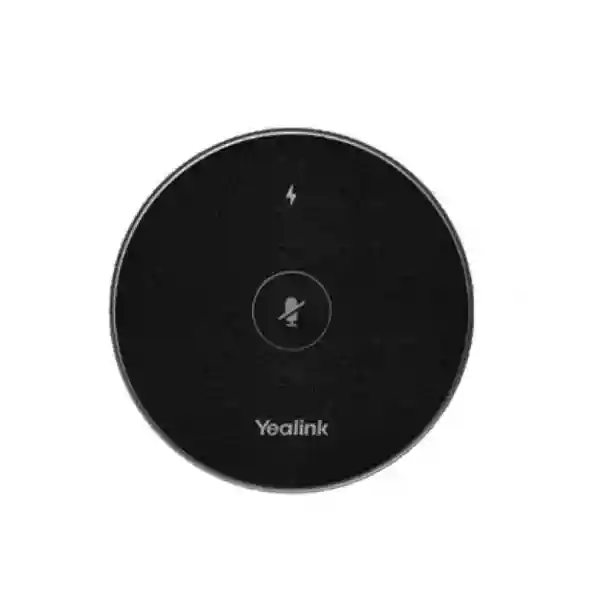
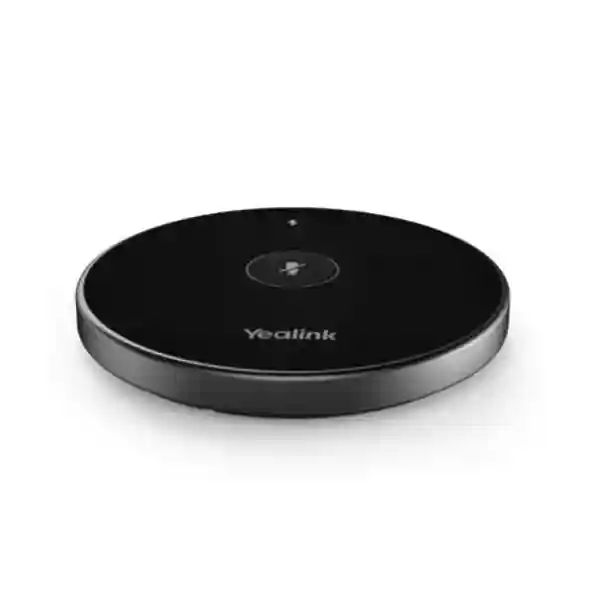
Yealink VCM36-W Pro Wireless Microphone
The Yealink VCM36-W Pro is a wireless video-conferencing microphone built for meeting rooms that need flexible microphone placement without permanent table cabling. Yealink specifies a built-in four-microphone array, 360° pickup coverage, a 3 m optimal pickup radius, full-duplex technology, acoustic echo cancellation and Noise Proof processing. It also supports dual-band wireless networking, including 802.11 b/g/n/ac/ax, and uses WPA-PSK/WPA2-PSK security.
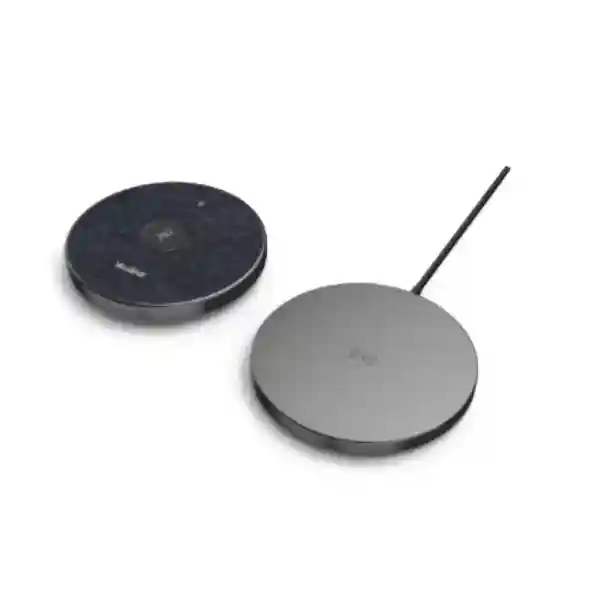
For organisations in Tanzania, the value is practical: the microphone can be repositioned as seating changes, used as an expansion microphone with supported Yealink room systems, muted from its touch surface and returned to its charging dock after use. A built-in 3840 mAh battery is rated for up to 24 hours of conference use and up to 14 days of standby, making it suitable for frequently used collaboration rooms where administrators want fewer loose cables and less daily handling.
Verified highlights
- 4-microphone array
- 360° coverage, 3 m optimal radius
- 100 Hz–20 kHz frequency response
- Full duplex, AEC and Noise Proof
- 802.11 b/g/n/ac/ax wireless
- 2.4 GHz / 5.1 GHz / 5.8 GHz
- Up to 24 hours conference use
- Wireless charging dock included
What the Yealink VCM36-W Pro solves
Meeting-room audio problems are often caused by distance, table layout, reflective surfaces, background noise and the simple fact that participants do not remain in one fixed position. A microphone permanently cabled to one table location can become inconvenient when rooms are reconfigured for workshops, board meetings, training sessions or hybrid calls. The VCM36-W Pro is designed to give room planners a movable microphone point that can be placed closer to the people who need to be heard while retaining a clean tabletop.
Its four-microphone array is intended for 360° pickup, which is useful when participants sit around a table rather than facing one direction. Yealink specifies an optimal pickup radius of 3 m. That figure should be treated as a design input rather than a guarantee that one microphone will be ideal for every room: acoustic conditions, participant volume, background noise and compatible endpoint behaviour all influence the final result. For larger or unusually shaped rooms, the quantity and placement of supported expansion microphones should be validated against Yealink’s current compatibility documentation and the exact conferencing endpoint.
The wireless design also shifts the installation discussion away from cable routing alone. The room still needs dependable wireless conditions, suitable endpoint compatibility and a charging routine. A procurement decision should therefore consider the complete room: the Yealink endpoint, display, camera, speaker path, seating plan, wireless environment and how users start and end meetings. FourTeck Tanzania can help customers frame those requirements using its business collaboration and IT solutions overview, which explains how meeting-room audio, video and network design fit together.
Key features and customer benefits
Four-microphone array
A four-element array supports 360° voice pickup around the tabletop, helping the microphone serve participants seated on different sides of a conference table.
Full-duplex audio
Yealink Full Duplex Technology is designed so both sides can speak naturally without the clipped conversational feel associated with half-duplex audio paths.
Noise and echo control
Acoustic echo cancellation and Yealink Noise Proof processing help reduce common distractions and support clearer speech in hybrid meetings.
Wireless placement
Dual-band Wi-Fi allows the unit to operate without a signal cable across the table, simplifying room changes and improving furniture flexibility.
Long operating cycle
The 3840 mAh battery is rated for up to 24 hours of conference use and up to 14 days of standby, reducing the need to recharge between short meetings.
Charging dock
The included wireless charging dock provides a clear home position for the microphone, supporting a simple end-of-meeting routine and predictable readiness.
Technical specifications
| Microphone array | Built-in 4-microphone array |
|---|---|
| Pickup | 360° coverage; 3 m radius optimal pickup range |
| Audio technologies | Optimal HD Audio, Yealink Full Duplex Technology, Acoustic Echo Cancellation, Yealink Noise Proof Technology |
| Frequency response | 100 Hz–20 kHz |
| Mute control | Touchpad mute |
| Battery | 3840 mAh; up to 24 hours use; up to 14 days standby |
| Wireless standard | 802.11 b/g/n/ac/ax |
| Wireless frequencies | 2.4 GHz / 5.1 GHz / 5.8 GHz |
| Wireless security | WPA-PSK / WPA2-PSK; Yealink also lists AES128 encryption |
| Microphone dimensions | 100 × 100 × 17 mm |
| Charging dock dimensions | 100 × 100 × 10 mm |
| Operating humidity | 10%–90% |
| Package contents | VCM36-W Pro, charging dock, base adhesive, USB A-C cable, power adapter and quick start guide |
Compatibility and deployment guidance
Compatibility should be confirmed against the exact Yealink room system and current firmware before purchase. Yealink’s room-accessory compatibility documentation shows that the VCM36-W Pro is supported with selected current endpoints and that supported microphone quantity can vary by endpoint and operating mode. Some combinations require specific minimum firmware versions. That means the phrase “wireless Yealink microphone” is not enough information for a safe procurement decision; the endpoint model, current software version, room mode and intended microphone count should be part of the quotation request.
Wireless does not remove the need for planning. A room may contain corporate Wi-Fi, guest Wi-Fi, personal hotspots, Bluetooth devices, wireless presentation systems and neighbouring access points. The VCM36-W Pro supports dual-band operation, but the meeting-room environment should still be assessed for stable connectivity. If an organisation is already redesigning its wireless infrastructure, FourTeck Tanzania’s IT integration and deployment services provide a useful reference for connecting conferencing requirements with wider network, installation and support needs.
The physical room also matters. Place the microphone where participants naturally speak toward it, avoid covering it with documents or laptops, and do not assume maximum room dimensions from pickup radius alone. A reflective boardroom with glass walls can behave very differently from a carpeted training space. For larger tables, multiple compatible microphones may provide better practical coverage, subject to endpoint limits. The charging dock should be positioned where users can return the microphone consistently, and administrators should include charging behaviour in the room’s operating checklist.
Buying guidance for Tanzania
Before ordering, identify the Yealink conferencing endpoint, meeting platform, room dimensions, normal seating arrangement, maximum participant count and whether furniture is fixed or frequently moved. Confirm whether the microphone will act as an expansion microphone and how many units the endpoint supports. If a room is being built from scratch, include display size, camera position, speaker output, cable routes, power, internet capacity and wireless design in the same scope.
Procurement teams should also ask for the exact model name “VCM36-W Pro.” The Pro model must not be confused with the older VCM36-W, which has different microphone-array, pickup, battery and frequency-response specifications. The VCM36-W Pro datasheet lists the newer four-microphone design, 24-hour battery rating and 100 Hz–20 kHz response. Recording the full model name on the quotation and purchase order reduces substitution risk.
For customers comparing conference-room accessories, the FourTeck Tanzania technology shop explains a compatibility-first buying approach across conferencing, networking, security and infrastructure. Organisations with related projects in neighbouring markets can also review FourTeck Kenya and FourTeck Uganda for regional technology requirements.
Yealink VCM36-W Pro Tanzania
Organisations evaluating the Yealink VCM36-W Pro in Tanzania are usually solving a broader meeting-room problem rather than simply buying a microphone. They need remote participants to hear people clearly, they want fewer table cables, and they may need to reconfigure rooms for management meetings, project reviews, customer presentations or training. The VCM36-W Pro fits that requirement when it is matched with a compatible Yealink room endpoint. Its four-microphone array provides 360° pickup, while the specified 3 m optimal pickup radius gives planners a useful starting point for table placement. Full-duplex operation, echo cancellation and Noise Proof processing are intended to support more natural conversation where both sides may speak at the same time.
For Tanzania deployments, the right design should account for room acoustics, internet quality, wireless conditions and operating discipline. A wireless microphone can reduce visible cabling, but it still depends on a suitable wireless link to the room system and on users returning the unit to its dock. Offices with frequent meetings may value the rated 24-hour conference battery because it reduces charging interruptions across multiple sessions. Organisations with shared rooms should also decide who owns room readiness: checking charge state, confirming microphone selection, keeping firmware current and verifying audio before important calls can prevent avoidable meeting delays.
When requesting a quotation in Tanzania, include the exact endpoint model, current firmware if known, room dimensions, table shape, number of seats and preferred microphone quantity. If the project includes a new camera, display or wireless network, submit those requirements together so compatibility can be reviewed as one room design. This is especially useful for offices upgrading from laptop-based calls to dedicated Teams, Zoom or general video-conferencing rooms. The VCM36-W Pro is most valuable when its flexibility is used intentionally: place it closer to participants, preserve a clean tabletop and design the room around predictable audio coverage rather than treating the microphone as an isolated accessory.
Yealink VCM36-W Pro Dar es Salaam
In Dar es Salaam, the Yealink VCM36-W Pro can suit corporate offices, professional-services firms, project teams, hospitality management spaces, training rooms and executive meeting areas that rely on hybrid collaboration. Many such rooms are multipurpose: the same table can host internal management meetings in the morning, customer presentations later in the day and remote project calls in the afternoon. A movable wireless microphone is helpful in this environment because it can follow the seating arrangement instead of forcing every configuration around a fixed cable position. The compact 100 × 100 mm footprint also limits tabletop clutter around laptops, documents and presentation equipment.
Dar es Salaam buyers should plan for real-world room conditions. Glass partitions, hard floors, air-conditioning systems and street or building noise can affect perceived audio quality. The VCM36-W Pro includes echo cancellation and noise-processing technology, but good results still depend on sensible placement and room design. The 3 m optimal pickup radius should not be stretched into a universal room-size promise. For long boardroom tables or rooms with participants at several distances, check whether the selected Yealink endpoint supports additional VCM36-W Pro units and whether a specific firmware level is required. Verify this before purchase, particularly when adding the microphone to an existing room system.
Procurement teams in Dar es Salaam can make quotations more accurate by sharing the current room equipment list, number of participants, conferencing platform and any planned upgrades. If the room has unstable wireless performance, that should be addressed alongside microphone procurement rather than after installation. A conferencing device, access point, switch, firewall and internet circuit all contribute to meeting quality. Where the room will be used for high-value external calls, schedule a basic acceptance test after deployment: confirm mute behaviour, walk through every seating position, test simultaneous two-way speech, check charging, and validate that users can start a meeting without needing technical assistance. This turns the VCM36-W Pro from a standalone accessory into a dependable part of the room workflow.
Yealink VCM36-W Pro Mwanza
For organisations in Mwanza, the Yealink VCM36-W Pro can support branch meetings, regional management calls, supplier discussions, training sessions and coordination between operational locations. A wireless microphone is particularly useful when a meeting room serves several teams and furniture is not permanently fixed. Instead of running a microphone cable across a table or floor, the VCM36-W Pro can be placed near the active group and then returned to its charging dock. Its up-to-24-hour conference-use rating provides useful endurance for days containing several scheduled meetings, provided the device is charged and maintained according to normal room procedures.
A Mwanza installation should begin by confirming the conferencing endpoint rather than the microphone alone. Yealink’s compatibility lists show that accessory support varies by system and software version. The endpoint may also determine how many VCM36-W Pro microphones can be paired and whether they work as expansion microphones in that configuration. This matters for larger tables because adding microphones without checking endpoint limits can lead to a design that cannot be implemented. Businesses should therefore provide the exact Yealink model and, where possible, firmware version when requesting pricing or technical guidance.
Network and power planning should be included in the conversation. While the microphone itself is battery powered during use, the room still needs reliable charging power and stable connectivity for the wider conferencing system. If the site experiences interruptions, the meeting-room endpoint, display, network switch, router and access point may need appropriate power protection. For remote collaboration, internet resilience can be just as important as microphone quality. A clear procurement brief should list room dimensions, seat count, expected call duration, frequency of room reconfiguration, existing Yealink hardware and preferred platform. That information enables a more realistic decision about whether one VCM36-W Pro is sufficient or whether the room needs a different microphone strategy. The objective is consistent, intelligible speech for remote participants, not simply installing the maximum number of accessories.
Yealink VCM36-W Pro Arusha
The Yealink VCM36-W Pro can be a useful meeting-room accessory in Arusha for hospitality groups, tour operators, NGOs, education organisations, professional offices and businesses coordinating with teams outside Tanzania. These environments often need clear hybrid meetings without dedicating a room to a single layout. A wireless tabletop microphone supports that flexibility. Participants can gather around a boardroom table, move into a workshop arrangement or bring the microphone closer to a smaller discussion group without rerouting signal cabling. The four-microphone array provides 360° coverage, which is appropriate for around-table discussion when placement is central and unobstructed.
Arusha buyers should pay attention to acoustics and background sound. Large tiled spaces, rooms with glass, open-plan adjacencies and air-conditioning can all change how voices are captured. The VCM36-W Pro includes acoustic echo cancellation and Yealink Noise Proof processing, but electronic processing should complement, not replace, good room practices. Position the microphone away from loudspeaker output where practical, keep its microphone surface clear and test the furthest expected speaker position. For important executive or customer rooms, a short live-call test with a remote listener is more meaningful than evaluating audio only inside the room.
Compatibility should be documented before procurement. Record the exact endpoint, room operating mode and required number of wireless microphones. If the room is being upgraded, confirm whether firmware must be updated before pairing. The VCM36-W Pro supports modern 802.11ax as well as earlier Wi-Fi standards, but overall room performance still depends on the complete network path. Organisations with frequent international calls should also review bandwidth, firewall policy, DNS reliability and wired connectivity for the conferencing endpoint. A good quotation request for Arusha therefore contains more than a product name: it explains the room, the users, the existing system and the expected meeting workflow. That allows the microphone to be selected as part of a collaboration solution rather than as an uncertain accessory.
Yealink VCM36-W Pro Dodoma
In Dodoma, organisations considering the Yealink VCM36-W Pro may include government-related offices, institutions, consulting teams, associations, project units and businesses that conduct structured meetings with remote participants. These rooms often need dependable audio for formal discussions where several people contribute in sequence. The VCM36-W Pro’s 360° pickup and full-duplex capability are useful in this context because the device is designed for natural two-way conversation rather than one-direction presentation only. Its wireless placement also helps meeting administrators keep conference tables clear of permanent signal cables.
A formal meeting room benefits from predictable setup. The microphone should have a defined charging position, a standard placement for the normal seating layout and a simple pre-meeting checklist. Users should know what the mute indicator means, and technical administrators should document pairing and endpoint compatibility. Yealink lists the VCM36-W Pro as an expansion microphone with selected room devices, but support details vary. Before procurement in Dodoma, check the exact Yealink endpoint and software version, especially if the room already contains older equipment. An accessory purchased without this verification may not deliver the intended configuration.
For rooms used in long sessions, the rated 24-hour conference battery is a strong operational benefit, but charging routines remain important. The supplied charging dock should be positioned where staff naturally return the unit after meetings. If the room is shared by multiple departments, assign responsibility for the equipment so the next meeting does not begin with an uncharged microphone or changed settings. The wider conferencing environment should also be reviewed: stable internet, appropriate display size, good camera framing and sensible acoustics all affect meeting quality. When requesting a Dodoma quotation, provide room dimensions, seat count, existing Yealink system, primary conferencing platform and whether the space is used for workshops, board meetings or training. Those details help determine quantity, placement and any supporting infrastructure requirements.
Yealink VCM36-W Pro UAE
For UAE organisations, the Yealink VCM36-W Pro is relevant to modern meeting rooms where clean interiors, movable furniture and fast room turnover are priorities. Corporate headquarters, consulting offices, co-working spaces, hospitality groups and regional project teams frequently standardise on dedicated conferencing rooms rather than relying on individual laptops. In these environments, a wireless expansion microphone can help preserve the visual simplicity of the table while providing an additional pickup point closer to participants. The four-microphone array, 360° coverage and 3 m optimal pickup radius make placement straightforward to plan around typical meeting-table layouts.
UAE deployments often involve dense wireless environments. Offices may contain multiple access points, guest networks, wireless presentation tools, personal hotspots and neighbouring tenants operating in the same spectrum. The VCM36-W Pro supports 2.4 GHz, 5.1 GHz and 5.8 GHz wireless operation and 802.11 b/g/n/ac/ax, but room designers should still consider channel usage and interference. Wireless microphone deployment should be tested in the completed room, particularly in large commercial buildings where radio conditions can differ significantly between floors and enclosed spaces.
Regional procurement teams managing both UAE and East African sites can benefit from keeping room standards consistent. Use a common checklist covering endpoint model, firmware, camera, microphone quantity, display, room-controller behaviour, network connection and acceptance testing. Standardisation does not mean every room uses identical quantities; it means the decision process is repeatable. For the VCM36-W Pro, document its charging location, expected table position, pairing method and supported endpoint mode. When adding it to an existing Yealink room, verify compatibility first rather than assuming support from brand match alone. If the organisation has multiple rooms, pilot the configuration in one representative space, gather user feedback on voice pickup and ease of use, and then apply the proven layout to similar rooms.
Yealink VCM36-W Pro Uganda
Businesses and institutions evaluating the Yealink VCM36-W Pro in Uganda may be planning branch collaboration, executive meetings, training calls or regular communication with regional offices. Wireless microphone placement is useful where meeting rooms serve several purposes and table configurations change during the week. The VCM36-W Pro can be moved nearer to a discussion group without running a long signal cable. Its built-in four-microphone array provides 360° coverage, while Yealink’s specified 3 m optimal pickup radius gives integrators a measurable starting point for placement and microphone-count planning.
For Uganda projects, compatibility and supportability should be addressed in the quotation stage. The exact Yealink room system, operating mode and firmware version should be recorded. Yealink’s accessory matrices show that supported quantity and behaviour are endpoint dependent. This is particularly important when expanding an existing meeting room, because a microphone that is technically current may still require an endpoint update or may not be supported in a specific legacy configuration. Buyers should also distinguish the VCM36-W Pro from the earlier VCM36-W; the Pro model has different array, battery and frequency specifications.
The broader site environment matters as well. Conferencing quality depends on the network path, internet service, display, camera and room acoustics. If meetings are business critical, consider power protection for the endpoint and network equipment, and verify what happens during temporary connectivity interruptions. The VCM36-W Pro’s battery allows it to operate independently of a table power cable during meetings, but the charging dock still needs reliable power. A useful Uganda procurement brief should include room size, maximum seats, existing endpoint, primary meeting platform, expected call duration and whether users frequently rearrange furniture. Organisations with projects in Uganda can use the regional FourTeck site linked earlier for related technology planning while keeping the product specification itself anchored to Yealink’s current documentation.
Yealink VCM36-W Pro Kampala
Kampala offices often combine regional management, sales, customer service, NGO, financial, professional-services and project functions in spaces where hybrid meetings are now routine. The Yealink VCM36-W Pro can strengthen such rooms when a compatible Yealink conferencing endpoint needs an additional wireless pickup point. Its compact tabletop design is especially practical for rooms that must remain presentable for customer meetings yet flexible enough for internal workshops. Users can position the microphone close to participants, then return it to the dock when the room is cleared.
In a busy Kampala office, wireless reliability is as important as microphone specification. The VCM36-W Pro supports modern 802.11ax together with earlier Wi-Fi standards, but radio congestion can still affect any wireless deployment. Where a building has many access points or shared spectrum, test the completed room at the times it is normally busiest. The conferencing endpoint should preferably have a stable wired network path where supported, while the room’s wireless environment should be managed intentionally rather than left to default settings. Audio testing should include normal speaking voices from each seat, not only a person standing close to the microphone.
Procurement should also cover lifecycle tasks. Identify who will update the Yealink room system, check microphone firmware behaviour, keep the charging dock connected and troubleshoot pairing if the room is reconfigured. For organisations standardising several Kampala meeting rooms, create a room template that records display size, camera model, endpoint, microphone placement, cable map and network settings. The VCM36-W Pro is particularly suitable where the template calls for a movable tabletop microphone rather than a fixed wired unit. Before quantity is finalised, verify how many VCM36-W Pro microphones the selected endpoint supports. This avoids over-ordering and ensures that expansion plans are technically achievable.
Yealink VCM36-W Pro Arua
For organisations in Arua, the Yealink VCM36-W Pro can support remote coordination, project reviews, institutional meetings and branch communication where reliable voice pickup is important. Wireless tabletop audio can be especially useful in rooms that are not permanently designed as boardrooms. The microphone can be brought out when needed, placed within its intended pickup area and stored or charged afterward. That flexibility can reduce the need for permanent signal cabling in multipurpose spaces and make it easier to adapt the room for different numbers of participants.
The microphone should nevertheless be treated as part of a complete conferencing system. The local room endpoint must be compatible, and the software level may affect support. Buyers should provide the exact endpoint model when requesting a VCM36-W Pro quote and should not assume that all Yealink products interoperate identically. For rooms where participants sit far apart, the 3 m optimal radius should guide placement decisions. If people routinely sit outside that range, verify whether multiple supported microphones or another microphone architecture is more appropriate.
Arua deployments may also benefit from a simple resilience checklist. Confirm charging power, internet quality, network equipment condition and an alternate method for urgent calls if connectivity is disrupted. Because the microphone itself provides long battery operation, it can remain available through extended meeting schedules, but the video endpoint and network still need power. If the room is used by several teams, add basic user instructions near the controller: where to place the microphone, how to mute it, where to return it and who to contact if pairing fails. These small operational details often have more impact on meeting reliability than adding unnecessary hardware. The purchase decision should therefore balance the VCM36-W Pro’s verified capabilities with the realities of the room and the support process.
Yealink VCM36-W Pro Mbarara
In Mbarara, the Yealink VCM36-W Pro may fit business offices, education settings, healthcare administration, hospitality operations and regional organisations that increasingly depend on remote meetings. A wireless microphone can simplify a room where a permanent conference-table installation is impractical. The unit’s four-microphone array is designed for omnidirectional pickup, allowing a centrally placed microphone to capture people seated around it. With a rated 24 hours of conference use, the VCM36-W Pro can also support repeated sessions across a working day without requiring a charging cable during each call.
For Mbarara buyers, room assessment remains important. The specified 3 m optimal pickup radius is not a substitute for listening tests. Room dimensions, furniture, ceiling height, wall finishes and noise sources all influence voice quality. If the space has strong reverberation, consider acoustic treatment or a revised microphone strategy before assuming that electronic noise reduction alone will solve the issue. Similarly, if the meeting room is adjacent to a reception, corridor or open workspace, the microphone should be placed to favour participants and minimise unnecessary pickup of peripheral noise.
Compatibility validation should be written into the purchasing process. Ask for confirmation against the exact Yealink endpoint and target firmware. If more than one wireless microphone is planned, verify the supported maximum for that system. The charging dock, USB A-C cable and power adapter are included according to Yealink’s datasheet, so the deployment plan should identify a stable charging position and prevent accessories from being misplaced. For branch organisations, document the final working setup after installation. A one-page room record containing endpoint details, microphone quantity, network information and support contacts can make troubleshooting faster when central IT teams are not onsite. This operational discipline helps the VCM36-W Pro deliver consistent value beyond its initial installation.
Yealink VCM36-W Pro Gulu
Organisations in Gulu considering the Yealink VCM36-W Pro are often looking for dependable hybrid collaboration without overcomplicating room installation. A wireless expansion microphone can be appropriate for meeting rooms used by project teams, education organisations, NGOs, branch managers and service businesses. The ability to reposition the microphone allows users to adapt to changing group sizes. For a small management meeting it can sit centrally; for a workshop it can move closer to the active discussion area, subject to compatibility and pickup planning.
The Pro model’s technical differences should be clearly recorded. It uses a four-microphone array, supports 100 Hz–20 kHz frequency response, includes a 3840 mAh battery and is rated for up to 24 hours of conference use. Those details distinguish it from the older VCM36-W and are important when comparing quotations from different suppliers. The order should specify “VCM36-W Pro” in full. Buyers should also request confirmation of the exact package contents and compatible endpoint rather than relying on a generic product family name.
For Gulu sites, practical support planning may be as important as the microphone itself. If the meeting room is remote from the organisation’s main IT team, document pairing, charging and basic troubleshooting. Keep the microphone dock connected in a visible but secure location and make sure users know the mute control. Review the site’s conferencing connectivity and power arrangements, particularly if remote calls are operationally important. The VCM36-W Pro can help improve pickup flexibility, but it cannot compensate for an unstable internet circuit, an incorrectly positioned camera or poor loudspeaker setup. The strongest result comes from treating the room as one system and validating voice quality through a test call before final handover.
Yealink VCM36-W Pro Kenya
Kenya organisations evaluating the Yealink VCM36-W Pro may be building standard meeting-room packages across Nairobi and other business locations or aligning collaboration rooms with regional offices. The microphone is well suited to environments where wireless tabletop placement is preferred to permanent signal cabling. Its compact form, full-duplex audio and 360° pickup make it appropriate for around-table discussion when used with a compatible endpoint and sensible room layout. The 24-hour conference battery rating also supports facilities teams that manage several meetings between charging cycles.
Because the VCM36-W Pro is a new-generation model, procurement teams should be careful when comparing online listings. Some pages describe the older VCM36-W, which has different pickup and battery specifications. Ask suppliers to quote the exact Pro model and confirm the Yealink part description. For room upgrades, provide the current endpoint model and software version. Yealink’s compatibility matrices should be checked before approving quantities, particularly when a design includes more than one microphone. This verification is preferable to assuming support based only on physical appearance or brand family.
For organisations operating in both Kenya and Tanzania, a common room standard can simplify training and support. Define standard microphone placement, room naming, network connections, display configuration and user instructions. Keep the standard flexible enough to account for room dimensions and seat count. In wireless-dense office buildings, test the room after installation to make sure the microphone remains stable during real meetings. Also test echo, mute indication, simultaneous speech and charging. The VCM36-W Pro should be judged by the complete user experience: can someone walk into the room, join a meeting quickly and be heard clearly without moving cables or adjusting settings? If the answer is yes, the deployment is doing the job it was purchased to do.
Yealink VCM36-W Pro Kuwait
For Kuwait meeting rooms, the Yealink VCM36-W Pro offers a clean wireless approach to tabletop voice pickup. Executive offices, corporate meeting rooms, consulting teams and organisations managing regional operations often place a premium on tidy interiors and easy room use. The wireless microphone reduces the need to route a microphone signal cable across the table and can be repositioned as chairs or meeting formats change. Its four-microphone array supports 360° coverage, while the 3 m optimal pickup radius can be used to plan central placement for typical boardroom seating.
Air-conditioned commercial environments can still present acoustic challenges. HVAC noise, reflective tables and glass walls may affect how voices sound to remote participants. Yealink’s Noise Proof processing and echo cancellation provide useful tools, but room design should still be validated through live testing. Place the microphone away from obvious noise sources, keep the top surface clear and listen from a remote endpoint while participants speak naturally from different seats. If the furthest seats are consistently weak, confirm whether the chosen Yealink endpoint supports additional VCM36-W Pro microphones or whether another system design is preferable.
Kuwait procurement teams should request compatibility confirmation and current firmware requirements. The VCM36-W Pro supports modern Wi-Fi standards, but the room’s wireless environment should be checked where many enterprise access points operate nearby. For larger organisations, include the microphone in a standard room bill of materials alongside camera, controller, display, mount, network connection and support documentation. This creates repeatable deployments and makes future troubleshooting simpler. Battery care should also be part of the room procedure: return the microphone to its dock after meetings and keep the dock in a designated location. The goal is a room that is ready when needed, not a collection of devices that users must assemble before every call.
Yealink VCM36-W Pro Ghana
In Ghana, the Yealink VCM36-W Pro can support organisations expanding hybrid work, branch collaboration and customer communication. The microphone is designed as a wireless conferencing accessory rather than a general-purpose USB microphone, so the most important first step is confirming the compatible Yealink room system. When that match is correct, the wireless design provides a practical benefit: meeting tables remain cleaner and the microphone can be positioned near the active group without changing permanent cabling.
Ghana buyers comparing specifications should note the Pro model’s four-microphone array, 3 m optimal pickup radius, 360° coverage, 3840 mAh battery and up-to-24-hour conference rating. It supports 802.11 b/g/n/ac/ax and dual-band operation. These specifications are useful for procurement, but they should be translated into room requirements. A long rectangular table, a U-shaped training room and a compact six-person boardroom may all need different placement or microphone counts. Acoustic noise from air conditioning, corridor activity or hard surfaces should also be considered during testing.
A well-prepared Ghana quotation request should include the exact endpoint, meeting platform, seat count, room dimensions and whether the space is fixed or multipurpose. If more microphones may be added later, ask about the endpoint’s maximum supported quantity now. This avoids designing an expansion path that the system cannot support. For organisations operating across West and East Africa, standard documentation is valuable: record firmware levels, pairing method, charge location, network settings and acceptance-test results for each room. The VCM36-W Pro’s value is not only its wireless specification; it is the ability to make a room easier to use while preserving clear, consistent voice capture. That outcome depends on correct integration and disciplined handover.
Yealink VCM36-W Pro Nigeria
Nigeria organisations may consider the Yealink VCM36-W Pro for executive rooms, regional operations centres, consulting spaces, customer meetings and distributed teams that spend significant time on video calls. The product is particularly relevant when table flexibility matters. Wireless operation lets facilities teams avoid permanent microphone signal cables while still placing the pickup point near participants. The 360° four-microphone array supports discussion around a table, and the 3 m optimal radius gives room designers a reference for how close speakers should normally be to the unit.
For Nigerian offices with busy wireless environments, deployment testing is important. The VCM36-W Pro supports current 802.11ax as well as earlier wireless standards and operates across 2.4 GHz and 5 GHz bands listed by Yealink. However, office towers and shared buildings can contain many overlapping wireless networks. Test the room during real working hours and make sure the wider conferencing endpoint has a stable network path. If meeting quality drops, diagnose internet, wireless and room-system factors separately rather than assuming the microphone itself is responsible.
Procurement teams should also define lifecycle ownership. Who applies endpoint firmware updates? Who checks that the microphone is charging? Who verifies room readiness before a board meeting? These questions become important when a company has many meeting rooms or several sites. Specify the exact “VCM36-W Pro” model on the purchase order, verify endpoint compatibility and document final pairing after installation. Where multiple microphones are needed, confirm supported quantity before ordering. A successful deployment should allow users to enter, join and speak naturally without technical intervention. The VCM36-W Pro contributes to that simplicity when its wireless flexibility, charging routine and audio pickup are incorporated into the room’s standard operating design.
Yealink VCM36-W Pro Seychelles
For organisations in Seychelles, including hospitality, tourism, professional services, government-related operations and regional businesses, reliable remote meetings can reduce the need for travel and help teams coordinate with suppliers, owners and partners in other countries. The Yealink VCM36-W Pro supports this kind of collaboration when paired with a compatible Yealink room endpoint. Its wireless tabletop format is useful in meeting spaces that need to remain neat and flexible, particularly executive and hospitality environments where permanent loose cabling would be undesirable.
The four-microphone array provides 360° pickup, and the device is designed for a 3 m optimal pickup radius. In Seychelles meeting rooms, that specification should be matched to the actual table and acoustics. Rooms with large windows, tiled floors or open connections to other spaces may be more reflective than expected. Test voices from each seat and ask a remote participant to assess clarity, because local listeners in the room cannot accurately judge how the conferencing system is processing the audio. Echo cancellation and noise reduction can help, but physical room conditions remain important.
For island operations where support visits may require additional planning, documentation is particularly useful. Record the endpoint, firmware, microphone pairing, charging position and basic troubleshooting steps at handover. Keep the supplied charging dock connected to dependable power and return the unit after use so it is ready for the next call. If the site has backup power for critical IT, include the conferencing endpoint and network devices according to business priority. The VCM36-W Pro’s long battery rating provides flexibility during meetings, but the complete room still depends on network and display infrastructure. A procurement request should therefore describe the room and current system, not only the microphone model, enabling a compatibility-led quotation and a deployment plan that can be maintained over time.
Frequently asked questions
What is the pickup range of the Yealink VCM36-W Pro?
Yealink specifies a 3 m radius optimal voice pickup range with 360° coverage. Actual room performance depends on participant volume, acoustics, microphone placement and the compatible endpoint configuration.
How many microphones are built in?
The VCM36-W Pro uses a built-in four-microphone array. This differs from the older VCM36-W model, so quotations should specify the full Pro model name.
How long does the battery last?
Yealink rates the built-in 3840 mAh battery for up to 24 hours of conference use and up to 14 days of standby. Actual operating time can vary with conditions and usage.
Does it support Wi-Fi 6?
The official datasheet lists IEEE 802.11 b/g/n/ac/ax support. The microphone operates on the listed 2.4 GHz, 5.1 GHz and 5.8 GHz frequencies.
Can it be used with any Yealink room system?
Do not assume universal compatibility. Yealink publishes room-accessory compatibility lists, and support can depend on the endpoint, operating mode, microphone quantity and firmware version. Confirm the exact configuration before purchase.
Is a charging dock included?
Yes. Yealink lists a VCM36-W Pro charging dock in the package along with a base adhesive, USB A-C cable, power adapter and quick start guide.
Quotation checklist
Provide room length and width, table shape, maximum seats, normal seat count and whether furniture is fixed or movable.
List the exact room endpoint, camera, controller and current firmware if known. This is essential for compatibility validation.
State whether the room is intended for Microsoft Teams Rooms, Zoom Rooms, general video meetings, BYOD or another supported mode.
Share the desired number of microphones and whether the room may expand later so endpoint limits can be checked before ordering.
Decision recap
Choose the Yealink VCM36-W Pro when your compatible Yealink meeting-room system needs a movable wireless tabletop expansion microphone, 360° coverage, full-duplex audio and long battery endurance. Its strongest use case is a room where flexibility and clean deployment matter, but where administrators are still willing to validate compatibility, wireless conditions and microphone placement properly.
Do not select it solely from a generic “wireless microphone” requirement. Confirm the endpoint, firmware, supported microphone quantity, room layout and user workflow first. A correct room design can make the VCM36-W Pro an unobtrusive part of every meeting; an unverified accessory purchase can create avoidable integration issues.
Plan the room before you order
Share your Yealink room-system model, meeting-room size, seat count and preferred microphone quantity. FourTeck can use that information to structure a compatibility-led quotation and identify related conferencing or network considerations that should be checked before deployment.
For the best buying outcome, request the exact Yealink VCM36-W Pro model and keep endpoint compatibility, firmware and room acoustics in the same decision. This reduces specification errors and gives the installation team a clearer path to a usable, supportable meeting room.




Reviews
There are no reviews yet.