
Yealink VCS-TVMount2 Tanzania
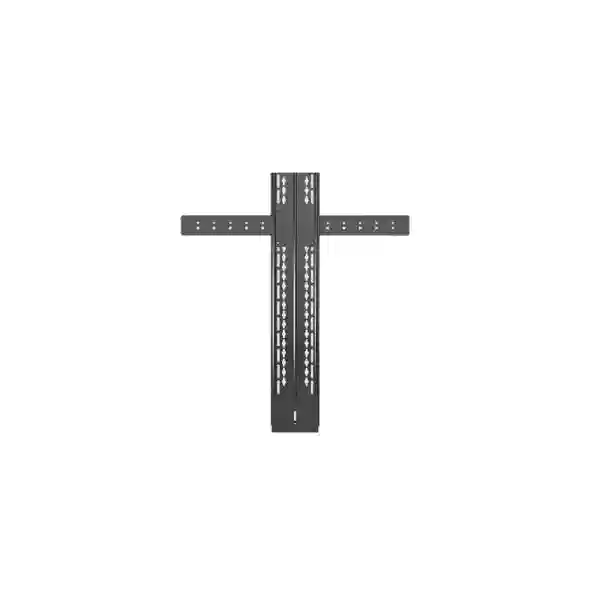
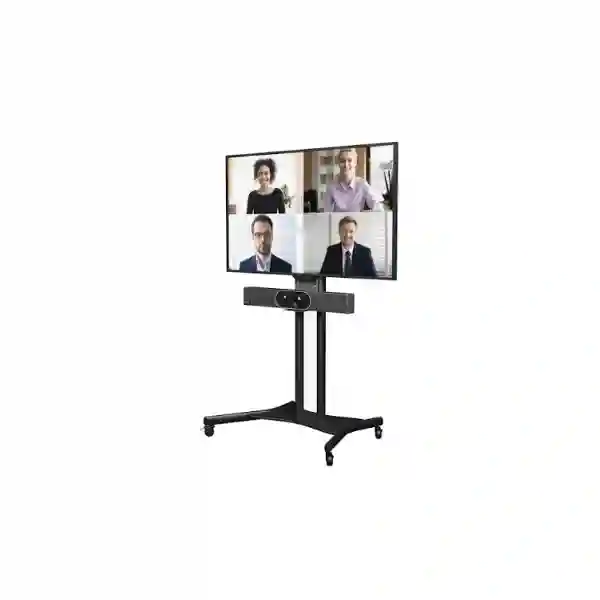
The Yealink VCS-TVMount2 is a purpose-built mounting kit for placing supported Yealink video conferencing endpoints and cameras above or below a television or professional display. For organisations designing meeting rooms in Tanzania, the mount offers a practical way to keep the camera aligned with the screen rather than relying on improvised shelves, furniture or unrelated brackets. That matters because camera height, display position, cable routing and mechanical compatibility all influence how professional and usable the finished room feels.
FourTeck Tanzania can help procurement teams verify the intended Yealink device, TV or display arrangement, VESA mounting environment and room layout before a quotation is prepared. The VCS-TVMount2 should be treated as part of a complete conferencing deployment rather than as an isolated metal accessory: the display, video endpoint, camera field of view, furniture, cabling and user experience all need to work together.
Official published dimensions for the VCS-TVMount2.
Net weight: 3.29 kg
Gross carton weight: 3.49 kg
Mounting approach: supported Yealink devices above or below a TV/display.
What it solves
It gives compatible Yealink video hardware a defined mounting position close to the display, helping meeting-room designers avoid ad-hoc placement that can create poor sight lines, uneven appearance or insecure positioning.
Where it fits
The bracket is intended for professional collaboration spaces using compatible Yealink room devices and supports VESA-based display mounting arrangements. Compatibility must still be checked against the exact Yealink model and display installation.
Why planning matters
Camera height affects remote eye contact, framing and room perception. The bracket should therefore be selected with the room geometry, screen height, table position and chosen Yealink endpoint in mind.
Yealink VCS-TVMount2 overview and verified specifications
Yealink describes the VCS-TVMount2 as a mounting accessory that can deploy supported devices below or above the TV. Official Yealink documentation lists physical dimensions of 704 mm wide by 802 mm deep by 148 mm high, a carton size of 829 × 108 × 182 mm, a net carton weight of 3.29 kg and a gross carton weight of 3.49 kg. Yealink also states that the VCS-TVMount2 supports VESA standards. These points are useful during project planning because they allow installers to consider space, screen placement and the mechanical relationship between the conferencing device and the display.
Current Yealink mount-compatibility guidance lists the VCS-TVMount2 as an optional accessory for several models, including MeetingBar A25/A25-BYOM, MeetingBar A40, MeetingBar A20 and MeetingBar A30, while it is not listed as supported for MeetingBar A50 or MeetingBar A10. For Yealink PTZ camera families, the same published compatibility table lists VCS-TVMount2 support for UVC86, UVC40/UVC40 E2, SmartVision 80, SmartVision 40 and UVC84, but not UVC34. Because product generations and mounting options evolve, the exact endpoint should always be confirmed against current Yealink guidance before ordering.
Older Yealink quick-start documentation also demonstrates installation with MeetingEye 600, MeetingEye 400, UVC40, MeetingBar A20 and MeetingBar A30 and recommends positioning the conferencing endpoint or camera approximately 1 to 1.2 metres from the floor in the illustrated installation. That recommendation is useful context, but a real meeting room may require different screen and camera positioning depending on furniture height, room depth and accessibility. The strongest procurement approach is therefore to identify the exact display, room dimensions and Yealink device before treating the bracket as confirmed compatible.
Key benefits for meeting-room deployments
Cleaner visual alignment
Mounting a compatible camera or video bar near the display creates a more deliberate visual centre for the room. Participants naturally look toward the screen, so keeping the camera close to that viewing area can make remote interaction feel less disconnected.
Above-or-below flexibility
Yealink explicitly supports deployment above or below the TV. This helps designers adapt to display height, furniture position and room architecture instead of forcing every installation into the same configuration.
Room-system consistency
Using the manufacturer’s intended mounting ecosystem can simplify planning around compatible Yealink devices and reduce the uncertainty that comes with generic third-party bracket combinations.
Support for mobile-cart scenarios
Yealink’s quick-start material includes an assembly method for TVs installed on mobile carts. This can be useful for flexible training rooms, shared meeting resources and spaces where the conferencing system must move between locations.
Compatibility should be confirmed before purchase
The VCS-TVMount2 is not a universal bracket for every Yealink collaboration product. Yealink’s current compatibility matrix distinguishes supported and unsupported MeetingBar and camera models, and newer products may use different accessories. A buyer should therefore provide the exact Yealink model, display model or at minimum the display VESA information, whether the camera is intended above or below the screen, and whether the display is wall-mounted or installed on a mobile cart.
This is especially important for organisations standardising multiple rooms. A bracket that is suitable for one generation of room system should not automatically be repeated across every room without checking the endpoint. FourTeck Tanzania can use those inputs to help structure a compatibility-focused quotation and identify any related display, conferencing, cabling or installation requirements.
Planning the complete Yealink room around the mount
A mounting kit influences more than physical appearance. In a small huddle room, a camera placed too high can produce an unnatural downward angle, while a camera mounted too low may be obstructed by laptops, furniture or people moving through the room. In a longer boardroom, the display may need to be raised for visibility, which can shift the preferred camera position. The best configuration balances screen viewing, camera framing and practical access to cables and service points.
Cable paths should be planned at the same time as the bracket. HDMI, USB, network and power connections can create strain or visible loops if the endpoint is positioned without considering connector direction and cable length. Where the display is on a cart, cables must also allow controlled movement without becoming a trip hazard or pulling on ports. In a fixed wall installation, conduit, trunking and service loops may need to be arranged before the screen is finally positioned.
For wider conferencing projects, buyers can review the FourTeck Tanzania technology services page for broader planning across video conferencing, displays, networking and supporting infrastructure. Customers sourcing several workplace technology categories can also use the FourTeck Tanzania business technology shop as a starting point for related product discussions.
Yealink VCS-TVMount2 Tanzania
Businesses in Tanzania searching for the Yealink VCS-TVMount2 are usually working on a wider meeting-room requirement rather than simply buying a bracket. The practical question is whether the mount is correct for the chosen Yealink endpoint, the TV or commercial display, the desired camera position and the room layout. Procurement teams should therefore identify the exact conferencing model first. Current Yealink compatibility information supports the VCS-TVMount2 with selected MeetingBar and camera families, but not every Yealink model. That distinction protects the project from avoidable rework and helps the quotation reflect the complete installation requirement rather than a single accessory line.
For Tanzanian offices, hotels, training centres, schools, healthcare organisations and project sites, the mount can be relevant where the room needs a neat video-collaboration endpoint directly associated with the display. The choice between mounting above or below the screen should consider table height, typical participant eye level, room depth, camera field of view and any furniture that could obstruct the image. The display’s own wall bracket or cart must also leave enough space for the VCS-TVMount2 arrangement and for installers to reach ports safely.
A useful Tanzania quotation request should include the Yealink model, number of rooms, display size and model if known, wall or cart installation, preferred camera position, site city and whether installation support is required. For multi-room projects, room dimensions and photos can help identify differences that should not be hidden by a single standard bill of materials. FourTeck Tanzania’s main site explains its broader approach to integrated workplace technology at FourTeck Tanzania, where conferencing is treated together with displays, networking and infrastructure.
The objective is not merely to attach a camera to a screen. It is to create a stable, maintainable meeting space where the camera sits in a sensible position, cables are controlled, the display remains serviceable and users can join calls without having to rearrange equipment. Buyers comparing generic brackets with the Yealink VCS-TVMount2 should give compatibility and installation quality more weight than headline price alone.
Yealink VCS-TVMount2 Dar es Salaam
In Dar es Salaam, the VCS-TVMount2 is relevant to corporate offices, hospitality properties, professional services firms, logistics businesses and regional headquarters that are standardising Microsoft Teams, Zoom or other video collaboration rooms around Yealink hardware. Dense office environments often have a mixture of small rooms, executive meeting spaces and larger boardrooms. The mounting decision should therefore be tied to each room profile instead of assuming that one screen height and one camera position will work everywhere.
For a compact meeting room, placing the compatible Yealink device below the display can keep it close to seated eye level, but the final position must not be blocked by a table edge or people walking through the camera view. In a larger boardroom, an above-display location may be more practical when the screen is low or when furniture would obstruct the lower position. The VCS-TVMount2 provides this above-or-below choice, but the installer still needs to confirm VESA compatibility, screen bracket clearances and the exact Yealink endpoint.
Dar es Salaam procurement teams should also think about maintenance access. A meeting room may be visually attractive on day one yet difficult to service if cables are trapped behind the screen or if the endpoint cannot be removed without dismounting the entire display. A better design leaves sensible service loops and documents which cables connect the camera, video bar, display, network and power. Where a TV is fitted to a mobile cart, Yealink’s installation material includes a cart-specific mounting approach, which can suit flexible spaces when the full cart assembly is mechanically appropriate.
When requesting a quotation for Dar es Salaam, provide the number of rooms, selected Yealink device, display model, intended mount position and any installation constraints. FourTeck Tanzania’s verified contact process accepts product-selection and compatibility enquiries, so the project can be scoped around the actual room rather than around an accessory name alone.
Yealink VCS-TVMount2 Mwanza
Organisations in Mwanza may use the Yealink VCS-TVMount2 when creating meeting rooms for branch coordination, education, healthcare administration, finance, mining-support operations, hospitality or regional management. In these environments the value of a well-designed room is consistency: employees should not need to improvise camera placement or move equipment every time a call begins. A manufacturer-aligned mounting kit can help maintain a fixed relationship between the display and a compatible Yealink endpoint.
Before procurement, buyers should check whether the selected Yealink model appears in the current mount-compatibility list. Supported examples in Yealink’s published guidance include selected MeetingBar systems and cameras such as UVC40/UVC40 E2, UVC86, UVC84 and SmartVision models, while some products use other mounting accessories. The display installation must also be examined. VESA support is an important part of the VCS-TVMount2 design, but a real screen may have recessed mounting points, cable covers, unusual back-panel geometry or an existing bracket that changes available clearance.
For Mwanza sites where specialist resources may be shared across multiple branches, documentation becomes especially useful. Record the display model, Yealink device, bracket orientation, cable type and any special spacers or cart components used in each room. If the system is later moved or a display is replaced, that information makes it easier to revalidate compatibility. It also helps procurement avoid ordering a bracket based only on a previous room that may have used a different Yealink generation.
A Mwanza quotation request should include photos or dimensions if the existing TV installation is already in place. This allows the conversation to address the full mounting environment, not only the VCS-TVMount2 itself. For organisations planning additional conferencing, network or display improvements, the same procurement exercise can identify related infrastructure needs and reduce repeated site changes.
Yealink VCS-TVMount2 Arusha
The Yealink VCS-TVMount2 can be a practical component for Arusha meeting rooms in tourism, hospitality, NGOs, education, professional services and administration. Many of these organisations collaborate with teams, partners or clients in different countries, so a conferencing room often needs to look professional while remaining simple enough for everyday staff to use. Fixed camera placement close to the display helps establish a predictable setup and reduces dependence on temporary stands or furniture.
Room appearance is only one factor. Camera position affects how remote participants perceive eye contact and framing. A camera located far above the screen may produce a high-angle view, while a very low camera can be blocked by table objects. Yealink’s VCS-TVMount2 supports installation above or below the TV, letting the designer choose the better orientation for the room. The final height should reflect screen placement, seating distance and the selected endpoint rather than copying an installation from a different space.
Arusha buyers should also consider whether the display is fixed or mobile. Training areas and shared conference facilities may use carts because the equipment must serve more than one room. Yealink’s quick-start documentation includes a method applicable to TVs with mobile carts, but the cart, display and endpoint combination must still be mechanically checked. Cable management is particularly important in mobile configurations because movement can pull connectors or create loops that catch on furniture.
For quotation planning, list the exact Yealink model, room type, display details, whether the camera should sit above or below the screen, and whether installation is fixed or cart-based. If several rooms are involved, group them by room size and furniture layout. That approach helps avoid treating every Arusha meeting space as identical and supports a more maintainable standard across the organisation.
Yealink VCS-TVMount2 Dodoma
In Dodoma, organisations considering the Yealink VCS-TVMount2 may be planning government, education, corporate, NGO or multi-branch collaboration rooms. Procurement is often easier when each component has a clear role. The display presents remote participants and shared content; the Yealink endpoint captures the room; and the mounting system positions the endpoint so the visual relationship remains consistent. The VCS-TVMount2 helps with that third requirement for supported Yealink products.
Because meeting-room deployments may remain in service for years, it is useful to document compatibility at the time of purchase. Yealink’s current support information lists different mounting options across product generations, so teams should not assume that a bracket ordered for an A20 or A30 automatically fits a newer or different MeetingBar. The same principle applies to cameras. UVC40 and several other models are shown as compatible, while UVC34 is not. These model-level distinctions should appear in procurement records to prevent future confusion.
Dodoma projects should also consider the display’s mounting structure. Wall-mounted screens may use a separate VESA wall bracket whose rails, arms or plate occupy space behind the television. The VCS-TVMount2 assembly must coexist with that hardware without forcing cables into sharp bends or compromising the screen mount. On carts, the vertical rails and handle position may also influence clearance. A site survey or clear rear-view photographs can therefore be valuable before confirming an installation.
When requesting a Dodoma quotation, include room count, Yealink endpoint, TV/display model, screen mounting method and required installation support. This information helps distinguish a straightforward accessory supply from a complete conferencing-room deployment. It also creates a better basis for discussing related networking, power, cabling and display needs if the room is being built or upgraded at the same time.
Yealink VCS-TVMount2 UAE
For organisations operating between Tanzania and the UAE, the Yealink VCS-TVMount2 can support room standardisation when compatible Yealink systems are deployed in both markets. Multinational teams often want the same meeting-room experience across branches so users do not have to relearn controls or adapt to inconsistent camera placement. A repeatable mounting approach can contribute to that consistency, but standardisation should be based on verified device and display combinations rather than a single generic room drawing.
The UAE market includes offices with many different display sizes, architectural finishes and room-control expectations. Some spaces use wall-mounted commercial displays; others use mobile carts for flexible training and project areas. Because the VCS-TVMount2 supports VESA-based installation and above-or-below placement, it can fit a range of supported room concepts. However, the physical space behind the display, access to connectors and the selected Yealink model remain decisive.
A company procuring for both the UAE and Tanzania should create a room-standard document that records exact models rather than simply naming a brand. That document can include the display, Yealink endpoint, mount, cable lengths, network requirement and room profile. It reduces the risk that a later project substitutes a visually similar endpoint that uses a different bracket. It also supports cleaner asset management and makes remote support easier when staff can refer to a known room configuration.
For regional infrastructure planning beyond Tanzania, buyers can also reference the wider FourTeck Africa technology portfolio. The practical procurement goal is to confirm compatibility first, then align room layout and installation details before finalising quantities.
Yealink VCS-TVMount2 Uganda
Ugandan organisations deploying Yealink conferencing equipment can use the VCS-TVMount2 as part of a structured room installation when the selected endpoint is listed as compatible. The accessory is particularly relevant when the organisation wants the video device positioned directly above or below the display instead of on furniture. This can be useful in boardrooms, branch offices, education spaces and shared meeting rooms where a clean, fixed setup reduces daily handling of equipment.
Cross-border organisations with Tanzania and Uganda operations should avoid assuming that every existing room uses the same Yealink generation. One branch might use UVC40 while another uses a newer MeetingBar or SmartVision camera. Yealink’s compatibility matrix changes the answer depending on the model, so the procurement list should capture that detail room by room. Checking the display’s VESA arrangement is equally important because the bracket must integrate with the physical television or monitor installation.
A robust Uganda deployment plan should also document whether the screen is wall-mounted or placed on a cart, the desired camera position, and how network and power cables will reach the endpoint. Where rooms need to be moved between locations, a cart solution may be appropriate, but cable strain, cart stability and safe routing should be designed deliberately. Fixed rooms may instead prioritise hidden cabling and straightforward service access.
Organisations evaluating related communication and IT systems in Uganda can review FourTeck Uganda for regional solution context. When requesting the VCS-TVMount2, provide the precise Yealink endpoint and display details so compatibility can be considered before a quotation is finalised.
Yealink VCS-TVMount2 Kampala
Kampala businesses often operate a mix of executive rooms, huddle rooms, client-facing meeting spaces and training facilities. The Yealink VCS-TVMount2 can be useful where supported Yealink video equipment needs to remain visually aligned with the main display. Rather than placing a video bar on a cabinet or adding a shelf after the room has been completed, the mounting kit allows the endpoint to be integrated into the display installation from the beginning.
The design process should begin with user behaviour. If participants sit close to the screen, a low camera position may be natural, but it must not be hidden behind laptops. If a large display is mounted higher for visibility, positioning the camera below it may prevent an excessively elevated view. In some rooms, above-display mounting will create better clearance. The VCS-TVMount2’s ability to support both orientations gives the installer options, although the endpoint’s own camera characteristics and Yealink guidance still determine what works best.
Kampala procurement teams should request a compatibility check whenever a display or Yealink device differs from a previous installation. Even small changes can matter: rear connection positions, wall-bracket depth, screen size and the physical shape of a video bar may affect installation. Standardisation should therefore be built around a documented combination of parts rather than around a broad label such as “Yealink room.”
For a useful quotation, provide room count, endpoint model, display information and whether the system will be installed on a wall or mobile cart. Also note whether the existing room already has cabling and power at the display location. These details help separate what is known from what still needs site verification and make the procurement process more precise.
Yealink VCS-TVMount2 Arua
In Arua, the VCS-TVMount2 can support organisations that need a stable video-conferencing setup for branch coordination, development programmes, education, healthcare administration or distributed business operations. Remote collaboration becomes more dependable when the room is arranged as a permanent tool rather than assembled differently for each call. Mounting a compatible Yealink endpoint close to the display helps preserve a consistent viewing and camera position for users.
The procurement question should not stop at “Does it fit a TV?” Yealink states that VCS-TVMount2 supports VESA standards, but the complete installation also depends on the display’s mounting points, its existing bracket, the chosen Yealink device and whether the display is fixed or mobile. Current Yealink compatibility information provides a model-by-model reference, and buyers should use that information rather than assuming all Yealink cameras and MeetingBars share the same accessory.
For Arua projects, remote support and future replacement planning may be important. Keep installation photographs, device serial references and a simple parts list showing the VCS-TVMount2 and associated endpoint. If a screen is replaced later, the new display’s rear geometry and VESA mounting pattern can be reviewed against the existing arrangement before installers arrive. This reduces the chance of discovering a mechanical conflict during a scheduled room upgrade.
A quotation request should include the exact endpoint, screen model if known, room type, mounting preference and destination. If the room uses a cart, state that clearly because the assembly method and cable-routing considerations differ from a fixed wall installation. The objective is a conferencing environment that remains stable, serviceable and easy for local staff to use without repeated physical adjustment.
Yealink VCS-TVMount2 Mbarara
Businesses and institutions in Mbarara can use the Yealink VCS-TVMount2 to support a more organised meeting-room installation where compatible Yealink video hardware is part of the room standard. The mount is useful for keeping the video endpoint in a deliberate position relative to the display, which can help with visual consistency, camera alignment and cable planning. This is preferable to relying on temporary furniture that may move between meetings.
Room geometry should guide the mounting position. A long conference table may require a different camera angle from a small four-person room. The display may be installed at a height chosen for shared content, while the camera ideally remains close to participant eye level. The VCS-TVMount2 allows above- or below-screen mounting for supported devices, giving designers more flexibility to balance these requirements. The final orientation should be decided after considering sight lines and the endpoint’s framing capabilities.
Mbarara buyers should also consider how the room will be maintained. Ports behind a display need enough access for troubleshooting, and cables should not be pulled tight when the endpoint is attached to the mount. For mobile-cart installations, use flexible cable paths that tolerate movement and keep excess cable controlled. For wall-mounted displays, plan conduit or trunking so the finished installation remains neat without making future service unnecessarily difficult.
When seeking a quotation, provide the model of the Yealink endpoint, the display, wall or cart installation type and the number of identical rooms. If the rooms differ, describe each profile separately. That information allows a compatibility-focused response and helps ensure the mount is considered as one part of the complete meeting-room design rather than an isolated accessory.
Yealink VCS-TVMount2 Gulu
For Gulu organisations using video meetings to connect with headquarters, field teams, partners or remote specialists, the physical setup of the room can have a large effect on day-to-day usability. The Yealink VCS-TVMount2 gives supported Yealink devices a defined location above or below the display, reducing the likelihood that the camera will be moved, blocked or left at an inconsistent angle between calls.
Compatibility must remain the first filter. The VCS-TVMount2 supports VESA-based arrangements and is listed by Yealink for a specific set of MeetingBar and camera products. If the organisation is buying a new endpoint at the same time, it is sensible to confirm the correct mount directly from the current Yealink compatibility table. If the endpoint already exists, record its exact model number rather than using a general description such as “Yealink camera.”
A Gulu deployment may also benefit from a standard installation checklist: confirm display mounting security, choose above or below placement, check camera view from typical seats, verify cable reach, secure loose cables, test the full conferencing system and photograph the final arrangement. This approach helps repeat successful rooms and makes troubleshooting easier if support is later provided remotely. Where the system is installed on a movable display cart, include a movement test to make sure cables do not tighten or drag.
For procurement, specify quantity, Yealink model, display model, site destination and whether installation assistance is required. A properly scoped request makes it easier to distinguish accessory supply from a complete conferencing-room project and ensures that the mount is evaluated together with the physical and technical environment in which it will operate.
Yealink VCS-TVMount2 Kenya
Kenyan companies with offices in Nairobi, Mombasa or other business centres may use the Yealink VCS-TVMount2 when standardising supported Yealink meeting-room systems across branches. A consistent physical design can be particularly valuable for regional organisations whose staff travel between sites. When the display, endpoint and mounting position are familiar, users can focus on the meeting instead of adjusting equipment or wondering where the camera should sit.
Standardisation should remain evidence-based. Yealink’s compatibility guidance shows that some MeetingBars and cameras support VCS-TVMount2 while others rely on different brackets. Before rolling out multiple rooms, create one validated room type and record each component. That baseline can then be adapted for different display sizes or room geometries. If a branch uses a different screen mounting system, check rear clearance and VESA arrangements before copying the same bracket specification.
Kenya deployments may include both fixed boardrooms and flexible training environments. The VCS-TVMount2’s documented use above or below a TV and Yealink’s cart-oriented assembly guidance provide options for these different spaces. In mobile rooms, cable management and cart stability become especially important. In fixed rooms, hidden cabling, service access and visual alignment may take priority. Neither environment should rely on the bracket alone to solve every installation requirement.
For Kenya-specific IT and collaboration planning, organisations can review FourTeck Kenya. For a VCS-TVMount2 quotation, provide the endpoint model, display details, room quantity and desired installation approach so the accessory can be evaluated within the complete conferencing setup.
Yealink VCS-TVMount2 Kuwait
Organisations in Kuwait considering the Yealink VCS-TVMount2 are often looking for a clean meeting-room finish that integrates the video endpoint with the display. Corporate offices, project rooms and training spaces frequently use large wall-mounted screens, and the camera position needs to look intentional while still supporting natural framing. The VCS-TVMount2 provides a manufacturer-defined way to position supported Yealink equipment above or below the television or display.
The correct orientation depends on the room. A low-mounted display may favour an above-screen camera position, while a higher display may make below-screen mounting more natural. The endpoint should remain close enough to the visual focus of the display that remote participants receive a convincing line of sight. At the same time, installers must preserve access to display ports, ventilation areas and any wall-mount release mechanisms.
Kuwait procurement teams managing multiple sites should define the exact Yealink endpoint in the room standard because compatibility varies. A bracket that works with UVC40 or MeetingBar A20/A30 should not be assumed to fit every Yealink product. Newer room devices can have their own mounting systems. The display’s VESA pattern and existing wall bracket should also be documented, especially in rooms with architectural panels or recessed screens where clearances are limited.
A quotation request should include device model, screen model, wall or cart installation, quantity and any room-design constraints. If the room is part of a regional standard covering Tanzania and other markets, use the same documentation format for each country so procurement can compare like with like and maintain compatibility records throughout the lifecycle of the conferencing estate.
Yealink VCS-TVMount2 Ghana
In Ghana, the Yealink VCS-TVMount2 can serve as a practical accessory for organisations building fixed or flexible conferencing rooms around compatible Yealink systems. The bracket supports a more integrated installation by keeping the camera or video endpoint attached near the display, which is often preferable to putting valuable meeting hardware on a movable table or cabinet. It can also make room layouts more repeatable across branches.
Buyers should start by matching the mount to the endpoint. Yealink publishes compatibility information for its mounting accessories, and the VCS-TVMount2 is not listed for every MeetingBar or camera. This means procurement teams should include the exact model number in every request. When an organisation is replacing an older Yealink device, the existing bracket should be rechecked rather than automatically reused with the new model.
Ghana projects should also consider the physical display installation. VESA compatibility is important, but the screen’s rear shape, wall bracket, power connection and signal ports can affect practical assembly. Rooms with decorative wall panels or shallow recesses may have less working space behind the display than a standard open-wall installation. Mobile carts create a different set of concerns, including cable movement, wheel clearance and maintaining stability while the display is repositioned.
A strong Ghana quotation request includes room quantity, Yealink endpoint, display make and model if available, installation type, desired camera position and required project support. If the room is being upgraded as part of a broader collaboration project, include any microphones, touch panels, networking or display requirements so the mount is assessed in the context of the full user experience.
Yealink VCS-TVMount2 Nigeria
Nigerian enterprises with distributed offices may use the Yealink VCS-TVMount2 to help standardise supported room systems across executive suites, project rooms, branch offices and customer-facing meeting spaces. Physical consistency matters when IT teams support rooms remotely because a known display-and-camera arrangement simplifies troubleshooting and documentation. The VCS-TVMount2 can form part of that standard when the exact Yealink endpoint is compatible.
For larger rollouts, procurement should separate the concept of a standard from the assumption that every room is identical. Screen size, furniture depth, ceiling height and wall construction can vary between Lagos, Abuja, Port Harcourt and other sites. The bracket allows supported devices to be positioned above or below the display, so each room can use the more practical orientation while retaining the same core accessory where appropriate.
Mechanical and cable planning should be documented before volume orders are placed. Confirm the display mount, verify that the VCS-TVMount2 can coexist with it, and check that cable lengths are adequate without leaving excessive loops. For cart installations, test movement and stability. For wall installations, preserve service access. If the organisation is migrating between Yealink generations, use Yealink’s current compatibility list to validate every endpoint family instead of relying only on historical room bills of material.
A Nigeria quotation request should state quantity, Yealink model, display details, city or destination and whether supply only or installation-related guidance is required. Clear information makes it easier to prepare an accurate commercial discussion without making unsupported assumptions about stock, lead time or site conditions.
Yealink VCS-TVMount2 Seychelles
Seychelles organisations in hospitality, government, professional services and tourism may use the Yealink VCS-TVMount2 to create tidy conferencing installations in rooms where appearance is particularly important. Guest-facing or executive spaces often benefit from keeping the video device visually integrated with the display rather than placing technical equipment on furniture. The mount’s ability to support compatible Yealink devices above or below a screen gives designers useful flexibility.
Because island deployments can make replacement visits or last-minute hardware changes inconvenient, compatibility verification before shipment is especially valuable. The exact Yealink endpoint, display model and installation type should be documented. Buyers should check current Yealink mount guidance rather than assuming that accessories are interchangeable between generations. A bracket chosen for a MeetingBar A20 or A30, for example, should not be automatically assigned to an unrelated Yealink model without confirmation.
Environmental and room-design considerations also matter. Conferencing rooms in hotels and resorts may use custom cabinetry or decorative wall treatments that leave limited space behind the display. The mounting arrangement should be reviewed for clearance, ventilation, connector access and future service. If a screen is placed on a cart for multi-purpose event rooms, cable movement and safe storage positions should be planned alongside the bracket installation.
For a Seychelles quotation, provide the endpoint model, screen details, quantity, final destination and installation environment. Photographs of an existing room can be useful when retrofitting. The aim is to confirm the accessory within the complete system so the finished meeting room looks organised, remains maintainable and delivers a predictable user experience.
Buying and quotation guidance
A productive quotation request for Yealink VCS-TVMount2 should include more than the product name. State the exact Yealink endpoint, number of units, display model if known, screen size, whether the display is wall-mounted or cart-mounted, desired camera position, city or project destination and whether the room is new or existing. If an existing display is already installed, rear-view photographs can help identify potential conflicts with the current wall bracket or cable arrangement.
Exact Yealink model and, if available, current room-system generation.
TV or commercial display make, model, size and existing wall or cart bracket.
Room dimensions, table position, typical seating and intended screen height.
Supply only, compatibility check, installation planning or wider conferencing deployment.
Frequently asked questions
What is the Yealink VCS-TVMount2 used for?
It is a mounting accessory for deploying supported Yealink video conferencing devices above or below a TV or display. It is intended to help integrate the endpoint with the screen rather than leaving the camera or video bar on separate furniture.
Does VCS-TVMount2 support VESA mounting?
Yes. Yealink’s current mount compatibility documentation states that VCS-TVMount2 supports VESA standards. The specific display, wall bracket or cart still needs to be checked for real-world mechanical fit and clearance.
Can the device be mounted above or below the TV?
Yes. Yealink describes the VCS-TVMount2 as supporting deployment of compatible devices below or above the TV. The best orientation depends on screen height, room layout, furniture and camera framing.
Which Yealink products are compatible?
Current Yealink compatibility guidance lists VCS-TVMount2 support for selected MeetingBar and camera models, including MeetingBar A25/A25-BYOM, A40, A20 and A30 as optional, plus camera families such as UVC86, UVC40/UVC40 E2, SmartVision 80, SmartVision 40 and UVC84. It is not listed for every product, so the exact endpoint should be checked before ordering.
Can VCS-TVMount2 be used with a mobile TV cart?
Yealink’s quick-start documentation includes an assembly method specifically described for TVs with mobile carts. The cart, screen and endpoint combination should still be checked for stability, clearance and cable movement.
What are the VCS-TVMount2 dimensions?
Yealink publishes dimensions of 704 × 802 × 148 mm. The listed net carton weight is 3.29 kg and gross carton weight is 3.49 kg.
What information should I send for a Tanzania quotation?
Send the Yealink endpoint model, quantity, display make and model if known, whether the screen is wall- or cart-mounted, preferred camera position, site city and whether installation or wider room-system support is required.
Decision recap: is the VCS-TVMount2 right for your room?
Choose the VCS-TVMount2 when your exact Yealink endpoint is listed as compatible, you want the video device positioned above or below the display, and the TV or cart installation can accommodate the VESA-based mounting arrangement. Do not select it only because another Yealink room used the same bracket. Confirm the endpoint generation and display environment first.
The best result comes from treating the bracket as part of a room system: display position, camera view, cabling, network connection and service access should be considered together. This produces a cleaner meeting space and reduces installation surprises.
Talk to FourTeck Tanzania about your Yealink room
For product-selection, compatibility and quotation enquiries, provide the details of your Yealink endpoint and display. FourTeck Tanzania can use the current room requirement to guide the commercial discussion without assuming unsupported compatibility, stock or delivery commitments.
For a complete room request, include the display, video endpoint, room dimensions, network connection, number of rooms and any installation constraints. A clear requirement produces a more useful quotation than a model number alone.




Reviews
There are no reviews yet.