
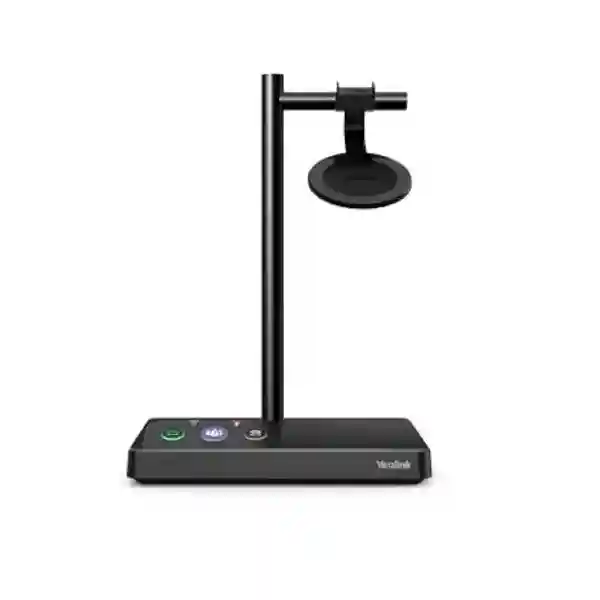
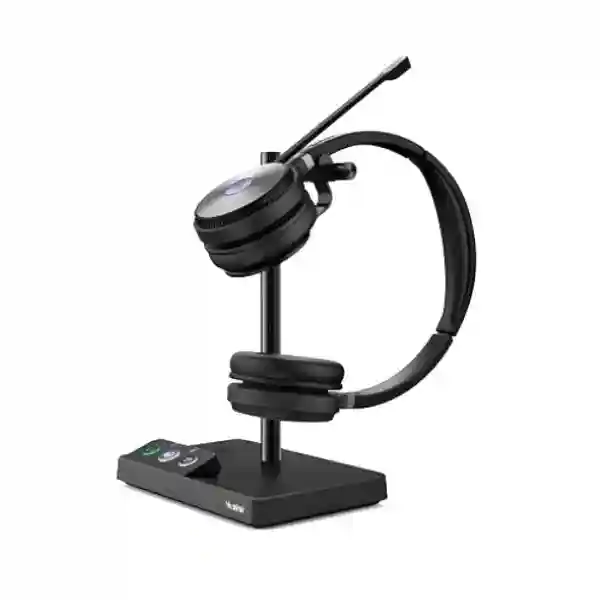
YEALINK DECT HEADSET ACCESSORY • HYBRID WORK
Yealink WH62 WH66 Portable Accessory Kit
The Yealink Portable Accessory Kit for WH62/WH66 is built for organizations that want to use compatible Yealink DECT headsets more flexibly without repeatedly carrying the full desktop base. Yealink positions the kit as a plug-and-play, lightweight option for hybrid workers. The commonly published kit contents are the WDD60 DECT dongle, a charging cable for WH62/WH66 and a carry bag. For businesses in Tanzania and multi-country operations, the practical buying question is simple: do you already have a compatible WH62 or WH66 headset and need a more portable PC-use setup? If yes, this accessory can be a focused addition to the existing headset investment.
Confirm the exact headset model and intended PC calling workflow before ordering. The kit is an accessory, not a complete headset.
WDD60 DECT dongle
The portable workflow centers on Yealink’s WDD60 dongle, allowing compatible WH-series headsets to be used with a PC without bringing the normal desk base into every location.
Charging cable
A dedicated charging cable supports a cleaner travel or home-office setup so users are not dependent on the original base for charging logistics.
Carry bag
The included bag helps keep the accessory components together when users move between office, home, hotel, branch or project locations.
What the Yealink WH62 WH66 Portable Accessory Kit solves
A DECT headset is normally chosen because it gives business users dependable wireless calling and freedom to move around a workspace. The inconvenience appears when the same employee works from more than one desk or alternates between company premises and remote locations. Carrying a full headset base, power supply and desk cables can turn a high-quality wireless headset into a cumbersome travel kit. Yealink created this portable accessory path to reduce that friction. The user can leave the larger base in its normal office position and take the headset together with the lightweight accessory components required for a mobile PC-oriented setup.
This is particularly relevant for sales managers, consultants, project coordinators, IT staff, finance leaders, executives and other employees whose work week is divided across multiple places. It can also help organizations standardize on one headset family while giving selected employees a more portable workflow. The accessory does not change the basic requirement to confirm compatibility, headset variant and calling platform. It simply removes part of the physical setup burden when the supported headset needs to travel.
Verified buying facts
| Official product positioning | Portable accessory kit for Yealink WH62/WH66 DECT headset users, intended to support hybrid-work portability. |
| Core kit components commonly listed | WDD60 DECT dongle, charging cable for WH62/WH66 and carry bag. |
| Compatible family | WH62 and WH66. Confirm the exact installed headset and desired connection method before purchase. |
| Use model | Useful when a compatible headset needs to move between office and remote PC calling locations without transporting the full normal base setup. |
Who should consider this accessory?
Hybrid employees
Users who work several days in the office and other days from home can reduce the number of bulky components they move between locations.
Multi-site managers
Managers moving between branches can keep their familiar headset while using a compact accessory set with supported PC calling environments.
Project and field coordinators
Staff who spend time at temporary project offices can benefit from a setup that is easier to pack, carry and reconnect.
IT standardization teams
Organizations already invested in WH62 or WH66 can add portability for selected roles without immediately changing the complete headset estate.
Compatibility and procurement guidance
Before ordering, identify whether the employee has a WH62 or WH66 and whether the intended second location is primarily a PC calling environment. Do not assume that every WH-series accessory works with every headset generation. For larger projects, capture the headset model, Teams or UC requirement where relevant, connected computer type, USB availability, quantity and preferred deployment locations. This simple checklist reduces the risk of ordering an accessory that solves the wrong problem.
For wider communication planning, FourTeck Tanzania also covers business IT and telecom solutions in Tanzania, the FourTeck Tanzania technology shop and deployment and support services. Companies coordinating East African branches can also review the regional FourTeck resources for Kenya business technology requirements and Uganda IT and communications projects.
Yealink WH62 WH66 Portable Accessory Kit Tanzania
For organizations in Tanzania, the most useful way to evaluate the Yealink WH62 WH66 Portable Accessory Kit is to start from the employee’s real working pattern. Many companies now have staff who divide their time between a main office, client premises, home, branch offices and temporary workspaces. A conventional DECT headset remains attractive because it supports professional calling and workspace mobility, but moving the full desktop base between sites can be inconvenient. This accessory kit addresses that practical issue for compatible WH62 and WH66 users by providing the WDD60 dongle, charging cable and carry bag used for a more portable arrangement.
Tanzania buyers should confirm the installed headset model before purchase. If the organization already owns WH62 or WH66 units, identify which users truly need a mobile setup rather than automatically purchasing the accessory for every seat. Receptionists or permanently desk-based agents may be better served by keeping the full base in one location, while managers, sales employees, consultants and hybrid workers are more likely to benefit from portability. This role-based approach controls accessory spending while improving user experience for the people who move most often.
Procurement teams should also document the computer connection environment. The WDD60 is central to the portable workflow, so the availability of an appropriate USB connection and the intended collaboration or softphone workflow should be checked. Where a company uses standardized laptops, docks or managed desktops, IT can test one pilot setup before a broader rollout. That validation can include call control behavior, audio device selection, charging routines, user sign-in procedures and the way the accessory is stored when not in use.
FourTeck can use this information to prepare a more accurate quotation discussion. Useful details include quantity, existing headset model, user roles, delivery city and whether the request is part of a larger Yealink headset or IP telephony project. The goal is not to overcomplicate a small accessory purchase, but to make sure the accessory solves the mobility requirement the buyer actually has.
Yealink WH62 WH66 Portable Accessory Kit Dar es Salaam
Dar es Salaam organizations often operate fast-moving office environments where staff travel between headquarters, customer sites, meeting locations and home offices. For a WH62 or WH66 user, the Portable Accessory Kit can reduce the need to disconnect and transport the full desk base whenever work moves to another PC-based location. That makes the accessory relevant to commercial teams, consulting firms, technology companies, logistics businesses, professional services, finance departments and regional management functions with frequent location changes.
A good Dar es Salaam procurement plan begins with a simple distinction between fixed users and mobile users. Fixed agents who work from one desk every day normally gain little from a travel kit, while account managers, directors and hybrid staff may gain substantially from keeping the office base installed and taking only the headset plus the compact portable components. That reduces setup time and also lowers the chance that a user leaves a necessary desk cable behind at the alternate location.
For companies operating shared desks or flexible seating, IT teams can define a consistent process for portable headset use. Users should know how the WDD60 is connected, how the operating system selects the correct audio device, where the charging cable is stored and how the carry bag is labeled. If several identical kits are deployed, asset tagging or user assignment can help prevent mixing parts across departments. This is especially useful where hot-desking is combined with managed laptops and collaboration platforms.
When requesting a Dar es Salaam quotation, provide the required number of kits and confirm whether the request is accessory-only or part of a wider headset refresh. If additional headsets are required, separately specify mono or dual preferences, Teams or UC variants where applicable and the principal calling devices. This helps keep the portable accessory decision connected to the broader communication environment without making unsupported assumptions about availability or compatibility.
Yealink WH62 WH66 Portable Accessory Kit Mwanza
Mwanza businesses considering the Yealink WH62 WH66 Portable Accessory Kit may be dealing with a different workflow from a large head-office environment. Branch managers, service coordinators and employees supporting multiple locations often need to carry working equipment between offices rather than remain at one fixed desk. For compatible WH62 and WH66 owners, the kit offers a focused way to make the headset easier to transport while leaving the normal base installed at the primary workspace.
The decision should be driven by usage frequency. If an employee occasionally works away from the main office, a shared portable accessory kit may be enough when company policy permits shared accessories and hygiene requirements are handled properly. Where employees travel frequently, individually assigned kits are simpler to manage. The carry bag helps keep the dongle and charging cable together, but organizations should still define a storage and sign-out routine because small accessories are easy to misplace.
Mwanza buyers should also consider how the remote location is set up. A laptop-only environment differs from a full desk-phone station. The portable accessory is most compelling when the supported headset needs to connect to a computer and the original base should remain at the main desk. Before a quantity purchase, test the intended workstation, operating system and calling application. Confirm that users understand audio-device selection and that the available USB connection is suitable for the deployment plan.
For branch procurement, include location, quantity, existing headset model and target use case in the quotation request. If the accessory forms part of a new office setup, provide the wider communication requirement as well, such as IP phones, softphone users, meeting tools or network readiness. That context helps separate a simple accessory order from a larger telephony deployment and supports more accurate product matching.
Yealink WH62 WH66 Portable Accessory Kit Arusha
In Arusha, the Portable Accessory Kit can suit organizations with employees who divide their week across offices, hospitality properties, project sites, training locations and remote work. The value is not that the accessory turns the WH62 or WH66 into a different headset; instead, it gives compatible users a lighter way to take the headset into another PC-based calling environment. The office base can remain cabled and organized at the primary desk, which reduces repeated setup and teardown.
Hospitality groups, tour-related businesses, NGOs, professional services and regional offices may have managers who spend time in several locations. For these users, maintaining a familiar headset can be more convenient than relying on whatever audio device happens to be available at the temporary workspace. The accessory kit makes that continuity easier, provided the destination computer supports the intended connection and the user carries the necessary components.
Arusha IT teams should plan the accessory like any small mobile asset. Label the carry bag, record assignment, keep the charging cable with the dongle and document the basic connection steps. If the business has several WH62 or WH66 variants, confirm that the portable kit is matched to the correct user group and avoid assuming compatibility with unrelated headset families. A short pilot with one employee can reveal practical issues such as port access, laptop docking behavior or software audio defaults.
For a quotation, state whether the requirement supports existing headsets or accompanies new WH62/WH66 procurement. Also include the number of travelers, typical work locations and whether the organization wants spare kits for shared contingency use. This gives the sales discussion a clear operational purpose and avoids turning an accessory purchase into an unstructured list of parts.
Yealink WH62 WH66 Portable Accessory Kit Dodoma
Dodoma organizations often need communication tools that work consistently across administrative offices, project teams and multi-site operations. Where WH62 or WH66 headsets are already in service, the Portable Accessory Kit can be useful for staff who need to take the headset to another computer-based workspace while leaving the standard base in place. The resulting travel set is smaller and easier to manage than repeatedly dismantling the primary desk configuration.
For procurement teams, compatibility verification should come before quantity. Record the exact headset model and identify the employees whose job genuinely requires movement. Permanent desk users may not need a portable kit, while program managers, technical leads, consultants and employees who alternate between offices may benefit. This segmentation helps build a defensible bill of materials and reduces unnecessary accessory purchases.
IT administrators can improve the rollout by preparing a short user guide that covers connection of the WDD60, selection of the headset in the computer’s audio settings, charging expectations and storage after use. The guide should be written for the organization’s actual software environment rather than copied from a generic checklist. A small controlled test is especially valuable when laptops use docking stations, restricted USB policies or centrally managed collaboration clients.
When Dodoma buyers request pricing, they can include quantity, current WH62/WH66 deployment size, user category and whether the kits are assigned permanently or held as shared equipment. If the need is connected to a broader branch telephony or hybrid-work project, include that context so related headsets, IP phones and communication infrastructure can be considered separately without confusing them with the accessory itself.
Yealink WH62 WH66 Portable Accessory Kit UAE
For UAE organizations, hybrid schedules and multi-office work are common reasons to investigate the Yealink WH62 WH66 Portable Accessory Kit. Employees may move between a Dubai headquarters, Abu Dhabi branch, client office, home workspace or temporary project location. If they already rely on a compatible WH62 or WH66 headset, taking the complete base setup each time can be inconvenient. The portable kit supports a lighter workflow by centering the remote setup around the WDD60 dongle, charging cable and carry bag.
A UAE procurement team should first determine whether the worker primarily needs computer calling at the secondary location. If the user expects to reproduce every desk-phone connection available at the main office, the portable accessory may not by itself meet that expectation. Clear requirements prevent confusion between “portable headset use” and “full replication of the desk workstation.” Identify PC type, available ports, software calling platform, travel frequency and the headset model already owned.
For companies with regional operations, standardization can simplify support. A defined WH62/WH66 user profile with optional portable kits for mobile staff can be easier to manage than a different headset for every branch. However, standardization should not override role needs. Some employees may be better suited to Bluetooth-first headsets, wired models or newer hybrid products. The portable kit is strongest when the organization is intentionally extending the useful workflow of its existing compatible DECT headsets.
Quotation requests should include quantity and the city or project destination, but should avoid assuming stock or immediate delivery until confirmed. Where the buyer is coordinating UAE and East African locations, it is also useful to keep an accessory inventory by site and record which kits are assigned to traveling users. This reduces lost dongles and keeps replacement planning more predictable.
Yealink WH62 WH66 Portable Accessory Kit Uganda
Uganda buyers can view the Yealink WH62 WH66 Portable Accessory Kit as a mobility add-on for existing compatible headset users rather than as a complete communications product. Its strongest use case appears when an employee already values the WH62 or WH66 at the main desk but wants an easier way to keep using the headset from another computer location. The WDD60 dongle and charging cable remove some of the dependence on carrying the full base, while the carry bag keeps the small components together.
Organizations with offices in Kampala plus regional branches can use role-based allocation. Head-office support agents who rarely leave their assigned desk may not need the kit. Managers, trainers, auditors, sales staff and implementation teams who travel between sites are stronger candidates. That difference matters because accessories are easy to over-order when procurement is based on total headset count rather than actual mobility requirements.
Before deployment, IT teams should validate the remote PC environment and explain the connection process to users. The headset should appear as the intended audio device, and the organization’s calling application should be tested with the dongle-based workflow. Where USB controls are restricted by endpoint security policies, administrators may need to approve the device according to internal rules. These steps are operational guidance rather than a claim that every software platform or policy environment behaves identically.
For purchasing, provide the current headset model, number of traveling users and main destinations. Companies coordinating Uganda and Tanzania offices can also standardize asset labels and replacement procedures across both countries. A consistent process for storing the dongle, cable and bag can save more support time than the size of the accessory might suggest.
Yealink WH62 WH66 Portable Accessory Kit Kampala
Kampala is a natural market for portable business communications because many employees divide time between offices, customer locations, home workspaces and branch meetings. For companies already using Yealink WH62 or WH66 headsets, the Portable Accessory Kit can make that movement simpler. Instead of disconnecting the full desktop base for every off-site day, the user can keep the base at the regular workstation and take a smaller set built around the WDD60 dongle and charging cable.
The kit should be assigned to users based on workflow rather than seniority. A mobile technical consultant may benefit more than an executive who works exclusively from one office. Likewise, a training coordinator who regularly connects from temporary rooms may have a stronger need than a fixed contact-center agent. This practical segmentation helps procurement teams explain why the accessory is being purchased and makes future replacement decisions easier.
Kampala IT teams can improve support by including the portable kit in onboarding for mobile users. Show employees where the dongle connects, how to select the headset in their calling software, how to charge it away from the base and how to keep the parts together after travel. If the company uses managed laptops, add the device to the normal asset and endpoint-testing process before a bulk rollout.
A quotation request should distinguish between accessory quantity and headset quantity. Buyers who need both should list them separately, because the portable accessory kit does not itself include a complete WH62 or WH66 headset. This distinction prevents budget misunderstandings and helps procurement compare the cost of extending existing headsets versus buying different mobility-focused models for new users.
Yealink WH62 WH66 Portable Accessory Kit Arua
Arua organizations with staff moving between local offices, field activities and remote administrative work may find the Yealink WH62 WH66 Portable Accessory Kit useful when compatible headsets are already part of the communication setup. The accessory’s purpose is narrow but practical: make it easier to use the headset away from the original base without transporting the entire desk arrangement. For employees who travel with a laptop, that can reduce both bulk and reconnection effort.
Regional operations often need equipment that is easy to account for. Small dongles and cables can disappear if they are treated as loose items. The included carry bag gives the organization a natural way to keep the components together, but procurement and IT should still label the kit and assign responsibility. For project teams, a check-in and check-out process may be more suitable than permanent allocation if travel is occasional.
Compatibility should be verified before ordering. Confirm WH62 or WH66, identify the intended PC and check whether the user’s normal calling application recognizes the planned audio device workflow. Where internet quality varies between work locations, remember that the headset accessory cannot correct network latency, packet loss or unstable connectivity. Voice quality depends on the complete path, including the computer, application, local network and internet service.
Arua buyers can strengthen a quotation request by sharing user count, travel pattern and whether the need is temporary, recurring or part of a permanent hybrid-work policy. This helps distinguish a few targeted kits from a full headset standardization project and keeps the recommendation proportional to the actual business requirement.
Yealink WH62 WH66 Portable Accessory Kit Mbarara
Mbarara businesses with distributed teams can use the Portable Accessory Kit to extend the flexibility of existing Yealink WH62 or WH66 deployments. The typical user is someone who wants the familiar DECT headset away from the normal desk but does not want to carry the complete base each time. This can apply to branch supervisors, sales staff, service managers, trainers and professionals who regularly work from more than one location.
The procurement decision should begin with an inventory of current headset models. If the company owns several Yealink families, do not assume one portable kit fits all of them. Record the headset name and variant, then match accessories to the supported group. This simple discipline is especially helpful when equipment has been purchased in phases and different departments have different devices.
Deployment can be straightforward, but support teams should still test the actual software and laptop configuration used by employees. USB permissions, docking stations, operating-system audio defaults and softphone settings can affect user experience. A pilot user can confirm the process before the company orders for every mobile employee. Documentation should be short and practical: connect, select, test, charge and store.
For Mbarara procurement, include the expected quantity and whether users already have WH62 or WH66 headsets. If new headsets are also needed, state the preferred wearing style and business application separately. That keeps the accessory role clear and helps the buyer compare the cost and operational fit of extending current equipment versus adopting another headset type for newly equipped employees.
Yealink WH62 WH66 Portable Accessory Kit Gulu
For Gulu organizations, the Yealink WH62 WH66 Portable Accessory Kit can support staff who need continuity between a primary office headset setup and a secondary PC workspace. Its value is practical rather than complex: compatible users can leave the standard base at the desk and carry a smaller accessory set for remote work. This can be especially useful for administrators, NGO teams, training staff, project managers and branch personnel who alternate between locations.
A small accessory still benefits from proper planning. First, confirm that the headset in use is WH62 or WH66. Second, identify how often the user travels and whether the secondary location relies on PC calling. Third, test the connection with the user’s managed laptop and communication application. These checks prevent a simple purchase from becoming a support ticket later.
Gulu IT teams should also think about resilience and spares. If one dongle is essential to a traveling employee, the business may decide to hold a limited spare quantity, but that choice should be based on operational impact rather than an assumed failure rate. Storage, labeling and assignment records are more important than buying unnecessary extras. The carry bag should remain with its designated cable and dongle to make troubleshooting easier.
When requesting a quote, specify whether the organization wants an accessory-only purchase or a mixed order with compatible headsets. Include the deployment city, quantity and user profile. If the headset is used for customer service or critical coordination, mention that business use case so the wider communication environment can be considered without making unsupported promises about performance outside Yealink’s documented product role.
Yealink WH62 WH66 Portable Accessory Kit Kenya
Kenya buyers often manage hybrid and multi-site work across headquarters, branches and customer locations. The Yealink WH62 WH66 Portable Accessory Kit is relevant when compatible WH62 or WH66 headsets are already deployed and selected users need a lighter travel arrangement. Instead of dismantling the full workstation base, the user takes the headset with the WDD60 dongle, charging cable and carry bag for use in the intended PC environment.
For larger organizations, standardization can be handled by job role. A call-center team that remains at fixed desks may keep the normal base setup. Regional sales, consulting, audit and management staff can receive portable kits. New employees can then be assigned either a fixed or mobile profile based on actual work patterns. This approach makes asset planning easier and helps procurement avoid treating every headset user as identical.
Before a bulk Kenya rollout, IT can test one accessory with the company’s standard laptop build and collaboration client. The test should cover USB connectivity, audio-device recognition, mute behavior, charging routine and reconnection after moving between locations. If users have several laptop models, include each common build in the pilot. The accessory is designed to be simple, but corporate endpoint controls can create differences that deserve validation.
Kenya quotation requests should state quantity, current headset model and destination. Companies running both Kenya and Tanzania operations can use the same naming convention for accessory assets and the same user instructions, which simplifies support across borders. Final availability, commercial terms and delivery arrangements should be confirmed during quotation rather than assumed from a product page.
Yealink WH62 WH66 Portable Accessory Kit Kuwait
Kuwait organizations with mobile professionals can consider the Yealink WH62 WH66 Portable Accessory Kit when employees already use compatible DECT headsets at a primary desk. The accessory is designed to reduce the inconvenience of moving the larger base between offices and remote workspaces. By using the WDD60 dongle, charging cable and carry bag, a supported user can travel with a more compact set intended for hybrid work.
The strongest candidates are employees who regularly work from multiple locations. Sales leaders, consultants, project managers, senior administrators and technical specialists may benefit, while permanently desk-based staff may have no operational reason to add the kit. Procurement teams can therefore base quantity on mobility profiles rather than the full number of WH62 or WH66 headsets installed.
Kuwait IT teams should confirm how the user will connect at the alternate location. The portable kit is most logical when the employee needs PC-based calling and the office base should stay behind. Test the corporate laptop, dock, USB policy and preferred calling application before scaling the rollout. Where multiple collaboration tools are used, verify the audio selection process in each relevant application and provide a short user instruction.
A commercial request should separate the accessory from any request for replacement headsets or new workstation devices. Provide the existing headset model, quantity and expected use. If a department is not yet standardized on WH62 or WH66, evaluate whether buying the portable kit plus an older headset architecture is still the best path compared with a newer hybrid model. The answer depends on installed equipment, budget and user needs rather than on one feature alone.
Yealink WH62 WH66 Portable Accessory Kit Ghana
Ghana businesses seeking a Yealink WH62 WH66 Portable Accessory Kit are usually trying to make an existing DECT headset investment more adaptable. The kit is not a substitute for the headset itself. It is an accessory package that supports portability for compatible users, especially when the normal workstation base should remain installed at the main office. The WDD60 dongle provides the central portable connection path, while the charging cable and carry bag support travel use.
For organizations with offices in Accra and other locations, role-based assignment can reduce unnecessary spending. Staff who travel or work from home several days per week are good candidates. Fixed reception, contact-center or back-office users may not need the accessory unless they have a defined continuity requirement. Keeping that distinction in the bill of materials also makes it easier to explain accessory quantities during budget approval.
IT should validate the intended device environment before purchase. Confirm that the employee’s computer has the required connection available and that the operating system and calling software can use the headset in the planned workflow. If USB devices are governed by security controls, include the dongle in the normal approval process. This is particularly important in regulated or centrally managed environments where new peripherals may be restricted by policy.
When requesting a Ghana quotation, provide the exact headset model, number of users and expected locations. If the accessory is part of a regional standard covering Tanzania, Kenya, Uganda or other countries, use consistent asset naming and support instructions. A small amount of standardization around accessories can prevent lost components, inconsistent user behavior and avoidable troubleshooting across the wider organization.
Yealink WH62 WH66 Portable Accessory Kit Nigeria
Nigeria organizations frequently manage teams across large cities, regional offices and client sites, making mobility a practical consideration in communications equipment. For users already equipped with Yealink WH62 or WH66 headsets, the Portable Accessory Kit can make movement between PC-based workspaces simpler. The employee can leave the standard base connected at the main desk and carry the headset together with the WDD60 dongle, charging cable and bag.
Large enterprises should avoid assuming that every wireless-headset user needs the portable accessory. Start with employee behavior: how often does the user work away from the base, what device is used at the secondary location, and is consistent headset use important to the job? A roaming manager may benefit significantly, while a fixed support agent may gain no measurable advantage. This user segmentation creates a more efficient purchase plan.
For IT departments, portability adds an asset-management dimension. Label the dongle and bag, keep the cable with the assigned kit and document replacement procedures. Test the setup against the organization’s standard laptop image and any USB security policies. In environments with several calling platforms, users should know how to select the correct audio device and verify microphone operation before an important call.
Nigeria buyers requesting a quote should list the exact WH62/WH66 installed base, required accessory quantity and deployment destination. If a new headset program is being designed from scratch, compare the portable-kit approach with current Yealink hybrid headset options rather than assuming the accessory is automatically the best architecture. Extending existing equipment and selecting new equipment are different decisions and should be evaluated separately.
Yealink WH62 WH66 Portable Accessory Kit Seychelles
Seychelles businesses may have compact teams but still face multi-location work across offices, hospitality operations, remote administration and regional coordination. For a user who already has a compatible Yealink WH62 or WH66, the Portable Accessory Kit can make it easier to preserve the same headset experience when moving to another computer-based workspace. The regular base remains at the primary desk while the user carries the smaller portable components.
This can be useful for managers overseeing more than one property or department, IT staff moving between sites, finance personnel working partly from home and sales or coordination teams who travel. The business case depends on frequency. If the headset rarely leaves the office, the accessory may not be necessary. If the employee moves several times per month, the reduction in setup effort can justify having an assigned kit.
Because small island operations may place a premium on organized spares, companies should keep a clear record of accessory components. A misplaced dongle can interrupt the intended mobile workflow even if the headset itself is available. Label the bag and cable, keep simple connection instructions inside the case if appropriate and test any spare kit periodically rather than discovering a problem only when travel begins.
For Seychelles procurement, send the existing headset model, quantity and intended delivery location with the quotation request. If the organization also needs IP phones, headsets for new users or collaboration-room equipment, list those separately so compatibility can be reviewed at system level. This keeps the Portable Accessory Kit focused on its true role: making supported WH62/WH66 headset use more convenient for selected mobile workers.
Selection checklist before you request a quote
Record whether the user has WH62 or WH66 and note the exact variant where known.
Identify whether the portable location uses a laptop or PC and what calling application is required.
Order for users who need portability rather than automatically matching the total headset count.
Validate USB policy, audio selection and collaboration software on the managed device image.
Label the carry bag and keep the dongle and charging cable together to reduce lost accessories.
The portable kit is not the complete headset, so list the required items separately in procurement documents.
Frequently asked questions
What is the Yealink WH62 WH66 Portable Accessory Kit?
It is a portability accessory package intended for compatible Yealink WH62 and WH66 DECT headset users. Yealink positions it for hybrid work, helping users take the headset between work locations without moving the full normal base.
What is included in the kit?
Published product listings identify the WDD60 DECT dongle, a charging cable for WH62/WH66 and a carry bag. Confirm current package contents on the quotation before ordering.
Does the kit include a WH62 or WH66 headset?
No. It should be treated as an accessory for compatible headsets rather than as a complete headset package. If you also need headsets, list those separately in the quotation request.
Why would a business buy this instead of carrying the normal base?
The benefit is convenience. The user can keep the normal base installed at the primary desk and carry a smaller accessory set for supported use from another computer workspace.
Is it suitable for hybrid workers?
Yes. Hybrid work is Yealink’s core positioning for the accessory. It is most relevant to existing WH62 or WH66 users who move regularly between work locations.
Should every WH62 or WH66 user receive one?
Not necessarily. Fixed-desk users may gain little benefit. Organizations can prioritize people who travel, hot-desk or work from home frequently.
Can FourTeck help confirm suitability?
Yes. Share the exact headset model, user quantity, PC environment and intended work locations so the requirement can be reviewed before quotation.
Decision recap
Choose the Yealink WH62 WH66 Portable Accessory Kit when you already have compatible headsets and want selected users to move between work locations without repeatedly transporting the full normal base. The kit is most valuable for genuine hybrid or traveling roles and should be validated against the user’s actual PC and calling workflow.
Do not buy it simply because a user owns a WH62 or WH66. Buy it because the user has a defined portability requirement. That distinction keeps procurement focused, reduces unnecessary accessories and gives IT a clearer deployment model.
Quotation checklist
For a faster and more accurate sales discussion, include the exact headset model, required number of portable kits, city or country, whether users have managed corporate laptops, the main calling application and whether any new WH62/WH66 headsets are also required. If the purchase is part of a larger IP telephony or hybrid-work project, mention the number of users and locations so related requirements can be considered separately.
FourTeck will need to confirm current commercial terms, availability and delivery arrangements at the time of quotation. This page therefore avoids making fixed stock, price, warranty or delivery claims that may change by market and date.
Consultation panel
Not sure whether your users need the portable kit, a complete WH62/WH66 headset, or a newer hybrid headset design? Send FourTeck the current device list and the work pattern you are trying to support. A short compatibility discussion can prevent over-ordering and can also reveal when a different headset category is better suited to the role.




Reviews
There are no reviews yet.