
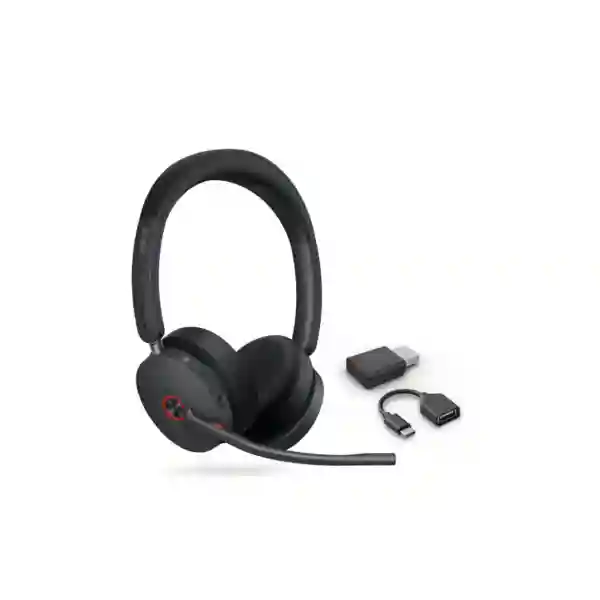
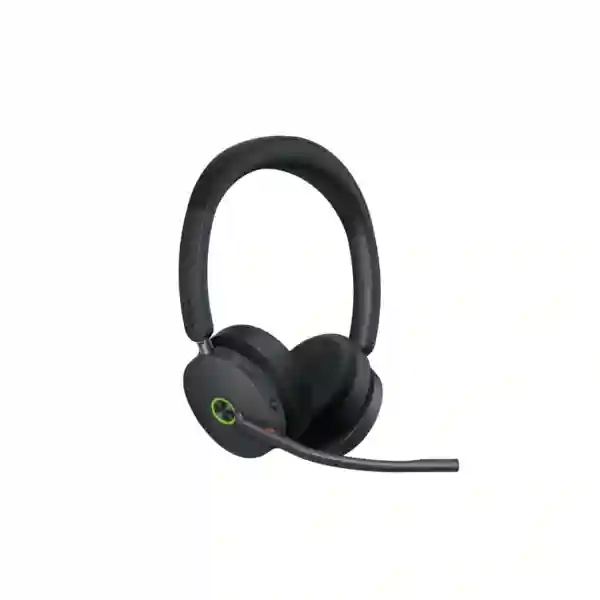
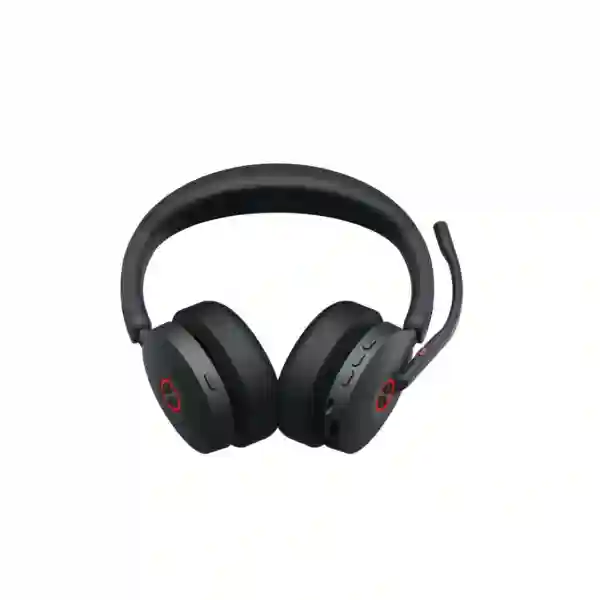
BUSINESS WIRELESS HEADSET FOR HYBRID WORK
Yealink WH68 Hybrid
Yealink WH68 Hybrid is designed for professionals who move between laptop calling, compatible desk-phone workflows and mobile communication without wanting to depend on one wireless technology. Its hybrid architecture combines DECT and Bluetooth 5.3, while Hybrid Active Noise Cancellation helps the wearer reduce surrounding distractions and Yealink Acoustic Shield Technology 3.0 targets background noise on the microphone side of a call. For businesses in Tanzania evaluating headsets for open offices, hybrid work, customer-facing teams and unified communications, the WH68 Hybrid provides a practical combination of mobility, call controls, long battery life and enterprise-oriented wireless connectivity.
What is the Yealink WH68 Hybrid?
The Yealink WH68 Hybrid is an on-ear stereo DECT wireless headset supplied around a compact dongle-based hybrid-work concept rather than a large desktop workstation. Yealink specifies a 155 g headset, a WDD60 DECT dongle connection, Bluetooth 5.3 in the headset, USB connectivity for PCs and compatible IP phones, and support for mobile Bluetooth use. The official specification lists up to 150 m / 492 ft DECT wireless range and up to 50 m / 164 ft Bluetooth operating range under suitable conditions. Battery ratings are up to 16 hours of talk time in DECT mode and up to 32 hours in Bluetooth mode, with up to 19 hours of DECT music playback, up to 48 hours of Bluetooth music playback, 195 hours standby and approximately 1.5 hours charging at 5 V / 1.2 A. Actual range and battery endurance depend on environment, radio conditions, device use and enabled features.
Verified Yealink WH68 Hybrid Features
Hybrid DECT & Bluetooth
DECT supports longer-range office movement while Bluetooth 5.3 supports direct mobile and compatible computer workflows. This dual-mode design is useful where a single user changes devices during the day.
Hybrid Active Noise Cancellation
Yealink uses feedforward and feedback microphones for Hybrid ANC. The objective is to reduce ambient noise heard by the wearer, helping concentration in shared or open-plan environments.
Acoustic Shield Technology 3.0
The WH68 Hybrid combines professional microphones with Yealink Acoustic Shield Technology 3.0 to isolate the speaker’s voice and reduce distracting background sound transmitted to remote participants.
Business Call Controls
Controls include call answer/end/reject, hold/unhold, volume, microphone mute, power and pairing, playback controls and ANC/ambient modes. Raising the boom can mute and lowering it can unmute.
Technical Specifications at a Glance
| Category | Verified specification |
|---|---|
| Wireless | DECT and Bluetooth 5.3; up to 150 m / 492 ft DECT range; up to 50 m / 164 ft Bluetooth range |
| Audio | 30 mm speakers; 20 Hz–20 kHz speaker frequency response; 100 Hz–10 kHz microphone frequency range; six MEMS microphones listed in Yealink specifications |
| Noise control | Hybrid ANC, Acoustic Shield Technology 3.0, hearing-protection functions |
| Battery | Talk: up to 16 h DECT / 32 h Bluetooth; music: up to 19 h DECT / 48 h Bluetooth; standby 195 h; charging about 1.5 h |
| Wearing style | Stereo, on-ear; headset weight 155 g |
| Management | Yealink USB Connect on PC and Yealink Management Cloud Service support |
Specifications should be checked against the exact regional part number and current Yealink documentation before procurement, especially where frequency bands, platform certification or bundled accessories affect a project.
Compatibility, Deployment and Buying Guidance
The WH68 Hybrid should be selected as part of a complete calling workflow rather than only by headset specifications. Yealink documents connection to PCs and compatible desk phones through USB, the WDD60 dongle or supported Bluetooth paths, and mobile-phone connectivity through Bluetooth. Yealink also notes that the Hybrid series does not use an EHS adapter in the same way as some base-station DECT models. Before purchase, confirm the exact desk-phone model, firmware, connection method, collaboration platform and required call-control behavior. A headset can carry audio yet still lack complete remote answer/end behavior if the device or application integration is not supported.
For broader communications planning, explore FourTeck Tanzania business technology solutions for integrated voice, conferencing and network requirements, or review specialist IP phone and business telephony solutions when the headset must be matched with desk endpoints, PBX features and user roles.
Yealink WH68 Hybrid Tanzania
Businesses evaluating the Yealink WH68 Hybrid in Tanzania are typically trying to solve more than one communications problem at once: staff need clearer calls, fewer distractions, practical mobility and a headset that can move between modern UC applications and other business endpoints. The WH68 Hybrid fits this requirement by combining DECT and Bluetooth in one headset. For office-based users, the WDD60 DECT connection can provide greater movement around a suitable workspace than a conventional short-range headset, with Yealink rating the DECT range at up to 150 metres in appropriate conditions. For mobile or laptop-led workflows, Bluetooth 5.3 offers a second path without forcing the user to carry a traditional DECT base around. This is relevant to Tanzanian organizations with hybrid staff who divide time between office desks, meeting spaces, customer sites and remote work.
A sensible Tanzania procurement exercise should start with the user profile. Contact-centre agents, finance teams, project managers, support engineers, sales staff and executives do not all work in the same acoustic environment. Open offices can make both sides of a call difficult: the employee hears nearby conversation while the far-end participant hears office noise. The WH68 Hybrid addresses these as separate challenges. Hybrid ANC is intended to reduce noise reaching the wearer, while the microphone system and Acoustic Shield Technology 3.0 target unwanted sound entering the outgoing call. Buyers should still consider room acoustics, seating density and expected call duration rather than assuming electronics can fully compensate for a very noisy environment.
When requesting a Yealink WH68 Hybrid quotation in Tanzania, provide quantity, intended devices, the exact IP-phone models if desk-phone use is required, preferred UC platform, laptop connection types and whether optional charging stands or replacement cushions are needed. Confirm the regional part number before ordering. For larger deployments, standardising headset configuration and documenting connection methods can simplify support. Businesses planning an end-to-end workplace communication refresh can combine headset selection with IP phones, PBX, Wi-Fi, switching and conferencing rather than treating the headset as an isolated accessory.
Yealink WH68 Hybrid Dar es Salaam
For organizations in Dar es Salaam, the Yealink WH68 Hybrid is particularly relevant where teams handle frequent voice and video calls in busy shared offices. Commercial, professional-services, logistics, technology, hospitality and customer-service operations may have staff who need to walk away from a desk while remaining available. The DECT side of the WH68 Hybrid is designed for that kind of office mobility, while Bluetooth supports direct use with mobile devices and compatible computers. The strongest buying case is not simply range; it is the ability to use different connection modes according to the task without moving to a completely different headset.
Dar es Salaam deployments should be assessed against building layout. Yealink’s up-to-150-metre DECT figure is a maximum specification and should not be interpreted as a guaranteed indoor distance through reinforced walls, multiple floors or dense office partitions. Wireless range can vary substantially with construction, interference and positioning. A pilot unit can be useful for a large roll-out because it allows the organization to test the actual walking routes that matter: desk to printer, reception, nearby meeting room, supervisor station or adjacent work area. Bluetooth range should be evaluated separately because its operating characteristics differ from DECT.
For procurement, specify whether users mainly call through Microsoft Teams, another UC client, a Yealink IP phone or a mixture. The exact integration determines how answer/end controls, mute status and device switching behave. If desk phones are part of a larger communications project, include PBX type, handset model and firmware in the request. This prevents a quotation from being based on the headset alone. Organizations upgrading office communications in Dar es Salaam may also want to align headsets with laptop docking, room conferencing and network quality so that user experience remains consistent from personal calls to scheduled meetings.
Yealink WH68 Hybrid Mwanza
Mwanza businesses comparing professional wireless headsets can use the Yealink WH68 Hybrid where employees divide time between desktop applications, mobile calls and office movement. Its two wireless technologies serve different purposes: DECT is the business-oriented long-range path, while Bluetooth 5.3 improves flexibility with modern endpoints. For a manager or support user who starts a day at a laptop, takes mobile calls and spends part of the day moving around the workplace, a dual-mode headset can reduce the need to maintain separate devices for each workflow.
The audio design is also relevant to offices where speech clarity matters. Yealink lists 30 mm speakers, a 20 Hz–20 kHz speaker frequency response, a 100 Hz–10 kHz microphone frequency range, Hybrid ANC and Acoustic Shield Technology 3.0. Buyers should understand the distinction between ANC and microphone noise cancellation. ANC focuses on what the wearer hears, while microphone processing focuses on what the person at the far end hears. Both can improve the experience, but a busy reception, shared operations room or sales office may need different settings than a quiet executive office. Comfort should also be tested with representative users because fit preferences are individual even when a headset is designed for long sessions.
For a Mwanza quotation, include the number of headsets, whether every user has the same endpoint, the preferred connection mode and the expected daily call pattern. If the organization has branches, note whether IT wants one standard headset across locations. Standardisation can make user training and troubleshooting easier, particularly when Yealink USB Connect is used to manage device settings on PCs. If the requirement includes phones, PBX or conferencing, combine those details in the same procurement brief so compatibility can be reviewed before equipment is committed.
Yealink WH68 Hybrid Arusha
In Arusha, the Yealink WH68 Hybrid can suit businesses that rely on frequent communication with customers, remote teams, suppliers and international partners. A headset in this environment needs to be easy to move between applications rather than tied to a single desk device. The WH68 Hybrid’s DECT-and-Bluetooth design provides a useful foundation for hybrid work, allowing an employee to use a DECT dongle-based connection at the main workstation and Bluetooth for supported mobile or computer scenarios. This is valuable for staff who shift between focused desk work, online meetings and calls taken while moving through the office.
Battery planning is a practical consideration for long business days. Yealink rates talk time at up to 16 hours in DECT mode and up to 32 hours in Bluetooth mode, with 195 hours of standby and approximately 1.5 hours charging under the published conditions. These figures are useful for comparing products, but organizations should plan charging behavior around actual usage, ANC settings, device combinations and call intensity. An optional compatible charging stand may improve desk discipline for users who otherwise forget to connect a cable at the end of the day. Replacement ear cushions can also be considered for shared-device policies or long-term maintenance planning.
Arusha buyers should confirm exact Teams or UC variant requirements before ordering rather than assuming one SKU is universal. If the headset must interact with a particular Yealink desk phone, record the model and firmware and verify the supported connection method. Where the wider requirement includes meeting-room video, personal headsets and IP telephony, procurement should create a consistent collaboration standard: named platforms, approved endpoint models, connection instructions and a simple support checklist. That approach generally delivers more value than choosing each accessory separately.
Yealink WH68 Hybrid Dodoma
For offices in Dodoma, the Yealink WH68 Hybrid offers a business headset option for users who need concentration, clear microphone pickup and freedom to work across different devices. Government-facing suppliers, professional firms, project offices, NGOs, education teams and private enterprises can all have communication roles where a conventional wired headset limits movement. The WH68 Hybrid is positioned for hybrid work, using a compact DECT dongle together with Bluetooth built into the headset. This avoids making mobility dependent on a large workstation base and gives IT teams more flexibility when equipping laptop-centric employees.
The model also includes dual busylights, which can be useful in shared environments because coworkers can see that the user is engaged in a call. Call controls cover answer, end, reject, hold, volume and mute, and the microphone boom can be raised to mute and lowered to unmute. These functions reduce the need to search for software controls during a conversation, but exact application behavior should be tested with the organization’s UC client. Where users frequently move between a desk phone and a computer, the device path and call-control integration deserve special attention during a trial.
A Dodoma procurement request should therefore state the endpoint environment, not only the desired quantity. Include laptop operating systems, UC platform, desk-phone models, USB port availability and whether mobile Bluetooth use is required. Also identify whether users work in quiet individual offices or shared rooms, because that influences how much value they may get from Hybrid ANC and microphone noise isolation. For multi-site organizations, documenting a standard setup can improve rollout consistency and make support simpler when staff move between branches.
Yealink WH68 Hybrid UAE
Businesses comparing the Yealink WH68 Hybrid in the UAE often operate in highly connected workplaces where Microsoft Teams, softphones, mobile calls and IP desk phones can all exist in the same environment. The WH68 Hybrid is attractive in this context because it combines DECT and Bluetooth 5.3 rather than forcing an IT department to choose one wireless method for every user. DECT can serve office mobility with the WDD60 dongle, while Bluetooth can support compatible mobile and computer workflows. Yealink’s published up-to-150-metre DECT range should be treated as a maximum under suitable conditions and validated inside the actual office.
In open-plan UAE offices, acoustic control may be a key buying criterion. Hybrid ANC uses feedforward and feedback microphones to reduce noise for the wearer, while Acoustic Shield Technology 3.0 focuses on voice pickup for remote listeners. This separation matters when comparing headsets: some products may emphasize only the caller-facing microphone, while others mainly reduce what the user hears. The WH68 Hybrid addresses both sides of the conversation. Organizations should still test it with typical noise sources such as nearby conversations, air conditioning and keyboard activity because perceived performance depends on fit and environment.
UAE regional procurement can also benefit from standardizing the same headset across offices when endpoint compatibility has been confirmed. Teams should document whether users require Teams-specific controls, generic UC behavior or integration with Yealink desk phones. For broader regional technology planning, FourTeck Africa solutions can provide multi-country context while the exact supply, commercial terms and service scope should be confirmed in a current quotation rather than assumed from a web page.
Yealink WH68 Hybrid Uganda
Ugandan organizations evaluating the Yealink WH68 Hybrid may be looking for one headset that works for both fixed office routines and mobile hybrid work. The combination of DECT and Bluetooth supports this objective. A user can rely on DECT for long-range office movement through the WDD60 path and use Bluetooth for compatible mobile or computer connections. The headset’s stereo on-ear design, Hybrid ANC and business-oriented microphone system make it particularly relevant for employees who spend a substantial portion of the day on voice or video calls.
A national or multi-branch deployment should begin with endpoint consistency. If one office uses Yealink IP phones, another relies on PC softphones and field teams use mobile devices, the WH68 Hybrid can potentially reduce headset variety, but each connection should be validated. Yealink’s compatibility guidance shows that hybrid headsets connect differently from some conventional DECT base models, so procurement teams should not assume EHS accessories used with older headsets will apply. The exact phone model, firmware and desired call-control behavior should be checked before quantity orders.
Battery ratings of up to 16 hours in DECT mode and 32 hours in Bluetooth mode provide useful capacity for extended workdays, though actual performance varies. For Uganda-wide procurement, consider whether a charging stand is required at fixed desks, whether spare ear cushions should be included for lifecycle maintenance, and whether IT will use Yealink USB Connect for configuration. Businesses seeking wider communications solutions can also review FourTeck Uganda technology solutions when headsets are part of an IP telephony, conferencing or office-network project.
Yealink WH68 Hybrid Kampala
Kampala offices can be demanding headset environments because dense open-plan seating, frequent online meetings and mixed communication platforms can create both noise and device-management challenges. The Yealink WH68 Hybrid addresses these with two complementary design choices: dual-mode DECT/Bluetooth wireless connectivity and separate technologies for wearer-side and microphone-side noise control. For organizations whose staff move between desk applications, meeting platforms and mobile calls, this can make the headset more adaptable than a single-mode device.
The practical buying question is how the WH68 Hybrid will connect to each user’s primary endpoint. Laptop users may use the dongle or USB path, while mobile users can pair via Bluetooth. Compatible Yealink desk phones can support documented WDD60 or USB/Bluetooth paths depending on model. IT teams should test the full call sequence: incoming call notification, answer, mute, hold, end, device switching and audio return after another application takes control. These workflow details have more impact on user satisfaction than a specification sheet alone.
For a Kampala roll-out, select representative users from quiet offices and busier shared spaces and run a short pilot before standardizing. Confirm comfort over long meetings, effective range along real walking routes, microphone clarity and recharge behavior. Then document the supported configuration and issue the same instructions with each device. If the project involves dozens of users, include spare strategy and lifecycle accessories in the quotation request. That makes the headset program easier to maintain and avoids small accessory gaps becoming support tickets later.
Yealink WH68 Hybrid Arua
In Arua, the Yealink WH68 Hybrid can support organizations that need professional calling equipment without tying users permanently to a desk. A hybrid headset is useful when staff work across laptops, mobile devices and compatible office telephony. DECT offers an office-oriented wireless path designed for greater roaming distance, while Bluetooth 5.3 gives another option for modern devices. This flexibility can be valuable for project teams, branch offices, NGOs, service organizations and businesses where employees combine administrative work with movement around the workplace.
For smaller offices, purchasing should focus on fit rather than simply selecting the highest specification. If the main need is a laptop headset in a quiet room, the organization may not use the full value of long DECT range or Hybrid ANC. If the user frequently walks away from the desk, works near conversations or needs mobile pairing, the WH68 Hybrid becomes more compelling. Yealink’s dual busylights also help coworkers identify when a user is already on a call, a simple feature that can reduce interruptions in shared spaces.
Arua buyers should request a quotation that identifies the exact headset variant and accessories. Provide the target UC platform, quantity, endpoint details and whether charging stands are desired. Avoid relying on generic “compatible with Teams” assumptions when dedicated Teams controls are required; confirm the actual regional part number. Where internet quality affects cloud calling, remember that a premium headset cannot correct network latency, packet loss or unstable Wi-Fi. Headset procurement should therefore sit alongside basic checks of the calling application, network and endpoint configuration.
Yealink WH68 Hybrid Mbarara
Mbarara organizations considering the Yealink WH68 Hybrid can use it as part of a standardized hybrid-work kit for staff who need reliable professional audio across more than one device. The headset includes DECT and Bluetooth 5.3 connectivity, a six-MEMS-microphone specification, Hybrid ANC, Acoustic Shield Technology 3.0 and integrated call controls. That combination targets a common business problem: users want to move freely and switch devices without sacrificing the voice clarity expected in formal customer or internal calls.
The 155 g stereo on-ear design is intended for workday use, with soft ear cushions and an adjustable boom. Comfort is personal, however, so businesses buying for many staff should test representative users instead of assuming one fit is perfect for everyone. This is especially important for roles with continuous calls. The flip-to-mute boom can also simplify daily use: raising the microphone mutes and lowering it unmutes, reducing dependence on an application window that might be behind other software.
When preparing a Mbarara requirement, separate mandatory needs from desirable features. Mandatory items might include mobile Bluetooth, long office range, Microsoft Teams controls, compatibility with a particular Yealink phone or enough battery for a full shift. Desirable items might include an optional charging stand or centralized management. This distinction helps the supplier confirm the correct version instead of quoting by model name alone. For organizations with multiple locations, apply the same checklist at each site and verify differences in phone models, USB availability and UC software before issuing a common standard.
Yealink WH68 Hybrid Gulu
For Gulu businesses and institutions, the Yealink WH68 Hybrid offers a modern headset option for employees who work between voice calls, online meetings and mobile communication. The most distinctive feature is not any single microphone or battery figure; it is the combination of DECT and Bluetooth within a hybrid design. This gives IT teams a way to support users who need office roaming and direct Bluetooth pairing without maintaining completely separate headset families for each work style.
The published DECT maximum of 150 metres is useful for comparison but should be verified in the intended building. Thick walls, metal structures, floors and radio conditions can reduce practical range. A simple site test with a pilot device is more meaningful than assuming the maximum figure will apply everywhere. Likewise, Bluetooth’s stated up-to-50-metre range depends on environment and connected equipment. Testing should follow the routes users actually take while on calls, not only an open corridor.
Gulu procurement teams should also distinguish audio quality from network quality. Acoustic Shield and ANC can improve the headset experience, but cloud calls still rely on a stable endpoint, application and network. If users report dropouts, delayed speech or one-way audio, troubleshooting may need to include Wi-Fi, internet connectivity, VPN paths and UC configuration. A well-planned headset deployment therefore includes basic user instructions, supported connection methods and escalation steps. When quantity is significant, ask for a clear bill of materials covering the exact variant, dongles, cables and any optional charging accessories required.
Yealink WH68 Hybrid Kenya
Kenyan enterprises comparing Yealink WH68 Hybrid headsets often need equipment that can support office, remote and mobile working patterns within the same user population. The headset’s DECT-and-Bluetooth architecture is suitable for this mixed environment because users can use DECT for extended office movement and Bluetooth for direct connections to compatible personal devices. With Hybrid ANC and Acoustic Shield Technology 3.0, the model is aimed at people who need to concentrate and be understood in shared workspaces rather than only in quiet private offices.
For Nairobi and other Kenyan deployments, large organizations should treat headset rollout as an endpoint-management project. Confirm supported operating systems and UC applications, choose the Teams or UC version as required, test desk-phone interaction, and define who is responsible for firmware and settings. Yealink USB Connect can be part of PC-side configuration. If the business already uses Yealink phones, validate the exact model because the Hybrid connection path differs from traditional EHS-based DECT headsets.
Commercial comparison should consider total usability, not only headline range. Evaluate comfort over several hours, actual roaming routes, microphone behavior in normal office noise, charging habits and the accessories included with the chosen regional package. When requesting pricing, include quantities and accessory requirements so quotations are comparable. Organizations sourcing within Kenya can review FourTeck Kenya technology solutions for related communications and infrastructure planning where the headset is part of a wider business telephony or collaboration project.
Yealink WH68 Hybrid Kuwait
In Kuwait, the Yealink WH68 Hybrid can be a strong fit for organizations with modern UC applications and employees who frequently change communication devices. Rather than being limited to Bluetooth-only mobility or a traditional DECT base arrangement, the WH68 Hybrid brings DECT and Bluetooth together in a compact system built around the headset and dongle. This supports office movement, laptop collaboration and mobile calling while retaining dedicated business-call controls and noise-management functions.
Hybrid ANC is especially relevant for users working near colleagues or building-services noise. It is designed to reduce distracting ambient sound for the wearer. Separately, Yealink’s Acoustic Shield Technology 3.0 works with the microphone array to improve voice isolation for remote participants. Procurement teams should test both aspects, because the employee’s perception of quiet and the far-end listener’s perception of voice clarity are different measures. Fit and ear-cushion seal also influence ANC performance, so pilot users should represent the actual workforce.
Kuwait buyers should verify the correct regulatory and regional product version, including supported DECT frequency band, rather than importing specifications from another market without confirmation. Provide the intended endpoints, UC platform and quantity when requesting a quotation. If staff use desk phones, verify exact models and firmware. If they use laptops through docks, note available USB-A and USB-C ports. Small details at this stage prevent the need for extra adapters or connection changes after deployment. A charging policy and spare-accessory plan can also improve reliability over the headset lifecycle.
Yealink WH68 Hybrid Ghana
Ghanaian organizations choosing business headsets can consider the Yealink WH68 Hybrid for staff who need both mobility and multi-device flexibility. Its DECT connection is designed for longer office roaming, while Bluetooth 5.3 enables direct communication with supported mobile and computer devices. This dual-mode approach is useful for businesses where desk-based calling and mobile work happen in the same role. The headset also supports centralized-oriented tools such as Yealink USB Connect and Yealink Management Cloud Service, subject to the organization’s chosen management setup.
Open-office buyers may place particular value on the combination of Hybrid ANC and microphone noise cancellation. These functions target different sides of the conversation and should be evaluated separately during a trial. A sales team might care most about making its own voice clear to customers, while an analyst may care more about reducing distractions heard during long meetings. The WH68 Hybrid is designed to address both, and dual busylights add a visible signal to colleagues when the user is engaged.
For a Ghana quotation, define the exact workflow: softphone or Teams on laptop, compatible IP phone, mobile device, or a mixture. Then confirm whether the Teams or UC variant is appropriate. Include quantities, preferred charging approach and any spare accessories. Where headsets are being introduced as part of a new VoIP deployment, coordinate them with the PBX, handsets, switching and user training. That improves consistency and reduces confusion over which device should be selected inside meeting applications or softphones.
Yealink WH68 Hybrid Nigeria
Nigeria’s large and varied business environments create a wide range of headset requirements, from quiet executive offices to busy customer-support floors. The Yealink WH68 Hybrid is relevant where organizations want a premium business headset that can adapt to these different workflows. DECT and Bluetooth 5.3 provide two wireless paths, Hybrid ANC helps reduce ambient noise reaching the wearer, and Acoustic Shield Technology 3.0 supports clearer outgoing speech. Yealink also specifies dual busylights, dedicated call controls and a stereo on-ear design suited to focused work.
For call-intensive Nigerian operations, battery ratings are important but should be interpreted against real use. Yealink publishes up to 16 hours talk time in DECT mode and 32 hours in Bluetooth mode. A team running continuous calls may choose a different charging routine from executives who have intermittent meetings. Optional charging stands can help fixed-desk users return the headset to a charging position consistently. For shared equipment, hygiene and ear-cushion replacement should be part of the operational plan.
Large deployments should also test radio behavior and application integration before ordering at scale. Conduct a pilot in the busiest office area, confirm walking range and verify Teams or UC controls. Record all endpoint models and supported connection methods. If sites use different phone systems, do not assume the same accessory path applies everywhere. A structured rollout checklist—variant, endpoint, firmware, connection, call-control test, charging and user guidance—can turn a sophisticated headset into a dependable standard rather than another variable support teams must troubleshoot.
Yealink WH68 Hybrid Seychelles
Seychelles businesses in hospitality, services, administration and professional sectors can use the Yealink WH68 Hybrid when employees need clear communication across cloud meetings, office telephony and mobile devices. Its hybrid wireless architecture means a user can take advantage of DECT for office-range movement and Bluetooth for supported direct device connections. This can reduce the friction of changing headsets when moving between a laptop collaboration session and a mobile call.
For smaller island-office deployments, availability planning and exact bill-of-material accuracy are important. Buyers should confirm the regional part number, required dongle and cable bundle, and whether an optional charging stand is needed before finalizing procurement. Because the WH68 Hybrid differs from base-station WH68 variants, specifications such as wireless range should not be copied between models. The Hybrid model is rated up to 150 metres over DECT, while other WH68 variants can have different published figures. Keeping the model identity clear avoids incorrect expectations.
A Seychelles implementation should also test the actual room environment. Open-plan offices, hard reflective surfaces and nearby conversations can affect perceived call quality even with ANC and microphone processing. Users should set the headset correctly and select the right device in their collaboration application. For a small deployment, a short setup note may be enough; for a larger operation, IT can standardize firmware, USB connections and user settings. When requesting a quotation, include quantity, use case, endpoint details and the preferred collaboration platform so compatibility can be considered before supply.
Who Should Choose the WH68 Hybrid?
The WH68 Hybrid is most compelling for professionals who value three things at the same time: long-range office mobility, direct Bluetooth flexibility and active noise management. Typical users include hybrid employees, managers, sales teams, support staff, customer-service personnel and anyone who changes devices during the workday. It can also make sense for companies standardizing headsets across laptop and compatible Yealink phone users, provided exact integration is checked.
It may be unnecessary for users who never leave a quiet desk and only need a basic wired USB headset. It may also be the wrong variant if the organization specifically wants the LCD console, hub and speakerphone functions associated with the WH68 Workstation. Choosing the correct member of the WH68 family is therefore a matter of workflow, not simply selecting the model with the most features.
Quotation Checklist
Users & quantity: number of headsets, user roles and whether the deployment is one site or multi-site.
Endpoints: laptop OS, exact desk-phone model/firmware, mobile use and USB port type.
UC platform: Microsoft Teams or other calling application, plus required call-control behavior.
Accessories: charging stand, replacement ear cushions and any required adapters or spare units.
Yealink WH68 Hybrid FAQs
Does the Yealink WH68 Hybrid support both DECT and Bluetooth?
Yes. Yealink specifies DECT and Bluetooth 5.3 for the WH68 Hybrid. The DECT connection is designed for longer office-range mobility, while Bluetooth supports compatible mobile and computer connections.
What is the wireless range?
Yealink rates the WH68 Hybrid at up to 150 m / 492 ft for DECT and up to 50 m / 164 ft for Bluetooth. Real-world range depends on walls, interference, endpoint radios and building layout.
How long does the WH68 Hybrid battery last?
Published talk time is up to 16 hours in DECT mode and up to 32 hours in Bluetooth mode. Music playback is listed at up to 19 hours DECT or 48 hours Bluetooth, with up to 195 hours standby.
What does Hybrid ANC do?
Hybrid Active Noise Cancellation uses feedforward and feedback microphones to reduce surrounding sound heard by the headset wearer. It is separate from microphone-side noise cancellation intended to improve what remote participants hear.
Can the WH68 Hybrid work with Yealink desk phones?
Yealink documents WH68 Hybrid support with compatible desk phones through supported USB, WDD60 or Bluetooth connection paths depending on model. The exact phone and firmware should be checked before purchase. The Hybrid series is not an EHS-adapter product in the same way as some traditional DECT base headsets.
Is the charging stand included?
Yealink documentation lists the BHC74 charging stand as an optional accessory. Package contents can vary by regional SKU, so the quotation should state exactly what is included.
Decision Recap
Choose the Yealink WH68 Hybrid when the user needs a stereo business headset with DECT mobility, Bluetooth flexibility, Hybrid ANC, microphone noise isolation and long talk time. Verify the exact Teams or UC variant, endpoint compatibility and regional part number before ordering. Do not substitute specifications from the standard WH68 or WH68 Workstation, because range, packaging and connection architecture differ.
For larger roll-outs, test one or more pilot units in the real office, document the supported setup and request a quotation that includes every required accessory. A small amount of validation before purchase can prevent compatibility and user-experience issues at scale.
Consult FourTeck Tanzania
FourTeck can help evaluate the Yealink WH68 Hybrid as part of a business telephony or unified-communications requirement. Share the quantity, endpoint models, calling platform and intended work environment so the discussion can focus on compatibility and the correct product variant rather than a generic headset quote.
For regional projects, the same requirements can be documented consistently across sites, then validated against local procurement and deployment needs. This is particularly useful when the headset is one element of a wider IP phone, PBX, collaboration or workplace-technology standard.




Reviews
There are no reviews yet.