
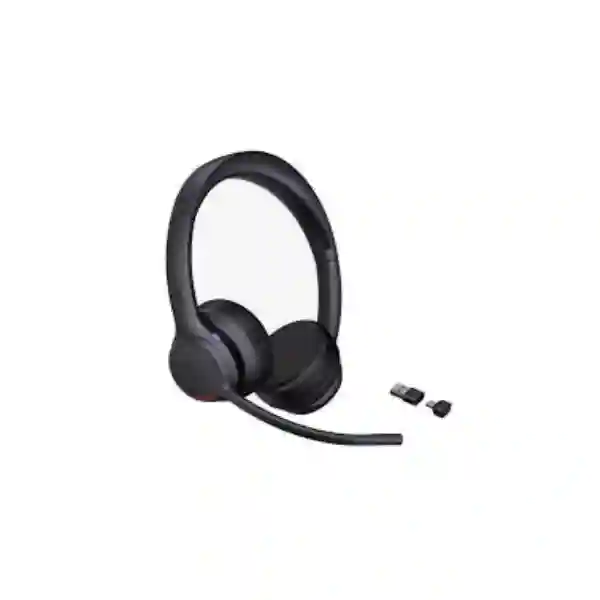
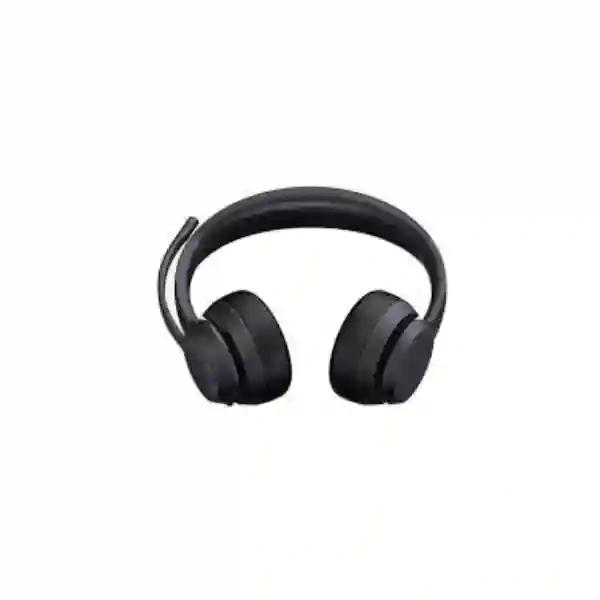
Yealink ZenOffice32 Bluetooth Headset
The Yealink ZenOffice32 Bluetooth Headset is designed for office, remote and hybrid communication where clear voice pickup, freedom of movement, long battery endurance and manageable deployment matter. It uses Bluetooth 6.1, supports a wireless range of up to 50 metres in suitable environments, connects to two Bluetooth devices simultaneously and can remember up to eight paired devices. Dual microphones work with Yealink Acoustic Shield and AI-assisted noise cancellation to reduce surrounding office noise so the user’s voice remains easier to understand during calls and meetings.
What the Yealink ZenOffice32 solves
Many business users now work across a laptop, mobile phone and collaboration platform during the same day. A practical headset therefore needs to do more than simply reproduce sound. It needs to isolate speech from nearby conversations, remain comfortable for long sessions, move between devices without creating unnecessary friction, and provide enough battery capacity that charging does not interrupt the workday. The ZenOffice32 addresses these needs with a lightweight on-ear design, soft memory-foam cushions, ambidextrous wearing, replaceable ear cushions, integrated call controls and a visible busylight. The dual version weighs 160 g while the mono version weighs 105 g, giving organizations a choice between two-ear focus and one-ear environmental awareness.
For IT teams, the value also includes management. Yealink lists support for Yealink USB Connect on PC, the Yealink Connect App on Android and iOS, and Yealink Device Management Platform. The headset includes the BT51C dongle with USB-C/A adapter, making it suitable for standardized workstation deployments where organizations want predictable connectivity rather than relying only on each computer’s built-in Bluetooth behavior. Microsoft’s current certified USB device list includes ZenOffice32 as certified for Microsoft Teams, while Yealink also states compatibility with Zoom, Google Meet and more than 100 UC platforms.
Clearer calls
Two microphones, AI-assisted noise reduction and Acoustic Shield processing help suppress common office distractions and keep speech intelligible.
Longer mobility
Bluetooth 6.1 and up to 50 m stated wireless range allow users to move around a normal workplace while remaining connected within practical radio conditions.
Multi-device workflow
Two simultaneous Bluetooth connections and pairing memory for up to eight devices suit users who move between PCs, phones and other endpoints.
Enterprise deployment
Central management options and the bundled dongle simplify standardization for larger teams and repeated workstation rollouts.
Verified technical specifications
| Wearing style | On-ear; available in dual and mono versions |
| Bluetooth | Bluetooth 6.1; up to 50 m / 164 ft stated range |
| Connections | Bluetooth, USB cable, BT51C dongle with USB-C/A adapter; two simultaneous Bluetooth connections; pairing memory up to eight devices |
| Microphones | Two microphones; Yealink Acoustic Shield; microphone frequency response 100 Hz–8 kHz |
| Speaker | 35 mm speaker; 20 Hz–20 kHz speaker frequency response; 32 ohm impedance |
| Battery | 420 mAh; up to 35 hours talk time, up to 43 hours music time, up to 20 days standby; charging up to 120 minutes |
| Controls | Answer/end/reject, volume, mute/unmute, power/pairing, play/pause, boom-arm mute and integrated busylight |
| Management | Yealink USB Connect, Yealink Connect App and Yealink Device Management Platform |
Compatibility and deployment guidance
The ZenOffice32 is particularly suitable for users whose primary communications happen through Microsoft Teams, Zoom, Google Meet, softphones and other UC applications. Compatibility should still be checked against the exact endpoint, operating system, desk phone workflow and organization policy before a fleet purchase. The bundled BT51C dongle can help create a more consistent PC experience and is useful when IT teams want a controlled headset-to-computer path. When a business also uses IP phones, check whether calls will be handled through the PC softphone, direct Bluetooth, USB or a different integration method.
FourTeck Tanzania can align headset selection with broader business telephony and collaboration planning. Customers comparing a headset with room audio should also review the site’s audio-conferencing and video-conferencing guidance, while customers deploying headsets alongside VoIP endpoints should consider the network, PBX and endpoint configuration as one workflow rather than isolated purchases. For cross-border projects, FourTeck resources in Uganda, Kenya, UAE and Africa provide additional regional context for organizations with multi-country requirements.
Yealink ZenOffice32 Bluetooth Headset Tanzania
Organizations searching for the Yealink ZenOffice32 Bluetooth Headset in Tanzania are usually evaluating more than a single accessory. The practical question is whether the headset fits the way employees actually communicate: laptop meetings, mobile calls, softphone sessions, customer-service conversations and hybrid work. The ZenOffice32 is designed around that mixed environment. Bluetooth 6.1, a stated range up to 50 metres, simultaneous connection to two Bluetooth devices and memory for up to eight paired devices can reduce friction for users who work between a computer and smartphone. For teams using collaboration software for most voice traffic, the Microsoft Teams certification and Yealink’s stated support for more than 100 UC platforms are important procurement considerations.
In Tanzania, buyers should decide whether mono or dual is more suitable before requesting a quotation. The mono model can be appropriate for reception, supervisory or shared-office roles where hearing nearby colleagues remains useful. The dual model can better suit concentrated softphone calling, training, virtual meetings and users who spend long periods in online conversations. Both use the same general platform, but quantities should be split according to job role rather than applying one wearing style to everyone. Comfort also deserves attention in a fleet deployment because headsets may be worn for many hours; Yealink specifies soft memory-foam cushions, an ergonomic headband and replaceable ear cushions.
Procurement teams in Tanzania should include device quantity, preferred mono or dual configuration, computer connector requirements, main collaboration platform and whether centralized management is required. If headsets will be distributed across branches, naming, asset tracking, firmware policy and spare ear cushions may be worth including in the deployment plan. The 35-hour stated talk time can reduce charging interruptions, while the busylight can help signal when staff are actively on calls in open offices.
Before ordering, confirm the exact part number and package contents for the selected variant. Yealink identifies ZenOffice32 Dual USB-C/A as part number 1208734 and ZenOffice32 Mono USB-C/A as 1208735. A FourTeck quotation can therefore be prepared around the correct variant, quantity and intended application rather than treating “ZenOffice32” as a single undifferentiated item.
Yealink ZenOffice32 Bluetooth Headset Dar es Salaam
For businesses in Dar es Salaam, the ZenOffice32 can fit offices where employees rely heavily on cloud meetings, customer calls and mobile collaboration throughout the working day. Commercial teams, finance departments, project coordinators, support desks, consulting firms and technology companies often need a headset that moves easily between a laptop and phone. Two simultaneous Bluetooth connections are useful in this setting because a user can remain paired with two active devices rather than repeatedly removing and recreating pairings. The bundled BT51C dongle also gives IT teams a standardized option for computers that may have different built-in Bluetooth hardware.
Open-plan workplaces create a different challenge: nearby speech, keyboards and general movement can reach a microphone and distract the remote participant. The ZenOffice32 uses two microphones with Yealink Acoustic Shield and AI-assisted noise cancellation. The objective is not to create absolute silence around the wearer, but to reduce competing background sound and prioritize the user’s voice. This distinction matters when evaluating any business headset. Organizations with especially noisy environments should test the device in the actual workspace before a large rollout, because acoustics and noise sources vary by site.
Dar es Salaam buyers may also need the headset to coexist with IP phones, USB conferencing equipment and company-managed PCs. The deployment decision should therefore specify which calls happen on desk phones, which on Teams or another softphone, and whether mobile calling is part of the workflow. A headset chosen only from a feature list can become inconvenient if the day-to-day call path is not mapped first. For larger offices, standardizing a few approved headset profiles by user role usually simplifies support.
When requesting a quote for Dar es Salaam, include quantity, work style, platform, connector preference and expected deployment schedule. If the headset is part of a wider IP telephony or meeting-room project, it is useful to include those requirements together so compatibility, endpoint configuration and user experience can be reviewed as one solution.
Yealink ZenOffice32 Bluetooth Headset Mwanza
Businesses evaluating the Yealink ZenOffice32 Bluetooth Headset in Mwanza may be supporting a mix of head-office communication, remote staff, branch coordination and customer-facing work. In this environment, the headset’s strongest advantage is flexibility rather than one single specification. It can connect through Bluetooth, USB cable or the BT51C dongle, giving organizations multiple ways to standardize use across laptops and other endpoints. Users who alternate between a mobile phone and computer can maintain two simultaneous Bluetooth connections, reducing the need to disconnect one device every time the call source changes.
Battery planning is also relevant where employees spend much of the day on voice or virtual meetings. Yealink specifies up to 35 hours of talk time with the busylight off, up to 43 hours of music playback and up to 20 days of standby. These figures are manufacturer maximums and actual use will vary with connection behavior, volume, distance and feature use, but they indicate that the headset is intended for extended business use rather than short occasional calls. Charging is specified at up to 120 minutes.
For Mwanza offices with staff working in shared rooms, a mono model may preserve awareness of colleagues, whereas dual-ear models can help users focus during longer meeting blocks. Procurement should therefore match each style to task. A customer-service employee may value sustained call comfort and microphone clarity. A manager may value multi-device pairing and quick movement between laptop and smartphone. An IT administrator may place greater emphasis on device management and predictable firmware handling.
A useful quotation request should mention whether deployment is for one office, multiple Mwanza locations or a wider branch environment. Include quantities by mono and dual variant, the primary UC platform, any desk-phone integration requirement and whether end-user onboarding is needed. That information helps avoid ordering the right headset in the wrong variant or with an unsuitable deployment assumption.
Yealink ZenOffice32 Bluetooth Headset Arusha
The Yealink ZenOffice32 Bluetooth Headset can be a practical fit for Arusha organizations that conduct frequent remote meetings, coordinate distributed teams or communicate with customers and partners outside the office. Sectors such as professional services, tourism operations, project management, education administration and regional business offices can all have users who alternate between calls, online meetings and mobile communication. In those environments, the value of a wireless headset comes from consistent behavior across applications and devices rather than simply eliminating a cable.
Yealink states that the ZenOffice32 supports Zoom, Google Meet and more than 100 UC platforms, and Microsoft lists the headset in its certified USB device program for Teams. Organizations should still confirm the exact application and endpoint workflow during procurement. Teams certification is valuable, but it does not replace the need to check whether users will connect through the BT51C dongle, direct Bluetooth or USB, and whether their organization manages application permissions or endpoint drivers centrally.
Arusha offices with mixed roles may benefit from combining mono and dual models. The 105 g mono version keeps one ear open, which can suit reception or operational coordination. The 160 g dual model covers both ears and may suit users spending more time in remote conversations or online training. The replaceable ear-cushion design is helpful for lifecycle planning because a worn cushion does not necessarily require replacement of the full headset.
When preparing an Arusha requirement, list the number of users, primary platform, PC connector type, mobile-device use and whether deployment is individual or centrally managed. If the headset will form part of a new office communications build, also identify IP phones, PBX or cloud calling platform and meeting-room systems. This creates a clearer path to compatibility checking and a quotation that reflects the complete communication environment.
Yealink ZenOffice32 Bluetooth Headset Dodoma
Organizations in Dodoma considering the Yealink ZenOffice32 Bluetooth Headset may prioritize dependable voice communication for administrative teams, professional offices, project units, institutions and branch operations. A headset in these settings often supports long sequences of scheduled meetings and phone calls, so user comfort and operational simplicity become as important as raw audio specifications. The ZenOffice32 combines a lightweight on-ear frame, memory-foam cushions, adjustable wearing and boom-arm mute behavior with long stated battery endurance.
The integrated busylight is useful in offices where colleagues need a visible cue that someone is on a call. It can reduce interruptions without requiring the user to repeatedly signal that a meeting is in progress. The headset also includes hearing-protection features listed by Yealink, including peak-block protection and daily noise-exposure protection. These functions are part of the product’s design, but organizations with formal occupational-audio policies should still apply their own internal standards and safe-listening practices.
From an IT perspective, Dodoma deployments can be made easier by defining a standard connection method. Some users may pair directly over Bluetooth; others may use the BT51C dongle for a consistent computer connection. Yealink USB Connect can be used on PCs, while the mobile app and Device Management Platform provide additional management paths. For a larger rollout, the organization should decide who is responsible for firmware, configuration, naming and support before devices are distributed.
For quotation planning, specify mono or dual version, unit quantity, target applications and whether accessories or replacement cushions should be included. If the requirement is tied to a broader VoIP or collaboration project, provide that context so the headset is evaluated with the calling platform and endpoint ecosystem. This is particularly useful for organizations refreshing both user headsets and telephony systems at the same time.
Yealink ZenOffice32 Bluetooth Headset UAE
For UAE businesses, the Yealink ZenOffice32 is positioned as a cost-conscious enterprise Bluetooth headset for scaled deployment. Large office environments frequently need consistent headsets across sales, support, administration and hybrid employees while still controlling the operational cost of equipping many seats. The ZenOffice32 is designed for that type of rollout. Its combination of 35-hour stated talk time, dual-microphone noise cancellation, busylight, centralized management choices and mono or dual variants gives IT teams a balanced feature set without moving into a highly specialized premium headset category.
UAE deployments often involve employees working across laptops, mobile devices and cloud collaboration services. Two simultaneous Bluetooth connections can simplify this workflow, while pairing memory for up to eight devices provides flexibility for users who occasionally move between different endpoints. The 50 m stated range is a maximum under suitable conditions; office partitions, radio congestion, building materials and device placement can reduce practical distance. Businesses should therefore treat range as an operating envelope rather than a guaranteed roaming radius.
The BT51C dongle is especially relevant for standardized corporate desktops and notebooks because it gives the headset a dedicated supported connection path. IT teams should define whether direct Bluetooth is allowed, whether users can pair personal phones, and whether settings will be managed centrally. These policy decisions are as important as the headset itself when hundreds of users are involved.
For UAE procurement, request a quote using the exact dual or mono part number, required quantity, UC platform and preferred connection method. If the project spans UAE and East African offices, align the model, firmware policy and accessories across locations where possible. A common headset standard can simplify training, replacements and support while still allowing mono and dual versions for different roles.
Yealink ZenOffice32 Bluetooth Headset Uganda
Ugandan businesses evaluating the ZenOffice32 can use it as part of a wider move toward softphones and cloud collaboration. Teams that previously relied mainly on desk phones may now spend more time in Microsoft Teams, Zoom, browser meetings and mobile calls, which increases the importance of a headset that can bridge several devices. Bluetooth 6.1, the BT51C dongle and USB connectivity create flexible deployment choices, while the headset’s call controls reduce the need to handle every action from the computer screen.
For call-centre-style or customer-facing teams, microphone performance should be tested in the actual workspace. Yealink’s two-microphone design and Acoustic Shield processing are intended to prioritize the speaker and reduce ambient noise, but room acoustics still influence the experience. A busy office with hard surfaces and multiple nearby conversations can sound different from a quiet private office. Pilot testing several units before a large purchase is therefore a sensible procurement step.
Battery endurance supports mobile work within the office. The user can move between desks, meeting areas and nearby workspaces without remaining physically attached to a computer. This can be useful for supervisors, sales staff and operational teams who need to continue a call while checking information elsewhere. The busylight provides a simple visual signal to colleagues that the wearer is occupied.
For Uganda-wide deployments, standardize model numbers and document who receives mono versus dual versions. Include branch quantities, target software, computer connection preference and spare-accessory planning in the quotation request. Organizations with a regional presence can also coordinate the headset standard with neighboring markets so users moving between offices encounter the same controls and support process.
Yealink ZenOffice32 Bluetooth Headset Kampala
In Kampala, where many organizations combine office-based teams with remote coordination and frequent online meetings, the ZenOffice32 offers a practical blend of mobility and manageable deployment. A user can connect to a PC through the BT51C dongle and maintain another Bluetooth relationship with a phone, creating a convenient two-device workflow. For employees who receive business calls on both devices, this can reduce time spent reconnecting and make the headset feel more like a standard workplace tool than a personal accessory.
The choice between mono and dual versions should be based on concentration needs and workplace awareness. Front-desk and supervisory roles often benefit from one open ear. Staff handling long remote meetings may prefer the dual version. Because Yealink uses an on-ear design rather than a large over-ear enclosure, organizations should let representative users test fit and comfort before purchasing at scale. Individual head shape, glasses and personal preference can influence all-day comfort.
Kampala procurement teams should also consider lifecycle management. Replaceable ear cushions can extend usable life, and centralized software tools can simplify support across a larger user base. Define a basic operating standard: approved firmware, connection method, naming, storage of spare dongles and process for re-pairing devices when staff change workstations. Small decisions made before deployment can prevent a large number of support tickets later.
A complete quote request should state user quantity, roles, preferred variant, collaboration platform and deployment date. If the business is refreshing IP phones or meeting-room technology at the same time, include those details so the headset can be checked against the wider communications architecture rather than purchased in isolation.
Yealink ZenOffice32 Bluetooth Headset Arua
For organizations in Arua, a wireless headset can support staff who coordinate between local operations, regional offices and remote stakeholders without requiring a dedicated meeting room for every conversation. The Yealink ZenOffice32 is well suited to this style of work because it combines PC and mobile connectivity with straightforward call controls and long battery endurance. Employees can use the same headset for scheduled video meetings, softphone calls and mobile communication, reducing the number of separate audio devices they need to manage.
The headset’s microphone system is designed for speech clarity in normal business environments. Dual microphones and AI noise cancellation can help reduce background activity, while the 35 mm speaker system supports both voice and media playback. For organizations using the headset for online learning, webinars or staff development as well as calls, the broader 20 Hz–20 kHz speaker response is useful because it is designed to reproduce music and general audio as well as narrow-band speech.
Arua buyers should assess how devices will be supported over time. If users work independently, direct Bluetooth and the mobile app may be sufficient. If the headset is part of an organization-wide deployment, Yealink USB Connect and Device Management Platform options become more relevant. The organization should keep a record of part numbers and distinguish mono from dual models in inventory because both share the ZenOffice32 family name.
When requesting pricing, include exact quantity, variant split and intended endpoints. If internet-based collaboration is important, remember that headset quality cannot compensate for unstable connectivity. Network and internet performance should be addressed separately so that clear local microphone capture is matched by a reliable path to the meeting or calling service.
Yealink ZenOffice32 Bluetooth Headset Mbarara
Mbarara businesses considering the ZenOffice32 can evaluate it for branch administration, professional services, education, healthcare administration, customer care and other roles that rely on frequent voice communication. The headset’s enterprise positioning is especially useful when an organization needs several or dozens of units and wants a common model with predictable controls, battery behavior and support tooling. Standardization can lower the burden on IT compared with allowing every user to select a different consumer Bluetooth headset.
For workers who frequently move away from the desk, the stated 50 m Bluetooth range provides useful flexibility under appropriate radio conditions. However, walls, metal furniture and other wireless devices can reduce range, so real-world testing matters. The headset should be considered a workplace mobility tool, not a substitute for site-wide cordless telephony. If users must roam across entire buildings or large facilities while remaining on calls, a DECT headset may also deserve comparison.
The ZenOffice32 makes sense when Bluetooth flexibility is the priority and users remain reasonably close to their computer or phone. Its long battery life, busylight, boom-arm mute and dual-device support are particularly useful for standard office workflows. The mono option is suitable when awareness of the room is necessary; the dual option is better when users need more focus and balanced stereo playback.
For Mbarara quotations, provide the number of workstations, expected call volume, software platform and whether users work from fixed desks or move between locations. This helps determine whether ZenOffice32 is the right family or whether a DECT or wired headset would better match the operational requirement. Buying guidance should start from the call workflow rather than assuming Bluetooth is automatically best for every user.
Yealink ZenOffice32 Bluetooth Headset Gulu
Organizations in Gulu can use the ZenOffice32 for modern business communications where staff participate in remote meetings, training sessions, branch calls and mobile conversations from the same desk. The headset is designed around unified communications, with support for common platforms and the ability to connect through Bluetooth, USB or the bundled BT51C adapter. This range of connection methods allows IT teams to select the approach that matches their computers and management policies instead of forcing every user into direct Bluetooth.
Comfort should be part of the procurement decision, especially for employees who may wear the headset for several hours each day. Yealink’s dual model weighs 160 g and mono model 105 g. Memory-foam cushions and an ergonomic headband aim to reduce pressure during long sessions, while the boom microphone can be worn for either left- or right-side use. Replaceable cushions also support hygiene and maintenance in environments where equipment is reassigned.
The audio platform includes two microphones, Acoustic Shield processing and a 35 mm speaker. For a typical office, this combination is intended to give clear call pickup and suitable audio for meetings and media. Businesses should still conduct a pilot for environments with generators, fans, open windows or high conversational noise, because microphone algorithms perform differently depending on the type and direction of background sound.
A Gulu purchasing request should indicate whether users need mono or dual, whether mobile phones are part of daily work and which UC application is primary. If the rollout is linked to new laptops or IP telephony, coordinate the projects so the user receives a tested end-to-end communication setup rather than separately purchased components with unclear responsibility for compatibility.
Yealink ZenOffice32 Bluetooth Headset Kenya
Kenyan organizations searching for the Yealink ZenOffice32 Bluetooth Headset can consider it for enterprise UC deployments where Teams, Zoom, Google Meet and softphone use are common. The model’s strongest procurement argument is a balanced combination of essential business features: Bluetooth 6.1, two-device simultaneous connection, AI-assisted microphone noise reduction, long battery endurance, busylight and centralized management tools. This makes it suitable for standard staff profiles rather than only specialist executive users.
For Nairobi and other business locations with dense open offices, noise performance can be a major selection factor. Yealink Acoustic Shield works with dual microphones to reduce competing sound, but it should be tested with the organization’s actual acoustic conditions. Procurement teams may wish to run a small user trial that includes quiet rooms, shared offices and remote-work locations. Feedback should cover microphone clarity, comfort, pairing stability and ease of switching between computer and phone.
Kenya-based businesses operating multiple branches can benefit from a common headset standard. The ZenOffice32 Dual USB-C/A and Mono USB-C/A variants provide two role-based options without requiring completely different headset families. IT can define which roles receive each version, maintain consistent accessories and use Yealink management software for configuration. A consistent model also simplifies spare inventory and new-employee onboarding.
When asking for a quote, specify part number where possible: 1208734 for the dual USB-C/A package and 1208735 for mono USB-C/A. Include quantities, required delivery locations, collaboration applications and whether device management is in scope. For regional companies with Tanzania and Kenya offices, aligning the headset standard can create a simpler cross-border support model.
Yealink ZenOffice32 Bluetooth Headset Kuwait
Kuwait businesses can evaluate the ZenOffice32 for corporate offices, contact teams, professional services and hybrid users who need one headset for PC and mobile communication. Bluetooth 6.1 and two simultaneous Bluetooth connections make the headset especially useful when employees operate across a laptop and smartphone. Pairing memory for up to eight devices provides additional flexibility, although organizations should decide whether users are permitted to pair personal devices under their security policies.
The headset’s 420 mAh battery is rated for up to 35 hours of talk time with the busylight off, which gives a practical buffer for long workdays and users who forget to charge nightly. Charging is specified at up to two hours. For large deployments, charging behavior should still be included in user guidance because no battery-powered headset is truly maintenance-free. A simple policy such as charging at the desk overnight can prevent avoidable support calls.
Kuwait procurement teams comparing ZenOffice32 with premium ANC headsets should note that this product is centered on microphone noise cancellation and practical business value rather than being positioned primarily as a high-end active-noise-cancelling listening headset. If users work in very loud environments and need strong reduction of what they themselves hear, another model may be more appropriate. If the main requirement is clear outbound speech, multi-device convenience and long battery life, ZenOffice32 can be a stronger value fit.
For a quotation, identify user count, preferred mono/dual split, calling application and whether deployment is part of a larger UC refresh. This gives suppliers enough information to quote the correct variant and helps buyers compare alternatives on a like-for-like basis.
Yealink ZenOffice32 Bluetooth Headset Ghana
Ghanaian businesses adopting cloud collaboration can use the Yealink ZenOffice32 as a standardized user endpoint for voice and meetings. Staff in sales, operations, administration and support frequently move between mobile calls and laptop meetings, so a headset that can remain connected to two Bluetooth devices helps reduce switching friction. The USB-C/A BT51C adapter also makes it easier to deploy the same headset across mixed laptop fleets with different physical USB ports.
For office environments in Accra and other cities, background noise is often a more significant issue than speaker loudness. The ZenOffice32’s two-microphone system and Acoustic Shield processing aim to preserve the wearer’s speech while suppressing surrounding noise. When evaluating a pilot, callers on the far end should be asked to score intelligibility and background distraction, because the person wearing the headset may not hear what the microphone is transmitting.
Long-term support is another procurement factor. Yealink provides PC, mobile and device-management tools, and the ear cushions are replaceable. That makes the headset more suitable for business lifecycle management than many consumer models that are purchased individually without centralized controls. Organizations should keep spare dongles and replacement cushions where practical, particularly when deploying to many users.
A Ghana quotation should state whether users need Teams, Zoom, Google Meet or another softphone, and whether they require mono or dual wearing. For teams with high call volumes, a small production pilot before full rollout is recommended. If the headset forms part of a wider telephony or network upgrade, include that context so call-quality problems are not incorrectly attributed to the headset when they may originate from bandwidth, Wi-Fi or application configuration.
Yealink ZenOffice32 Bluetooth Headset Nigeria
Nigeria’s large and varied business environments make role-based headset selection important. The Yealink ZenOffice32 can suit organizations that want a common Bluetooth platform for employees using laptops, mobile phones and UC applications without moving every seat into a premium-price headset. Dual and mono variants allow one family to cover focused callers as well as staff who need to remain aware of the office around them.
For Lagos, Abuja and other urban business centres, radio congestion and office density can influence real-world Bluetooth performance. Yealink states up to 50 m range, but practical range depends on obstructions and interference. During a pilot, users should test the typical movement path they expect to take while on calls. If they need building-wide roaming or long-distance coverage, a DECT solution may be more appropriate. ZenOffice32 is best viewed as a flexible Bluetooth office headset for movement within a normal working area.
Call clarity is supported by dual microphones and AI noise cancellation. This is particularly valuable where colleagues sit close together. Organizations should combine headset selection with basic acoustic and workspace practices: sufficient spacing where possible, sensible microphone boom position and user training on mute behavior. The boom can be moved upward to mute and downward to unmute, which is easy to learn and useful during frequent meetings.
For Nigerian enterprise purchasing, document the approved model and part number, specify which roles receive mono or dual, and decide whether mobile pairing is permitted. Include quantity, endpoint type and required management approach in the request for quote. Larger organizations should also consider a spare ratio so failed or misplaced headsets do not leave critical users without a communication device.
Yealink ZenOffice32 Bluetooth Headset Seychelles
Businesses in Seychelles may have smaller teams but still depend heavily on communication with international partners, suppliers, guests and remote colleagues. The ZenOffice32 can be attractive in this setting because one headset can support computer-based meetings and mobile calls without requiring separate devices. Its two simultaneous Bluetooth connections are particularly useful for managers and service teams who move between a corporate laptop and phone throughout the day.
Hospitality, professional services and administrative operations may also value the mono option where users need to hear the room while remaining on calls. The dual option is better suited to focused meetings, training and longer virtual sessions. Because replacement logistics can be more important on an island market, organizations should confirm spare headset, dongle and ear-cushion strategy before deployment rather than waiting for a failure to occur.
The ZenOffice32’s long battery specification helps users stay mobile during a full day. However, businesses should still establish a charging routine and avoid treating maximum battery figures as guaranteed under every usage pattern. Wireless range also varies according to room construction and interference. A short on-site trial is the best way to validate actual performance for the intended desk, meeting area and nearby workspace.
When requesting a Seychelles quotation, include the desired variant, quantity, preferred shipment planning, UC application and computer connection method. If the headset supports a broader upgrade to IP telephony or meeting systems, include that scope as well. A coordinated requirement allows compatibility and deployment planning to be completed once, reducing the risk of discovering after purchase that different components were selected without considering how employees use them together.
Buying checklist before requesting a quotation
A good headset quotation starts with a clear user profile. State how many users need the headset, whether each role should receive mono or dual, the primary collaboration application, the computers or phones that will be used, and whether mobile pairing is required. For larger orders, add the preferred management method, rollout schedule and any need for spare units or replacement ear cushions.
Frequently asked questions
Is the Yealink ZenOffice32 certified for Microsoft Teams?
Yes. Microsoft’s current certified USB-device list includes the Yealink ZenOffice32 Headset. Organizations should still confirm their intended connection and management method for the specific Teams environment.
How long does the ZenOffice32 battery last?
Yealink specifies up to 35 hours of talk time with the busylight off, up to 43 hours of music playback, up to 20 days standby and up to 120 minutes charging time. Actual results depend on usage conditions.
Can it connect to two devices at the same time?
Yes. Yealink specifies two simultaneous Bluetooth connections and pairing memory for up to eight devices, which is useful for laptop-and-phone workflows.
What is the difference between ZenOffice32 mono and dual?
Mono uses one earpiece and weighs about 105 g, making it useful when the wearer needs awareness of the surrounding office. Dual uses two earpieces and weighs about 160 g, which can improve focus and stereo listening. The correct choice depends on the job role.
Does ZenOffice32 have active noise cancellation for listening?
The product is promoted for dual-microphone AI noise cancellation and Acoustic Shield to improve transmitted voice. Buyers specifically requiring premium active noise cancellation of incoming environmental sound should compare the ZenOffice32 with Yealink’s ANC-focused models.
What comes in the package?
Yealink lists the headset, drawstring bag, 1.2 m USB charging cable, quick-start guide, BT51C dongle and USB-C/A adapter in the package.
Decision recap
Choose the Yealink ZenOffice32 when your priority is a lightweight business Bluetooth headset with strong microphone noise reduction, long battery endurance, two-device connectivity and enterprise-friendly management. Select mono where situational awareness matters and dual where focus and stereo listening are more important. For users who need extensive building-wide roaming, compare DECT options. For users who need premium listening-side ANC, compare Yealink’s ANC Bluetooth models.
The most reliable procurement approach is to pilot the headset with real users, validate the chosen UC platform and connection method, then standardize part numbers and deployment settings before scaling.
Talk to FourTeck Tanzania about ZenOffice32
For a useful quotation, send the required quantity, mono/dual preference, primary collaboration platform, computer or phone type and deployment location. FourTeck can then evaluate the request in the context of your wider telephony, conferencing and workplace technology environment.




Reviews
There are no reviews yet.