
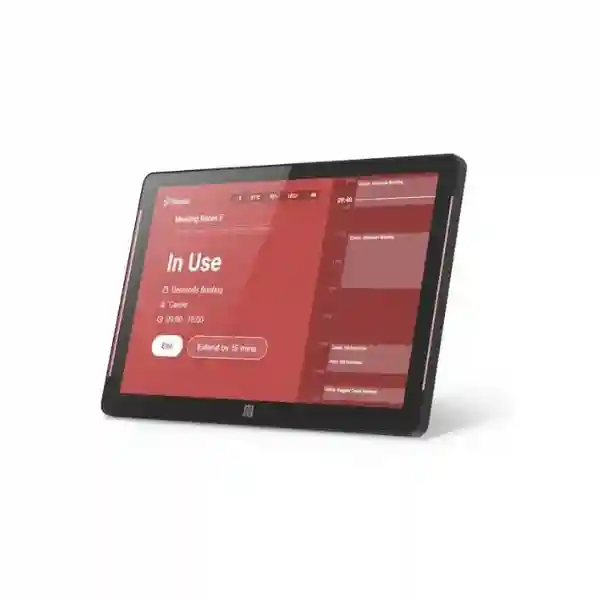
Yeastar DS7510 Visitor Screen Tanzania
The Yeastar DS7510 Visitor Screen is a purpose-built 10.1-inch touchscreen for organizations that want a more structured, professional visitor arrival process. Connected to Yeastar Workplace, it can support visitor self-registration, scheduled-visitor check-in and reception workflows without forcing every guest interaction through a paper logbook or a receptionist. For businesses in Tanzania, the key purchasing decision is not only the screen itself: a successful deployment also depends on the right Yeastar Workplace subscription, Visitor License, network access, mounting method, reception workflow and operational handover.
Quick Answer
DS7510 is a Yeastar visitor-management display for indoor reception areas. Official Yeastar documentation lists a 10.1-inch 1280 × 800 TFT touchscreen, Gigabit Ethernet, PoE, dual-band Wi-Fi, Bluetooth 5.0, NFC, proximity sensing, ambient-light sensing and wall, glass or 75 × 75 mm VESA mounting. Yeastar Workplace Standard or Pro plus a Visitor License is required for the documented visitor-screen workflow.
1280 × 800 resolution and a 16:10 aspect ratio provide a practical interface for reception and visitor check-in use.
A single compatible Ethernet link can simplify power and connectivity when a PoE switch or injector is used.
Official specifications list 2.4 GHz and 5 GHz Wi-Fi support with WPA2-PSK and WPA2-EAP options.
The DS7510 includes a 13.56 MHz NFC area, proximity sensor and ambient-light sensor for a refined kiosk-style experience.
What the Yeastar DS7510 Visitor Screen Does
The DS7510 works as the visitor-facing touchscreen in a Yeastar Workplace visitor-management environment. Yeastar documents the device for visitors who need to check in to scheduled visits or submit visit requests. During registration, the administrator adds the screen in the Yeastar Workplace management portal using its serial number or registration code. Once the device is online and associated with the correct server, it becomes part of the organization’s visitor workflow.
For a reception team, this can reduce dependence on ad-hoc paper forms and repetitive manual data entry. For visitors, a dedicated screen creates a clear point of interaction on arrival. Organizations can also configure the welcome screen to match company branding. The important distinction is that the DS7510 is not simply a generic Android tablet mounted at reception; it is documented by Yeastar as a supported hardware endpoint for Yeastar Workplace visitor-screen use.
Before ordering, confirm how many entrances need visitor check-in, whether each location has wired Ethernet or reliable Wi-Fi, whether PoE is preferred, where the screen will be mounted, and how visitor invitations and approvals will be handled internally. These practical questions determine whether the installation feels seamless on day one.
Verified DS7510 Technical Specifications
| Display | 10.1-inch TFT LCD touchscreen, 1280 × 800, 16:10 |
| Wired network | One 10/100/1000M Ethernet port |
| Wireless | IEEE 802.11 b/g/n at 2.4 GHz and 802.11a/n/ac at 5 GHz; WPA2-PSK and WPA2-EAP |
| Bluetooth | Bluetooth 5.0 |
| Power | PoE, DC 12V/1A, or Type-C 5V/2A |
| NFC | 13.56 MHz |
| Sensors | Proximity sensor up to 1.5 m; ambient-light sensor with five brightness levels |
| Dimensions / weight | 245 × 160 × 18 mm; 0.65 kg |
| Mounting | Wall mount, glass mount, or 75 × 75 mm VESA desktop stand mount |
| Environment | Indoor use; operating temperature documented from -20°C to +50°C |
Licensing and Deployment Checklist
Yeastar’s setup documentation states that the visitor-screen workflow requires Yeastar Workplace Standard or Pro and a Visitor License. Licensing should therefore be discussed before hardware is purchased. The screen must also be able to reach the appropriate Yeastar Workplace server over the internet or the organization’s selected on-premises environment. In a SaaS deployment, the device should be pointed to the same server region used by the Workplace portal; in an on-premises deployment, the custom server domain or IP address is configured on the device.
For the physical installation, decide between wall, glass and VESA desktop mounting. If PoE is used, confirm the switch or injector and PoE budget. If Wi-Fi is used, verify signal quality at the actual reception position rather than assuming office-wide coverage is sufficient. If the screen will be visitor-facing all day, plan cable routing, screen height, glare, reception traffic flow and a process for support escalation.
Yeastar DS7510 Visitor Screen Tanzania
For organizations buying the Yeastar DS7510 Visitor Screen in Tanzania, the strongest use case is a reception point where visitor arrivals need to be more organized, visible and repeatable. Corporate offices, professional services firms, technology companies, educational institutions, healthcare administration buildings, industrial offices and multi-tenant business environments can all benefit from replacing improvised sign-in processes with a dedicated visitor interface. The screen itself is only one layer of the project. Tanzania buyers should evaluate Yeastar Workplace licensing, visitor workflow ownership, reception operating procedures, network reachability and the physical position of the device before deployment.
The DS7510 is well suited to locations where a wired network is available because Gigabit Ethernet and PoE can reduce installation complexity. A single network cable can provide connectivity and power when the surrounding infrastructure supports PoE. Where cabling is difficult, dual-band Wi-Fi provides another path, but the selected reception position should have reliable signal quality. Reception desks are often near doors, glass, lifts, structural columns and public areas, so a wireless survey at the exact mounting point can prevent intermittent connectivity later.
Procurement teams should also confirm the mounting method. A desktop VESA stand may work well on a staffed reception desk, while wall or glass mounting can create a cleaner self-service kiosk. The device is specified for indoor use, so it should not be treated as an outdoor gate terminal. Organizations with multiple offices should decide whether visitor policies, naming conventions and user responsibilities will be standardized across sites. This simplifies future expansion and support.
FourTeck Tanzania can coordinate the DS7510 within a broader technology project that includes networking, Wi-Fi, structured cabling and access-control planning. Review FourTeck Tanzania’s integrated IT portfolio to understand how the visitor endpoint fits into the wider business infrastructure. For regional technology coordination beyond Tanzania, the FourTeck Africa technology network can also be relevant for organizations planning standardized deployments across several African markets.
Yeastar DS7510 Visitor Screen Dar es Salaam
Dar es Salaam organizations often operate reception environments with a high mix of employees, suppliers, contractors, delivery personnel, customers and scheduled business guests. In such settings, the Yeastar DS7510 can provide a consistent digital arrival point that makes the visitor journey easier to understand. A clearly positioned touchscreen can direct guests toward self-registration or check-in while the reception team handles exceptions and human assistance. This is particularly useful for larger offices where front-desk staff should not have to re-enter the same visitor information repeatedly.
For city offices in commercial buildings, the practical installation questions are often about network and mounting. If the reception desk has a managed PoE switch connection, DS7510 deployment can be clean and relatively simple. Where the screen is separated from the main reception desk, a glass or wall mount may be more suitable, provided cable routing and access to power or PoE have been planned. Wi-Fi remains an option, but reception areas in multi-floor buildings can have unpredictable radio conditions because of glass partitions, neighboring access points and dense user traffic. Testing the intended location is more reliable than assuming the nearest office access point will provide adequate service.
A Dar es Salaam deployment should also define who approves unscheduled visits, who receives arrival alerts, how staff handle a visitor whose invitation is missing, and what happens if internet connectivity is unavailable. These operational rules matter as much as the touchscreen hardware. Organizations should train reception staff on the normal process and the fallback process so the system improves service rather than creating confusion during busy periods.
Where visitor-management planning is connected to door entry or physical-security upgrades, FourTeck’s Tanzania integration and support services can help frame the DS7510 as part of a complete front-of-house environment rather than an isolated screen. A request for quotation should include quantity, installation location, preferred mounting, network type, Yeastar Workplace status and whether the project also needs PoE switching, Wi-Fi improvement or access-control coordination.
Yeastar DS7510 Visitor Screen Mwanza
In Mwanza, the Yeastar DS7510 can serve businesses that want a more professional visitor experience across offices, administrative facilities, education environments, logistics operations and growing commercial sites. The most valuable benefit is not a decorative display; it is the ability to create a defined arrival workflow. Visitors should know where to check in, staff should know when a guest has arrived, and administrators should have a manageable process for visitor registration. When those responsibilities are clear, the screen becomes a useful operational endpoint rather than just another device at reception.
Network design deserves early attention. Mwanza organizations with structured cabling can use the DS7510’s Gigabit Ethernet port and PoE capability to simplify installation. PoE is especially useful when the reception position does not have a convenient power socket or when the organization wants the screen powered from centrally protected network equipment. If the site uses Wi-Fi, the DS7510’s 2.4 GHz and 5 GHz support gives flexibility, but signal stability should be confirmed during site planning. Public-facing entrances can sit at the edge of wireless coverage, and nearby metal, glass or dense construction can affect radio behavior.
Businesses should also consider environmental placement. The DS7510 is specified for indoor use. It should be protected from rain, outdoor dust exposure and direct conditions that exceed its intended environment. For a lobby, the 10.1-inch form factor can work on a desk stand or as a mounted interface. A mounting height that is comfortable for a broad range of visitors, good lighting and clear signage will improve adoption. The built-in ambient-light sensor can support screen visibility, but the physical position still matters.
When requesting pricing for Mwanza, buyers should provide the planned number of devices, whether each unit is new or part of an existing Yeastar Workplace deployment, desired mounting and whether a Visitor License is already available. This makes the quotation more useful and reduces follow-up questions. If the project includes wider LAN preparation, FourTeck can also discuss switching, wireless, cabling and network-security requirements as part of the same implementation plan.
Yeastar DS7510 Visitor Screen Arusha
Arusha businesses with visitor-heavy reception areas can use the Yeastar DS7510 to create a more predictable guest journey. Hotels and hospitality offices, tourism operators, NGOs, professional services firms, educational organizations and regional corporate offices may receive visitors whose arrival patterns vary by day and season. A dedicated visitor screen can give scheduled guests a consistent check-in point while providing a structured route for unscheduled visitor requests. The result depends on configuring Yeastar Workplace around the organization’s actual approval process rather than installing the hardware with default assumptions.
For hospitality-adjacent organizations, presentation matters. The DS7510 welcome screen can be configured to better match corporate branding, making the visitor interface feel like part of the reception environment. Device position should be obvious but not obstruct circulation. In a compact office, a VESA desktop stand may be sufficient. In a larger lobby, wall or glass mounting can create a more deliberate self-service station. Because the screen is designed for indoor operation, any deployment near an entrance should still keep the unit inside a protected indoor area.
The network path should be stable throughout business hours. PoE over wired Ethernet is often the simplest choice when cabling can be brought to the visitor station. Wireless connectivity is helpful where new cable runs are impractical, but shared guest Wi-Fi should not automatically be used for business infrastructure. Network policy should determine the appropriate SSID, authentication method and internet access. WPA2-Enterprise support can be useful where the organization already uses centralized wireless authentication.
Arusha buyers should treat the screen, Workplace subscription and Visitor License as one solution set. Confirm who will administer the platform, who owns visitor policy, how alerts are handled and how support will be escalated. For organizations with branch operations outside Tanzania, FourTeck Kenya provides a related regional technology context that may help groups seeking a consistent approach across East African offices.
Yeastar DS7510 Visitor Screen Dodoma
Dodoma organizations that receive scheduled stakeholders, contractors, vendors, consultants and public-facing business visitors can use the Yeastar DS7510 as part of a controlled front-desk process. A visitor-management deployment should begin with policy: which visits are pre-approved, which require host approval, what information must a guest provide, and how the reception team handles exceptions. Once these rules are clear, the screen can support a smoother digital workflow rather than forcing staff to improvise each time someone arrives.
For administrative facilities and larger offices, the infrastructure plan can be as important as the device. The DS7510 has a Gigabit Ethernet port and supports PoE, which can be beneficial where the network rack and switches are centrally managed. If a UPS backs the PoE switch and upstream network equipment, the visitor screen may remain powered during short mains interruptions, although continued operation still depends on the availability of the required network and platform services. Where a DC adapter is preferred, the screen also supports 12V/1A power.
The screen’s 10.1-inch 1280 × 800 display is suitable for a close-range kiosk interaction. The proximity sensor and ambient-light sensor are practical additions for a reception endpoint, while NFC provides a supported identification interface within the hardware. Organizations should avoid treating NFC as proof of compatibility with a specific badge system unless that integration is explicitly confirmed for the intended workflow. Procurement should separate verified hardware capability from any site-specific integration requirement.
For a Dodoma quote, include the number of visitor stations, network availability, existing Yeastar Workplace status, licensing needs and mounting preference. If an office is being built or renovated, it is efficient to coordinate the visitor screen with data outlets, PoE switching, reception furniture and any nearby door-security system before finishing works are complete. That approach reduces visible cabling and avoids retrofitting a newly completed reception.
Yeastar DS7510 Visitor Screen UAE
For organizations operating between Tanzania and the UAE, the Yeastar DS7510 can support a standardized reception design across regional offices when the same Yeastar Workplace visitor-management approach is appropriate. Standardization is useful for groups that want consistent visitor instructions, administrator roles, device naming and deployment documentation. Rather than treating each branch as a separate experiment, the business can define a repeatable template covering mounting, network connection, device registration, welcome-screen branding and reception operating procedures.
In the UAE, many modern offices already have structured cabling and PoE switching, making the DS7510’s Ethernet/PoE combination attractive for clean reception installations. Corporate buildings can also have strict fit-out rules, so mounting location and cable routing should be coordinated with facilities management before installation. Glass-fronted receptions may favor the supported glass-mount approach, while executive offices may prefer a VESA desktop stand integrated into the reception counter.
Regional IT teams should decide whether each site will be administered independently or under a shared governance model. Even when the same hardware is used, visitor policy may differ by business unit, building or country. The technology should support the policy, not replace it. Admin ownership, escalation, privacy expectations and host behavior need to be documented. Where a central IT team manages multiple branches, consistent naming and an inventory of serial numbers can make remote administration and support easier.
Businesses seeking UAE-wide infrastructure support can review FourTeck UAE technology solutions. For Tanzania–UAE projects, a common procurement checklist can be used while still validating local requirements for each site. The quote should identify device count, Workplace licensing, network method, mounting and any wider integration with Wi-Fi, switching, access control or reception systems.
Yeastar DS7510 Visitor Screen Uganda
Uganda organizations considering the Yeastar DS7510 should focus on the complete visitor-management workflow rather than buying the display in isolation. The device becomes useful when it is registered to Yeastar Workplace, connected reliably to the required server and aligned with a defined reception process. Businesses with multiple entrances should decide whether every entrance needs a visitor station or whether guests can be directed to one controlled reception point. That decision affects quantity, cabling and user experience.
The hardware offers flexibility for Ugandan offices because it supports both wired and wireless connectivity. In a managed office network, PoE can simplify the installation and reduce the need for separate power supplies. In leased premises where new cable runs are restricted, dual-band Wi-Fi can be practical. However, businesses should avoid placing the device on an unstable guest network. The visitor screen is part of business operations and should receive appropriate connectivity, monitoring and access policy.
Organizations should also plan the visitor data and staff process around their own policies. The screen can support self-registration and scheduled check-in, but internal rules determine who approves a visitor, which hosts receive notifications and how exceptional cases are resolved. A front-desk procedure should cover forgotten invitations, walk-ins, connectivity outages and visitors who need assistance. These details often determine whether staff accept the system enthusiastically.
For broader Uganda requirements, FourTeck Uganda provides a regional technology reference for networking, communication and infrastructure projects. A multi-country customer can align the DS7510 deployment standard across Uganda and Tanzania while allowing each office to apply its own visitor policies and facility constraints.
Yeastar DS7510 Visitor Screen Kampala
Kampala offices can use the Yeastar DS7510 in busy reception environments where a mix of scheduled meetings and walk-in visits creates pressure on front-desk staff. A visitor screen gives the reception area a clear digital interaction point, but the organization should still define when human assistance is required. High-value guests, first-time visitors and people unfamiliar with digital kiosks may need guidance, while repeat visitors can benefit from a straightforward check-in process.
In multi-storey office buildings, wired PoE can provide predictable connectivity and centralized power, provided the network is designed correctly. The DS7510’s 10/100/1000M Ethernet port is more than sufficient for a visitor-management endpoint, while Wi-Fi offers flexibility where cabling is constrained. IT teams should confirm VLAN, firewall and DNS/internet requirements before installation. If the visitor system relies on a cloud-hosted Yeastar Workplace environment, reliable outbound connectivity is fundamental to the user experience.
Reception design matters as well. The screen should be positioned where arriving visitors naturally stop, not behind staff or in a place that blocks circulation. A desktop stand is convenient when reception staff supervise use; a wall or glass installation is cleaner for self-service. The ambient-light sensor can adjust brightness levels, but glare from windows should still be considered when selecting the exact position.
Kampala procurement teams should include licensing in the project scope. Yeastar documents Workplace Standard or Pro and a Visitor License for the visitor-screen setup. A complete quotation should therefore separate hardware, required platform licensing, mounting accessories where applicable, and any installation or network work. This approach prevents a hardware-only purchase from reaching site without the subscriptions or infrastructure needed for a functional rollout.
Yeastar DS7510 Visitor Screen Arua
For offices and organizations in Arua, the Yeastar DS7510 can be an effective way to introduce a more consistent visitor process without requiring a large dedicated reception technology stack. The screen combines touchscreen interaction, wired or wireless networking and flexible mounting in a compact form factor. The best results come from identifying the exact business problem first: long reception queues, inconsistent sign-in, difficulty notifying hosts, lack of a clear walk-in process, or the need to present a more organized first impression.
Connectivity should be treated as a deployment requirement rather than an afterthought. If the site has a managed PoE switch, a wired connection can provide both network access and power. If the visitor screen must be installed away from available Ethernet, Wi-Fi may be appropriate, but the signal should be tested during normal office load. The chosen SSID should have the necessary access to the Yeastar Workplace service while still following the organization’s network-security policy.
Arua businesses with smaller IT teams may benefit from keeping the deployment simple and well documented. Record the device serial number, mounting position, switch port or Wi-Fi profile, Workplace server selection, assigned administrator and support contact. Documentation is particularly valuable when the person who originally installed the system is unavailable. It also makes future replacement or expansion easier.
When budgeting, avoid comparing only the screen price. Include the required Visitor License, Workplace subscription, mounting, PoE injector or switch capacity if needed, structured cabling and configuration time. If the reception area is part of a new office fit-out, planning these items before furniture and wall finishes are completed can reduce installation effort and create a cleaner result.
Yeastar DS7510 Visitor Screen Mbarara
Mbarara organizations that want to modernize reception can use the Yeastar DS7510 as a dedicated interface for visitor arrival. The screen is especially relevant where staff already use digital scheduling and want the front desk to connect more naturally with the rest of the workplace process. A self-service screen can reduce repeated manual steps, but it should be introduced with clear signage and staff training so visitors know when to use the kiosk and when to speak directly with reception.
The DS7510 provides several installation choices that can suit different facilities. A desktop stand works well for a reception counter, while wall and glass mounting can save desk space and create a permanent visitor station. Because the unit is relatively slim at 18 mm and weighs about 0.65 kg, it can fit into modern office interiors, but mounting should still be secure and accessible for service. The device is intended for indoor use and should not be installed as an exposed outdoor gate panel.
For power and networking, PoE is worth considering when the site already has suitable switching. It can simplify cable management and centralize power. The alternative DC and Type-C power options provide flexibility for special cases. On the network side, wired Ethernet is predictable, while dual-band Wi-Fi can be useful where physical cabling is not practical. The organization should choose based on stability and maintainability rather than convenience alone.
Before procurement, Mbarara buyers should confirm platform licensing, device quantity, expected visitor volume and whether each branch needs its own visitor station. If several sites are involved, using a common configuration standard can simplify administration. Naming conventions, documented network settings and a shared support procedure can make a distributed Yeastar Workplace deployment easier to operate over time.
Yeastar DS7510 Visitor Screen Gulu
In Gulu, the DS7510 can support organizations that need a clear reception process for staff guests, contractors, project partners, suppliers and scheduled meetings. The value of a visitor screen increases when the organization has defined the full journey from invitation to arrival to host notification. A digital kiosk cannot solve an unclear internal process by itself, so the deployment plan should include responsibilities for reception, hosts and system administrators.
For sites with limited available infrastructure at the front desk, the DS7510’s multiple power and network options can make installation easier. PoE over Ethernet is often the cleanest design when a compatible switch or injector is available. A DC adapter can be used where network power is not required, and Wi-Fi can remove the need for a new data cable. Each choice has operational tradeoffs: wired PoE is centralized and predictable, while Wi-Fi is flexible but depends more heavily on local radio conditions.
Gulu deployments should also consider supportability. Keep the screen on a documented network segment, record its serial number and identify who can access the Yeastar Workplace administrator portal. Yeastar supports remote reboot of registered online visitor screens from the management portal, which can be useful for routine troubleshooting, but physical access to the device may still be necessary for network or power faults. A simple local checklist can help non-technical reception staff identify whether the issue is screen power, network access or application availability.
A quotation request should therefore include both commercial and technical information: number of screens, mount type, network method, licensing status and any need for installation. This produces a more accurate project scope than requesting a unit price alone and then discovering missing accessories or infrastructure during deployment.
Yeastar DS7510 Visitor Screen Kenya
Kenya organizations adopting Yeastar Workplace can use the DS7510 to provide a dedicated visitor check-in point at corporate receptions, shared offices, education facilities and other managed workplaces. For businesses with branches in both Kenya and Tanzania, the device can become part of a common regional visitor-management standard. Standardization can simplify purchasing, administrator training and support while still allowing each branch to apply local visitor procedures.
A Nairobi or other urban office may already have managed switching, segmented wireless networks and structured cabling. In that environment, the DS7510 can be placed on an appropriate business network using PoE Ethernet or Wi-Fi. The IT team should document the chosen connection and avoid unnecessary complexity. If wired infrastructure is available at reception, PoE is attractive because power and data can share one cable. If office fit-out limits new cabling, dual-band Wi-Fi may be more practical.
For groups with cross-border offices, licensing governance deserves attention. Decide whether Yeastar Workplace administration is centralized or delegated to local teams. Define how visitor templates, branding and notifications are maintained. A centrally managed system can improve consistency, but local reception staff still need training and a clear fallback process. The equipment should fit the organization’s operating model, not force every branch into a workflow that does not reflect how it receives visitors.
When evaluating the DS7510 for Kenya, include mounting, power, connectivity and licensing in the same bill of requirements. Businesses can consult FourTeck Kenya for regional project context and use the Tanzania FourTeck contact route when the procurement is led from Tanzania. This is particularly helpful for organizations seeking a consistent technology partner across East African sites.
Yeastar DS7510 Visitor Screen Kuwait
For Kuwait offices, the Yeastar DS7510 provides a compact visitor interface that can complement modern corporate reception designs. The device is best suited to indoor lobbies and staffed or semi-self-service reception areas where visitor check-in should follow a defined process. Organizations operating between East Africa and Kuwait may choose the same endpoint to standardize support, documentation and user training across branches.
Office fit-outs in commercial towers often require careful coordination of data outlets, power and mounting. The DS7510’s PoE capability can simplify this by allowing a suitable Ethernet connection to supply both power and data. Where the reception counter is already complete, a VESA desktop stand may reduce installation work. Wall or glass mounting can create a cleaner kiosk effect if facilities approval and cable routes are available. Because the device is for indoor use, it should not be installed at exposed external entrances.
The licensing model should be confirmed before ordering. Yeastar’s visitor-screen documentation identifies Workplace Standard or Pro and a Visitor License as requirements. Procurement should therefore request a solution quote, not simply a device quote. The IT team should also confirm whether the deployment uses Yeastar’s SaaS environment or an on-premises Workplace server, since the device registration process depends on selecting the correct server.
A regional company can standardize the technical build while adapting the front-desk policy to each country. The Kuwait office might have different visitor approval or building-access requirements from a Tanzania office, but both can still use the same equipment and similar network architecture. For Kuwait-specific technology projects, FourTeck Kuwait can provide a relevant regional point of reference.
Yeastar DS7510 Visitor Screen Ghana
Ghana organizations can use the Yeastar DS7510 to modernize reception in business offices where guest registration needs to be more consistent and easier to manage. The device’s dedicated touchscreen format helps create a clear visitor station rather than asking guests to use a shared employee tablet or an informal sign-in method. When connected to Yeastar Workplace, the visitor screen becomes part of the broader workflow for scheduled check-in and visitor requests.
Accra offices and other commercial sites should evaluate reception layout first. A desk-mounted visitor screen can work well when staff supervise the process. A wall or glass mount is more suitable for a self-service interaction point. The display should be reachable, visible and positioned away from strong glare. Cabling should be secure and discreet, particularly in public-facing spaces. PoE can reduce cable clutter by combining power and network connectivity on one compatible Ethernet connection.
Wireless connectivity is another option, and the DS7510 supports both 2.4 GHz and 5 GHz Wi-Fi. For enterprise offices, the documented WPA2-EAP capability may align with centrally managed wireless authentication. Even so, wired connections may be preferable where reliability and centralized troubleshooting are priorities. The right choice depends on the actual site infrastructure, not a generic recommendation.
Businesses with offices across Ghana, Tanzania and other African markets can develop a repeatable deployment template covering licensing, naming, mounting, network policy and staff training. That makes future rollouts easier and reduces configuration drift. The project should still respect local reception procedures at each branch. A common hardware platform can create consistency without forcing every office to handle visitors in exactly the same way.
Yeastar DS7510 Visitor Screen Nigeria
Nigeria businesses with high visitor volumes can use the Yeastar DS7510 as a controlled front-of-house interface that supports a more scalable reception process. Large offices may have many scheduled meetings each day, frequent vendor visits and multiple departments expecting guests. A visitor screen can reduce repetitive manual work and give arrivals a clear first action, while reception staff focus on exceptions, security checks and people who need assistance.
For larger Lagos, Abuja or branch-office deployments, network segmentation and device management should be planned from the beginning. The DS7510 has Gigabit Ethernet and dual-band Wi-Fi, so it can fit into a managed network architecture. PoE is useful for centralized power, especially where the network switches are protected by UPS. If Wi-Fi is selected, the reception area should be tested for capacity and interference during busy periods. A kiosk that loses connectivity repeatedly will quickly undermine confidence in the visitor process.
Multi-site Nigerian businesses should decide how devices are named and who administers them. A consistent pattern such as site-reception-01 makes inventory and support easier than ad-hoc names. Maintain a record of serial numbers and installation locations. Yeastar’s management features include the ability to remotely reboot supported online visitor screens, which can assist with routine support, although network and power faults still need normal troubleshooting.
The purchasing conversation should include the Workplace subscription and Visitor License, not just the DS7510 hardware. It should also capture mounting, switch or injector needs, cabling, configuration and staff handover. For groups with Tanzania and Nigeria operations, a common solution design can simplify procurement while allowing each office to define its own visitor approval and security procedures.
Yeastar DS7510 Visitor Screen Seychelles
Seychelles businesses in hospitality administration, corporate services, professional offices and tourism-related operations can use the Yeastar DS7510 to create a polished digital check-in point for visitors. The compact 10.1-inch screen can fit into receptions where space is valuable, while wall, glass and VESA desktop mounting provide options for different interior designs. The system should be positioned as an indoor reception device rather than an outdoor access terminal.
For island environments where IT support may be centralized across several properties or offices, deployment documentation is especially important. Record how each device is powered, which network it uses, the assigned Yeastar Workplace server, licensing status and administrator responsibility. A well-documented installation is easier to troubleshoot remotely and simpler for local facilities staff to support when physical intervention is required.
Connectivity should be selected based on stability. PoE Ethernet is ideal when structured cabling reaches reception, because it combines network and power. Wi-Fi can help where cabling is difficult, but the visitor station should use a dependable business network rather than a congested public guest network. The DS7510’s support for both 2.4 GHz and 5 GHz Wi-Fi provides flexibility, while wired Gigabit Ethernet remains available when radio conditions are inconsistent.
Seychelles buyers should also include licensing and operational setup in their budget. Yeastar Workplace Standard or Pro and a Visitor License are part of the documented visitor-screen requirements. Before go-live, test scheduled visitor check-in, walk-in request handling, host notifications and the fallback procedure for network outages. A short reception training session can prevent small usability issues from becoming recurring support calls and helps ensure the digital process feels natural to guests.
Integration with Networking, Wi-Fi and Access Control
A visitor-management screen sits at the edge of several business systems. It needs network access, physical mounting and a reception workflow, and it may exist near access-control infrastructure. FourTeck’s Tanzania portfolio covers managed switching, wireless networks, structured cabling and access-control planning, which can help organizations design the supporting environment around the DS7510. Buyers can review the FourTeck Tanzania services page for broader integration support.
The DS7510 hardware includes NFC, but any badge or access-control integration should be verified against the exact Yeastar feature and third-party system involved. Yeastar separately documents access-control functions for DS7510 room-display use with specific hardware revisions and interfaces; that should not be automatically assumed to apply to every visitor-screen scenario. A project that requires door unlocking, credential issuance or visitor badge integration should therefore be scoped explicitly.
From a network perspective, the visitor screen usually needs stable outbound access to the selected Yeastar Workplace environment. IT teams should document VLAN placement, DNS, gateway and any firewall policies. For PoE deployments, confirm switch capacity and PoE budget. For Wi-Fi deployments, validate signal strength and authentication at the exact reception location. These simple checks reduce the risk of a visually complete installation that fails operationally.
Who Should Choose the DS7510?
Corporate offices
Organizations with regular meetings and external visitors that want a consistent reception workflow and branded arrival experience.
Multi-site businesses
Regional companies that want to standardize visitor-screen hardware, administration, naming and support across several offices.
Reception modernization projects
Businesses replacing paper registers or improvised tablet check-in with a dedicated, supported Yeastar Workplace endpoint.
Quotation Checklist
To prepare a useful DS7510 quotation, include: number of visitor screens; city and site count; Yeastar Workplace SaaS or on-premises status; current Workplace plan; Visitor License requirement; wired Ethernet or Wi-Fi preference; PoE switch or injector availability; wall, glass or desktop mounting preference; structured-cabling needs; expected visitor workflow; and whether reception training or deployment assistance is required.
If the deployment will later extend to other countries, mention that at the start. A standardized device and configuration template can then be considered as part of the initial design instead of being recreated for every branch.
Frequently Asked Questions
Does the Yeastar DS7510 require Yeastar Workplace?
Yes for the documented Yeastar visitor-screen workflow. Yeastar’s setup guidance specifies Yeastar Workplace Standard or Pro and a Visitor License.
Can the DS7510 use PoE?
Yes. Yeastar lists Power over Ethernet as a supported power method. The device can also use 12V/1A DC or Type-C 5V/2A power.
Does the DS7510 support Wi-Fi?
Yes. Official specifications list 2.4 GHz 802.11 b/g/n and 5 GHz 802.11a/n/ac Wi-Fi, with WPA2-PSK and WPA2-EAP support.
How can the visitor screen be mounted?
Yeastar lists wall mounting, glass mounting and 75 × 75 mm VESA desktop stand mounting for the DS7510.
Is the DS7510 suitable for outdoor installation?
No. Yeastar specifies the DS7510 for indoor use. Outdoor gate or exposed entrance projects should use hardware designed for those environmental conditions.
Can the DS7510 be remotely rebooted?
Yeastar documents remote reboot for supported DS7510 visitor screens that are online and registered in Yeastar Workplace.
Decision Recap
Choose the Yeastar DS7510 when you need a dedicated indoor visitor touchscreen that fits directly into Yeastar Workplace, supports PoE or Wi-Fi deployment, offers flexible mounting and can help create a more consistent reception workflow. Before ordering, confirm Workplace licensing, Visitor License, network method, mounting and the internal visitor approval process.
FourTeck can help scope the surrounding infrastructure and quotation requirements. For wider enterprise technology coordination, visit FourTeck global technology solutions or use the Tanzania contact route below for a product-focused request.
Consult FourTeck About Your DS7510 Deployment
Share your location, number of reception points, preferred mounting, available network connection and Yeastar Workplace status. FourTeck can use those details to prepare a more useful product and implementation discussion without making assumptions about licensing, accessories or site conditions.




Reviews
There are no reviews yet.