
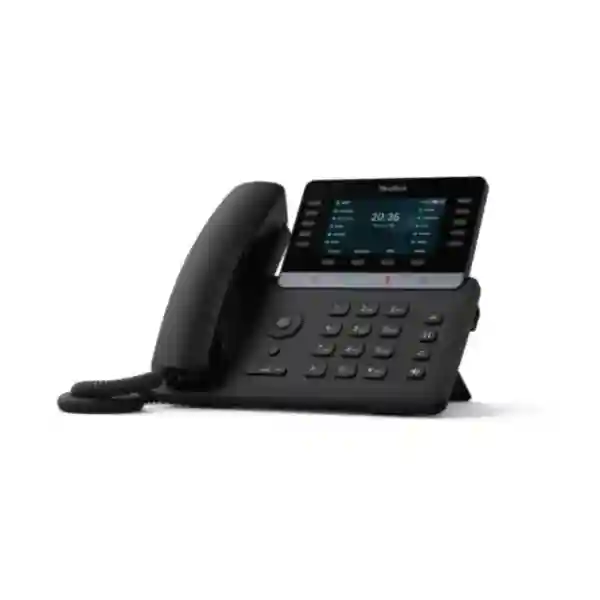
Yealink T74LTE 4G Business Phone Tanzania
The Yealink T74LTE 4G Business Phone brings cellular connectivity into a familiar enterprise desk-phone format. It is designed for organisations that want a fixed desktop endpoint without depending entirely on a conventional wired voice connection. Yealink positions the T74LTE as a 4G business phone with a built-in nano-SIM slot, VoLTE calling, a 4.3-inch 480 × 272 colour display, built-in Bluetooth 5.0, wireless connectivity, HD audio, smart noise filtering and support for business telephony features. For procurement teams in Tanzania, the key benefit is not simply that the phone has a SIM slot; it is that the device can be considered as part of a wider voice architecture covering cellular service, SIP or PBX integration, user workflows, network resilience and deployment at sites where traditional desk-phone cabling may be inconvenient.
What is the Yealink T74LTE?
The Yealink T74LTE is a Linux-based 4G business desk phone that combines VoIP-style desktop features with cellular-network access. The European T74LTE model published by Yealink supports VoLTE calling and multiple LTE frequency bands including B1, B3, B7, B8, B20, B28 and B38. Yealink also states that the phone supports 16 accounts, including one IMS account. This combination makes the device interesting for businesses that need a professionally presented desk phone in places where fixed Ethernet voice infrastructure is unavailable, slow to deploy, temporary, or where a secondary communications path is desirable.
A cellular-capable desk phone should not be treated as universally plug-and-play in every market. Before ordering for Tanzania or another country, the exact hardware version, operator frequency support, SIM provisioning, VoLTE enablement and service-plan compatibility should be checked with the chosen mobile network provider. This is especially important because carrier policies can affect IMS registration, voice-over-LTE availability and supported device profiles even when radio bands appear technically compatible. FourTeck therefore recommends confirming the intended carrier, number of phones, PBX or SIP environment and business continuity requirement before finalising a quotation.
Cellular-first deployment
The integrated nano-SIM slot allows the T74LTE to use supported mobile networks for VoLTE calling. That can simplify desktop-phone deployment where a dedicated fixed voice line is not practical.
Business-grade audio
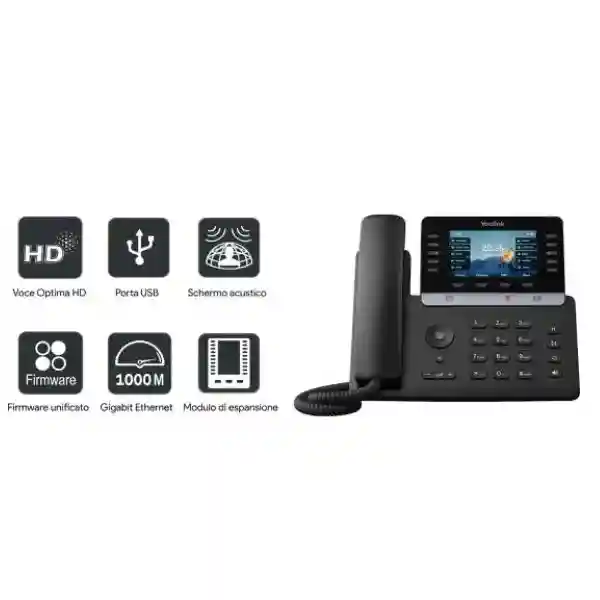
Yealink lists Optimal HD audio, Smart Noise Filtering and Acoustic Shield technologies for clearer conversations in offices, reception areas and operational environments where background sound can be distracting.
Flexible endpoint connectivity
Built-in Bluetooth 5.0, wireless networking, USB accessory support and expansion-module compatibility help the phone adapt to different business users, from general staff to supervisors and high-call-volume roles.
Centralised deployment options
Yealink supports provisioning and management methods intended to make larger rollouts easier for administrators, reducing repetitive manual setup when many phones must follow a common configuration.
Verified Yealink T74LTE Features
| Display | 4.3-inch, 480 × 272 pixel colour display with backlight |
| Cellular | Built-in nano-SIM slot and VoLTE calling support |
| Accounts | Up to 16 accounts, including 1 IMS account |
| Wireless | Built-in Bluetooth 5.0 and dual-band wireless networking |
| Audio | Optimal HD audio, Smart Noise Filtering, Acoustic Shield and 3W speaker |
| Accessories | USB headset support, EHS support and compatible colour-screen expansion modules |
| Security | Security functions published by Yealink include trusted execution technology, secure boot controls, TLS 1.3, SRTP-related protections and WPA3 support |
| European LTE bands | B1, B3, B7, B8, B20, B28 and B38; carrier and local network compatibility must still be verified |
Where the T74LTE Fits in a Business Phone Strategy
The strongest use case for the Yealink T74LTE is a desk-based user who needs business-phone ergonomics but cannot rely on a traditional fixed-line deployment. Examples include temporary project offices, retail counters, branch sites, construction management cabins, remote facilities, emergency or continuity locations, pop-up operations and desks that may be moved as a site evolves. Unlike a smartphone, the T74LTE preserves the familiar handset, keypad, line-key and desktop workflow that many reception, operations and administrative users prefer during long working days.
For organisations already using an IP PBX, the phone may also form part of a hybrid strategy. The actual integration depends on the PBX, SIP configuration, carrier profile and desired routing. Buyers should decide whether the primary objective is direct cellular voice, SIP-based office telephony, resilience between network paths, or a combination of these functions. That decision affects configuration, account planning and support responsibilities.
For broader telephony planning, FourTeck Tanzania provides information about business telephony and IP PBX services, while the FourTeck Tanzania technology shop helps buyers review IP phones, PBX equipment and supporting network categories in the context of compatibility, deployment and growth.
Selection and Deployment Checklist
The T74LTE is published in regional variants. Verify that the quoted unit is the intended Europe/international version and that its supported LTE bands match the target network.
A compatible LTE band does not automatically guarantee voice service. Ask the mobile operator whether the SIM and tariff are enabled for VoLTE and whether the device profile is accepted.
If the phone will register to a SIP server or PBX, provide the platform name, account requirements, extension plan, provisioning method and any advanced features that must be supported.
A manager, receptionist, supervisor and occasional phone user can have different needs for line keys, headsets, directories, call handling and expansion modules.
Yealink T74LTE 4G Business Phone Tanzania
For organisations in Tanzania, the Yealink T74LTE is particularly relevant where a conventional desk-phone experience is required but the underlying connectivity may vary from site to site. A company may have a well-cabled head office in Dar es Salaam, a smaller branch in another region, a temporary project location, or an operational site where fixed telecom infrastructure is not yet available. The T74LTE creates an additional option because voice service can be planned around cellular connectivity rather than assuming that every desk has a dedicated Ethernet voice path. That can reduce installation dependency in some environments, but a proper assessment is still important because mobile coverage, operator VoLTE policy, indoor signal conditions, power availability and PBX requirements all influence the result.
Tanzania buyers should begin with the network operator. The European T74LTE supports LTE bands B1, B3, B7, B8, B20, B28 and B38, but band overlap alone is not enough to guarantee service. VoLTE depends on the operator allowing the SIM and device to register for IMS voice. Before large-scale procurement, it is sensible to validate a sample unit using the intended SIM, location and calling scenario. If the phone will also use SIP accounts, test the chosen PBX platform, inbound and outbound calling, transfers, hold, caller ID, voicemail access and any reception features that are part of the organisation’s standard workflow.
The business case is strongest when deployment speed and flexibility matter. Retail counters, branch offices, project teams, field coordination offices, temporary facilities and backup communications locations can benefit from a desktop endpoint that does not depend entirely on fixed voice cabling. For head-office environments, the T74LTE may also be evaluated as part of a continuity design, although continuity should be tested rather than assumed. Power, cellular coverage and carrier policy remain dependencies. Where users work in noisy environments, Yealink’s Smart Noise Filtering and Acoustic Shield technologies can improve call clarity, while Bluetooth and USB accessory support offer headset choices for staff who handle frequent calls.
FourTeck Tanzania can help structure the requirement around user count, carrier choice, extension design, PBX integration and network readiness. Customers can also review FourTeck’s broader Tanzania IT and telecom solution portfolio to connect the phone requirement with switching, Wi-Fi, firewall, cabling and other infrastructure where needed. The aim is to make the T74LTE part of a coherent communications design rather than an isolated handset purchase.
Yealink T74LTE 4G Business Phone Dar es Salaam
Businesses in Dar es Salaam often operate across a mixture of modern office towers, retail locations, warehouses, hospitality properties, construction sites, logistics facilities and temporary project spaces. The Yealink T74LTE can be useful in this environment because it gives organisations another way to place a professional desk phone without making every location dependent on the same fixed voice infrastructure. A new branch, pop-up customer-service desk or project office may need voice capability before permanent cabling is complete. A mobile-network-enabled desktop phone can reduce that dependency, provided the selected carrier delivers suitable indoor signal and enables VoLTE for the SIM and device.
Procurement teams in Dar es Salaam should define whether the T74LTE will replace a standard SIP phone, supplement an existing PBX, or operate as a dedicated cellular line. Each objective leads to a different configuration. A reception desk may require multiple call appearances, transfer workflows, directories and possibly an expansion module. A site supervisor may prefer a straightforward cellular line with a headset. A manager may need both business SIP accounts and flexible wireless connectivity. Because the T74LTE supports multiple accounts and a built-in IMS account, it can fit several scenarios, but the design must be confirmed against the selected PBX and carrier.
Building conditions should also be considered. Cellular signal quality can change between floors, interior rooms and reinforced structures, so a desk that works well near a window may behave differently in an internal office. Before rolling out many units, test the phone at the actual desks where it will be used. If Wi-Fi or Ethernet will be part of the deployment, check local LAN design, DHCP, firewall rules and QoS policy where appropriate. For high-call-volume users, validate headset comfort, call handling shortcuts and directory access during the pilot rather than relying only on specifications.
For larger projects, FourTeck can align the T74LTE requirement with broader voice and network planning. Dar es Salaam organisations that are refreshing their communications platform can review IP PBX, Wi-Fi, switch and structured-network requirements at the same time, reducing the risk of deploying a capable phone into an environment that lacks consistent addressing, security or management. A useful quotation request should include the number of phones, preferred mobile operator, PBX platform, required accessories, target locations and whether installation or provisioning is required.
Yealink T74LTE 4G Business Phone Mwanza
In Mwanza, the T74LTE may appeal to businesses that need dependable desk-based communications across offices, hospitality operations, distribution points, service centres and project locations where a conventional telephone deployment may not be convenient. A cellular-capable desk phone can simplify the physical setup because the endpoint can use a nano-SIM for supported VoLTE service. That does not remove the need for planning; it changes the planning questions. Instead of focusing only on Ethernet ports and switch capacity, the buyer must also confirm mobile-network coverage, SIM policy, VoLTE activation, desk location and the relationship between cellular calls and any existing PBX.
For a branch office in Mwanza, it can be useful to establish a clear communication model before ordering. Decide which users need direct numbers, which calls should route through a central business number, and whether the branch is expected to share the same extension plan as a headquarters location. If a SIP PBX is involved, confirm how the T74LTE will register, how remote provisioning will be handled and how administrators will manage credentials securely. Yealink’s support for provisioning tools can simplify standardisation when multiple endpoints use a common template, but the template itself should be tested against the intended workflows.
Audio is another practical consideration. Retail floors, front desks and operational facilities can have background conversation, fans, vehicles or customer activity. Yealink’s noise-management technologies are intended to improve clarity in such conditions. For users who spend long periods on calls, Bluetooth or USB headsets can reduce fatigue and leave hands free for data entry. If an expansion module is required for additional programmable keys, confirm the accessory model and power arrangement before purchase.
Mwanza buyers should treat a pilot as part of the procurement process when cellular calling is mission-critical. Test real calls at representative desks during business hours, check inbound and outbound quality, verify caller identification and transfer behaviour, and confirm what happens if the preferred network path becomes unavailable. A short pilot can answer more useful questions than simply comparing product datasheets. FourTeck can assist by turning those findings into a repeatable branch configuration for wider deployment.
Yealink T74LTE 4G Business Phone Arusha
Arusha has a diverse business environment that includes hospitality, tourism administration, NGOs, professional services, education, logistics and project offices. The Yealink T74LTE can suit organisations that want a stable desktop calling experience while retaining flexibility in how the phone reaches the network. For a hotel back office, tour operator, field-programme office or temporary project site, the ability to use a nano-SIM and supported VoLTE service can help avoid waiting for a dedicated fixed voice circuit at every desk. At the same time, the phone retains enterprise features such as multiple accounts, programmable controls, a colour display and headset connectivity.
A useful Arusha deployment discussion should separate user experience from transport technology. The user may simply need to answer, transfer, hold and place calls through a familiar handset. Behind that workflow, the organisation must decide whether calls are delivered by the mobile operator, a SIP platform or both. If several branches are expected to use the same extension plan, it may be preferable to centralise call routing through a PBX while using the T74LTE’s available connectivity options at the endpoint. If the objective is only to provide a standalone cellular desk line, configuration can be simpler, but operator compatibility becomes even more important.
Hospitality and service organisations should also consider how callers reach staff. A device with many features does not automatically create good call handling. Define reception groups, escalation, after-hours routes, voicemail and responsibilities before configuration. Where teams handle guest or customer calls throughout the day, test headset options and ringtone levels. For quieter administrative offices, handset calling may be sufficient. The two-angle stand and colour interface support comfortable desk use, while Smart Noise Filtering can help where reception or shared-office noise is present.
For procurement, provide the intended operator, number of handsets, current PBX or cloud-voice platform, expected calling pattern and whether any accessories are required. This lets FourTeck evaluate the T74LTE as part of the real business workflow rather than as a specification-only purchase. Arusha organisations with multiple locations can also use the same process to standardise phone settings, naming and support documentation across sites.
Yealink T74LTE 4G Business Phone Dodoma
For organisations in Dodoma, the Yealink T74LTE offers a practical option where a desktop communications endpoint is needed but fixed phone infrastructure is not the preferred or most convenient route. Government-related offices, professional services, project teams, educational organisations and branch operations may all have users who need a consistent business handset with direct access to cellular calling. The T74LTE supports VoLTE through a nano-SIM and combines that with the familiar controls of a modern desk phone, helping users avoid the compromises of relying on personal smartphones for every business conversation.
Security and administration should be part of the design from the beginning. Yealink publishes features such as TLS 1.3, SRTP-related protection, encrypted configuration capabilities and trusted execution technology within the T7 series security approach. These functions are valuable, but they must be paired with sound operational practices. Administrators should use controlled credentials, restrict management access, maintain approved firmware, document account ownership and remove unused services. If phones register to a PBX across the internet, firewall policy, DNS and remote-access design should be reviewed so that the endpoint is not exposed unnecessarily.
Dodoma buyers should also consider power and continuity. Cellular connectivity can remove dependence on a wired voice circuit, but the phone still requires reliable power and a working mobile network. If communications are considered operationally important, the complete path should be assessed: handset power, building power protection, mobile coverage and the availability of alternative contact methods. Continuity is strongest when the organisation understands each dependency rather than assuming one device eliminates all failure points.
A well-prepared quotation should state the quantity, target desks or departments, desired mobile operator, whether each phone requires its own number, any SIP account requirements, headset needs, expansion-module requirements and preferred provisioning approach. FourTeck can then help determine whether the T74LTE is the right endpoint or whether a mixed fleet of LTE and standard IP phones would better fit the different user roles in the organisation.
Yealink T74LTE 4G Business Phone UAE
UAE organisations evaluating the Yealink T74LTE should focus first on carrier certification and the exact regional version being supplied. The European T74LTE publishes a set of LTE bands suited to many international networks, but VoLTE service is controlled by the mobile operator and may depend on device approval, IMS profile and SIM provisioning. This makes pre-deployment testing important, particularly for businesses planning a large number of desk phones. A successful pilot should confirm registration, inbound and outbound calling, caller ID, hold, transfer, emergency-calling requirements where applicable and behaviour after a temporary network interruption.
The device can be useful for temporary offices, construction projects, retail counters, service desks and branch sites where fixed voice infrastructure is undesirable or unavailable. The desktop form factor gives staff a dedicated business endpoint with a handset, keypad, display and programmable controls instead of asking them to rely on mobile phones. For UAE companies with IP PBX platforms, the T74LTE can also be assessed as part of a hybrid communication design, but PBX compatibility should be verified against the exact features and provisioning method required.
Headset and accessory planning is relevant for high-call-volume environments. Bluetooth 5.0, USB headset support and EHS compatibility provide several ways to equip reception, customer-service and administrative users. Expansion-module support can be useful where operators need more keys for monitored extensions or speed dial. The actual accessory combination should be confirmed before purchase so power, cabling and desk space are understood.
Companies with UAE and East African operations may benefit from using the same endpoint evaluation framework in each country while allowing for different carrier conditions. FourTeck’s UAE technology solutions site provides a regional reference point for organisations coordinating voice, network and infrastructure requirements across locations. Standardising configuration templates, extension naming and support documentation can reduce operational differences even when local carrier profiles vary.
Yealink T74LTE 4G Business Phone Uganda
In Uganda, the Yealink T74LTE can be considered by businesses that need a professional desktop phone in branch offices, customer-facing locations, field coordination centres and sites where cellular service is easier to deploy than a dedicated fixed voice circuit. The phone’s nano-SIM slot and VoLTE capability support that objective, while the 4.3-inch screen, multiple accounts, programmable keys and headset options preserve the experience expected from an office handset. The key procurement step is verifying that the intended operator supports the device’s LTE bands and VoLTE profile.
A Uganda deployment should also define how the device relates to the organisation’s existing call system. A company with a central IP PBX may want branch users to retain extension dialing, transfer functions and a common outbound identity. Another organisation may simply need independent cellular desk lines at each site. Those are different designs. When a PBX is involved, confirm SIP registration, codec support, NAT and firewall requirements, provisioning and remote management. When cellular service is primary, focus more heavily on operator testing and signal quality at the actual desk locations.
For multi-site businesses, the T74LTE can also support standardisation. A common phone interface reduces training differences between branches, and centralised provisioning can help administrators maintain consistent account names, line keys, directories and policies. Standardisation should still allow local differences in numbering and carrier configuration. It is often useful to create a documented branch template, then record exceptions rather than configuring every phone independently.
FourTeck’s Uganda IT and business communication site highlights IP PBX, VoIP and networking as core solution areas. Customers planning T74LTE deployments can therefore consider the handset alongside extension design, LAN readiness, connectivity and ongoing support rather than treating the phone as an isolated purchase.
Yealink T74LTE 4G Business Phone Kampala
Kampala businesses often need communications that can be deployed quickly across offices, retail points, service centres and project locations. The Yealink T74LTE is relevant where teams want a dedicated desktop handset but also value cellular flexibility. Rather than assigning staff personal smartphones for fixed-desk duties, an organisation can deploy a business endpoint with a full keypad, line controls, directory functions and headset options. That can make day-to-day call handling more consistent, particularly for reception, administration and customer-service roles.
Before ordering, test the device with the intended mobile operator. LTE band overlap should be checked, but practical VoLTE service depends on operator policy. A pilot should include calls at the actual desks, not only an equipment room, because indoor signal strength can vary by floor and construction. Test ringing, answer, mute, hold, transfer and any PBX features that users rely on. If the phone is expected to switch between connectivity paths, simulate an interruption so administrators know how the device behaves and how quickly service returns.
Kampala call-centre-style users or busy front desks may benefit from a headset and expansion keys. The T74LTE’s Bluetooth and USB accessory options provide flexibility, while expansion modules can increase the number of visible programmable functions. However, accessory selection should be confirmed by exact model compatibility and user role. A general office user may not need the same setup as a receptionist, and avoiding unnecessary accessories can reduce cost and support complexity.
For organisations with many branches, administrators should also define a provisioning and documentation standard. Record the phone serial or asset identity, assigned user, extension, SIM number, carrier, configuration profile and support contact. This information becomes especially valuable when a handset is moved or replaced. FourTeck can help structure a rollout plan that covers devices, accounts, operator testing and PBX integration as one project.
Yealink T74LTE 4G Business Phone Arua
For Arua offices and operational sites, the T74LTE may be attractive where conventional fixed telephony is difficult to deploy or where organisations need a desktop voice option that can be established using a supported mobile network. The use case can include branch administration, logistics coordination, NGO operations, service desks and temporary facilities. The phone provides a more structured desk experience than a general-purpose mobile handset, with a large colour screen, dedicated call controls and support for multiple business accounts.
The first technical question should be coverage at the site. Cellular voice quality depends on radio conditions, and remote or edge locations can behave differently from urban centres. Test the selected operator with the intended SIM and phone at the actual desk or building zone. If the device will be used in a location where network conditions fluctuate, users should also be given a simple escalation procedure so they know what to do when service becomes degraded. Business continuity is not only a hardware feature; it includes clear operational procedures.
If the T74LTE is connecting to a central PBX, branch networking and security must be planned as well. The phone may use cellular or IP connectivity, but administrators still need to define how extensions register, how remote endpoints are authenticated and how configuration is protected. A standard template can reduce errors. For larger organisations, central provisioning is preferable to manually entering settings on every unit because manual processes become difficult to audit as the fleet grows.
Arua procurement teams should provide FourTeck with the number of users, desk locations, carrier preference, existing phone system, required calling features and any headset needs. That information supports a more useful quotation and helps identify whether every user needs the LTE model or whether a combination of standard IP phones and T74LTE units would better match the site conditions and budget.
Yealink T74LTE 4G Business Phone Mbarara
Mbarara businesses can evaluate the Yealink T74LTE when they need a dedicated office phone that remains flexible about how connectivity is delivered. The combination of nano-SIM, VoLTE, SIP-oriented features and enterprise audio makes the device suitable for branch desks, reception points, retail operations and administration areas. Its value is highest where deployment flexibility matters enough to justify an LTE-capable endpoint rather than a standard Ethernet-only desk phone.
A practical buying process starts by separating essential and optional requirements. Essential requirements may include reliable inbound and outbound calling, caller ID, transfer, hold and access to a central directory. Optional needs can include Bluetooth headsets, expansion modules, multiple SIP accounts or wireless connectivity. This distinction helps avoid over-specifying every desk. Some users may need the full T74LTE capability while others can use simpler endpoints on the same PBX.
The T74LTE should also be considered in relation to the site’s network and power environment. Even when cellular calling is the primary path, the device still requires stable power and secure administration. If it is connected to Wi-Fi or Ethernet for management or SIP services, ensure DHCP, DNS, firewall and VLAN policies are suitable. If a branch has a UPS-backed network rack, consider whether phone power should also be protected for important desks. Continuity design should include both the handset and the services behind it.
Before purchasing a larger quantity in Mbarara, FourTeck recommends a controlled pilot with the target mobile operator and business call flow. Test at least one representative user from each role, such as reception, management and general office. Record any configuration differences and confirm that support teams can reproduce the setup. This turns procurement into a managed rollout rather than a series of one-off device installations.
Yealink T74LTE 4G Business Phone Gulu
For organisations in Gulu, the Yealink T74LTE offers a way to deploy a business-style desk phone using supported cellular connectivity where fixed-line options may be limited, delayed or undesirable. This can be useful for administration offices, field-programme coordination, branch operations, hospitality, education and logistics. The handset remains a dedicated business endpoint, which helps organisations keep work calls separate from employees’ personal devices and gives users the familiar workflow of a desktop phone.
Coverage planning should be treated as a site-specific task. Do not assume that because a mobile phone works in the building, every desk location will deliver the same T74LTE experience. Signal conditions can change with construction materials, interior placement and network load. Test the selected SIM and device at the intended desks, and repeat the test during normal operating periods. If voice is critical, document a fallback contact method so staff are not dependent on one endpoint during an unusual outage.
The T74LTE’s audio and accessory options can support different Gulu user profiles. A shared reception point may require a wired or Bluetooth headset and more programmable keys. A manager may value multiple accounts and a clear display. A standard desk may use the handset and a simpler set of line keys. Matching accessories to real user tasks keeps the rollout cost-effective and makes training easier.
For multi-branch organisations, configuration governance is as important as device selection. Define a naming standard, account structure, firmware policy, administrator access method and change process before the fleet grows. If central provisioning is used, maintain a tested baseline configuration and document site-specific settings. FourTeck can help convert the T74LTE from a standalone purchase into a repeatable branch communications standard where the carrier and PBX environment support it.
Yealink T74LTE 4G Business Phone Kenya
Kenyan organisations looking at the Yealink T74LTE should assess it as a flexible business endpoint for sites where cellular voice deployment can simplify installation. The phone’s nano-SIM and VoLTE capability can be useful for branch offices, retail counters, temporary project locations and desks that cannot easily be connected to a traditional voice network. At the same time, the device preserves business telephony features that can support users who need more than a basic mobile handset.
Carrier verification remains the critical first step. The European T74LTE lists LTE bands B1, B3, B7, B8, B20, B28 and B38, but the selected Kenyan operator must still support the relevant band at the deployment location and allow VoLTE/IMS service for the device and SIM profile. Organisations should avoid ordering a large fleet until this has been confirmed in a live pilot. Test incoming and outgoing calls, number presentation, audio quality and any network switching behaviour required by the business.
For companies using IP PBX or unified communications platforms, map the phone to the wider call architecture. Decide which users need multiple accounts, how branch extensions should be numbered, whether direct inward dialing is required and how remote phones will be provisioned. If the device will use a headset or expansion module, include these accessories in the pilot so user experience is evaluated accurately. Security configuration and management access should also follow the organisation’s standard policy.
FourTeck’s Kenya business IT and VoIP solutions site provides a regional reference for organisations planning phone systems, network security and enterprise connectivity. Companies operating in both Kenya and Tanzania can use a common T74LTE deployment framework while validating each country’s carrier conditions separately.
Yealink T74LTE 4G Business Phone Kuwait
Kuwait businesses can consider the Yealink T74LTE for environments where a desktop phone must be deployed quickly without tying the installation to a conventional fixed voice circuit. Temporary offices, project sites, retail and service locations are examples where a cellular-enabled handset can reduce dependency on local cabling. The T74LTE’s desktop controls, colour display and headset options also make it more suitable for desk-based users than relying on personal smartphones as permanent business endpoints.
Because VoLTE is controlled by the mobile operator, procurement should begin with compatibility verification. Confirm the exact T74LTE regional model, its supported bands, the operator’s local radio bands and whether the SIM plan allows voice-over-LTE on the device. If the phone is part of a PBX deployment, add SIP registration, codec, routing and provisioning tests. A successful technical match on paper should always be validated with real calls before large quantities are ordered.
User-role planning can improve the return on the deployment. High-call-volume staff may benefit from Bluetooth or USB headsets, while receptionists may need more programmable functions through a compatible expansion module. General staff may require only a standard handset configuration. By defining these profiles, organisations can avoid purchasing the same accessory bundle for every user and can create clearer support documentation.
Kuwait organisations with regional branches can also use the T74LTE as part of a broader endpoint standard if the carrier environment in each country supports it. Standardising the user interface and provisioning approach can make training easier, while local SIM, number and network settings remain site-specific. A quotation request should therefore state both the global phone standard and the local connectivity assumptions.
Yealink T74LTE 4G Business Phone Ghana
Ghana businesses may find the Yealink T74LTE valuable when they need a professional desk phone but want the flexibility of cellular voice connectivity. Branch offices, customer-service points, temporary project facilities and locations awaiting permanent telecom infrastructure are natural examples. The device combines a nano-SIM slot and VoLTE support with enterprise telephony features, making it possible to create a more structured call-handling environment than a collection of mobile handsets.
The purchase decision should start with the selected mobile operator and actual deployment location. Confirm whether the operator supports the T74LTE’s regional band set and whether VoLTE is available for the SIM and device profile. If possible, run a pilot at more than one site because coverage and indoor signal conditions can differ. Record results for call setup, incoming calls, audio, caller ID, hold, transfer and any required PBX functions. This evidence gives procurement and IT teams a stronger basis for scaling the deployment.
When the phone is part of an IP PBX environment, treat provisioning and security as part of the endpoint lifecycle. Administrators should know how the device is configured, how credentials are protected, how firmware is updated and how a unit is reassigned when an employee changes role. Central provisioning can reduce configuration drift, especially when many branch phones share the same policy. Headset models and expansion accessories should also be standardised where practical.
FourTeck’s Ghana business communication and IT solutions site covers IP PBX, IP phones, networking and supporting infrastructure. Organisations with operations in Ghana and Tanzania can coordinate endpoint standards across both markets while treating carrier validation as a local requirement for each deployment.
Yealink T74LTE 4G Business Phone Nigeria
Nigeria organisations evaluating the Yealink T74LTE should focus on deployment flexibility, carrier compatibility and the intended call architecture. A cellular-capable desk phone can be particularly useful for branch locations, temporary sites, customer-service desks and offices where fixed voice infrastructure is not the preferred approach. The T74LTE provides the controls of a dedicated office handset while allowing supported VoLTE service through a nano-SIM, which can make deployment more adaptable than a conventional wired-only endpoint.
The most important technical safeguard is to test with the intended Nigerian mobile operator before purchasing at scale. VoLTE availability depends on more than frequency bands. IMS provisioning, device support, SIM profile and network policy all matter. A pilot should include real inbound and outbound calls, signal testing at the actual desk location and verification of any required business features. If the phone will connect to a central PBX, the pilot should also verify registration stability, transfers, voicemail and remote provisioning.
For large organisations, the T74LTE can be one class within a mixed endpoint strategy. Critical desks or locations without suitable fixed voice infrastructure may use LTE-capable units, while ordinary office desks with strong LAN infrastructure may use standard IP phones. This approach can control cost while placing flexibility where it delivers the most operational value. Device policies, naming conventions and configuration templates should remain consistent across both endpoint types.
Procurement teams should therefore provide a complete usage picture when requesting a quote: phone quantity, cities or sites, preferred carrier, existing PBX, required extensions, headset users, expansion-key requirements and whether remote provisioning is needed. FourTeck can use this information to recommend a deployment model that is practical rather than simply quoting the maximum-feature configuration for every desk.
Yealink T74LTE 4G Business Phone Seychelles
In Seychelles, the Yealink T74LTE may be useful for hospitality, offices, service businesses, property operations and distributed sites that want a professional desk phone with cellular flexibility. A hotel back office, reception overflow point, maintenance coordination desk or temporary office may need a dependable business handset without waiting for additional fixed voice cabling. The T74LTE’s nano-SIM support and VoLTE capability can address that type of requirement when the local operator supports the device and service profile.
Island and multi-property environments make site-specific testing especially important. A phone that performs well at one building may experience different indoor signal conditions at another location. Before standardising the device across several properties, test each representative site with the intended SIM and operator. Check call setup time, incoming calls, audio quality and any desired PBX functions. If the business expects the phone to provide continuity during an internet failure, test that exact scenario rather than assuming the cellular path will behave as expected.
Hospitality and service teams may also benefit from the T74LTE’s headset and audio features. Bluetooth 5.0 and USB support provide options for users who need hands-free work, while noise-reduction technologies can help in front-office environments. For supervisory roles, programmable keys and optional expansion capability can simplify access to frequently used functions. User training should still be part of the rollout so staff understand how to transfer, place calls on hold, access directories and report service issues.
For procurement, define whether each phone is intended as a standalone cellular line, a PBX extension or a hybrid endpoint. That single decision clarifies many other requirements, including numbering, account provisioning, security and support. FourTeck can help document the intended role of each phone and create a deployment checklist that can be repeated across properties or sites.
Frequently Asked Questions
Does the Yealink T74LTE support a SIM card?
Yes. Yealink specifies a built-in nano-SIM slot for the T74LTE. The phone is designed to support VoLTE calling on compatible mobile networks. Always verify carrier and SIM provisioning before deployment.
Can the T74LTE be used in Tanzania?
The European model supports several LTE bands used internationally, but practical use in Tanzania depends on the chosen operator’s local bands, VoLTE service, IMS policy and acceptance of the device profile. A live carrier test is recommended before large-scale purchase.
How many accounts does the Yealink T74LTE support?
Yealink lists support for up to 16 accounts, including one IMS account. The usable configuration depends on the intended cellular and SIP/PBX design.
Does the T74LTE support headsets?
Yes. Yealink states that the phone supports Bluetooth headsets, USB headsets and EHS-based headset integration. Check the exact headset and adapter combination before procurement.
Is the T74LTE suitable for a reception desk?
It can be suitable where the reception workflow matches the phone’s available accounts, programmable keys and accessory options. Reception requirements should be tested with the actual PBX, headset and any expansion module needed by the operator.
What should be checked before buying the T74LTE?
Confirm the regional hardware version, mobile operator, LTE bands, VoLTE availability, SIM provisioning, PBX or SIP requirements, number of users, accessories, power arrangements and provisioning method. For cellular-dependent deployments, test a sample unit at the real site.
Related FourTeck Resources
Use the FourTeck Tanzania shop to place the T74LTE in the wider context of IP phones, PBX hardware, switches, wireless infrastructure and business technology procurement. The shop guidance is useful when a phone requirement depends on other equipment rather than standing alone.
Review FourTeck Tanzania services when the project includes PBX configuration, voice network planning, Wi-Fi, switching, security or broader IT integration. This is relevant for customers who want deployment and configuration considered alongside hardware supply.
For East African branch coordination, FourTeck Uganda and FourTeck Kenya provide regional references for IP PBX, VoIP, networking and business communications. Organisations operating across several countries can use a shared endpoint standard while validating each market’s carrier conditions independently.
For UAE procurement and regional project coordination, FourTeck UAE provides broader IT and telecom solution coverage. This can be useful for businesses maintaining a common communications architecture across East Africa and the Gulf.
Quotation Checklist for Yealink T74LTE
To prepare a useful quotation, provide the quantity of phones, deployment city or site, preferred mobile operator, whether the phones will use direct cellular numbers, the existing PBX or SIP platform if any, required extensions, headset requirements, expansion-module requirements, provisioning preference and whether installation or configuration support is needed.
For a multi-site project, also include the number of phones per branch, any shared call-flow requirements, whether configuration should be standardised across locations and whether the organisation already has a numbering plan. This information helps distinguish device procurement from a complete business telephony deployment.
Decision Recap
Choose the Yealink T74LTE when the requirement is a professional desk phone with cellular flexibility, multiple business accounts, a clear colour interface and strong accessory options. It is especially relevant for temporary sites, branch locations, operational desks and projects where traditional fixed voice deployment is inconvenient.
Do not select the T74LTE solely because its LTE bands appear compatible. Confirm the exact regional model, mobile operator, VoLTE support and PBX requirements before ordering. A short live pilot using the target SIM and actual desk location is the most reliable way to validate the design.
Consult FourTeck Tanzania
FourTeck can help review whether the Yealink T74LTE fits your user roles, mobile operator, PBX platform and branch deployment model. Share the planned quantity, locations, connectivity, existing phone system and expected call workflow. We can use that information to build a clearer quotation and identify any accessories, configuration or infrastructure dependencies that should be resolved before rollout.




Reviews
There are no reviews yet.