
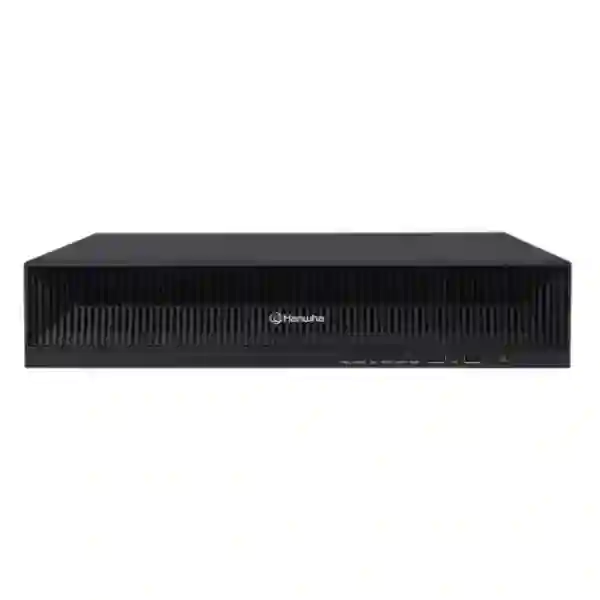
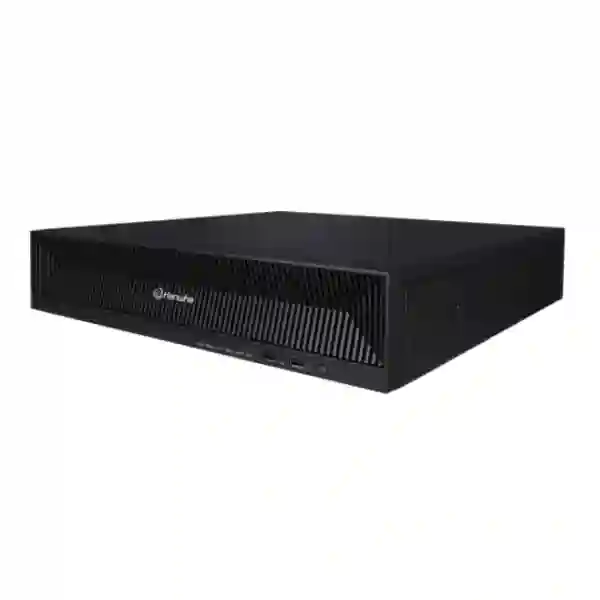
Hanwha XRN-1627SB1-12 — 16-channel PoE NVR for smart-parking surveillance
Plan a reliable IP camera recording system with an integrated sixteen-port PoE recorder, a stated 140 Mbps recording limit and a flexible four-bay storage design. For Tanzania projects, confirm the exact regional interface language, supplied drives and integration requirements before ordering.
Verified technical snapshot
The following figures are from Hanwha Vision’s exact-model product specifications. They describe technical capabilities; they do not confirm a Tanzania stock position, sales configuration, warranty, or local authorisation.
| Model | Hanwha Vision XRN-1627SB1-12 |
|---|---|
| Product type | 16-channel PoE network video recorder, smart-parking variant |
| IP camera inputs | Up to 16 |
| Recording bandwidth | Up to 140 Mbps aggregate |
| Camera input resolution | Up to 32 MP |
| Compression | H.265 / H.264 / MJPEG; WiseStream referenced by manufacturer |
| Storage | 4 SATA bays; up to 24 TB nominal supported |
| Manufacturer-listed factory drives | 2 × 6 TB; verify the supplied Tanzania unit |
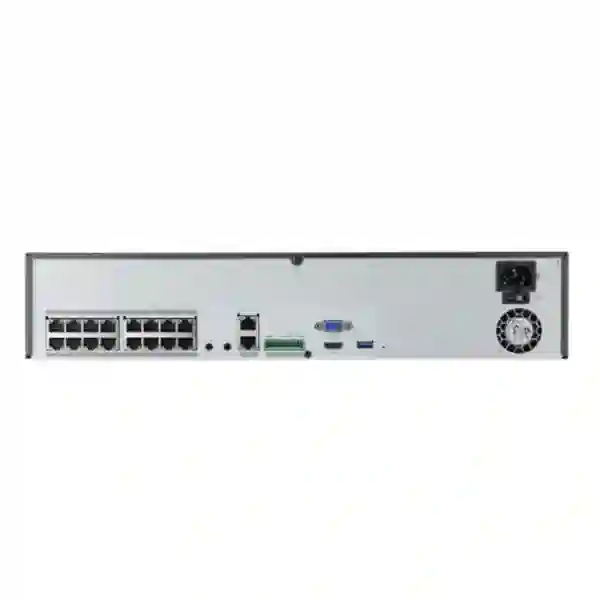
| Camera network ports | 16 PoE+ RJ-45 ports (10/100) |
| Total PoE budget | 200 W |
| Uplinks | 2 gigabit RJ-45 network interfaces |
| Local monitor output | HDMI up to 3840 × 2160 / 30 Hz; VGA output |
| Playback bandwidth | Up to 32 Mbps |
| Related functions | RAID-1, N+1 failover, ARB and compatible-camera AI search |
| Operating environment | 0°C to 40°C; 20–85% relative humidity |
| Power input / maximum draw | 100–240 VAC 50/60 Hz; up to 310 W |
| Approximate chassis dimensions | 440 × 89.8 × 428.4 mm |
| Interface-language caution | Korean listed for exact regional model; English not verified |
A 16-camera recorder for carefully planned security
The Hanwha XRN-1627SB1-12 is a 16-channel network video recorder for organisations that want one place to manage IP camera recordings and review incidents. Hanwha Vision describes this particular variant as a PoE recorder for smart-parking environments. Its built-in camera connections, four-drive storage architecture and local display interfaces make it relevant to building managers, security teams and integrators planning a defined site rather than an unlimited camera estate. It can be considered for parking areas, commercial premises and controlled access locations, provided the intended cameras, parking software, language and network design are verified before an order is placed.
The practical question is not whether an NVR has a long specification sheet; it is whether it can record the required scenes, preserve video for the required period and let authorised staff find evidence when it matters. This model offers a published maximum recording bandwidth of 140 Mbps and support for up to sixteen camera inputs. Those figures provide starting limits, not a promise that every combination of sixteen high-resolution cameras will work at full frame rate. A successful design begins with actual camera streams, realistic retention calculations, a power plan and a deliberate approach to daily operation.
Choose a sensible camera count
Sixteen channels mean that the recorder can register up to sixteen IP camera sources. A channel is not the same as a physical area: a wide loading entrance may need several views, while a compact reception might need only one. Before choosing camera positions, sketch the site and identify gates, vehicle approaches, pay stations, pedestrian routes, equipment rooms and evidence-critical views. Assign a camera to each objective rather than simply filling every available port. That approach helps prevent blind spots and avoids spending network capacity on imagery that does not support an actual operational requirement.
For installations that initially need fewer than sixteen cameras, unused channels may provide measured room to expand. However, channel count does not create extra recording bandwidth, PoE power or disk capacity. A site expecting sixteen cameras now and many more soon should compare a higher-capacity recorder or an appropriately designed multi-recorder system. A project spanning separate buildings may also favour network switches and structured cabling rather than direct camera connections throughout. The correct choice depends on physical layout, fibre runs, maintenance access, fault isolation and who is responsible for the recording system.
Understand the 140 Mbps recording limit
Hanwha Vision specifies a maximum network camera recording bandwidth of 140 Mbps. This is a shared limit across active recording streams, not a per-camera allowance. For example, image detail, resolution, frame rate, compression profile, movement in the scene and illumination all influence the data rate. Busy vehicle lanes and trees moving in wind can behave differently from a quiet corridor. The correct estimate uses the selected camera models and their intended profiles rather than a single generic bit rate. Add the expected rates together, then keep an operating margin for changes and peak activity.
Recording bandwidth should also be distinguished from display, playback and network transmission capacity. The manufacturer separately lists a maximum 32 Mbps playback bandwidth. A recorder may therefore accept a collection of streams whose live-view or simultaneous playback experience differs from the headline recording specification. Test the operator’s normal tasks: displaying many cameras, searching historical events, exporting evidence and reviewing high-resolution footage. If several operators will work concurrently, include their anticipated workflow in the test. Bandwidth planning is successful when the recorder is responsive during realistic use, not merely when every camera appears online.
Built-in PoE and camera power planning
The XRN-1627SB1-12 has sixteen published PoE+ camera ports and a total PoE power budget of 200 W. These ports simplify a compact deployment because compatible cameras can receive network connectivity and power from the recorder over appropriate Ethernet cabling. The important distinction is between the number of available ports and the shared electrical budget. Sixteen cameras drawing more than the available combined power cannot be assumed to operate correctly simply because there are sixteen sockets. Check each camera’s maximum demand, including infrared illumination, heaters and any accessories that may increase consumption.
A PoE budget also needs margin. Power demand can vary during startup or when cameras activate night-time functions. Confirm individual port capability, cable type, run length, connector quality and the recorder’s total available wattage before commissioning. Cameras installed far from the equipment room, across separate structures or in harsh outdoor areas may be better served by appropriately specified external PoE switches and fibre uplinks. Do not treat the recorder as a universal power source for barriers, intercoms, gate motors or other parking equipment. Those systems need their own documented interfaces and electrical provisions.
What the listed 12 TB configuration means
The manufacturer’s Korean product information identifies this model with two factory-installed 6 TB hard drives, giving a nominal total of 12 TB. It also identifies four SATA drive positions and a maximum supported capacity of 24 TB using compatible drives. These are manufacturer’s configuration details, not a confirmation of the contents of any particular consignment offered in Tanzania. A quotation should state the installed drive count, exact capacity, supported disk models and whether additional bays are available for expansion. Ask whether usable recording space differs because of the selected recording or mirroring configuration.
Nominal capacity should not be confused with guaranteed video retention. Filesystem overhead, camera bit rates, audio streams, motion settings, event recording and disk protection all affect how much history remains available. The manufacturer lists RAID-1 support, but an integrator must confirm the intended disk layout, usable capacity and recovery procedure for the actual installed software and hardware. Mirroring can reduce usable storage, and it does not replace a separately managed backup. If footage must be retained for a stated policy period, require a documented storage calculation before purchase.
Estimate retention from a real camera schedule
A useful recording plan starts with an inventory of every intended camera and its normal recording profile. Record the codec, resolution, frames per second, approximate bit rate, whether audio is enabled and whether the camera records continuously or on events. Next state the required number of days and whether activity is concentrated at particular times. A gate camera that must capture every arrival may justify continuous recording, while a less critical view may use an event schedule after testing detection reliability. These decisions should follow operational and evidence requirements, not a target disk figure chosen in advance.
Ask for a retention estimate that shows assumptions rather than only the final number of days. Include a safety margin for busy scenes, bitrate variation, firmware changes and future camera additions. Confirm how old footage is overwritten and whether an operator receives an alert if a disk fails or recording stops. Treat examples based on standard bit rates as preliminary; only measured streams and representative test footage can establish a trustworthy estimate. For incidents that trigger investigations, specify how the evidence will be exported before routine overwrite removes it from the recorder.
H.265, H.264 and WiseStream in context
The manufacturer lists H.265, H.264 and MJPEG recording formats and references WiseStream support. These technologies can help manage the relationship between video detail, compression and storage demand, but the outcome depends on camera support and configuration. More efficient coding often reduces the average data required for a scene compared with a less efficient profile at a similar quality target. That advantage may make it easier to meet a retention objective, yet the camera’s bitrate controls still determine the actual recording load. There is no single savings percentage that can be promised for every installation.
Quality must be assessed at the moment of interest. If a customer needs to recognise a vehicle at a gate, test moving vehicles under sunlight, rain, headlights and low illumination rather than judging only a still daytime scene. Strong compression can remove fine detail from challenging footage. Agree which views require identification-quality images and which are intended only for general awareness. A suitable codec setting should preserve the information the site genuinely needs while staying inside bandwidth and storage limits. Review both live images and exported recordings; they should be evaluated separately.
Camera resolution and recording are different from screen output
Hanwha specifies camera input resolutions up to 32 megapixels, sometimes described as 8K-class recording support. The local monitor interface is a separate specification: HDMI output reaches 3840 by 2160 at 30 Hz, with VGA also available. A 32 MP recording does not mean the monitor displays sixteen 32 MP images simultaneously at native resolution. Decoding limits, screen layouts and playback workloads determine what an operator actually sees. Ask the installer to show the planned split screen with the intended mix of high-resolution cameras before deciding on the monitoring station.
Think about the human operator as well as the recorder. A small screen displaying sixteen views may be adequate for status awareness but poor for close inspection of a vehicle or person. The site might benefit from a larger display, a second monitor or a workstation for detailed playback. Place the monitoring desk where lighting, noise and working posture support long periods of use. Establish whether staff need an always-on overview or occasional incident review. Those two use cases can lead to very different choices of screen size, camera viewing profiles and remote software.
Smart parking without unsupported promises
Hanwha classifies the XRN-1627SB1-12 as a smart-parking recorder. That classification makes it worth evaluating where vehicle movements, entry and exit activity and parking-area footage are central to site operations. It does not, by itself, confirm that a complete barrier controller, ticketing system, payment platform, parking guidance network or licence-plate recognition solution is included. Those are separate functional requirements that may involve specialist cameras, software, licences, integrations and equipment. Before buying, draw a clear line between what the recorder captures and what the full parking solution must decide or automate.
For a controlled entrance, specify the evidence that staff need when an access event is disputed: an overview of the vehicle, a view of the gate condition, timing of the event and any available camera metadata. If number-plate search is required, confirm the exact compatible cameras, country-specific plate performance, firmware and licensed functions with the responsible system designer. Do not infer local recognition accuracy from a product family name. A useful acceptance test includes different vehicles, angles, headlights, shadows, dirty plates and conditions typical of the actual entrance.
AI-assisted search requires compatible cameras
The manufacturer describes AI-based object search when this recorder is used with compatible Hanwha AI cameras. This is an important dependency. The recorder should not be presented as independently generating every possible AI attribute from any attached camera. Search results depend on the camera’s analytics, how metadata is delivered, supported firmware and the recorder’s search implementation. Confirm the desired task first, such as locating vehicle activity or filtering a sequence of events, and then obtain a documented list of the exact devices and features that support it.
AI search can reduce the time operators spend reviewing long recordings, but it should remain an aid to investigation rather than a guarantee that every object or event is classified correctly. Lighting, occlusion, camera height, traffic density and analytic confidence influence results. Operators still need a method to inspect original footage and verify timestamps. Ask the integrator to demonstrate the chosen search workflow against representative video from the site. If the requirement is a legal-quality identification or a business-critical decision, define a human review process and protect the original recording from alteration.
Protocol and third-party camera compatibility
The product specifications identify ONVIF and Hanwha SUNAPI among the supported protocols. These are useful integration starting points for a network video project, but protocol support is not an unconditional compatibility certificate for every camera. Video may connect successfully while special analytics, metadata, motion events, audio or remote configuration remain unavailable. Obtain exact make, model and firmware details for each camera, including cameras from other manufacturers. Test streaming, recording, playback, timestamps, events and reconnection after a power interruption before accepting the system.
When replacing an older recorder, inspect the existing cameras and network hardware rather than assuming the replacement is a drop-in swap. Check codec settings, camera credentials, event configuration, address plans, PoE demand and which features depend on proprietary interfaces. Compatibility should also cover export procedures and the software used by the security team. If a specialist parking application consumes live or recorded video, verify that its supported interface remains available. Document the final camera inventory so later firmware updates and maintenance changes do not quietly break important workflows.
Recording schedules and event handling
The manufacturer’s recording modes include normal recording, dual streams, continuous or event-based schedules and event recording with before-and-after coverage. This flexibility is valuable only when the schedule matches operational priorities. A site may choose continuous recording for vehicle entrances while enabling event-related bookmarks for faster review. The choices should be deliberate: an event-only recording strategy can miss relevant footage if detection rules are poorly configured. Specify how much context must be captured before and after a trigger and verify that the chosen cameras can supply the expected events.
The recorder can respond to supported events through actions such as notifications and alarm outputs, subject to configuration and connected equipment. An event rule should have an owner who understands what it means and how to respond. Avoid sending large numbers of low-value alerts that operators will eventually ignore. Confirm time synchronisation, notification delivery and the conditions under which events are logged. During commissioning, simulate camera disconnection, motion events and an alarm input, then check whether video, timestamps and operator alerts agree. A short written test record is more valuable than relying on default settings.
Evidence search, review and export
Operational CCTV becomes useful when staff can find an incident without having to watch hours of unrelated footage. Hanwha lists calendar, event, text and smart-search methods for this model, alongside local and network export formats. A suitable workflow starts with a reliable time source and clear camera labels. Rather than naming cameras with arbitrary numbers, label them according to areas such as vehicle entrance, loading access and rear pedestrian gate. Incident reports can then reference the precise camera, date and time range needed for review.
Build an evidence-export procedure before an incident occurs. Confirm how authorised users can make a copy, what player or format is needed, whether the export preserves accurate date and time information and how files are checked after transfer. Keep access to original recordings restricted and record who handled exported material. A USB drive, network destination or investigation workstation may be appropriate depending on site policy. Test the whole procedure by exporting a short sample and opening it on the device used by the intended recipient. A successful export button is not enough if the file cannot later be played.
Network design for dependable camera recording
The manufacturer’s interface specification includes sixteen 10/100 PoE camera ports and two separate gigabit RJ-45 network interfaces. A typical design must distinguish the local camera side from uplinks used for management, operators or integration. Draw the topology with the recorder, any switches, routers, workstations and external systems. Confirm which network segments need to communicate and which should remain separated for security. Camera IP addressing, DHCP arrangements and routing need a clear commissioning plan, particularly where an existing business network already supports sensitive applications.
A resilient topology avoids placing critical cameras behind unmanaged equipment or unreliable connectors. Use suitable cable grades, installation methods and surge protection where justified by local conditions and the equipment design. Long distances, outdoor routes and separate buildings can introduce grounding and lightning risks that cannot be solved with recorder settings. Also assess how recordings behave during an uplink outage. Because many directly connected cameras can still communicate with the recorder when the external internet is unavailable, internet loss and local network loss must be tested as different failure scenarios.
Network security and controlled access
A recorder holds information about people, vehicles and site activity, so it deserves the same disciplined access controls as other important business systems. Set unique administrator credentials, create separate accounts for different responsibilities and remove default or shared passwords. Enable supported secure communication features and record which firmware version was tested. Limit network access to devices and users that genuinely need it. Remote access should use a controlled security design rather than exposing the recorder indiscriminately to the public internet. Follow the manufacturer’s current security notices and approved update procedure.
Security settings also influence serviceability. Keep a protected record of configuration changes, camera addresses, firmware revisions and recovery arrangements. Agree who can authorise firmware updates and how the site will confirm that recording still works afterwards. Restrict evidence export to approved roles and remove unused accounts when staff change. Review access logs and storage alerts on a defined schedule. If a third-party monitoring company will connect, document its access scope and responsibilities. The objective is to preserve both privacy and the availability of evidence without turning daily operation into an unmanageable administrative burden.
Remote viewing and operator workflows
Hanwha lists browser, mobile and management-client capabilities associated with its recorder platform. Actual viewer compatibility must be checked against the precise firmware and the devices used by the customer. Before procurement, list the people who need live access, those who need playback, and those allowed to export files or change settings. A guard at the site may need a local monitor, while a facilities manager may need occasional off-site review. Those requirements are not interchangeable, and a high-resolution live stream may consume more bandwidth than a routine status view.
Test remote use over the actual internet connection available to the site rather than a demonstration network. Upload capacity, latency, data charges, intermittent service and firewall policy can affect the result. A disconnected external internet link should not be allowed to stop local recording when the local camera network is healthy. Choose a secure access method, then test login, permissions, viewing, playback and sign-out. Document what happens when the network fails and reconnects. A user-friendly deployment is one that remains predictable during common operational problems, not one that simply works during its first demonstration.
Storage protection, failure recovery and backups
The manufacturer lists RAID-1 capability, automatic recovery backup support and an N+1 failover function for this recorder family. These terms describe possible resilience features, not an automatically complete disaster-recovery solution. Their effectiveness depends on the storage layout, compatible equipment, configuration and tested operating conditions. In particular, RAID mirroring is not an archive and cannot protect against every form of deletion, corruption, theft or physical damage. The buyer should ask which failures the proposed configuration protects against and how long it takes to restore ordinary recording.
A recovery plan should include at least three scenarios: a failed hard disk, a disconnected camera and an unavailable recorder. Confirm how the security team is notified, who replaces hardware and which recording gaps are expected. Test restoration from an approved backup and make sure passwords, configuration records and camera mappings are accessible to authorised maintainers. If uninterrupted evidence capture is a high priority, ask the integrator to demonstrate the proposed failover arrangement with its actual companion equipment. Do not equate a published feature name with guaranteed continuity until the installation proves it.
Electricity, PoE load and UPS sizing
Hanwha specifies a 100–240 VAC, 50/60 Hz input range and maximum power consumption of 310 W, with a 200 W PoE budget. This makes power planning more involved than selecting a backup unit for the recorder chassis alone. Connected camera demand, disk activity, networking equipment and the monitoring display may all contribute to the total load. A suitable uninterruptible power supply should be sized using measured or conservatively calculated equipment consumption, required backup time, battery condition and any intended safe-shutdown procedure. A model’s watt rating and its battery runtime are separate considerations.
Power reliability matters particularly when cameras protect entrances and other areas where a gap in footage has operational consequences. Define what should stay powered during a short interruption: the recorder, cameras, switches, site router and perhaps selected displays. The gate motor or barrier controller may need a separate scheme. Protect the equipment with correctly installed electrical wiring, earthing and surge provisions appropriate to the site. Test a controlled power-loss scenario and verify that recordings resume correctly afterward. Include UPS battery checks in periodic maintenance, because the best backup plan fails when the battery is neglected.
Heat, humidity and equipment-room placement
The published operating environment for this recorder is 0°C to 40°C and 20% to 85% relative humidity. These are operating limits, not a promise of suitability for exposed outdoor cabinets. In Tanzania, equipment placed near roofs, in unventilated rooms or inside metal enclosures can experience temperatures above surrounding ambient air. A server closet that seems comfortable when opened may also trap heat during the day. Plan ventilation or cooling so the actual air around the recorder and hard drives stays within the manufacturer’s limits under peak operating conditions.
Protect the equipment from dust, moisture, direct sunlight, accidental spills and unauthorised handling. Leave appropriate clearance for airflow, cable bends and safe maintenance access. The published chassis dimensions are approximately 440 by 89.8 by 428.4 millimetres, so rack depth, rear cabling and supporting shelf space deserve attention. Consider noise where staff work nearby. Environmental monitoring and scheduled cleaning may be especially useful for continuously operating recording equipment. Put the recorder somewhere that can be serviced without disrupting unrelated business systems, and label both power and network connections clearly.
Commissioning and installation acceptance
A good installation ends with more than pictures appearing on a monitor. Start with a written acceptance checklist covering every camera, its field of view, focus, time synchronisation, recording schedule, recording health and supported event triggers. Test both daylight and night conditions, preferably during representative business activity. Check the PoE budget after cameras have activated their most demanding normal features. Verify the network address plan, operator permissions and any configured alarms. Confirm that all cameras can reconnect after a controlled restart and that no streams silently remain offline.
Then test evidence retrieval and actual retention over an agreed observation period. Review video from all critical cameras, export sample evidence and confirm the exported files work on the intended viewing platform. Record installed drive details, free capacity, expected daily storage consumption and all firmware versions. Make a secure configuration backup and train the people who will use the system. The final handover should explain what routine checks to perform, how to recognise a recording fault and whom to contact under the relevant service agreement. Do not leave those decisions to the first incident.
Day-to-day operations and maintenance
For a security system, routine health checks are as important as initial installation. Assign an owner to confirm that every required camera is online, the system time is correct, disks are healthy and the expected number of days of video remains accessible. Check alarm and event notifications for abnormal frequency. Make sure camera lenses and protective housings are inspected when dirt, insects, rain or other obstructions affect image quality. Someone should periodically review representative recordings rather than relying only on green status indicators.
Maintain a change log when cameras are moved, profiles are adjusted or new staff receive access. Any material change to resolution, frame rate or codec can alter recording load and retention. Test after firmware updates and retain an approved configuration backup. If the customer uses vehicle evidence for dispute resolution, set a clear procedure for incident requests and timely export. Review the retention policy when business needs or applicable obligations change. The most reliable system is one whose configuration and operating responsibilities are understood by more than the original installer.
Planning future expansion and integration
Although the recorder can accept sixteen camera inputs, a growing business may need to consider more than available channel slots. Additional cameras consume recording bandwidth, PoE capacity, disk space, switch ports and operator attention. Before expanding, update the camera schedule and calculate the consequences for live view and retention. A new high-resolution gate camera can materially affect capacity even when it occupies only one channel. If the site could exceed this recorder’s limits, assess an appropriately larger recorder, multiple recorders or a supported video management architecture before purchasing unnecessary accessories.
Integrations also deserve explicit scope. The presence of ONVIF or SUNAPI does not guarantee that every parking, access-control or business application can exchange all desired data. Specify the information flow: video only, alarms, metadata, event bookmarks or access decisions. Confirm any software licences, firmware dependencies, protocol profiles and supported APIs with the parties responsible for the connected systems. Build a small proof of concept for the most critical integration and document how failures are handled. This prevents a hardware selection from becoming an unexpected software project later.
The language and regional-configuration checkpoint
There is one particularly important qualification for Tanzania buyers. Hanwha’s exact-model Korean product page lists the system language as Korean. That published information does not establish that the supplied unit offers an English interface or an English-supported regional firmware. It also does not establish local distribution, warranty handling or service arrangements. Before placing an order, ask the quoted supplier to show an image or live demonstration of the operating language and confirm the approved firmware, documentation and maintenance route for the exact unit being offered.
Keep model identifiers precise during this check. The XRN-1627SB1-12 should not silently be substituted with a similarly named XRN-1620SB1 or a different parking recorder simply because some hardware specifications overlap. Request the full manufacturer model code on the quotation, packaging and final handover record. If the product needs country-specific parking integration, obtain confirmation from the responsible supplier and implementer before considering it a fit. A commercial quote should resolve these questions clearly, rather than leaving the buyer to discover regional limitations after equipment arrives.
A practical pre-purchase comparison
Compare recorders against the site requirements rather than comparing only channel count and drive size. First confirm camera compatibility, total recording bandwidth, per-camera video quality and the PoE power budget. Then compare usable storage after the chosen disk layout, projected retention, local display capability and the effort needed to export evidence. Finally review software compatibility, remote access, environmental limits, resilience and technical support arrangements. An eight-channel model may be sufficient for a small site, while a larger recorder may be preferable for a multi-building installation or one with rapid growth.
For this particular Hanwha model, the strongest starting points are integrated sixteen-port PoE, the published 140 Mbps recording ceiling, up to 32 MP camera input support and a four-bay storage design. The corresponding questions concern achievable retention, the combined 200 W power budget, camera-specific AI dependencies and the regional language and supply configuration. No single specification decides the outcome. A suitable system is the one whose actual deployment meets the operational brief without hidden assumptions about compatibility, storage, viewing or availability.
Requesting a useful Tanzania quotation
To request a meaningful quotation for the Hanwha XRN-1627SB1-12, provide the intended camera count, camera makes and models, a simple site layout, approximate cable lengths and the number of days of recording needed. Identify whether the system is for general CCTV, parking-area evidence, access dispute review or a wider smart-parking project. State if remote monitoring, AI-assisted search, audio, additional software or special export requirements are essential. The more precise this information, the easier it is to compare an equipment-only proposal with a complete, tested system proposal.
Ask the responding supplier to identify the exact model and drive configuration, confirm the available interface language, specify all included and excluded accessories and declare any relevant software or licensing dependencies. Request an installation and commissioning scope separately where applicable. Confirm pricing, lead time, warranty, local support and delivery terms directly on the issued quotation; none of these commercial items are verified for this Tanzania listing here. The right next step is to share the requirements and obtain written confirmation, not to assume that every feature mentioned in a global or regional product document is supplied locally.
How to interpret the technical headline figures
Headline figures describe different resources. Sixteen channels limit the number of registered camera inputs; 140 Mbps describes the maximum stated aggregate recording throughput; 32 MP is the top supported camera resolution rather than a guaranteed simultaneous display format. Two installed 6 TB drives describe the manufacturer’s regional factory configuration, while four SATA slots and 24 TB describe the documented storage ceiling. The 200 W PoE budget constrains aggregate power to directly connected cameras. These limits must be evaluated together because meeting one does not compensate for exceeding another.
The manufacturer’s 32 Mbps playback specification, monitor output capabilities and environmental range add separate constraints. A deployment may have ample disk space yet insufficient recording bandwidth, or spare camera channels yet inadequate PoE capacity. Similarly, a parking application may require functions supplied by cameras or external software rather than the recorder. Use the figures as measurable acceptance criteria and ask for tests under realistic simultaneous load. Doing so turns an attractive specification into a credible operating design and gives the buyer a defensible basis for choosing the final configuration.
Questions Tanzania buyers commonly need answered
These answers distinguish published hardware features from decisions that depend on camera selection, local supply and integration testing.
Is the XRN-1627SB1-12 a 16-channel IP camera recorder?
Yes. Hanwha Vision identifies it as a sixteen-channel network video recorder with integrated PoE connectivity. The number of supported channels is a camera-input limit; every proposed camera also has to fit within recording-bandwidth, power and compatibility constraints. Ask for a tested camera schedule before assuming that sixteen demanding video streams can all run with a particular quality profile.
Does this model have sixteen PoE ports?
The published interface specification lists sixteen PoE+ RJ-45 camera ports and a combined 200 W PoE budget. The budget is shared, so the load from all connected cameras matters. High-power cameras, infrared lighting and accessories should be accounted for individually. Exceeding the total budget can produce unreliable startup or operation even if unused physical ports remain.
Are hard drives included?
The manufacturer’s Korean listing describes a factory configuration with two 6 TB drives, for a nominal 12 TB total. That does not verify the content of a particular Tanzania quotation. The supplier should identify the actual installed drives, their supported models and whether a protective disk configuration reduces usable capacity. Request these details in writing before purchase.
Can I expand the recording storage?
The exact-model manufacturer’s specifications list four SATA slots and a maximum supported nominal capacity of 24 TB. Expansion is not simply a matter of inserting any available drive; supported models, drive capacity, configuration and service procedures matter. Check the approved compatibility information and calculate the resulting usable space and expected retention before making changes.
Does the recorder support H.265 cameras?
Hanwha lists H.265, H.264 and MJPEG among the supported recording formats, with WiseStream referenced in its product features. Exact camera integration and features depend on hardware and firmware compatibility. Compression efficiency can help storage planning, but real scene complexity and the selected video bitrate determine actual storage demand.
Can the NVR record 32 MP cameras?
The manufacturer lists IP camera input resolution up to 32 MP. That figure should not be interpreted as a guarantee that sixteen 32 MP streams can be recorded at any chosen frame rate, nor that all can be decoded on the local monitor at native resolution. The combined 140 Mbps recording limit and display constraints must also be respected.
Does smart parking mean automatic barrier control?
Not automatically. The manufacturer describes the recorder as a smart-parking product, but the complete gate, access, ticketing, recognition or payment workflow may require separately verified cameras, controllers, software and licences. A buyer should define each required parking function and require a supported integration demonstration before ordering the solution.
Will AI search work with any IP camera?
AI-based object search is described by Hanwha in connection with compatible Hanwha AI cameras. Do not assume identical metadata and search behaviour from every ONVIF camera. The exact supported object attributes, software and firmware must be confirmed for the proposed installation, and real-world detection results should be checked with representative footage.
Can staff watch the cameras from a phone?
Hanwha’s specifications describe mobile client support, but actual usability depends on compatible software, firmware, network connectivity and secure access settings. Test the intended device and its assigned permissions before handover. Off-site viewing requires a suitable connection; losing the internet should be treated separately from losing the recorder’s local camera network.
Does the recorder offer RAID protection?
The manufacturer lists RAID-1 support. The installer must explain how the selected drives will be configured and what usable space remains. RAID can reduce some storage-failure risks when correctly configured, but it is not a substitute for separately protected evidence exports, reliable backups or a tested recovery procedure.
Will the user interface be available in English?
English support is not confirmed for the exact regional variant. Hanwha’s Korean product page lists Korean as the system language, so the buyer should require an explicit English-language demonstration or written confirmation for the intended unit and firmware. This check is especially important before sourcing the model for a Tanzania deployment.
What temperature should the equipment room maintain?
The manufacturer’s stated operating range is 0°C to 40°C, with relative humidity from 20% to 85%. Equipment should remain within these limits at the recorder itself, not only at the building thermostat. An unventilated enclosure or exposed cabinet may need a different installation plan, particularly where heat and dust are difficult to control.
What should a quotation include?
Ask for the exact full model number, installed drives, camera compatibility schedule, recording and retention assumptions, power plan, required network equipment, interface language, software dependencies and commissioning scope. Price, tax, delivery, warranty and after-sales arrangements should appear as verified commercial terms on the supplier’s actual quotation, not as assumptions taken from a generic product page.
Is this the same as the XRN-1620SB1-12?
No. It is important to keep the requested XRN-1627SB1-12 identifier distinct from similar Hanwha recorder models, even when many published specifications overlap. The exact unit is identified by Hanwha as a smart-parking-oriented 16-channel PoE recorder. Buyers should check the full code, firmware, regional interface and intended parking-system compatibility on the actual order.
Request a specification-checked quotation
For a Tanzania project, share your camera list, parking-site requirements, desired retention period and preferred monitoring workflow. Request confirmation of the exact Hanwha XRN-1627SB1-12 model, supplied hard drives, supported interface language and compatibility with the cameras and any parking application. Obtain written pricing, availability, delivery, installation and service terms before committing to purchase.




Reviews
There are no reviews yet.