
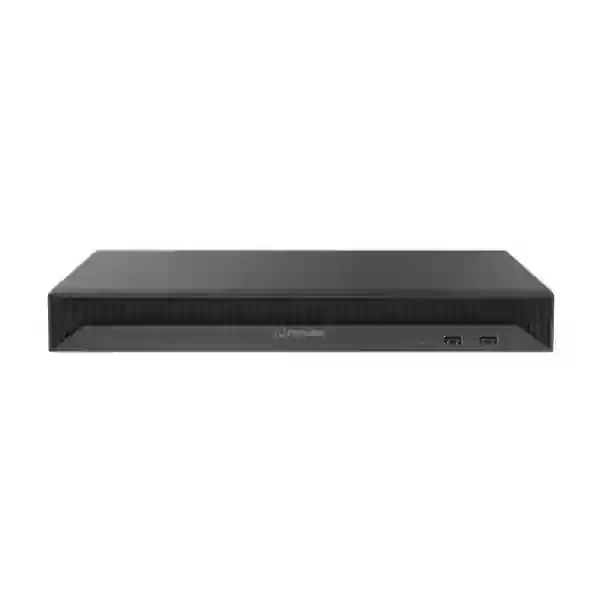
Professional IP video recording | Tanzania buying guide
Hanwha WRN-816S Wisenet WAVE PoE+ NVR
Bring IP camera connectivity, video recording and Wisenet WAVE management into one carefully planned surveillance solution. This Hanwha Vision recorder is specified with eight built-in PoE/PoE+ ports, a shared 100W camera-power budget, up to 150 Mbps recording throughput, four included WAVE Professional licences and two internal SATA drive bays supporting up to 20TB in total. The correct fit still depends on your camera schedule, licensing, storage and site network.
For a Tanzania quotation, request the exact storage variant and a camera-by-camera configuration review before ordering. Pricing, stock, warranty, delivery and installation coverage require separate confirmation.
Verified facts at a glance
The product family and market-specific bundle may vary. Confirm disk installation, camera capacity and licence scope for the exact quoted configuration.
Four numbers every buyer should keep separate
| Measure | Published fact | Buying decision |
|---|---|---|
| Camera connections | 8 built-in PoE/PoE+ ports | How cameras receive power and network access |
| Recording licences | 4 WAVE Professional licences included | How many recordings are licensed for the design |
| Recording traffic | Up to 150 Mbps aggregate | How selected camera streams fit the workload |
| Data storage | 2 SATA bays, up to 20TB total stated | How long footage can be retained in practice |
Common deployment discussions
Retail and service counters
Balance entrance awareness, transaction-area visibility and responsible access to recorded incidents.
Offices and shared premises
Prioritise managed entrances, authorised operator access and clear retention rules.
Storage and dispatch areas
Plan loading-point views, low-light requirements and cable distances before selecting cameras.
Standalone business facilities
Decide how local recording, internet-dependent remote viewing and power backup fit together.
These scenarios illustrate buyer requirements and do not assert any current FourTeck installation contract or service territory.
Who this recorder is designed for
The WRN-816S is a practical candidate when a site needs an IP video recording platform with integrated camera power, central management and room to plan storage carefully. Typical discussions begin with a shop, office, small commercial building, reception area, warehouse zone or other controlled premises where dependable recording and easy review matter more than complicated marketing labels. A buyer should start with the camera locations, intended recording schedule, event-review requirements and persons authorised to view footage. The recorder is one component of a complete surveillance design, not a substitute for camera placement, network engineering or site policy.
For a Tanzania deployment, the useful buying question is not simply whether an NVR has eight ports. It is whether the physical ports, 100W power budget, four included Wisenet WAVE Professional licences, 150 Mbps stated recording bandwidth and chosen disk configuration suit the cameras and retention target. Ask for a design that explicitly documents every assumption. A compact installation with modest camera loads can look straightforward, while high-resolution streams, long retention periods or multiple remote viewers can change the total solution substantially.
A quick guide to the headline specification
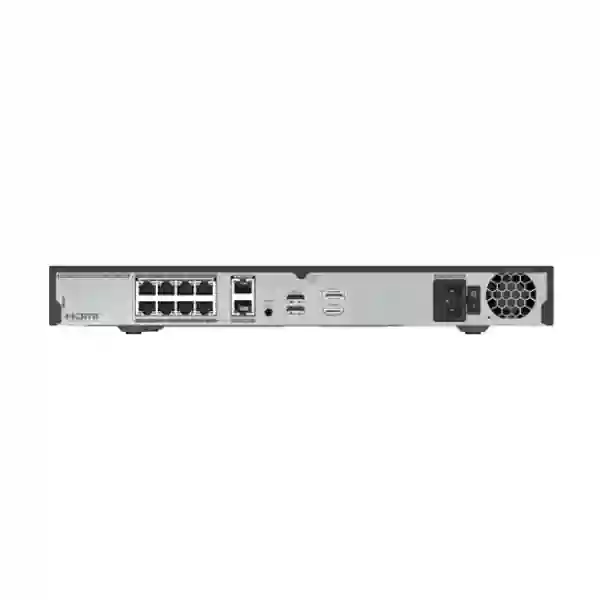
Hanwha Vision identifies the model as a Wisenet WAVE PoE+ NVR. Its published key features specify eight integrated PoE/PoE+ ports, a combined 100W power budget and recording throughput of up to 150 Mbps. Two SATA data-drive positions offer a stated maximum combined internal capacity of up to 20TB, subject to approved drives and configuration. Four Wisenet WAVE Professional recording licences are included in the manufacturer’s system specification. HDMI and DisplayPort outputs support setup and basic monitoring, while WAVE clients and mobile access provide other ways to operate the system.
Each number answers a different question. A port is a physical network connection with a power-delivery capability; a recording licence authorises recording in the video-management environment; throughput describes an aggregate stream budget; and disk capacity indicates how much material might be retained. They should never be presented as interchangeable measures. The precise installed disk capacity is not established by the base WRN-816S model designation. Storage-loaded variants may differ, so the quoted order configuration should specify the installed drives and their usable capacity.
Eight PoE ports are not eight included licences
The integrated switch provides eight physical PoE/PoE+ connections for appropriately compatible cameras. That does not mean eight camera-recording licences are automatically included. Hanwha Vision’s model specification states that four Wisenet WAVE Professional licences are supplied. If the camera schedule includes more recordings than the bundled licences cover, additional WAVE licensing may be required. Verify the entitlement and licence requirements against the current WAVE configuration before purchasing, especially when combining single-sensor and multi-sensor devices or carrying over an older installation.
Some channel descriptions on third-party listings may refer to a higher potential recorder or server channel capacity than the number of ports or included licences. That is why a buyer should request three separately stated figures: integrated powered ports, expected licensed recording channels and validated system capacity for the proposed workload. External network switching can provide physical connectivity for other cameras where the architecture supports it, but it does not increase the integrated 100W PoE budget or magically supply recording licences. A site design should distinguish every one of these limits.
Plan the camera schedule before choosing capacity
A useful camera schedule lists each proposed viewpoint, its purpose and the information an operator needs to see. A wide entrance scene may need a different focal length from a narrow payment counter; a loading bay might need better low-light performance; and a corridor may benefit from careful mounting rather than simply more pixels. Decide whether operators need face-level detail, activity overview, vehicle observation or only incident verification. These goals shape camera selection and recording demand far more effectively than counting devices in isolation.
Add a column for camera model, resolution, frame rate, compression type, typical and peak bitrate, power consumption, installation location and retention class. Mark whether a camera requires audio, analytics or motion-triggered schedules, subject to the site’s rules. Once the schedule is complete, total the camera power loads, estimate sustained and peak recording traffic and calculate storage. Confirm that live viewing on workstations and network links has also been considered. This workflow prevents a seemingly affordable recorder choice from becoming an under-sized complete system.
What 150 Mbps recording throughput means
The published up-to-150 Mbps recording-throughput figure is a total budget that engineers should use when sizing incoming camera streams. It is not a promise that every connected camera can use 150 Mbps independently. The practical total depends on camera resolutions, chosen codecs, frame rates, image complexity, frame-by-frame bitrate behaviour and other workload characteristics. A site with several high-resolution streams can consume substantial bandwidth even when the camera count is modest. Build in margin instead of designing at the advertised ceiling.
Request both an average recording estimate and a conservative peak estimate for the planned cameras. Test representative busy scenes, such as people walking through a doorway or vehicles entering a yard, because moving detail can affect bitrate. Check the bandwidth needed for remote clients and exports on the wider network separately from the stated recording limit. Document how the system behaves when cameras disconnect or reconnect. An engineered budget should remain comfortable during normal operations, software maintenance and expected future additions.
Select storage for the actual retention requirement
The chassis is specified with two SATA data-drive bays and an upper internal storage figure of 20TB. This describes a possible configuration ceiling, not a promise that 20TB ships with every unit or that all raw drive space is available for video. The base model name alone does not verify whether hard drives are installed. Buyers should ask for a written disk schedule showing quantity, make, model, rated capacity, supported configuration and usable video space. Confirm approved drive options with the current manufacturer documentation.
Begin the retention calculation with the camera plan and the number of days footage needs to remain available. Continuous recording uses space differently from event or motion recording. Higher average bitrate, longer retention, more cameras and additional recorded audio can all increase demand. Allow margin for system operations and future changes. A practical acceptance test is not simply seeing a disk indicator light; it is confirming that the oldest playable footage, export process and automatic retention behaviour match the written requirement after the installation has been running.
A transparent way to estimate video storage
For a rough continuous-recording estimate, one camera producing a steady 1 Mbps stream creates about 10.8 decimal gigabytes per day before overhead. Multiply by the number of Mbps, cameras and recording days to estimate raw stream data. For example, eight hypothetical cameras at an average 4 Mbps each create around 345.6GB of video in one day and approximately 10.4TB in thirty days. This example is arithmetic, not a claim about any particular camera or an assurance of thirty-day retention on a quoted drive configuration.
Actual results will vary with scene activity, codec, camera settings, scheduling and software overhead. Using a lower frame rate or efficient compression may help in some cases, but those choices must be checked against the visual evidence a site needs. Do not promise a fixed retention period without a testable bitrate assumption. When recorded events are business-critical, ask how exports will be protected from routine footage recycling and how a responsible employee can retrieve an incident quickly without altering the original recording.
Choose disks and understand resilience
Recording systems write to storage repeatedly, so disk compatibility and sustained workloads matter. Select drives approved for the recorder and the intended recording arrangement, rather than assuming any desktop hard drive is suitable. Check whether the exact ordered configuration contains one drive or two, whether replacing a failed drive requires downtime, and what monitoring indicators are available. A storage-capacity figure should be labelled raw or usable. Never assume the device offers a particular RAID mode without explicit model and firmware confirmation.
Storage capacity and data protection are different design topics. More terabytes may extend retention, but they do not automatically provide protection against disk failure, theft, fire or accidental deletion. Decide which incidents require exported copies, who may authorise exports and how that evidence is kept securely. For a single-site recorder, document the recovery plan before commissioning: configuration backups where supported, replacement hardware arrangements, access credentials managed securely and a clear procedure to restore recording after a fault.
Power cameras with a verified 100W budget
The integrated eight-port PoE/PoE+ switch simplifies cabling because compatible cameras can receive network connectivity and power through the same cable. Its stated total power budget is 100W. The key limitation is combined load: a group of cameras with high infrared illumination, heaters, motors or other power-hungry functions can consume more than expected. Check each proposed camera’s maximum published power requirement, not merely its typical daytime draw. Add the maximum loads of all proposed directly powered devices and allow engineering headroom.
One common design mistake is to divide 100W evenly across eight ports and assume every camera will behave exactly that way. Individual port capabilities, cable quality and camera startup characteristics still need attention, and the manufacturer’s supported PoE classifications remain relevant. If a design needs more power or more physical connections, an appropriately specified external PoE switch may be considered. That switch has its own power budget and network requirements. Do not connect unverified third-party powered equipment just because the plug fits.
Network layout and camera isolation
The manufacturer lists two gigabit network interfaces in its system specification, alongside the integrated PoE connections. Hanwha Vision’s support guidance describes connecting cameras through the onboard PoE switch, an external PoE switch or both. For installations with corporate user traffic and video devices, a deliberate network layout is important. Determine which segment contains cameras, which contains authorised clients and whether the recorder should have any route to the wider internet. The network design must reflect the customer’s security policy.
Avoid exposing recorder administration directly to the public internet. Use trusted remote-access methods, strong account credentials, appropriately restricted permissions and site-approved network controls. Work with the network administrator on address planning, DNS, time synchronisation and outbound service requirements. Hanwha’s configuration guidance also warns that competing DHCP services can disrupt camera addressing. Record interface names and network settings in the handover document, and test discovery after power cycling. A stable IP plan makes later maintenance significantly less error-prone.
System commissioning should follow an ordered checklist
Start with physical placement and power: use a secure, ventilated location, check the supply and ensure safe access for service. Install the correct approved disks and cameras according to their own manuals. Verify cable runs and network interfaces, then initialise the recorder using the current Hanwha instructions. The WAVE-based WRN family uses Ubuntu, and the official initialization guidance calls for setting a secure password and checking the system clock. Configure authorised users before normal recording begins.
Commission one representative camera first, then expand to the full approved schedule. Check live image quality, recording, playback and export for every camera. Confirm that the interface shows the expected licence entitlement and that disks are recording correctly. After connecting external switching, verify discovery and network separation, especially if DHCP is used. Test a restart, an interrupted camera link and a normal user login. Finish by documenting what was verified, what remains conditional and who owns day-to-day operations.
Use Wisenet WAVE as an operating workflow
Wisenet WAVE is the video-management environment associated with this recorder. Hanwha identifies support for WAVE clients, mobile access and Cloud Sync, giving organisations different options for viewing and managing surveillance footage. In a practical installation, operators need intuitive camera names, consistent layouts, quick event review and a clearly defined export process. The right software configuration should help a person locate a relevant event, not force them to memorise individual camera IP addresses or technical jargon.
Design roles around real duties. Reception personnel might need live views, supervisors might need playback, and designated investigators might require export permissions. Apply the least access needed for each role and review permissions when staff change. Use meaningful camera names that correspond to physical areas, such as ‘Rear Goods Door’, rather than arbitrary device numbering. Confirm which features are included in the installed WAVE version and how updates are handled; a feature mentioned for a software family does not automatically apply to every licence or configuration.
Remote viewing and Cloud Sync considerations
Remote viewing is valuable when a manager, security coordinator or authorised maintenance professional needs access away from the recorder. The WRN-816S product information names WAVE client, mobile and Cloud Sync support, but the performance of remote viewing depends on the chosen method, the system version, network policy and available connectivity. The presence of a mobile feature does not make the recording system independent of internet availability. Local recording and remote access are separate capabilities and should be tested separately.
For Tanzania sites using a fixed broadband connection, wireless link or another internet service, plan around the actual upload capacity and reliability at the premises. The recorder should not be configured on the assumption that remote viewers can continuously stream every high-resolution camera. Choose sensible remote layouts, limit access to approved users and test access from outside the local network using the authorised configuration. Agree on who responds when a remote client cannot connect, and avoid treating cloud synchronisation as an automatic off-site video backup.
How AI metadata can add context
Hanwha Vision lists support for AI metadata among the recorder’s key features. This is useful to understand, but buyers should distinguish recording and handling analytics metadata from performing analytics inside the recorder itself. Whether searchable object information or advanced event information is available depends on compatible cameras, software capabilities, configured analytics and any separate licensing requirements. Request a demonstration with the actual proposed camera models before assigning operational value to a specific analytics feature.
An analytics-assisted search can potentially narrow the time spent reviewing recordings, but it should not replace an operator’s judgement or a documented incident process. False positives, missed events, lighting and camera positioning can all affect detection quality. Decide what information the business genuinely needs and avoid collecting more data than necessary. If a feature is vital to the buying decision, include it as a pass-or-fail acceptance test, naming the camera, event type, required WAVE version and expected operator result.
Local monitors are for setup and basic monitoring
The product specification includes one HDMI output and one DisplayPort output. Hanwha describes these as useful for configuration and basic monitoring. That wording matters: the outputs should not automatically be sold as a replacement for a large, dedicated multi-screen security control-room system. Determine where the recorder will physically sit, who is allowed near its local display and whether local video is needed every day or only during setup and maintenance.
A remote client workstation can be a better operational fit for staff who work away from the communications cupboard, provided the workstation and network are suitably specified. For a small reception desk, a simple layout with a few relevant live views may be enough. For extensive display walls, advanced decoding or many concurrent clients, assess the complete WAVE system design rather than relying on the presence of two connectors. Protect both recorder access and monitor visibility when recordings involve private areas or staff activity.
Security hardening before opening the site
Every network-connected recording device should be treated as part of the organisation’s IT security boundary. Use unique strong credentials, restrict administrative access and establish a documented process for changes. Keep the software and system components on a supported update plan, checking official Hanwha guidance before applying firmware or operating-system updates. Separate routine operator accounts from administrator accounts. Where remote access is enabled, implement the business’s approved secure-access method and revoke access promptly when roles change.
Also consider the physical security of the recorder. If the unit is visible in an open office or unsecured rack, recordings could be at risk from tampering or removal. Place it where authorised staff can service it without exposing sensitive equipment. Decide how logs, exports and account permissions will be reviewed. Document the person responsible for security patch assessment, configuration change approval and periodic password review. These operational controls often matter as much as selecting the right hardware.
Power continuity and environmental conditions
Hanwha’s published electrical specification lists a 100–240V AC power input and a 170W power-consumption figure. The stated operating temperature range is 0°C to 40°C, with operating humidity of 20% to 85% non-condensing. These figures are planning inputs, not a substitute for assessing the heat, dust, power quality and airflow at the actual installation site. Keep vents clear and allow the spacing required by the manufacturer’s installation guidance. An enclosed cabinet without ventilation may become too warm during extended operation.
Where power interruptions are a realistic risk, discuss a suitably selected UPS, cable protection and a recovery procedure. The UPS must be sized for the recorder and other equipment that must remain operational, such as network switches, routers and cameras. An NVR that stays powered while cameras and networking lose power cannot provide uninterrupted live recording from those devices. Test startup, shutdown and recovery as a system. Do not promise a particular UPS run time until an electrical load and battery design has been completed.
Planning a Tanzania installation responsibly
Buyers in Tanzania can use this recorder as the starting point for a site-specific surveillance discussion, but climate, building layout, local network conditions and operating procedures must still be assessed. For example, a building with distant outbuildings may need a different structured-cabling or fibre design from an office with nearby indoor cameras. A retail setting may prioritise transaction review and entrance coverage, while a controlled storage area may prioritise a loading door and authorised access points. Those are planning examples, not claims of local stock or installation coverage.
Before purchasing, confirm the exact hardware variant, region-specific availability, power accessories, required WAVE licences and supported hard drives through the quotation process. Where recording captures people or sensitive commercial activity, arrange a privacy and retention assessment appropriate to the organisation’s obligations in Tanzania. No warranty length, local certification, delivery time, support coverage or price is assumed here. A reliable proposal distinguishes verified product characteristics from matters that must be confirmed for the buyer’s own premises.
Choose cameras for the scene, not only for resolution
Camera resolution is just one part of image usefulness. Lens angle, field of view, mounting height, illumination, exposure, motion and distance can decide whether a recording answers the intended question. Too wide a view may show a great deal of scene activity without providing adequate identification detail. Too narrow a view can miss an event. Discuss the real observation objective at each location, then identify models and lenses that meet it. A test installation can reveal problems that a specification sheet cannot.
Match each camera to the recorder’s networking and power constraints. Verify supported integration methods and the exact camera firmware where interoperability is important, particularly for third-party equipment. A camera that produces a standard video stream is not necessarily guaranteed to expose every analytics event or control function through a chosen VMS. If microphones or other advanced functions are proposed, confirm licence, privacy and compatibility implications. Record the intended bitrate and maximum power for each selected model so the design remains auditable.
Installation distance, cabling and external switches
Before an installer pulls cable, survey the route. Consider cable length, physical protection, electrical interference, surge exposure, environmental conditions and access for future replacement. The integrated PoE switch is convenient where camera runs return to a suitable central point, but remote buildings or dispersed equipment might benefit from additional network infrastructure. Any external switch must be sized for its attached cameras, uplink traffic and power demands. It also needs a clear location and maintenance plan.
A neat cable label can save substantial troubleshooting time later. Identify both ends of every run and keep an updated network diagram. Verify cable continuity and actual PoE negotiation at the device, not merely the indicator on the switch. Where external switches are used, make sure their camera traffic and addressing match the manufacturer-recommended topology. Design the network to maintain video reliability without opening unnecessary paths between cameras and unrelated business systems. Include these checks in the final commissioning record.
Upgrading from an existing DVR or older NVR
An upgrade project requires more than swapping recorders. Older analogue cameras may need an entirely different connection method from IP cameras, and existing cameras might not expose the intended features to Wisenet WAVE. Inventory every current camera, its connection, codec, credentials, resolution, firmware and recording requirement. Confirm whether it can be supported in the proposed system before assuming it can be reused. Avoid making a migration plan that depends on unsupported analytics, undocumented passwords or proprietary integrations.
Decide how historical video will be retained or exported before the old recorder is retired. New equipment should not be presented as automatically importing every legacy recording format. Plan a cutover window, run a test camera and check time synchronisation so old and new incidents can be interpreted correctly. Confirm which employee is responsible for decommissioning the former device, securely handling any removed drives and updating site documentation. A staged migration can reduce the chance of discovering a serious compatibility problem after cameras have been disconnected.
Define operational roles and evidence handling
A surveillance system becomes easier to manage when responsibilities are stated in plain language. Identify the owner of the recording policy, the daily operator, the technical administrator and the person who can approve access to sensitive exports. Decide how staff will request footage, what information must be recorded about each request and how files will be transferred securely. These steps are particularly important where recordings may later be reviewed during an incident investigation or a workplace dispute.
Create a simple incident procedure that records the relevant date, time, camera, reason for review and export location. Ensure the recorder’s clock is accurate and the time zone reflects the deployment. Check exported clips using the intended playback method before deleting the local copy or closing an incident. Define how permissions and retention periods are reviewed. The right NVR can assist the workflow, but good evidence handling depends on people, access controls and documented practices beyond the hardware specification.
What should be tested at acceptance
A procurement document should include a clear acceptance checklist rather than only a shopping list. Verify that the delivered device matches the quoted WRN-816S variant, that any installed disks and licences match the offer and that the physical serial information is recorded appropriately. Check camera discovery and recording from every intended viewpoint. Test image quality during relevant daytime and nighttime conditions, and verify that the network remains stable with all approved streams active. Measure whether disk usage aligns reasonably with retention estimates.
Then confirm that authorised staff can log in, play back footage and export a clip using the agreed procedure. Test remote viewing if included in the scope, and review the security of administrative access. Confirm the time settings, response to a camera disconnect and restart behaviour. The installer should provide the network diagram, camera schedule, asset details, configuration information, operator training notes and any unresolved issues. Written acceptance criteria give both buyer and supplier a shared definition of a finished installation.
Compare integrated PoE with a distributed design
The recorder’s integrated PoE is attractive when a moderate group of cameras can return by cable to one secure, central equipment location. Fewer separate powered boxes may simplify procurement, installation and troubleshooting. However, this architecture is not always ideal for long distances, very power-intensive cameras or a site where network equipment is spread among several buildings. A distributed design using correctly sized external switches may better match a large footprint, even though it adds configuration and maintenance considerations.
When comparing designs, evaluate the full installed cost rather than recorder price alone. Include approved storage, recording licences, camera power, switches, cabinet space, UPS, structured cabling, setup labour, training and future maintenance. Check where a failure could affect multiple cameras, and whether the organisation can continue operating while a component is repaired. A decision matrix based on location, bandwidth, resilience and support expectations is more informative than a marketing comparison based solely on the number printed beside ‘channels’.
Understand the boundaries of the quoted package
The product family appears in storage-specific variants, but no installed drive size or exact commercial package has been specified for this Tanzania request. A useful quotation should state the complete manufacturer part number, included drive capacities, approved accessories, number and type of WAVE recording licences, and whether any cameras, power backup, networking or installation services are included. Avoid interpreting a product image as evidence that the box contains a particular disk or accessory.
Ask the supplier to itemise any additional licence requirements separately. The manufacturer’s key-features text identifies a USB mouse and rack brackets, while another specification field gives different accessory wording; therefore the final shipment contents should be explicitly confirmed rather than assumed. The same discipline applies to software versions, support terms and storage compatibility. Written configuration detail makes it easier to compare legitimate offers and reduces ambiguity when the system is installed or expanded.
Maintenance after commissioning
Plan regular operating checks even when the system records automatically. A designated person should confirm that expected cameras remain online, the recording timeline is advancing, storage is healthy and the clock is correct. Review alert settings and determine who receives fault notifications, if configured. Check the recording retention period against the business requirement after changes to cameras, codecs or schedules. A system can appear normal during live viewing while silently retaining less history than management expects.
Periodically test an export and playback, because emergency retrieval is a poor time to discover that the operator lacks permission or has forgotten the procedure. Review software updates through the official Hanwha support process and schedule them to avoid unnecessary recording interruptions. Keep a change log for new cameras, licence additions, network readdressing and disk replacement. Document whether maintenance requires physical access to the recorder, remote administration or coordinated work with the customer’s IT team.
Troubleshooting common deployment issues
If a camera does not appear during setup, start with its physical connection, power draw and network address. Confirm the camera can operate on the selected PoE port and that the combined power budget is not overloaded. Check for conflicting DHCP services before enabling automatic address assignment, as described in Hanwha’s WRN support guidance. Where an external switch is used, review its uplink connection and the chosen camera-network interface. Escalate unsupported behaviour through documented product support rather than changing unrelated settings at random.
If live view works but recording is missing, inspect the recording licence allocation, schedule, available disk space and system status. For unexpectedly short retention, compare the real recorded bitrate against the original estimate. For remote access problems, distinguish local recording from the client connection and verify authorised network routes and authentication. For unstable operation, record the software version, error message and steps needed to reproduce it. This structured approach gives support staff useful evidence and reduces unplanned changes to a live system.
Buyer questions to settle before placing an order
Confirm the count of installed cameras today and the likely future count. Ask whether every camera will connect directly to one of the eight integrated PoE ports or whether external networking is necessary. Request a power summary showing each camera’s maximum draw and the aggregate load against the 100W budget. Confirm that the number of licensed recordings matches the proposed camera schedule. Ask for a bandwidth budget showing ordinary and peak traffic as well as any assumptions about software processing.
Next, agree on retention days, recording mode, expected bitrate and installed usable storage. Clarify remote-viewing requirements, account roles, local-monitor needs, privacy responsibilities and maintenance ownership. Check physical rack dimensions, ventilation, power backup and site network access. Obtain a line-item quote instead of relying on a short product name. When these decisions are settled, the Hanwha WRN-816S can be assessed against a clear specification rather than an uncertain bundle of expectations.
What the available product information does not confirm
Product research validates the core hardware characteristics, but it does not establish the inventory status or commercial terms of a Tanzania-specific listing. No Tanzania selling price, discount, tax treatment, delivery date, warranty duration, installation package, local approval or on-site service entitlement has been verified here. The current request also does not identify a storage-loaded variant or a locally assigned product SKU. These facts should remain open until supported by an exact quotation or user-supplied listing information.
Some distributor descriptions label this hardware with broader channel-capacity wording, while other listings call it an eight-channel NVR. Rather than silently choosing one interpretation, evaluate the eight built-in PoE connections, four included WAVE Professional licences and documented recording-throughput limit independently. Confirm any higher planned camera count with Hanwha’s current compatibility and licensing guidance. This avoids promising a specific scale that might not match the actual licensed configuration being delivered to a customer.
Frequently asked questions
How many built-in PoE ports does the WRN-816S have?
Hanwha Vision lists eight PoE/PoE+ ports and a combined 100W power budget. These are physical powered connections for compatible IP cameras, not the same thing as WAVE recording licences. Before selecting cameras, compare their maximum stated power use with individual port requirements and the combined power allowance. If cameras are distributed across a large site, assess whether external switching and network design are more appropriate than direct cabling to the recorder.
Are eight camera-recording licences included?
No. The published base system specification identifies four Wisenet WAVE Professional licences. Additional recordings may require additional licences depending on the final camera and WAVE system design. A quoted package may differ, so ask the seller to itemise the included licence entitlement and any proposed additions. Do not assume the number of Ethernet sockets tells you how many streams are legally or technically enabled for recording.
Does this recorder support sixteen cameras?
Some third-party descriptions refer to a sixteen-channel system capacity, but that should not be confused with its eight built-in powered camera ports or its four included WAVE Professional licences. The achievable camera count and recording arrangement must be validated for the exact configuration, licences, software version, storage and network bandwidth. Ask for a camera-by-camera design and manufacturer-confirmed scalability before ordering on the assumption that sixteen recordings are already enabled.
Is a hard drive included with the product?
The plain WRN-816S model name does not confirm an installed capacity. Storage-specific commercial variants may include drives, while the device’s technical specification describes the chassis capability. The stated internal ceiling is up to 20TB across two SATA bays, subject to supported drives and configuration. Ask for the full quoted part number, installed capacity and usable footage space. A promotional image or an unrelated seller’s storage configuration is not evidence of what a Tanzania order will contain.
How much recording history will fit?
There is no universal number of days. Retention depends on camera count, recorded bitrate, frame rate, compression, scene movement, schedules and available usable storage. For orientation, continuous video at 1 Mbps is approximately 10.8GB per day before overhead. Multiply by the combined average bitrate and required days, then include margin and confirm by testing. Do not order a drive solely because another installation with different camera settings retained a particular number of days.
Can I watch video using my phone?
The product is described as supporting Wisenet WAVE mobile access and Cloud Sync. Actual remote viewing requires appropriate software configuration, authorised accounts and suitable connectivity. The internet service’s upload performance can affect how comfortably users view high-quality streams away from the site. Confirm the supported app, access method and security controls for the installed software version. Remote viewing should be tested during commissioning rather than assumed to work automatically when the recorder is powered on.
Does the WRN-816S perform AI detection by itself?
The manufacturer states that the recorder supports AI metadata. This does not establish that every AI detection runs on the recorder or works with every camera. Analytics availability can depend on the specific camera, embedded features, data format, WAVE configuration and separate licensing. If person, vehicle or object-related search is central to the purchase, request a live demonstration using the intended models and exact event types. Include successful search and review in the acceptance checklist.
Can I connect a third-party IP camera?
A third-party camera may be usable where the current WAVE software, camera protocol and device firmware are compatible, but compatibility should be verified model by model. Basic video streaming and full support for audio, events, analytics, PTZ or other controls are different levels of integration. Check the current supported-device information and test a representative camera before buying many units. Avoid assuming that a matching network connector or general protocol label guarantees every advanced function.
What happens when the internet stops working?
Internet access and local recording are separate considerations. A properly designed on-site system can use local camera networking and storage, but the actual behaviour depends on its configuration, power and network dependencies. Remote viewing or cloud-related functions can be interrupted when connectivity fails. Test the intended local recording and playback workflow without outside connectivity, and document which remote features will be unavailable. Ensure that the clock, camera network and user access have been planned appropriately.
What electrical and environmental conditions apply?
Hanwha’s published information lists a 100–240V AC input, 170W power-consumption specification, operating temperatures from 0°C to 40°C and 20% to 85% non-condensing relative humidity. The installation environment should remain within the manufacturer’s requirements, with secure placement and adequate ventilation. A UPS can be considered for power continuity, but its battery and load must be sized for the whole necessary system, including networking and cameras where continuity matters.
Will the HDMI and DisplayPort outputs replace a control-room PC?
The manufacturer describes the HDMI and DisplayPort connections as outputs for configuration and basic monitoring. They should not be assumed to provide every capability of an appropriately specified WAVE client workstation or specialised display-wall system. Assess how many live streams operators need, the layout, display resolution, workstation processing requirements and permissions. A small local monitor can be suitable for setup, while a dedicated client may be more effective for regular surveillance operations.
What should a Tanzania buyer request in a quote?
Ask for the full manufacturer variant, installed hard-drive capacity, licence breakdown, camera and PoE budget, expected retention, network plan and required accessories. Confirm whether taxes, delivery, installation, training, power backup, support and warranty terms are included; none of these local commercial details is established by the base technical specification. A quote that makes assumptions explicit is easier to compare and reduces the risk of discovering missing licences or storage at installation.
How should the system be maintained?
Nominate an owner to review camera connectivity, recording status, storage health, time accuracy and security access on a regular schedule. Test that important footage can still be played back and exported. Follow the official update and maintenance guidance for the installed WAVE and WRN software versions, and plan updates around the site’s operating needs. Keep records of camera replacements, licence changes, network settings and incidents so the next technician can understand how the surveillance system was configured.
Request a WRN-816S configuration and quotation
Share the number and models of cameras, required recording days, local and remote viewing needs, installation environment and preferred storage capacity. Ask FourTeck Tanzania to confirm the exact available variant, installed drives, licence requirements and commercial terms before making a purchase decision.
Next step: Request current pricing and a verified technical configuration.




Reviews
There are no reviews yet.