
Hanwha Vision | Wisenet WAVE recording
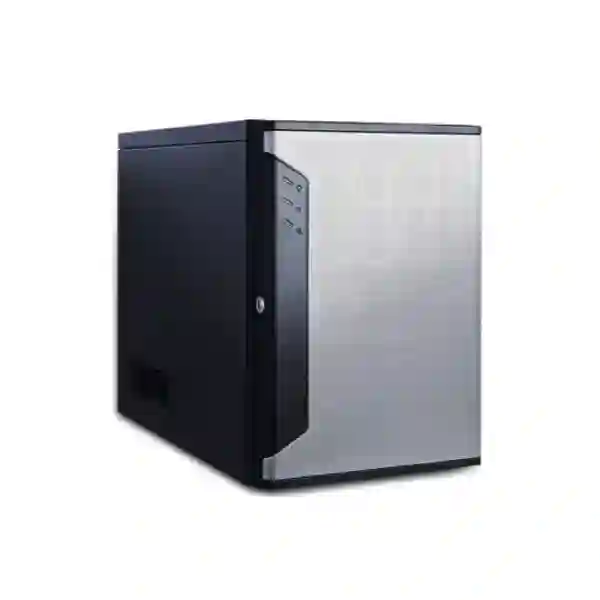
Hanwha WRT-3301 Network Video Recorder
A legacy dual-purpose Wisenet WAVE recorder for organizations evaluating local video monitoring, camera licences and evidence storage. Assess the exact unit and its support status before ordering.
First, check whether this is the right recorder for your site
The Hanwha WRT-3301 combines a Wisenet WAVE recording server with a local viewing client in a mini-tower enclosure. It is best assessed as a specific legacy hardware platform, not as a current, universally supported CCTV package. For a Tanzania deployment, confirm camera models, recording bitrates, usable storage, licensing, network capacity, power continuity and maintenance arrangements. Ask for the exact configuration and lifecycle position in writing.
Verified original specifications
| Type | Dual-purpose Wisenet WAVE server and client |
|---|---|
| Original software licences | 4 × Wisenet WAVE Professional |
| Recording throughput | Up to 170 Mbps |
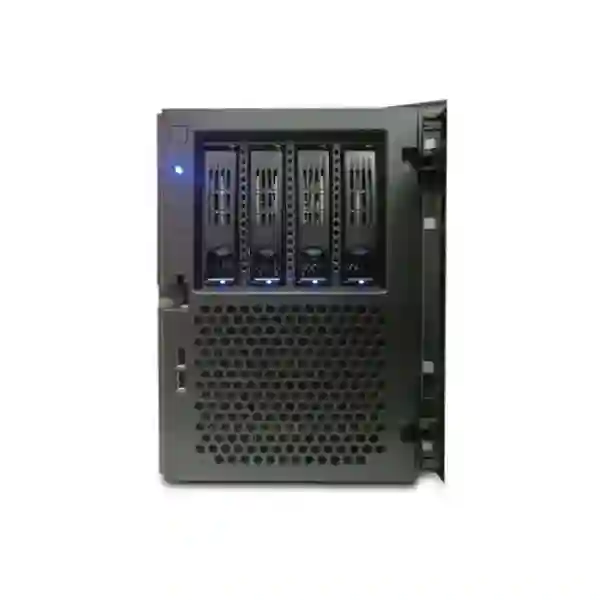
| Data drive bays | 4 × front-accessible 3.5-inch |
| Maximum raw storage | Up to 32 TB |
| Operating-system drive | 1 × internally mounted 64 GB SSD |
| RAID | Not supported in original datasheet |
| Processor / RAM | Intel Core i3-7101E, 3.9 GHz / 4 GB DDR4 |
| Operating system | Windows 10 IoT Enterprise (WRT-3301) |
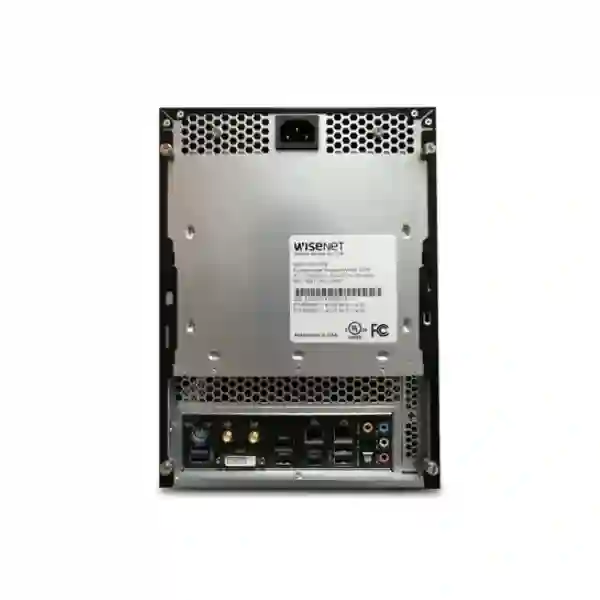
| Networking | 2 × Gigabit Ethernet; IEEE 802.11ac Wi-Fi |
| Display outputs | 2 × HDMI, 1 × DVI |
| USB ports | 4 × rear USB 3.0; 1 × rear USB-C 3.0; 2 × front USB 2.0 |
| Power input / PSU | 100–240 V AC input; 250 W power-supply rating |
| Operating conditions | 0–50°C; 5–85% relative humidity |
| Enclosure size / weight | 200 × 270 × 310 mm; approx. 7 kg without HDDs |
These are historical manufacturer specifications, not a promise about installed drives, accessories, current software support or stock for a particular offer.
What the WRT-3301 is designed to do
The Hanwha WRT-3301 is a compact network video recording platform for organizations that want camera management and a viewing workstation in one enclosure. It combines a Wisenet WAVE media server with the ability to run a WAVE client locally, so an operator can work from the same unit that stores video. This is different from purchasing a recorder that is only a headless server and then separately specifying a computer for every viewing position. The arrangement can make sense for a single security desk, a modest premises, or an additional recording node in an existing WAVE environment when its software and hardware remain suitable.
The important purchasing question is not simply whether a camera can connect. Buyers should examine the specific WRT-3301 unit, included drive configuration, recording workload, licence status, current WAVE version, operating-system condition and plans for ongoing support. The model comes from an older hardware generation and appears in manufacturer discontinued-model information. A legacy appliance may remain useful in a controlled deployment, but a new critical installation deserves a documented assessment of lifecycle risk and replacement alternatives before anyone treats the original launch specification as a current service promise.
Understand the four included licences
Hanwha’s original WRT-3301 datasheet specifies four preloaded Wisenet WAVE Professional licences. These are the starting recording entitlements associated with the appliance’s original offering; they are not evidence that every physical chassis has four fixed camera sockets or a four-port camera switch. The camera streams arrive over an IP network rather than through four dedicated analogue inputs. For a straightforward four-camera project, the inclusion can simplify initial licence planning, provided the entitlement is still usable and correctly associated with the specific hardware and WAVE system being supplied.
Projects with more than four cameras need a separate licence and performance review. The WAVE ecosystem supports additional licensing arrangements, but additional licences alone do not increase the WRT-3301 processor, disk, network or video throughput. Ask for a current licence inventory and confirmation of the transfer or activation path before buying refurbished hardware. Do not assume that a second-hand machine includes unused licences merely because an original datasheet states four. Camera-count decisions should also account for multisensor devices, encoder arrangements and the exact WAVE licensing rules applicable to the intended software release.
Plan around the 170 Mbps recording figure
The published recording-throughput figure is up to 170 Mbps under Hanwha’s original Wisenet WAVE testing. This describes an aggregate recording workload, not the bitrate of one camera and not a promise that every combination of resolution, frame rate and analytics will operate perfectly. A group of cameras streaming high-motion scenes can require much more sustained bandwidth than a similar group covering quiet corridors. Resolution is only one factor: codec, image complexity, compression settings, frame rate, scene activity and simultaneous playback also influence the design.
A sensible project starts with estimated or measured camera bitrates and a margin for operational variation. Add the video streams that will be recorded concurrently, then assess live monitoring, playback, system activity and remaining capacity. Avoid designing to a headline limit without headroom. An installer should test the actual chosen camera profiles and investigate any dropped frames or storage warnings during acceptance. Where future camera expansion, heavy investigative playback or very high-resolution recording is planned, the better purchasing choice may be a newer recording server sized specifically for that projected workload.
Calculate recording retention before choosing disks
Hanwha lists up to 32 TB of raw internal data storage for the WRT-3301. Raw capacity is not the same as usable video archive space, and it does not represent a fixed number of days of footage. Retention depends primarily on aggregate recorded bitrate, the recording schedule, storage reserved for the system, filesystem overhead and the condition of the installed disks. For example, a camera recording continuously consumes much more space than a camera using a carefully tested event-based schedule, although event recording may not meet every security or evidence requirement.
To estimate retention, identify each camera’s expected sustained bitrate, daily recording hours and the number of days for which footage should remain accessible. Add a contingency for periods of elevated scene activity and for business changes. Then compare the resulting requirement with the capacity of the exact supplied drive set rather than the 32 TB maximum. If a business needs reliable evidence over a defined period, validate the retention calculation under realistic conditions and document what happens when archive capacity fills. Do not promise 30, 60 or 90 days without doing that project-specific calculation.
Four HDD bays do not mean RAID protection
The appliance provides four front-accessible 3.5-inch data-drive bays and a separate internally mounted 64 GB solid-state operating-system drive, according to the original specification. It is important to distinguish these storage roles when checking a used or refurbished unit. The internal SSD is described as the system drive; it should not be counted as part of the stated video archive capacity. A listing may describe a 4 TB, 8 TB, 12 TB or other preinstalled storage variant, but the bare model name WRT-3301 by itself does not identify the drives actually included.
The original datasheet explicitly lists RAID support as not available. That is a material limitation for security teams expecting automatic disk redundancy. Four populated drive bays do not turn this machine into a RAID 5 or RAID 6 appliance. A drive failure can create recording and recovery consequences, and an external backup process does not magically remove that risk. For evidence-sensitive environments, assess a more resilient recorder or a documented secondary recording strategy. Request disk health results, installed capacities, drive age, supported replacements and a practical failure-and-recovery plan before accepting the appliance.
Choose compatible IP cameras thoughtfully
The WRT-3301 was designed around Hanwha Wisenet cameras and IP cameras that conform to relevant ONVIF requirements. In practice, compatibility should be checked at the model, firmware and intended-feature level. Being discoverable on a network is not the same as supporting every useful function. A third-party camera might stream live video while some motion events, edge analytics, PTZ controls, audio functions or metadata require additional configuration or remain unsupported. The exact WAVE software version can also affect device compatibility.
Before procurement, make a camera schedule showing manufacturer, model, firmware, resolution, compression mode, target bitrate and required events. Confirm how each device is detected in WAVE and verify live view, recording, playback and time synchronization. If a camera is integrated through a generic RTSP path rather than a tested ONVIF driver, establish which capabilities are available. For a mixed-brand Tanzania installation, this compatibility exercise can prevent late surprises and unnecessary site visits. Do not describe the recorder as universally compatible with every IP camera simply because it uses network protocols.
How networking should be arranged
Two RJ-45 Gigabit Ethernet interfaces are listed on the original hardware specification. These allow a system designer to consider distinct recording and management paths when the network design and software configuration support that approach. The product also lists IEEE 802.11ac wireless networking with external antennas. Wireless capability can be convenient for certain client or management tasks, but a dependable camera-recording design should not assume that office Wi-Fi is a substitute for engineered network capacity, stable coverage and deliberate traffic segmentation.
Plan the recording network around the actual switches, uplinks, VLANs and camera locations. Determine how IP cameras receive power, because the WRT-3301 datasheet does not identify built-in Power over Ethernet camera ports. A separately sized PoE switch or other camera power solution may therefore be required. Check multicast or unicast behavior, IP address allocation, clock synchronization and firewall permissions with the network administrator. For an existing enterprise LAN, coordinate with IT rather than connecting a new surveillance server to unrestricted business segments without an agreed security and bandwidth plan.
Local viewing and operator workstation use
The Windows WRT-3301 specification provides two HDMI outputs and one DVI output. The combination supports the idea of a local operator station using the Wisenet WAVE client, with a keyboard and mouse included in the original package specification. These ports should not be read as a guarantee that every monitor combination or high-resolution video wall will perform acceptably. The workload depends on the number of camera tiles being decoded, display resolutions, software release and the older onboard processing resources.
For a guard post or facilities office, agree on the actual operator tasks before deciding that one device should record and display simultaneously. A single or modest multi-camera layout may be a very different load from continuous playback across many large screens. Ask the installer to demonstrate the proposed live-view layout, timeline search and evidence export during commissioning. Where several users, multiple workstations or intensive review activity are expected, design the client arrangement separately and keep the recording server’s available resources in mind.
Processing hardware and realistic expectations
The original datasheet describes an Intel Core i3-7101E processor running at 3.9 GHz and 4 GB DDR4 memory. Those figures identify the WRT-3301 hardware generation; they do not represent a current recommendation for every release of Wisenet WAVE. Newer software, increased camera resolutions and changing security requirements can place different demands on server memory, decoding, drivers and system storage. It is therefore unsafe to infer present-day upgrade compatibility solely from the specification that was published when the product launched.
Evaluate the whole operating environment: software build, hardware health, thermal behavior, free disk space, driver availability and workloads during normal and busy hours. Check current vendor requirements before proposing a software upgrade or reinstall. A machine that can boot an older WAVE installation may not meet the recommended specifications for a current client experience. If an upgrade is being considered, protect existing archives and configuration records first, obtain a verified recovery plan, and test performance before making the revised system operational.
Operating system and legacy lifecycle considerations
The exact WRT-3301 model is specified with Windows 10 IoT Enterprise. The similarly named WRT-3301L is a different Linux variant in the historical manufacturer literature; the two names should not be mixed when preparing quotations or software instructions. The supplied hardware may have a particular Windows IoT edition, build and servicing lifecycle, so determine those details from the actual unit. Do not presume that a contemporary WAVE release automatically runs on the original image or that any operating-system upgrade is licensed and supported.
Hanwha publishes changing WAVE operating-system requirements and distinct guidance for discontinued or end-of-life products. The fact that current WAVE software supports some versions of Windows does not establish that this recorder is approved for every recent upgrade. A responsible buyer should establish the installed WAVE release, available media, activation method, OS servicing condition, security update position and manufacturer support eligibility. For a new business-critical CCTV rollout, record the reasons for choosing legacy hardware rather than a currently supported recorder before the purchase is approved.
Storage integrity, backups and evidence handling
Reliable video evidence is a process, not just a storage-capacity number. Decide who may view, bookmark, export and delete recordings, how users are authenticated and where important exports are retained. The WRT-3301’s lack of documented RAID support means disk condition and recovery arrangements deserve particular attention. Monitor archive activity, review storage warnings and define what staff should do when a drive reports problems. Where footage is needed for investigations, an additional controlled copy can be part of a documented evidence-handling process.
Export workflows should preserve useful context, including the camera identifier, time period, timezone and chain of custody appropriate to the organization. Verify that playback software and exported formats will remain available when an incident is reviewed later. Schedule periodic retrieval tests instead of assuming that a system is healthy because live thumbnails look normal. A tested retention policy, managed access permissions, protected backups and proper time synchronization can be more valuable to an operations team than simply installing the largest drives that physically fit.
Security hardening for network-connected recording
Treat a network video recorder as an IT system with important data and administrative access, not as a plug-and-forget electrical appliance. Change all default credentials, create individual operator accounts and apply role-based permissions where supported. Place cameras and the recording platform on controlled network segments, allow only required communications and protect administrative access. Assess the security update position of the operating system, WAVE installation and attached cameras. Legacy machines require particular care because some fixes or vendor services may no longer be available.
Avoid exposing recorder management or camera interfaces directly to the open internet. If authorized remote access is required, have the network team select an approved secure method and document responsibility for accounts, credentials and access reviews. Maintain a configuration backup and a record of active software versions. Check log and system-health visibility, and remove obsolete user permissions when employees or contractors change roles. These measures do not guarantee security, but they reduce common operational risks that cannot be solved by increasing recording bitrate or disk size.
Power, heat and physical placement
Hanwha specifies a 100–240 V AC input and a 250 W power-supply rating. The latter is a power-supply figure, not a verified continuous electricity draw for every drive configuration. Actual consumption should be measured or obtained from an exact supported configuration when sizing an uninterruptible power supply. For a site where power interruption would cause unacceptable evidence gaps, design power continuity for the recorder and the network equipment that carries the camera streams, not the recorder alone.
The manufacturer lists an operating range of 0°C to 50°C and 5% to 85% relative humidity for the WRT-3301. Those limits are component environmental specifications, not permission to install it outdoors or in a wet, dusty or poorly ventilated enclosure. In a warm equipment room, allow clearance for airflow and review the heat produced by installed drives. Keep the unit physically secure while ensuring operators can service the front-accessible disks. Plan for surge protection, proper grounding and safe shutdown in accordance with the site’s electrical design.
Where this format may fit a business
A compact server-and-client recorder may be considered for a controlled single-building deployment where a small security team needs local camera viewing and footage search. Examples include a reception area monitoring entrances, a workshop reviewing access points or a small warehouse documenting goods movement. These are use-case illustrations, not claims that the model has been validated for any particular premises. The number of cameras, recording hours, required evidence period and existing infrastructure must still be calculated for each installation.
The WRT-3301 can also be evaluated as a legacy component within an established Wisenet WAVE environment. That path requires a stronger compatibility check than installing an isolated new recorder: review system version alignment, licence ownership, hardware health, migration requirements and consistency of operating procedures. Conversely, a hospital, industrial campus or critical facility with strict uptime and retention requirements may be better served by modern hardware with redundant storage and a clearly documented vendor support lifecycle. Match the recorder to the duty, rather than stretching the duty to match an inexpensive legacy box.
Tanzania site-planning considerations
For a project in Tanzania, start with the conditions at the actual premises rather than broad claims about nationwide connectivity. Ask whether cameras will operate on a local wired network, whether any sites depend on wireless bridges, how often power outages occur at that specific location and who maintains the equipment. Assess the physical environment, cable routes, equipment-room ventilation and the security team’s operating hours. A recorded video system is only as consistent as its camera power, switching infrastructure, timekeeping and storage operation.
Do not assume that remote viewing will work reliably merely because internet access is available. Internet upload capacity, latency, access controls and the number of simultaneous viewers matter. Keep local recording needs separate from remote viewing convenience and avoid relying on consumer router defaults for business surveillance. Confirm the organization’s policies on who can access images and how long they may be kept. Any claim about local stock, delivery, installation coverage, pricing or warranty for Tanzania should come from a verified quotation rather than the international WRT-3301 product specification.
Installation and commissioning sequence
Begin commissioning by recording the exact unit identity, serial number, operating system, WAVE version, licence information and installed drives. Inspect the chassis and storage health before connecting production cameras. Prepare the IP addressing plan, install or check the camera network, confirm electrical power arrangements and decide which accounts will manage the system. Then add cameras in controlled groups and test each camera’s live stream, recording profile, event behavior and timeline playback. Compare measured incoming bitrate with the design estimate as cameras are added.
After the basic recording test, verify the intended local displays, search controls, camera naming and user permissions. Simulate a network disconnection and examine the resulting event and recovery behavior. Check time synchronization, exporter permissions and footage playback from a representative period. Record the final camera settings, password ownership, licence inventory and support contacts in a handover pack kept securely by the customer. Commissioning is complete only when the customer can demonstrate practical retrieval of footage, not merely when all devices appear in a camera list.
Questions to ask when buying an older unit
Because WRT-3301 units may be offered in different original or secondary-market configurations, ask the seller for photographs and a written breakdown of the actual item supplied. Confirm whether the price includes storage drives, keyboard, mouse, antennas, power cable and any accessories. Request the disk capacities and condition, the current OS image, the installed WAVE version and evidence of any active licences. A product name alone is insufficient to establish those details. Distinguish a bare chassis from a recorder advertised with preinstalled storage.
Clarify whether the seller is offering refurbished, new-old-stock or previously deployed equipment and how its condition is assessed. Obtain written confirmation of applicable warranty terms, service options and any limitations, without assuming original manufacturer coverage continues. Ask if compatible replacement parts remain practical to source. If no test report, supported software path or reliable licensing evidence is available, compare the risks of that uncertainty against a newer WAVE server. Procurement should favor a dependable working system over a specification sheet that looks attractive in isolation.
Migrating from an existing recording system
An upgrade or migration should begin with an inventory of cameras, user accounts, recording schedules, stored evidence and operational expectations. Determine whether the proposed WRT-3301 is intended as a replacement, a temporary bridge or an additional recording node. Review the existing WAVE system version and documented migration process before making changes. The destination platform must have suitable licences, usable disk capacity and supported connectivity for the planned workload. Do not assume that archives from a different system can be opened directly by the appliance without preparation.
Set a cutover plan that explicitly addresses recording gaps. Ideally, test cameras and client access on the intended configuration before retiring the previous recorder. Preserve copies of footage that must be kept, verify that critical exports remain readable and document new credentials and network paths. If an older machine is being used temporarily, agree on its planned replacement date. Where the project is upgrading away from the WRT-3301, focus on validated data preservation and user continuity rather than trying to replicate every obsolete hardware interface.
How to compare this model with a newer recorder
A modern recording appliance should be evaluated on present-day workload and support rather than name similarity. Begin with required camera count, total sustained bitrate, planned archive capacity, display responsibilities and the organization’s preferred management platform. Then compare the supported operating system, WAVE version, processor and memory resources, storage layout, redundancy options and service lifecycle. A newer recorder might offer a better long-term fit even when the WRT-3301’s original 170 Mbps headline appears sufficient for today’s camera list.
The comparison also has to consider total operating cost. Count additional camera licences, drives, switches, UPS equipment, replacement parts, maintenance and any upgrade work. Document whether failure of a single disk is tolerable and how quickly staff need access to recorded evidence. Avoid implying that any specific successor is a direct drop-in replacement without a verified compatibility review. The appropriate next step is a requirements-led quotation that states what is included and which details remain subject to site verification.
Operations after handover
Regular operational checks help reveal problems before an incident makes them urgent. Create a short schedule for reviewing camera offline alerts, recorder health, free storage, disk warnings, power events, clock accuracy and user access. Check the archive timeline periodically using different cameras and times rather than relying entirely on a dashboard status indicator. Staff should know what to report when footage is missing, a camera becomes inaccessible or the expected retention window shortens. Good documentation allows the customer to distinguish an operational fault from a planned configuration change.
Keep records of changes to camera settings, firmware, user accounts and network infrastructure. A replacement camera with a different bitrate can materially change storage requirements even when the total camera count stays the same. When a recording problem appears, examine the video source, network path, storage health and software logs in an orderly sequence. Do not assume the fault is always the recorder. For an ageing WRT-3301 installation, scheduled reassessment of software support and replacement options should be part of ongoing operations.
A clear procurement checklist
Before asking for a final quote, prepare a camera list and define the recording objective in plain language. Include the number and types of cameras, approximate site layout, expected hours of operation, the desired archive duration, who will view video and how important uninterrupted recording is to the business. State whether a local viewing monitor is required and whether staff need access from other authorized workstations. Supply the project’s network and power constraints where known so the recorder is not sized in isolation from its surroundings.
Ask the seller to confirm the exact WRT-3301 configuration, complete drive specification, licence situation, software release and all supplied accessories. Request a documented compatibility and lifecycle assessment, especially if the equipment is refurbished or sourced from old stock. Specify who will handle installation, initial settings, customer training and troubleshooting, without assuming any of these services are included automatically. If uncertainty remains around the machine’s security support, RAID limitation or OS compatibility, request a current-generation alternative for comparison.
Frequently asked questions about the WRT-3301
Is the Hanwha WRT-3301 a camera or a recorder?
It is a network video recorder and Wisenet WAVE server/client appliance, not a surveillance camera. Compatible IP cameras provide the video, and the recorder receives and stores streams through the network. A complete installation also needs suitable cameras, network switches, cabling or wireless infrastructure where appropriate, a power strategy and licensed recording capacity. The required components vary according to the project rather than coming automatically with the recorder.
How many cameras can the WRT-3301 record?
The original manufacturer offering includes four Wisenet WAVE Professional licences. This is a licence entitlement, not a statement that the recorder contains four direct camera ports or that its hardware may never be configured for a different camera count. Additional camera planning requires confirmation of current licences and aggregate hardware throughput. Always validate the licence state of the actual unit, especially when purchasing used equipment.
Does the WRT-3301 include a hard drive?
The model designation alone does not establish the installed data-drive capacity. Historical variants and reseller listings describe different preinstalled storage amounts, while a bare unit may have no data drives supplied. Hanwha specifies four front-accessible 3.5-inch bays and a separate internal 64 GB system SSD. Confirm the exact drive count, capacity, condition and inclusion in the quote before relying on any storage total.
Does this recorder support RAID 5 or RAID 6?
No RAID support is shown in the original WRT-3301 datasheet. Buyers should not interpret four drive bays as RAID capability. If the installation needs protection against the failure of a storage disk, discuss a modern recording platform with a verified redundancy feature or another documented evidence-resilience design. Any backup or secondary recording method should be separately specified and tested.
What does 170 Mbps recording bandwidth mean?
The figure is the up-to aggregate recording throughput stated in the manufacturer specification. It is not a per-camera limit, an internet-speed recommendation or a guaranteed operating rate for every mix of codecs and camera resolutions. The installer should estimate or measure total incoming camera bitrate and leave capacity for variation, playback and operational overhead. More licences do not increase the physical machine’s original performance specification.
Can the WRT-3301 use non-Hanwha cameras?
The original product literature says the recorder supports Wisenet and ONVIF-conformant IP cameras. That is a useful starting point, but compatibility is best validated for each camera model, firmware version, chosen stream and required events. Some third-party integrations may expose a live stream without every advanced feature. Test the required recording, playback, control and event workflows before making a purchase decision.
Is WRT-3301 the same as WRT-3301L?
No. Historical Hanwha documentation distinguishes the Windows-based WRT-3301 from the WRT-3301L Linux variant. A quote, image or technical sheet for one should not silently be applied to the other. Confirm the model label, operating system and actual installation state before selecting updates, replacement parts or commissioning instructions. Product suffixes matter when dealing with older security hardware.
Can it show camera video on a directly connected monitor?
The original Windows WRT-3301 specification includes two HDMI video outputs and one DVI output and describes a dual-purpose WAVE server/client. This makes local viewing part of its intended use. The practical number and resolution of live camera tiles depend on workload, software and display configuration. Request a demonstration of the actual operator layout rather than assuming full-performance output across all connected screens.
Can the recorder power the cameras through PoE?
The manufacturer’s WRT-3301 specifications list two Gigabit Ethernet network interfaces but do not list dedicated built-in PoE camera ports. Plan a suitably rated external PoE switch or another approved camera power arrangement instead of assuming the recorder supplies power through its network sockets. The switch’s power budget, cable distances and UPS coverage are important parts of the complete system design.
Is the WRT-3301 a current model?
It is an older model and is identified in discontinued-product material, while some resellers also label it discontinued. That does not prove any particular unit is defective, but it makes lifecycle review essential. Establish hardware condition, support eligibility, WAVE release compatibility and current security posture. For a new long-life installation, request a comparison against a current supported recording solution rather than relying only on its launch-era specification.
Is Wisenet WAVE software already installed?
Hanwha’s original product description says Wisenet WAVE was preloaded and configured with four Professional licences. The state of a specific second-hand or refurbished appliance may be different. Ask the vendor to demonstrate the installed version, successful recording operation and valid licence entitlement. Updates or transfers may require additional verification; do not assume that every legacy unit can be upgraded to the latest release.
How long can footage be retained?
There is no universal retention period for the WRT-3301. Recording duration depends on the actual usable data storage, camera bitrates, recording schedules, scene activity and overhead. The original specification lists up to 32 TB raw capacity, which should not be confused with guaranteed archive space. Provide camera counts, image settings and retention goals for a project calculation, then test the resulting storage performance after installation.
Can it be used at a business premises in Tanzania?
Its suitability depends on a site-specific engineering and purchasing assessment. Relevant questions include camera compatibility, local power quality, equipment-room temperature, LAN capacity, staff workflows, licence validity and support for a legacy platform. Avoid assuming stock availability, imported-product warranty, or local service coverage without a confirmed seller quotation. Where long-term continuity is a priority, evaluate a currently supported alternative alongside the older model.
What information should I send when requesting a quote?
State the number of cameras, each camera’s model if known, required recording duration, location and environment of the planned installation, expected live-view arrangements and whether existing Wisenet WAVE licences or servers are involved. Indicate whether you want the historical WRT-3301 specifically or are open to a supported alternative. This allows the quote to separate equipment supplied, licensing, drives and any optional services instead of treating the model name as a complete system design.
Request a configuration review for Tanzania
Tell FourTeck Tanzania the number of cameras, camera models, expected recording period, need for local displays and whether you already use Wisenet WAVE. Ask for the precise Hanwha WRT-3301 unit condition and included storage and licences, plus a comparison with a current recording platform if lifecycle or resilience is important.
Request an itemized quotation and an explicit compatibility, licensing and support assessment before choosing an installation configuration. Pricing, inventory, services and delivery are subject to verification for the exact offer.




Reviews
There are no reviews yet.