
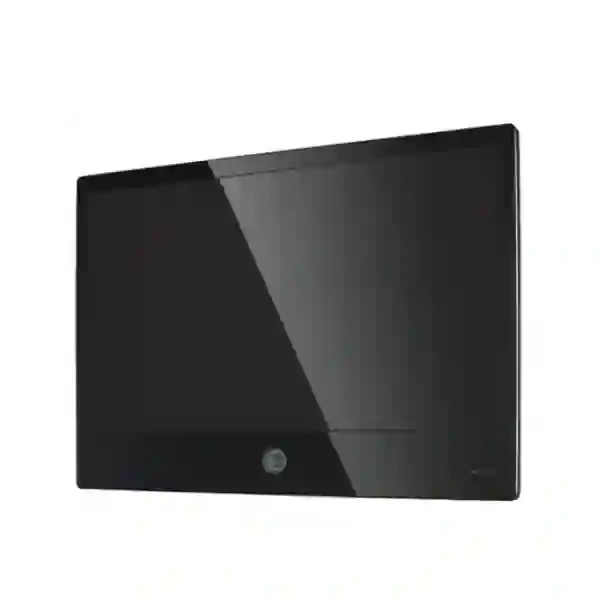
Hanwha SMT-2701PVM public view monitor
The Hanwha SMT-2701PVM public view monitor is a black 27-inch Full HD LED display with an integrated 2-megapixel network camera. Rather than simply showing a video feed behind a security desk, it can show visitors that a monitored area is under observation. Its face-detection outline and configurable on-screen recording message are intended as visible deterrents. The integrated camera supports network video, and the display provides HDMI and VGA inputs for an additional source. This makes the unit worth evaluating for shop entrances, customer-facing counters, reception points and other controlled indoor locations where the security message must be visible.
For a Tanzania installation, the correct purchase decision depends on where the screen will be seen, what the built-in camera must capture, whether footage will be stored, and how the device connects to the existing security network. This product description explains those decisions without assuming local stock, warranty terms, installation coverage or an approved configuration. Ask FourTeck Tanzania for a model-specific quote and confirm the site requirements before ordering.
Why buyers consider this model
The combination of visible live video, an integrated network camera and a customizable security message can simplify a particular type of entrance installation. It does not eliminate the need for a site survey, sound recording design or a check of the intended video-management system. The purpose of the following guide is to make that decision practical before a quotation is requested.
Verified specifications at a glance
These figures describe the product, not a promise about local package contents or installation performance. Confirm the current manufacturer revision when specifying the system.
| Product type | Integrated-camera public view monitor |
|---|---|
| Brand / model | Hanwha Vision / SMT-2701PVM |
| Finish | Black |
| Screen | 27-inch LED; 1920 × 1080; 16:9 |
| Camera | Integrated 2MP IP network camera; fixed 4.6 mm lens |
| Horizontal camera view | Approximately 73.8° |
| Dynamic range | 150 dB WDR |
| Visitor-facing features | Face-detection outlines; configurable on-screen text |
| Video codecs | H.265, H.264, MJPEG |
| Connections | HDMI input, VGA input, RJ-45 Ethernet |
| Storage capability | microSD / microSDHC / microSDXC, up to 256 GB |
| Audio | 2 × 2 W built-in speakers |
| Mounting patterns | VESA 100 × 100 mm / 200 × 100 mm |
| Power consumption | 45 W maximum (manufacturer specification) |
| Environment | Specified operating temperature 0–40°C; less than 90% RH |
What makes a public view monitor different?
A conventional CCTV monitor is normally placed where staff review pictures from a recorder. A public view monitor is positioned where customers or visitors can see it. The difference is not merely cosmetic: visible live imagery may remind people that monitoring is present, while an integrated camera means the point of display can also be the point of capture. The SMT-2701PVM combines these functions in one wall-mounted format rather than requiring the screen and camera to be selected as entirely separate devices.
The model is most useful when its 27-inch image is legible from the intended approach direction. A screen hidden above a doorway, angled away from people, or washed out by strong glare may be technically operational without delivering a useful public view. During planning, identify the desired viewer, approximate viewing distance, approach path and lighting conditions. A monitor installed for deterrence should be judged partly by what a visitor can actually notice, not only by whether its specification sheet meets a nominal resolution.
Display specification and everyday visibility
The LED panel measures 27 inches and uses a 1920 × 1080 Full HD image in a 16:9 format. Manufacturer material lists a 3,000:1 contrast ratio, 300 cd/m² brightness, 178-degree horizontal and vertical viewing angles, and a 12 ms response time. These values are useful for assessing image legibility and mounting geometry, but they are not a guarantee of visibility in direct sunlight. An indoor entrance with reflective glass, for example, can expose the screen to glare that is not apparent during a quick bench test.
Think about three different viewing conditions: a person arriving at the entrance, someone passing across the display, and staff who may glance at it from a nearby counter. Check text legibility and image contrast at each position using the actual lighting at the premises. If the installation depends on reading fine details from a long distance, test a proposed viewing height before fitting the final bracket. Full HD is appropriate for a clear public-view picture, but this product should not be described as a 4K monitor.
Understanding the integrated 2MP camera
The built-in camera is a 2-megapixel network device rather than an external USB webcam. The manufacturer specifies a 1/2.8-inch CMOS sensor and a fixed 4.6 mm pinhole lens. The stated horizontal field of view is approximately 73.8 degrees, with a vertical angle of 39.6 degrees. That gives an installer useful starting information for coverage planning, although the portion of a doorway captured will vary considerably with mounting distance, height and tilt.
A fixed-lens camera cannot be treated like a motorized zoom camera after installation. If the face area is too small in the frame or the field of view misses a side entrance, the remedy may require moving the monitor or adding a separate camera. Place the unit to achieve both a readable public display and a useful camera view; those goals may compete. A high wall position can increase screen visibility across a large area but change the angle at which the integrated camera sees people.
Visible face detection is not facial identification
The SMT-2701PVM can draw a colored bounding box around a detected face as a visual deterrent. Manufacturer documentation describes real-time face detection for up to six faces and allows the overlay color to be configured. This is a feature for detecting face-shaped regions in a scene; it should not be presented as identity recognition, watchlist matching or verification of an individual. Those are different functions with different technical and privacy requirements, and they are not established by the presence of a face box.
In practice, the overlay can make it easier for a visitor to understand that the image on the monitor is live and responds to people. Its effectiveness depends on positioning, lighting, face angle, movement and other scene conditions. Test it during normal foot traffic rather than relying solely on a demonstration with one stationary person. If the deployment requires evidence-quality identification, specify camera placement, pixel density, retention and access procedures separately instead of assuming that the visual deterrent feature satisfies those requirements.
What 150 dB wide dynamic range means for an entrance
The integrated camera specifies 150 dB wide dynamic range. Wide dynamic range is especially relevant when a person stands between a bright external entrance and a darker indoor background. Without suitable exposure handling, faces can become silhouettes or background detail can be lost. The camera’s WDR capability provides a way to manage scenes with substantial light variation, though the result still depends on scene brightness, configuration and where the screen is mounted.
For shops and offices in Tanzania, the useful planning question is whether an approach route includes strong daylight, glass doors or changing afternoon glare. A walk-through at the intended mounting location is more informative than assuming the WDR figure alone solves all exposure problems. Check a person entering with bright light behind them and a person moving back into the room. The manufacturer also lists backlight compensation and day/night adjustments, which should be configured to the site’s actual illumination rather than left unexamined after installation.
Customizable on-screen deterrent messaging
A defining feature is the monitor’s configurable on-screen display, including a preset message reading “Recording in progress.” This text is useful when the business wants a straightforward visual indication of a security presence. The manufacturer describes customization of the text overlay, which allows a site to select wording appropriate to its environment and operating policy. Choose short, readable text and consider the local language and audience rather than filling the screen with lengthy notices.
The important limitation is that a visible message and an active recording process are separate things. If recording is not configured, a message claiming recording is taking place could be misleading. Verify the camera’s actual recording destination, schedule and retention before enabling such wording. Public notices should also be consistent with the business’s privacy procedures. The screen can be a visible part of a wider security communication plan, but it does not replace a properly designed notice or a lawful internal process for handling surveillance footage.
Video analytics beyond the face box
Manufacturer documentation lists motion detection and additional video analytics such as tampering, loitering, directional events and virtual-line activity. These capabilities can support more targeted monitoring than a constant image alone. However, the practical value of each analytic depends on scene design and configuration. A busy entrance with people entering and leaving all day is different from a controlled corridor that should remain quiet after business hours. The same sensitivity settings will rarely be appropriate for both scenes.
A useful commissioning exercise is to define one clear event to detect, configure the relevant area of the image, and observe how the system behaves during representative traffic. False triggers can arise from lighting transitions, reflections or movement near the edges of the scene. Document what the analytic is intended to alert on and what staff will do if it triggers. Avoid representing the presence of a function as a guarantee that every incident will be detected; video analytics complement, rather than replace, human procedures and site-specific risk assessment.
Network streaming and codec choices
The camera supports H.265, H.264 and MJPEG, with multiple streams and a network interface. These formats matter because an installation may need to show live video, record footage and transmit a lower-bandwidth view to a monitoring station. H.265 may reduce bitrate for a suitable scene and compatible recorder, while H.264 can be preferable when an existing system does not fully support H.265. MJPEG is another supported format, not necessarily the best storage choice for continuous capture.
Start with the receiving system rather than selecting a codec in isolation. Verify the recorder or video-management software’s exact support for the camera, required resolution, frame rate, event handling and authentication. Confirm the number of simultaneous viewers and whether the network has sufficient capacity during busy periods. A public view screen may remain visible locally even when a separate network recording path fails, so acceptance testing should include a deliberate network interruption and a check that the site’s planned recording and alert arrangements behave as expected.
Storage, event recording and retention planning
Manufacturer information identifies a microSD, microSDHC or microSDXC slot with support up to 256 GB. This gives the integrated network camera a potential local storage option, including for suitable configured recording events. A memory card is not automatically included merely because the device supports one, and a listed maximum capacity is not a guarantee of a particular number of recording days. Retention depends on image content, resolution, codec, frame rate, bitrate, schedule and event activity.
Decide whether the site needs local edge storage, central recording to an NVR, or an approach that uses both. Consider how footage will be retrieved after an incident, which users may access it, and what happens if the monitor or card is damaged. Cards can fail or fill; capacity checks and periodic verification are part of a reliable recording plan. Do not describe the unit as a complete recording system without confirming the intended recording workflow. The visible “Recording in progress” message should match that workflow at the time of operation.
HDMI and VGA: what the external inputs are for
The monitor provides one HDMI and one VGA video input in addition to its integrated camera functionality. These connectors allow the screen to be considered for an appropriate external display source, subject to the configured operating mode. For example, an installer might assess whether an existing recorder’s local video output can be displayed where the public-view monitor is installed. Compatibility, supported signal format and the chosen source-switching behaviour should be checked before procurement.
Do not confuse a monitor input with a network recorder output. The camera’s network stream is associated with its IP connectivity; the HDMI and VGA connectors are listed as monitor inputs. Likewise, the USB connection is described for software updating, not as a general-purpose USB camera interface. Draw a simple connection diagram that identifies the video input, network switch, recording server or NVR, and power connection. This prevents a common purchasing error: ordering the right-looking screen but assuming a connector performs an unsupported function.
Audio capability and sensible use
The manufacturer specifies built-in speakers rated at 2 × 2 W and stereo mini-jack audio connections. Audio facilities can matter when the site has a legitimate requirement for sound alongside visual monitoring, but the exact use should be confirmed with the intended input source and system configuration. The presence of speakers does not by itself demonstrate two-way communication for a particular deployment, nor should it lead a buyer to assume an announcement system is included.
At a retail entrance, audible messages may be unnecessary when a clear visual deterrent is already present. In a reception area, unexpected audio could create confusion or disturb waiting visitors. Define whether the installation needs sound at all, then test the level and clarity at the intended location. Any capture or playback of audio should be reviewed against the business’s privacy and operational policies. Select an audio configuration because it solves an identified requirement, not simply because the connection appears on the specification sheet.
Power, operating conditions and reliability
The manufacturer’s technical material states maximum power consumption of 45 W and an operating temperature range of approximately 0–40°C with relative humidity below 90%. It lists a DC 12–24 V input arrangement and a power supply specification that should be verified against the accessories furnished with the quoted unit. The integrated camera is described as internally powered. Do not infer that the complete monitor is powered directly by PoE simply because it also has an Ethernet connector.
Installation planning should check stable mains power, electrical protection, appropriate cable routing and ventilation. A hot, enclosed cabinet or a location exposed to water can undermine an otherwise suitable indoor monitor installation. Where continuity matters, the project’s power-backup strategy should cover the monitor, network equipment and recording system together. An uninterruptible power source attached to the screen alone cannot preserve network recording if the connected switch or NVR loses power. Ask the installer to assess the actual ambient conditions and the manufacturer’s current installation instructions.
Mounting dimensions and sight-line checks
The display chassis is approximately 637 mm wide, 448.3 mm high and 48.2 mm deep according to manufacturer material. VESA mounting patterns of 100 × 100 mm and 200 × 100 mm are listed; the datasheet states that a stand is not included. The precise mounting hardware, wall construction and load capacity require site assessment. A generic monitor bracket should not be assumed suitable simply because it appears close in size or fits one pair of holes.
Before drilling, mark the screen outline on the wall and check the public approach path, door clearance, lens direction and accessible cable routes. Leave space for service access and avoid positions where people can easily obstruct, tamper with or strike the equipment. The installation must balance two objectives: the screen should be noticed by the public, and the built-in camera should see the area the security plan actually prioritizes. Ask for a mounting drawing if the monitor sits above a doorway, near glass, or close to other signage.
Retail entrances and shop-floor deterrence
A retail doorway is a natural candidate for a public view monitor because visitors move through a predictable area and may quickly notice themselves on screen. The integrated camera can show approaching traffic while the display presents a live image and an appropriate monitoring message. The strongest practical setup is not always the largest or highest installation; the key is a position where a typical visitor can see the screen without obstructing movement or presenting a safety hazard.
Decide whether the priority is entrance visibility, a waiting area, or a transaction zone. These are different viewpoints and may call for different mounting positions. Test for reflections from storefront glazing, shadows cast at different times of day and the way customers move in groups. A face-detection outline can reinforce the visible-camera message, but high traffic or unusual angles can affect the demonstration. If an existing CCTV system already records entrances, establish whether the integrated camera is an additional view or a replacement for a defined camera position.
Reception desks, lobbies and service counters
In offices, clinics, commercial buildings and customer-service spaces, a public-view unit can make monitoring visible without placing a conventional security workstation in the lobby. The SMT-2701PVM has a relatively discreet integrated camera design, yet the live image on the screen signals its presence. This can be useful where staff want a clearly recognizable monitoring point rather than an exposed camera attached beside a consumer television.
Reception areas involve tradeoffs. A screen facing visitors may be easy to read, but the corresponding camera angle could be too high or off-axis for the coverage objective. Reflective surfaces, backlit glass doors and variable occupancy also deserve attention. Consider accessibility, the tone of the displayed message, and whether showing other visitors on a public screen is appropriate in that setting. Where sensitive discussions occur or confidentiality expectations are high, the choice of camera view and displayed material requires particularly careful review before deployment.
How the unit fits into a larger surveillance system
The SMT-2701PVM should be treated as one device within the overall security design. Its built-in IP camera produces video that may need to be managed with a compatible NVR or video-management application; its display may also be fed from an appropriate external video input. Those functions must be documented separately. Confirm supported protocols and exact interoperability for the firmware and software versions proposed, rather than assuming that sharing a manufacturer name makes every feature automatically available.
For a multi-site organization, define who is responsible for adding the camera to the network, configuring accounts, documenting IP addressing, reviewing footage and maintaining updates. Determine whether the monitor’s video is monitored live, searched after incidents, or used mainly as a deterrent. Each purpose changes expectations for network capacity and storage. A drawing that shows the camera stream, viewing station, recording destination, time synchronization and power feeds is an effective way to catch gaps before installation rather than during a handover dispute.
Cybersecurity and administrator access
Because the integrated camera is network-connected and manageable over IP, it belongs in the organization’s device-security inventory. Use authorized administrator accounts, a documented initial configuration and a defined update procedure. Assign credentials according to the organization’s policy, avoid unnecessary exposure to the public internet and place the device on an appropriately controlled network segment. The ability to see an image locally is not evidence that the network configuration has been secured.
Confirm the manufacturer-supported firmware and authentication functions for the exact hardware revision before deployment. Record who may change analytics, modify the on-screen message, review stored footage and export evidence. Restrict these permissions to staff with a business need, and document how access will be removed when responsibilities change. If the device is to be monitored from another site, involve the network administrator in planning the secure connection. A procurement specification should include these maintenance responsibilities, not only the camera’s resolution and screen size.
Privacy, notices and responsible monitoring
The visible nature of this product makes privacy planning especially important. A public-facing display may show people who are not expecting to appear on a monitor, while the network camera may record information that the business must handle responsibly. Choose the camera field of view to match a legitimate security purpose and avoid unnecessarily covering neighbouring premises, private work areas or other sensitive spaces. Configure any available privacy masking where appropriate and verify the effect in the actual scene.
Before enabling recording, the business should decide what it is collecting, why it needs the footage, how long it keeps it, who may access it and how incidents are handled. Notices and internal practices should be reviewed for the applicable Tanzanian legal and organizational requirements rather than relying on a preset screen message as legal advice. The face-detection outline is not proof of facial identification. Avoid promising automatic identity matching, and ensure the displayed claims about recording are truthful for the actual configuration.
A practical installation and commissioning checklist
Begin with a site survey. Photograph the proposed mounting area, note the expected visitor approach, measure the available wall space and identify power and network routes. Confirm the field of view before final fixing. Next, agree on the security objective: visible deterrence, local video capture, central recording or a combination. Map every objective to a responsible device or process and verify that the proposed software and recorder support it. List the required cables, bracket and storage media separately instead of assuming they accompany the monitor.
During commissioning, validate the displayed image, HDMI or VGA source where used, camera focus and field of view, WDR performance in challenging light, face-overlay behaviour, clock accuracy, network connectivity and recording. Inspect a saved sample file rather than relying only on a live preview. Check that the on-screen notice accurately reflects real operation. Finally, document access credentials through the organization’s secure process, settings, serial details, firmware, acceptance results and the person responsible for future review. A good handover makes the system maintainable after the installer leaves.
What this product should not be expected to do
The SMT-2701PVM is not a generic 4K television, a pan-tilt-zoom camera or a complete turnkey security installation. The fixed camera lens does not provide mechanical zoom or repositioning, and the visible face box does not establish facial recognition. Its SD slot does not imply an included card or guaranteed retention period. HDMI and VGA are monitor inputs, while network connectivity serves the camera and management functions. These distinctions are important when a specification is being prepared from a brief product name alone.
Likewise, the stated performance cannot guarantee that every incident will be deterred, recorded or detected. A concealed approach, poor lighting, power loss, blocked lens, incorrect recorder setup or expired storage space can reduce usefulness. Procurement should include a site-specific design and a realistic acceptance test. It may be preferable to combine the unit with additional external cameras if the main goal is broad evidence coverage. Clear boundaries help buyers avoid paying for a feature they have misunderstood or omitting a component their project actually needs.
Comparing a public view monitor with other options
A conventional CCTV display is usually suited to staff monitoring, where the public does not need to see live video and camera placement can be independent of screen placement. A separate IP camera plus display offers greater flexibility in choosing a lens and viewing angle, though it introduces additional hardware and installation decisions. A larger public-view monitor may attract attention from farther away but needs more space. A smaller monitor can fit constrained entrances but may have less impact at a distance.
The SMT-2701PVM makes sense when one device can reasonably satisfy the visible-display and integrated-camera requirements. Compare total installed cost, not only the screen price: mounting, cable routing, network configuration, recording licenses where applicable, storage, backup power and future maintenance can matter more than the base hardware difference. If the location requires night-time outdoor exposure or weatherproof construction, select equipment specified for that environment rather than assuming an indoor public-view monitor can be installed outside.
Tanzania procurement questions to settle before ordering
For a buyer in Tanzania, the first quotation question is whether the exact SMT-2701PVM model can be supplied for the project. Product availability can vary by region, and an international manufacturer’s listing does not verify local stock. Request confirmation of the model and casing color, included power accessories, recommended mounting hardware, any optional memory card and the documentation supplied. Have the seller state the applicable local commercial terms separately, rather than copying a warranty, price or delivery statement from an overseas retailer.
The next set of questions relates to the location. Tell FourTeck Tanzania whether the unit is for an entrance, counter or lobby, and whether a recorder, network switch and suitable power supply already exist. Share the intended video-management platform and ask for compatibility review. Clarify installation scope, testing responsibility, after-sales arrangements and any necessary configuration services before approving the order. Where a business needs multiple locations, a small representative pilot can reveal sight-line and network issues before a larger roll-out is planned.
Ongoing checks after installation
A public-facing security device is visible every day, so a failed screen or misleading message can quickly undermine the intended effect. Build a simple inspection routine around the live image, clock, camera view, lens condition, recording destination and storage health. Confirm that visitors can still see the display after changes to furniture or signage. Review event-detection settings when the entrance layout or operating hours change, rather than assuming that initial analytics remain appropriate indefinitely.
Keep configuration records, update procedures and a named system owner. Test retrieval of footage periodically when recording is part of the deployment, because a live image alone cannot confirm usable evidence exists. Inspect wall hardware and cable protection as part of normal site maintenance. If the monitor is relocated, repeat the visibility and lens-coverage checks; even a small change in height or angle can change how the public perceives the screen and what the camera captures. Preserve any privacy controls established during the original installation.
Frequently asked questions
Is the Hanwha SMT-2701PVM only a monitor?
No. It combines a 27-inch Full HD LED public view screen and an integrated 2MP IP camera. The screen is meant to be seen by people in the monitored area, while the camera can provide network video. It is not merely a passive monitor, but it still needs a suitable installation and recording plan if saved footage is required.
Can I connect an existing CCTV recorder?
The display lists HDMI and VGA inputs, so an appropriate source may be evaluated. Whether your particular recorder can provide the desired image and operating mode depends on its outputs, signal settings and the monitor configuration. Separately verify compatibility between the built-in network camera and any recording or video-management platform you intend to use.
Does the face-detection box identify customers?
No identification capability should be inferred. The published feature draws an outline around detected faces as a deterrent. A bounding box is not the same as matching a person to a database or establishing their identity. If identity-related functionality is a requirement, it needs a separate technical, legal and privacy assessment.
Does “Recording in progress” mean the video is being saved?
Not necessarily. The wording is a configurable on-screen message. A recording schedule, usable storage target and functioning camera-to-recorder path must be verified independently. Before displaying the message, test a saved clip and make sure the text matches how the site actually operates.
Can the camera record to a memory card?
Manufacturer information specifies a microSD-family slot supporting cards up to 256 GB. Card inclusion and the actual recording configuration must be confirmed. Retention varies with bitrate, codec, frame rate, schedule and scene activity, so a capacity figure cannot be turned into a fixed number of days without a recording design.
Can the screen and camera run entirely from PoE?
Do not assume that. The device includes Ethernet connectivity, but manufacturer material specifies a separate power input arrangement for the monitor and describes the integrated camera as internally powered. Confirm the correct supply and accessories for the exact unit in the quotation and installation instructions.
Is this monitor suitable outdoors?
An outdoor or exposed installation should not be assumed suitable. The published operating conditions and the lack of a verified outdoor-enclosure rating mean the installation environment needs review. If the location is exposed to rain, intense heat or direct sun, ask for equipment and mounting protection explicitly rated for those conditions.
Which camera and display settings matter most at an entrance?
Start with the screen’s visibility and camera’s field of view. Then test backlighting, the face-detection overlay, on-screen message, network connection and actual recording. Set analytics for the traffic pattern at the location, and confirm that the mounting arrangement does not create glare, obstruction or an impractical service position.
Is the SMT-2701PVM available in Tanzania and what does it cost?
No local availability or price is confirmed in this description. Request a quotation for the exact model from FourTeck Tanzania. Ask for written confirmation of supply status, included components, any required mounting or storage accessories, applicable commercial terms and any installation services requested for your site.
What should I provide when requesting a quote?
Provide the exact model name, number of units, proposed indoor location, mounting surface, approximate viewing distance, existing recorder or video-management platform, network arrangement and whether local or central recording is needed. Include any desired on-screen message, privacy requirements and required commissioning scope so the response can address your installation rather than only the hardware.
Request a model-specific quotation
If this device fits your security brief, ask FourTeck Tanzania to confirm the exact model, commercial availability, compatible recording setup, mounting and power accessories, and any required implementation scope. Provide the site use case and your existing CCTV platform so the quotation addresses real installation requirements. No local price, stock position, delivery promise or warranty term is implied by this product description.




Reviews
There are no reviews yet.