
UniFi Network | Compact cloud gateway
Ubiquiti Cloud Gateway Ultra Tanzania: UCG-Ultra for controlled, secure business networks
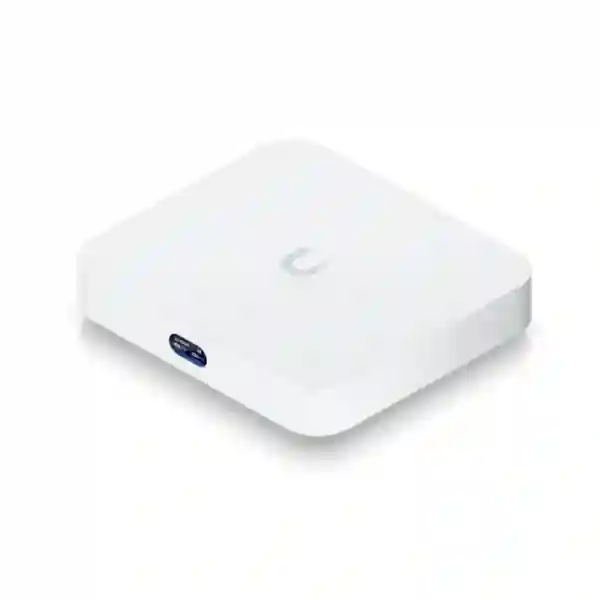
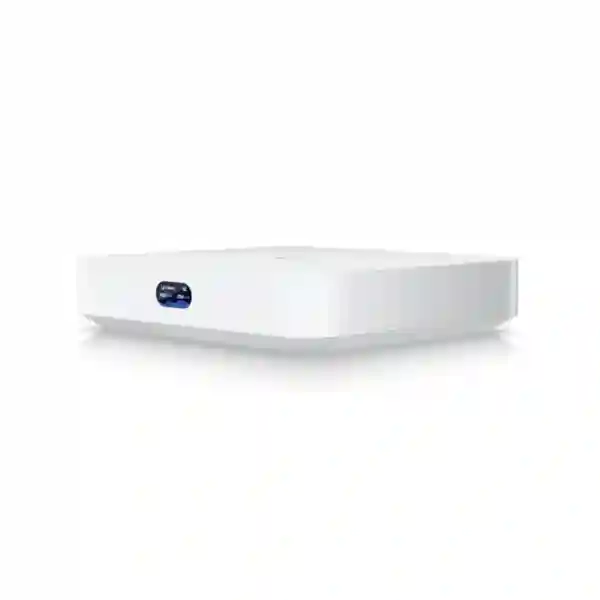
Build a controlled, easier-to-manage wired and wireless network with the Ubiquiti UniFi Cloud Gateway Ultra (UCG-Ultra). This compact desktop gateway brings internet routing, firewall policies, intrusion detection and prevention, VPN connectivity, multi-WAN options and UniFi Network management into one appliance. It is designed for teams and households that want more visibility and control than a basic internet-service-provider router ordinarily provides, without committing to a large rack-mounted gateway.
For buyers in Tanzania, the important decision is whether the wider network fits the gateway. Ubiquiti rates the UCG-Ultra for 1 Gbps of routing with IDS/IPS enabled, management of 30 or more UniFi devices and support for 300 or more simultaneous users. These figures are manufacturer capacity indicators, not guarantees for every workload. A 2.5 GbE WAN interface provides a modern internet-facing connection, while the four local Ethernet interfaces are 1 GbE. Request a configuration review or quotation based on your internet service, access points, switches, security policies and expected growth.
At a glance: the main reasons to choose it
- Consolidates routing, firewall features and UniFi Network management into one compact gateway.
- Supports IDS/IPS, traffic inspection, segmented networks and selected content controls.
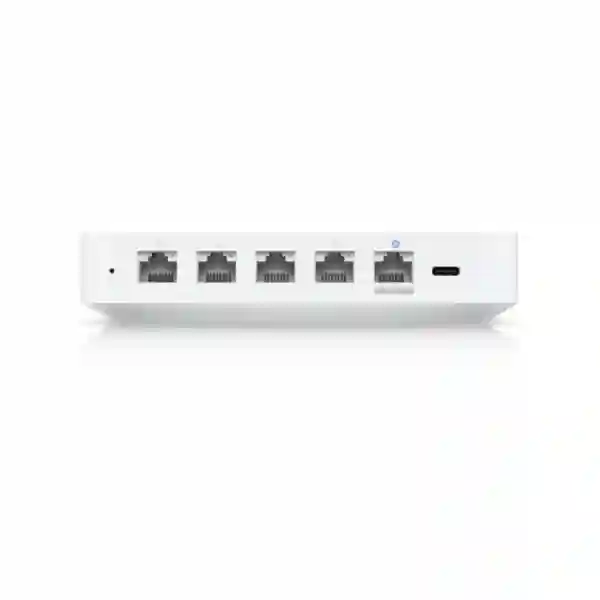
- Provides one default 2.5 GbE WAN connection, four 1 GbE LAN ports and multi-WAN configuration options.
- Supports compatible VPN server, client and site-to-site networking options.
- Designed for separately installed wireless access points and switches; no built-in Wi-Fi or PoE output.
- Runs UniFi Network, not a built-in UniFi Protect recording service.
Verified technical specifications
These values are manufacturer specifications for the exact UCG-Ultra model. Where capacity or throughput is stated, the figures describe published product positioning and may not reflect every real-world deployment.
| Model | UCG-Ultra (Cloud Gateway Ultra) |
|---|---|
| Manufacturer | Ubiquiti |
| Primary application | UniFi Network |
| Manufacturer-rated IDS/IPS throughput | 1 Gbps |
| Managed UniFi devices | 30+ |
| Simultaneous users | 300+ |
| Default WAN | 1 × 2.5 GbE RJ45 |
| Local Ethernet ports | 4 × 1 GbE RJ45 |
| Maximum supported WAN count | 4, subject to supported port remapping |
| Processor | Quad-core ARM Cortex-A53, 1.5 GHz |
| Memory / storage | 3 GB memory / 16 GB on-board storage |
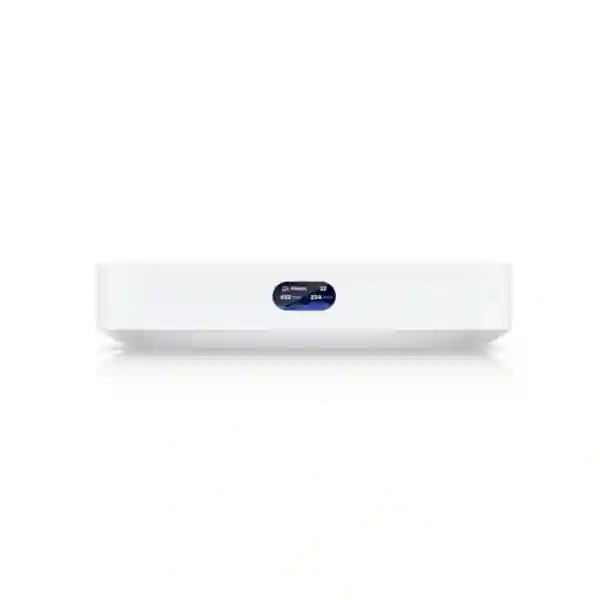
| Display | 0.96-inch status display |
| Power | USB-C, 5 V DC / 3 A; adapter listed as included |
| Maximum power consumption | 6.2 W |
| Dimensions | 141.8 × 127.6 × 30 mm |
| Weight | 520 g |
| Ambient operating temperature | −10 to 40 °C |
| Wi-Fi radio / PoE output | None / none |
What the Cloud Gateway Ultra actually does
The Cloud Gateway Ultra sits at the edge of a network, between the incoming internet connection and internal devices. It decides how traffic is routed, applies security policies, provides network services and supplies the UniFi Network management environment for compatible switches and access points. In a typical installation, the ISP modem or optical network terminal feeds the gateway WAN port; a downstream switch distributes Ethernet; and separately purchased Wi-Fi access points serve mobile and wireless users. This separation keeps the equipment roles clear and makes it possible to place wireless access points where coverage is required, rather than wherever the internet connection enters the building.
Unlike a basic switch, the gateway is responsible for routing among networks and toward the internet. Unlike an ordinary wireless access point, it does not create a Wi-Fi signal by itself. Unlike a standalone software controller, it combines the UniFi Network management plane with a functioning network gateway. That combination is especially valuable for a small organization that wants to see connected devices, internet conditions, network usage and security-related events from one management interface. The administrator still needs to design network policies, maintain backups, protect account credentials and monitor changes; the hardware does not remove those responsibilities.
Where this model fits best
Consider the UCG-Ultra for a small business, professional office, shop, clinic administration network, home office or distributed branch that needs organized connectivity at approximately gigabit-class speeds or below. Its attraction is not merely port count. The more useful capability is the ability to connect a manageable set of UniFi infrastructure devices, define separate networks for different users and devices, and apply routing and firewall rules in a consistent interface. A retailer might separate payment equipment from public Wi-Fi; an office might separate workstations, guest connections and smart building equipment; a branch might need a VPN to reach a main site.
The model also suits buyers who plan to add UniFi wireless access points gradually. They can start with one correctly placed access point and extend coverage later, provided that switch capacity, cabling, PoE power and radio design are considered. It is less suitable when the requirement is an all-in-one box with built-in Wi-Fi, when a major part of the project is local UniFi Protect recording, or when the internet service and inter-VLAN traffic need sustained multi-gigabit forwarding. Rather than choosing from a headline client number alone, assess concurrent workloads, application needs and the desired network topology.
Key performance and capacity numbers explained
Ubiquiti specifies 1 Gbps IDS/IPS throughput for this gateway. This describes the vendor-rated routing performance while intrusion detection and prevention capabilities are in use; it is not a promise that every speed test, VPN tunnel, local file transfer or application session will reach exactly 1,000 Mbps. Actual experience can vary with packet size, configuration, ISP conditions, encryption, routing policies and the rest of the network. For a connection sold as faster than 1 Gbps, the Ultra can become the limiting device despite having a 2.5 GbE physical WAN port. Internet plans and physical interface speeds should not be confused with inspected routing capacity.
The stated 30-plus managed UniFi devices and 300-plus simultaneous users represent Ubiquiti’s published support positioning. Managed devices are infrastructure elements such as compatible UniFi switches and access points, whereas users or clients are endpoints such as laptops and phones. Those two counts are not interchangeable. In a real deployment, 300 connected clients could create very different workloads depending on whether they browse occasionally, attend video meetings or transfer large files continuously. Capacity planning should include peak concurrent use, Wi-Fi airtime, routing load, memory headroom and operational expectations, not simply an upper-end marketing figure.
Ethernet ports and WAN flexibility
The physical layout consists of one default 2.5 GbE RJ45 WAN port and four 1 GbE RJ45 ports normally assigned to the LAN. Ubiquiti lists a maximum WAN port count of four through supported port assignment features, but using additional WAN interfaces means allocating suitable Ethernet ports away from local-network use. The gateway should therefore not be described as having four dedicated extra high-speed WAN sockets. A buyer planning multiple internet links needs to draw the final port map before ordering, including the connection to the downstream switch and the available bandwidth of each port.
The 2.5 GbE WAN connection is useful for negotiation with suitable upstream equipment and gives flexibility on the internet-facing interface. It does not turn the four local 1 GbE interfaces into multi-gigabit LAN ports. If a workstation, server or aggregation switch needs 2.5 GbE or 10 GbE end-to-end connectivity, assess a different gateway and a matching switching platform. Also verify the ISP handoff method: Ethernet, bridge mode, VLAN tagging, PPPoE or another provider-specific arrangement may affect the design. Port remapping and multi-WAN configuration depend on the software version and exact supported configuration.
Security features you can actually use
The Cloud Gateway Ultra supports a stateful firewall, application-aware Layer 7 filtering, traffic identification, zone-based firewall policies, content filtering, ad blocking and intrusion detection and prevention. These functions help an administrator define what traffic is permitted, identify broad application activity and respond to selected network threats. For example, a guest segment can be allowed to reach the internet while being restricted from business devices, or a remote-office VPN can be limited to the business resources it needs. Security rules must be tested against legitimate traffic to avoid disrupting applications unexpectedly.
Intrusion prevention is one layer rather than a complete security program. Its effectiveness depends on current signatures, appropriate policy selection, working updates, correct segmentation, secure endpoint configuration and human oversight. Ubiquiti lists a larger signature set with its CyberSecure offering; features or commercial terms associated with CyberSecure should be checked separately rather than assumed to be included in a particular purchase. Maintain endpoint protection, multifactor authentication where available, secure Wi-Fi settings and timely patching. A sensible purchase decision considers both the gateway capability and who will maintain the network after installation.
VLAN separation for employees, guests and devices
Virtual LANs let a network carry multiple logically separate groups over appropriately configured shared infrastructure. An office might define an employee network, a guest internet network, a voice-device network and a network for printers or building equipment. These groups can use different IP address ranges, DHCP settings and firewall rules. The benefit is practical: a visitor should not automatically receive the same internal access as an employee workstation. In a shop, payment-related devices may require stricter network access policies than customer browsing, subject to the organization’s payment-security requirements.
Creating VLAN names is only the first step. The gateway, managed switches and wireless access points must agree on tagged and untagged traffic; the correct wireless SSID must be mapped to the intended network; and firewall rules must specify exactly which traffic crosses segments. Some devices need carefully controlled access to printing, discovery or local services, and indiscriminate isolation can break those workflows. Plan the address ranges and exceptions before rollout, document why each policy exists and test with representative clients. VLANs improve control when configured correctly; they do not themselves certify a network for a regulated use.
Multi-WAN: resilience versus extra speed
Multi-WAN is useful when a site has two independent internet paths, such as primary fixed broadband and a separately arranged backup connection. The gateway supports failover and load-balancing capabilities, along with policy-based selection of internet paths. For a retail point of sale, the priority may be to restore internet access when the preferred line fails. For a team with heavier traffic, administrators may choose policies that distribute eligible new connections or send particular classes of traffic through a selected provider. The correct design depends on the applications and on how the two services are delivered.
Failover should not be described as perfect continuity. Existing sessions, voice calls or VPN connections may reset as the public IP path changes, and a second connection only helps if it is genuinely independent and operational. Load balancing does not necessarily combine two access links into one faster single download. If a backup router or cellular modem is required, confirm that its interface and subscription suit the intended arrangement. Schedule a supervised failover test, record expected behavior and choose monitoring thresholds carefully. Where uninterrupted operation is critical, also examine power protection, access-switch redundancy and the ISP’s own service commitments.
VPN and site-to-site connectivity
The UCG-Ultra supports several UniFi VPN roles, including WireGuard and OpenVPN server or client functions and site-to-site options such as IPsec and Site Magic. These tools can help connect a roaming employee to permitted office resources, reach a branch location or route selected traffic across an encrypted tunnel. A suitable configuration might allow accounting staff secure access to a head-office service without placing that service openly on the internet. VPN capability is valuable, but it should be deployed with least-privilege firewall rules, account safeguards and a clear understanding of the network resources being exposed.
Before promising remote access, examine the internet connection on each end. Carrier-grade NAT, private WAN addressing, double NAT, provider firewall restrictions and changing IP addresses can affect how tunnels are created or reached. Different VPN types have different prerequisites, and encryption throughput is not the same specification as IDS/IPS throughput. Site Magic is intended for compatible UniFi gateways under appropriate account management, while interoperability with external platforms needs protocol and configuration review. Test DNS resolution, route overlap, reconnection behavior and access permissions, then document recovery steps for the person who will support the deployment.
UniFi Network management in one place
The integrated UniFi Network application provides a management environment for the gateway and adopted compatible UniFi network devices. Administrators can review infrastructure status, configure Wi-Fi networks on supported access points, examine client connectivity, organize wired and wireless networks and make controlled changes to routing or firewall behavior. Centralized management can reduce the need to configure each compatible infrastructure device independently. This matters for a modest business with a few access points and switches, especially when the same person is responsible for performance, security and user support.
Central management does not mean every third-party device can be adopted or configured as a UniFi device. Non-UniFi switches and access points may pass network traffic but have separate management interfaces and different feature support. Nor should a remote dashboard be mistaken for an assurance that internet or power outages will have no impact. Protect the owner account, limit administrator roles and keep a secure inventory of device names, locations and configuration changes. Before a major update, check compatibility and arrange a maintenance window, particularly when a failed change would affect sales, communications or access to business applications.
Wi-Fi access points, PoE and switching requirements
The UCG-Ultra is not an all-in-one wireless router. It does not include a built-in Wi-Fi radio, so wireless coverage requires separately selected access points. A PoE-powered access point also needs a suitable PoE switch or injector because the gateway does not provide PoE output on its LAN ports. The choice of access point depends on coverage area, wall materials, client density, radio interference and expected application load. One powerful access point in a poor position may perform worse than multiple appropriately positioned units connected by proper Ethernet cabling.
For a small network, the gateway can connect directly to a compatible switch, which then feeds access points, desks and other endpoints. The switch must provide enough physical ports, any necessary PoE power budget and the VLAN features required by the design. Long cable runs, unreliable connectors and incorrect power injectors can cause problems that look like internet or gateway faults. Where wireless roaming and guest isolation matter, test these functions with actual phones and laptops rather than relying on a product specification alone. Budget for the complete topology, not only the price of the gateway.
What the Ultra does not replace
Ubiquiti lists UniFi Network as the application supported by this model. The Cloud Gateway Ultra should therefore not be purchased on the assumption that it hosts UniFi Protect recording, video storage or the broader application suite found on some other consoles. Security cameras can still use a network behind the gateway like other IP devices, but a complete UniFi Protect deployment needs appropriate separate hosting and recording hardware. That distinction is essential when a customer is considering a combined office-network and camera-system upgrade.
The Ultra also does not replace a wireless access point, an Ethernet switch in installations needing many local connections, or a battery backup. It is a gateway, not a guarantee of secure remote access through every ISP. It has no built-in multi-gigabit LAN ports for high-speed workstation-to-server traffic. A procurement list that includes only the gateway can therefore be incomplete. Request a bill of materials that covers the internet handoff, required PoE, switching, access points, cabling, optional secondary internet equipment and suitable power protection. Confirm which components are already present and compatible before specifying replacements.
Tanzania internet service: questions to ask first
For a Tanzania deployment, begin with the actual service characteristics rather than assuming all fixed, wireless and fibre links behave identically. Ask the internet provider what Ethernet or router handoff is provided, whether the service uses DHCP, PPPoE or another authentication method, and whether any VLAN settings must be preserved. Establish the contracted download and upload speeds and whether a public routable address is included. If the provider equipment combines modem, router and Wi-Fi functions, ask whether bridge mode or another supported handoff is available.
These checks are particularly important for remote access, hosted business applications and failover planning. A connection using carrier-grade NAT may function well for ordinary browsing while creating additional challenges for inbound services. If the deployment needs a backup internet link, evaluate whether it depends on the same building power or upstream infrastructure as the primary service. No specific Tanzanian telecom operator, service area, delivery commitment or gateway approval is assumed here. The practical next step is to verify the exact provider and subscription against the intended network design and document the results before installation.
Power, placement and environmental limits
The gateway uses USB-C power at 5 V DC and 3 A, and Ubiquiti states a maximum power consumption of 6.2 W. The manufacturer lists a compatible AC input range of 100–240 V for its supplied power arrangement. This low-power desktop form factor can be convenient where a rack-mounted device would be unnecessary, but the equipment still needs a stable electrical supply and suitable cable management. Confirm the physical adapter and plug configuration for the exact delivered unit rather than assuming a regional plug style from a foreign product photograph or listing.
Ubiquiti specifies physical dimensions of 141.8 by 127.6 by 30 mm and a weight of 520 g. It also specifies an ambient operating temperature range of minus 10 to 40 degrees Celsius and non-condensing humidity conditions. For an equipment cupboard in a warm location, leave appropriate airflow, keep the device away from direct heat and avoid trapping it among power adapters. A UPS can be considered when internet availability matters, but it must protect the upstream modem, switch and wireless equipment as needed; backing up only the gateway does not keep the whole network operational.
Practical small-office deployment
Imagine an office where employees use cloud documents, email, business calls and a shared printer. A coherent design would connect the ISP handoff to the UCG-Ultra, use a managed switch for wired desks and powered access points, and provide separate employee and visitor Wi-Fi networks. The gateway would issue addresses according to the planned network segments and enforce policies so visitors have internet access without unrestricted access to internal systems. The administrator could use UniFi Network to identify relevant client devices and review internet quality when the team reports that connections feel slow.
Before deployment, count active wired ports, estimate peak wireless occupancy and confirm whether critical applications need inbound connectivity, fixed public addresses or quality-of-service rules. A video meeting problem might originate in poor Wi-Fi coverage, insufficient upstream bandwidth or competing traffic rather than the gateway itself. Test a normal day of use after installation, including calls, printing and access to cloud services. Record a baseline for troubleshooting and make sure another authorized administrator can recover account access. The value lies in a maintainable office network, not simply installing a sophisticated router at the edge.
Retail shop and point-of-sale scenario
A retail business may need internet access for checkout, cloud inventory, office administration and customers. The sensible objective is separation of functions and predictable recovery from common failures. The Cloud Gateway Ultra can provide the routing and policy foundation for distinct device groups when combined with compatible switching and wireless equipment. Staff devices, guest Wi-Fi and business systems should not be placed on one flat unrestricted network merely because it is easy to set up. Where payment platforms define additional security requirements, follow those requirements separately rather than treating a VLAN or firewall feature as certification.
If the checkout depends on an online service, the business should also plan how it will operate during an ISP outage. A secondary connection, where available and suitable, can improve resilience, but it may not preserve every ongoing payment transaction. Test the actual checkout devices and service provider’s requirements before relying on automatic failover. Make written procedures for confirming connectivity, recognizing provider outages and escalating support. Ask about uptime requirements, safe maintenance windows and the number of people who will need guest access. These details influence gateway policies and the surrounding equipment more than superficial specifications.
Guest Wi-Fi and shared premises
Guest access is a common reason to choose a more capable network platform. In a small hospitality space, meeting room, showroom or shared office, visitors should be able to browse without gaining automatic access to employee laptops, management interfaces or internal printers. The UCG-Ultra can participate in such a design by defining networks and routing policies, while separately installed UniFi access points provide the wireless service. Appropriate SSID settings, bandwidth policies and segmentation must be configured across the gateway, switch and access point rather than presumed from the gateway’s model name.
Consider the user journey as well as the technical setup. Guests need an understandable way to join, stable coverage where they sit and predictable performance when many clients connect. The administrator needs a way to change access credentials and investigate connectivity complaints without weakening the business network. A shared-premises design may also need to separate tenants more strictly than an ordinary guest network. Validate those requirements and any applicable obligations with the relevant organization. A well-designed guest network is easier to support when its limits, authentication method and ownership are documented from the start.
Branch networks and remote administration
For organizations with multiple small premises, a gateway at each site can provide a consistent foundation for routed networks and secure inter-site communication. A branch might need to reach selected head-office systems while still using its own local internet connection for day-to-day traffic. Site-to-site VPN functions and policy-based routing create possible options, but the chosen method must match the supported firmware, account ownership and available public connectivity. IP address ranges should be planned so different sites do not overlap, and only the business systems that require cross-site access should be permitted.
Remote management can save unnecessary visits when the problem is a configuration error or when a client needs to be identified. It cannot fix a physically disconnected cable, failed access point or power outage from a distance. Decide who is authorized to administer each site, how incidents are escalated and how settings are backed up. If multiple people share responsibilities, use individual accounts and appropriate privileges instead of one informal shared password. For a business with many sites or very demanding connectivity, consider whether a higher-capacity gateway and wider monitoring approach better suit long-term growth.
Comparing the Ultra with higher-capacity gateways
The Cloud Gateway Ultra is best assessed as a compact UniFi Network-focused appliance with 1 GbE LAN connectivity and a 1 Gbps manufacturer IDS/IPS routing rating. If the purchase requires multi-gigabit local ports, faster inspected routing or native hosting of additional UniFi applications, evaluate a more capable model such as the Cloud Gateway Max or another appropriately specified gateway. The right choice depends on the complete technical requirement rather than model names or price difference alone. A faster WAN port is not the same as a faster local network, and more processing capacity is not automatically necessary for a small installation.
Also compare the Ultra with a gateway that includes integrated Wi-Fi if the site values a simple single-box setup more than separate access-point placement. Separate wireless equipment is often preferable in a building that needs several coverage zones, while an integrated device may reduce equipment count in a very small space. Consider lifecycle needs: future internet upgrades, camera recording plans, the need for PoE outputs, rack space and business continuity expectations. Establish which capabilities are immediate requirements and which are speculative. This approach avoids paying for features that may never be used or buying a gateway that will quickly constrain a planned expansion.
A realistic total cost checklist
The price of a gateway alone rarely represents the cost of a functioning office network. A complete quote may need managed Ethernet switches, PoE switches or injectors, wireless access points, patch leads, structured cabling, a suitable enclosure, UPS equipment, optional secondary internet hardware and setup work. The exact list depends on what is already installed and reusable. Some organizations also need configuration documentation, network testing, staff handover and ongoing maintenance. These items should be presented separately so a buyer understands what the gateway includes and what belongs to the broader project.
Do not assume that buying the Ultra includes an internet subscription, wireless coverage, network installation or premium security subscriptions. Confirm all commercial terms with the seller and review the precise scope of any professional configuration service before approving a purchase. In Tanzania, local price, stock position, delivery arrangements, taxes and warranty conditions can only be established from a current verified offer for the intended listing. This product description intentionally does not state a Tanzanian shilling price or make availability promises. A written quote should identify the exact model, included accessories and any optional services.
Installation planning before the first power-on
Prepare the network diagram before connecting the gateway. Record the intended WAN type and credentials, management owner, local subnets, expected VLANs, switch uplinks and wireless SSIDs. Decide which ports will be WAN and which must remain available for LAN before enabling multiple internet paths. Ensure that access points and switches have their own appropriate power sources. A labelled network diagram makes it easier to troubleshoot a disconnected printer, an incorrectly assigned guest network or an unexpectedly slow uplink. It also reduces risk when someone other than the original installer must support the site later.
During commissioning, bring the system online in controlled steps rather than changing every setting at once. First establish the primary internet connection, secure the administrator account and confirm system updates. Then adopt compatible UniFi infrastructure, introduce each VLAN, test firewall rules and verify wireless client connectivity. Add VPN or secondary WAN configurations only after the basic network is stable. Confirm how to restore administrative access if a setting blocks management, and retain a secure configuration record. A short acceptance checklist should include real user tasks such as printing, joining guest Wi-Fi, completing a transaction and accessing approved remote resources.
Moving from an existing router or controller
Replacing an ISP router or an older UniFi gateway should be planned as a migration rather than treated as a quick cable swap. Inventory the current subnet, DHCP reservations, static addresses, port forwards, Wi-Fi network names, VPN connections and any special services such as voice systems or remote cameras. Check whether the current ISP device must remain in place for modem functions or provider authentication. Moving to a different router can change public-facing behavior, NAT arrangements and address assignments, so assess critical services before the maintenance window begins.
If the site already manages UniFi equipment through another controller, determine the appropriate backup, restore or adoption path before disconnecting it. Avoid assuming that two management systems can simultaneously own the same adopted devices. Arrange authorized access to all equipment and retain a reversible plan in case an unexpected compatibility issue appears. After cutover, test the actual workflows used by staff, including DNS resolution and any site-to-site links. Document what changed, what was preserved and which network settings require follow-up. Careful preparation usually matters more than the physical effort of installing the compact gateway.
Routine operations and maintenance
Once the network is running, define a simple maintenance routine. Review software updates and release notes, monitor unusual outage patterns, maintain an authorized administrator list and test backups. Watch for changes in connected devices and traffic patterns that may indicate new equipment or unexpected activity. Verify that guest isolation and other firewall rules continue to behave as intended after major changes. Audit old port-forwarding rules and VPN access when employees or service providers no longer need them. Some alerts may need tuning so the administrator receives useful information rather than constant noise.
Operational health depends on supporting infrastructure as well as gateway software. Inspect cable connections, power supplies, access-point placement and switch capacity when usage grows. Maintain a documented method for contacting the ISP and distinguishing a last-mile fault from a local Wi-Fi fault. Keep important configuration records securely stored outside the gateway itself, and establish who can authorize changes. For a busy shop or office, schedule disruptive work outside critical periods where possible. A practical routine makes a compact network more dependable and helps the organization get sustained value from the investment.
Security and business-continuity boundaries
Advanced gateway features should be evaluated with clear limits. A stateful firewall helps regulate network flows, but it cannot prevent a user from disclosing credentials to a fraudulent website. Intrusion prevention can detect or block selected patterns, but it does not remove the need for endpoint updates, application security or verified backups. Content filtering may block certain unwanted destinations, but businesses should still apply appropriate acceptable-use policies and protect sensitive data. Administrators need to understand the effect of each rule rather than simply enabling every security option at the highest level.
Likewise, multi-WAN features address selected connectivity failures, not the failure of the gateway hardware or every service dependency. A backup line that uses the same failed power source may provide no useful protection. A VPN may be unavailable when an upstream provider assigns restrictive addressing, and a managed switch outage can disconnect an entire floor even while the gateway is healthy. Match the design to the consequences of downtime. Sites that require high availability, high inspected throughput or specialized compliance controls may need a different class of equipment and a broader security architecture.
Frequently asked questions
Direct answers to common buying, installation and compatibility questions.
Does the UCG-Ultra have built-in Wi-Fi?
No. The Cloud Gateway Ultra is a wired gateway and UniFi Network console, not a wireless access point. To serve laptops and phones over Wi-Fi, connect appropriately selected access points through suitable Ethernet switching or a supported direct connection. Plan access-point placement from the actual building layout, not merely the gateway’s location. If the access points require PoE power, provide it through a matching switch or injector. This distinction is especially important when comparing the Ultra with integrated wireless routers.
Can it power a UniFi access point using PoE?
No. Its RJ45 LAN interfaces do not supply Power over Ethernet. The gateway itself is powered by USB-C through the specified power arrangement. A PoE-capable access point needs its own supported PoE switch or injector, with the correct power standard and sufficient power budget. Confirm the model of each intended access point and the accessories included in the proposed bill of materials before ordering. A powered gateway alone does not turn on an access point connected with ordinary Ethernet cabling.
Does it support a 2.5 Gbps internet service at full speed?
It has a 2.5 GbE WAN port, but Ubiquiti rates IDS/IPS routing at 1 Gbps and the LAN ports are 1 GbE. Therefore, a buyer should not assume the full speed of a multi-gigabit internet plan will be delivered through this gateway under inspected routing conditions. Consider the number of active users, types of traffic and desired security settings. If sustained performance significantly above 1 Gbps is required, compare a more capable gateway with suitable multi-gigabit local connectivity.
Can I use two internet providers?
The gateway supports multi-WAN configurations, including failover and load balancing, when the relevant ports and upstream connections are configured correctly. One Ethernet interface is the default WAN, and supported additional WAN arrangements can require repurposing LAN interfaces. Verify both providers’ handoff details, how routing should behave during an outage and which traffic should use each connection. A backup line may require extra hardware and service costs. Failover does not guarantee that an existing call, transaction or VPN session will survive a change of public internet path.
Can the gateway host UniFi Protect recordings?
No. Ubiquiti’s published application support for the Cloud Gateway Ultra is UniFi Network, not the UniFi Protect recording application. Cameras can still be network endpoints behind the gateway, but recording, storage and UniFi Protect management require separately suitable hardware. If integrated camera management is part of the initial project or expected soon, compare other UniFi consoles before buying. Do not treat the gateway’s on-board storage as a video-recorder drive or assume a camera-management licence or recording capacity is included.
Can users connect remotely through a VPN?
Yes, the UCG-Ultra supports several VPN approaches, including WireGuard, OpenVPN and compatible site-to-site options. The best method depends on whether users need remote access to specific systems or a persistent connection between sites. Review the ISP’s public-address and NAT arrangement, account security, permitted routes and remote-device policy first. Some configurations require additional prerequisites or careful firewall rules. VPN transfer rates depend on encryption and network conditions; the 1 Gbps IDS/IPS rating should not be interpreted as a guaranteed VPN speed.
How many UniFi devices and users can it handle?
Ubiquiti lists management of 30 or more UniFi devices and support for 300 or more simultaneous users. These are different measures: a managed device is infrastructure such as an access point or switch, while a client might be a phone, laptop or other endpoint. Real-world capacity depends on traffic volume, security services, network design and wireless coverage. A heavily used office can stress its network in ways a larger number of occasional browsing clients does not. Size the installation from actual demand rather than a single count.
Do I need a separate UniFi controller?
The Cloud Gateway Ultra includes the UniFi Network management application, so a separate UniFi Network controller is not normally required for a deployment managed by this gateway. Supported UniFi switches and access points can be adopted into its management environment. An existing deployment should be migrated with attention to backups, account ownership and device adoption. The built-in management application does not mean the Ultra can host every UniFi application. Always confirm the particular device and feature compatibility before planning a controller migration.
Will it work with an ISP router in Tanzania?
It can be integrated into many Ethernet-based ISP arrangements, but the exact design must be checked with the service provider. If the upstream router can use an appropriate bridge or passthrough mode, the UniFi gateway may receive the required WAN addressing directly. If it remains behind another router, double NAT may affect inbound services or selected VPN configurations. Ask the provider about authentication, VLAN requirements, public IP availability and any equipment restrictions. No compatibility guarantee with an unnamed provider or subscription is implied.
Is this gateway suitable for guest Wi-Fi?
Yes, as part of a complete design. The UCG-Ultra can define routed networks and access policies while separately installed access points provide the actual wireless connection. A guest SSID should be mapped to the intended VLAN or guest network, and isolation policies should prevent unnecessary access to internal systems. Managed switches and access points must be configured consistently. Test the experience using real client devices, especially if the venue has many visitors, and make sure guest traffic limits do not unexpectedly interfere with business applications.
Does it include a USB-C power adapter?
Ubiquiti’s published technical specifications list a USB-C 5 V DC, 3 A power supply with the adapter included. The gateway’s rated maximum power consumption is 6.2 W. However, the plug type and exact commercial package should be confirmed for the specific unit offered in Tanzania rather than inferred from a listing for another region. If the site needs backup power, assess the power requirements of the ISP terminal, switch and access points as well as the gateway so the complete connection remains useful during an outage.
What should I provide when requesting a quote?
Share the desired internet speeds, number of users, current router and switch models, number and location of Wi-Fi access points, whether guest networks or VPNs are needed, and any plans for cameras or a second internet line. Also mention important applications, existing cabling, available power protection and any requirement for remote administration. These details make it possible to identify missing accessories and confirm whether the Ultra is an appropriate fit. Ask for a quote that names the exact model and separates hardware, optional services and commercial terms.
Is the UCG-Ultra a good choice for a growing business?
It can be a sensible starting point when current and foreseeable needs fit gigabit-class routing, UniFi Network management and separate switches and wireless access points. The modular approach allows wireless coverage and local port counts to grow with additional compatible equipment. However, adding switches does not increase the gateway’s inspected routing rating or change its 1 GbE LAN interfaces. If high-speed inter-VLAN routing, locally hosted Protect recording or significantly greater internet throughput are planned, examine the requirements now and compare higher-capacity gateways before committing.
Request a UCG-Ultra quote and compatibility review
Ask FourTeck Tanzania about the Ubiquiti Cloud Gateway Ultra Tanzania product, model UCG-Ultra, including the exact package, current commercial terms and accessories needed for your network. Share your internet connection type, number of users, access-point requirements, security expectations and any planned backup link so the quotation can address the full solution rather than the gateway in isolation.
Next step: request an itemized quotation and deployment suitability check.




Reviews
There are no reviews yet.