
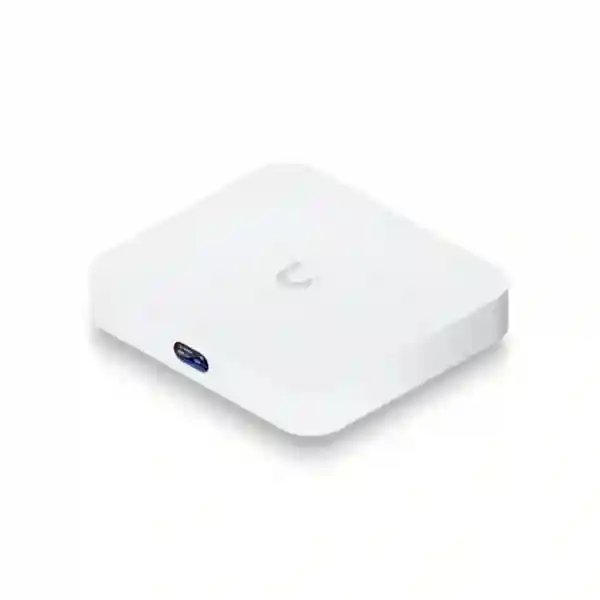
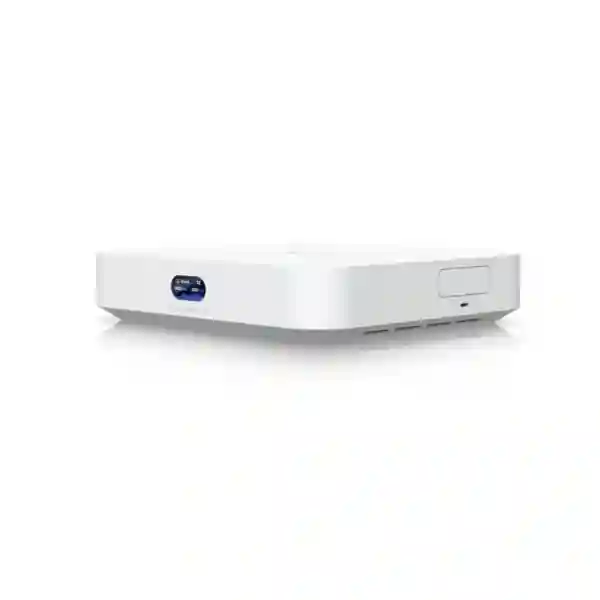
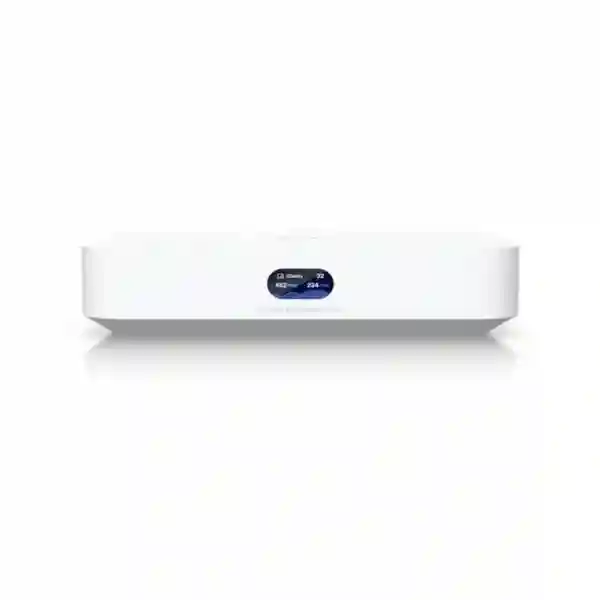
Ubiquiti Cloud Gateway Max UCG-Max
2.5 GbE wired networking, centralized UniFi management, advanced firewall features and optional local Protect recording in a compact desktop gateway.
For a Tanzania business planning a reliable managed network, this gateway is worth considering when separate access points and switching are already part of the design. Confirm the exact storage version and the internet handoff before requesting a quotation.
Cloud Gateway Max at a glance
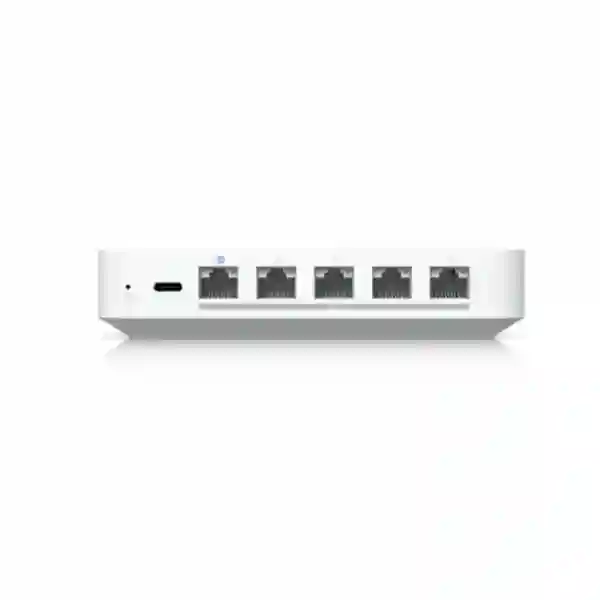
| Ethernet | Five 2.5 GbE RJ45 ports: one default WAN, four LAN |
|---|---|
| Security throughput | 2.3 Gbps manufacturer-rated IDS/IPS |
| Management guidance | 30+ UniFi devices and 300+ simultaneous connected users |
| WAN options | Up to four WAN ports with supported remapping |
| Protect capacity | 15 HD or 8 2K or 5 4K cameras as reference limits |
| Optional recording | Selectable NVMe SSD storage up to 2 TB |
| Other hardware | Quad-core 1.5 GHz ARM Cortex-A53, 3 GB memory |
| Dimensions and supply | 141.8 × 127.6 × 30 mm; USB-C 5V/5A; maximum 16.1 W |
| Important exclusions | No built-in Wi-Fi, no PoE output, no 10 GbE interface |
Published figures come from the manufacturer and describe the product family. A specific deployment must be sized and tested for its workload, software and purchased storage configuration.
What is the Ubiquiti Cloud Gateway Max UCG-Max?
The Ubiquiti Cloud Gateway Max UCG-Max is a compact, wired network gateway that combines internet routing, firewall controls, traffic visibility, UniFi device management and optional local video recording. It is intended for an organisation that wants more control than a basic internet-service-provider router usually offers, without dedicating space to a full rack-mounted gateway. It fits at the network edge, between the internet handoff and office switches or connected endpoints. It does not create wireless coverage on its own; Wi-Fi access points are separate devices.
Think of the device as the decision-making centre of a properly designed UniFi network. It helps define which users can reach which resources, manages internet connections, and provides a single interface for supported UniFi applications. The manufacturer rates its intrusion detection and prevention throughput at 2.3 Gbps, and its five RJ45 ports support 2.5 Gigabit Ethernet. Those figures describe gateway capabilities, not guaranteed internet speed at a particular premises. The service plan, connected equipment, configuration and workload still matter.
- A compact desktop gateway rather than a wireless access point or PoE switch.
- Built-in UniFi management with optional Protect recording when suitable NVMe storage is fitted.
- A practical candidate for small offices, professional practices, retail operations and managed home networks.
Who should consider this gateway?
The strongest buyers are teams with several wired and wireless network segments, a desire to manage UniFi equipment centrally, or a need to preserve security features while moving beyond a simple gigabit router. An office using UniFi access points and a managed switch may want consistent settings for employees, visitors, cameras and shared devices. A small multi-room workplace may need an additional internet circuit for continuity. An IT administrator may value a familiar UniFi environment for troubleshooting and configuration backups.
Suitability depends more on topology and traffic than the number of people on a company payroll. A branch with a modest headcount but substantial file transfers, multiple 4K cameras and several site-to-site VPN connections can create greater demand than an office with many users doing light browsing. Buyers should map the existing cable runs, access points, client devices, ISP handoff and camera plan before selecting the gateway. The UCG-Max is most compelling when its 2.5 GbE ports and integrated software actually simplify that design.
- Good fit: centrally managed wired and Wi-Fi networks with a separate access point.
- Good fit: one primary internet connection with an optional secondary uplink.
- Reconsider: environments demanding integrated Wi-Fi, direct PoE output, 10 GbE interfaces or larger-scale NVR storage.
Understand the published capacities correctly
Ubiquiti lists support for 30-plus managed UniFi devices and 300-plus simultaneous connected users, along with defined UniFi Protect and Access limits. These are manufacturer positioning figures, not a promise that any arbitrary mix of clients, applications and security policies will perform identically. Video streams, packet inspection, VPN encryption, inter-VLAN routing and application behaviour all influence real-world load. Capacity planning should identify peak traffic, not only daily averages or total device counts.
Before ordering, count UniFi switches and access points, estimate peak concurrent clients, review security inspection requirements, then estimate future growth. If wireless clients use a crowded radio channel, a faster gateway cannot remove that radio bottleneck. If upstream internet service is only a few hundred megabits per second, a 2.5 GbE port alone will not make the internet faster. The benefit is flexible networking headroom, better manageability and consolidated services. A small amount of sensible unused capacity is more useful than treating every published maximum as a recommended steady operating target.
Five 2.5 GbE ports: what the layout means
The gateway includes five 2.5 GbE RJ45 ports. In its default arrangement, one port is used for WAN and four are available for LAN connections. Supported link rates include 2.5G, 1G, 100M and 10M, allowing connection to a variety of existing Ethernet equipment. This enables a practical design where the internet modem or optical-network terminal feeds the WAN port while a managed switch, desktop workstation or other wired device connects to an available LAN port.
The ports do not replace a full office access switch. As soon as an installation needs more wired endpoints, centrally controlled PoE for access points, or structured cable distribution, an appropriate switch becomes important. Port remapping can create extra WAN links, but every LAN port reassigned to WAN reduces the ports left for local devices. Read the port plan as a resource allocation decision, not simply a list of five interchangeable connectors. Check cable quality, switch uplink speeds and actual link negotiation during commissioning.
What 2.5 Gigabit Ethernet does and does not deliver
A 2.5 GbE physical interface can negotiate above traditional gigabit Ethernet when the device on the other end supports it. This is valuable for a suitable multi-gigabit internet connection, a 2.5G-capable switch uplink or high-throughput local traffic. However, the gateway’s quoted 2.3 Gbps IDS/IPS throughput is a separate security-processing measure. That advertised figure is not an assurance of 2.3 Gbps sustained throughput for every VPN type, packet mix, ISP access method or policy combination.
For a useful buying comparison, trace the slowest link in the path: ISP service, modem Ethernet handoff, gateway security settings, switch port, wireless access point and receiving device. A laptop on gigabit Ethernet may remain limited to its negotiated gigabit link even when the gateway is faster. Similarly, a Wi-Fi device may be constrained by distance or interference. The objective is an end-to-end design in which the extra port bandwidth solves a real requirement instead of becoming a headline number with no measurable benefit.
Firewall, intrusion detection and traffic analysis
The UCG-Max provides a stateful firewall, application-aware Layer 7 filtering, traffic identification, intrusion detection and prevention, content filtering and other UniFi Network security capabilities. These controls can help administrators define how different categories of traffic move into and through the business network. The 2.3 Gbps IDS/IPS rating indicates manufacturer-stated performance for that security function, but actual results can change with software versions and enabled services.
Good security is not simply turning on every feature. Begin with a clear inventory of trusted systems, guest devices, camera equipment and business-critical applications. Define least-privilege rules, choose inspection options that meet the organisation’s threat model, and test important services after changing policies. A gateway is only one layer: endpoint updates, account protection, reliable backups, administrator access controls and staff awareness remain necessary. Traffic inspection should also be reviewed against privacy obligations and any applications that require specific network exceptions.
- Stateful and application-aware firewall policies.
- Traffic identification and network visibility for informed troubleshooting.
- IDS and IPS controls, with performance assessed under the intended configuration.
Separate staff, guest, camera and device networks
VLAN and subnet segmentation is often the feature that makes a managed gateway worthwhile. Rather than placing every device in a single flat network, a business can plan separate logical networks for employees, guest Wi-Fi, surveillance cameras, building devices and administration. The gateway provides the routing and firewall-policy point between these areas, while properly configured managed switches and UniFi access points carry the corresponding VLAN tags and wireless networks.
A useful example is a guest network with internet access but no route to accounting computers. Another is a camera network that reaches only the required recording service and approved management stations. Segmentation is not automatic merely because different network names are created; administrators must confirm addressing, switch port profiles, access-point settings, DNS, DHCP and inter-network firewall rules. Test from the perspective of a real guest and a real employee before considering the policy complete. Document exceptions so that future troubleshooting does not inadvertently weaken the design.
Plan firewall rules around real business processes
Start rule planning with a small diagram: which source group needs access to which destination, over which protocols and for what business reason? Accounting workstations may need an application server; a printer may need to receive jobs from selected VLANs; cameras may need DNS and time services. Explicitly defining those paths helps avoid overly permissive rules that expose systems unnecessarily. It also makes changes easier to understand when staff or equipment are added.
Where available in the installed software, UniFi’s zone-based firewall features can simplify the logical grouping of networks, but they still require careful testing. Administrators should preserve management access while tightening policies and should record why each exception exists. Review rules after a new office application, VPN route or guest service is introduced. The gateway supplies powerful controls; the quality of the final security posture depends on thoughtful network architecture, secure credentials, software maintenance and monitoring. Have a fallback administration method before enforcing restrictive rules.
Multi-WAN failover and load balancing
Ubiquiti specifies up to four WAN ports for the UCG-Max, with one designated as WAN by default and supported remapping of suitable LAN interfaces. This allows an appropriately planned network to use more than one internet service. Failover is intended to help preserve access when a monitored primary connection fails, while load balancing can distribute eligible connections according to configured policies. These are different behaviours and neither should be interpreted as automatically combining several service plans into a single faster download.
A practical design might use a fixed primary internet circuit and a secondary compatible modem or router on another WAN connection. Check that the backup path truly works after the primary is disconnected, and verify how key business applications handle the transition. Existing real-time calls or sessions may still drop when their public network path changes. Reassigned WAN ports reduce available LAN ports, and the reliability of failover depends on service monitoring, provider equipment, addressing, power and configuration. Record any traffic that must remain on a specific WAN.
Tanzania internet-service compatibility checklist
For a Tanzania deployment, the correct first step is to ask the chosen internet provider for its actual handoff requirements. Confirm whether the service presents Ethernet from an optical terminal or modem, and whether the gateway should use DHCP, a static address, PPPoE or a provider-specified VLAN. Ask about public versus carrier-grade NAT addressing, DNS requirements, IPv6 availability and any router restrictions. None of these details should be assumed for a named provider or locality; they depend on the exact service contract and installation.
For a secondary connection, check whether a cellular or fixed-wireless router can provide a stable Ethernet connection and whether its data plan, antenna placement and failover characteristics meet the site’s needs. Power arrangements matter as much as link capacity: both the gateway and the provider terminal must remain powered for internet access to continue. Record installation-specific settings securely before any migration. If there are server, remote desktop or VPN requirements, confirm inbound access restrictions before treating a consumer-grade connection as equivalent to a business circuit.
- Confirm physical handoff and WAN authentication.
- Check NAT behaviour, IPv6 and external VPN reachability.
- Verify provider equipment, power and failover through a real test.
Remote access VPN for staff and administrators
The manufacturer’s published feature set includes several VPN options, including WireGuard, OpenVPN, L2TP and Teleport-related capabilities, subject to the current software and configuration. A VPN can help authorized people securely reach permitted resources when working away from the premises. It is particularly relevant to administrators supporting a branch, a professional needing a private application, or staff using trusted devices to access an internal system.
Choose the VPN mode according to device compatibility, authentication controls and the actual access requirement. Configure narrowly scoped routes so a remote worker does not automatically receive unnecessary access to every office subnet. Test DNS resolution, file services, application logins and multi-factor authentication where supported. Real VPN speeds should not be inferred from the IDS/IPS throughput number; encryption protocol, client capability, ISP uplink rate and latency can all affect experience. Where inbound access is restricted by the provider, evaluate supported VPN deployment choices before promising that a particular remote-access setup will work.
Site-to-site connectivity and distributed offices
UniFi lists Site Magic SD-WAN and site-to-site VPN capabilities such as IPsec among the UCG-Max’s networking features. These can be considered when two branches need to exchange approved internal traffic while retaining independent local internet access. A well-designed inter-office connection is a policy decision, not just a tunnel: the networks at each site need compatible addressing, secure authentication, expected route behaviour and clarity about which applications belong across the connection.
Before deployment, compare both sites’ address ranges to avoid overlapping subnets and check the upstream connection quality at each location. Plan what happens when one site loses its internet connection, and ensure critical applications have an appropriate recovery approach. For a business operating multiple premises in Tanzania, investigate the exact ISP and topology conditions at each site rather than assuming all links behave alike. Routing complexity and data sensitivity may justify a more detailed network assessment, particularly if connections carry finance, voice, surveillance or operational systems.
Built-in UniFi Network management
One major reason to choose this Cloud Gateway rather than a gateway-only device is the integrated UniFi management environment. The console can host UniFi Network and provide a common view of adopted switches, access points, network settings and traffic information. A small organisation can maintain consistent names, configurations and operational visibility without deploying a separate self-hosted network server merely to manage its UniFi site.
Adoption must still be planned. New UniFi devices need compatible software and a working route to the management environment; existing devices may require migration or reassignment from another controller. Backups, administrator accounts and updates deserve attention during setup. Devices from different vendors may connect through standard Ethernet or IP networking, but that does not mean all third-party devices become manageable inside UniFi Network. Check management expectations before replacing a mixed-vendor solution. Cloud-assisted administration is useful, but the on-premises gateway and local network remain physical systems that require power and maintenance.
Client counts and network growth planning
The manufacturer’s figures of 30-plus managed UniFi devices and 300-plus concurrent users are useful signals about intended market segment. They should start a conversation about scaling rather than end it. Ask how many UniFi switches, access points and other eligible components will be adopted; how many people will actually connect at peak times; and how many simultaneous flows will cross the gateway. A café guest network and a design studio may have the same client count but markedly different performance needs.
Network growth adds operational concerns as well as raw bandwidth demand. More access points require channel planning, PoE capacity and wired switching. More VLANs add DHCP scopes, policies and documentation. More cameras add storage and recorder workload. More sites add route coordination and support procedures. A buyer expecting substantial expansion should compare gateways based on total topology, application performance and future high-speed uplinks, not only the largest published client number. Avoid designing a system that already depends on operating continuously at its headline maximum.
Wi-Fi design: add separate access points
The UCG-Max does not include an integrated wireless radio. To provide wireless access, connect suitable standalone access points through the required network switching and power equipment. In a UniFi deployment, adopted access points can be managed from the gateway’s Network application, enabling consistent Wi-Fi names and many centralized wireless settings. This separation is advantageous when wireless coverage must be tailored to office walls, room layout, user density and future expansion.
Wi-Fi throughput should be sized independently of the gateway. A modern Wi-Fi 6 or Wi-Fi 7 access point can have different uplink and power requirements, and a 2.5 GbE gateway interface does not guarantee full wireless performance everywhere. Conduct a coverage assessment, consider building materials, and plan channels to reduce interference. If several access points share a switch, assess its uplink bandwidth and PoE budget. For locations where an all-in-one box is preferred, compare a UniFi router with built-in wireless rather than expecting this wired model to broadcast Wi-Fi.
PoE switching and connected-device power
None of the UCG-Max Ethernet ports provides PoE power for access points, IP cameras or other powered devices. The gateway itself is powered through USB-C. This distinction is important because a buyer may see several network ports and assume an attached camera or access point can be powered directly. In most office designs, one or more suitably rated PoE switches or individual compatible PoE injectors are required.
Calculate the combined power requirements of the selected cameras and access points, including startup and peak demand, then compare them with the switch’s total PoE budget and individual port ratings. Consider future ports and resilient power supply arrangements. Select the switching uplink to avoid becoming the unexpected limit between high-speed clients and the gateway. A small site may begin with one managed PoE switch, while a larger premise may require distribution across rooms or floors. Include these accessories in the planned bill of materials rather than discovering them after delivery.
UniFi Protect and the storage variant decision
The UCG-Max can run UniFi Protect with optional local NVR storage, and Ubiquiti advertises selectable NVMe SSD capacity up to 2 TB. The manufacturer offers no-storage and storage-equipped versions in its product family. A buyer must verify the exact selected variant and its contents before ordering. Do not assume that every box contains a drive, an SSD tray or the same recording capacity merely because the product family supports Protect.
The no-storage version is attractive when recording is not needed or when an appropriate storage accessory and drive will be sourced separately. A preconfigured storage variant may suit someone who wants to simplify the initial recording setup. Storage capacity influences potential retention but does not automatically increase the manufacturer’s supported camera limits. SSD compatibility, mounting hardware and intended duty cycle should be checked against current Ubiquiti requirements. If surveillance is business-critical or expected to expand considerably, a separate UniFi Network Video Recorder may be a better architectural choice.
Camera capacity and recording workload
Ubiquiti’s current Cloud Gateway Max specification lists managed-camera guidance of 15 HD, eight 2K or five 4K cameras. These are alternative reference configurations, not three separate capacities that can simply be added together. Actual planning must account for mixed resolutions, frame rates, encoding settings, event recording choices and the resource demands of other running applications. A camera count that looks modest on paper may still generate substantial continuous recording traffic.
Before purchasing, list every planned camera, its resolution, recording mode, estimated average bitrate and required days of retention. Consider growth and footage review requirements. A larger SSD does not raise the gateway’s recommended camera count; it mainly changes how much footage can be retained, depending on workload. Decide whether local recording on the gateway is suitable or whether a dedicated recorder provides more headroom and storage flexibility. The same network should also be assessed for PoE power and Ethernet path capacity because cameras need both, even when the gateway handles recording.
Video retention, privacy and storage operations
Retention is a policy choice that needs business input. A shop may need quick review of recent activity, while a facility with formal incident procedures may require a more deliberate retention schedule. The amount of video that fits on an SSD depends on how many cameras are recording, their resolution, bitrate, event frequency and the selected recording settings. It is not sound to promise a fixed number of days from drive capacity alone without measuring or modelling these variables.
Use UniFi Protect’s applicable storage and recording management functions to review disk health, retention settings and camera schedules. Restrict footage access to authorized users, use secure accounts and establish how exports are handled. Consider whether the organisation needs policies covering notification, retention, incident management and access rights under applicable local law; do not mistake a manufacturer’s feature list for a legal-compliance assessment. Continuous recording is a sustained write workload, so select storage appropriate for the intended use and keep a recovery plan for failed hardware. Critical footage should not depend entirely on one small gateway.
Other UniFi applications on the gateway
The official specification indicates support for the UniFi application suite, including Network, Protect, Access, Talk and Connect. This broad capability can help consolidate administration for a compatible environment, but it should not be interpreted as a guarantee that every application, accessory, regional telephony function or third-party integration is ready to use with no further conditions. The connected door-access hardware, phones or screens are separate components with their own requirements.
For a deployment involving UniFi Access, confirm reader, hub and lock design as well as safe door operation during a power outage. For any telephony requirement, separately verify licensing, local availability and connectivity assumptions before committing to a service workflow. Consider resource sharing when several applications run on one compact gateway. Businesses with high surveillance volume or critical access-control uptime may choose dedicated controllers or recording systems. The value of the combined application environment is centralized administration where the product’s published limits and the organisation’s operating needs align.
Physical size, location and operating environment
The UCG-Max is a compact desktop unit measuring approximately 141.8 by 127.6 by 30 mm, with a polycarbonate enclosure and a small front status display. Its form factor works well for locations without a full rack, provided that the unit can be placed securely with sensible airflow and cable support. Small does not mean immune to heat, moisture, dust, tampering or accidental disconnection.
Ubiquiti lists an operating temperature range of minus 10 to 40 degrees Celsius and non-condensing humidity requirements. In a warm equipment cupboard, leave room for passive heat dissipation and inspect the actual ambient temperature, especially where power supplies, modem equipment and switches are concentrated. Avoid exposed outdoor mounting or locations where water or heavy dust may reach the unit. Label cables and protect the reset button from casual interference. Equipment placement should allow an administrator to see status, replace a cable and maintain the device without disrupting unrelated systems.
USB-C power, electricity and backup planning
The manufacturer’s specification identifies a 5V DC, 5A USB-C power method, an included compatible USB-C adapter and maximum power consumption of 16.1 W. It also lists a 100–240V AC input range for the provided power supply. These details make the unit relatively straightforward to incorporate into a small powered network cabinet, but they do not eliminate the need for proper surge protection, safe electrical installation or power continuity planning.
Where internet access is critical, a UPS should account for the gateway and all dependencies, including the optical-network terminal or modem, required PoE switch and any necessary external wireless equipment. Keeping only the gateway running will not preserve Wi-Fi or ISP connectivity if the other devices lose power. Check UPS runtime against actual load and the longest outage the business is prepared to tolerate. Avoid assuming that every USB-C power source is an interchangeable substitute for the specified adapter. Use components that meet the device’s electrical requirements and installation guidance.
Establish a secure initial configuration
Before connecting the gateway to a live business network, agree a basic design: internet connection type, management users, network names, IP addressing, VLANs, Wi-Fi SSIDs, DNS choices and any remote access required. Prepare a change window so essential business systems are not unexpectedly disconnected. Follow current UniFi setup guidance, install supported updates and keep administrator access restricted to the people who need it. Enable available account protection appropriate to the organisation.
After the gateway reaches the internet, configure the correct WAN settings and confirm external reachability. Create internal networks in a manageable sequence, then adopt UniFi devices according to their supported onboarding process. Apply firewall rules incrementally rather than locking down the entire network without a verified administration path. Document passwords and recovery methods in a secured organisational system, not in public notes or product comments. Finish with a configuration backup and basic performance tests, including important internal business applications.
A practical deployment checklist for the installer
A structured installation is more reliable than plugging in equipment and hoping automatic settings fit. Start by checking the box contents against the ordered storage option and verifying the included power accessory. Photograph or label the existing cable layout for reference. Test the provider handoff, then connect the gateway WAN and a known-working management workstation or configured switch. Establish management access, confirm the time and software status, and verify that wired clients receive the intended addressing and DNS configuration.
Continue with one wireless network or VLAN at a time, testing each from an appropriate client device. If multi-WAN is part of the design, simulate an outage and observe routing behaviour. If VPN is required, test it from a network outside the premises. If Protect is enabled, confirm drive recognition, live camera feeds, successful recordings and footage playback. Record the final configuration, export a supported backup and brief the local administrator on routine checks. An acceptance checklist gives the buyer a clearer result than merely confirming that LEDs are illuminated.
- WAN handoff and public internet access tested.
- Staff, guest and management isolation tested as designed.
- Backup, administrator access and recovery information documented.
Migrating from an existing router or controller
Replacing an old router requires careful consideration of IP addressing and any services tied to it. Record existing DHCP reservations, static addresses, port forwards, DNS settings, VPN users, VLAN assignments and externally hosted applications. If UniFi devices are currently managed by a different console, create the appropriate backup and consult the manufacturer’s current migration guidance before changing their adoption point. Some environments can use a supported backup restore; others will need a more manual transition.
Avoid creating accidental double NAT where provider hardware continues operating as a router unless that arrangement is intentional and compatible with the business’s requirements. Do not assume existing firewall rules map exactly to the new policy model. Arrange a rollback path and confirm that staff can regain internet connectivity if the migration needs to be paused. After cutover, validate sensitive services such as payment terminals, printers, remote-access tools and business applications. Documentation matters especially when the installer and day-to-day network administrator are different people.
How to test actual throughput and responsiveness
Performance acceptance should use the real network design and a repeatable method. Check that both ends of the relevant Ethernet link negotiate the expected speed, then measure internet access and local routed traffic with appropriate testing tools. Distinguish wired-client results from Wi-Fi results; wireless performance can fluctuate with channel use, location and signal quality. Run tests before and after enabling major traffic inspection or routing policies to identify their effect.
Do not judge the device from a single public speed-test result. A result can be constrained by the remote server, ISP peering, busy-hour congestion or the client device itself. Test latency and packet loss as well as throughput when voice calls or interactive applications are important. For a VPN workload, test actual file transfers over the expected protocol and network conditions. Record software version, test settings and results so future troubleshooting has a baseline. Compare observations to the purchased service requirements, not to an unconditional interpretation of headline specifications.
Routine maintenance after installation
Treat the gateway as an operational network appliance that deserves scheduled maintenance. Review internet quality reports, administrator activity, firmware releases, backup status and storage health if recording is enabled. Maintain an inventory of attached equipment and a diagram of the current topology. Adjust firewall policy when staff roles, servers or external applications change, and remove access that is no longer needed. A small network can remain well managed if its configuration is understandable and regularly reviewed.
Updates should be planned rather than applied blindly during peak business hours. Check current release information and whether the update affects supported applications or device adoption. Keep a reliable backup before significant changes and verify that remote administration remains available afterwards. For multi-WAN sites, periodically test that the backup connection has usable data service and that business applications behave as expected. Inspect the UPS, power adapters and equipment temperatures. These operational habits often have a larger effect on perceived reliability than moving to a marginally faster gateway.
Scenario: professional office with secure visitor Wi-Fi
Consider a small professional office where staff use cloud applications, network printers and a private file server, while visitors occasionally need wireless internet. The UCG-Max can act as the wired security and routing boundary. Compatible UniFi access points provide the wireless coverage, and a managed switch carries traffic from multiple rooms. Staff and guest clients can be assigned to separate networks, with rules that keep visitors away from internal resources while permitting normal internet access.
The design process should begin with identifying the office’s key applications and any systems that require special inbound or outbound connections. If remote employees need access, build a narrowly scoped VPN and validate it away from the office. If a secondary ISP link is planned, decide which services should use it and test the switchover. This scenario illustrates the device’s value in policy management and consistent operation, not just port speeds. Requirements such as PoE switches and access points remain separate purchasing decisions.
Scenario: shop or facility combining network and cameras
A retail site may need business terminals, staff Wi-Fi, visitor Wi-Fi and several surveillance cameras. This creates a strong reason to separate networks and manage devices centrally. The UCG-Max can provide the internet gateway and, with the correct NVMe storage configuration, an integrated Protect recorder for a deployment within Ubiquiti’s camera guidance. An appropriate PoE switch powers cameras and access points, while network policy limits which endpoints can reach recorded video.
Camera storage should be estimated from real recording settings and the organisation’s required retention period. A site that cannot tolerate missing footage should examine the tradeoffs of placing network routing and surveillance recording on one small device. Security procedures should define who can view footage and export evidence. Where the camera count, retention demand or resilience requirement is higher, a separate UniFi NVR is worth considering. The gateway is useful for consolidating a moderate deployment, but it should not be treated as a substitute for proper surveillance planning.
Scenario: branch office with two connectivity options
A branch whose daily operations depend on online services may prefer a primary internet circuit and a second independently supplied connection. The UCG-Max supports multi-WAN features and compatible port remapping, allowing the architect to plan failover and traffic policy. In a simple approach, the primary line serves normal operations while a second modem or network device provides backup when monitoring detects a failure. The exact equipment, service terms and addressing need to be verified at the location.
Do not assume that two service subscriptions always mean two independent routes; both may share infrastructure or a common power dependency. Test what happens when the modem is unplugged, the upstream service fails without the Ethernet link dropping, or the backup plan runs out of usable data. Check whether remote tunnels and payment applications reconnect as expected. A realistic resilience plan may also require UPS power, off-site access procedures, staff guidance and provider support contacts. The gateway enables the policy but cannot guarantee provider uptime.
Compare alternatives before placing an order
The Cloud Gateway Ultra may be sufficient for a buyer whose requirements are predominantly gigabit-class and who does not need the UCG-Max’s specific multi-gigabit LAN and Protect storage capabilities. The Cloud Gateway Fiber is a more relevant comparison when 10 GbE interfaces, additional uplink headroom or higher rated IPS routing performance are priorities. A UniFi router with integrated Wi-Fi may be more convenient where only one appliance is desired and the floorplan is small enough for that approach.
These alternatives are not interchangeable simply because their names all contain Gateway or Router. The separate Gateway Max product, for example, is a different management proposition from the Cloud Gateway Max. Buyers should check whether the model includes an integrated UniFi console, storage support, PoE, wireless radios and the exact network interfaces required. Compare full solution cost—including switch, access points, storage, cabling and backup power—instead of comparing gateway hardware alone. Manufacturer specifications and the real deployment plan should govern the decision.
What to verify before requesting a quote in Tanzania
The correct quote should specify the exact UCG-Max storage selection: no storage, 512 GB, 1 TB or 2 TB where the desired variant is available through the purchasing channel. Ask for confirmation of included accessories and whether an SSD tray or additional drive is required for a no-storage configuration. Do not assume a quoted gateway includes access points, PoE switching, installation services, cameras or a UPS. If the selected model is intended to support Protect, record the planned camera type and retention goal.
Also provide the estimated number of wired devices, access points, simultaneous users, internet services, VPN users and network segments. Include the WAN handoff method if already known. Request confirmation of actual Tanzania pricing, availability, delivery terms and applicable warranty conditions from the seller at the time of enquiry rather than relying on foreign-market list prices. A clear requirements summary helps avoid incompatible accessories and makes it easier to assess whether this compact gateway is the right long-term fit.
- Identify the exact storage variant and accessories.
- Share a simple topology and list of critical applications.
- Confirm current local commercial terms directly before ordering.
Frequently asked questions
Does the UCG-Max have built-in Wi-Fi?
No. It is a wired Cloud Gateway, not a wireless access point. To provide Wi-Fi, add separately powered, compatible access points and suitable network switches. The gateway can centrally manage adopted UniFi access points through UniFi Network, but the radio coverage comes from those external devices. This modular approach can be advantageous when a business wants wireless coverage throughout several rooms or floors.
Does the UCG-Max provide PoE on its LAN ports?
No. Its Ethernet ports do not supply PoE to access points or security cameras. If connected devices need PoE, plan for a correctly rated PoE switch or compatible injectors. Verify each device’s power standard and the aggregate switch budget. The gateway itself is powered through a specified USB-C adapter, so the installation needs a reliable power source and appropriately planned backup if continuity matters.
What is the maximum wired port speed?
All five Ethernet interfaces support up to 2.5 GbE link negotiation. One is WAN by default and four are LAN. This is the physical connection speed, not a blanket guarantee of internet or VPN throughput. The rest of the path—including the internet subscription, modem, switch, cable and client interface—must support the required rate. A slower link or heavily loaded service can constrain the result.
How fast is IDS/IPS routing?
Ubiquiti currently rates the Cloud Gateway Max at 2.3 Gbps IDS/IPS throughput. This is the manufacturer’s published security-routing figure, not a promise that every application, VPN protocol or WAN access method will achieve the same speed. Actual results vary with software, traffic profile and network topology. For critical deployments, acceptance testing under the intended policies is more reliable than assuming the headline figure applies universally.
Can the gateway use two internet connections?
Yes, the platform supports multi-WAN with suitable port remapping and configuration. Administrators can plan failover or load balancing for compatible WAN links. Confirm the physical connectivity and available ports, and test how important applications behave during an outage. Failover does not guarantee uninterrupted sessions, and two subscriptions do not necessarily create a single faster connection. The upstream providers and power supply remain external dependencies.
Can it record UniFi camera footage locally?
Yes, it supports UniFi Protect and selectable NVMe NVR storage up to 2 TB. The purchased storage configuration matters: a no-storage variant should not be assumed to include a drive and its associated tray. Ubiquiti publishes reference camera limits of 15 HD, eight 2K or five 4K devices. Evaluate retention, workload and future camera growth before choosing between this gateway and a dedicated recorder.
Is the product suitable for a 4K camera deployment?
It may be suitable for a smaller deployment within Ubiquiti’s published guidance of five 4K cameras, depending on the wider application workload and recording configuration. Storage capacity should be calculated from bitrate, recording schedule and retention requirement. Increasing the SSD size does not itself increase the supported number of cameras. Larger or more demanding sites should consider a dedicated surveillance recorder and separate network-power planning.
Does a 2 TB SSD guarantee a fixed number of recording days?
No. The number of days depends on camera count, resolution, bitrate, continuous versus event-based recording and other storage settings. Recording estimates should be made for the actual planned cameras and policies. The selected SSD should also be appropriate for the recording workload. Confirm what the quoted variant contains and review the installed system’s storage and retention information after the cameras begin operating.
Can the gateway host a remote-access VPN?
The published feature list includes options such as WireGuard and OpenVPN. Whether a particular remote-access workflow works as intended depends on the configured protocol, user credentials, firewall rules and the internet service’s addressing and restrictions. Define which internal resources each remote user may reach and test from outside the premises. Do not use the IDS/IPS performance rating as an estimate for VPN encryption speed.
Is a separate UniFi controller necessary?
Normally the Cloud Gateway Max can host UniFi Network itself, so a separate Network Server is not required merely to manage compatible UniFi devices at that site. Existing environments must nevertheless plan their controller migration and device adoption carefully. Other applications and integrations may have additional requirements. Keep supported backups and confirm device compatibility rather than assuming every network device from every vendor will become centrally manageable.
Will it work with an ISP in Tanzania?
Potentially, provided the service presents a compatible connection and the required settings can be configured. Verify the actual provider handoff, authentication method, VLAN requirements, NAT type and IPv6 support. Check inbound VPN requirements separately, especially if the service uses carrier-grade NAT. Compatibility should be confirmed for the selected connection and equipment; this product description does not assert support for any named Tanzanian provider or package.
Can the UCG-Max replace a PoE switch?
It can connect a handful of wired devices to its LAN ports, but it does not supply PoE power or offer the port count of a dedicated access switch. An office with several cameras and access points will normally need an appropriately sized switch. Plan the switch’s PoE budget, uplink speed and number of ports based on future growth. The gateway is the network edge and control plane; the switch handles device connectivity and power distribution.
Does it have 10 Gigabit Ethernet ports?
No. The UCG-Max has five 2.5 GbE RJ45 interfaces and no 10 GbE ports. If a project needs 10 GbE backbone or ISP handoff, compare a different UniFi gateway with suitable interfaces, such as a model in the Fiber range, and verify current specifications. Selecting a faster gateway also requires checking switch uplinks, cabling and access-point requirements so that the full network path benefits.
How should a buyer select the correct version?
Choose first based on the network layout, then on whether integrated Protect recording is necessary. Specify the storage capacity only after estimating camera workload and retention. Record the number of managed UniFi devices, peak users, required WAN links, expected VPN traffic and PoE accessories. Ask the supplier to identify the exact variant and included items on the quote. Local stock, price and warranty terms should be confirmed separately rather than inferred from manufacturer specifications.
What information should be supplied for a quote?
Provide the exact UCG-Max storage variant, intended number of access points and cameras, required internet speed, existing ISP handoff, number of sites, VPN needs and any managed switching requirement. Mention whether the project includes an existing UniFi controller that must be migrated. Where needed, ask for a complete design covering PoE, UPS, cabling and recording storage. This provides a clearer purchasing decision than a model name alone.
Request a UCG-Max configuration and quotation
Tell FourTeck Tanzania which storage variant you need, how many users and UniFi devices you expect, whether you require PoE switching, VPN or Protect cameras, and the internet handoff available at your location. Request a current quotation and confirmation of the exact included accessories, delivery details and commercial terms.
The appropriate next step is a requirements-based quote; no unverified price, stock claim or delivery promise is made here.




Reviews
There are no reviews yet.