
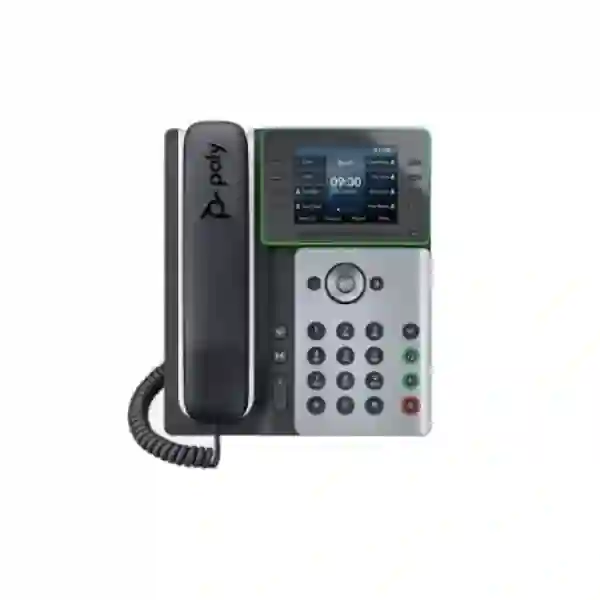
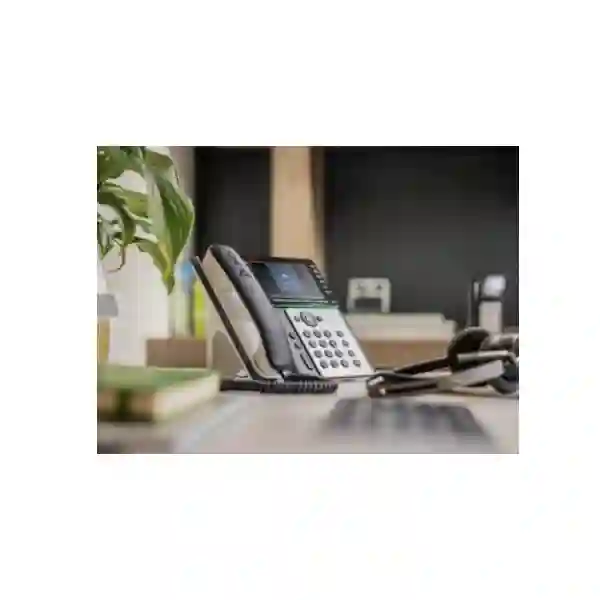
HP Poly Edge E300 IP Desk Phone
Equip a wired business desk with a readable 3.5-inch colour display, physical call controls, eight line keys that support up to 32 paginated assignments, Gigabit Ethernet and Poly audio technologies. The HP Poly Edge E300 IP Desk Phone is designed for teams that need reliable access to a compatible SIP calling service, with a traditional handset and flexible wired headset choices.
For procurement in Tanzania, first verify your PBX or hosted voice platform, PoE readiness and accessory requirements. Request a model-specific quotation rather than assuming local stock, pricing or wireless capabilities.
At a glance
Specifications at a glance
| Display | 3.5-inch colour IPS LCD, 320 × 240 |
|---|---|
| Keys and assignments | 8 physical line keys; up to 32 paginated assignments |
| Ethernet | 2 × 10/100/1000 RJ-45 connections |
| Power | IEEE 802.3af PoE, Class 3; optional suitable external adapter |
| Headset interfaces | USB-C, RJ-9 and EHS for compatible accessories |
| Wireless distinction | NFC is documented; base E300 is not Wi-Fi/Bluetooth-enabled |
| Calling and audio | SIP, Poly HD Voice, Acoustic Fence, NoiseBlockAI |
| Common features | Hold, transfer, voicemail key, speed dial, configurable lines |
| Package guidance | Handset, console, stand, handset cord, network cable and setup sheet |
Specifications are based on HP’s product information. Calling-platform features, accessory support and the final supplied package require individual confirmation.
Who should choose the HP Poly Edge E300 IP Desk Phone?
The HP Poly Edge E300 IP Desk Phone is a practical choice for an organisation that wants a familiar desk-phone experience without limiting staff to a basic single-line handset. It is intended for people who spend a meaningful part of their day speaking with colleagues, customers, suppliers or service partners. Reception support staff, department coordinators, office administrators, account teams and people who share a workstation can all benefit from direct physical call controls, visible line information and convenient access to frequently used contacts. The value comes from aligning the device with an existing or planned business calling platform rather than treating the phone as a standalone telephone service.
For a Tanzanian business assessing a new IP phone, the first decision is whether its network, power equipment and calling service can support a SIP desk phone. The E300 connects using wired Ethernet; it is not the right base model for a desk that depends exclusively on Wi-Fi. A compatible PoE switch or other approved power arrangement must be planned. Before buying several units, identify the PBX or hosted calling service, confirm that its administrator supports the exact model and firmware, and agree which calling features staff actually require.
The E300 balances a colour display, programmable keys and Poly audio features with a conventional keypad and handset. That combination suits a fixed business desk, a flexible seating arrangement with an appropriate sign-in process, or a small team replacing ageing handsets. It does not itself provide an internet connection, a phone number, a SIP subscription or a guarantee that every softkey function will operate on every platform. A short compatibility assessment is therefore the best first step toward a useful purchase.
A readable colour screen and room for busy call handling
The 3.5-inch colour IPS LCD presents line appearances, menu items, contacts and feature choices in a format designed to be easier to navigate than a narrow monochrome screen. HP lists a native 320 × 240 resolution for the model. Context-sensitive softkeys sit below the display and change according to the available action. Navigation keys, a Home key and a Back key let the user move between screens without relying on a touchscreen. The screen is designed to make common calling functions visible while retaining physical buttons for speed and familiarity.
Eight line keys are provided on the phone, and pagination allows a total of up to 32 line, contact or feature assignments. That does not mean every business will automatically receive 32 separately provisioned telephone numbers or 32 simultaneous conversations. Assignments can represent lines, monitored colleagues, shortcuts or other platform-supported functions. The actual behaviour depends on the phone configuration and the calling system. A busy administrator may choose a few primary lines, commonly used extensions and transfer targets instead of filling every available assignment.
The surrounding lightbar supplies a visual indication of call or device status. Dedicated keys for hold, transfer, mute, speakerphone, headset and voicemail reduce the need to search through menus. For organisations moving from older analogue sets, these tactile controls can make training easier, particularly where staff regularly transfer calls or alternate between handset and hands-free operation. The biggest usability gain comes from an intentional key layout: document what each programmed key means, keep labels understandable and train users on the tasks they perform most often.
What Poly audio technologies do in real workplaces
HP identifies Poly HD Voice, Acoustic Clarity, Acoustic Fence and NoiseBlockAI in the E300’s audio capabilities. They serve related but different purposes. Acoustic Clarity addresses full-duplex conversation and echo control, making two-way speaking more natural. Acoustic Fence is relevant when using the handset or an appropriate wired headset, helping reduce nearby competing sounds. NoiseBlockAI targets background noise when the speakerphone is in use. These technologies can improve intelligibility, but none can compensate for a badly configured voice network or a microphone placed far from the speaker.
In a shared office, a member of staff may take a quick internal call on speakerphone, then switch to a headset for a longer customer conversation. The E300 provides distinct audio paths and volume controls, so an organisation can develop a consistent way of using each one. Teams handling private customer information should prefer the handset or a suitable headset when conversations could be overheard. Noise reduction improves communication quality; it is not a substitute for privacy procedures, sensible seating arrangements or a quiet place for sensitive discussions.
Network characteristics also matter. Speech can become delayed or choppy when a connection suffers sustained congestion, packet loss or jitter, even if the endpoint has advanced audio processing. For business-critical deployments, test several representative calls at busy times and check the upstream PBX, router, switch and service-provider path. Choose a supported codec with the telephony administrator rather than assuming an advertised codec always produces a particular quality level. Good handset audio, sensible user habits and a stable voice network work together.
Wired networking, Gigabit passthrough and PoE planning
The E300 includes two 10/100/1000 Ethernet interfaces. Typically, one connection carries network traffic to the phone, while the other can provide a wired passthrough to a nearby computer, subject to the design of the local network. This can be useful where a desk has a single network outlet, but it should not replace checking switch capacity, segmentation requirements or organisational policies governing workstation traffic. An IT administrator should decide whether voice and computer traffic share physical cabling and how each traffic class is separated.
Built-in IEEE 802.3af Power over Ethernet makes installation cleaner when a suitably rated PoE switch is available. HP identifies the handset as a Class 3 PoE device and lists a maximum power figure of 13 W in its technical documentation. That value is important when calculating the power budget across a switch serving many desks. It is not enough to count physical PoE ports; the switch must also provide sufficient power at the required operating conditions. Allow headroom for other powered equipment and review backup arrangements for switches and upstream routers.
Where PoE is unavailable, HP documents an external compatible 5 V DC power adapter arrangement, with the power supply sold separately in the manufacturer’s materials. Buyers should verify the exact approved adapter and local electrical fit with the supplier rather than choosing an arbitrary connector or voltage. A phone powered by PoE may remain on during a short outage if the switch, router and call system are backed by suitable power, but continued calling still depends on connectivity beyond the phone itself.
The base E300 is a wired IP desk phone. Its NFC capability is intended for supported identification and integration scenarios; NFC should not be confused with Wi-Fi internet access or Bluetooth headset pairing. An office requiring wireless network operation should compare the E350 model specifically and verify its wireless requirements. For the E300, a documented Ethernet and power plan is a core part of deployment readiness.
Headsets, handset and hands-free workstyles
The device supports the familiar included handset, a built-in speakerphone and appropriate connected headsets. HP lists an RJ-9 headset connection, a USB Type-C port with headset support, and an Electronic Hook Switch interface for compatible accessories. This makes it possible to choose different calling arrangements for staff who move between short calls and lengthy consultations. Headsets and Electronic Hook Switch adapters are accessories that may need to be purchased separately; their mere physical connector type does not guarantee interoperability.
Before ordering headsets, confirm the exact headset model, connection method and any required adapter with the phone and accessory vendor. For example, a wired RJ-9 headset may meet the needs of someone who remains at a workstation, while a compatible USB-C headset may be preferable where equipment standardisation is important. Electronic Hook Switch functions can simplify answering and ending calls through certain supported headset controls, but the accessory combination and phone configuration must be checked. Do not assume Bluetooth pairing on the base E300.
Staff training should cover changing between speakerphone, handset and headset, the meaning of illuminated audio keys, and safe volume settings. Where multiple people share a desk, include an end-of-shift hygiene and equipment check. The practical objective is not to install the largest possible accessory set; it is to match the audio path to call frequency, workspace noise, privacy requirements and user comfort. A short pilot with the actual intended users can reveal connector or usability issues before a larger purchase.
Everyday call controls for reception and office teams
The Poly Edge E300 supports familiar telephony tasks including answering, holding, transferring, forwarding and muting calls. Manufacturer documentation also lists features such as call waiting, voicemail access, speed dial, Busy Lamp Field, local three-way audio conferencing and shared or bridged line appearances. These are device capabilities, not unconditional promises that every hosted service will expose every feature. For example, Busy Lamp Field requires configuration on an appropriate calling system, while parking or pickup functions may follow the PBX administrator’s dial plan.
Consider a customer service desk receiving several calls during a busy period. A user can answer an incoming call, place it on hold, consult a colleague and transfer it when appropriate. If the directory and key assignments have been configured, common contacts may be reached with fewer key presses. The pagination key gives access to additional programmed assignments without using a separate physical expansion unit. Clear transfer instructions, agreed call-handling rules and a correctly configured phone make these functions more valuable than a long specification list.
Voicemail and contact-directory behaviour should be tested against the organisation’s platform. Some installations depend on the service provider’s voicemail service, central directory or enterprise authentication. Users should understand how to access messages, distinguish missed calls from voicemail alerts, and recover gracefully when a transfer target is unavailable. A good acceptance test includes real incoming calls, internal transfers, external calls, voicemail, hold and at least one busy or unanswered-call scenario.
For a reception position with exceptionally heavy call routing or a need for many simultaneously visible contacts, evaluate the whole workstation rather than selecting solely by the number 32. The E300 offers up to 32 paginated key assignments, but a different model with additional display real estate or a dedicated attendant console may be more comfortable for some workflows. Suitability depends on visual workload, call volume and the organisation’s operating procedures.
SIP service and PBX compatibility: the questions to verify
The E300 is a Session Initiation Protocol, or SIP, desk phone. HP lists IETF SIP support and a set of network protocols commonly used by managed voice systems. That makes it a candidate for numerous standards-based deployments, but SIP support by itself is not proof of complete feature compatibility with an arbitrary hosted PBX, on-premises call server or internet telephony provider. Each platform can specify supported firmware, authentication methods, provisioning templates, feature packages and security settings.
Ask the administrator or provider whether it officially supports the exact Poly Edge E300 model, which software release is approved, and whether the device can be provisioned in the intended account. Confirm the number of required extensions, any device licensing rules, voicemail integration, directory access, call transfers, Busy Lamp Field and emergency-dialling arrangements. A provider might support basic voice calls while not supporting every advanced softkey or presence indicator. It is better to identify that distinction before purchasing hardware.
Check the network boundary as well. SIP signalling and media can be affected by firewalls, address translation, routing rules and provider-specific ports or encryption requirements. Do not open a wide collection of ports based on a generic internet checklist. Instead, follow the PBX or provider’s current implementation guidance, use an appropriate firewall configuration and test both inbound and outbound audio. One-way audio, failed registrations and intermittent calls often point to environment-specific settings rather than a defect in the handset.
If a business is migrating from analogue lines or an older proprietary phone system, confirm the transition architecture before promising plug-and-play replacement. Existing numbers may require a porting or provider arrangement, and analogue telephone wiring is not interchangeable with an Ethernet voice network. A sensible pilot connects one test phone, proves call routing and audio in both directions, then documents the settings for wider rollout.
Network readiness checklist for Tanzania deployments
For an office in Tanzania, the same core VoIP design principles apply as elsewhere: reliable data connectivity, stable local networking, adequate upstream bandwidth and a suitable power plan. The specific service performance depends on the building and the internet or private network provider. Avoid choosing an IP telephone solely because a connection is described as fast. Voice quality can be affected more by congestion, packet loss and jitter than by a headline broadband speed. Observe real call conditions during normal working hours and at peak utilisation.
Where the business depends on a single internet link, discuss the operational effect of an outage. A spare link, alternative calling procedure or suitable provider failover may reduce disruption, but none should be assumed without testing. Similarly, a UPS may protect the PoE switch while the router or optical termination device remains unpowered. Map the entire call path from desk phone to switch, router, access link and PBX or hosted platform, then identify which elements need backup electricity or operational contingency.
Voice VLANs, quality-of-service tagging and switch configuration can help separate or prioritise business calling traffic. HP documents VLAN discovery and QoS-related support, including LLDP-MED and IEEE tagging. These features only help when the rest of the network implements them consistently. IT teams should test DHCP scope availability, DNS resolution, time synchronisation, provisioning server access and traffic priority before installing a large set of devices. A working demonstration with one phone on one desk is not a complete office-capacity test.
If the installation involves a carrier SIP trunk, clarify the roles of the trunk provider, the PBX administrator and the desk-phone supplier. The handset typically registers to a configured calling platform; it does not independently create a commercial trunk service. Confirm local number routing, call charges, emergency calling and service-level arrangements directly with the appropriate provider. Regulatory or type-approval requirements should be checked for the specific imported equipment and deployment rather than presumed from certifications issued for other countries.
Security controls and responsible administration
HP’s E300 technical information lists security capabilities such as 802.1X authentication, Transport Layer Security, SRTP media encryption, encrypted configuration files, HTTPS provisioning and support for signed software. These facilities give an IT team options for building a managed voice environment. They do not mean that the device automatically uses encrypted calls or that a provider has enabled every protection. Actual security is determined by firmware, service configuration, certificates, account controls and ongoing administration.
Begin by changing or securely managing administrative credentials, assigning the phone to the correct device-management process and restricting access to configuration systems. If the organisation uses certificate-based authentication, validate certificate trust and renewal processes. Protect any provisioning credentials in secure channels instead of placing them in emails, public ticket comments or printed workstation notes. Use the organisation’s approved firmware and keep a record of changes so unexpected call behaviour can be traced.
Segmentation is particularly relevant when phones are deployed across shared office spaces. Network policies can limit which devices reach the calling platform and management systems. Logging, monitoring and incident response remain important even where encryption is available. An IT team should plan what happens when a handset is misplaced, an employee changes roles, a device is reassigned or a phone must be removed from service. Reset and reprovisioning procedures should be tested before the rollout is considered complete.
Do not infer data residency, secure cloud hosting or compliance with any specific Tanzanian regulation merely from a phone’s security feature list. Those outcomes depend on the complete communication service and its governance. For organisations handling sensitive calls, confirm retention practices, vendor responsibilities and applicable internal policies with the relevant stakeholders. A desk phone is one endpoint in a larger system, not the system’s entire security boundary.
Provisioning and managing more than one handset
A single phone can be configured for a pilot, but larger installations benefit from consistent provisioning and a documented device inventory. HP identifies management technologies including Poly Lens and zero-touch provisioning capabilities in its materials. Availability and exact management functionality depend on the deployment environment, software, entitlements and supported service integration. An administrator should determine whether the selected PBX or device-management platform offers a proven template for the E300 instead of assuming all cloud tools automatically manage every feature.
Start with a configuration standard that defines extension naming, display language, time zone, date and time, network settings, directory behaviour, key layout, approved software version and voicemail access. When possible, create different templates for roles such as reception support, general staff and department coordinators. This avoids manual inconsistency, such as a transfer key in one location being mapped differently from an apparently identical phone at the next desk.
Before enabling automatic provisioning, confirm the authentication path, device ownership and recovery process. A factory reset may wipe local settings, and a phone provisioned for a previous organisation may need proper release or reconfiguration. For each device, record the asset identifier, physical desk or user assignment, extension, chosen power method and support contact. These records help with fault isolation, replacement equipment and internal moves.
After rollout, review real user issues rather than assuming installation is finished when the first call succeeds. Common support requests involve headset selection, transfer behaviour, voicemail credentials, misunderstood status lights and network changes. A concise support guide with actual key assignments can reduce repeat tickets. Where hot-desking is planned, confirm that the chosen calling platform supports the required user sign-in or reassignment method and test how personal information is cleared after use.
Accessibility and a comfortable daily experience
Accessibility is a practical procurement consideration when a phone will be used by staff with different visual, hearing or motor needs. HP lists text-to-speech options, screen-colour adjustments and larger-font settings among the E300’s user-facing features. Manufacturer documentation also identifies a hearing-aid-compatible handset. These capabilities should be evaluated with the intended user and the actual software setup; an available feature is not proof that a particular arrangement meets every individual’s accessibility requirement.
The two-position desk stand allows the screen and keypad to sit at different viewing angles. Wall mounting is supported, subject to the correct installation arrangement. Physical keys for mute, volume, hold and transfer can make repetitive tasks more predictable. Good placement matters too: keep the display free from glare, route cables safely, maintain comfortable handset reach and avoid putting frequently used controls behind other desk objects.
Where staff share phones, provide a short introduction covering screen navigation, audio volume, the status light and basic recovery steps. If visual or hearing requirements are important, perform a user-specific trial with the accessories that will actually be supplied. It is preferable to confirm a workable configuration in advance than to depend on a feature name in a catalogue. The result should be an accessible, comprehensible calling station that supports daily work with minimal friction.
Typical workplace scenarios
In a general office, the E300 may serve a staff member who receives direct-dial calls and regularly transfers a customer to a colleague. A compact set of programmable keys can expose the most relevant extensions, while a familiar handset supports longer conversations. In an accounts or procurement team, speed dial and a central directory can make repeat supplier calls simpler if the voice platform provides the necessary directory and dial-plan integration. The phone can be useful even when no one needs all 32 available assignments.
For a flexible desk, the important question is not just whether the phone has a modern screen but how the business manages identities. A hot-desking environment needs a supported user sign-in, extension assignment or reprovisioning process. Test what appears on the display, how voicemail is reached and whether a previous user’s information remains after a change. Where those behaviours are unsupported by the service, assign the phone permanently or adopt a different operational procedure.
A reception-adjacent desk may benefit from monitored colleagues and transfer shortcuts, provided the chosen PBX supports the desired Busy Lamp Field and call-transfer behaviour. A small service department may use the handset with a compatible wired headset for repeated customer calls. In a manager’s office, a shared or bridged line appearance might be valuable if properly supported. Each scenario calls for an appropriately designed key layout and user training, not merely the same default configuration.
For a home office with a wired network point and a compatible business calling service, the E300 can provide a dedicated physical calling device rather than asking staff to rely entirely on a computer softphone. That does not make it portable in the way a mobile handset is portable, and residential routers or provider restrictions may require extra configuration. Check electrical power, call routing, emergency-calling policy and the support boundary between employer, provider and user before deployment.
Choosing between E300, E320 and E350
The Poly Edge E300, E320 and E350 belong to the same wider series, but buyers should not transfer every series-level feature to the standard E300. The E300 supplies the essential wired desk-phone experience, including the 3.5-inch colour display, multiple paginated assignments, Gigabit ports and Poly audio technologies. Manufacturer family documentation differentiates the enhanced variants by adding Bluetooth connectivity to the E320 and E350 and Wi-Fi connectivity to the E350. The exact regional product and configuration still require confirmation.
Choose the standard E300 when the phone will remain at a cabled desk and a wired headset or handset is acceptable. Assess the E320 when integrated Bluetooth is a defined requirement but wired networking remains suitable. Consider the E350 when the intended design needs supported Wi-Fi as well as Bluetooth, after checking the network’s wireless policy and the model’s approved configuration. Avoid paying for features that the user will never employ, and avoid selecting a lower model when those features are essential to the workflow.
Buyers should also assess whether a larger display or different contact-handling interface would be better for a full-time attendant. Eight keys with pagination are flexible, but pagination requires navigation; a busy receptionist with many monitored contacts may benefit from a different visual arrangement. Compare actual desk tasks, not just maximum advertised assignment counts. A quick demonstration of three or four everyday call workflows is more informative than a feature comparison sheet alone.
What to verify before requesting a price or order
A meaningful business quote should describe the exact device variant, expected quantity, any compatible headsets or power accessories, the required provisioning assistance and the planned calling platform. Confirm that the request is for the base Poly Edge E300 rather than E320 or E350. HP identifies product number 82M92AA for a published E300 configuration, but regional or packaging variants may use different order information. Ask the seller to confirm the exact manufacturer identifier on the offered unit rather than treating an identifier from another market as guaranteed local stock.
Next, specify the infrastructure in simple terms: number of desks, available wired network points, whether a PoE switch is present, expected voice platform, preferred headset type and whether an existing extension or telephone number must be retained. If the business is replacing an analogue handset, disclose that fact. It may affect cabling, network hardware and PBX requirements. If calls involve an external provider, coordinate the provider’s requirements early so phones do not arrive before registration details and service activation are available.
Total deployment cost extends beyond the handset. Potential elements include switching capacity, PoE power budgets, UPS equipment, compatible headsets, optional adapters, network changes, PBX licensing and staff training. These are planning categories, not an assertion that a particular item is included or sold by FourTeck. Ask for a written breakdown specifying what the quoted equipment contains and what services are excluded. This avoids surprises when a shipment of desk phones is ready but the site still lacks a working voice network.
For Tanzania purchases, request confirmation of current local pricing, stock, delivery options, warranty terms and any relevant regulatory documentation directly from the seller. No Tanzania-specific price, availability, installation coverage or approval status is asserted on this page. Commercial details and eligibility may differ by order and location. A clear quotation based on the actual environment is more reliable than an unsourced universal price.
Installation sequence: from planning to a working desk
Begin with an inventory of intended users and locations. Record which desks have structured Ethernet cabling, how many network switch ports are available and whether those ports provide compatible Power over Ethernet. Confirm the PBX platform, phone configuration method, credentials and any approved firmware requirements. At this stage, determine who is responsible for network settings, who owns the calling subscription and who will give end users their first instructions. Clear responsibility prevents issues from being passed between teams during installation.
Next, stage one device using a designated test extension. Connect it to a properly configured network port, verify that it powers on, obtains addressing information and reaches the provisioning or call service as planned. Confirm the time and date, display labels, correct user or extension, and any expected directory entries. Make an internal call and an external call, then test audio in both directions using the handset, speakerphone and any selected headset. Verify the network during periods of typical load, not only when the office is empty.
Then test operational call handling. Transfer a call to another extension, place it on hold, retrieve voicemail if provided, and examine the behaviour when a colleague is unavailable. If Busy Lamp Field, shared lines, pickup or forwarding are required, test those functions individually on the actual service. Record results and the configuration version. Where supported features differ from staff expectations, adjust the procedure or configuration before multiplying the problem across the entire deployment.
Once the pilot is accepted, apply the documented configuration to the remaining devices in controlled groups. Check switch power usage, label endpoints consistently and confirm each phone is associated with the correct person or shared desk. Provide a short user guide and a route for reporting faults. Maintain a rollback plan for configuration changes that affect live calls. Successful commissioning is demonstrated by repeatable, supported everyday workflows, not by the number of phones that display a dial tone.
Maintenance, continuity and lifecycle considerations
IP phones become part of the organisation’s managed technology estate. Establish who will track firmware announcements, review security notices, approve configuration changes and maintain the replacement inventory. Do not assume a device will receive indefinite software updates or a particular duration of support without checking current manufacturer lifecycle guidance for the model and region. The decision to standardise on an endpoint should include maintainability alongside purchase price.
Periodic health checks can be simple and valuable. Review devices that repeatedly lose registration, phones showing the wrong time, users reporting one-way audio, and switches approaching their PoE power capacity. When a fault appears, compare a working and affected desk before replacing hardware. Common causes may include cable damage, switch-port configuration, DHCP changes, credentials, provider outages or headset compatibility. A written diagnostic sequence improves consistency.
Plan spare-device handling in advance. A replacement phone may require re-provisioning, extension reassignment and secure removal of previous settings. Keep unused administrator credentials out of the user’s reach and protect any configuration backups. A clear process for staff departures or desk moves should address personal contact data and voicemail access. These practices are especially useful where a company runs several locations or has shared staff areas.
Continuity planning should include people as well as equipment. Document whom staff should contact if the calling system is unavailable and what authorised alternative communication route they can use. A redundant internet link or UPS is only effective when it has been designed, maintained and tested as part of the complete service. The E300 is a dependable component to evaluate, but business continuity is a property of the whole calling environment.
Technical summary and important boundaries
The E300’s hardware profile is deliberately suited to a wired workstation: a 3.5-inch IPS LCD, eight physical line keys with pagination, two Gigabit Ethernet connections, IEEE 802.3af PoE, USB Type-C, an RJ-9 headset connector and an EHS interface. Poly describes NFC capability, text-to-speech and other accessibility options. The published datasheet lists an adjustable two-position desk stand, wall-mount capability and a maximum power demand of 13 W. Exact enabled options and accessory compatibility should always be checked against the delivered unit and approved firmware.
Supported audio codecs identified in HP documentation include G.711, G.722, G.729AB, iLBC, OPUS and G.722.1. Codec support describes what the device can negotiate in an appropriate deployment; it does not guarantee that each codec is enabled on a particular service or suitable for every network. HP also lists SIP signalling, IPv4 and IPv6, time synchronisation, VLAN discovery, quality-of-service controls and remote provisioning protocols. These are capabilities for an administrator to configure, not preconfigured services included with the handset.
The manufacturer’s listed package contents include the phone console, handset, handset cord, desk stand, network cable and setup sheet. A separate power adapter and selected headset accessories may not be included. Confirm the final supplier’s package before ordering, particularly where different regional kits or part numbers may exist. The manufacturer’s standard limited warranty description does not establish the warranty entitlement for an unverified Tanzanian reseller offer; buyers should obtain those terms in writing.
Most software-driven calling functions depend on the service-provider platform and the installed configuration. The phone does not create a PBX subscription, a calling number, guaranteed encryption, internet access or mobile network access. Its advertised maximum key assignments should not be read as a promise of 32 independent concurrent conversations. These boundaries make it easier to compare suitable devices and avoid a technically incomplete purchasing decision.
Frequently asked questions
Does the HP Poly Edge E300 support Wi-Fi?
The standard E300 is designed for wired Ethernet networking and should not be sold as a built-in Wi-Fi phone. HP identifies Wi-Fi as a differentiating feature of the E350 variant. If the intended desk has no suitable Ethernet connection, evaluate whether the E350 is supported by the required calling platform and wireless network, or arrange appropriate cabled infrastructure.
Does the base E300 have integrated Bluetooth?
Do not assume integrated Bluetooth on the E300. Within this series, the enhanced E320 and E350 variants are the models identified by HP’s family information for integrated Bluetooth. The E300 offers wired headset options, including supported USB-C and RJ-9 accessories. Always match the exact model number to the desired headset connection before placing an order.
Can I use the E300 with a hosted PBX or SIP provider?
The phone supports SIP and can be considered for suitable hosted or on-premises calling services, but the provider must confirm exact-model support, firmware requirements and feature availability. Ask specifically about registration, encryption, directory services, voicemail, transfers and monitored lines. Successful basic calls do not automatically prove that all advanced functions will work.
How many phone lines does it handle?
There are eight line keys on the device and pagination supports up to 32 assignments for lines, contacts or features. This figure should not be interpreted as 32 telephone numbers supplied with the phone or 32 guaranteed simultaneous calls. Your PBX’s extension configuration and the service’s capabilities determine what the keys can do.
Is a power adapter included?
The device supports IEEE 802.3af Power over Ethernet, which is convenient where a properly provisioned PoE switch is available. HP describes a compatible external power-supply option as sold separately. Verify the exact package contents and the appropriate approved adapter with the supplier; do not connect a generic supply based on an assumed plug fit.
Can the phone share one Ethernet outlet with a computer?
Two Gigabit Ethernet ports allow a typical arrangement in which the phone connects to the network and a computer uses the passthrough connection. Whether that is acceptable depends on switch policies, voice VLANs, data segregation, power budgets and the organisation’s IT rules. The network administrator should approve and test the final arrangement.
Will Poly noise reduction eliminate every background sound?
No. Acoustic Fence and NoiseBlockAI are designed to reduce certain distracting sounds in supported audio modes, while Acoustic Clarity supports natural conversation. Room acoustics, speaking distance, network quality and headset choice still matter. Use a suitable headset or private space for sensitive or consistently noisy calls.
Does the E300 work as a regular analogue telephone?
It is an IP desk phone, not a drop-in analogue handset for a traditional telephone socket. It needs a configured IP network and a compatible calling platform. Replacing an analogue system may involve changes to cabling, switching, PBX services, numbering and staff procedures. A pilot should confirm the complete migration route before the business orders multiple devices.
Can it be used in a shared-desk or hot-desking environment?
It can be suitable for shared workplaces when the calling platform supports an appropriate method to assign users, extensions or profiles. Verify the actual sign-in or reprovisioning process and confirm that previous-user information is not unintentionally exposed. Do not assume that NFC alone creates a ready-to-use hot-desking service.
Can we connect a wireless headset?
The standard E300 does not provide a built-in Bluetooth pairing capability comparable to the enhanced series variants. An EHS interface and supported wired headset connections are documented, but any separate wireless headset base, adapter or accessory requires explicit compatibility confirmation. Ask the headset vendor to identify the exact supported E300 combination.
What should an IT team test before a multi-phone rollout?
Verify network address assignment, PoE capacity, registration, inbound and outbound calls, two-way speech, voicemail, transfer behaviour, selected programmable keys, directory access and headset operation. Test under realistic network load and document the approved firmware and provisioning settings. Also confirm fallback communication during a power or connectivity outage.
Is a Tanzania price, local stock or delivery promise available here?
No verified Tanzania-specific commercial offer is stated here. Request a current quotation that identifies the exact model, quantity, accessories, software or service dependencies, stock status, warranty terms and applicable fulfilment arrangements. That approach prevents an international list price or another retailer’s availability from being mistaken for a local offer.
Request an HP Poly Edge E300 quotation
Share the required quantity, existing phone or PBX platform, preferred headset type, availability of PoE network ports and any commissioning needs. Ask for confirmation of the exact model variant, supplied accessories, local commercial terms and service compatibility before placing an order.
A detailed request helps the supplier distinguish hardware cost from network, licensing and installation requirements. FourTeck Tanzania can be contacted through its established business enquiry channels for a tailored discussion; no unverified online checkout link or availability promise is provided here.




Reviews
There are no reviews yet.