
BUSINESS HEADSET · TANZANIA PRODUCT GUIDE
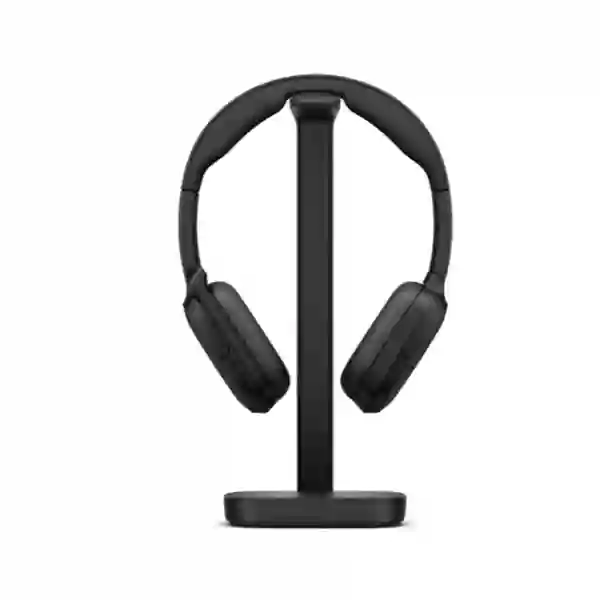
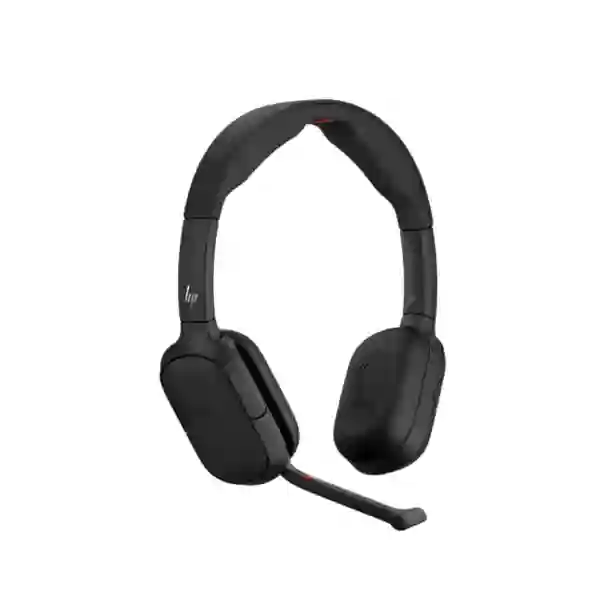
HP Poly Focus 625 Headset with Wireless Charging Stand
Work calls, hybrid meetings and focused listening benefit from clear voice pickup, adaptable noise control and a charging routine that fits the desk. This non-foldable stereo Focus 625 bundle includes a wireless charging stand and BT700 Bluetooth adapter.
At a glance
Best evaluated for professionals using laptop calls, video meetings or mobile collaboration. HP publishes up to 25 hours of talk time with ANC and the online indicator enabled, up to 50 metres of wireless range in suitable conditions, a six-microphone architecture and a charge stand in this package. Those maxima depend on conditions. Request a FourTeck Tanzania quotation to verify price, availability, the exact bundle and commercial terms.
Technical overview
| Product family | HP Poly Focus 625, non-foldable stereo Bluetooth headset |
|---|---|
| Package | Headset bundled with wireless charging stand |
| HP product number | C56XXAA — manufacturer identifier, not a verified FourTeck SKU |
| Audio controls | Hybrid ANC, Transparency mode, Acoustic Fence 2.0 |
| Microphone configuration | Six microphones in HP specifications; four described for noise-cancelling voice pickup |
| Drivers and form | 32 mm speakers; on-ear stereo; hideaway boom |
| Bluetooth | Qualified against Bluetooth Core 6.0; up to 10 paired devices |
| Wireless range | Up to 50 m under suitable conditions |
| Talk time | Up to 25 h with ANC and online indicator on; up to 30 h with both off |
| Listening time | Up to 42 h with ANC on; up to 52 h with ANC off (indicator off) |
| Charging | Approx. 1 h wired; approx. 3 h wireless |
| Weight | Approx. 208 g headset; 368 g stand |
| Stand size | Approx. 116 × 106 × 253 mm |
| Included adapters | BT700 Bluetooth USB-C adapter; USB-C-to-USB-A adapter |
| Published OS support | Windows 10/11, macOS, ChromeOS, iPadOS, Android, iOS |
| Call platform note | HP lists Microsoft Teams Open Office certification |
Specifications reflect HP manufacturer information for product number C56XXAA; battery and wireless figures are stated maxima. Package and commercial conditions must be confirmed for the actual sale.
Who this headset is designed for
The HP Poly Focus 625 Headset with Wireless Charging Stand is a premium stereo Bluetooth headset bundle for people whose work depends on intelligible conversations, concentration and a predictable desk routine. The included wireless stand gives the headset a defined place to recharge between meetings. Its on-ear design, hideaway microphone boom and soft ear cushions suit office desks as well as hybrid schedules in which users alternate between calls, focused work and travel.
For procurement teams in Tanzania, the useful question is not simply whether a headset has Bluetooth. It is whether colleagues can hear each other reliably, users can remain comfortable through several meetings, and staff can connect to the computers and mobile devices they actually use. This Focus 625 configuration brings together Acoustic Fence 2.0 voice processing, hybrid active noise cancellation, a bundled BT700 USB-C Bluetooth adapter and a matching charge stand. It is a practical candidate for teams that require consistent communication equipment rather than a basic music headset.
Before ordering, confirm the desired configuration, the exact device fleet and the quantity required. This is the non-foldable Focus 625 with the stand bundled, identified by HP product number C56XXAA. Other Focus 625 packages, including a Fold variant or headset-only listings, should not be assumed to include the same accessories. Ask FourTeck Tanzania to confirm current quotation details, local supply arrangements and applicable terms for your intended order.
A quick answer: what makes the bundle different?
Many business buyers compare headsets by battery life or noise-cancelling labels alone. This bundle deserves a closer look because the headset tackles both sides of a work conversation: microphone processing helps prevent nearby noise from dominating what the remote participant hears, while hybrid ANC reduces environmental sound reaching the wearer. The integrated charging routine then addresses a less glamorous but frequent problem: a useful headset that has been left uncharged when an important meeting begins.
The wireless charging stand is not the same as a Bluetooth desk phone base station or a universal dock for computers. It is a dedicated place to position and charge the compatible headset. The included BT700 adapter serves the wireless connection to a host computer. These two accessories perform different roles, and knowing the difference makes setup and purchasing decisions considerably easier.
The Focus 625 is an on-ear stereo model. Users hear audio in both ears but can choose Transparency mode when awareness of the room matters. Buyers seeking a single-ear wearing style, a folding design or a desk-phone-specific solution should compare the intended work pattern before selecting this configuration. A good headset choice should fit the working environment first and the specifications second.
Voice clarity: Acoustic Fence 2.0 and microphone design
HP describes the Focus 625 as using four noise-cancelling microphones with Acoustic Fence 2.0 enhanced noise reduction for voice pickup. The official technical specifications also list six microphones in total, allocated across transmit, combined transmit/ANC and ANC functions. These statements describe different aspects of the microphone architecture; they are not a reason to claim that every one of the six microphones performs the same job. The practical aim is clearer speech during video calls and voice conversations amid ordinary workplace distractions.
In a shared workspace, background conversations, keyboard sounds and nearby movement can make a speaker difficult to follow. Enhanced microphone processing can reduce how noticeable certain competing sounds are to the person at the other end of the call. The microphone boom also helps define a consistent speaking position. For best results, position the boom as recommended in HP guidance and test the microphone using the organization’s actual meeting application rather than judging call quality from recorded music.
No noise-processing system can guarantee complete silence for remote listeners. Very loud voices close to the wearer, strong wind or an exceptionally reverberant room may still be audible. Internet performance, the selected input device and the meeting platform’s own noise-processing settings can also affect the outcome. Treat the technology as an aid to intelligibility, not a substitute for good microphone placement and sensible call etiquette.
Hybrid ANC, Transparency mode and a practical focus zone
Hybrid active noise cancellation uses microphones inside and outside the ear cups to help reduce environmental noise reaching the headset wearer. It can make it easier to concentrate on a remote meeting or a complex task when the office contains steady background activity. This is separate from Acoustic Fence microphone treatment: ANC helps the wearer listen, whereas voice noise reduction helps the people listening to the wearer.
Transparency mode offers a contrasting operating choice. It allows the wearer to remain more aware of nearby activity when a colleague approaches, an announcement needs attention or a user is temporarily moving through a shared space. Because working conditions can change over the course of a day, straightforward access to ANC and Transparency controls is a more useful feature than leaving one mode enabled in every situation.
Neither ANC nor Transparency mode should be treated as a hearing-protection device or a guarantee that every warning signal will be heard. In environments where safety depends on hearing alarms, traffic, machinery or instructions, follow workplace procedures and remove the headset when appropriate. For ordinary office use, choosing the mode deliberately can improve comfort and situational awareness without requiring the user to change devices.
Battery endurance: understand the test conditions
HP lists up to 25 hours of talk time when active noise cancellation and the online indicator are enabled. With both disabled, its published talk-time figure reaches up to 30 hours. For listening rather than speaking, HP states up to 42 hours with ANC on and the online indicator off, or up to 52 hours with ANC and the indicator off. These are manufacturer maximums under defined conditions, not promises about the battery duration of every individual workday.
For a realistic estimate, consider how frequently the wearer changes devices, the listening volume, call frequency, wireless conditions, battery age and enabled features. A staff member making continuous calls with ANC enabled should plan against the more relevant talk-time figure rather than the longer music-listening specification. A user who mostly listens to training videos may experience a different usage profile.
The distinction is useful when budgeting for a support desk or an executive team. A good operational rule is to return the headset to its stand during breaks and at the end of the shift, instead of trying to use the published maximum as a charging schedule. This makes the accessory valuable even when the nominal battery figure appears long enough to last several working days.
Wireless charging versus USB-C cable charging
The bundled stand provides a convenient location for wireless recharging. HP specifies approximately three hours for wireless charging and approximately one hour for wired charging. Those figures illustrate a meaningful difference: the stand is ideal for a repeatable desk habit, while a direct cable connection is useful when faster replenishment is needed. Keep the stand powered and positioned in a dry, stable place where users will naturally place the headset after a session.
HP also specifies a quick wired-charge capability: approximately ten minutes of charging can deliver up to four hours of talk time or up to six hours of listening time with ANC and online indicator disabled. The word ‘wired’ matters. Buyers should not attribute those quick-charge figures to the wireless stand. If an employee begins a day with little remaining battery and expects a long meeting, use an appropriate USB-C connection and verify the charge status before joining.
Charging habits can be standardized without imposing an unnecessarily complicated policy. Assign a dock to a regular workstation, label shared accessories if needed and keep the supplied USB cable accessible. A dock is less helpful if employees move across desks and leave it behind, so frequent travelers may prefer to carry the cable while using the stand at their main location.
Bluetooth flexibility and the BT700 adapter
The Focus 625 supports Bluetooth connectivity and the bundle contains HP’s BT700 Bluetooth USB-C adapter plus a USB-C-to-USB-A adapter. The supplied adapter provides a defined computer connection method, which is useful in managed fleets where IT teams want a repeatable setup. HP lists Bluetooth qualification against Core 6.0, up to ten paired devices and a maximum wireless range of up to 50 metres.
A paired-device count is not the same as a guarantee of ten simultaneous active connections. Staff should confirm practical device-switching behavior for the computers and phones they intend to use, especially if they expect a headset to move quickly between a laptop meeting and an incoming smartphone call. Pair only the devices required for daily work and remove retired connections from the configuration when appropriate.
The stated wireless range is an upper bound under suitable conditions. Concrete walls, metal furniture, competing radio traffic, crowded offices and device placement can reduce usable coverage. For critical calls, a reliable connection near the workstation is more important than walking to the theoretical boundary. A simple on-site test with a representative laptop and mobile phone is more informative than choosing by the maximum distance on the specification sheet.
Computer, mobile and operating-system fit
HP lists Windows 10, Windows 11, macOS, ChromeOS, iPadOS, Android and iOS among compatible operating systems. That range makes the headset relevant to mixed work environments, but a broad operating-system list is not the same as guaranteeing every control or software-management function on every device. Some features depend on the host operating system, application version, connection mode and IT permissions.
For a laptop user, start by deciding whether the BT700 adapter or a direct Bluetooth pairing should be the standard connection path. Then select the Focus 625 as the input and output device in the operating system and meeting app. For a smartphone or tablet, verify that microphone and playback routing behaves correctly during both a test call and the intended production application.
Organizations using specialized softphones, browser-based call systems, desktop dialers, virtual desktop environments or remote sessions should run a compatibility test. Confirm that call answer, mute, device switching and microphone selection work as the business expects. HP’s broad OS compatibility is a useful starting point, not proof that every third-party telephony deployment will need no configuration.
Microsoft Teams and other collaboration workflows
HP identifies the Focus 625 with Microsoft Teams Open Office certification in its product information. This is relevant to organizations with Teams-based communication and shared workspaces. The headset also provides controls for calls, mute and Microsoft Teams use. Nevertheless, each business should confirm which functions operate in its chosen application and deployment, particularly where a virtual desktop, browser meeting or company security policy changes audio-device behavior.
For Teams users, a sensible acceptance test covers joining a meeting, hearing remote participants, sharing the microphone, using mute and ending the call. Try the test in an actual noisy workplace area, not only in a silent IT office. Check that the headset is selected for both speaker and microphone duties, and that users know whether they are muted through the headset, the application or both.
For other collaboration services, avoid assuming that all certifications are interchangeable. HP positions the headset for popular communications providers, but particular feature availability should be checked against the latest platform guidance and actual software versions. A standard headset profile may carry audio adequately even when a special call-control integration is unavailable. Document those differences so employees know what to expect.
Comfort and fit during repeated meetings
The headset weighs approximately 208 grams according to HP and uses an ergonomic headband with soft on-ear cushions. This design can appeal to employees who spend several hours moving between meetings, training sessions and focused desk work. Its hideaway boom microphone also helps keep the appearance discreet when the user is listening to media or moving away from a call.
Fit is individual. People vary in head size, eyeglass use, temperature preference and sensitivity to pressure. On-ear cushions apply pressure directly over the ears, whereas over-ear designs surround them. Neither category is automatically more comfortable for everyone. A small pilot involving different staff members is particularly valuable when purchasing many units, because long-session comfort cannot be accurately predicted from a weight figure alone.
HP offers replacement cushions and an alternative over-ear cushion option as accessories, sold separately. Confirm which parts are included with the quoted bundle and which require additional purchase. This distinction can matter for teams considering hygiene practices, replacement cycles or different wearing preferences. The non-foldable design should also be considered by employees who carry a headset in a tightly packed travel bag.
Everyday controls and smart interaction
The Focus 625 includes hardware controls for answering, ignoring and ending calls, microphone muting, volume adjustment, playback and pairing. HP also describes a tactile volume jog wheel, smart sensor functions and voice-related features. Practical controls reduce the need for constant switching between a mouse and the meeting window, although the precise behavior can depend on the connected device and active application.
Employees should learn a small number of actions first: locate mute, confirm the selected audio mode and recognize battery or connection alerts. Voice prompts for low battery and connection status are especially useful when a user is walking between rooms or joining a call under time pressure. More advanced functions, including assistant interactions or smart sensors, can be introduced after the core workflow is stable.
Smart features should be tested rather than assumed. An automatic pause or call action may be welcome for one role and distracting for another. When a configuration is shared across a team, document the intended settings and provide simple instructions for restoring them. Good onboarding converts a feature-rich device into something predictable, which is often more important to staff satisfaction than the length of the feature list.
Stereo listening, spatial audio and work media
Two-ear stereo playback makes the Focus 625 suitable for listening to meetings, training material and ordinary work media. HP specifies 32 mm speakers with a 20 Hz to 20 kHz speaker bandwidth and describes spatial audio as part of the user experience. These features may help users distinguish sounds in supported content, but the headset’s principal value for an enterprise remains communication and day-to-day usability.
A microphone headset for work should not be evaluated solely against entertainment headphones. Call clarity, boom placement, reliable transitions between devices and a comfortable working fit may matter more than a consumer headphone’s sound signature. If employees also use the headset for instructional videos, recorded webinars and voice messages, test those scenarios using realistic listening volumes.
Audio preferences should be configured consistently with working conditions. Some users prefer ANC to reduce background sound; others use Transparency mode when they need to remain approachable. The ability to change modes does not require every user to choose the same one. A practical headset policy defines what must work reliably while allowing personal preferences where they do not compromise safety or customer service.
The charging stand as part of desk organization
The included stand has its own footprint and should be treated as an intentional desk accessory. HP specifies stand dimensions of approximately 116 × 106 × 253 mm and a weight of 368 grams. These measurements help teams decide whether it fits beside a display, docking station and keyboard. Plan placement so the headset can be lifted and returned without crossing cables, blocking ventilation or competing with a shared power outlet.
During workstation planning, identify the location of USB power, the supplied cable and the route through which employees leave their desks. A stand placed behind a monitor may look tidy but be inconvenient for someone answering several calls per hour. An accessible charging position encourages consistent use and reduces the chance of headphones being left under papers or in a drawer.
An office may also have users who rarely occupy the same desk. In that case, the charging stand is still useful at a home workstation or assigned desk, but a cable-based mobile charging habit should be planned. The bundle solves the question of where to place the headset at a desk; it does not remove the need to think about charging on travel days.
Specifications that matter to a buyer
The official HP listing identifies the non-foldable black Focus 625 stereo Bluetooth headset and stand bundle by product number C56XXAA. Its 32 mm drivers, six-microphone architecture, hybrid ANC, Acoustic Fence 2.0, Transparency mode and BT700 adapter form the core of the offering. The headset is approximately 180 × 150 × 53.5 mm, and the manufacturer lists a 70 mm boom microphone.
Battery and radio figures deserve context in any technical comparison. Up to 50 metres of wireless range is not a deployment guarantee, and the longest published battery figures refer to particular feature settings. Approximately one-hour wired charging and approximately three-hour wireless charging provide a more useful distinction when planning shift transitions. The manufacturer also lists SoundGuard Digital acoustic protection technology, but the headset should still be used at safe listening volumes.
Do not confuse the manufacturer’s product number with a FourTeck Tanzania SKU. The former helps buyers identify the hardware variant; the latter, if assigned, belongs to the target retailer’s product record and has not been provided for this listing. An accurate quotation should confirm the item identity, its bundle contents and the commercial terms without assuming that a number found on an unrelated store is a local stock identifier.
What the manufacturer lists in the box
The standard bundle specified by HP includes the wireless headset, a wireless charging stand, a travel pouch, a BT700 Bluetooth USB-C adapter, a USB-C charging cable, a USB-C-to-USB-A adapter, a quick-start guide and a warranty card. The list is useful when a buyer is comparing an attractive headset-only price against a bundle that supports a ready-to-use desk setup.
Check the received package against the quoted bundle and retain the documentation for future support. The presence of a USB-C-to-USB-A adapter is particularly useful in organizations with a mixed generation of laptops. The travel pouch supports carrying the headset, but the non-foldable form still needs adequate space and care inside a bag.
The quoted supply should be confirmed before purchase because packaging, regional variants and commercial offerings can change. Do not assume that optional over-ear cushions, an alternative multi-device stand, spare batteries, replacement cushions or other accessories are included unless the quote explicitly states so. A purchase specification that lists the required contents is easier to evaluate than a broad product-family name.
A sensible fit for Tanzanian business teams
Organizations operating in Tanzania may have a mix of individual offices, shared desks, meeting rooms, remote colleagues and mobile employees. The Focus 625 can be evaluated across those different arrangements without presuming a specific city, internet provider or local support package. A team using online meetings will benefit most when every participating employee has a suitable microphone, a reliable host device and consistent call setup.
For a busy office, microphone intelligibility and comfort may dominate the decision. For a hybrid professional, the ability to move between a computer and a phone plus a convenient charging routine may be more important. For IT purchasing across departments, the included adapter and shared setup procedure may simplify deployment. Each scenario requires a different emphasis even though the underlying headset is the same.
Network quality remains a separate dependency. A high-grade microphone cannot repair severe packet loss, interrupted internet connectivity or unstable collaboration software. Test calls over the links and applications staff actually use, and plan a backup communication process where essential. The right purchasing process assesses the headset, software, power and connectivity together instead of treating any single accessory as a complete communications system.
Use case: customer support and high-volume calls
Customer-facing agents need other people to understand them clearly and often spend long periods speaking. The Focus 625 is worth testing in this role because of its boom microphone, enhanced voice noise reduction and accessible call controls. Begin with a pilot that includes typical incoming and outgoing calls. Ask a remote listener to assess voice clarity while the local office performs its normal activities.
A customer service supervisor should also check how headset mute behaves in the actual softphone or meeting platform, especially during transfers, consultation calls and call holds. If agents use a dedicated telephone system, verify compatibility with that environment rather than assuming a Bluetooth computer headset automatically connects to a desk telephone. It may require a different connection method or a different product category.
Shift-based usage introduces practical concerns that a general product review may miss. Decide whether headsets are assigned to individuals, whether the charging stand remains at each station and how cushions are cleaned or replaced. These operating details affect satisfaction and ongoing cost. The Focus 625 should be selected after it demonstrates both clear customer audio and a manageable daily workflow.
Use case: managers, consultants and frequent meetings
For managers and consultants, the working day may alternate between long online meetings, brief phone calls, presentations and concentrated document work. The Focus 625’s combination of stereo sound, ANC and Transparency mode helps match listening behavior to the task. The hideaway boom also offers a more discreet appearance when not actively speaking.
These users may be particularly interested in the included charging stand because it makes the headset visible and easy to collect before an unexpected call. Nevertheless, frequent travel changes the charging pattern. The USB-C cable should remain available when an overnight hotel desk or temporary office does not have the stand. The stand is a home-base convenience, not a dependency for every charging occasion.
A good evaluation asks whether the headset remains comfortable after two or three consecutive meetings, whether the primary laptop recognizes the adapter consistently and whether a mobile call can be handled predictably. The most useful feedback often comes from the small actions employees repeat every day: finding mute, adjusting volume, switching audio and returning the headset to charge.
Use case: training, education and internal collaboration
Training departments, administrative groups and project teams often spend more time listening than speaking. The manufacturer publishes a longer maximum listening-time figure than talk time, but real endurance still depends on settings and usage. Stereo playback can make recorded lessons, webinars and interactive meetings convenient on a personal device without disturbing nearby colleagues.
When buying for a classroom or shared training station, confirm whether learners will have individual headsets, whether microphones must be active and how devices will be paired. Multiple Bluetooth accessories in one room can create administrative overhead if students or staff switch stations frequently. Label adapters and define a reset procedure so a headset assigned to one machine is not inadvertently paired to another.
The headset is not a replacement for installed room microphones, loudspeakers or conferencing bars. It is designed around an individual wearer. Where several people must speak from the same room, choose the appropriate room-audio system instead. This distinction helps buyers avoid deploying a good personal headset into an unsuitable group-audio scenario.
Selecting between Focus 625 configurations
The Focus 625 family includes different product presentations. The item described here is the non-foldable stereo headset packaged with the wireless charging stand. HP also identifies a Focus 625 stereo headset sold without this stand and a separate Fold design. Package names and product numbers should be compared carefully because a minor naming difference can alter what the buyer receives.
Choose this package when most users work from a recognizable desk and will actually make use of a standing charging position. A headset-only configuration may fit teams with established compatible chargers or staff who primarily travel, provided the required charging accessories are available. The Fold variant is worth investigating when compact packing is a decisive requirement, but it should not be substituted without comparing specifications and accessories for the exact model.
Do not interpret a similar product-family name as proof of identical connectors, cables, physical folding behavior, packaging or procurement terms. HP’s official description for this configuration specifically calls it non-foldable. Ask for the exact manufacturer product number and complete bundle description in the quotation. Doing so prevents a common mismatch between the model demonstrated during a pilot and the items later purchased in quantity.
Comparing a business headset with simpler alternatives
A basic Bluetooth headphone may be acceptable for occasional listening, but business buying decisions typically add criteria such as microphone location, collaboration application behavior, acoustic processing, standardized adapters and maintainable consumables. The Focus 625 offers a more structured proposition for employees who communicate professionally throughout the day. Whether the extra features justify its cost depends on the frequency and importance of calls.
Conversely, not everyone needs hybrid ANC, a dedicated stand or stereo audio. A quiet private office with infrequent meetings may be adequately served by a simpler headset. An operator who must hear the surrounding workspace continuously may prefer a different wearing style. A user who relies on a traditional desk phone may need a telephone-specific system rather than a laptop-oriented Bluetooth accessory.
Evaluate alternatives using a small scorecard: microphone intelligibility, wearing comfort, host compatibility, charging convenience, ease of support, accessory replacement and quoted total cost. Add real test observations rather than assigning points to marketing phrases. The outcome should be the most suitable work tool, not necessarily the product with the greatest number of technical features.
An IT rollout checklist for business purchases
Before issuing a purchase order, inventory the main computer operating systems and the communications applications in use. Establish whether the organization will use the included BT700 adapter consistently, whether USB-A adapter availability matters, and whether any users require smartphone pairing. Then identify a pilot group representing quiet desks, shared offices and remote or mobile work.
Run consistent test cases: first pairing, reconnecting after restart, joining a meeting, changing the selected microphone, using mute, handling a phone call and charging on the stand. Record problems with the host model and application version rather than attributing every issue to the headset. If a feature depends on configuration or permissions, resolve that during the pilot instead of passing the problem to every new employee.
Create concise user instructions and a small internal support checklist. Include where to place the microphone, how to recognize a low-battery alert, when to use the charging stand and how to find the headset in sound settings. Maintain a record of assigned equipment and compatible replacement accessories. An organized rollout can save more support time than marginal changes in published specifications.
First-day setup, step by step
Start by unpacking the headset, stand, cable and Bluetooth adapter. Compare the items with the bundle list and inspect them for damage. Position the stand on a stable surface and connect its charging cable according to the supplied quick-start instructions. Leave sufficient space to lift and replace the headset without straining its hinge or the power lead.
Charge the headset before a critical meeting. If a faster top-up is needed, HP provides a wired USB-C charging option; if the desk routine matters more, place the headset correctly on the wireless stand. Confirm the charging indication instead of assuming that any nearby placement establishes charging contact. Learn where the charging light and battery notifications appear.
For a computer setup, insert the BT700 USB-C adapter into a supported port, using the supplied USB-A adapter when appropriate. Follow the pairing and connection instructions from HP. Ensure the computer recognizes the headset and choose it as the input and output device in the operating system’s audio settings. Avoid pairing several similar units in close proximity without labeling them.
Open the intended meeting or calling application and check its own audio-device selection. Some applications maintain a separate microphone choice even when the operating system defaults have changed. Place a short test call with a colleague and confirm that both sides can hear clearly. During the call, test volume, mute and whichever call controls the application supports.
Next, try the headset in the real workspace. Switch ANC and Transparency modes to understand their different purposes, and check that the microphone remains clear when nearby people speak. If the wearer moves away from the desk, observe whether the connection remains dependable at the intended distance. Do not assume a maximum-range specification will apply through walls.
Finally, return the headset to the stand, confirm charging and explain how to report a problem. Save any necessary settings under the organization’s device-management approach and document any limitations found during testing. Once the routine is repeatable, staff can spend more time on meetings and less time investigating a device immediately before a call.
Tuning call quality and troubleshooting common issues
If participants complain that a voice is quiet or muffled, begin with the physical microphone position and the application’s selected input device. Check whether the headset is muted and whether another microphone, such as a built-in laptop array, is active instead. A short recording and a live test call often identify these mistakes faster than changing advanced settings.
If sound reaches the headset intermittently, inspect the Bluetooth connection and the position of the BT700 adapter. Nearby wireless activity, intervening structures and host-device behavior can influence reliability. Reconnect according to HP instructions and reproduce the issue at a normal working distance. For a recurring problem, record the host model, software version and steps needed to reproduce the fault.
If charging is slower than expected, remember that HP specifies different approximate charge durations for wired and wireless methods. Check the stand’s power connection, correct headset placement and visible charging indicator. Test the supplied wired method if appropriate. Avoid immediately concluding that the battery is defective because the wireless stand takes longer than a USB-C cable.
For unexpected call-control behavior, compare the operating-system settings with the calling application’s settings. Some functions operate differently when connected by direct Bluetooth, the BT700 adapter or a particular meeting client. Standardize the supported connection pattern where possible. A small, reproducible checklist is more useful than an unspecific instruction to reinstall everything.
Care, maintenance and longer-term ownership
Routine care protects comfort and helps equipment remain presentable for customer-facing use. Store the headset in a dry location, keep cushions clean according to the manufacturer’s guidance and avoid pressure on the microphone boom when packing. The supplied travel pouch offers basic organization, but the non-foldable chassis should not be forced into a small compartment.
HP describes the Focus 625 as supporting replaceable batteries and ear cushions, with replacement parts sold separately. This is relevant to organizations that want to plan maintenance rather than treating all wear as an automatic reason to replace an entire headset. Availability, prices and the exact maintenance procedure should be confirmed for the intended market and item before assuming any repair arrangement.
Make a distinction between a manufacturer-published limited warranty and the commercial or service terms of a particular Tanzania sale. HP’s Africa specification lists a standard two-year limited warranty, but local eligibility, proof-of-purchase procedures and the seller’s obligations must be confirmed for the exact quoted supply. Do not promise local service coverage, turnaround time or an exchange policy without the corresponding offer details.
What to verify on a Tanzania quotation
Ask the seller to identify the Focus 625 headset-and-stand package by its full description and manufacturer product number C56XXAA. Confirm the included BT700 USB-C adapter, USB-A adapter, cable, stand and pouch. If the intended purchase covers multiple employees, specify the quantity and whether all users need the same charging arrangement. This makes it easier to compare offers that may otherwise look similar in a short title.
Confirm final price and currency, applicable taxes or charges, delivery options, lead time, returns procedure and any commercial warranty or support terms directly with FourTeck Tanzania. No Tanzania-specific price, stock level or delivery promise has been established in this description, and none should be inferred from an international HP listing. Request written confirmation for decisions that depend on those terms.
For organizations with procurement controls, add a compatibility pilot or sample evaluation to the approval process. A representative user should test the headset with the intended computer, calling application and workplace noise conditions. Include the outcome in the purchase file along with the configuration chosen. This approach offers a stronger basis for selection than a specification sheet alone.
Questions that determine whether it is the right purchase
First, decide who will wear the headset and for how long each day. High-call-volume users place greater value on microphone clarity, comfort and accessible mute controls than someone attending one meeting a week. Second, identify where the headset will live when unused. The charging stand is a strong advantage at an assigned workstation but may be less important for a constantly mobile employee.
Third, consider the surrounding sound environment. Hybrid ANC can help a user focus in a busy office, while Transparency mode provides a way to listen to nearby surroundings. Neither feature makes an unsafe environment safe or guarantees complete isolation. Fourth, confirm that the intended computer, operating system and meeting or calling software work together as expected.
Finally, distinguish the hardware decision from the procurement decision. The manufacturer provides documented capabilities, but pricing, availability, tax treatment, delivery and support depend on the actual seller and order. A complete quotation should address both. If these questions are answered before purchase, the Focus 625 bundle can be assessed on its real fit for the organization instead of on assumptions.
Frequently asked questions
Does the HP Poly Focus 625 Headset with Wireless Charging Stand include the charger?
Yes. The HP configuration described here explicitly includes a wireless charging stand as part of the headset bundle. HP also lists the USB-C charging cable, BT700 Bluetooth USB-C adapter, USB-C-to-USB-A adapter, pouch and documentation. However, different Focus 625 listings exist, so a buyer should verify the exact manufacturer product number and bundle contents on the quotation. The stand is a charging accessory, not a universal computer docking station or a dedicated desk-phone connection base.
Is the Focus 625 a mono or stereo headset?
This product is an on-ear stereo Bluetooth headset that provides sound to both ears. It is not a single-ear telephone earpiece. Stereo listening may suit employees who attend online meetings and use training media, while Transparency mode can help them remain aware of nearby activity. If a role requires one ear to remain continuously uncovered, compare an appropriate mono design rather than assuming a stereo headset will provide the same wearing experience.
How many microphones does the Focus 625 have?
HP lists six microphones in the full technical specification, including microphones used for transmit and active noise cancellation. Its feature description highlights four noise-cancelling microphones associated with Acoustic Fence 2.0 enhanced voice noise reduction. These descriptions are consistent when the different microphone functions are considered. The user benefit is an improved opportunity for clear speech in common work settings, although actual remote-call quality also depends on placement, room acoustics and the calling application.
What is the difference between Acoustic Fence and ANC?
Acoustic Fence 2.0 is associated with voice noise reduction and helps limit the distracting sound transmitted to the other person on a call. Hybrid ANC is used to reduce some surrounding noise heard by the person wearing the headset. These two functions act on different parts of the communication experience. A buyer should evaluate both: ask a remote colleague how clear the microphone sounds, and ask the wearer whether the listening experience is comfortable in the intended office.
How long does the headset battery last?
HP publishes up to 25 hours of talk time with ANC and the online indicator enabled and up to 30 hours when both are disabled. It also publishes up to 42 hours of listening with ANC on and the indicator off, or up to 52 hours with ANC and the indicator off. These are maximum manufacturer figures under specified conditions. Actual endurance varies with volume, wireless environment, battery condition and work pattern. Use the relevant talk-time figure when planning frequent voice calls.
How long does the wireless stand take to charge it?
HP specifies approximately three hours for wireless charging and approximately one hour for wired charging. The difference is important for staff who sometimes need a fast top-up. The stand is convenient for routine between-call or end-of-day charging, while the USB-C connection may be more practical when time is limited. Always confirm that the headset is correctly placed and that the charging indicator behaves as expected. Charge figures are approximate, not guaranteed appointment times.
Can a short charge support an urgent meeting?
HP states that around ten minutes of wired charging can provide up to four hours of talk time or up to six hours of listening time when ANC and the online indicator are disabled. This is the manufacturer-described wired quick-charge condition; it should not be attributed to the wireless stand. The exact result depends on usage and device condition. For an important meeting, start with a verified battery level and keep the supplied cable accessible rather than relying entirely on a last-minute top-up.
Does the Focus 625 work with Microsoft Teams?
HP lists Microsoft Teams Open Office certification and a Microsoft Teams-related control among the model’s features. That makes it a relevant candidate for Teams users, including shared-office staff. Specific control behavior can still depend on application versions, connection mode and company configuration. Before a larger deployment, test joining and leaving meetings, audio routing, microphone mute and handling of calls on the intended workstations. A successful live pilot is more useful than assuming every software feature is identical on every host.
Can I connect the headset to a laptop and smartphone?
The headset supports Bluetooth and is compatible with a range of computer and mobile operating systems listed by HP. The bundle includes a BT700 USB-C adapter and USB-A adapter for computer use. HP also lists up to ten paired devices, but this does not mean ten calls can be active simultaneously. Confirm the actual switching behavior required between your laptop and phone, and test it with the intended software before buying for users who frequently move between the two.
Does it work with Windows, macOS and mobile devices?
HP includes Windows 10 and 11, macOS, ChromeOS, Android, iOS and iPadOS in the published compatibility list. That breadth is encouraging for mixed fleets. Nevertheless, an operating system being listed does not guarantee every button, app integration, sensor function or management feature on every software version. Verify your main calling application and any security or virtual desktop setup as part of the purchase process. Confirm USB port availability when planning to use the BT700 adapter.
What wireless range should I expect in an office?
The manufacturer states a Bluetooth range of up to 50 metres. This is a maximum figure, not a guaranteed operating distance in every building. Walls, metal shelves, radio congestion, device position and other local factors can reduce usable coverage. For important customer conversations, test the range along routes employees actually take and encourage a stable working position. If a particular room loses audio, improve the connection arrangement rather than assuming the headset is defective solely because the advertised maximum has not been reached.
Is the headset foldable for travel?
The specific Focus 625 with wireless charging stand described here is non-foldable according to HP’s official specification. A separate Focus 625 Fold family configuration exists and should not be confused with this package. The included travel pouch helps organize the headset and its accessories, but the physical structure still requires appropriate space and protection during travel. If compact packing is a priority, compare the exact Fold model, its charging options and its included accessories before placing an order.
Can I replace the ear cushions or battery?
HP describes replaceable batteries and ear cushions among the Focus 625’s features, with replacement parts sold separately. This can be useful for planned maintenance and changing wear preferences, including optional over-ear cushion accessories. Part availability and any approved replacement procedure should be confirmed for the exact model and market. Do not assume that a spare battery or extra cushions are included in the standard stand bundle. Follow manufacturer instructions for safe maintenance rather than attempting improvised battery work.
Will the headset connect to a traditional desk telephone?
The supplied BT700 adapter is intended as a Bluetooth computer connection accessory, and the charging stand is a charging location. Neither fact alone establishes compatibility with an individual desk telephone or PBX handset. If the business uses dedicated desk phones, list the models and connection requirements before ordering. A headset designed for a USB-connected computer or softphone may require different equipment for telephone integration. Test the intended call path rather than relying on the word ‘wireless’ in the product title.
Is it suitable for a noisy customer service office?
It is a plausible choice for evaluation because HP emphasizes Acoustic Fence 2.0 enhanced voice noise reduction, hybrid ANC, a boom microphone and Microsoft Teams Open Office certification. However, every call environment is different. Conduct a pilot where several agents speak at once, ask people at the far end to assess clarity, and check comfort across a representative shift. Also verify call controls in the exact agent application. The right decision depends on successful testing, not on a promise that all background sound will disappear.
Does the headset protect my hearing?
HP lists SoundGuard Digital acoustic protection technology, which is relevant to sound exposure management. It does not eliminate the need for safe listening levels or workplace practices, and the headset is not presented as a substitute for certified hearing protection in hazardous noise environments. Adjust volume responsibly, take appropriate breaks and follow occupational safety requirements. In settings where workers must hear alarms or vehicle movement, remove the headset when necessary rather than depending on Transparency mode as a safety guarantee.
What is the HP product number, and is it the local SKU?
HP identifies this non-foldable headset with wireless charging stand as C56XXAA. This is a manufacturer product identifier for the configuration described. A retailer SKU is a separate listing identifier and must come from the exact seller’s own record. No FourTeck Tanzania SKU has been supplied here, so one should not be invented by borrowing the manufacturer’s code or a different seller’s number. Use the HP identifier to validate the quoted variant and request the seller’s own inventory reference if needed.
Can I get a Tanzania price, stock confirmation or delivery estimate?
Those commercial details require a current quotation for the intended quantity and location. No verified Tanzania-specific price, stock level, tax treatment, delivery commitment or service coverage is available in this product description. Contact FourTeck Tanzania with the product title, HP identifier C56XXAA, quantity and the computer or calling application you plan to use. Request the available configuration and terms in writing. This avoids treating an overseas product page as evidence of what a local purchase includes.
Is the stand necessary to use the headset?
The stand is not needed for the headset to operate as a Bluetooth audio device, but it is included in this bundle and provides a dedicated wireless charging position. HP also specifies a wired USB-C charging method, giving the user flexibility when travelling or topping up more quickly. Whether the stand is worth buying depends on the work pattern. People at assigned desks may value the charging habit, while constantly mobile staff should pay more attention to their portable charging arrangements.
What should an organization test before ordering multiple units?
Test the real laptop and operating system, the intended softphone or meeting app, microphone selection, mute and call controls, comfort during a long session, radio reliability in the workspace and charging with both stand and cable. Include staff with different work styles and ask remote listeners to judge call audio. Confirm exact bundle contents and manufacturer product number on the quote. Document any application-specific limitations before rollout. A short evidence-based pilot helps reduce avoidable deployment and support issues.
Request a Focus 625 quotation for Tanzania
Tell FourTeck Tanzania how many HP Poly Focus 625 headset-and-wireless-stand bundles you need, which laptops and meeting applications your team uses, and whether you require a pilot before a wider purchase. Ask for a current quotation with confirmed bundle contents, price, availability, delivery and support terms. The manufacturer’s package identifier is C56XXAA; a local listing SKU has not been verified.
Next step: contact FourTeck Tanzania for configuration and quotation confirmation. No unverified product URL, external link, stock promise or pricing claim is included.




Reviews
There are no reviews yet.