
Professional wired UC audio
Hear the conversation. Help your voice come through.
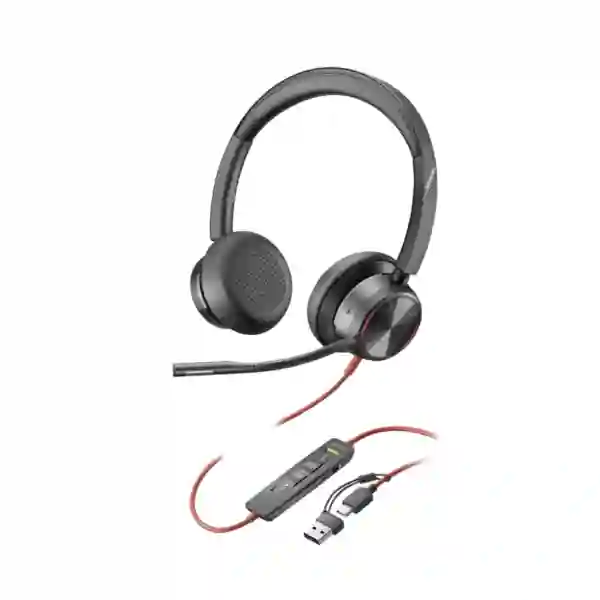
The Poly Blackwire 8225 USB-C headset combines hybrid active noise cancellation, a noise-cancelling boom microphone with Acoustic Fence technology, stereo listening and a USB-C cable with a USB-A adapter. It is designed for seated professionals who work through calls and meetings in offices or home workstations. Assess the headset against your computers, calling platform and work environment, then request a quotation for the exact configuration.
Standard USB-C/A adapter model: HP manufacturer part number 8X223AA. Dedicated Microsoft Teams-certified version is a separate product.
Key features at a glance
Hybrid ANC
Wearer-selectable off, low and high settings for different environments.
Acoustic Fence
Noise-cancelling boom microphone technology intended to reduce distracting sounds on calls.
USB-C / USB-A
USB-C wired connection with a tethered USB-A adapter in this configuration.
Call controls
Inline answer/end, mute, volume and ANC controls, subject to application integration.
Stereo on-ear
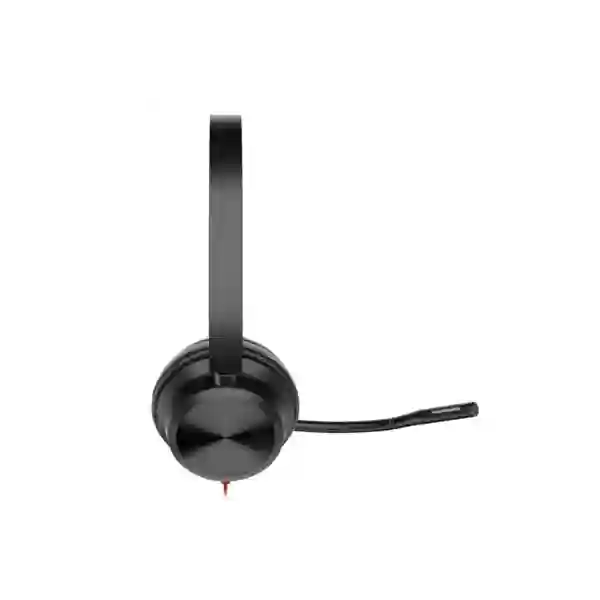
Two-ear listening design with padded headband and artificial-leather cushion surfaces.
PC compatibility
Manufacturer lists Windows 10, Windows 11 and macOS.
Built for focused desk-based communication
The Poly Blackwire 8225 USB-C headset is designed for people who spend a meaningful part of their working day in voice calls, video meetings, online support conversations and other listening-intensive tasks. It combines a stereo, on-ear wearing style with a wired computer connection, an adjustable boom microphone and selectable hybrid active noise cancellation. The aim is practical: give the wearer a more manageable listening environment while helping remote participants hear speech with fewer nearby distractions. The supplied USB-C to USB-A adapter also makes this configuration relevant when an organisation has a mixture of newer and older computer ports.
This is a professional desk headset rather than a general-purpose Bluetooth travel accessory. It is best evaluated against the actual working conditions of a team: how often employees speak, how closely they sit to colleagues, whether they remain at a computer, what collaboration software they use and which USB ports are available. A procurement decision should consider these operational details before comparing headset specifications in isolation. For teams in Tanzania, the same assessment applies whether staff work in a shared office, a service environment, a study-support unit or from a home workstation. Ask for confirmation of the exact configuration before ordering.
What the two kinds of noise control actually do
It is helpful to separate two features that can sound similar in advertising. Hybrid active noise cancellation is intended primarily to make background sound less intrusive to the person wearing the headphones. It uses microphones and electronic processing to counter some external noise. The Blackwire 8225 provides off, low and high ANC settings, so users can select a level suited to the surroundings. A steady ventilation hum may be different from unpredictable conversations nearby, and active cancellation will not make every sound disappear. The stereo ear cushions also provide a physical fit that contributes to the listening experience.
The boom microphone takes on a separate challenge: what people at the other end of a call hear. HP describes the model as having a noise-cancelling microphone enhanced by Acoustic Fence technology. That processing is intended to emphasise the wearer’s speech and reduce some unwanted surrounding sounds. The microphone system is not a guarantee of silence at the receiving end, especially where several people speak loudly close together. For that reason, a pilot call in the real workplace is more informative than relying on the feature name alone. Test both the outgoing speech and the wearer’s listening comfort before a broad rollout.
Select the right ANC setting for the room
ANC controls are useful because an employee’s environment can change during the day. Off may be appropriate when someone needs to monitor activity around the desk or is working in a quiet private room. Low can be tried when everyday background noise is distracting but the user does not want the strongest available reduction. High may be preferable in a busier area where concentration is difficult. These are choices for the wearer, not preset promises of a particular amount of noise reduction. Encourage staff to experiment while remaining attentive to workplace safety and necessary verbal communication.
There is also a practical distinction between active cancellation and a transparency mode. The published controls specify ANC off, low and high; they do not identify a dedicated ambient-awareness or transparency setting for this configuration. Switching ANC off does not automatically recreate the natural acoustics of an uncovered ear, because the headset remains on the ears. If a role requires uninterrupted awareness of visitors, alarms or nearby colleagues, evaluate whether a stereo headset is appropriate in that role at all. People performing safety-critical monitoring should follow their employer’s hearing and communication policies rather than relying on any headset mode.
A microphone designed for conversation
Clear outgoing speech is a central buying criterion for reception teams, remote service staff, sales professionals, supervisors and contact-centre employees. The Blackwire 8225 uses a boom-style noise-cancelling microphone, rather than depending on a laptop’s built-in microphone placed at some distance from the speaker. Its adjustable arm allows the wearer to position the microphone near the mouth while keeping it out of the main airflow from breathing. HP specifies a 135 mm boom with a 280-degree rotation range for the standard USB-C adapter configuration.
Microphone performance depends on more than the specification line. A very quiet speaker, a microphone pointed away from the mouth, a fan blowing directly across the boom or a conferencing application with unusually aggressive software noise suppression can all affect the result. During an acceptance test, ask an employee to make a normal call, then repeat it while nearby colleagues talk at their usual volume. Record whether the distant listener can understand numbers, names and customer details without repeated requests. A good deployment standard is intelligible, natural speech in the actual environment, not simply a headset that is labelled as noise cancelling.
Stereo listening for long meeting days
The headset uses two on-ear speakers rather than a single-sided mono design. Stereo listening can suit people who need sustained focus, frequent video conferencing and occasional media playback at the same workstation. HP publishes 32 mm speaker drivers and different speaker bandwidths for speech and media modes. These details confirm that the device is intended for both communications and wider computer audio, although perceived sound quality will still depend on the source material, application settings, fit and individual hearing. A product specification is not a substitute for a listening trial.
A stereo headset has an operational tradeoff: it covers both ears. Some employees appreciate the stronger separation from a busy office, while others need one ear unobstructed to coordinate with colleagues or serve customers walking to a counter. A supervisor in constant face-to-face conversation might therefore prefer a mono alternative, even though the Blackwire 8225 offers more elaborate noise-control features. Determine whether the employee spends most of the shift listening to the computer or interacting with the surrounding room. That simple question often matters more than an abstract premium-versus-entry-level product ranking.
USB-C convenience without abandoning USB-A computers
This product configuration uses a wired USB-C connection and includes a USB-C to USB-A adapter. HP describes the adapter as tethered, a useful arrangement when headsets move between compatible office computers. USB-C may suit newer laptops and docking stations, while the adapter extends the connection choice to computers equipped with a suitable USB-A port. For an IT team managing mixed generations of machines, that flexibility can reduce the need to purchase separately terminated variants simply because workstation ports differ. Confirm that the USB connector remains accessible when a laptop is docked or used with a monitor.
The adapter is not a universal converter for every telephone or audio socket. It does not turn this USB headset into a headset with a standard 3.5 mm analogue plug, nor does it establish compatibility with every desk phone, mobile device or USB hub. HP lists this specific configuration for PC use over USB-C or the USB-C/A adapter and identifies Windows 10, Windows 11 and macOS as compatible operating systems. Software-specific controls and management features can vary, so administrators should validate the complete computer, operating system and calling application combination they plan to deploy.
Understand the wired working style
A wired headset changes the day-to-day experience in ways that matter to busy teams. There is no wireless pairing sequence before each workstation session, no headset battery charging routine and no wireless range to manage while an employee remains at the desk. The USB connection provides a predictable physical path between the computer and the headset. That simplicity is attractive in fixed-seat operations, shared service desks and teaching or administration settings where a user starts work at the same computer each day. Cable management is still necessary, especially when desks are height adjustable.
The limitation is equally straightforward: movement is constrained by the cable and the computer’s location. The manufacturer lists a total cable length of approximately 219 cm for the standard adapter configuration, including sections around the inline control unit. That figure is useful for planning the desk layout, but it should not be treated as a guarantee that an employee can reach a filing cabinet or walk around a room while wearing the headset. If frequent mobility away from the desk is essential, compare a suitable wireless model instead. Choose the connection style according to actual behaviour, not a blanket assumption that wired or wireless is always better.
Inline call control at the workstation
The inline controller gives the user direct access to common call tasks: answering or ending calls, muting the microphone and adjusting listening volume. It also provides access to ANC off, low and high settings. Physical controls can reduce the need to find an application window while taking notes, checking records or discussing details on screen. This is particularly relevant when staff switch rapidly between several applications during a customer conversation. The call-control experience may depend on the communications software and its integration with the headset.
Train users to distinguish microphone mute from ANC. Mute affects the audio transmitted to the call; ANC affects the wearer’s listening environment. Turning ANC up is not a substitute for muting the microphone during a private discussion, and pressing mute does not cancel sound in the office. Before a team begins using the headset, test the relevant buttons in the actual calling application, including what happens when a call is incoming, already connected or placed on hold. A brief practical introduction prevents common mistakes that no technical data sheet can solve.
On-call indicator and shared-desk etiquette
HP describes visible on-call indicators on the headset. In a shared work area, a visual indicator can give nearby colleagues a useful cue that the wearer is engaged in a conversation. That can help reduce avoidable interruptions when a colleague would otherwise approach the desk at an inconvenient moment. It should be understood as an indicator feature, not as an access-control system or a guaranteed reflection of every application’s call state. Its behaviour should be tested with the organisation’s selected conferencing software.
Teams get more value from indicators when they combine them with simple communication habits. Agree how to handle urgent requests, whether non-urgent questions should be sent through chat and when someone may interrupt a person on a call. In a busy service operation, visual cues work best when supervisors and neighbouring agents share the same expectations. This headset can support better call etiquette, but it cannot establish those workplace practices on its own. Include headset-status behaviour in new-employee orientation rather than assuming it will be intuitive from the first shift.
Comfort, fit and wearing experience
The Blackwire 8225 has a padded headband, soft artificial-leather ear-cushion surfaces and adjustable fit elements. HP lists a weight of approximately 187 g for the standard USB-C adapter configuration and describes pivoting speakers intended to accommodate different head shapes. These design choices are relevant for people who remain on calls for long periods, although comfort is subjective. Ear shape, glasses, hairstyle, headband adjustment and heat in the workplace can all change how comfortable a headset feels after several hours.
A purchasing team should avoid treating the phrase all-day comfort as a measurable guarantee. Have representative users wear the headset during ordinary work and report pressure around the ears, headband tension, heat buildup and any tendency to reposition the microphone. A headset that is comfortable for a short demonstration can feel different after back-to-back meetings. Where the office is warm or the user wears glasses, ask specifically about cushion pressure and perspiration. Encourage periodic breaks where work practices allow. Comfort feedback should be part of the equipment decision, alongside microphone clarity and computer compatibility.
What SoundGuard Digital means for evaluation
HP lists SoundGuard Digital as an acoustic protection technology for this model. Acoustic protection is an important feature to investigate when employees wear headsets for frequent voice calls, because sudden peaks and prolonged listening exposure are different concerns from ordinary ANC. However, a named protection technology should not be represented as permission to use excessive volume or as a medical safety guarantee. Actual exposure can depend on application settings, audio levels, operating conditions and how any device-management functionality is configured.
HP’s product documentation notes that certain SoundGuard Digital functions require the Poly Lens desktop software. Organisations should therefore confirm what protection and configuration options are active in their intended operating environment, rather than assuming every software-dependent feature is enabled immediately after connecting the USB cable. An IT administrator can establish a practical headset policy that covers reasonable listening volumes, user training and periodic review. Staff who experience discomfort or unusual sound should follow workplace procedures. The goal is a controlled listening setup, not an unsupported claim that a particular headset eliminates hearing risk.
Collaboration software: check the exact variant
The standard Stereo USB-C plus USB-C/A adapter configuration is not the same product identifier as the Microsoft Teams-certified version with a dedicated Teams button. HP identifies the standard version as manufacturer part number 8X223AA, while the separately named Microsoft Teams-certified stereo USB-C adapter model is 8X225AA. The versions can look similar, and both belong to the Blackwire 8225 family. Buyers should therefore verify the exact model description and manufacturer part number on the quotation, packing label and procurement record before accepting a delivery.
This distinction matters when a business has a standard collaboration platform, particularly where dedicated buttons or a formal certified configuration are requirements. General compatibility with common conferencing applications is not identical to being supplied with the dedicated Teams-certified product. HP also references Zoom certification in product documentation for the standard configuration. Even with a certified headset, check the organisation’s application version and IT policies before assuming every control will behave identically. State the intended platform in the purchasing enquiry so the quotation can identify the correct version without ambiguity.
A sensible IT pilot before fleet rollout
A small test deployment can reveal the practical limitations of an otherwise suitable specification. Select users from different roles: one person in a quiet office, one in a shared work area, one who handles many inbound calls and one who regularly changes between a docked and undocked laptop. Ask them to use the headset for normal work, not only in an isolated product demonstration. Check the microphone, call-answer button, mute state, volume control, ANC choices and comfort after several sessions. Record whether the intended USB port is convenient at each workstation.
The pilot should also test unusual but foreseeable conditions. Disconnect and reconnect the headset during a supervised trial. Restart the calling application, switch between speakers and headset, test a call after a computer wakes from sleep and check whether the software retains the preferred microphone choice. If workers use a virtual desktop or a centrally controlled application, include that environment in the trial rather than extrapolating from a normal local installation. Written observations will help the purchasing team distinguish issues that require IT settings from issues caused by the physical headset choice.
Tanzania office deployment considerations
Teams purchasing business headsets for use in Tanzania may have varied working environments, from compact private rooms to larger open-plan offices and shared service counters. The appropriate choice depends on noise, staffing patterns, computer equipment and the customer’s communication channels, not on a general claim about any particular city or industry. A headset with hybrid ANC may be worth evaluating when an employee must concentrate while others are speaking nearby. The USB-C/A arrangement may also help where an organisation retains compatible computers with different port types.
For an effective purchasing discussion, provide the number of intended users, operating systems, calling platforms and approximate workstation layout. Indicate whether staff sit in fixed locations or rotate between desks, whether they wear headsets continuously or intermittently and whether a few departments need mono headsets instead. For local commercial terms, request a quotation that identifies the exact variant, price currency, availability, delivery arrangements and applicable warranty handling. None of those order-specific terms should be assumed from a general product description. This prevents a technically appropriate product from being paired with an unsuitable procurement plan.
Use cases: reception, support and service operations
A service team handling remote enquiries needs two things at once: staff must understand the caller, and callers must hear the staff member clearly enough to follow instructions or confirm information. The Blackwire 8225 brings together stereo listening, an adjustable boom microphone and user-selectable ANC, making it a plausible candidate for such seated roles. It may be especially relevant when the team’s computers are already equipped with supported USB connections and the calling application can use the headset’s controls. The headset itself does not provide a telephone line, call recording or a contact-centre software subscription.
In a support environment, test sample conversations that resemble normal work. Have staff read reference numbers, repeat account names and ask clarification questions while colleagues conduct routine conversations nearby. Check whether noise processing suppresses too much of a soft speaker’s voice or whether users can comfortably hear low-volume callers. If supervisors move frequently through the room or must hear colleagues immediately, a different wearing style may fit that role better. Equip distinct roles based on what they do, rather than purchasing one headset configuration for every employee by default.
Use cases: meetings, training and administrative work
Administrative employees often move between video calls, spoken instructions, online training and individual desk work. For those users, the Blackwire 8225 can serve as one USB audio device for both conversation and computer playback. Stereo listening and a dedicated microphone may make it preferable to using a laptop’s built-in speakers in a shared room. The inline controls provide a convenient place to manage mute and listening volume during meetings. Performance still depends on the conferencing platform, source quality and computer settings; it is not a substitute for a reliable network connection.
Training coordinators should pay attention to how many people need to share one workstation. This is an individual on-ear headset, not a room microphone or loudspeaker designed to capture several participants around a table. For a training session attended by many people in the same room, a purpose-built meeting-room audio system may be more appropriate. For staff participating individually at separate desks, standardising a correctly configured personal headset can make joining calls more predictable. Test the actual meeting workflow, including application prompts, microphone selection and whether the user can hear both instruction and notification sounds at reasonable levels.
Home-workstation and hybrid-work fit
Employees who take video calls from home may face distractions such as nearby conversation, household activity or intermittent background sound. Hybrid ANC can help the wearer concentrate, while the boom microphone and Acoustic Fence processing are intended to improve outgoing speech. The wired connection also avoids having to remember to charge a wireless headset before the first meeting. For someone who works mostly at a laptop desk, these are meaningful conveniences. They do not mean the headset can fully remove unpredictable noise such as a loud appliance or a person speaking immediately beside the microphone.
A practical home-work assessment starts with the computer connection. Check that the laptop or dock has a supported USB-C or USB-A connection, that the meeting software selects the headset and that the inline controller is easy to reach without pulling the cable. Check whether the cable runs across a walking path or could catch on a chair arm. If the employee frequently takes calls while moving between rooms, a wired headset may be inconvenient despite its audio features. Matching the headset to the actual workspace is more useful than choosing solely by the presence of ANC.
Working with modern laptops and docks
A business laptop may offer USB-C ports that are also used for charging, monitors or docking. The headset’s USB-C connection is therefore convenient only if the workstation still has a suitable free port. Its tethered USB-A adapter broadens the options when a compatible USB-A connection is available, but a dock’s behaviour can depend on the dock model and computer software. Before placing a large order, connect the headset through the exact dock intended for daily work and test an incoming call as well as audio playback.
If an IT environment uses multiple audio devices, the operating system may change the default speaker or microphone after docking, rebooting or disconnecting a monitor. Employees sometimes interpret that as a headset failure even though the calling application has selected a different device. Document which device should be the default for both input and output, then ensure the application follows the intended configuration. Where headsets are shared across hot desks, include an easy method for checking the selected device at the beginning of a shift. These small configuration tasks help the hardware perform consistently.
Planning a shared or hot-desk environment
Shared workplaces introduce both equipment-management and hygiene questions. A tethered USB-A adapter is helpful because the connection accessory is less likely to become separated from the cord during moves, although the complete headset still needs tracking. Decide whether each employee should receive an individually assigned headset or whether devices will be shared with appropriate cleaning procedures. Individual assignment can make fit, training and accountability simpler; shared devices may require a clear process for inspection, storage and cushion condition.
Create a short standard for the start and end of each session. Users should verify the USB connection, position the microphone, check the active mute state and set ANC to the level suited to the workspace. At the end, they should leave the cable tidy and report damaged cushions or controls. Any cleaning method should follow the current manufacturer care guidance and the organisation’s hygiene policy. Do not assume that an arbitrary chemical wipe is safe for artificial-leather ear cushions or plastics. Hot-desking succeeds when equipment, software settings and user expectations are managed together.
Specifications that matter in everyday use
The manufacturer’s published technical details provide a clear baseline for evaluating the standard USB-C adapter configuration. It is a black, wired, stereo on-ear headset with 32 mm speakers, a noise-cancelling boom microphone and a USB-C connection supported by a USB-C to USB-A adapter. HP lists Windows 10, Windows 11 and macOS compatibility, microphone bandwidth from 100 Hz to 10 kHz, speech-mode speaker bandwidth from 200 Hz to 6.8 kHz and media-mode speaker bandwidth from 20 Hz to 20 kHz. The boom rotates through a specified range, and the inline controller handles core call and ANC settings.
Those figures help identify the hardware correctly, but they do not by themselves predict how the device sounds in a particular office. Bandwidth describes published operating characteristics; it is not a promise that every caller, application or recording will sound equally clear. A quoted cable length helps with physical layout, while the ear-cushion material and overall weight inform a comfort evaluation. Buyers should use specifications as checks against their needs and then verify usability in practice. When comparing quotations, insist on the exact manufacturer variant instead of accepting a generic description that simply says Blackwire 8225.
What is supplied with this configuration
HP’s specifications for the standard Stereo USB-C Headset plus USB-C/A Adapter list the headset, a USB-C to USB-A adapter, a carrying case and a user guide. This is useful procurement information because it separates accessories included in the manufacturer’s package from any additional items a seller might choose to supply. The exact contents should still be checked against the quoted, locally supplied package, particularly when an organisation is buying multiple units or receiving items through more than one supply channel.
A carrying case can help an employee protect the headset when moving between desks or transporting it with a laptop. It does not replace proper handling: cables should not be tightly kinked, the microphone boom should not be forced beyond its normal range and the headset should not be left where chairs or desk drawers can crush it. Record package contents during receipt, and report missing items through the agreed purchasing process. If a team expects spare ear cushions or other accessories, treat those as separate confirmation items rather than assuming they come in the standard box.
Choosing between the standard and Teams-specific models
Purchasing teams may encounter two similar names in catalogues: a general Blackwire 8225 stereo USB-C adapter configuration and a Microsoft Teams-certified Blackwire 8225 stereo USB-C adapter configuration. HP gives these variants different manufacturer identifiers. The standard configuration corresponding to this page is 8X223AA; the separately named Teams-certified configuration is 8X225AA. The dedicated Teams button is associated with the Teams version, and the label should not be applied automatically to every headset in the series. Verify the exact offered product instead of interpreting a picture of the family as proof of the supplied version.
The best choice depends on the organisation’s software requirements. If IT has a formal requirement for the Teams-certified configuration or a dedicated Teams button, name that need in the request for quotation. If the workforce uses other supported unified-communications applications, evaluate the standard version and its certified platform coverage. The physical audio qualities may be similar, but purchasing an incorrect certification variant can create an avoidable expectation gap. Ask the supplier to identify the manufacturer part number prominently on the quotation and invoice, and have IT confirm platform fit before purchase approval.
When a different headset may be the better purchase
The Blackwire 8225 is not automatically the best headset for every job. A person who walks through a workplace while talking may be better served by a properly matched wireless model. Someone who must remain aware of visitors or colleagues may prefer a single-ear headset. A worker who connects directly to an analogue audio socket, smartphone or desk telephone should verify a product with that required interface rather than assuming the USB-C/A adapter solves the problem. A room full of participants needs a conferencing speakerphone or meeting-room system rather than one personal boom microphone.
Budget should also be linked to need. If a quiet office does not present a listening-noise challenge, a simpler wired headset may be sufficient. If noisy shared desks are unavoidable, investing in selective ANC and a more capable microphone can be worth assessing through a pilot. In either case, verify operating-system support, the intended application and physical comfort. An effective procurement process may result in different headset types for service agents, reception staff, managers and mobile workers. Consistency is useful, but matching each job to the right equipment is more important than forcing complete uniformity.
A practical receiving and acceptance checklist
Before accepting a shipment, compare the quoted product name with the manufacturer part number and the physical packaging. Confirm that the requested units are the stereo USB-C/A adapter configuration rather than a USB-A-only headset or the separate Teams-specific variant. Check the presence of the headset, adapter, carrying case and user guide where included by the quoted pack. Examine the cable, boom, cushions and inline controller for visible damage. Keep the documentation with the purchasing record so future replacements can match the installed fleet.
Next, test a sample of the shipment on the actual computers that will be used. Confirm that the system detects the device, the microphone works, sound is heard through both sides and the inline mute and volume controls operate as expected in the target application. Try each ANC setting and have a remote listener check voice quality. An acceptance checklist is especially useful when devices will be issued to many employees at once: it reduces uncertainty about whether a later problem originated during shipment, configuration or daily use. Record any discrepancies and follow the agreed support process before wider distribution.
Simple setup guidance for end users
Start with the headset connected to a supported computer through USB-C or the supplied USB-A adapter, as appropriate for the port. Open the computer’s audio settings and select the headset for input and output if the system has not done so automatically. Then open the intended call or meeting application and confirm the same selections there. Place the ear cups comfortably, adjust the headband and position the boom so the microphone captures speech without touching the face. Make a short test recording or call to verify that others can hear you clearly.
Learn the inline controls before a live customer conversation. Identify mute, answer/end, volume and the switch for ANC off, low and high. Begin at a comfortable listening level and choose ANC according to the surrounding room. If the other person cannot hear you, first check mute status and the application’s selected microphone. If you cannot hear them, check the selected speaker and application volume. For persistent issues, the IT team should verify device settings, software permissions and the computer port rather than assuming the headset is defective. Keeping a one-page setup guide with a fleet rollout is often valuable.
Ongoing care and team support
As with other professional headsets, ongoing performance depends on how the equipment is handled. Avoid pulling the headset free by the cable, crushing the inline controller under office items or twisting the boom beyond its intended adjustment. Store it where the cushions and cord will not be compressed. Inspect the ear-cushion surfaces periodically for damage and follow manufacturer-recommended care instructions rather than experimenting with solvents or excessive moisture. If units are assigned to individuals, create a straightforward way to request support for damaged cables or worn parts.
IT support should keep a small record of the selected application, computer operating system and manufacturer variant for each deployment group. When a user reports a failure, the help desk can then ask targeted questions about USB detection, device selection, mute behaviour and recent workstation changes. For managed deployments, HP Poly Lens software may offer configuration or management options where supported, but deployment policies and feature availability should be validated against current vendor guidance. Keeping configuration, training and hardware records aligned helps a team troubleshoot efficiently without promising that any individual fault can be resolved by software alone.
Making the purchase decision
For this model, the most useful buying question is whether the employee needs a wired stereo headset that addresses both listening distractions and unwanted background sound during speech. The Blackwire 8225 combines selectable hybrid ANC, an Acoustic Fence-enhanced boom microphone, physical call controls and USB-C/A connectivity. These characteristics make it a credible candidate for seated employees with frequent calls in mixed-noise workplaces. Its limitations should remain visible: it is not a wireless mobility solution, not a room-conferencing device and not an analogue 3.5 mm headset.
A good next step is to request a product-specific quotation with the required quantity, computer environment, collaboration platform and exact variant. Ask for confirmation of commercial terms rather than relying on assumptions about local price, stock, delivery, warranty handling or availability. If the equipment will be deployed broadly, consider a short user evaluation first. FourTeck Tanzania can be contacted for a quotation or an enquiry about suitability; the customer should supply the intended use case and ask that the offered product be identified precisely. That keeps the decision focused on operational fit and confirmed order details.
Manufacturer specifications: standard USB-C/A adapter version
| Configuration | Wired, stereo, on-ear; black |
|---|---|
| Manufacturer part number | 8X223AA (not a verified FourTeck listing SKU) |
| Connection | USB-C; supplied USB-C to USB-A adapter |
| Hybrid ANC | Off, low, high |
| Microphone | Noise cancelling with Acoustic Fence; 135 mm boom; 280° rotation |
| Speakers | 32 mm; 200 Hz–6.8 kHz speech mode; 20 Hz–20 kHz media mode |
| Microphone bandwidth | 100 Hz–10 kHz |
| Controls | Answer/end, mute, volume up/down, ANC |
| Operating systems | Windows 10, Windows 11, macOS |
| Headset weight | Approximately 187 g |
| Total cable length | Approximately 219 cm |
| Cushion surface | Artificial leather |
| Included by manufacturer | Headset, USB-C/A adapter, carrying case, user guide |
Specifications describe the manufacturer configuration and should be matched to the exact unit quoted. Platform features, local commercial terms and user experience require separate confirmation.
Frequently asked questions
Is this headset wireless?
No. The specified configuration is a wired USB headset intended to connect to a computer. That suits fixed workstations where users prefer not to manage pairing or charging. It is not the right choice when someone must move freely away from the computer during a call. For mobile roles, compare a purpose-designed wireless alternative and check its platform and device compatibility.
Does the USB-A adapter come with it?
HP lists a USB-C to USB-A adapter in the package for the standard USB-C plus adapter configuration. HP also describes the adapter as tethered to the cable. Confirm the exact pack in your supplier quotation and during delivery receipt. A USB-A adapter does not provide a 3.5 mm audio connection or guarantee compatibility with desk telephones.
What is the difference between ANC and microphone noise cancellation?
Active noise cancellation is intended to reduce some surrounding sound reaching the listener’s ears. The noise-cancelling boom microphone and Acoustic Fence processing address unwanted sound transmitted to other meeting participants. They perform different tasks and can be useful together. Neither feature can guarantee that all background speech or sudden noise will disappear in every environment.
Can I change the ANC strength?
Yes. HP specifies three user settings: off, low and high. Employees can choose according to the surrounding noise and their comfort. These settings should not be confused with a dedicated transparency mode, which is not identified in the published control list for this configuration. In roles requiring constant awareness of the room, assess whether a stereo headset is appropriate.
Will it work on a Windows laptop or Mac?
HP lists compatibility with Windows 10, Windows 11 and macOS for this standard model. The computer needs a suitable USB-C port or a compatible USB-A connection used with the supplied adapter. Application-specific buttons and administrative software may have additional requirements. Before a large purchase, test the headset with the actual operating system, dock and communications platform.
Does it work with Microsoft Teams?
The Blackwire family is designed for unified-communications use, but the product described here should not be confused with the separately named Microsoft Teams-certified variant. HP identifies the standard USB-C plus adapter version as 8X223AA and the Teams-certified USB-C plus adapter version as 8X225AA. If formal Teams certification and a dedicated Teams button are required, specify the correct variant explicitly.
Can I connect it to a mobile phone or desk phone?
Do not assume so. HP specifies this model primarily for compatible PCs through USB-C or the USB-C/A adapter. A connector that physically fits another device is not enough to prove calling or control compatibility. If a desk phone, tablet or mobile device is essential to the workflow, request a model with an explicitly verified connection method for that device.
Is the microphone suitable for a busy office?
The boom microphone uses noise-cancelling technology with Acoustic Fence processing, designed to reduce some surrounding distractions in outgoing speech. That makes the model worth evaluating for shared offices. Actual results depend on the speaker, microphone positioning and noise environment. Test the headset with nearby conversation before buying units for a whole support or contact-centre team.
Does it need a separate battery or Bluetooth pairing?
This is a corded USB configuration, so it does not rely on a wireless headset battery or Bluetooth pairing for its ordinary computer connection. Users should still check the computer’s audio device selection and calling-application settings. Cable reach and tidy routing remain important. If leaving the desk while talking is a routine requirement, wireless models offer a different working style.
How comfortable is it for long calls?
HP provides a padded adjustable headband, pivoting ear speakers and soft artificial-leather cushions, with a published standard-model weight of approximately 187 g. Comfort cannot be guaranteed from those features. People who wear glasses, work in warm offices or make consecutive calls should test the fit for a realistic period before fleet deployment. Individual comfort feedback is an important purchasing criterion.
Does the headset block all sound around me?
No. Hybrid ANC is intended to reduce distracting sound, but it does not create complete silence. Results vary with the type and level of background noise, fit and selected ANC setting. Sudden nearby speech and other irregular sounds may remain audible. If a job requires awareness of colleagues, visitors or safety signals, follow workplace procedures and assess whether a different headset style is safer.
Are there any special software considerations?
Basic USB audio and application controls should be evaluated separately. The computer and meeting software must select the headset for input and output. HP Poly Lens provides device-related management capabilities where supported, and some SoundGuard Digital functions require Poly Lens desktop software according to HP documentation. An IT administrator should confirm current software support and any permitted deployment settings before a large rollout.
What accessories are in the manufacturer’s package?
HP lists the standard model with a headset, USB-C to USB-A adapter, carrying case and user guide. Buyers should verify the exact locally quoted package rather than assuming separate replacement cushions or other accessories are included. Inspect the received equipment and record missing or damaged items during acceptance. A carrying case can help protect the device in transit when used properly.
How do I request the right configuration for my business?
Provide the required quantity, intended computers, operating systems, collaboration platform and typical work environment. Explain whether staff sit at desks, share headsets or need to move around during calls. Ask for the exact manufacturer variant and confirmation of price, availability, delivery terms and applicable support. For this standard USB-C/A adapter configuration, HP identifies the manufacturer part number as 8X223AA.
Request a quotation for the correct headset
Ask FourTeck Tanzania about the Poly Blackwire 8225 USB-C headset and share your required quantity, operating systems, collaboration software and deployment conditions. Request confirmation of the exact manufacturer part number, current commercial terms and any locally applicable fulfilment or support arrangements before placing an order.
Contact FourTeck Tanzania to discuss your headset requirement.




Reviews
There are no reviews yet.