
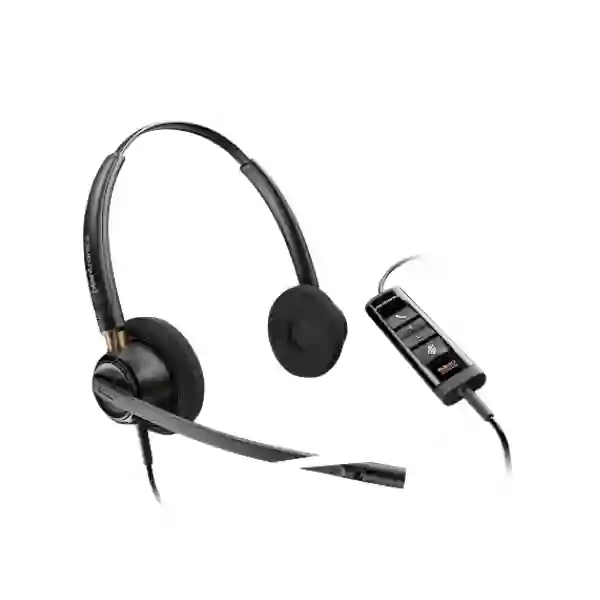
Professional USB communications headset
Clearer conversations, simpler desk setup
The HP Poly EncorePro 525 Stereo USB-A Headset combines two on-ear speakers, a noise-cancelling boom microphone and straightforward wired calling controls. It is a practical product to evaluate for computer-based customer support, office communication and contact-centre operations in Tanzania. Check the exact model and your calling software before purchasing.
At-a-glance specifications
These are manufacturer-published characteristics for the referenced standard USB-A variant. They help confirm the correct headset when comparing quotations; they do not establish local stock, pricing or configuration of any particular supply bundle.
| Product name | HP Poly EncorePro 525 Stereo USB-A Headset |
|---|---|
| Manufacturer reference for standard model | 783R3AA |
| Wearing style | Stereo, on-ear |
| Connection | Wired USB Type-A |
| Microphone | Flexible noise-cancelling boom |
| Published user controls | Mute; call answer/end; volume up/down |
| Published cable length | 2,085 mm (approximately 2.085 m) |
| Published product weight | 74 g |
| Published speaker size | 30 mm |
| Published boom length / rotation | 135 mm / approximately 290° |
| Listed compatible operating systems | Windows 10, Windows 11, macOS |
| Acoustic technology | SoundGuard Digital; relevant features require Poly Lens Desktop App |
| Published headset dimensions | 11.1 × 14.9 × 6.7 cm |
| Colour | Black |
| Box contents listed by HP | Headset |
| Related variant, not this listing | Teams-specific model 783R2AA |
Made for clear conversations throughout the working day
Customer-facing work demands a headset that keeps speech understandable while remaining straightforward for employees to use. The HP Poly EncorePro 525 Stereo USB-A Headset brings together two on-ear speakers, a wired computer connection, a flexible boom microphone and familiar call controls. It is intended for people who spend meaningful portions of their day talking with customers or colleagues rather than listening to music alone. The practical benefit is a focused communication device that can sit alongside a laptop, desktop computer and the calling software already used by the team.
Before choosing this model, establish how your agents work. Do they need both ears covered, or must they hear nearby colleagues? Is there an available USB-A port? Which calling application handles their calls? These questions matter as much as technical specifications because the best headset is the one that fits a real workflow. The EncorePro 525 is particularly worth evaluating for a dedicated calling workstation, but it should not be purchased on the assumption that every telephone, mobile device or software platform behaves identically.
Who should consider the stereo USB-A model
The two-ear configuration is suited to agents who want business audio presented to both ears while they process a call, consult a record and enter information into a system. Customer service representatives, appointment teams, sales staff, remote help desks and internal support employees may all benefit from this arrangement. It can also suit training or quality-assurance roles where being able to follow both sides of a conversation matters. Actual suitability depends on the surrounding noise, personal comfort preferences and the way the calling application operates.
It is less appropriate when the employee needs an open ear for frequent face-to-face exchanges, relies primarily on a mobile phone, or requires freedom to walk away from the desk during a call. A stereo wired headset is not automatically better than a mono or wireless alternative. For an office purchasing several units, ask users to trial the wearing style during normal duties instead of judging comfort from a specification table. That simple exercise can prevent a costly mismatch between the product and the work being performed.
Noise-cancelling boom microphone: what it really means
The EncorePro 525 has a noise-cancelling microphone positioned on an adjustable boom. The purpose is to reduce the amount of unwanted surrounding sound transmitted with the speaker’s voice. In practical terms, a nearby conversation, office activity or ambient room sound may be less prominent to the person on the other end than it would be with an ordinary laptop microphone. The flexible boom also gives the user a way to place the pickup closer to the mouth and keep a more repeatable speaking position across multiple calls.
Microphone noise cancellation should not be confused with active noise cancellation for the wearer’s ears. This model is not marketed as an active noise-cancelling listening headset, and an on-ear design does not seal the user off from all room noise. Very loud speech, music or equipment near the microphone may still reach the caller. It is sensible to test voice pickup in the actual office, especially for an open-plan service desk. The room layout, microphone placement and application audio settings still influence the final customer experience.
Stereo listening and attention during calls
Two on-ear earcups deliver the call to both ears, which may help some users concentrate on the conversation rather than the activity around them. This is a reason many contact centres consider stereo models for agents who handle long or demanding calls. Stereo does not guarantee privacy, acoustic isolation or higher comprehension for every person. The surrounding space remains important. A workplace with constant interruptions may need better seating arrangements and noise management in addition to a capable communications headset.
For teams currently using a single-ear headset, the strongest reason to change is a documented user need rather than a general claim that two ears always improve performance. Invite a small group to compare how easily they can hear soft-spoken callers, how aware they remain of nearby supervisors, and whether they can work safely in their assigned role. Some jobs benefit from one ear being open. Others benefit from both ears receiving the call. A brief practical comparison helps identify the more appropriate fit.
Lightweight on-ear design and fit
HP lists the standard headset at approximately 74 grams, with dimensions of about 11.1 by 14.9 by 6.7 centimetres. The light weight is relevant when a headset is worn repeatedly across a working day, but it does not predict comfort for every user. Head shape, ear sensitivity, eyewear, hairstyle and the pressure of the headband can alter the experience. A headset that feels comfortable during a five-minute demonstration may be judged differently after several lengthy calls or a full shift.
Arrange the headband so the earcups rest evenly, without forcing the microphone or earcups into place. Users who wear glasses should confirm that the ear pads do not create an uncomfortable pressure point against the frames. Allow time to adjust the fit and give staff permission to report discomfort. Sensible breaks, a well-positioned monitor and a supportive chair remain part of a healthy workstation. A lightweight headset can contribute to a good setup, but it does not replace appropriate working practices.
Wired USB-A connection: what to check
The primary connection is wired USB Type-A for a compatible computer. That makes the product especially relevant to desktops and business laptops with conventional rectangular USB-A ports. Because the connection is wired, there is no headset battery to charge or Bluetooth pairing routine to manage. Employees can establish a familiar procedure: connect the device, select it in the computer’s audio settings and use the organisation’s calling application. Whether audio selection happens automatically depends on the host computer and its configuration.
Some HP documentation describes support for USB Type-C through an appropriate adapter or connector arrangement, but buyers should verify the exact supplied connector and any adapter in the quoted package. Do not assume a USB-C adapter is included merely because compatibility is mentioned. A computer equipped only with USB-C ports may require additional planning. The headset is not a direct analogue 3.5 mm headset and is not intended to plug into an RJ9 desk-phone handset socket without an appropriate, separately verified solution.
Cable length and desk arrangement
HP lists a cable length of approximately 2,085 millimetres, or 2.085 metres, for the standard model. That length can offer useful room for movement between a seated employee and a nearby computer, particularly when a desktop tower sits under the desk. Nevertheless, the practical reach will be shorter once the cable follows the route around a monitor, desk edge or cable guide. Check the workstation dimensions before ordering for a large group, particularly when equipment is mounted away from the user.
Position the cable so it will not catch on chair arms, drawer handles, footrests or the edge of a keyboard tray. Avoid pulling on the cord to disconnect the headset; grip the connector. If employees frequently stand, rotate or move between work surfaces, consider whether a corded product remains the best choice. The cable is a predictable, simple connection, but it is not a substitute for the mobility offered by an appropriately chosen wireless device.
Convenient controls during a busy call
HP lists user controls for mute, call answer or end, and volume adjustment. These give agents a direct way to perform common actions without repeatedly searching for controls on the screen. The ability to mute quickly is useful when an employee needs a brief private discussion or must manage unexpected office noise. Volume adjustment is equally practical when call levels vary between speakers. A well-positioned control interface can make the daily workflow simpler, especially when the agent is simultaneously using a customer record system.
Software support for call answer and end commands can vary between applications, device integrations and system versions. Before making the headset a company standard, test each control on the actual calling platform and note which features work. Employees should learn to verify that mute is active instead of assuming that a keypress has succeeded. For sensitive conversations, use the application status and the appropriate business procedure as the final confirmation of the call state.
Operating systems and computer compatibility
HP lists compatibility with Windows 11, Windows 10 and macOS for the referenced model. That supports its role as a computer-oriented communications headset, although operating-system support alone does not establish compatibility with every browser, virtual desktop, contact-centre platform or endpoint configuration. The calling application must recognise the device as an audio input and output. Administrators may also have policies that control USB peripherals, microphone access or audio device selection.
For a mixed-computer environment, test at least one representative device from each approved operating-system image. Verify input and output selection, mute behaviour, stable audio, microphone permissions and reconnection after a restart. When calls run through a browser, repeat the checks in the browser actually deployed. When remote desktop technology is involved, check that microphone redirection and speaker output work as intended. These practical validations are more reliable than assuming an operating-system listing confirms every component of the complete solution.
Poly Lens and device-management considerations
HP describes Poly Lens as a management route for supported Poly devices, including relevant device insights and deployment options. For organisations operating multiple workstations, a central view of headsets can be useful when investigating firmware, configuration or support questions. However, the exact functions available depend on the device, software deployment, account setup and management environment. A company should verify the current supported feature set rather than assume that every management function is enabled by default.
Plan who is responsible for the desktop software, whether endpoint restrictions allow installation, and how changes will be tested before broad deployment. IT teams should confirm the device is recognised, check whether any recommended application version or policy is needed, and maintain a simple record of approved settings. An optional management layer should make support easier without complicating the employee’s first day. If the organisation cannot deploy a management application, evaluate which basic calling functions remain available without it.
Understanding SoundGuard Digital
HP identifies SoundGuard Digital as the headset’s acoustic-protection technology. It is designed to address aspects of unwanted audio exposure while retaining speech intelligibility. The manufacturer’s documentation also notes that the relevant SoundGuard Digital features require the Poly Lens Desktop App to be enabled. Therefore, it would be misleading to treat every protection function as automatically activated in any computer setup. The exact operating conditions should be checked against the installed software and the current manufacturer guidance.
SoundGuard Digital is not permission to set excessively high listening volumes or to ignore an employer’s hearing-conservation procedures. People vary in their sensitivity to sound, and workplace noise can include sources outside the headset. Use a comfortable listening level, investigate unexpectedly loud calls and follow the organisation’s occupational-health guidance. When an enterprise has a formal audio exposure policy, its technical team should review the manufacturer’s information and the application configuration before declaring the deployment suitable.
Standard model versus Microsoft Teams variant
The product name matters because HP also identifies a separate Poly EncorePro 525 Microsoft Teams Certified Stereo with USB-A version. The standard USB-A model is commonly referenced by manufacturer product number 783R3AA, while the separately named Teams variant uses 783R2AA. These numbers should not be interchanged when placing a purchase order or matching a quotation. Both names may appear close together in catalogues, which makes it easy to mistake a related variant for the exact product requested.
Teams-specific controls, certification details and accessories should only be promised when the exact variant being offered confirms them. Even when software certification is shown in a product document, customers still need to validate the specific platform configuration they use. Include the complete product description and manufacturer reference in procurement correspondence. For an organisation whose workflow depends on a special Teams key or a precise certified bundle, request written confirmation of that variant before approval.
A practical way to evaluate voice quality
Begin by recording or monitoring sample calls through the normal calling platform, with appropriate employee consent and organisational controls. Test a quiet room, a typical working area and a moderately busy desk. Ask the remote listener whether speech is clear, words are lost, or surrounding talk remains distracting. Compare these results with the organisation’s present headset rather than relying on demonstrations that use different rooms, microphones or software settings. Use normal speaking volume and a realistic microphone position.
Repeat the test with different voices and with the agent turning slightly to view another monitor. Check what happens when the microphone boom moves away from the mouth and whether staff can quickly restore the intended position. Listen for clipping, uneven volume, echo and changes after the calling application updates. A structured trial gives buyers clearer evidence about real-life suitability. If the test identifies a room acoustics problem, changing the headset alone may not fix it.
Planning a pilot before a bulk purchase
A small pilot is particularly useful when a buyer is preparing a larger rollout. Choose employees from different teams, including at least one person who uses glasses, one who has long calls and one whose workstation is in a noisy area. Give each participant the same test scenarios and a simple feedback form. The aim is not to produce an artificial performance score, but to observe whether the equipment supports actual work consistently during the trial period.
Ask about comfort after repeated calls, ease of locating the mute control, cable movement, perceived caller clarity and any software behaviour that causes delays. Have IT document device recognition and any required configuration. Include a comparison with existing equipment so management can judge whether the change delivers a meaningful benefit. For a multi-seat deployment, review results before choosing quantities. A modest evaluation can reduce the likelihood of unused devices, repeated replacements or unexpected integration work.
Rolling out to contact-centre workstations
A contact-centre rollout requires more than ordering matching boxes. Build an inventory that associates each headset with the intended workstation or employee, identify the approved audio device settings, and agree on a straightforward support route. Establish who can change application settings and how an employee reports a failed microphone. If the organisation uses standard computer images, test the headset against the image before deployment to avoid discovering permission or default-device issues after agents begin taking calls.
Where desks are closely spaced, assess headset cables alongside network leads, keyboard connections and power adapters. Provide a short orientation on adjusting the headband, positioning the boom, muting, selecting devices and looking after the cord. A manager should be able to recognise when the issue is a platform problem rather than a headset problem. The value of a standardised headset fleet comes from consistent support practices as well as consistent hardware.
Working from home and hybrid desk setups
The EncorePro 525 can be relevant to hybrid employees who make calls from a computer at home and at the office. A wired USB connection is straightforward in principle and avoids a separate charging routine. Nevertheless, working from home introduces different variables: family noise, unstable internet connectivity, small desks and laptops with limited ports. The microphone can help with sound from the surrounding room, but it cannot repair a poor broadband connection or guarantee that household voices disappear.
Encourage remote staff to choose a quiet position, use the same approved conferencing settings as their colleagues, and test audio before important conversations. Check whether the home laptop needs a verified USB-C adapter. If employees transport the headset regularly, establish suitable storage and cable-care practices. The headset should be one component of a wider remote-working plan that includes connectivity, application support, privacy and a place where the employee can speak comfortably.
Shared desks and hygiene
Hot-desking environments need a clear decision about whether headsets are personally assigned or shared. Many organisations prefer individually assigned headsets for comfort and hygiene, but the appropriate policy will depend on local workplace procedures. Where sharing is necessary, the cleaning method should follow manufacturer instructions for the exact materials. Avoid using improvised harsh chemicals or soaking the earcups. Cleaning products that are unsuitable for the pads can shorten their usable life or leave residue.
Set up a simple process for disconnecting, storing and identifying shared devices. Make sure employees are not tempted to pull a headset off another user’s computer while the cable is under tension. In spaces with frequent staff changes, an inventory label and a designated storage location can save time. If an ear cushion is damaged or no longer fits comfortably, confirm the exact compatible replacement part before buying. A consistent hygiene procedure is part of a professional deployment.
Agent onboarding and microphone habits
An adjustable microphone boom is useful only when employees know how to position it. During onboarding, show users how to place the microphone near the side of the mouth without making contact with lips or clothing. Ask them to speak at their normal level, then use an actual test call to refine placement. HP highlights visual and tactile positioning cues for the flexible boom, which can help staff return it to a suitable position after taking the headset off.
Train agents to avoid tapping the microphone, covering it with a hand, or leaving it too far from the mouth. Show them how to recognise and resolve accidental mute. Teach the distinction between headset volume, microphone sensitivity and an application’s own sound settings. A short, repeatable onboarding routine helps maintain more consistent conversations across a team, especially when employees are new to headsets or work across different computer environments.
Comparing stereo and mono headsets
A stereo design provides two on-ear speakers. A mono design covers one ear and leaves the other ear more directly exposed to the room. Neither is inherently the correct choice for every team. Stereo may suit sustained customer conversations and situations where attention to the remote caller is the priority. Mono may be more appropriate for a reception desk, a supervisor who frequently talks to nearby colleagues, or an employee who needs greater awareness of ordinary room sounds.
Before standardising on stereo, ask what an employee needs to hear besides the remote party. Consider the layout of the room, any safety requirements, and personal preferences. Trial both styles where roles differ. When the primary need is occasional calling rather than daily high-volume conversations, simpler equipment may meet the business need. When voice communication is central to the job, dedicated controls and a purpose-built microphone may justify closer evaluation.
Comparing wired and wireless approaches
A wired USB headset avoids batteries, charging schedules and wireless pairing, which can simplify daily readiness. It can be attractive for a fixed computer workstation where the employee rarely needs to leave the desk during a call. The tradeoff is physical movement: the cable determines how far the user can move. A wireless model may suit a supervisor who walks between nearby work areas, but introduces separate considerations such as battery management, radio performance and the compatibility of its base or receiver.
Consider both user mobility and the organisation’s support model. A wireless fleet can be convenient but may require chargers, spares and new support procedures. A wired fleet is simple to connect but needs practical cable routing and a plan for worn connectors. Neither connection type improves a weak internet link. Choose the device type according to the job, the actual endpoints and the operational cost of keeping the equipment working.
Why a USB communications headset differs from ordinary headphones
Consumer headphones can be useful for entertainment and casual meetings, but many lack the microphone position and call-oriented controls expected in a dedicated service environment. The EncorePro 525 combines a boom microphone, stereo on-ear listening and control functions within one wired computer headset. That arrangement is useful when employees regularly answer calls, speak clearly and switch between listening and responding. It reduces the number of separate accessories the user may need at a fixed workstation.
Even a purpose-built business headset cannot compensate for every weakness in an audio chain. Computer gain settings, a poor network connection, application compression and the remote caller’s equipment all affect the conversation. When assessing value, focus on repeatable calling performance and employee usability rather than treating a headset specification as a guarantee of customer satisfaction. A good headset works alongside the rest of the communications system.
Key technical specifications explained
HP identifies the referenced standard unit as a black, wired, stereo on-ear headset with USB Type-A connectivity. Published measurements include a weight of about 74 grams, a cable approximately 2.085 metres long, a 135-millimetre microphone boom and an approximately 290-degree boom rotation. HP also lists 30-millimetre speaker drivers and an advertised speaker bandwidth of 20 Hz to 20 kHz. Such figures help an IT buyer identify the hardware, but do not by themselves describe the sound perceived in every environment.
The published microphone bandwidth is 35 Hz to 21 kHz and the sensitivity is approximately minus 40 dB with a tolerance of three decibels. Those values are technical characteristics, not a direct score for speech intelligibility. The most useful comparison is still a call made on the application the business intends to use. When matching a quotation to this listing, request the precise model description and manufacturer part number so that data from a neighbouring EncorePro variant is not accidentally applied.
Caring for the headset during normal use
Give staff a simple routine for handling the headset. Lift it off by the headband, adjust the microphone gently and avoid twisting the cord around the earcups. Keep drinks away from the USB connector and audio controls. At the end of a shift, store the headset where it cannot be crushed by documents or pulled from the desk by the cable. These habits are especially relevant in a shared office where different people may move the same peripheral.
If the audio becomes intermittent, first check that the connector is firmly seated and that the computer is using the correct input and output device. Look for an application mute state or a loose USB connection before assuming the hardware has failed. For physical damage or persistent faults, follow the applicable support and warranty procedure. Do not attempt repairs that could damage the product further. Routine care and prompt reporting are practical ways to protect the equipment investment.
Troubleshooting a headset that cannot be heard
When the caller reports silence, start with the simplest checks. Confirm that the microphone boom is in its normal speaking position, that the mute control is off and that the calling application has selected the headset microphone. Verify that the operating system has granted microphone access and that the USB connection is stable. If several audio devices are connected, the computer may have selected a webcam or laptop microphone instead of the new headset.
Next, make a short test recording or call with another known working endpoint. If the headset microphone works in one application but not another, investigate the application configuration rather than replacing the hardware immediately. If the problem follows the headset across compatible computers, document the symptoms and seek the appropriate technical support. Avoid changing several settings at once; a stepwise process makes it easier to identify the real cause and to restore a standard configuration.
Troubleshooting low, distorted or uneven audio
If the agent hears a remote caller poorly, check headset volume, computer volume and the application’s call volume separately. These controls can interact, and excessively high output is not a desirable solution. Ask whether the problem occurs with every caller or only one connection. A single low-volume caller may have a microphone problem at the other end. Intermittent audio can also result from application settings or unstable connectivity, not just from a headset fault.
For distorted outgoing speech, repeat a test with the microphone placed correctly and verify the application’s input gain. Move away from a source of sustained noise and compare results. Restarting the application or reconnecting the headset can be useful diagnostic steps where approved by IT. Keep a record of any consistent pattern, such as failures after a system update. Escalation with accurate symptoms usually saves more time than repeatedly switching hardware without a diagnosis.
Security, privacy and calls with sensitive information
The headset provides an audio input and output, not an independent security or encryption system. Confidentiality for customer calls depends on the communications platform, endpoint security, workplace processes and how employees handle the conversation. A noise-cancelling microphone reduces unwanted sound pickup; it does not prevent nearby people from overhearing what an agent says. Employees should use an appropriate location for private discussions and follow the business’s data-protection rules.
Before a remote or shared-desk deployment, confirm that applications require appropriate sign-in, that employees understand when calls are recorded and that microphone access is limited according to the organisation’s policies. Mute is a useful operational control but should not be the sole safeguard for a confidential conversation. The headset should fit a complete customer-service process, including access management, appropriate workspace design and responsible handling of call information.
What the headset does not replace
Good headsets are often evaluated alongside a telephony or contact-centre upgrade, but they address a different part of the system. The EncorePro 525 does not provide an internet connection, a calling account, a telephone number or a contact-centre software licence. It also does not guarantee that a particular browser, desk phone, SIP system or conferencing service will recognise every button command. Those dependencies should be evaluated independently as part of the full communications solution.
Buyers should therefore separate questions about physical hardware from questions about software licensing, network resilience and phone service. A call that drops during a network outage will not be fixed by changing the earcups. Likewise, a headset that is not selected as the active microphone will not work correctly merely because the application is licensed. A clear responsibility map between the hardware supplier, IT team and calling-platform provider speeds up issue resolution.
Planning procurement for Tanzania
For a business purchasing in Tanzania, begin with the number of users, the existing computer ports, the preferred wearing style and the exact manufacturer reference. Request confirmation of the quoted variant, included accessories and the intended calling application. Because this page does not establish local inventory, price, delivery coverage or warranty handling, each of those commercial points should be confirmed in an actual quotation rather than assumed from an international catalogue.
Where a team has several locations, plan for consistent device configuration and local IT support before placing a multi-unit order. Ask how the business will manage spare headsets, identify faulty units and replace worn equipment. Procurement teams should compare total suitability rather than a headline unit price alone. Clarifying the hardware specification early is especially valuable where computers have a mixture of USB-A and USB-C ports or where employees use different contact-centre applications.
Questions to include in a business quotation
A precise request for quotation should state the product name HP Poly EncorePro 525 Stereo USB-A Headset and the manufacturer reference 783R3AA, then ask the supplier to confirm that the offered unit is the standard model. Include the requested quantity, preferred delivery destination and the workstation or application details relevant to compatibility. Ask whether any adapter is provided, whether the quoted configuration has the required controls and what documentation accompanies the hardware.
Request an itemised statement of price and applicable taxes or charges, local availability, delivery terms, payment conditions and support arrangements. These are commercial details that cannot responsibly be assumed here. If the company requires a Teams-specific version, state that requirement explicitly instead of allowing a general description to stand in for a verified model. For a critical contact-centre operation, ask whether sample units can be evaluated before a broader purchase.
Total cost and support over time
An equipment budget should include more than the initial price of the headset. Evaluate the time needed for installation, onboarding, troubleshooting, cleaning and eventual replacement. A standard model across many desks can simplify documentation and training, but it is useful only if the model truly fits the users. Consider whether IT can support the operating systems and applications involved, and whether any required desktop software creates an additional management task.
Prepare a straightforward replacement policy for accidental damage, connector wear and other common issues. Keep model references on purchasing records so the business can order matching hardware later. If your team works in shifts, decide how quickly a spare device must be available when a headset fails. These steps make the purchase operationally predictable without inventing a promised lifespan or claiming that any product will operate without interruption.
Managing headset upgrades and software changes
Calling software and operating systems change, so compatibility checks are not necessarily a one-time event. Keep a test workstation available when your organisation updates a calling application, moves to a new browser or changes its endpoint-management policy. A simple verification call can check whether the device is still recognised, whether the microphone is active and whether mute and call controls behave as expected after the change.
When an update alters call behaviour, note the application version, operating system, headset model and any installed Poly software before opening a support case. That information makes a problem easier to reproduce. Do not assume every failure is caused by a headset firmware issue or that a management tool will automatically correct it. A measured test-and-document approach protects customer calls and reduces disruption when teams adopt new communication tools.
Practical setup checklist for a new user
Start by confirming that the computer has an appropriate USB connection and that the headset is the expected model. Connect it without pulling the cable tightly. In the operating system, identify the chosen speaker and microphone, then select the same devices inside the calling application. Set a comfortable listening volume and check that the mute indicator or application state responds as intended. Place the microphone boom close enough for clear speech without touching the face.
Make a real test call rather than relying only on a device icon in the settings menu. Ask the listener to report clarity and background noise, and check that the agent can hear comfortably through both earcups. Test ending and answering a call if those controls are part of the workflow. Finally, place the cable safely and store the headset correctly when not in use. This quick sequence can become a repeatable onboarding checklist for every workstation.
A sensible decision for buying teams
The strongest reason to choose the EncorePro 525 is that it combines a purpose-built boom microphone, stereo on-ear listening, familiar wired connectivity and call controls in a lightweight format. Its suitability is easiest to establish through a short test with the business’s actual computers, calling software and workplace noise. The technical specifications can identify the model and narrow the shortlist, but the employee’s experience should guide the final choice.
If the organisation needs a USB-A stereo contact-centre headset, this model deserves consideration. If it instead needs wireless mobility, direct telephone compatibility, an open ear or a guaranteed Teams-specific control arrangement, the requirement should be clarified before purchasing. A careful match between the headset, the work and the support environment is more valuable than choosing purely by name. Request the exact model and relevant commercial terms for your Tanzania deployment.
Frequently asked questions
Answers to practical questions from business buyers, IT teams and headset users.
Is the HP Poly EncorePro 525 a stereo headset?
Yes. The standard model is a two-ear, on-ear headset. Both ears receive the call audio. That may suit staff who want to concentrate on remote conversations, but an on-ear stereo design does not eliminate all surrounding room sound. Employees who must hear nearby people frequently may prefer to compare it against a mono model before purchasing.
Does it use USB-A or USB-C?
The standard model’s specified wired connection is USB Type-A. HP also describes USB Type-C compatibility through an appropriate adapter or connector arrangement. The precise connector and any adapter supplied should be confirmed for the quoted unit. Do not assume an adapter is included just because compatibility with another connector type is described.
Will the headset work with Windows and Mac computers?
HP lists Windows 10, Windows 11 and macOS compatibility for the referenced headset. That makes it a candidate for business computers running those systems. However, each calling platform and company endpoint configuration may behave differently. Test the actual computer, browser or softphone, microphone permissions and intended call controls before scaling to a large team.
Does noise cancelling remove background sound for the wearer?
The noise-cancelling feature refers primarily to the microphone and the sound sent to the person on the other end of a call. It is not a promise of active noise cancellation for the wearer’s ears. The user may still hear office conversations and other environmental noise. A quiet calling space and good microphone placement remain important.
Can I use this headset directly with a desk telephone?
This is a computer-oriented wired USB headset, not a conventional RJ9 handset headset. Direct compatibility with any particular desk telephone has not been established by the product name alone. Check the phone’s accessory support, any required interface and the complete proposed connection path before purchasing. A USB port on a device does not automatically guarantee USB headset support.
What controls does the headset provide?
HP lists mute, call answer or end, and volume controls. These are useful functions for service teams that need quick access during conversations. The actual response of the answer or end function can depend on the calling application and its integration with the headset. Verify the controls in the organisation’s normal system and train users to confirm the mute state.
Is it suitable for call centres and service desks?
It is designed for contact-centre communication and is a reasonable option to test for staff handling regular computer-based calls. The wired design, boom microphone and stereo earcups are relevant to that work. Suitability still depends on the room, users, endpoint devices and calling software. For a multi-seat operation, a pilot with actual agents is a prudent purchasing step.
How long is the headset cable?
The standard model’s published cable length is approximately 2.085 metres. Actual usable reach depends on the route between the user’s seat and the computer, including any cable guide and under-desk installation. Measure the workstation rather than relying solely on the nominal length, and keep the cable away from moving chairs and high-traffic floor areas.
How much does the EncorePro 525 weigh?
HP lists the standard unit at approximately 74 grams. This is a lightweight figure for a wired communications headset, but the comfort experience will vary by person. Headband adjustment, eyewear, ear sensitivity and call duration all matter. A trial during normal duties is a better way to judge personal fit than a weight specification by itself.
What is SoundGuard Digital?
SoundGuard Digital is HP Poly’s acoustic-protection technology for applicable headsets. HP’s documentation notes that the relevant digital features require the Poly Lens Desktop App. Organisations should verify installation, configuration and current support requirements before assuming a particular protection function is active. Workplace listening-volume and hearing-safety procedures should still be followed.
Does this listing include the Teams-certified variant?
This content is prepared for the standard USB-A stereo model, commonly identified as 783R3AA. HP separately lists a Microsoft Teams Certified Stereo with USB-A variant with reference 783R2AA. Buyers who require a particular Teams-specific version or control should request it explicitly and have the exact model reference confirmed in their quotation.
What is included in the box?
HP’s published specification lists the headset as the included item. The exact packaging, connector configuration and any additional accessory included with a local order should be confirmed against the quotation. Do not assume a USB-C adapter, carrying case, spare cushions or other accessories are provided unless the actual offered bundle identifies them.
Is Poly Lens required to make a call?
The headset is designed as a USB communications device, while Poly Lens provides supported management functions and is specified as required for SoundGuard Digital features. Whether a specific company needs the app for its broader workflow depends on platform and policy. Test basic calling and the desired management features separately so expectations are clear before rollout.
Can the headset be used for home-based customer support?
It may be used with a compatible work computer in a home setting. A reliable internet connection, appropriate application settings, a reasonably quiet space and a suitable USB port remain necessary. The microphone can help reduce some background sound sent to callers, but cannot guarantee privacy or eliminate network problems. Remote employees should test the setup before taking important calls.
What should I verify before buying units for Tanzania?
Confirm that the quote identifies the standard headset and intended manufacturer reference, then review quantity, computer connectivity, application compatibility, any necessary adapters and support arrangements. Ask the supplier to confirm actual local pricing, stock, delivery terms, warranty handling and taxes. No unverified Tanzania-specific availability or commercial promise should be inferred from international product specifications.
Can the microphone boom be adjusted?
Yes. HP describes a flexible microphone boom with positioning cues and lists a 135-millimetre boom length and approximately 290-degree rotation. Position it near the side of the mouth and perform a test call. Do not force the boom beyond its designed movement. Consistent placement helps the person at the other end hear the speaker more clearly.
Is it wireless or battery-powered?
No. This is a wired USB headset. Its appeal for fixed desks includes avoiding wireless pairing and headset charging routines. The tradeoff is that movement is limited by the cable and attached computer. If agents regularly need to walk away from their desks while speaking, evaluate a compatible wireless product instead.
What if a caller cannot hear me?
Check the mute state, microphone placement, operating-system microphone permission, selected input device and the calling application’s own audio settings. Make a short test call using a known working computer or application. If the microphone functions elsewhere, investigate the software configuration. If the fault follows the headset consistently, collect the symptoms and consult the appropriate support process.
Request a headset quotation for your team
For a Tanzania procurement enquiry, specify the HP Poly EncorePro 525 Stereo USB-A Headset and standard manufacturer reference 783R3AA. Share your required quantity, workstation connectors and calling application, then ask for confirmation of the exact model, accessory bundle, current price, availability, delivery terms and applicable local support arrangements.
Ask FourTeck Tanzania for a quotation and exact-model confirmation.




Reviews
There are no reviews yet.