
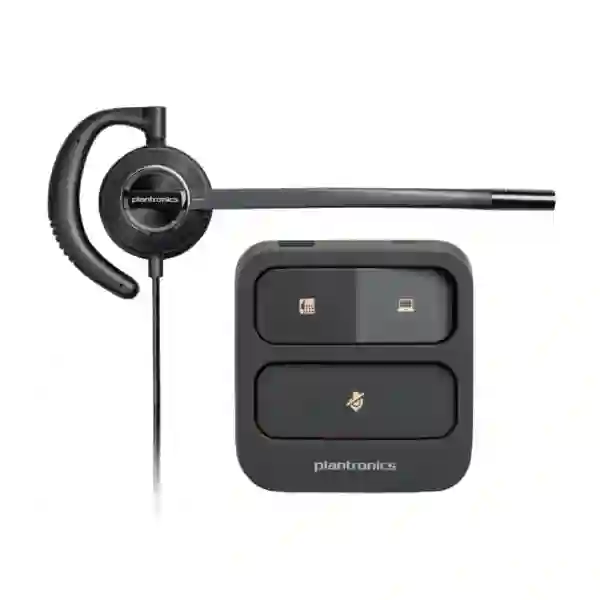
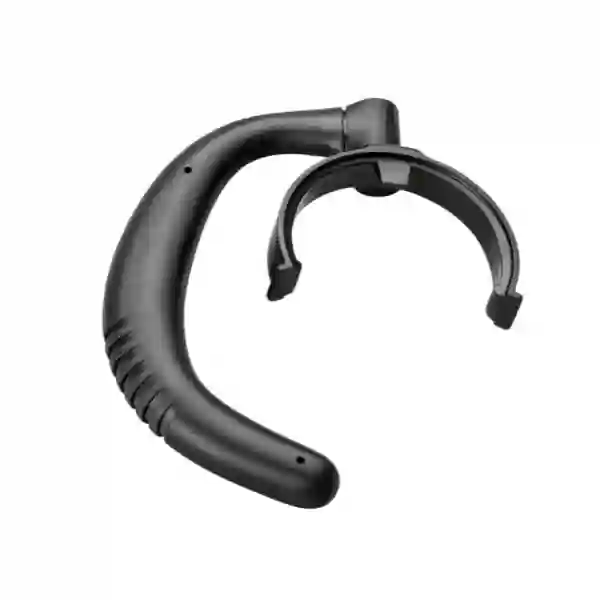
HP Poly EncorePro 530 Over-the-Ear QD Headset
For customer support teams, reception staff and contact centres that need clear voice communication, the HP Poly EncorePro 530 Over-the-Ear QD Headset offers a compact wired, single-ear format. Its flexible noise-cancelling microphone and low listed weight make it worth evaluating for desk-based calls. The most important ordering step is to match its Poly Quick Disconnect interface to your actual phone or computer.
Start with the headset, then verify the QD adapter, host device and exact quoted variant.
At a glance
Best for buyers who want a compact, fixed-workstation calling headset and are prepared to verify its QD connection equipment. It is not a Bluetooth headset, a complete USB headset on its own, or a listening device with guaranteed active noise cancellation. The exact phone or PC connection must be checked before ordering.
Verified headset details
| Form factor | Wired monaural, over-the-ear wearing style |
|---|---|
| Connection | Poly Quick Disconnect (QD); compatible host cable or interface required |
| Microphone | Flexible noise-cancelling boom |
| Weight | 22 g (HP published specification) |
| Cable length | Approximately 890 mm (headset lead) |
| Ear contact | Foam cushioning |
| Acoustic feature | Poly SoundGuard |
| Box contents | Headset (verify offered bundle) |
Listed specifications refer to the verified EncorePro 530 family configuration. Exact regional variants and included accessories should be confirmed in the offer.
A quick buying answer
The Poly EncorePro 530 over-the-ear QD headset is for people whose working day is measured in conversations rather than in music listening. It uses a wired single-ear design, a flexible boom microphone and Poly Quick Disconnect technology. The useful question is not simply whether a headset sounds good: it is whether the earpiece remains comfortable, colleagues can still be heard when necessary, and the connection works with the equipment already at the workstation.
Buyers should separate three decisions before selecting this model: wearing style, call audio and connection method. The EncorePro 530 is an over-the-ear, monaural option rather than a conventional two-ear headset. Its microphone is noise cancelling, but that does not mean the earpiece includes active noise cancellation. Its QD plug is designed to work through a suitable connection lead or adapter rather than being inserted directly into every phone or laptop.
For a Tanzania procurement enquiry, identify the phone system or application, the actual desk-phone or computer connection and the number of people who will use the equipment. These facts make a quotation more useful than a model name alone. A supplier can then confirm whether the required compatible adapters and accessories are available for the planned configuration before any purchase decision.
The core product specifications, explained
HP identifies the EncorePro 530 as a black, wired monaural headset using a Quick Disconnect connector. The manufacturer lists a 22 g headset weight, foam cushioning and an adjustable boom microphone. Its published technical information includes an approximately 890 mm headset cable and a 290-degree microphone boom rotation. These details describe the headset; they do not establish the length or controls of any separately selected computer or desk-phone adapter.
The specified microphone is noise cancelling, intended to reduce some unwanted sound entering the outgoing speech signal. HP also lists SoundGuard acoustic protection and a voice-oriented audio design. The practical result to evaluate is whether words are understandable in the actual work environment. Background noise, caller line quality, software settings and microphone placement can still affect what the person at the other end hears.
HP documentation lists Windows 10, Windows 11 and macOS for a related current QD product configuration. That operating-system information should not be read as a promise of direct connection or native software controls. The computer still needs an appropriate Poly QD interface or other verified audio processor. Exact regional and TAA variations should be checked against the requested manufacturer part number.
What over-the-ear wearing style means
Over-the-ear describes how the headset rests at one ear without using the familiar headband running across the top of the head. Many agents choose this style because it feels discreet and leaves the other ear uncovered. Fit is individual, however. People who wear spectacles, hearing devices or particular protective equipment should test how the earpiece sits before a larger roll-out, rather than assuming that any lightweight design will fit everybody equally well.
An over-the-ear headset also should not be confused with large over-ear headphones that surround both ears with padded cups. The EncorePro 530 is a compact communications headset. It trades the physical coverage of a two-ear listening design for a smaller form factor. In an open office, that can be useful when users need awareness of nearby instructions, but it means more room noise may remain audible to the wearer.
Before standardising this model, ask a representative group to wear it during normal calls. Check whether the ear contact is secure during natural head movement and whether the microphone boom reaches the right speaking position. Comfort should be judged after realistic call sessions, not just a thirty-second demonstration. A short trial also helps reveal whether some colleagues would be better served by a headband or two-ear alternative.
Why a single-ear headset can be the right tool
A single-ear design allows the listener to hear incoming calls in one ear while remaining more aware of the immediate workspace with the other. Reception staff may need to respond to a visitor, and a service representative may need to hear a supervisor without removing the headset. These benefits depend on sensible workplace procedures; an uncovered ear is not a substitute for established rules about confidential information and focused calling.
The balance is particularly relevant in shared offices and support counters. A monaural headset does not isolate the wearer from room noise in the way that some two-ear models can. In a busy room, that trade-off may be worthwhile for a front-desk position but less helpful for a dedicated agent who handles difficult calls in a loud contact centre. Listening comfort and surrounding noise need to be assessed together.
For teams buying several styles, define the role first rather than issuing the same headset to every employee. A front-office worker who switches between conversations and visitors may prefer one ear open. A person doing sustained detailed transcription or handling calls in a noisy shared room may have different preferences. Matching the wearing style to the role often improves acceptance more than choosing solely by a technical specification.
Microphone clarity and the speaking environment
The flexible noise-cancelling microphone is one of the most relevant features for customer-facing work. HP describes microphone positioning cues intended to help users place the boom consistently. Good placement is important because a boom that is too far from the mouth can make speech seem weak, while one pressed directly against the lips can pick up breath noise and movement. A short microphone test should be part of workstation setup.
Noise cancelling on the microphone primarily concerns the sound being transmitted to the caller. It does not guarantee that surrounding colleagues, traffic, fans or other disturbances disappear. A loud workplace may still affect call quality, especially when several sources of noise occur at once. Buyers should test ordinary voices, interruptions and typical background activity rather than relying on the feature label as a guarantee of perfect isolation.
Ask trial users to record a brief sample, then listen to it through the intended call platform or phone line. Compare normal speech, quieter speech and a busy-room scenario. Have a colleague listen at the remote end, because what an agent hears through the headset is not necessarily what a caller hears. If quality changes significantly, check placement and connection settings before deciding that the headset itself is unsuitable.
Voice audio and understandable conversations
A communications headset is optimised for spoken dialogue, not for creating a home cinema experience. HP describes voice-focused audio for the EncorePro family, and the EncorePro 530 belongs to that calling-oriented range. In practical terms, a buyer should judge how naturally a colleague’s or customer’s words can be understood through the telephone or application that will be used every day.
Call quality is a chain. A headset can be well designed and still produce a poor experience when the desk phone has unsuitable settings, a computer uses the wrong input, the application applies aggressive processing or the network connection is unstable. For that reason, a headset trial should reproduce the actual workstation: the same phone, cable, call application, operating system and typical calling conditions.
When evaluating voice quality, listen for clarity, uneven loudness, distortion and moments when one person asks the other to repeat a word. These practical checks are more meaningful than comparing isolated specification numbers from unrelated devices. If a team has language or accent diversity, include representative callers in the test and make sure the sound remains understandable in normal working conditions.
SoundGuard and responsible listening
HP specifies SoundGuard acoustic limiting technology for the EncorePro 530. The manufacturer describes its role in limiting certain sudden high-level acoustic events, with a published limit below 118 dBA for the relevant technology. This is a useful headset feature, but it does not mean that every sound exposure is safe, that user volume never matters, or that a headset can replace workplace hearing-protection policies.
Organisations should still encourage appropriate call volume and reasonable listening habits. Supervisors can help employees avoid turning the level up merely to overcome background noise that would be better addressed by improving the work area. People who notice discomfort or an unusual sound problem should report the issue rather than continuing to increase volume or work through a faulty setup.
For a formal contact centre programme, headset selection belongs alongside work-environment design, maintenance and training. SoundGuard is one product capability within that broader approach. Confirm any organisation-specific acoustic policy requirements separately. Do not interpret a marketing mention of acoustic protection as a verified local certification, a medical assurance or a guarantee of protection in every situation.
Quick Disconnect: useful, but often misunderstood
Quick Disconnect, or QD, is a headset connection system that allows a user to detach the headset from an appropriate Poly QD cable or adapter. This can be convenient when someone needs to leave a workstation without removing the headset from the ear. The feature is mechanical and connection-related; it should not be confused with Bluetooth, wireless freedom or a universal USB port built into the headset.
A QD plug by itself is not the same as the USB-A or USB-C connector on a laptop, nor is it automatically compatible with every telephone socket. The connection from headset to host device usually involves another component selected for that host. The exact adapter can affect supported controls and integration behaviour. Buyers should establish the adapter model and its compatibility before concluding that the whole system is ready for use.
Disconnecting a QD headset also should not be assumed to perform a specific action in every calling application. Whether a call continues, is placed on hold or behaves differently depends on the phone, processor, adapter and system configuration. Train employees on the tested behaviour of the actual setup. That avoids confusing a convenient physical disconnect with an application-level hold or mute function.
Using it with a desk phone
A desk phone can be an appropriate environment for a QD contact centre headset, but matching the cable matters. Two telephones with similarly shaped headset sockets can still have different pinouts, electronic hook-switch needs or accessory requirements. The EncorePro 530 should be treated as one element in a system rather than a guarantee that a generic cable will work with every desk-phone manufacturer or model.
Before requesting a quotation, record the full desk-phone brand and model, whether a headset port is present, and whether staff need to answer and end calls from the headset or only use it for listening and speaking. If an audio processor is already installed, photograph or record its model and existing QD cable details. This often makes a compatibility discussion more precise and reduces orders for the wrong connection lead.
After installation, check incoming speech, outgoing speech, acceptable listening volume and the behaviour of the phone during a QD disconnect. Test with real inbound and outbound calls. If a desk phone has dedicated headset volume or mode settings, verify those separately. A successful connection means more than simply hearing a dial tone; it must support the user’s normal calling routine without unexpected interruptions.
Using it with a PC or call application
Computer-based agents may use browser calling, a contact centre softphone or a unified communications application. The EncorePro 530’s QD connector is not a standard direct PC connector, so a suitable Poly QD-to-computer interface or supported audio processor is needed. The correct combination depends on the host and any application control functions the workplace needs. The base headset’s QD plug does not establish USB or application-level certification by itself.
Check the actual operating system, available ports and intended calling software. If the workstation has only USB-C ports, a solution should be verified for that hardware; a label referring to Windows or macOS does not solve the physical connection question. If the organisation relies on answering calls, muting or using an application-specific control, confirm those functions with the proposed adapter, not merely with the headset model name.
In pilot testing, verify that the software selects the intended audio input and output, and make a call to an internal or external tester. Check whether switching between speakers and headset requires user action. Repeat the test after restarting the application and reconnecting QD. Document the working configuration so new staff can be onboarded consistently and support teams can troubleshoot without recreating the process from scratch.
Choosing an appropriate QD adapter
The adapter decision should start with the host device rather than with the connector name alone. Record the exact telephone, computer or interface model and the purpose of the connection. For a telephone, ask about a dedicated headset port and any call-control requirements. For a computer, confirm ports, software and whether external audio processing is already present. The best adapter is the one specifically validated for the resulting setup.
Purchase planning should treat required accessories as separate line items unless a quotation expressly includes them. HP’s listed package contents for the relevant EncorePro 530 configuration say headset; they do not establish that every needed connection lead is provided. Ask the supplier to state what comes in the box and what additional cable or interface is needed for each class of workstation.
Where different phone models are in use, a single accessory specification may not cover the whole organisation. Map the fleet by model and connection method before ordering. For mixed environments, a small compatibility matrix can save considerable work later. It should show the headset model, required adapter, host device, tested application or phone function, and whether the full configuration was approved during a pilot.
Contact centre deployment considerations
In a contact centre, the headset is both personal equipment and a component of the communications platform. Plan around role, call duration, ambient noise and the equipment agents already use. The EncorePro 530’s light wearing style and voice-focused features can make it worth testing where single-ear awareness is desirable. The headset should be assessed within the operational workflow, not only through a purchasing catalogue.
A deployment trial can involve a few representative users from different shifts. Have each person record comfort, microphone positioning, call intelligibility and how frequently they need to leave the desk. Include a supervisor or IT technician who can evaluate connection stability and user-reported issues. These observations reveal whether a particular connection cable or wearing style produces avoidable support requests.
Once the setup is approved, keep a record of the headset variant and adapter assigned to each workstation. Organise a simple process for replacement accessories and reporting damaged cables. Avoid mixing visibly similar but incompatible QD components without verification. For larger teams, clear labelling and a basic fit-and-audio introduction can do more to protect daily productivity than distributing headsets with no setup guidance.
Reception and front-desk work
Front-desk employees often alternate between callers and people standing in front of them. A monaural headset can be appealing because it leaves one ear uncovered. The EncorePro 530 also avoids the movement constraints of a bulky headband. However, the design does not decide how privacy, queuing or interruptions should be managed; workplace protocols still need to establish when a call should be transferred or a conversation paused.
Trial the headset at the counter during an ordinary workday. Ask whether the earpiece remains stable when the employee turns to greet someone, reaches for paperwork or uses a keyboard. Confirm that the microphone remains near the mouth and that the connection lead does not snag on furniture. These small ergonomic details can be more significant over a shift than the initial feel of the headset in its packaging.
If several staff members share one reception desk, provide guidance on changing headset users, cleaning contact surfaces and checking the cable connection. A permanently attached desk-phone adapter with individually issued headsets may be practical in some workflows, but the arrangement must be verified for equipment compatibility and local hygiene policy. The appropriate sharing arrangement depends on how frequently shifts overlap and how calls are handed over.
Help desks and technical support teams
IT support agents and internal help desks need to speak clearly while looking at documentation or carrying out a task on the computer. A wired QD headset can suit a fixed desk when the selected connection supports the help-desk calling system. A single-ear arrangement may also help a technician communicate with an on-site colleague while staying on a call, provided the situation is appropriate for confidential discussion.
These teams should focus on whether callers understand technical instructions. Test spelling out usernames, device models and short codes, because such information is often more sensitive to muffled speech than casual conversation. Make sure the microphone is not pointed into a direct stream of air from a fan or ventilation outlet, and confirm that the headset’s connection does not interfere with the computer’s normal audio routing.
An IT department choosing headsets for its own personnel can use the same process later for wider deployment. Record the configuration and known limitations during the pilot. If a QD interface requires special software or an adapter-specific feature, document that dependency. Doing so prevents the misconception that a headset which works at one desk must necessarily function identically at every other desk.
Working from home and hybrid locations
The EncorePro 530 can be considered for staff who make regular calls from a home workstation, especially if the organisation already uses compatible QD equipment. Its wired design avoids reliance on a wireless headset battery, but does not eliminate the need for the correct computer interface. Portability also depends on the accessories the worker needs to carry between different work locations.
A home environment may introduce sounds that do not occur in an office, such as family conversation, household appliances or outdoor traffic. The noise-cancelling microphone can help with outgoing speech under some conditions, but callers may still hear disruption. Encourage workers to test their microphone where calls will actually take place. Background noise in the room and issues caused by a weak internet connection should be assessed separately.
If employees alternate between a business desk phone in the office and a laptop at home, ask whether the same headset can be supported with two verified connection solutions. That might be operationally convenient, but should not be presumed without checking adapters and workflow. Labeling the components for each location and documenting how audio devices are selected can make hybrid moves less confusing.
Fit, positioning and day-to-day comfort
HP lists the EncorePro 530 at 22 grams, which illustrates how lightweight the design is. Weight is useful context, but comfort also depends on ear shape, how securely the headset rests and how the cable runs across the user’s workspace. People react differently to the same earpiece. Give trial users enough time to form an opinion during normal duties, particularly when their roles involve lengthy calls.
Adjust the wearing position so the unit feels supported rather than forced. Position the boom to capture speech without brushing against skin or clothing. A microphone near a collar or scarf may pick up friction and movement. Users should also check that the cable is not pulling down on the earpiece. A simple cable-management clip or route may help, provided it does not create a snag or strain point.
Ask users to report slipping, pressure or poor microphone positioning early. A persistent issue may indicate incorrect fitting, a worn contact component or an unsuitable style for that individual. Rather than asking everyone to tolerate one configuration, set a clear route for fitting advice or an alternative approved headset. Better fit helps staff concentrate on the conversation rather than on adjusting equipment.
Care and cleaning practices
A call headset is touched repeatedly during the working day, so routine care matters. Follow current manufacturer and employer guidance for cleaning materials and methods. Avoid soaking electronic components, pulling on the microphone or applying an unverified solvent. Remove surface contamination gently using a procedure suitable for the materials and do not reconnect damaged or wet equipment until it has been inspected appropriately.
When headsets are shared, establish a clear cleaning and handover process. Keep the earpiece and cable free of obvious damage and make sure users know when a worn component should be reported. The aim is consistent hygiene and dependable use, not an improvised deep-cleaning practice that could damage foam, plastics or connectors. Personal assignment may be preferable where operationally possible.
Storage is also part of care. Do not leave the headset hanging by the microphone boom, trapped under a chair or tightly wound around the connection lead. Place it where the ear contact and QD plug are protected between shifts. For fleets, track recurring issues such as cable strain or worn cushions; the pattern may reveal a handling habit that can be corrected through a simple staff reminder.
Troubleshooting when a caller cannot hear you
Start with the simplest checks. Confirm that the microphone boom is correctly positioned, the QD connection is fully engaged and the intended audio input has been selected on the phone or computer. If a softphone is involved, check its microphone permission and mute state. A device or application mute is different from physically detaching a QD headset, and each has its own behaviour.
Ask whether the issue occurs on every call or only in one application. If another call platform works correctly, investigate the software routing and permissions. If no platform receives audio, inspect the adapter and connection in a controlled way. A known-good compatible adapter or headset can help isolate the failed component, but avoid swapping cables across devices without validating their compatibility first.
Document the result before replacing hardware. Include the host model, adapter, application, operating system where relevant and symptoms such as intermittent sound or low microphone volume. This record lets the support team identify repeated problems and establish whether they stem from connection handling, settings or physical damage. If the equipment appears damaged, remove it from service rather than continuing to test it on production calls.
Troubleshooting when you cannot hear the caller
First check the phone or application’s output destination and listening volume. Some computers continue sending sound to internal speakers after a headset or audio processor is connected. Make a controlled test call and confirm that the expected headset is chosen. Avoid increasing volume excessively to compensate for a selection error. If the issue appears only after moving between workstations, compare the audio configuration at each.
Inspect the QD coupling and the selected host adapter without pulling the cable sharply. Intermittent audio when a lead is moved may point to a damaged connection or a strained cable. Also check whether the phone is in the correct headset mode. A headset is not at fault simply because a particular telephone does not automatically switch its audio path when a cable is attached.
If the problem is occasional or affects only external calls, include the telephone or network service in the investigation. Codec negotiation, endpoint settings and call path conditions can change the experience independently of the headset. Explain to users how to report the circumstances of an issue, since a reproducible symptom is much easier to address than a vague description that the audio sometimes sounds wrong.
Evaluating alternatives within the headset category
The EncorePro 530 is best judged alongside products intended for comparable work. A two-ear QD model may be worth considering for agents who need less room distraction. A conventional headband-style monaural model may suit people who dislike ear-hook contact. Convertible designs may offer more than one wearing configuration, but buyers should confirm which pieces are supplied and whether the chosen version is compatible with the existing connection system.
A USB headset can appear simpler for a laptop because the interface may plug directly into the computer. That does not make USB better in every environment. Organisations with suitable Poly QD infrastructures may value the ability to retain an approved connection arrangement and change just the headset. The right comparison includes adapter cost, call controls, compatibility, user comfort and maintenance rather than only the connector type.
Wireless models serve a different need when workers must move away from the desk while staying connected to a call. The EncorePro 530 is a wired product and does not provide wireless range. If roaming during calls is a core requirement, evaluate a purpose-built wireless solution instead. If predictable desk-based calling is the main task, assess whether a wired setup meets the workflow without adding features staff will not use.
Plan an effective staff pilot
A useful pilot should answer questions that a datasheet cannot. Select people with different roles, ear-fit preferences and calling patterns. Use the phone or computer each person normally uses and a connection setup that the IT team has approved. Give participants a short checklist covering fit, microphone intelligibility, listening volume, connector operation and ease of use during their actual work.
Allow the trial to include ordinary interruptions and routine movements. For example, reception staff can check whether they can respond to a visitor while keeping the earpiece stable, while contact centre agents can assess comfort across several consecutive conversations. Make the feedback specific. ‘Comfortable’ is less actionable than ‘remained secure while turning’ or ‘pressure became noticeable after repeated calls’.
At the end, compare the observations against the stated role requirements. Do not use a single enthusiastic participant as proof that everyone will like the same wearing style. Capture exceptions and decide whether an alternative is necessary for some positions. Confirm the exact connection parts used in any successful trial so the production order matches the tested solution.
Ordering quantities and connection accessories
A procurement list should have a line for the headset and separate lines for any required QD cables, adapters or host accessories. The quantity of each accessory may differ from the number of agents when equipment is shared or when a desk has a permanent interface. Calculate that difference deliberately and make it explicit in the quotation request, rather than relying on assumptions about what is included.
Confirm the exact requested manufacturer variation. HP has issued different part numbers and regional variants in the EncorePro 530 family, so the model-family name is not enough to establish every purchasing identifier or local listing SKU. The supplier should verify the specific item offered and the accessories that accompany it. An outside retailer’s stock-keeping code is not automatically the SKU used for a Tanzania listing.
Before placing a bulk order, request written confirmation of compatibility, commercial terms, warranty applicability, any special accessories and lead time for the actual quotation. Do not derive a local price from an overseas catalogue or assume that a listed manufacturer warranty states every term that will apply to a Tanzania transaction. Those details need confirmation for the exact offered item.
Create a workable deployment record
An equipment record can be simple: user or desk, headset variant, host device, QD adapter, configuration date and any known limitation. This is especially useful in organisations that rotate staff between desks. If a headset works with one tested adapter but not another, the record lets IT distinguish a connection mismatch from a headset fault before replacing equipment unnecessarily.
Where a software calling platform is used, include the application name and supported configuration, but avoid treating a platform logo on a product family page as certification of a specific headset-plus-adapter combination. Certifications and control capabilities can vary by version, interface and product variation. A brief practical acceptance test should establish what the deployed combination can actually do.
Keep a responsible person for updating the record when the phone fleet or operating system changes. Small infrastructure changes can have large effects on a QD headset installation if adapters are moved or replaced. Re-testing one representative workstation after a change is a sensible practice. If the result differs, investigate and communicate the compatibility implications before changing an entire group of desks.
What Tanzania buyers should confirm
For organisations sourcing call headsets in Tanzania, the most productive starting point is a requirement rather than a guessed price. State whether the headset is for a reception desk, support agent, customer service team or another communications role. Explain whether the user is on a desk phone or computer and identify the exact host model. This establishes what can be technically verified without implying particular local availability.
Ask about the proposed complete connection solution and whether the supplier can quote the compatible QD cable or adapter alongside the headset. If deployment will span several office locations, provide the separate host-equipment lists because configurations may differ. Verify any local installation or support arrangements directly rather than assuming they are included. Avoid placing a bulk order until the connection path is confirmed.
Commercial details also require explicit confirmation. A Tanzania quotation should establish the offered product variation, quantity, price, applicable taxes, delivery terms, warranty terms and stock status at the time of enquiry. None of these is established by the general headset specifications. For a better purchasing decision, request confirmation in writing and keep the final accepted configuration with the order.
A practical pre-purchase decision checklist
Before choosing the EncorePro 530, confirm that a wired, one-ear headset aligns with the job. Check whether employees need greater environmental awareness or more isolation from room distractions. Verify that the over-the-ear fit is comfortable for representative users and that the microphone can be placed consistently. This gives the purchasing team a role-based decision, not just a product description.
Next, make the connection decision. Record the exact host and working adapter, then confirm which accessories are included in the proposed order. Test incoming and outgoing speech, the intended calling application and QD disconnection behaviour. If special call controls matter, they should be verified using the full setup. Include maintenance and hygiene arrangements if equipment will move between users.
Finally, ask the supplier to verify the manufacturer variant and commercial conditions for the requested quantity. A well-scoped enquiry should help prevent purchasing incompatible adapters, duplicating accessories or assuming a feature is present because it appears on a different series model. The goal is a dependable daily calling system assembled from correctly matched parts, rather than a headset chosen in isolation.
Frequently asked questions
Does the HP Poly EncorePro 530 connect directly to a laptop?
Not by its QD headset connector alone. The EncorePro 530 uses Poly Quick Disconnect, and a compatible QD-to-computer connection or supported audio processor is needed for the intended laptop. Check the available ports, operating system and calling application, then confirm the specific adapter. A reference to Windows or macOS compatibility does not mean a bare QD plug is USB-A or USB-C.
Is the EncorePro 530 wireless or Bluetooth?
No. The model described here is a wired communications headset with a Quick Disconnect interface. QD makes it possible to separate the headset from an appropriate connection cable, but it does not create a wireless link. If agents need to remain in a call while walking away from the workstation, compare products intended for wireless calling rather than relying on a physical disconnect feature.
Does its microphone cancel the noise a wearer hears?
The noise-cancelling feature refers to the boom microphone and the outgoing voice signal. It is not a promise of active noise cancellation at the listener’s ear. Since the EncorePro 530 is single-ear, environmental sound can still be audible to the person wearing it. Test the headset in the actual work area if background noise is a major concern.
Is the EncorePro 530 good for call centre agents?
It is designed for professional communication and can suit call-intensive roles, especially when a user wants a discreet one-ear fit. Whether it is ideal depends on room noise, individual comfort and connection compatibility. A pilot with representative agents can check microphone clarity and secure fit through normal calls. Very noisy teams may prefer to evaluate a two-ear design as well.
What does Quick Disconnect do during a call?
QD physically separates the headset from a compatible lead or adapter. The response of the phone or software application can depend on its own configuration and the specific connection components. Never assume that unplugging QD automatically places a call on hold, mutes every route or ends the session. Test the behaviour and train users on their system’s actual workflow.
How much does the EncorePro 530 weigh?
HP’s published product information lists 22 g for the EncorePro 530 headset. That is a useful indication of its lightweight construction, but it does not determine how it will feel on a particular person’s ear. Comfort depends on contact points, fit, cable movement and use patterns. An on-desk trial is still recommended for staff who spend long periods calling.
Can it be used with a desk phone?
It may be used with a compatible desk-phone setup through the correct Poly QD connection equipment. The telephone’s make, model, headset port and required call-control functions should be identified first. Do not select an adapter solely because the plug appears to fit. A supplier or technical team should verify the chosen combination and test both incoming and outgoing audio before deployment.
Does the headset support Windows or macOS?
HP lists Windows 10, Windows 11 and macOS for a current EncorePro 530 product configuration. However, software platform compatibility is not the same as having an appropriate physical interface or supported calling controls. A suitable QD adapter and correctly configured application are still required. Verify the exact part variation, host connection and deployment software before purchasing.
Is it suitable for receptionists?
The one-ear design may appeal to reception workers who need to answer callers while remaining aware of people at the counter. It is a wired headset, so cable routing and reach also matter. Trial it in the real workspace, checking whether it remains secure during ordinary head movements. Privacy procedures and visitor-handling workflows should be considered separately from the headset design.
What comes with the headset?
HP’s published box contents for the identified EncorePro 530 QD configuration list the headset. Do not assume that the connection adapter for a particular desk phone or computer is included unless the quotation expressly confirms it. Ask the seller to identify all supplied parts and any required additional cable. This is especially important when several different devices are being equipped.
Is SoundGuard the same as a workplace hearing-safety programme?
No. SoundGuard is a manufacturer-described acoustic limiting feature in the headset, not a complete hearing-safety programme. User volume, working conditions and employer procedures still matter. Organisations should follow relevant occupational health guidance and their own safety policies. Do not treat one sound-limiting specification as a guarantee of protection from every possible exposure.
Should I choose the 530 or a two-ear model?
Choose based on the worker’s surroundings and preferred wearing style. The 530 allows one ear to remain uncovered, which can help staff maintain awareness of nearby activity. A two-ear design may be preferable when distraction reduction is the bigger priority. Both choices still require a compatible connection path. A short trial is more reliable than selecting by appearance or specification alone.
Can several employees share one headset?
Shared use is an operational decision that should account for hygiene, fit, storage and connection procedures. A workplace may choose individually assigned headsets at shared desks or another documented arrangement. If staff change equipment frequently, ensure they know how to disconnect it without damaging QD leads and how to clean the contact surfaces in accordance with applicable guidance.
How can I request a quotation in Tanzania?
Give FourTeck Tanzania the exact product name, required quantity and the model of the desk phone or computer that will be connected. Mention any current Poly QD adapters, special call-control requirements and preferred wearing style. Ask for the complete compatible configuration and written confirmation of the offered variant, stock, price, delivery and applicable warranty terms.
Request a compatible headset quotation
The Poly EncorePro 530 over-the-ear QD headset can be assessed as part of a complete workstation calling setup. For a useful quotation, share the number of headsets, the exact desk-phone or computer models, and any existing Poly QD connection accessories. Ask FourTeck Tanzania to confirm the available product variation, compatibility and commercial terms for the requested quantity.
Next step: contact FourTeck Tanzania with your device details and request a verified, itemised quote. No price, local stock or delivery promise is implied.




Reviews
There are no reviews yet.