
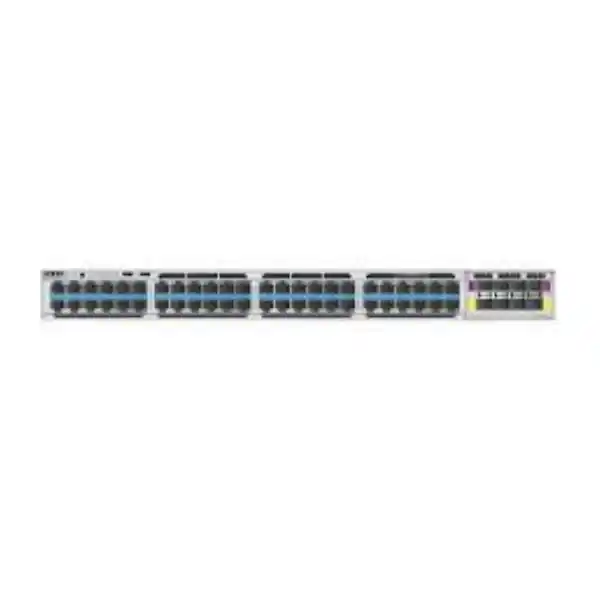
Cisco C9350-48HXN Smart Switch for High-Density Enterprise Networks
The Cisco C9350-48HXN is a 48-port enterprise access switch built for organisations that need more than conventional 1 Gigabit Ethernet at the edge. It combines a practical mix of 5G and 10G multigigabit copper ports, high-power UPOE+ capability, modular high-speed uplinks, StackWise-1.6T stacking and Cisco IOS XE software. For a Tanzanian business, campus, hospitality property, healthcare environment, financial institution, public-sector network, industrial site or system-integration project, the model is most relevant when the access layer must support modern wireless, demanding endpoints and future bandwidth growth without making every copper port a 10G port.
The key design question is not simply whether the switch has 48 ports. Buyers should match the C9350-48HXN to endpoint speed, PoE demand, uplink capacity, redundancy, rack and power conditions, software licensing and the expected growth of the network. FourTeck Tanzania can use those requirements to help frame a suitable bill of materials and quotation request without assuming stock, lead time, price or a specific support entitlement before those commercial details are confirmed.
- 48 copper multigigabit downlinks
- 36 ports up to 5G
- 12 ports up to 10G
- Up to 90 W UPOE+ per port capability
- StackWise-1.6T, up to eight members
- Up to 200G modular uplink bandwidth
- Cisco IOS XE 26.1.1a minimum for this model
- Default PSU: 850 W AC model specified by Cisco ordering guidance
What the C9350-48HXN is designed to solve
Many enterprise networks now have an uneven access-layer demand. A large portion of user devices may be satisfied by 1G, 2.5G or 5G, while selected wireless access points, content-creation workstations, storage-facing systems or specialist devices can benefit from 10G copper. The C9350-48HXN addresses that mixed requirement by providing 36 multigigabit ports supporting 10M, 100M, 1G, 2.5G and 5G, alongside 12 multigigabit ports that add 10G operation. This allows network planners to reserve the highest-speed copper interfaces for endpoints that can actually use them while still giving all 48 downlinks access to modern multigigabit operation.
That distinction matters when planning Wi-Fi 6E and Wi-Fi 7. Modern access points can exceed the practical capacity of a single 1G link, especially when many clients are active, wider channels are used or applications move large amounts of local and internet traffic. A multigigabit switch port can increase wired backhaul capacity without immediately forcing a change to fibre at every access point location. The final negotiated speed still depends on the endpoint, cabling quality, distance and configuration, so a migration plan should include cable certification rather than assuming every installed copper run will deliver the maximum supported rate.
The model also addresses the power side of the edge. Cisco specifies UPOE+ support based on IEEE 802.3bt Type 4, with capability up to 90 W per port. This can be useful for higher-power wireless access points, advanced cameras, displays, building-automation devices and other endpoints that need more than conventional PoE+ power. However, per-port capability and total chassis PoE budget are different measurements. The power-supply design must be sized for the total connected load, redundancy target and future device additions.
Verified port architecture and performance profile
| Design item | C9350-48HXN detail | Why it matters |
|---|---|---|
| Downlink ports | 48 RJ-45 multigigabit ports | Dense access switching for users, APs and powered edge devices |
| 5G group | 36 ports: 10M/100M/1G/2.5G/5G | Efficient capacity for the majority of multigigabit endpoints |
| 10G group | 12 ports: 10M/100M/1G/2.5G/5G/10G | Higher-speed copper where selected endpoints require it |
| Model bandwidth specification | 1000G | Supports a high-throughput access-layer role |
| Forwarding rate | 744 Mpps | Relevant when validating packet-forwarding scale |
| With stacking | 2600G switching capacity, 1934.40 Mpps forwarding | Shows the platform scaling profile in a stacked design |
| Stacking | StackWise-1.6T, up to eight switches | Single-system operation and access-layer expansion |
| Uplink potential | Up to 200G for supported modular uplink choices | Supports high-speed aggregation toward distribution or core layers |
Cisco lists the C9350-48HXN with a single Silicon One A100/L ASIC. The C9350 family also provides 16 GB of DRAM and 18 GB of flash at the platform level, with optional SSD capacity for application-hosting scenarios. The exact value of these capabilities to a buyer depends on the network design. A branch with modest routing and VLAN requirements may never approach the scale limits, while a large campus may care about routing entries, ACL scale, NetFlow capacity, segmentation and high-density telemetry. The important point is to size the switch against the intended architecture rather than selecting it only from the front-panel port count.
PoE planning: understand capability versus available power
The C9350-48HXN supports UPOE+ and is capable of delivering up to 90 W on a port when the endpoint and power configuration require and support it. Cisco also describes a maximum total PoE budget of 4,320 W for the model. That maximum should not be confused with the PoE power available from the default single power supply. Cisco’s current ordering guidance identifies an 850 W AC power supply as the default for the C9350-48HXN, while the detailed power table lists 470 W of available PoE with the default single 850 W primary configuration. Additional or higher-capacity power supplies increase the available PoE budget, and achieving the platform maximum requires an appropriate multi-PSU design.
This is especially important in Tanzania where sites may have different utility, generator, UPS and environmental conditions. The correct approach is to calculate the network cabinet as a complete power system. A specification should include expected steady load, worst-case PoE draw, PSU redundancy, UPS runtime objective, generator transfer behaviour where applicable and cooling. FourTeck can help structure those questions for a quotation, but the final electrical design should follow the actual site conditions and applicable local requirements.
Why the mixed 5G and 10G port layout can be efficient
The C9350-48HXN is not simply a lower-speed version of a 48-port 10G switch. Its design is useful when a project wants deliberate performance tiering. Thirty-six ports can serve endpoints that need up to 5G, and twelve ports are available for devices that justify up to 10G. In many real networks, that can be more economical and operationally sensible than assigning 10G capability to every edge port when only a subset of endpoints can use it.
For example, an office floor might have several high-performance access points, a few specialist workstations and a larger number of standard user devices, phones, printers and cameras. A hotel may need strong wireless backhaul around high-density guest areas while many back-office devices remain at lower speeds. A university building may have selected laboratories or media rooms that benefit from 10G copper alongside classrooms and administration spaces that do not. The C9350-48HXN gives the network designer a structured way to assign those tiers.
The limitation is equally important: only twelve downlinks provide the full 10G multigigabit range on this model. If the project genuinely requires 10G copper on most or all 48 downlinks, another C9350 variant such as the C9350-48HX or a different architecture may be a better fit. The correct product choice therefore starts with an endpoint map, not with a generic preference for the newest switch family.
Uplinks: plan beyond the access ports
Fast access ports are only useful when traffic can leave the switch without an avoidable bottleneck. Cisco supports modular uplinks on the C9350 platform, and the C9350-48HXN supports up to 200G of modular uplink bandwidth with supported module choices. Cisco ordering information includes options such as the C9350-NM-2C with 100G/40G QSFP28 interfaces and the C9350-NM-8Y with SFP56 interfaces supporting multiple 25G, 10G and 1G combinations as well as selected 50G operation. Cisco documentation also lists an RJ-45 multigigabit uplink module option in the family. Module compatibility, optics, cabling and software support should be checked against the exact configuration being ordered.
A good uplink design begins with traffic direction. Wireless access points may create substantial east-west and north-south traffic. Video surveillance can create sustained flows toward recorders or storage. Virtual desktop, backup, media, engineering and cloud workloads can generate bursts that are very different from normal office browsing. If several access switches aggregate toward the same distribution layer, uplink capacity, redundancy and oversubscription should be modelled across the full path rather than calculated per switch in isolation.
The bill of materials should also distinguish the switch from its optional network module, transceivers, fibre patching, DAC or other interconnects. These components are not interchangeable details. Fibre type, connector type, distance, optics compatibility and the port capabilities at both ends must align. For a multi-building or campus project, the uplink design may also need to consider route diversity and physical pathways, not only interface speed.
StackWise-1.6T and StackPower+ for scalable access layers
Cisco specifies StackWise-1.6T for the C9350 Series, with up to 1.6 Tbps aggregate stacking bandwidth and support for as many as eight switches in a StackWise system. This can simplify an access-layer design by allowing multiple physical switches to operate as a unified system with a common management model. Cisco also states that C9350 models can stack with other C9350 models at StackWise-1.6T speeds when the license level is aligned, which gives designers flexibility to mix port profiles within the same family.
The C9350 stack uses dedicated StackWise-1.6T cables, and Cisco explicitly notes that the switches are not compatible with stacking cables from earlier Catalyst 9300 generations. That detail is important for migration projects. A customer replacing older switches should not assume that existing stack cables can be reused. Cable length and rack positioning must be planned before ordering, particularly when a stack spans multiple rack units or adjacent racks.
StackPower+ addresses the power domain. Cisco describes it as a 55 V power-sharing architecture that pools power supplies across connected members. Up to four switches can participate in a StackPower+ ring. This can increase power flexibility and help with redundancy, but it requires compatible StackPower cabling and a deliberate design. The data stack and the power stack are separate planning items, and both should appear clearly in the bill of materials.
For buyers, the practical question is whether a stack is required at all. A single switch may be sufficient for a small deployment. Larger floors, campuses and high-availability designs may benefit from stacking, but the design should also consider fault domains, software maintenance strategy, uplink topology and the impact of a shared control plane. Stacking is a tool for architecture, not a mandatory checkbox.
Security, segmentation and visibility
The C9350 family runs Cisco IOS XE and supports enterprise switching and routing functions that can be used to create a more controlled access layer. Cisco lists Layer 2 switching, IP routing, IPv6 routing, multicast routing, Software-Defined Access, Flexible NetFlow, enterprise QoS, out-of-band management and programmability among the platform features. The data sheet also describes capabilities such as hardware access control lists, Cisco TrustSec, MACsec, traffic visibility and telemetry. Exact feature availability can depend on the selected software release, license and deployment mode, so a quotation should define those elements rather than treating every software capability as automatically included.
These capabilities matter when a network carries different classes of device. Corporate laptops, guest wireless users, VoIP phones, surveillance cameras, building-management devices, printers and operational technology should not automatically share unrestricted access to the same network. VLANs, routing policy, ACLs, identity-based controls and monitoring can help reduce unnecessary reachability and improve troubleshooting. A good design maps business roles and device types to network segments before the switch configuration is created.
Visibility is also important. Flexible NetFlow and streaming telemetry can provide useful data for capacity planning and incident investigation when integrated into an appropriate monitoring system. For organisations with strict security requirements, the value of the switch is not only port speed; it is the ability to enforce and observe policy at the access edge. The monitoring platform, retention requirements and operational workflow should therefore be considered alongside the hardware purchase.
Cisco IOS XE, management and licensing considerations
Cisco lists IOS XE 26.1.1a as the minimum software requirement for the C9350-48HXN. The broader C9350 software platform supports model-driven programmability through technologies such as NETCONF, RESTCONF and YANG, along with telemetry and application-hosting capabilities. Cisco also offers different management approaches across on-premises, cloud and hybrid operations. The best choice depends on the customer’s existing Cisco estate, network-operations skills, security policy and standard management platform.
Licensing needs to be treated as part of the solution, not as an afterthought. Cisco’s current C9350 documentation describes unified licensing delivered through a Cisco Networking Subscription or an Enterprise Agreement, with licensing managed through Cisco Smart Accounts. Some advanced capabilities can be tied to license level, release or service term. Before purchase, the customer should define which features are required on day one and which are planned for later, then match the hardware and subscription to those requirements.
Software-release planning also matters. A new hardware platform may have a higher minimum IOS XE release than older switches already in the environment. Standardisation teams should compare approved software versions, feature dependencies, interoperability and maintenance policy before introducing the model. If the C9350-48HXN will join a stack or participate in an existing Cisco campus architecture, software and license alignment should be validated in advance.
Cisco documentation notes that post-quantum cryptography support is available in IOS XE 26.2.1 at the platform level. That does not mean every cryptographic or security function is automatically active or relevant in every deployment. Security architecture should be based on actual requirements, validated feature support, license level and approved software. Buyers should avoid selecting the platform solely from a headline feature without confirming how that feature will be used operationally.
Tanzania deployment planning: practical checks before ordering
A technically suitable switch can still create deployment problems if the site is not ready for its physical, electrical and cabling requirements. For Tanzanian projects, the preparation should start with a site-specific checklist. This is particularly important for multi-floor buildings, campuses, hospitality properties, healthcare facilities, schools, warehouses, factories and remote operational sites where network closets may vary significantly in cooling, power continuity and cabling quality.
Rack depth and airflow
Cisco lists the C9350-48HXN chassis at 4.4 x 44.5 x 47.2 cm without the power supply and approximately 4.4 x 44.5 x 51 cm with an 850 W or 1600 W PSU. Confirm usable rack depth, cable bend radius, rear access and airflow before delivery.
Weight and mounting
Cisco lists an approximate weight of 8.3 kg with the default power supply. The rack should be suitable for the switch, additional PSUs, patch panels, UPS equipment and related hardware. Standard 19-inch rack brackets are part of Cisco’s default ordering package, while non-standard mounting hardware must be selected separately.
Power and UPS
Calculate the switch load together with the PoE endpoint load and any other rack devices. Decide required UPS runtime and whether the system must remain fully powered during utility loss, generator transfer or a PSU failure. Do not size UPS capacity using only the chassis idle load.
Temperature and environment
Cisco specifies operation from -5°C to 45°C up to 6,000 ft and -5°C to 40°C up to 10,000 ft, with a 0°C minimum for cold start, plus 10% to 95% non-condensing relative humidity. Site cooling should be designed around real cabinet conditions and PoE load.
Copper cabling
Higher multigigabit speeds depend on cabling condition, category, distance, termination quality and electromagnetic environment. Existing structured cabling should be tested before a migration so that switch capability is not blamed for a physical-layer limitation.
Fibre and optics
For uplinks, identify required distance, fibre type, connector, redundancy and target speed. Optics or cables should be selected for the exact network module and the peer device. A 100G-capable module alone does not define a working optical link.
Common business scenarios
Enterprise offices
Useful where modern wireless, IP telephony, user devices, cameras and building systems converge on the access layer. The mixed 5G/10G port profile can allocate higher-speed ports to access points or specialist users while keeping broad multigigabit coverage across the floor.
Education campuses
Can support high-density wireless in lecture spaces, labs and administration areas. Stacking and high-speed uplinks can help scale access closets, but endpoint counts, PoE requirements and inter-building fibre should be mapped building by building.
Hospitality properties
A hotel or resort may combine staff systems, guest Wi-Fi, cameras, IP phones and building devices. Segmentation, PoE sizing and uplink design should reflect peak occupancy and the number of high-capacity wireless access points rather than average daytime use.
Healthcare networks
Healthcare sites can have diverse clinical, administrative, wireless, security and facilities endpoints. Network policy and redundancy requirements may be more important than raw port count, so the design should define segmentation, change control and uptime expectations before selecting accessories.
Industrial and smart-building sites
UPOE+ can be relevant where the same access switch powers cameras, sensors, controllers or other edge devices. Environmental conditions and power continuity should be assessed carefully because high PoE density increases the importance of cooling and electrical planning.
System integrators and project supply
Integrators can use the model where a bill of materials needs a defined mix of 5G and 10G access, scalable PoE and high-speed uplinks. The quotation should clearly separate switch, license, network module, optics, stacking, power supplies and service items.
C9350-48HXN versus nearby C9350 choices
Selecting within the C9350 family is easier when the decision is tied to the endpoint mix. The C9350-48HXN is best understood as a tiered multigigabit model. It provides twelve 10G-capable copper ports and thirty-six ports up to 5G, all with UPOE+ capability. By comparison, Cisco lists the C9350-48HX with 48 multigigabit downlinks up to 10G and UPOE+, while the C9350-48TX provides 48 multigigabit downlinks up to 10G as a data-only model without PoE.
| Model | Downlink profile | PoE role | Typical selection logic |
|---|---|---|---|
| C9350-48HXN | 36 up to 5G + 12 up to 10G | UPOE+ up to 90 W per port capability | Mixed-speed high-power access where only some endpoints need 10G |
| C9350-48HX | 48 ports up to 10G | UPOE+ up to 90 W per port capability | When most or all copper access ports may require 10G-class multigigabit performance |
| C9350-48TX | 48 ports up to 10G | Data only | High-speed copper access where PoE is not needed |
This comparison is not a complete substitute for a design review. Uplink requirements, switching capacity, software, licensing and power strategy can change the most suitable choice. A project that appears to need the C9350-48HXN because of Wi-Fi 7 may actually need fewer ports, more 10G ports, a different PoE budget or a different access-layer architecture once the endpoint schedule is documented.
Migration planning from older access switches
A switch refresh should solve known constraints rather than merely replace hardware one-for-one. Start by recording the current port utilisation, PoE usage, uplink utilisation, VLANs, routing roles, spanning-tree design, authentication methods, ACLs, monitoring integrations and any special features. This creates a baseline for deciding what must be preserved, what should be redesigned and what can be retired.
Cabling is one of the most common hidden constraints. A port may support 5G or 10G, but a legacy cable route may not. Certification testing can identify runs that need remediation before the cutover. Wireless upgrades should also be coordinated with switch-port speed and power. An access point that requires more power or bandwidth than the old network provided may need both a switch change and a cabling review.
Stack migration needs additional care. Cisco states that C9350 switches use their own StackWise-1.6T and StackPower cable sets and are not compatible with stacking or StackPower cables from previous Catalyst 9300 generations. A replacement project should therefore include the correct C9350 stack cables and should not assume existing cable assets are reusable. Rack layout and cable lengths need to be planned before the maintenance window.
Finally, configuration migration should be reviewed rather than blindly copied. Software syntax, defaults, features and recommended practices can change between platforms and releases. The team should validate the target IOS XE version, licensing, management integration and feature support, then test a representative configuration before large-scale rollout. That reduces the risk of discovering design assumptions during a production cutover.
Buyer checklist for a C9350-48HXN quotation
A useful quotation request should contain enough technical context to distinguish a complete deployable solution from a bare switch line item. The following information helps reduce revisions and makes the commercial comparison more meaningful.
Number of endpoints, expected speeds, copper versus fibre and projected growth.
Device type, quantity, expected wattage and which endpoints need higher-power UPOE+.
Target speed, redundancy, fibre type, distance, peer-device interfaces and optics needs.
Single switch or stack, number of members, rack positions and required stack-cable lengths.
PSU count, redundancy policy, UPS runtime, PDU capacity and expected maximum PoE load.
Required features, management platform, Smart Account readiness and subscription expectations.
Rack depth, cooling, cable management, environmental conditions and maintenance access.
Existing switch models, config complexity, outage window, testing plan and rollback requirements.
A quotation can then identify the switch, selected license, uplink module, optics, power supplies, power cords, stack cables, StackPower cables and any other required accessories as separate, checkable items. This is preferable to assuming that every accessory shown in a solution diagram is included with the base chassis.
Frequently asked questions
How many 10G copper ports does the Cisco C9350-48HXN have?
Twelve of the 48 downlink ports support the full multigigabit range through 10G. The other thirty-six downlinks support speeds through 5G. This mixed layout is a defining difference of the HXN model and should be matched to the number of endpoints that genuinely need 10G copper.
Does every port support PoE?
Cisco specifies UPOE+ capability for all 48 downlinks, with up to 90 W per port capability. The amount of power that can be delivered across all ports at the same time depends on the installed power supplies and total chassis PoE budget.
Does the default switch configuration provide 4,320 W of PoE?
No. Cisco’s detailed power table lists 470 W available PoE for the C9350-48HXN with the default single 850 W primary power supply. Additional and/or upgraded power supplies are required to raise the available PoE budget, and the full platform maximum depends on the appropriate power configuration.
Is the C9350-48HXN suitable for Wi-Fi 7 access points?
Cisco positions the model for dense wireless access environments including Wi-Fi 6, Wi-Fi 6E and Wi-Fi 7. Whether it is the right fit for a particular access point depends on the AP’s Ethernet speed, PoE requirement, quantity, cabling and uplink design.
What uplink speeds can be used?
The switch uses optional modular uplinks. Cisco states that the C9350-48HXN supports up to 200G of modular uplink bandwidth with supported module combinations. The selected module, optics or copper media, and the peer device must all be compatible with the chosen speed.
How many switches can be stacked?
StackWise-1.6T supports up to eight C9350 switches in a data stack. Cisco states that C9350 models can be mixed within the stack at StackWise-1.6T speeds when the license level is the same. Exact topology and software requirements should be validated for the intended deployment.
Can existing Catalyst 9300 stack cables be reused?
No. Cisco documentation states that the C9350 Series uses StackWise-1.6T and StackPower cables specific to this platform and is not compatible with stack or StackPower cables from the Catalyst 9300 Series or other previous-generation switches.
What is the minimum IOS XE release for the C9350-48HXN?
Cisco lists IOS XE 26.1.1a as the minimum software requirement for the C9350-48HXN. Newer releases may add features or fixes, so the target release should be chosen according to Cisco support guidance, feature requirements and the customer’s software standards.
Does the switch support Layer 3 routing?
Yes. Cisco lists IP routing, IPv6 routing, IP multicast routing and IPv6 multicast routing as available C9350 platform features. The precise functions and scale required by a project should still be checked against the chosen license and software release.
How large is the switch?
Cisco lists the C9350-48HXN chassis at 4.4 cm high, 44.5 cm wide and 47.2 cm deep without the power supply. With an 850 W or 1600 W power supply, the depth is approximately 51 cm. Rack depth and rear cable clearance should therefore be confirmed before ordering.
What should a Tanzanian buyer provide for a useful quote?
Provide the number and type of endpoints, required port speeds, PoE device list, uplink design, existing core or distribution interfaces, fibre distances, preferred redundancy, rack details, UPS expectations, license and management requirements, quantity and project timeline. This allows the quotation to be built around the actual deployment rather than a bare chassis.
Is price or stock confirmed on this page?
No. Price, stock, lead time, delivery, support entitlement and warranty handling can vary by configuration, supplier status, quantity and project requirements. Those commercial details should be confirmed in the current quotation for the exact order.
Request a Cisco C9350-48HXN configuration review for Tanzania
If your project needs high-density multigigabit access, Wi-Fi 6E or Wi-Fi 7 backhaul, high-power PoE, resilient stacking or faster uplinks, the C9350-48HXN can be a strong candidate when its mixed 5G/10G port profile matches the endpoint plan. The most useful next step is to define the complete requirement before requesting the final commercial offer.
Share the site type, port count, number of high-speed access points or other powered devices, expected PoE load, uplink speed, fibre distance, redundancy needs, rack and UPS details, management preference and required quantity. FourTeck Tanzania can then prepare the requirement for quotation and help identify the switch, power, uplink, stacking and licensing components that should be reviewed together.




Reviews
There are no reviews yet.