
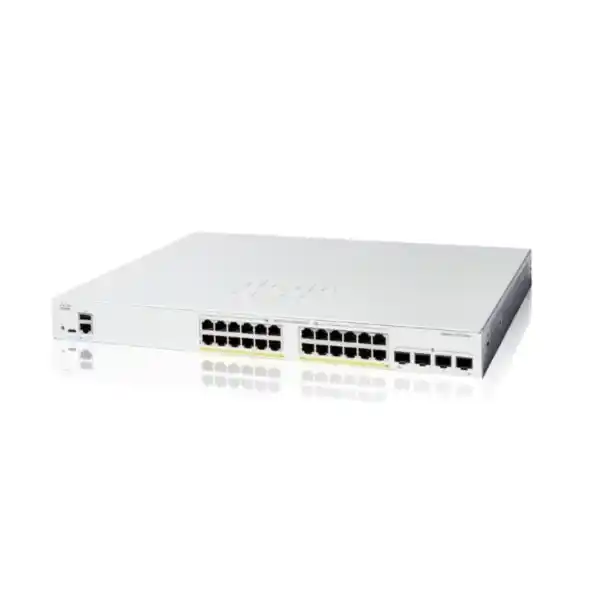
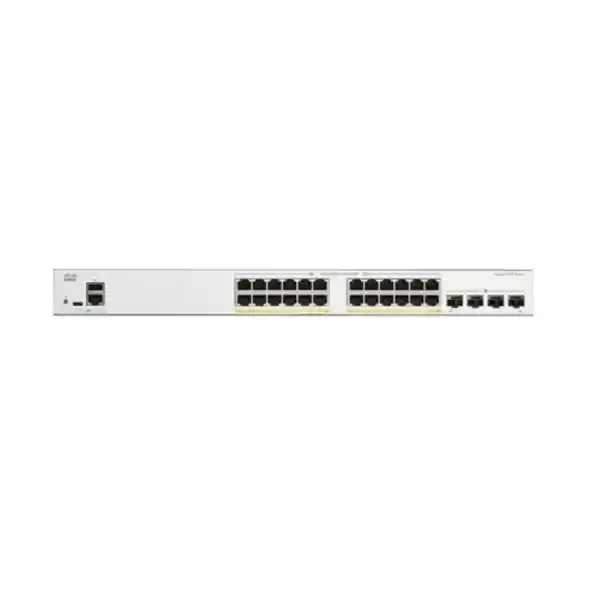
Cisco Catalyst 1200 · Business access switching
24 copper connections. Four fibre uplink options. Clear control of your LAN.
Choose the Cisco C1200-24T-4G switch for a structured Gigabit access network when your endpoints have separate power and your backbone needs 1G SFP connectivity. Plan the uplinks, device power and management approach together before ordering.
A practical access switch for a wired business LAN
The Cisco Catalyst C1200-24T-4G Network Switch suits a business that needs organised wired connectivity for computers, printers and other independently powered Ethernet devices. It combines 24 copper Gigabit ports with four Gigabit SFP uplink slots, giving a small office or departmental network a clear separation between endpoint connections and uplinks. Choose this model when Gigabit access is sufficient and power delivery over Ethernet is not required. Request a quotation from FourTeck Tanzania with your device count, uplink requirements and planned network layout.
This is a smart switch for buyers who need more control than an unmanaged device provides. VLANs, traffic prioritisation, access controls and management tools support a structured LAN, while the fanless design helps when equipment is installed near working areas. The important buying decisions are whether your endpoints need PoE, whether the backbone needs more than 1G per link, and whether the proposed configuration matches the person or team that will operate it.
Verified specifications at a glance
| Specification | Model detail |
|---|---|
| Manufacturer and family | Cisco Catalyst 1200 Series |
| Exact model | C1200-24T-4G |
| Copper access connections | 24 × 10/100/1000 Mbps RJ-45 ports |
| Uplink connections | 4 × Gigabit SFP slots |
| Power over Ethernet | No PoE output on this model |
| Switching capacity | 56 Gbps |
| Forwarding rate | 41.67 million packets per second, measured with 64-byte packets |
| Cooling | Fanless |
| Installation format | Rack-mountable |
| Dimensions, width × depth × height | 445 × 240 × 44 mm |
| Unit weight | 2.63 kg |
| Power input | Internal universal AC supply, 100–240 V, 50–60 Hz |
The copper ports connect devices through suitable Ethernet cabling. The SFP slots require compatible modules and an appropriate link design; a slot is not a complete fibre connection by itself. Specify the transceivers, fibre patch leads and remote equipment when requesting a complete solution. Keep the exact model on the purchase request because adjacent Catalyst 1200 variants change power delivery, uplink speed or port count.
Published switching capacity describes the switch fabric rather than the speed of an individual application or internet service. A single access port remains limited by its negotiated link speed, and an application also depends on its server, storage, cabling and upstream connections. Use the specification table to identify the hardware, then size the network around the traffic that must cross each link.
Check fit before choosing the model
Start with an endpoint inventory rather than the number of people in the office. One employee may use a computer and an IP phone, while a shared printer, meeting-room system or locally powered wireless access point adds another connection. Count equipment that will connect on the first day and record likely additions separately. A proposed port map makes it easier to see whether a 24-port access layer leaves an appropriate amount of room for your own growth plans.
This model is a sensible candidate for a department with ordinary Gigabit endpoints and a modest uplink requirement. It can also serve a branch where the firewall or router handles internet access and security policy. Suitability depends on the actual design: confirm how users reach shared applications, whether guest traffic crosses the switch, and which devices remain available during a power interruption. Those questions often matter more than a long feature list.
Select a different configuration when the requirements point elsewhere. Devices powered only through Ethernet need a suitable PoE source. A busy shared storage path may justify faster uplinks. A larger access layer may need more ports or a different resilience architecture. If enterprise access requirements extend beyond this product’s intended role, review the broader options in the verified Tanzania guide to Cisco Catalyst 9200 Series switches.
Understand the four Gigabit SFP uplinks
The four SFP slots provide Gigabit uplink options while preserving the copper access ports for local devices. A typical design might use fibre between a departmental rack and an upstream switch. Decide which links are needed before ordering modules: identify the two ends of each connection, the fibre already installed, the measured route length and the connectors available at the patch panels. Fibre selection should follow the link requirements rather than a guess based only on the building size.
Ask the person preparing the bill of materials to match the transceiver type at both ends. Record the supported speed, fibre type, wavelength and optical budget, along with any compatibility requirements of the remote equipment. Connector appearance alone does not establish compatibility. Existing fibre should be identified and checked before it becomes the basis for an order, especially if records are incomplete or previous equipment used a different optical standard.
These are 1G SFP uplinks. Do not buy this model expecting a 10G SFP+ backbone, and do not assume that changing the module upgrades the slot’s speed. For a design needing 10G uplinks, compare the appropriate 4X variant and validate its optics separately. This distinction is especially useful where many access devices will share a path to a central server, backup destination or upstream aggregation switch.
Plan endpoint power separately
The 24T model carries network data without supplying PoE to attached endpoints. A desktop computer with its own power supply is a straightforward match. An IP phone, camera or access point may also communicate through the switch if it has a suitable independent power source, but its individual Ethernet and power requirements must be checked. Do not infer power compatibility from the fact that the cable plugs into an RJ-45 socket.
For a mixed network, make a simple list showing each device, its power source and whether it must stay operational during an outage. If only a small number of endpoints require PoE, compare appropriate injectors with a PoE switch design. Check the power standard and required wattage for every powered device. Injectors also add sockets, cables and equipment to manage, which may affect the practical choice even when they meet the electrical requirement.
If centralised Ethernet power is a core requirement, evaluate a PoE-capable model with an adequate total budget and per-port capability. Avoid selecting solely by the number of PoE ports because the connected devices may have different power demands. Include endpoint power in any backup-power plan: keeping this switch running alone will not keep a separately powered phone, access point or upstream router operating.
Use VLANs to organise traffic
VLAN support allows the LAN to be divided into separate logical groups. For example, an organisation could plan distinct networks for staff devices, visitors, voice endpoints and equipment management. The useful outcome is a clear relationship between a device’s role and the network it joins. Define those groups before configuration so the installer can establish consistent port membership and the required connections to the upstream router or firewall.
The practical work includes agreeing which ports carry a single endpoint network and which links carry tagged traffic for several networks. Both ends of a tagged connection need compatible settings. Ask for a port schedule showing the intended VLAN membership, the connected device and any exceptional treatment. That schedule is easier to maintain than relying on cable colours or the memory of the person who performed the original installation.
Segmentation also needs a communication policy. Write down which groups should reach the internet, shared printers, business applications and management interfaces. A separate VLAN does not by itself define all permitted communication once routing is enabled. Have the network designer place enforcement where it can be understood, tested and maintained, and verify both the connections that should work and those that should be blocked.
Keep routing responsibilities clear
Static routing is available on the Catalyst 1200 platform and can be useful in a deliberately scoped network design. Before using it, decide which device should act as the gateway for each subnet and where traffic inspection should occur. In some offices, keeping gateway and security responsibilities on the firewall produces a simpler operating model. In others, local routing may be appropriate after the traffic paths and access policy have been reviewed.
Do not enable routing merely because the feature is present. Ask what business requirement it serves, who will maintain the route entries and how return traffic will reach each network. List the intended destinations, next hops and default path as part of the design. A working connection in one direction is not enough evidence that the routing arrangement is complete or that every application will behave as intended.
Keep this product’s access-switch role distinct from requirements for advanced enterprise routing or a complete security gateway. If the project calls for complex route exchange, sophisticated inspection or a particular high-availability architecture, specify those requirements explicitly and select equipment against them. Configuration should follow a reviewed topology instead of treating all products carrying the Catalyst name as interchangeable.
Prioritise voice and other sensitive traffic
Quality of Service provides a way to give selected traffic preferential treatment when links are contended. Voice VLAN capabilities can help organise supported phone traffic, while classification and queue settings support an agreed priority policy. Begin with the application’s needs and the existing markings used across the network. A useful configuration applies consistent treatment at each point where traffic could queue, rather than setting a priority only on the access switch.
Discuss which devices are trusted to mark traffic and how the upstream network handles those markings. An overly broad priority rule can favour traffic that does not need special treatment. Ask the installer to document the intended classes in plain language so the person supporting the network can understand why a rule exists. Test a representative call or meeting while normal business activity continues, then investigate problems across the complete path.
Prioritisation does not create extra bandwidth or correct every source of delay. If a busy shared uplink is repeatedly saturated, review the demand and uplink design as well as the policy. If an application depends on an internet service, check the router, firewall and provider path separately. Establish the point of congestion before choosing a remedy, and avoid promising call quality from a switch specification alone.
Build a secure management approach
Management access should be planned alongside user connectivity. The platform provides security functions including management access controls, SSH, port security and 802.1X authentication capabilities. Choose the controls that fit the organisation’s processes and supporting infrastructure. Before enabling an authentication scheme, confirm that the required identity services and endpoint behaviour have been considered so legitimate users are not unexpectedly disconnected.
Define which administrator devices may reach the switch and which people are responsible for changes. Use individual administrative access where practical, store credentials in the organisation’s approved system and review access when responsibilities change. Avoid leaving management available from visitor networks merely because it is convenient during installation. Agree a recovery method before tightening access, particularly if the rack is in a location that is difficult to reach.
Treat access control lists as part of a documented policy. The platform supports MAC, IPv4 and IPv6 ACLs, but a rule must be applied in the right context to have the intended effect. Ask for a short explanation of the traffic each rule permits or denies, then test representative devices. Keep the security gateway’s responsibilities explicit and review changes to addressing or applications that might make an older rule inappropriate.
Choose a management workflow your team can maintain
The switch offers a browser-based configuration interface, and Cisco provides a dedicated CLI guide for the Catalyst 1200 platform. Choose the day-to-day method according to the team’s skills and the scale of the deployment. A small office may prefer a documented browser workflow, while an experienced administrator may use command-line access for specific tasks. The important requirement is that another authorised person can understand the configuration and support it later.
Initial setup should establish a known management address, suitable administrator credentials and a clear device name. Record where the switch is installed, what role it serves and which upstream device it connects to. Confirm that changes have been saved using the appropriate configuration workflow before ending the installation. Retain a protected configuration backup and explain how to reach the management interface from an authorised workstation.
If central management is required, review the Cisco Business Dashboard option against the proposed environment and current supported deployment method. Do not assume that every Cisco management platform manages every Catalyst family in the same way. Confirm the exact integration required before purchase, including the administrator’s access path and responsibilities. Keep software maintenance, monitoring and configuration ownership in the project scope instead of leaving them as unspecified tasks after delivery.
Size shared links around actual traffic
A port count says how many connections are available, but a traffic map explains whether the proposed network will feel responsive. Identify traffic that remains within the local switch and traffic that must pass through an uplink. Large file transfers, central backups and multiple simultaneous users of remote resources can place different demands on the same connection. Ask when those activities occur, since a scheduled overnight transfer may have a different business impact from congestion during working hours.
Use realistic workloads when checking capacity. A small office using cloud applications may have a different pattern from a department transferring large project files to central storage. Measure an existing network where possible, or describe expected application use if the site is new. Include the capabilities of the receiving server and its own network interface; upgrading a switch does not remove a bottleneck elsewhere in the path.
Link aggregation can be considered when both ends support the intended arrangement. The platform supports LACP, but an aggregate should be designed and tested rather than treated as a substitute for a faster individual link. Traffic distribution depends on the implementation and flow pattern. Ask the network designer to explain the expected benefit for your applications and what happens if a member connection fails.
Design redundant connections deliberately
Adding a second cable between switches needs a planned topology. The Catalyst 1200 platform supports spanning-tree functions that help manage Layer 2 paths, while link aggregation offers a different approach where appropriate. Decide which method the design uses and ensure that settings on connected equipment agree. Unplanned parallel links can introduce faults that are difficult to diagnose, especially when a small network has grown through ad hoc changes.
Ask for a simple diagram showing the access switch, upstream connections, gateway and important dependencies. If resilience is required, define the failure being addressed: a damaged patch lead, one uplink, an upstream device or a loss of rack power. Different failures need different solutions. Two cables passing through the same vulnerable route may provide less protection than their appearance suggests.
Plan a controlled failure test during commissioning. Confirm which applications should remain available, the expected operational response and any limits of the chosen design. Record the result so future changes can be assessed against a known arrangement. This switch should be selected within that topology; do not assume chassis stacking or a particular enterprise failover feature from the Catalyst family name.
Prepare the rack, power and cabling
The chassis is rack-mountable and uses fanless cooling. Position it where ventilation openings remain clear and cable management does not obstruct access to the ports. Fanless construction is useful near offices, but it still requires an appropriate installation environment. Review the manufacturer’s mounting guidance and the conditions inside the intended cabinet, including other equipment that may increase temperature.
Check rack depth with room for power and data cables, rather than comparing only the chassis dimensions. Make patch-panel labels readable, route fibre without strain and leave enough access for replacing a transceiver or tracing a cable. Where a rack is shared, agree who may move patch leads. Physical organisation is a practical support tool: a clearly labelled installation reduces the time spent finding a connection during an incident.
Plan suitable AC power and backup power for the whole service chain. The switch has an internal universal supply, but an operational LAN may also depend on a router, firewall, internet termination device and separately powered endpoints. Have the electrical arrangement checked by an appropriate installer. For Tanzania procurement, confirm the supplied power lead, site requirements and any necessary accessories in the written quotation.
Apply the switch to a defined business scenario
Office workgroup
A team connecting desktop computers, a shared printer and other locally powered equipment can use a structured port plan. Confirm uplink demand during busy periods and reserve an appropriate number of connections for likely additions.
Departmental rack
A department connected to a central network can use compatible fibre uplinks after the installed fibre and remote equipment are checked. Define which VLANs cross the uplink and who maintains each end.
Training or teaching room
Wired workstations can be grouped according to their role. Review management access, shared applications and the procedure for connecting temporary devices before deciding the final configuration.
Branch with an existing firewall
The switch can provide local Ethernet access while the firewall handles the intended gateway and security functions. Document address ranges, required application paths and the complete backup-power dependency.
These are planning examples, not guarantees of fit for every site. Before choosing the hardware, list the actual applications, endpoint interfaces and operating constraints. A small number of demanding devices can change the uplink requirement, while a modest office with many PoE endpoints can change the power requirement. Evaluate the design against the workload and service expectations rather than using the organisation’s industry as the only selection criterion.
Move from an existing switch with a clear change plan
For a replacement project, collect the information needed to reproduce the required behaviour before disconnecting cables. Photograph and label the current patching, record active ports and identify every uplink. Obtain the VLAN list, management address, gateway information and any special port treatment. Ask application owners whether there are devices that are easy to overlook, such as attendance terminals, network printers or equipment used only at particular times.
Compare the existing design with the proposed model rather than assuming that the same number of sockets means equivalent capability. Check endpoint power, uplink speeds, optics, authentication and traffic controls. A configuration from another Cisco family should be reviewed for this platform instead of pasted without validation. Keep a record of the intended result so the change can be tested independently of how the old switch was configured.
Agree a maintenance window and a practical rollback arrangement. Identify the person authorised to accept the change, the equipment needed onsite and the point at which service should be restored to the previous arrangement if acceptance fails. Keep the old device and its configuration available until the new setup has met the agreed checks. A controlled migration limits uncertainty without implying that any switch replacement is automatically interruption-free.
Commission the network with acceptance checks
Define success before installation begins. For each important device group, identify the application, printer, server or internet service it must reach. Include permitted communication across networks and examples of traffic that should remain blocked. A useful acceptance sheet pairs each requirement with an observable result, such as a workstation reaching a business application or a guest device being unable to access a management interface.
Check physical links and representative application behaviour after the configuration is applied. Verify expected link speeds, investigate interface errors and test uplinks with the intended traffic. If voice, video or fibre connections are included, test those specific paths rather than assuming that a successful web browse covers them. Where changes affect a remote department, have someone at that location verify the user experience.
Complete the handover with a port map, topology, management details, configuration backup and a list of outstanding items. Keep passwords and other sensitive material in the approved protected channel rather than placing them in a general document. Confirm who will review logs and maintain the switch after installation. Separately agree any ongoing service requirement; purchasing the hardware does not by itself define an operational support arrangement.
Use monitoring to narrow down faults
Cisco’s administration tools provide interface statistics, logs and diagnostic views that can help investigate connectivity problems. Establish a basic record when the installation is working: connected devices, expected port speeds and the normal role of each uplink. That baseline provides context when an administrator later sees an unexpected link change or a user reports intermittent performance. Monitoring is most useful when someone has a clear responsibility for reviewing the information.
When one device loses access, begin with its connection, power source and assigned network before changing a global setting. If several users are affected, compare their shared paths and dependencies. Check whether the problem is local switching, an uplink, a gateway or a remote application. A systematic check avoids making unrelated configuration changes that obscure the original fault.
For recurring problems, record when they occur, which users are affected and which applications fail. Preserve relevant logs and counters before replacing equipment or restarting services where practical. If packet analysis is required, have a qualified administrator select an appropriate diagnostic method and protect any captured business data. Use the findings to decide whether the remedy is cabling, configuration, capacity or another component in the network.
Request a complete Tanzania quotation
Send FourTeck Tanzania the exact model name, quantity and a short description of the intended deployment. Include the current or proposed upstream equipment, endpoint count and whether any devices require power through Ethernet. For fibre links, provide the installed fibre type, route length and equipment at the far end. If those details are unknown, state that a compatibility review is needed rather than selecting modules from appearance or price alone.
Ask for a written bill of materials that distinguishes the switch from transceivers, fibre leads, copper patch cords and any other required accessories. Identify installation, configuration, migration and support requirements separately so the quotation can address the work you actually need. Confirm the commercial details for the exact offer, including price in the quoted currency, stock position, applicable taxes, delivery terms and warranty or support arrangements.
Keep procurement and technical acceptance connected. The purchase request should name this model precisely, while the technical scope should describe the network outcome and agreed limitations. If the supplier proposes a substitute, compare port count, power delivery, uplink type, management requirements and physical installation before approval. A clearly specified substitute can be evaluated; a vague promise of an equivalent Cisco switch leaves too much unresolved.
Frequently asked buying questions
Does the C1200-24T-4G supply PoE?
No. This model does not supply Power over Ethernet to connected devices. Check how every phone, camera or wireless access point will be powered. If Ethernet power is required, specify a suitable PoE model or compatible external power arrangement before placing the order.
Are the four SFP uplinks 10 Gigabit?
No. They are Gigabit SFP uplinks. A project requiring 10G uplinks should evaluate a suitable 4X model or another appropriate platform. Choose the uplink speed from the expected shared traffic and remote equipment requirements, then confirm the exact hardware.
Can all 24 copper ports be used with the SFP uplinks?
Cisco lists this model with 24 copper Gigabit ports plus four SFP ports. The SFP connections are additional uplink interfaces. Plan the optics and cabling separately, and verify the intended configuration before treating the port count as a complete bill of materials.
Is this a fanless switch?
Yes. Cisco identifies this model as fanless. That can be helpful where a rack is near people, but installation still needs ventilation and suitable environmental conditions. Check the cabinet layout and surrounding equipment instead of assuming that fanless hardware can be enclosed without airflow.
Can it support phones or wireless access points?
It can provide suitable Ethernet data connectivity where the endpoint’s interface and configuration requirements match. This non-PoE model leaves endpoint power to another source. Check each device’s required link speed, VLAN arrangement and power method; do not assume every access point is well matched to Gigabit access.
Does it support VLANs and static routing?
The Catalyst 1200 platform supports VLANs and static routing. Use those features within a reviewed topology that defines gateways, address ranges and traffic policy. The presence of routing does not remove the need to decide where security inspection and internet access will be handled.
Are fibre modules included with the switch?
Do not assume that the quoted switch includes transceivers. Ask the quotation to list modules and patch leads explicitly. Identify the fibre type, distance, connectors and remote interface so both ends of the link can be checked before the equipment is ordered.
Will it improve an existing internet connection?
It can address a suitable local switching requirement, but internet performance also depends on the service, router, firewall and other shared paths. Identify where congestion or errors occur before buying. A faster or better organised LAN cannot by itself increase the provider’s subscribed bandwidth.
Is it a direct replacement for every 24-port Cisco switch?
No. Compare the exact existing model and configuration. Differences in PoE, uplink speed, stacking, routing, security features or management can matter even when both products have 24 access ports. Document the required behaviour and validate the replacement against that list.
How should I confirm price and availability in Tanzania?
Request a written offer from FourTeck Tanzania for the exact model, quantity and accessories. Confirm the applicable commercial terms at the time of ordering. Include installation or support requirements in the enquiry so they can be addressed explicitly in the proposed scope.
Request your C1200-24T-4G quotation
Share your required quantity, endpoint types, upstream switch or firewall, and fibre link details with FourTeck Tanzania. Ask for the exact switch and a clearly itemised accessory list, then confirm commercial terms and the required configuration scope before ordering.
Next step: request a written product quotation and compatibility review for your planned network.




Reviews
There are no reviews yet.