
CISCO CATALYST 1200 · BUSINESS ACCESS SWITCHING
Connect office devices and power compatible endpoints from one managed access switch
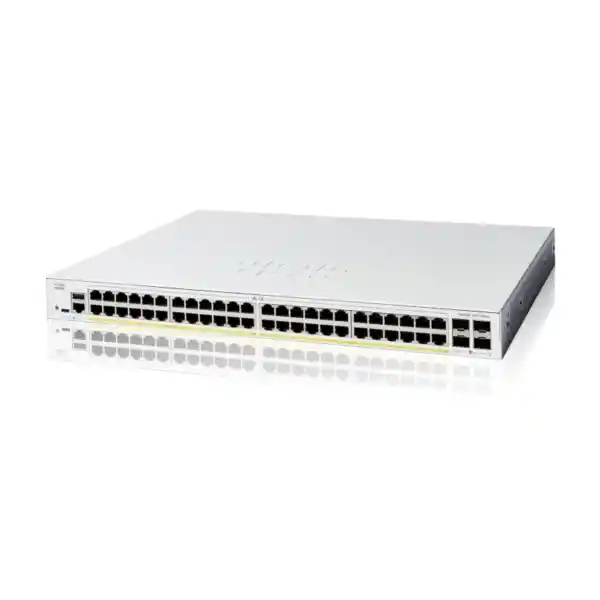
The Cisco Catalyst C1200-48P-4G Network Switch suits Tanzania buyers who need a substantial bank of wired connections alongside power for compatible phones, cameras and wireless access points. Its strongest fit is a business access network where endpoint density matters and Gigabit uplinks match the expected traffic. Start your selection with the equipment you intend to connect, the power each device needs and the capacity of the upstream network.
4 × 1G SFP uplinks
Shared PoE power budget
Request a quotation from FourTeck Tanzania with your device list and uplink requirements. Include any planned wireless or surveillance expansion so the proposed configuration can be checked before you approve an order.
The main buying decision: port density, power and uplink capacity
A switch purchase works best when three requirements are assessed separately. The first is the number of physical connections needed in the cabinet. The second is the combined power requirement of endpoints that rely on the network cable for electricity. The third is the amount of traffic that must leave the switch toward shared services, other buildings or the internet gateway. A design can have enough sockets while still being constrained by power or upstream bandwidth.
For an office with a mixture of computers and powered devices, this model offers a practical starting point. For a cabinet filled mainly with demanding wireless radios or high-power cameras, the endpoint inventory needs closer review. Equally, a site with intensive file transfers or concentrated video traffic should assess its uplink design before choosing the switch solely on access-port count. Ask the project team to record assumptions rather than relying on a broad description such as “business networking.”
A sensible shortlist when
- You need many wired connections in one cabinet.
- Powered endpoints have verified, moderate combined demand.
- Your upstream design is suitable for Gigabit links.
- An administrator will maintain the network configuration.
Compare another configuration when
- The design requires faster uplinks or multigigabit access.
- The power worksheet leaves little expansion capacity.
- The current network depends on specialized platform features.
- The cabinet needs a different resilience architecture.
These are selection questions, not automatic exclusions. A smaller number of busy devices may influence the design more than many lightly used desktops. Share actual application patterns, recording locations and expected device growth when requesting advice. That gives procurement a defensible specification and gives the installer a clear target for commissioning.
Verified hardware snapshot
| Product family | Cisco Catalyst 1200 Series |
|---|---|
| Model / manufacturer product ID | C1200-48P-4G |
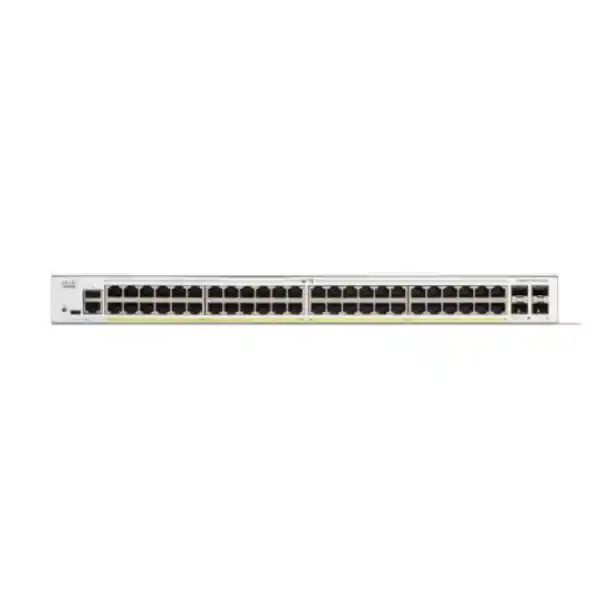
| Copper access | 48 × 10/100/1000 RJ-45, PoE+ |
| Dedicated uplinks | 4 × Gigabit SFP |
| PoE standards | IEEE 802.3af and IEEE 802.3at; up to 30W at an individual port, within the total budget |
| Published PoE budget | 375W in Cisco’s current datasheet and model comparison; confirm the supplied unit at quotation |
| Switching capacity | 104Gbps |
| Forwarding rate | 77.38 million packets per second for 64-byte packets |
| Chassis dimensions | 445 × 350 × 44mm (width × depth × height) |
| Unit weight | 5.43kg |
| Power input | Internal universal supply, 100–240V AC, 50–60Hz |
| Cooling | One fan; consider acoustic placement |
Treat switching capacity as an internal hardware specification. It does not describe the speed of an internet subscription, a single file transfer or an individual uplink. Similarly, a forwarding benchmark uses defined packet conditions and should not become a promise about application response times. End-to-end performance depends on the devices, links and services involved in the actual installation.
There is a documentation difference worth resolving before purchase: Cisco’s administration guide lists a 370W budget for this model, while its current datasheet and comparison page list 375W. Ask for confirmation against the exact offered hardware and documentation. Plan a useful reserve rather than designing around the final few watts. This page does not promise that an unspecified supplied revision will deliver a different budget.
Build a PoE worksheet before connecting the full endpoint estate
Begin with a simple inventory containing device model, quantity, maximum required power and intended switch port. Obtain each endpoint’s requirement from its own manufacturer documentation. A measured daytime reading can be helpful, but it may miss startup demand, optional accessories or operating modes used at other times. Include the planned expansion devices in the same worksheet rather than treating them as a future problem.
Distinguish power supplied by the switch from power available at the far end of a cable. Use consistent figures when comparing endpoints with the available budget, and allow for cable-related losses and the allocation method used by the equipment. If the endpoint documentation gives several power modes, record the mode needed for the required functions. Do not approve a wireless design on the assumption that every radio will operate fully under any available PoE source.
An illustrative mixed-device calculation
Consider a planning example with 20 phones budgeted at 7W each, eight cameras at 10W each and four access points at 20W each. The arithmetic is 140W plus 80W plus 80W, giving 300W. These figures are hypothetical allocations, not specifications for any particular endpoint. Check whether real device allocation, operating conditions and cable allowances fit the final confirmed switch budget before using the example as a design.
Now compare a different hypothetical requirement: 16 devices each demanding a 30W switch-side allocation would total 480W. That exceeds the published budget for this model even though there would be unused physical ports. The lesson is to count watts and connections independently. If the power requirement is too high, assess a different switch configuration, split the load between cabinets or redesign the endpoint mix with appropriate engineering review.
Leave room for changes that happen after installation
Reserve capacity for practical changes such as an extra access point in a meeting area, an additional camera near a new entrance or a phone fitted with an expansion accessory. Agree which additions are already within scope and which require a fresh power assessment. A documented reserve is more useful than an undefined statement that the switch has spare ports.
Also decide how critical endpoints will be prioritized operationally. The camera covering an entrance, a reception phone and a guest wireless radio may have different business importance. Record the desired behavior during constrained power conditions and ask the installer to validate the available configuration against the selected firmware. Avoid discovering the priority policy only when the cabinet is under load.
Plan the upstream connection around real traffic paths
Map where data travels before specifying optics or patching. A desktop browsing cloud applications has a different path from a camera sending a continuous stream to a recorder in another cabinet. A file server on the same access switch creates another pattern. The useful question is how much concurrent traffic must cross each shared link during the busiest relevant period.
Ask the network team to review peak periods rather than averages alone. Morning logins, scheduled backups, recording exports and large software updates can overlap. A link that appears comfortable in a daily average may still cause queues during those events. Where measurements are available, include a representative busy period and enough context to explain what applications were running.
If link aggregation is part of the design, assess both switches and the traffic distribution method together. Multiple member links can improve aggregate capacity for suitable traffic patterns, but the design should not assume that one conversation will use the combined bandwidth of every member. Agree the behavior expected if a member fails, and include a commissioning check for the surviving path.
Select fiber components as an end-to-end pair
For fiber connections, provide the existing fiber type, route length, termination style and the upstream equipment model. Check the selected transceiver at both ends, including supported speed and optical characteristics. A module that physically fits an opening is not enough evidence of a working link. The quotation should identify the intended optic and patch leads clearly.
Keep an installation record of which strands and patch-panel positions carry each service. This becomes valuable when a contractor changes a route or an engineer needs to isolate a failed connection. Label both ends consistently and keep spare patching organized. Good records can reduce avoidable troubleshooting without changing any hardware specification.
When faster upstream capacity is a firm requirement, compare the appropriate alternative before ordering. The similarly named C1200-48P-4X has four 10G SFP+ uplinks according to Cisco’s model comparison. Record the complete suffix on the quotation and purchase order so a higher-speed design is not inadvertently supplied with a different uplink configuration. Optics, upstream ports and the fiber installation still require their own compatibility checks.
Organize the network around services and permitted access
Cisco documents VLAN configuration, access and trunk interface modes, voice VLAN functions and surveillance VLAN functions for the Catalyst 1200 platform. The value of those controls depends on a coherent plan. Start by identifying services that should share a network and services that need separation. Typical planning groups might include staff workstations, guest wireless, phones, cameras and equipment management.
Write down the permitted relationships between those groups in ordinary language before translating them into settings. For example, guests may need internet access while staff require access to printers and business systems. Camera operators may need access to recording services without receiving unrestricted access to administration interfaces. This policy exercise helps prevent a technically tidy configuration from giving users more access than the business intended.
Define where inter-network traffic will be routed and inspected. The platform supports static routing, but routing a packet and enforcing the organization’s security policy are separate decisions. Decide whether particular paths should pass through the firewall and check the return path as well. A convenient local route should not accidentally bypass the controls required for a sensitive service.
Make the port schedule understandable
Create a port schedule that connects each socket with its endpoint role, VLAN assignment and patch-panel label. Identify ports carrying several networks and record the intended tagged and untagged behavior at each end. When an access point carries staff and guest services, validate its configuration together with the switch and gateway rather than treating the wireless name alone as proof of isolation.
Ask an administrator to test the intended restrictions using representative devices. A useful acceptance test includes both a connection that should succeed and a connection that should be blocked. Keep the results with the configuration record. Testing only whether a device can reach the internet leaves many internal access relationships unexamined.
Set a simple process for desk moves and new endpoints. The person patching a socket should know which port profile is appropriate and when a change needs technical review. Review unused connections periodically and keep the schedule current. This avoids a gradual drift in which equipment moves but the original network permissions remain attached to an old cabinet port.
Match voice, wireless and surveillance to their own requirements
IP telephony
For a telephone rollout, prepare an endpoint list and identify the call platform, provisioning services and network dependencies. Confirm where phones obtain addresses and configuration, and which systems they must reach. Test a sample handset before moving an entire department. The switch is one part of a service chain that also includes the phone, call control, routing and any external voice provider.
Cisco’s voice VLAN and quality-of-service controls can help implement a planned voice design. They still require suitable classification and consistent treatment along the traffic path. Avoid marking every application as the highest priority. Define which traffic needs preferential handling, then validate calling behavior while other expected traffic is active. Clear calls under idle conditions do not demonstrate performance during a backup or busy meeting period.
Wireless access
For wireless, make the access-point model and required operating mode explicit. Review the device’s wired interface and power requirements together. A project that targets high client density may need a different wired design from a small office coverage project. Ask the wireless designer to identify the capacity assumptions rather than assuming that a newer radio automatically improves the experience for everyone.
Plan the management path, wireless network mappings and guest policy before installation. A radio may power on and advertise a network while still lacking the path needed for authentication or management. Include a client test on every intended service, and check roaming-sensitive applications where they matter. For broader selection questions, see the Cisco wireless access point planning guidance from FourTeck Tanzania.
IP surveillance
For surveillance, record the camera models, recording destination and expected traffic pattern. Include conditions that can change endpoint demand, such as illumination, accessories or movement functions, where those exist on the chosen camera. Review these items against the camera manufacturer’s information rather than applying a generic wattage to every device on the schedule.
Then test viewing and recording separately. A live picture on one workstation does not confirm that every required stream is being retained correctly. Check representative exports, the path to the recorder and the effect of other traffic. Keep surveillance permissions aligned with the organization’s policy so the network provides the required operational access without opening unrelated business systems.
Management and day-to-day administration
The platform provides an on-device web interface and command-line administration. Choose the management method that your team can maintain consistently. Before commissioning, name the owner of the configuration, the person authorized to approve changes and the location where current backups will be kept. Straightforward ownership often matters more in practice than having several management interfaces available.
Use a management addressing plan that remains understandable when equipment is replaced. Document the device name, cabinet location, management address and upstream connection. An administrator should be able to identify the physical switch from the asset register and identify the asset from the cabinet label. Consistent naming helps when several similar units are installed across an organization.
Keep administrative access deliberate
Decide who needs to administer the device and from which networks. Cisco documents security controls including secure management access and authentication functions. Configure only the administration methods that fit your operating requirements, and review access when staff or contractors change roles. Store sensitive credentials through the organization’s approved process rather than placing them on a shared port schedule.
A recovery plan should address the situation where a network change interrupts remote management. Arrange an appropriate local access method and an authorized person who can assist during maintenance. Record how to distinguish a management-path problem from a wider outage. Prepare this before the switch supports production users, especially where travel or site access requires coordination.
Maintain a configuration record that can be used
Keep a dated configuration backup after accepted changes, together with a brief explanation of the reason for each change. Confirm that the running configuration has been saved appropriately so intended settings survive a restart. A backup file is more useful when someone has checked how it would be restored and which software version it belongs to.
Review firmware changes as planned maintenance. Check release information for the exact platform and version, assess relevant fixes and confirm a recovery approach before scheduling the work. A new version should be evaluated in the context of the network’s needs and maintenance policy. Keep the previous approved configuration and a clear decision point for rollback during the change window.
For monitoring, choose a manageable set of signals: uplink use, link changes, endpoint power behavior and errors on important connections are useful starting points. Agree who reviews alerts and what action follows them. Collecting large amounts of data without an owner can hide the few events that require prompt attention. Use a baseline from normal operation to make later changes easier to interpret.
Prepare the cabinet, power continuity and cabling
Check the cabinet’s usable depth, mounting arrangement and cable space before approving the hardware schedule. The physical enclosure needs room for power connections, fiber bend radius, patch leads and access to service the unit. A nominal rack dimension alone does not describe the available working space. Compare the full installation arrangement with the site rather than considering only the chassis measurements.
Place equipment so its ventilation openings remain clear, following Cisco’s installation instructions. Avoid storing spare cables or packaging against the switch. Consider the environment inside the closed cabinet during a busy operating period. Nearby power equipment and other active devices can affect that environment, so the room’s general comfort is not a complete assessment of conditions at the air intake.
The presence of a fan also affects placement in occupied areas. Discuss acoustic expectations if a cabinet shares space with reception staff, a classroom or a meeting room. Assess the actual room and workload rather than interpreting a laboratory noise figure as a guarantee about how noticeable the equipment will be. A suitable equipment location can avoid a later relocation project.
Size backup power for the complete service
When continuity matters, include the switch and its powered endpoints in the power plan alongside the router, firewall and any equipment needed upstream. Supporting only the access cabinet may leave users without the service they depend on. Define which applications need to continue, how long they need to operate and which other devices are required for those applications to work.
The PoE budget describes output available to connected devices; it is not the complete AC input load for UPS sizing. Ask the responsible installer to calculate the expected and relevant maximum load, then select backup power around the required runtime and equipment characteristics. Include battery maintenance in the operating plan. Runtime should be verified against the proposed UPS configuration rather than inferred from its headline rating.
Check the structured cabling
Review existing copper runs for condition, termination quality, route length and labeling. Poor patch leads or damaged terminations can create intermittent faults that look like switch problems. Test suspect paths systematically and retain useful cabling records. Where a new installation is involved, agree the handover evidence expected from the cabling contractor before work starts.
Separate physical acceptance from logical acceptance. A labeled connection and a working link indicator demonstrate only part of the installation. The endpoint must also obtain the correct network access, reach required services and receive suitable power under its intended operating conditions. Keeping these checks distinct makes faults easier to isolate and makes project sign-off more meaningful.
A commissioning plan that makes the purchase measurable
Agree the acceptance criteria before the old equipment is disconnected. Identify representative devices for each service and define what successful operation looks like. Include the people who own the applications, not only the person configuring the switch. This gives the migration a practical finish line and reduces disagreement about whether an issue was present before the change.
1. Capture the existing state
Record current patching, addressing, network assignments, important dependencies and any special endpoint behavior. Where an older switch is being replaced, keep a usable copy of its configuration and photographs of the cabinet connections. Identify connections that are poorly labeled before the outage window. Treat unknown cables as an investigation item rather than moving them according to appearance.
2. Prepare and review the target configuration
Build the intended configuration from the agreed design and compare it with the endpoint schedule. Review uplink settings, network membership, management access and power assumptions. If a configuration is adapted from another location, check every site-specific value. Similar-looking cabinets can serve different subnets or upstream policies, and an old template may contain settings that no longer apply.
3. Move representative endpoints first
Where the change plan allows it, validate a small selection of devices before moving the remainder. Check a staff workstation, a powered endpoint and any connection with special network requirements. Confirm the correct service path from each. Record failures as observations with the relevant device and port so investigation stays focused.
4. Test busy and failure conditions that matter
Include a realistic mix of traffic and endpoint operation during acceptance. If the design includes an alternative path, test the intended failure case in a controlled window. Check both the effect on users and the administrator’s ability to recover service. Do not interrupt production links casually; agree scope, communication and rollback with the site’s responsible team.
5. Complete the operational handover
After acceptance, save the approved configuration and update the asset register, port schedule and network diagram. Provide the named operational owner with the relevant recovery information and maintenance arrangements. Record any remaining limitations separately with a responsible owner. A project should not leave the next administrator dependent on the original installer’s memory of how the cabinet was connected.
Compare nearby models by the requirement that changes
Keep comparison narrow enough to be useful. The most relevant alternatives are usually those that change a specific constraint: access-port quantity, powered-device capacity or uplink speed. Ask for a technical reason alongside each proposed substitution. Two items with similar names can create different accessory requirements or operational expectations, so a substitute should be reviewed before the purchase order is changed.
| Model | Key distinction |
|---|---|
| C1200-24P-4G | 24 access ports, 195W PoE+, four 1G SFP uplinks |
| C1200-48T-4G | 48 data-only access ports, four 1G SFP uplinks |
| C1200-48P-4G | 48 PoE+ access ports, four 1G SFP uplinks |
| C1200-48P-4X | 48 PoE+ access ports, four 10G SFP+ uplinks |
A non-PoE configuration can be relevant where endpoints have their own suitable power supplies and future network-powered devices are not part of the plan. A smaller chassis can be relevant where the connection count is lower. Balance these choices with realistic growth and cabinet space. Avoid buying unused capability without a reason, but also avoid a design that requires immediate replacement when an already planned project begins.
For an existing enterprise switch estate, compare operational functions as well as sockets. Document any dependency on stacking, routing behavior, access policy or management tooling and verify the proposed replacement against it. A shared Catalyst brand does not establish configuration interchangeability. Preserve the service requirements and review how the new platform will implement them.
Organizations undertaking a broader legacy refresh can also review FourTeck Tanzania’s Catalyst 2960-X replacement planning. Use that resource for migration questions while keeping this product selection focused on its exact hardware role. A model chosen for a new small-business access cabinet may require a different assessment from a replacement inside an established enterprise design.
Buyer questions
Can every powered device use the maximum port power simultaneously?
No. Individual-port capability and the shared switch budget are different constraints. Add the required allocation for every planned endpoint and leave an agreed reserve. Check the maximum operating mode you actually need, including relevant accessories. If the worksheet exceeds the confirmed available output, select a different configuration or redistribute the devices before installation.
Will this switch improve a slow internet connection?
That depends on the cause. A switch change may address a local bottleneck or fault, but it does not increase an internet service’s contracted capacity. Review where delays occur, inspect local links and check gateway and provider performance. Measure a representative application path so the purchase addresses an identified constraint.
Are fiber modules included in the quotation?
Ask for an itemized quotation stating the proposed transceivers, patch leads and quantities. Do not assume accessories are included because a switch has slots for them. Identify the upstream device and installed fiber so both ends can be reviewed together. Keep optional accessories separate from components required for the agreed design.
Can I reuse the configuration from my old switch?
Use the existing configuration as evidence of required behavior, then review the target platform and software. Check interface names, supported functions, network membership, management access and upstream settings. Validate the result with representative endpoints. Keep a backup and a rollback plan rather than assuming that a pasted configuration will reproduce every service correctly.
Is the switch suitable for modern wireless access points?
Suitability depends on the exact radio, its required power mode, wired interface and expected workload. Review those requirements together with shared uplink demand. Confirm the operating features needed by the wireless design and test a sample device. A successful power-on does not establish that the access point has the capacity or functions required for the project.
Does a VLAN automatically provide the required business security?
No. Segmentation needs an access policy and an appropriate routing and enforcement design. Decide which systems should communicate, then configure and test those paths. Include checks for traffic that should be denied as well as traffic that should pass. Review administrative access separately from ordinary user connectivity.
How should I request the correct Tanzania quotation?
Provide the exact model name, quantity, endpoint schedule, uplink details and site requirements. Ask for price and commercial terms against that defined configuration. Include accessories and any requested implementation scope as separate lines. Confirm availability, delivery arrangements and applicable support or warranty terms in the offer before making a procurement decision.
Request a Cisco switch quotation from FourTeck Tanzania
Send your required quantity and a short description of the network you are building or upgrading. Include the endpoint models and quantities, any expected growth, the upstream switch or gateway and the media used for each uplink. If the project replaces equipment, add the current model and the functions that must be preserved. This provides a stronger basis for selection than a port-count request alone.
- Hardware: exact requested model, quantity and acceptable alternatives.
- Power: endpoint schedule, operating modes and expansion allowance.
- Connectivity: upstream equipment, fiber details and intended traffic paths.
- Project scope: cabinet constraints, migration needs and required handover records.
Ask the quotation to distinguish the switch from optics, cabling, backup power and any separately requested services. Confirm the offered hardware’s documented PoE budget and the applicable commercial terms. Request your C1200-48P-4G quotation with this information so the configuration can be reviewed against your requirements.




Reviews
There are no reviews yet.