
FourTeck Tanzania · Compact business networking
Cisco Catalyst C1200-8T-E-2G Network Switch
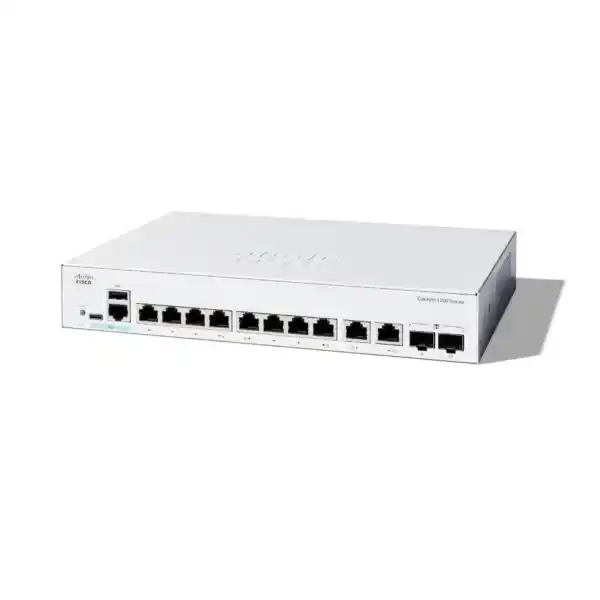
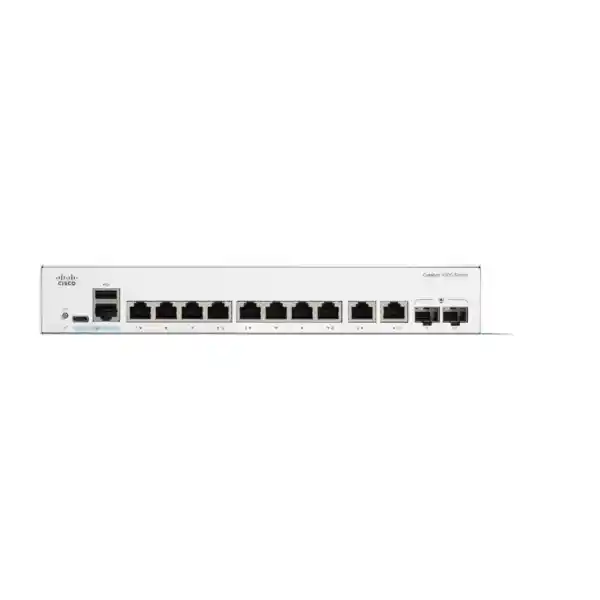
The Cisco Catalyst C1200-8T-E-2G Network Switch suits a small office, branch or work area that needs Gigabit wired connections, managed traffic separation and a choice of copper or fiber uplink. It provides eight 10/100/1000 Ethernet ports plus two Gigabit copper/SFP combo ports. This is a data-only model: connected phones, cameras and access points need their own suitable power source. For a Tanzania quotation, send FourTeck the exact model, quantity, endpoint list and uplink requirements so the proposed equipment can be checked against your network.
Good fit
A modest device count, Gigabit uplinks, independently powered endpoints and a defined need for managed traffic controls.
Check before ordering
Endpoint growth, fiber compatibility, power arrangements, required accessories and the complete path to critical applications.
Consider another configuration
Centralized PoE, higher port density, faster uplinks or equipment-level resilience may change the appropriate hardware choice.
A compact switch for a clearly defined network
The main buying advantage is control over a modest number of connections. A small network can still need separate staff and guest traffic, a management address that only administrators can reach, and a documented connection to the firewall. Those requirements can matter just as much in an eight-desk office as in a larger building. This model is worth considering when the port count and Gigabit uplinks fit the expected workload and a larger access switch would add unused capacity.
Start with the devices and applications that depend on this location. Include shared printers, meeting equipment, a local server or storage appliance, and any links to adjacent equipment. Count future additions separately from today’s connected devices. A switch selected around a written port schedule is easier to evaluate than one selected only around the number of employees.
Specifications at a glance
| Model | Cisco Catalyst C1200-8T-E-2G |
|---|---|
| Access connections | 8 × 10/100/1000 Ethernet ports |
| Uplink connections | 2 × Gigabit copper/SFP combo ports |
| Combo-port use | One active medium per pair; copper or SFP |
| Total usable connections | 10 Gigabit Ethernet connections |
| Power over Ethernet output | Not supported on this model |
| Switching capacity | 20 Gbps aggregate |
| Forwarding rate | 14.88 mpps with 64-byte packets |
| Cooling | Fanless chassis |
| Mounting | Rack-mountable |
| Chassis dimensions | 268 × 185 × 44 mm (W × D × H) |
| Switch power | External supply; 100–240 V AC, 50–60 Hz input |
| Configuration | Browser-based management; VLANs, QoS and static routing |
| Optical accessories | Confirm compatible transceivers and patching for the proposed link |
Understand the eight ports and two combo uplinks
A combo port offers alternative physical media for one logical connection. Each of the two combo pairs can use its copper connector or its SFP interface; the two connectors in one pair do not provide two independent simultaneous links. Plan around ten usable Gigabit connections in total. This distinction matters when a drawing shows both a copper cable and a fiber cable beside the same combo pair.
For example, a small office could allocate six standard ports to computers, one to a printer and one to a locally powered access point. One combo connection could then connect upstream to the firewall or distribution switch. The other remains available for a separately planned connection. This is an illustrative allocation, not a requirement to use every interface or a guarantee that this arrangement meets every site’s resilience needs.
Choose the uplink media from the installation conditions. Copper can be practical for equipment in the same rack or nearby room. Fiber can be appropriate where an existing optical backbone already connects network areas. Before ordering optics, identify the equipment at the other end, the installed cable type, connector arrangement and required reach. An SFP slot alone does not define a working optical link or confirm that a particular transceiver is suitable.
Read performance figures in the context of your applications
Cisco lists 20 Gbps switching capacity and a forwarding rate of 14.88 million packets per second for this exact model, with the forwarding figure specified for 64-byte packets. These describe the switch’s forwarding resources. Individual Ethernet connections remain Gigabit links; the aggregate capacity figure does not make an attached computer or an uplink operate at 20 Gbps.
For everyday office work, examine where traffic actually travels. A computer printing locally creates a different path from several users backing up to storage through the same upstream connection. Internet access also depends on the router, firewall, service connection and application servers. A switch replacement can address a local switching constraint, but it cannot independently improve every part of that path.
Ask whether busy activities overlap. Large file copies, scheduled backups, video meetings and cloud synchronization can coincide even in a small office. If several demanding devices regularly need to share one Gigabit uplink, assess utilization before purchase. A platform with faster uplinks may be more appropriate for that design. Keep the expected peak workload and acceptable transfer time in the purchasing brief, alongside the number of physical ports.
Power planning: this model does not supply PoE
Choose this variant when the connected devices already have appropriate power arrangements or when the requirement is primarily computers, printers and other independently powered equipment. An Ethernet connection provides network connectivity here; it does not power an IP phone, wireless access point or camera. Confirm each endpoint’s supported power method rather than assuming that every network device includes an adapter.
Where only one device needs power over its network cable, a compatible injector may be considered as part of the design. Where several devices need centrally managed Ethernet power, compare a PoE-capable switch instead. Review the endpoint’s required standard, maximum demand and installation arrangement. Additional power equipment affects socket use, cable organization, UPS sizing and maintenance, so include it in the overall bill of materials.
The switch itself uses an external power supply. Cisco specifies a 100–240 V AC, 50–60 Hz input range for the external supply arrangement. Confirm the supplied adapter and power-cord configuration on the quotation for the delivered unit. Place the adapter where its ventilation and connections can be maintained, and include it in the site’s power protection plan. Do not assume the switch can be powered from an upstream Ethernet port.
Use VLANs to organize business traffic
The Catalyst 1200 administration tools support VLAN configuration, including port membership and tagged or untagged traffic handling. This allows a network administrator to assign connections to defined logical groups. A practical design might group staff workstations separately from guest wireless traffic and infrastructure management, provided the connected access point and upstream network are configured to carry the corresponding VLANs.
Begin with the business access rules. Write down which devices need the printer, which need only internet access, and which administrators should reach the equipment interfaces. Then map those requirements to VLAN membership, addressing and gateway policy. A named VLAN is useful documentation, but the name does not itself enforce a security rule. Inter-network access needs an explicit routing and policy design.
Pay particular attention to the upstream connection. Both ends must agree about which VLANs are tagged and how untagged traffic is handled. A mismatch can leave devices physically connected while preventing them from obtaining the expected network service. During acceptance, test a representative device in each group for addressing, required access and prohibited access. That gives buyers evidence that segmentation works beyond a configuration screenshot.
Choose where routing and security policy will live
This platform supports Layer 3 static routing. That capability can be useful for a small, deliberately planned network, but the routing location should follow the security requirements. Some organizations prefer the firewall to act as the gateway between user groups so that communication passes through their established inspection and access policies.
If routing is placed on the switch, define the permitted paths, return routes and upstream default route before enabling it. Review how the chosen arrangement affects traffic that previously passed through a firewall. A successful ping between two networks proves reachability; it does not prove that the organization’s intended security controls still apply to the application traffic.
Keep the design understandable for the people who will support it. A small site may benefit from a simple gateway arrangement rather than distributing routing responsibilities across several devices. Provide the current subnet list and router or firewall details with the enquiry. If the project depends on dynamic routing, extensive route scale or a specific advanced feature, request a separate platform assessment instead of assuming that the Catalyst name guarantees those functions.
Protect administration and endpoint access
The security tools include port-based authentication using 802.1X with a suitable authentication infrastructure. A deployment using this approach needs compatible clients, a reachable authentication server and a policy for devices that cannot participate in the normal authentication process. Plan and test the behavior during server unavailability before enabling it across production connections.
Other useful measures begin with administration itself. Give authorized staff individual access where practical, protect credentials and restrict management reachability to the systems that need it. Review unused services and unused physical ports against the organization’s policy. Keep a recovery method available so that a management-network change does not leave the support team unable to reach the device.
Security settings should fit normal operations. A printer replacement, an approved visitor device or a new workstation should have an understood onboarding process. Overly broad exceptions can undermine a carefully designed network, while undocumented restrictions create avoidable support calls. Include ownership, approval and recovery responsibilities in the handover. These operational steps complement the switch’s controls and help the customer maintain them after installation.
Plan quality of service for shared connections
Quality of Service settings provide traffic classification and queue handling, including policies based on Class of Service and DSCP markings. These controls are relevant when delay-sensitive traffic shares a congested connection with bulk transfers. The useful objective is to preserve an agreed service experience during contention, using a policy that matches the rest of the network.
Establish which equipment is allowed to mark traffic and where those markings should be trusted. A workstation should not automatically receive higher priority simply because an application requests it. Coordinate the switch policy with the firewall, router and voice or conferencing system. A locally consistent setting can still give disappointing results if an upstream device treats the traffic differently.
Validate with realistic competing activity. For instance, observe a business call while an authorized test transfer uses the same path, then compare the behavior with the intended policy. Record the conditions and application results. Prioritization does not create extra bandwidth and cannot repair a poor wireless signal or an overloaded remote server. Capacity planning remains part of the decision even when the switch offers useful traffic controls.
Fiber selection and compatibility checks
For an optical uplink, specify the transceiver as a separate line item unless the quotation explicitly includes it. Confirm compatibility with this switch and with the remote equipment, then match the optical standard to the installed fiber. The purchasing record should identify the required link speed, cable type, distance and connector details so that all parts of the link can be checked together.
Existing fiber deserves inspection before reuse. Ask for the cable records, termination locations and any recent test results. An apparently spare pair may have uncertain labeling or may not terminate where the drawing suggests. Dirty connectors, unsuitable patch leads or an incorrect optical pairing can delay commissioning even when both switches are functioning correctly.
For links between buildings, obtain an installation assessment covering the route, protection and relevant site conditions. Do not choose an optic solely from the straight-line distance between two rooms. Include patching and the actual cable route in the assessment. Where details are missing, supply photographs of labels and termination panels for clarification, while avoiding assumptions that any available SFP module will work simply because it physically fits the slot.
Fanless placement, mounting and ventilation
The C1200-8T-E-2G is fanless and rack-mountable. Cisco’s current data sheet gives chassis dimensions of 268 × 185 × 44 mm, measured width by depth by height. That compact size can help when equipment space is limited, but the complete installation must also accommodate patch leads, mounting hardware and the external power adapter.
Fanless operation is useful near occupied work areas because there is no cooling fan in the switch chassis. It still needs an appropriate installation environment. Leave ventilation openings unobstructed, avoid placing heat-producing equipment directly against the enclosure and keep the cable layout serviceable. A cupboard that fits the chassis may still be unsuitable if it traps heat or prevents safe access to power connections.
Confirm the intended mounting method and required accessories before the order is finalized. Include the rack layout or proposed equipment position in the project notes, together with nearby power sockets and patch-panel locations. Allow room to identify ports and disconnect cables without disturbing adjacent equipment. Good physical organization is especially valuable in a compact network where one small cabinet may contain the switch, firewall, service-provider equipment and backup power.
Manage the device and preserve a recoverable configuration
The switch provides a browser-based configuration interface. The local interface can be useful for a small deployment where the support team needs to inspect ports, review settings and make controlled changes without building a separate management platform first. Define the management address, authorized administrators and access path during commissioning rather than leaving those details to be discovered during an outage.
Configuration persistence is an essential handover check. Cisco distinguishes the running configuration from the startup configuration, and applying a change is not the same as saving it for a later reboot. After approved changes, save the intended configuration and retain an appropriately protected backup. Perform any reboot validation within an agreed maintenance window.
Keep a brief change record with the reason, affected ports and verification result. Before software maintenance, check the release documentation for the exact platform and planned version, take a configuration backup and establish a recovery approach. The buying discussion should also identify who owns ongoing administration. A managed switch is most useful when someone can maintain its settings and respond to changes in the surrounding network.
Monitoring and fault isolation
SNMP support can allow a compatible monitoring system to observe device information and receive configured notifications. Where monitoring is required, define the management station, permitted access and notification recipients. Use the organization’s approved security settings and avoid exposing management access beyond the intended network. Confirm monitoring from the actual management system during acceptance.
The most useful alerts are tied to operational responsibilities. An upstream link failure may need urgent investigation, while an unused desk port going down may be routine. Record the uplink interfaces and critical endpoint ports so that support staff can interpret events without tracing every cable. Ensure someone receives and acts on the agreed alerts.
For intermittent performance problems, collect evidence before changing several settings at once. Note the affected applications, time of occurrence, involved endpoints and whether the issue appears on one port or across the site. Review the physical link and the wider traffic path. A clear baseline after installation makes later diagnosis faster because the team can compare the current behavior with a known working state.
Troubleshooting questions to resolve before a replacement
A new switch should address a defined requirement. If the current problem is that one workstation connects slowly, test the device and cable path before changing the network design. Compare an affected connection with a known working one, record the negotiated link rate and check whether the problem follows the endpoint or the cable. Preserve the observations so the support team can distinguish a physical fault from an application issue.
If all users lose access together, investigate the shared dependencies. Check whether local devices can still communicate, whether the gateway is reachable and whether the problem coincides with upstream equipment or power events. This narrows the investigation toward the access layer, upstream network or external service. Avoid changing VLANs, routing and cabling simultaneously unless a documented recovery plan requires it.
For a replacement enquiry, provide the current switch model, a simple connection drawing and a concise account of the symptoms. Include whether the objective is additional ports, managed segmentation, a fiber connection or a fault-driven replacement. A clear objective helps the proposed C1200 configuration solve the actual buying need and gives both the customer and implementer a measurable acceptance criterion.
Migration from an unmanaged or older switch
Moving to managed switching creates an opportunity to document connections that were previously informal. Photograph or label the existing cables, identify the endpoint attached to each one and record any equipment connected through another small switch. Follow unexplained links before cutover. An unknown cable can lead to another office area or an essential service that is easy to miss in a desk-only inventory.
Build the target configuration around that inventory. Decide which existing behavior must continue immediately and which improvements can be introduced in a later change. For example, a business may prefer to establish stable connectivity first and schedule a separate, tested segmentation change. The appropriate sequence depends on its downtime allowance, support availability and current policy.
Arrange the old equipment so it can be restored during the agreed rollback period if the acceptance checks fail. Keep an exact record of any cable movements and addressing changes. After the new installation is accepted, update the network drawing and remove obsolete references from support records. This avoids a situation where the hardware has changed successfully but future troubleshooting still relies on an inaccurate map.
Power continuity for the whole service path
Backup power planning should cover the equipment needed for the business service to work. Protecting only the switch may leave the internet unavailable if the router or service-provider device loses power. Similarly, an independently powered access point or phone needs its own continuity arrangement. List these dependencies before selecting UPS capacity or estimating useful runtime.
Measure or obtain the relevant load figures for the actual equipment combination, then choose backup power around the required operating period and the UPS manufacturer’s guidance. Include the external switch adapter and allow for the way plugs and power strips occupy the cabinet. Avoid quoting a runtime from the switch load alone when other connected equipment shares the same UPS.
Document what staff should do during a sustained interruption, including any orderly shutdown and restart sequence. After a planned power test, verify that the upstream connection, addressing and applications recover as expected. These checks are particularly useful for a branch that may be supported remotely. They also reveal whether the proposed installation has an overlooked single dependency that additional Ethernet ports would do nothing to resolve.
Loops, extra links and controlled resilience
The Catalyst 1200 includes spanning-tree controls, with Rapid Spanning Tree available for suitable designs. These functions matter when more than one Layer 2 path could exist. Configure the intended topology deliberately and document the upstream relationship. Two cables connected between switches should never be treated as a complete resilience design merely because the connectors are available.
Before adding an extra link, establish whether it belongs in an agreed aggregation arrangement or should be controlled as an alternative path. Both ends of the connection need compatible settings. A design review should identify what happens when one cable fails, what happens when the upstream device fails and whether the remaining path has enough capacity for essential traffic.
Also consider equipment-level failures. Extra network paths cannot compensate for every power, chassis or upstream dependency. If the business requires continued operation through a switch failure, discuss an architecture that addresses that requirement explicitly. Include the acceptable interruption and recovery process in the brief. That helps determine whether this compact standalone unit fits the required service level or whether the project needs a different platform and topology.
Practical business scenarios
Small office: connect a limited set of workstations, a shared printer and independently powered network equipment, with the upstream path chosen to match the firewall or router. The main planning tasks are port allocation, spare capacity and clear management ownership. Check that backups and local file services fit the uplink capacity.
Retail back office: separate approved business devices from guest wireless traffic when the wider network supports the required VLAN arrangement. Document the specific applications and services each group needs. Any payment-related environment requires its own policy and compliance assessment; purchasing this switch alone does not establish compliance.
Training room: define whether student equipment needs only internet access or controlled access to local resources. Reserve an administrative path for support, and account for the way desks or devices are moved between sessions. A repeatable port schedule can make resets and troubleshooting easier.
Branch work area: use an existing copper or compatible optical connection to the wider network while keeping the local device count modest. Confirm who can support the branch, how configuration backups are retained and how replacement equipment would be commissioned. These are illustrative fit scenarios; endpoint power, access rules and application requirements still need project-specific checks.
A buying comparison based on requirements
Keep this model on the shortlist when the requirement is a compact managed Gigabit switch with data-only access ports and flexible uplink media. Consider a PoE variant when Ethernet-powered endpoints are central to the installation. Consider greater port density when expected growth would consume the spare connections immediately. Consider faster-uplink equipment when the planned workload requires more upstream capacity.
Compare complete configurations rather than isolated chassis prices. An alternative with integrated endpoint power may change the number of injectors, adapters and UPS outlets needed. A higher-port-count model may simplify expansion, while a smaller unit may suit an isolated work area. Neither outcome can be decided from the model name alone.
For broader enterprise access requirements, review FourTeck Tanzania’s Catalyst 9200 series planning guidance. Treat that as a separate platform assessment with its own model and software considerations. If wireless equipment is part of the same purchase, the Cisco wireless access point guidance can help frame the radio, uplink and power questions. A related product family should be selected for a verified requirement, not assumed to be interchangeable.
Prepare a complete Tanzania quotation request
State the exact requested model and the quantity, followed by the site role and device count. Identify which endpoints already have power and which require a new power arrangement. Describe the upstream device, required media and any existing optics. If fiber details are uncertain, flag that uncertainty so the quotation can separate confirmed equipment from items awaiting technical review.
Specify the physical installation: rack or other approved mounting position, power connections, backup power and cable termination points. Add the expected implementation date and whether the enquiry covers hardware only or also requires a separately defined configuration or installation scope. Commercial availability and any service arrangements need confirmation for the actual request.
Ask the written quotation to distinguish the switch, optical modules, patch leads, mounting accessories and any additional power equipment. Request the applicable commercial terms, warranty handling, support scope and delivery details for the supplied configuration. This page does not establish a local price, current stock level or delivery commitment. Those details should be confirmed against the exact order so procurement can compare complete, current offers.
Commissioning and acceptance checklist
Before cutover, record the current network layout and agree on the change window. Prepare a port schedule identifying each endpoint, logical group and upstream connection. Confirm a workable rollback arrangement for the old equipment. Keep configuration details and administrative access available to authorized staff without placing passwords in broadly shared project documents.
During commissioning, check each physical connection and confirm that representative devices obtain the intended addressing and reach their required services. Test the printer, business applications, internet access and any shared storage that the site depends on. Verify that guest or restricted devices cannot access resources outside the agreed policy. Include the remote end of the uplink in troubleshooting rather than treating the new switch as an isolated device.
For handover, retain the approved configuration backup, port map, management details and acceptance results. Confirm that the configuration has been saved for restart and arrange any controlled restart test with the business. Assign responsibility for updates, monitoring and future changes. These records turn the purchase into an equipment installation that the customer can maintain, extend and support with less uncertainty.
Common buyer questions
Does it power wireless access points or IP phones? No. This is the non-PoE variant. Provide suitable endpoint power separately or evaluate a PoE-capable model. Check the endpoint specification before selecting an injector or adapter.
Are the two SFP interfaces additional to two independent copper uplinks? Each uplink is a copper/SFP combo pair. Select one medium per pair; do not count both connectors in the same pair as simultaneous independent ports.
Can it connect to an existing fiber backbone? Potentially, after the transceivers, fiber type, remote interface, link speed and reach have been verified together. Include the existing backbone details in the enquiry rather than ordering optics from connector shape alone.
Is this a 10 Gigabit switch? Its network interfaces are Gigabit Ethernet. The published switching capacity is an aggregate forwarding specification, not a 10G uplink specification. Choose a different configuration if the design requires 10G connectivity.
Can it separate staff and guest traffic? VLAN configuration supports logical traffic grouping. The connected equipment, tagging, gateway and access policies must be configured consistently to enforce the intended arrangement.
Will replacing my current switch improve internet speed? That depends on the actual bottleneck. Review the wired links, firewall, internet service and affected application before attributing a performance issue to the switch.
What should accompany the order? Request a complete, itemized configuration covering required accessories and explicitly confirmed supply terms. Optics, cabling, endpoint power and implementation services should each be identified when needed.
Request your Tanzania switch quotation
Send FourTeck Tanzania your required quantity, endpoint list, uplink media and existing network details. Include the mounting position, accessory requirements and whether you need a separately scoped implementation service. Ask for a written configuration that confirms the exact hardware and the commercial terms applicable to your order.
For this model, the key checks are straightforward: enough usable ports, suitable Gigabit uplink capacity, compatible optical components when required and a complete power plan. Confirm those details before purchase so the supplied equipment matches the network you intend to operate.




Reviews
There are no reviews yet.