
FOURTECK TANZANIA · 10 GIGABIT SWITCHING
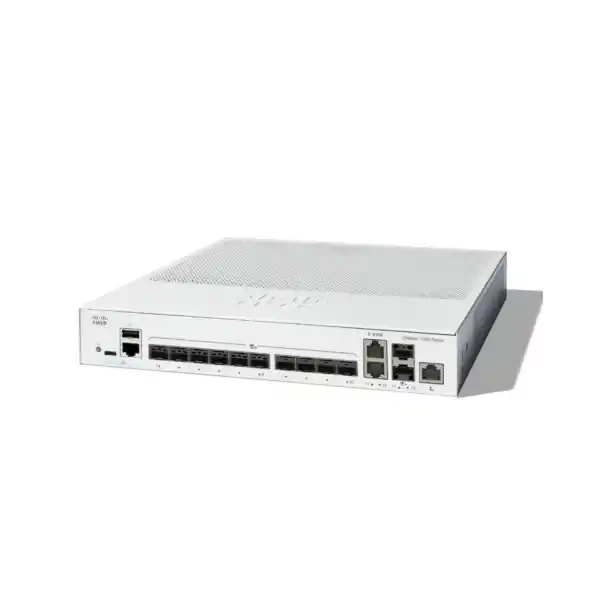
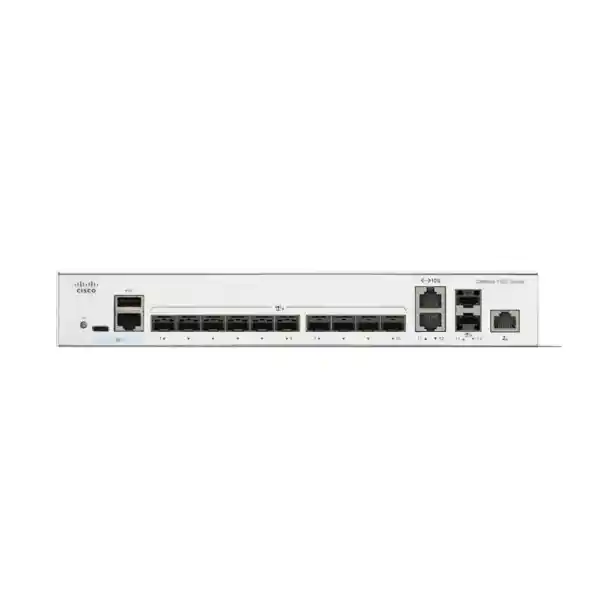
Cisco Catalyst C1300-12XS Network Switch
Bring fibre uplinks and compatible high-speed systems together with a compact managed switch. Plan the port mix, connection accessories and network policy as one purchase so the equipment matches the work your organisation needs it to do.
Good fit to assess
A fibre-led business backbone with a defined set of high-speed uplinks, compatible server connections and a team that needs managed switching.
Check before ordering
Shared port allocation, accessory support, expansion room and the proposed routing or stacking design. Every link needs an endpoint and media check.
Next step
Request a matched quotation from FourTeck Tanzania using a connection schedule and the business outcome you want the network to support.
A compact aggregation point for a growing business network
If your access switches, application servers and backup systems need a shared 10GbE connection point, the Cisco Catalyst C1300-12XS is worth assessing against your link schedule. It is a managed switch in Cisco’s Catalyst 1300 range, with an emphasis on SFP+ connectivity. Its strongest buying case is a network where several high-speed links converge and the team needs visibility and configuration control.
For a Tanzania procurement, start with the number of links that must operate at the same time, their media and their destinations. Then establish the traffic policy and continuity requirement. Those decisions determine whether this compact model has sufficient room for the initial installation and later expansion. Request a quotation that matches those requirements, including connection accessories, rather than selecting the chassis in isolation.
The sections below separate verified hardware facts from practical planning guidance. The deployment examples are design illustrations, not promises that every application will achieve a particular throughput. An effective choice depends on the equipment at both ends of every link, the cabling between them and the configuration used in production.
Verified hardware at a glance
The specification summary gives the starting point for a technical comparison. Treat switching capacity and packet forwarding figures as manufacturer ratings under their stated conditions; they are not a measured file-transfer result for your servers or applications.
| Item | Verified specification |
|---|---|
| Data interfaces | 10 dedicated 10GbE SFP+ ports plus 2 shared 10GbE copper/SFP+ combo ports |
| Simultaneous data-port count | 12; each combo pair supports one active medium |
| Out-of-band management | 1 Gigabit Ethernet management port |
| Switching capacity | 240 Gbps |
| Forwarding rate | 178.57 million packets per second, using 64-byte packets |
| Chassis dimensions (W × D × H) | 268 × 300 × 43.94 mm |
| Unit weight | 2.67 kg |
| Power input | Internal 100–240V AC, 50–60 Hz |
| Cooling | 1 fan |
| Endpoint power | No PoE output |
| Form factor | Rack-mountable |
Understand the shared ports before counting connections
The two combo positions each provide a choice between a copper connection and the corresponding SFP+ connection. Each pair represents one usable data interface. Choosing copper for a pair does not leave its paired SFP+ socket available as an additional independent link. A diagram that counts every physical socket as a separate active port would therefore overstate the usable connection count.
Make the media choice explicit in the port schedule. Record the equipment name, the selected interface medium and the remote interface for every connection. Mark a paired socket as unavailable when its other medium is used. This small documentation step is especially useful when different people purchase accessories, patch the rack and configure the switch.
Also keep the dedicated management connection separate from the production data-port total. Its purpose is administration through an out-of-band management path. Decide how administrators will reach that path and which equipment must remain powered for it to work. A management cable alone does not provide remote recovery if the management network, upstream router or power supply is unavailable.
Before approving the bill of materials, ask for a labelled connection drawing. It should show production links, any ports reserved for stacking and spare capacity. Reviewing that drawing is often easier for a mixed procurement and IT team than interpreting a list of sockets and transceiver part numbers.
Where this SFP+ switch can fit
Access-switch aggregation: consider this role when several downstream switches already have compatible high-speed uplinks. Count the uplinks first, then add the connections to routing, security and server infrastructure. Include any second uplink planned for resilience. The resulting demand may differ substantially from the number of access switches because one device can require more than one physical connection.
Server and storage connectivity: assess the model when compatible server adapters and storage interfaces need a common Ethernet switching layer. Describe the workload before choosing accessories. A backup destination, a virtualisation host and an application server may create different traffic patterns even when their interfaces have the same speed rating. Confirm the storage vendor’s network requirements separately.
Fibre distribution within a site: a fibre-oriented design can be useful when network rooms or equipment areas are joined by suitable optical cabling. Obtain the actual cable route and termination details. Distance alone is insufficient for selecting an optic; the installed fibre, connectors and optical loss also matter. Building-to-building work requires a proper cabling and site assessment.
A small number of copper connections: the shared RJ-45 options may help accommodate equipment that does not use optical interfaces. They should be allocated deliberately. If most of the intended links are copper, compare a copper-oriented model before ordering multiple media adapters. Choose the interface mix that reflects the real network rather than using accessories to compensate for an unsuitable starting point.
Choose optics and cables as part of the purchase
An SFP+ socket needs a suitable connection component before it can carry traffic. For each link, establish whether the design calls for an optical transceiver with fibre or a supported direct-attach copper cable. Check Cisco’s compatibility information for the exact switch and software, and check the equipment at the remote end independently. Mechanical fit is not sufficient evidence of support.
For an optical connection, record the fibre type, connector arrangement, required speed and measured or designed route length. Ask the supplier to identify both endpoint modules and all required patch leads. Existing patch panels and intermediate joints form part of the link, so they should appear in the survey rather than being treated as invisible infrastructure.
For a short rack connection, assess a compatible DAC option against the distance and the cable routing space. Check both endpoints against the proposed cable part number. A cable can be suitable for one device and unapproved for another. Leave room for the connector bodies and cable bend requirements when positioning equipment in the cabinet.
Avoid treating a quoted maximum optical reach as a universal guarantee for any installed cable. The link still needs an appropriate optical budget and a clean, correctly terminated path. Where existing fibre is being reused, ask for inspection and test evidence before assuming it is ready for a higher-speed connection.
Keep a per-link accessory schedule with quantities. Distinguish items already owned from items to be supplied, and identify any proposed reuse that remains subject to testing. This makes quotations comparable and reduces the chance that the switch arrives before essential modules or patch leads have been ordered.
Plan traffic paths and measure the real bottleneck
A faster aggregation layer is useful only when it addresses the part of the network limiting the workload. Trace an important application from the client through access switching, aggregation, security and server interfaces. If a slower connection remains elsewhere in that path, upgrading one switch may leave the user experience largely unchanged.
Collect representative observations before purchasing: when transfers slow down, which uplinks become busy and whether the server or storage system is already constrained. Schedule measurements around the workload that matters. A quiet morning sample is unlikely to describe an overnight backup window or the end-of-day reporting period.
Define success in operational terms. Examples include finishing a scheduled backup within its maintenance window, allowing several departments to use a shared application concurrently, or retaining acceptable access during an uplink outage. Those goals help the team choose a meaningful acceptance test instead of relying solely on a device specification.
Where several sources converge on one destination, consider the destination link as well as the switch fabric. Multiple high-speed ingress connections can compete for a single egress connection. Plan workload timing, additional paths or a different destination design when necessary. Do not assume that an aggregate switch rating means each application can consume the entire capacity simultaneously.
Separate departments with an intentional VLAN plan
VLAN configuration is useful when one physical switching layer must carry several logically separated networks. Establish a simple purpose for each network before creating identifiers. Typical planning categories include staff devices, guest access, business systems and network administration. The appropriate categories depend on the organisation’s applications and risk requirements rather than a universal template.
Cisco documents tagged and untagged VLAN handling for this platform. The connected devices must agree on how traffic is presented. For every inter-switch or firewall link, specify the VLANs to carry and the treatment of untagged frames. A mismatch can prevent an otherwise healthy physical link from reaching the expected service.
Write a communication matrix alongside the VLAN list. Identify which groups need to reach which systems and who owns each decision. This turns a broad instruction such as “separate guests” into a testable requirement. Include essential infrastructure dependencies, because an allowed application can still fail if name resolution or addressing services are inaccessible.
During commissioning, check permitted and prohibited paths from representative endpoints. A successful login to a business application does not prove that guest isolation works. Likewise, blocking an unwanted connection does not prove the production workflow still functions. Record both results and retain a copy of the final VLAN and port mapping for future changes.
Decide where routing and security policy belong
The Catalyst 1300 administration guide includes IPv4 static-route configuration. That capability can be relevant where a design needs defined routes between networks or toward an upstream gateway. Whether routing should run on this switch depends on the traffic path, the required inspection and the team’s operating standards.
If sensitive traffic must pass through a firewall, document that requirement before moving gateways. A topology change that creates a shorter local path may also change where security inspection occurs. Have the network and security owners agree on the permitted path and the return route, then test both normal communication and failure behaviour.
Do not assume that the Catalyst name makes every software function identical across Cisco product families. Specify any required dynamic routing protocol, automation integration or advanced network feature by name. Confirm support on the exact model and software release before including it as a mandatory capability in a purchase order.
For example, Cisco’s current combined datasheet identifies OSPF support with the 1300X models. It should not be added to this product’s capability list by copying a family-wide marketing paragraph. Where that protocol is required, compare a platform explicitly documented to support it.
For related design context, review FourTeck Tanzania’s Cisco firewall installation and configuration guidance. Use the project scope to confirm who will review the routing and security changes.
Use access controls to express specific rules
Cisco documents MAC, IPv4 and IPv6 access control lists for the platform. These controls allow the network team to define which matching traffic is admitted or denied at the configured interface. Rules should follow the agreed communication requirements, with careful attention to direction, ordering and the traffic that must remain reachable.
Start with a small, reviewed set of rules rather than a large inherited list with unclear ownership. Give every requirement a business explanation, such as limiting network administration to an approved management source. Keep the explanation in the design record so future engineers can distinguish deliberate restrictions from obsolete entries.
Test changes with an available recovery path. A rule intended to protect management can also interrupt the administrator’s own connection if it is applied incorrectly. Agree on the change window, preserve the previous configuration and identify how local access will be restored if the remote session is lost.
Revisit the rules when applications move or addressing changes. A restriction that was correct during installation can become inaccurate after a server migration. Assign ownership for these reviews and document who can request exceptions. The practical value of access controls depends on maintaining the policy as the business network evolves.
Keep priority traffic usable during busy periods
Quality of service provides tools for handling different traffic classes when links become congested. Cisco documents classification and DSCP-related controls in the Catalyst 1300 administration guide. The useful buying question is which applications need predictable treatment and where congestion is likely to occur, not simply whether a switch lists QoS.
Coordinate the policy across the path. Identify which equipment assigns markings, which links trust them and where they may be changed. Avoid assuming that an application’s priority setting will be preserved by every intermediate device. A documented policy makes it easier to interpret results when voice, video and large transfers share an uplink.
Test under representative load. A call made while the network is idle gives little evidence about what will happen during a busy backup or upload period. Reproduce the competing workload within an agreed test window and observe the business application that matters. Include the WAN connection when the service depends on external connectivity.
Prioritisation does not increase the physical capacity of a constrained path. If the total demand consistently exceeds what the path can carry, consider scheduling, capacity changes or application design. Use QoS as part of the traffic plan and verify the outcome through measurements rather than presenting it as a guarantee of flawless calls or video.
Build resilience without introducing unintended loops
Redundant physical paths need a deliberate control method. Cisco documents spanning-tree operation, including RSTP, for this range. Decide how the intended topology should behave and which devices form the main switching path. An extra cable should be part of that design, rather than an informal attempt to make the network more reliable.
Document the normal path and the expected alternative for each important service. Include the upstream firewall, server interfaces and power dependencies. A second cable to equipment that shares the same single point of failure may provide less protection than the connection diagram initially suggests.
If link aggregation is proposed, require a review of both endpoints and their configuration. Determine how traffic will be distributed, what happens when one member fails and how the team will recognise a degraded group. Define performance expectations per workload, since aggregate link capacity does not imply that a single conversation uses every member.
Commissioning should include controlled failure tests that are appropriate for the business. Observe the application, the network state and the time needed for normal operation to return. Record the test conditions and any interruption instead of promising zero downtime. Repeat the relevant checks after major topology changes so the documented recovery behaviour remains credible.
Assess stacking as a system design decision
This model belongs to the C1300 Family 2 stacking group. Cisco documents stacking within the same family, with up to eight supported switches. Do not assume that another Catalyst 1300 model can join simply because it shares the series name. Confirm every intended member and the software combination against the applicable documentation.
Front-panel ports assigned to stacking are dedicated to that purpose and cease to be ordinary production interfaces. Reserve those positions before calculating spare capacity. Include the chosen stack links in the accessory schedule and drawing, and confirm suitable supported cables. A plan that allocates the same port to a server and to stacking cannot be implemented as written.
Consider whether unified management provides enough operational benefit for this project. The stack has active and standby roles, and failover can involve relearning dynamic network state. It should be tested with the intended applications. Consolidated management does not remove the need for backups, maintenance planning or a recovery procedure.
When evaluating a stack against independent switches, compare how engineers will isolate faults, replace a member and perform upgrades. Identify the support team’s familiarity with the chosen approach. A design that is easy to describe but difficult for the available staff to maintain may be a poor fit, even when its connection count appears attractive.
Prepare the rack, power and cabling environment
Choose an installation position that gives the switch adequate ventilation, accessible connectors and a clear service path. The chassis is compact, but space planning must include mounting hardware, power connections and the cable assemblies in front of it. A cabinet drawing should show where fibre will be routed without being trapped behind doors or placed under tension.
This model uses a fan, so account for ventilation and acoustic expectations when selecting the room. Avoid relying on a general statement that some switches in the series are fanless. Inspect the intended cabinet for heat accumulation, dust and obstructions, and follow the installation guidance for the specific equipment being deployed.
Check the complete power path with the site team. Identify the socket arrangement, rack distribution and any UPS that will support the installation. Size backup power for all equipment required to keep the service operating, including upstream devices and management access. A protected switch cannot maintain a service whose other essential components have lost power.
Label the two ends of every cable with a consistent naming scheme. Keep fibre routes and spare leads organised so a future technician can identify the correct connection without disturbing neighbouring links. Record the final patching after installation, since a drawing prepared during quotation may not reflect adjustments made on site.
For Tanzania projects, ask for a site-specific assessment rather than assuming that every location has the same electrical, environmental or access conditions. Confirm installation responsibilities and any required local work in the written scope. Country-wide service coverage, site attendance and response arrangements should be agreed for the actual project.
Set up management that the support team can use
Define who administers the switch and how they reach it. The platform provides management options through its web interface and command line; the project should choose the approved methods and restrict access accordingly. Keep the management address, account ownership and recovery process in the operational handover.
Cisco’s administration guide covers system logging, time settings, firmware operations and configuration files. Use those functions within a documented maintenance process. Consistent time and useful logs make it easier to correlate a reported outage with network events. Configuration copies help the team understand what changed and provide a starting point for recovery.
Assign responsibility for reviewing software updates and their release notes. Confirm the intended release against required features and connected equipment before deployment. Schedule changes with a backup, an acceptance test and a rollback plan rather than installing an update merely because a newer file is available.
Establish a baseline once the network is stable. Record normal link utilisation, interface status and relevant counters using the platform’s statistics functions and your chosen monitoring tools. Investigate changes against that baseline. A one-off reading may be misleading when the workload varies throughout the day.
Include a practical handover session if a separate party performs the installation. The receiving team should know how to identify a disconnected link, retrieve the current configuration and contact the agreed support channel. Confirm that the required access works before the project is treated as complete.
Example deployment: connecting access switches and business systems
Consider a hypothetical organisation consolidating several network-room uplinks with a small server group. The first step is to list each downstream switch, its uplink medium and the remote interface capability. Add the connection toward security and routing equipment, then list server or backup links. This creates the initial production-port requirement.
Next, review resilience and expansion. A second path for a critical connection consumes additional interfaces, as can the links required by a stacking design. Reserve capacity for realistic additions instead of allocating every available position on the first day. If the resulting schedule does not fit, compare a larger or differently arranged switch before procuring accessories.
Assess the traffic pattern between those systems. Some workloads may remain local, while internet-bound traffic must traverse the security gateway. A backup job could cross a different path from an employee’s application session. Draw these flows and identify where the intended VLAN and gateway design places each connection.
Finally, turn the design into tests: confirm the expected link speeds, validate application access, check that guest traffic cannot reach protected systems and exercise the agreed recovery case. Keep the design and test results together. This example illustrates a planning method; the correct connection count and topology must come from the actual site inventory.
When to compare a different switch
Choose a PoE access switch when the main requirement is to connect and power phones, wireless access points or cameras over Ethernet. The C1300-12XS is not a PoE power source. It can be considered elsewhere in a network carrying traffic from such devices, but the endpoint power requirement must be served by suitable equipment.
Compare a copper-oriented alternative when most connections terminate in RJ-45 and very few optical links are required. Compare a larger SFP+ design when the optical connection schedule leaves inadequate expansion room. In either case, assess the total solution cost, including accessories and installation, rather than assuming that the smallest chassis will be the most economical choice.
Specify a different capability class when the project needs faster interfaces, a particular routing protocol, specialised data-centre functions or environmental characteristics beyond this model’s verified specification. Ask the engineer to map each mandatory requirement to documented support. Do not treat a familiar brand name as proof that the required feature is present.
If replacing older equipment, review the actual configuration and operating dependencies. Existing optics, stack arrangements, monitoring and change procedures may require adjustment. A port count that appears similar does not establish that the replacement is operationally equivalent. Use a controlled migration plan with a way to restore the previous service if acceptance checks fail.
Make the quotation complete and comparable
Provide FourTeck Tanzania with a link schedule and a short statement of the business objective. Include quantities, equipment models, fibre details, distances and the intended routing or stacking arrangement. Identify existing accessories proposed for reuse and distinguish confirmed information from items still awaiting a site survey.
Ask for separate line items for the switch, connection components, mounting requirements and professional work where applicable. Specify whether supply alone, installation, configuration or migration is being requested. Written boundaries help procurement compare proposals that would otherwise look similar while covering different responsibilities.
Confirm the exact regional order variant and equipment condition in the offer. Ask which accessories are included and which must be purchased separately. The product model identifies the platform; the complete commercial offer must also resolve the details needed for delivery and installation.
Request current pricing in the quotation rather than relying on an unverified advertised amount. Confirm availability, lead time, delivery destination, payment terms, taxes and support arrangements with the supplier. For support, ask who handles a fault, what evidence is required and which terms apply to the exact supplied unit.
If a quotation changes the proposed transceiver or cable, have the technical owner review the substitution before acceptance. A seemingly minor accessory change can affect endpoint support, route suitability or cabinet installation. Keep the approved bill of materials with the network records so later replacement purchases use the agreed components.
Commissioning checklist for a reviewable handover
Inventory and installation: check the supplied model against the approved order, record equipment identifiers and verify mounting and power arrangements. Match the delivered optics and cables against the per-link schedule. Resolve substitutions and missing items before beginning the production cutover.
Connectivity and policy: validate interface operation, expected link speed, VLAN membership and gateway reachability. Check representative application workflows as well as access restrictions. Include addressing and name-resolution dependencies in the test plan so a partially functioning network is not mistaken for a completed service.
Performance and recovery: run the agreed representative workload and record the conditions. Exercise only the failure scenarios authorised for the change window. Confirm that the observed interruption and recovery meet the project’s acceptance criteria, and investigate unexplained errors before handing over the network.
Operations and ownership: save the final configuration, retain a backup and update the connection diagram. Verify that approved administrators can use the management path and obtain the necessary logs or status information. Record who owns future software reviews, configuration changes and supplier support requests.
Procurement close-out: retain the final quotation, delivery documentation, accessory list and agreed support terms. These records help distinguish a hardware fault from an installation or configuration issue later. A complete handover gives both IT and purchasing a shared account of what was supplied and how it was accepted.
Buyer questions answered
How many connections can operate at once?
The usable production count is 12 data interfaces before any are reserved for stacking. The copper sockets share two of those interfaces with paired SFP+ sockets. Count the chosen medium once for each pair, and keep the management connection outside the production-port calculation.
Are transceivers included with the switch?
Do not assume they are included in a hardware quotation. Ask the supplier to identify the supplied components explicitly. Each proposed optical or direct-attach connection should have a compatible accessory allocation, with both endpoints and the installed cable path checked before the order is approved.
Can it connect to equipment from another manufacturer?
Evaluate the exact Ethernet interface, media, speed and configuration on both devices. Brand alone does not settle interoperability. Check each endpoint’s supported optics or cables and test the intended VLAN and link behaviour. Special application requirements should be confirmed with the relevant equipment vendor.
Will this switch make internet access faster?
It may help when the existing internal switching path is the bottleneck. It cannot increase the contracted internet connection speed or remove a constraint in the firewall, upstream link or application. Measure the relevant path before treating a LAN upgrade as a solution to an internet performance issue.
Can existing fibre be reused?
Potentially, subject to its type, termination, condition and suitability for the selected optics and speed. Obtain the route information and test evidence. Reusing an unidentified cable introduces uncertainty that a new switch cannot resolve. Include any cleaning, patching or testing work in the installation scope.
Is stacking the same as adding a normal uplink?
No. Stacking forms a managed system with defined member roles and dedicated stack connections. A normal uplink connects switching devices without making them members of that stack. Choose the topology deliberately and review its compatibility, maintenance and failure behaviour before assigning ports.
What should a Tanzania quotation request contain?
Send the required quantity, site requirements, connected device models, link distances and media. Include the VLAN or routing role, resilience goals and proposed accessory reuse. Request written confirmation of the exact supplied variant, price, availability, delivery details, included items and support terms.
Request a C1300-12XS quotation for your network
Share your link schedule, connected equipment and deployment goals with FourTeck Tanzania. Ask for the switch and connection components to be specified together, with commercial terms and the required project scope confirmed in writing.
Include the fibre type and distance for each optical route, any existing accessories proposed for reuse and the resilience requirement. A reviewed bill of materials gives your team a clearer basis for purchasing, installation and acceptance.




Reviews
There are no reviews yet.