
CISCO CATALYST 1300 · TANZANIA
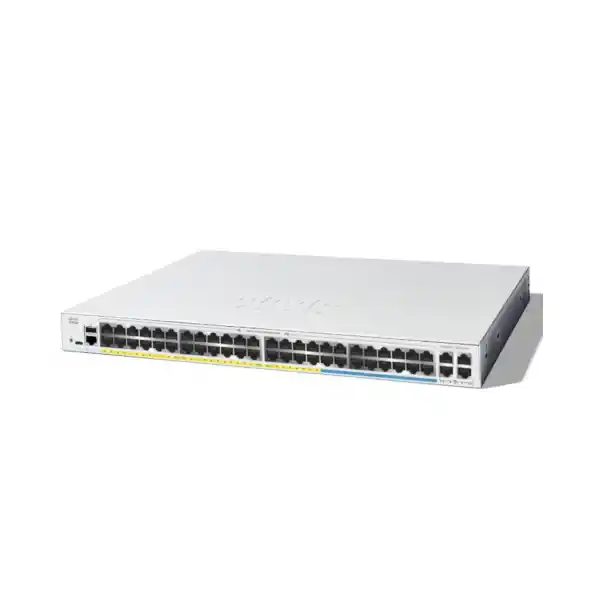
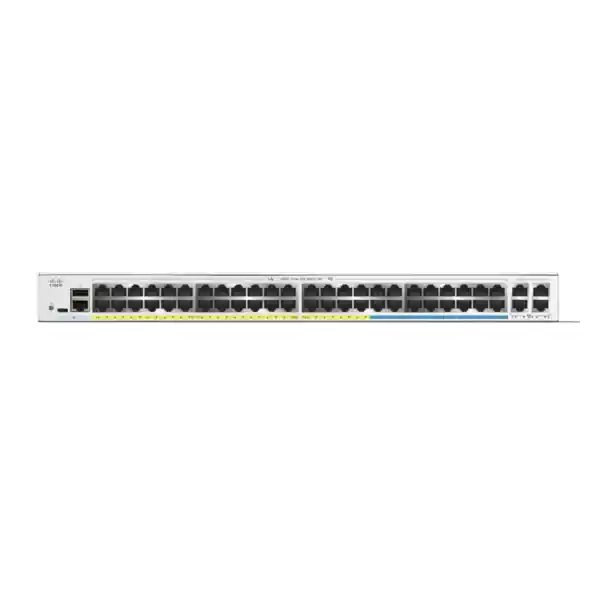
Cisco Catalyst C1300-48MGP-4X Network Switch
Connect everyday office equipment and selected multigigabit powered endpoints through one managed access switch. Plan port speed, PoE demand and the upstream connection together, then request a quotation matched to your device inventory.
A switch for mixed Gigabit and multigigabit access
Choose the Cisco Catalyst C1300-48MGP-4X Network Switch when a Tanzania business needs many ordinary Ethernet connections alongside a defined group of faster powered endpoints. Its particular value is the combination of access capacity, PoE+ delivery and faster uplinks in one managed platform. Rather than treating every connected device as identical, plan the installation around which endpoints need additional link speed, which require network power and which simply need a dependable wired connection.
This model is relevant to an office refresh, a growing branch, a teaching environment or a property with separate staff and guest networks. These are deployment examples, not a promise that any existing system will work without design checks. Start with a device schedule and a simple network diagram. Request a FourTeck Tanzania quotation that identifies the exact switch, required uplink accessories and any agreed implementation scope. This gives purchasing and technical teams the same basis for comparison.
Technical snapshot
| Item | Specification | What to check |
|---|---|---|
| Copper access | 32 × 10/100/1000 Ethernet; 16 × 2.5 Gigabit Ethernet | Allocate faster connections to endpoints that can use them. |
| Uplink interfaces | 4 × 10 Gigabit SFP+ | Select supported optics or direct-attach cables for the intended links. |
| Power delivery | PoE+ on 48 access ports; up to 30W per port within a 740W shared budget | Check both individual device demand and the total power allocation. |
| Management and routing | Managed Layer 3 switch; VLANs and static routing | Define who controls addressing, segmentation and inter-VLAN access. |
| Form factor | Rack-mountable; 444.3 × 350 × 43.94 mm | Allow extra cabinet depth for plugs, patch leads and ventilation. |
| Electrical input | Internal universal supply; 100–240V AC, 50–60Hz | Confirm the supplied cord, site outlet and backup-power design. |
| Cooling | Fan-cooled | Place in a suitable ventilated equipment space. |
Use this snapshot to screen the model before preparing a detailed bill of materials. A port count alone does not describe the complete deployment. The selected endpoints, cable plant, upstream equipment and operating configuration determine what the finished network can deliver.
Allocate ports by endpoint requirement
Build a port schedule before ordering. Give each connection a device name, location, expected Ethernet rate, power requirement and intended network segment. Reserve the faster copper connections for devices whose actual wired interfaces justify them. Ordinary desk equipment can occupy the remaining access connections, helping preserve the more capable ports for the planned wireless or workstation upgrade. Document this allocation so later additions do not consume capacity that another phase needs.
A cable connecting an endpoint to the switch does not guarantee a particular application speed. Review the endpoint adapter, patch leads, permanent cabling and upstream path together. Where an existing building has inconsistent cable records, arrange testing and retain the results with the installation documentation. A repeatable cable test is more useful than assuming that every socket behaves like the sample tested near the rack.
Leave practical spare capacity for moves, replacements and new equipment. Count devices connected through telephone passthrough ports carefully, and identify any downstream switches that hide additional endpoints. A clear schedule makes future troubleshooting easier because the expected device and network role are recorded against each physical port.
Size the PoE budget before counting powered devices
The switch-wide budget and a port’s individual ceiling answer different questions. One describes the combined supply available to attached powered devices; the other limits what a single connection can provide. A design must satisfy both conditions. Read each endpoint’s supported PoE standard and documented power requirement instead of estimating from its physical size or marketing category. Include its intended operating mode, not only its idle behaviour.
As an illustrative calculation, 20 devices allocated 20W each require 400W. Adding 12 devices allocated 15W each brings the planned allocation to 580W, leaving 160W against this model’s published total. This is a sizing example, not a validated device list or a guarantee about power negotiation. Actual reservations, cable losses, startup demand and configured priorities must be checked during commissioning.
Forty-eight connections requesting 30W would total 1,440W and therefore exceed the available shared budget. Do not interpret the access-port count as permission to run every connection at its maximum simultaneously. Record expected demand and an agreed reserve, then decide how critical devices should be treated if the planned installation approaches the limit.
Check access-point power and uplink speed together
For a wireless refresh, list the precise access-point models and the features that must remain enabled. Some wireless devices change their available capabilities depending on the supplied power or negotiated Ethernet connection. Ask for an explicit match between each proposed access point and the switch port rather than relying on a general statement that both devices support PoE. Higher radio specifications do not by themselves establish electrical compatibility.
This is particularly relevant when replacing several generations of wireless equipment in one project. Different rooms may keep existing access points while busy areas receive newer hardware. Record the required power class and Ethernet connection for each group. If an endpoint requires more power than this switch can provide per connection, select another power arrangement or switch model that has been validated for that endpoint.
Wireless performance also depends on placement, interference, client capability and the upstream network. Use the switch selection as one part of the design. For broader planning, review the Cisco wireless access-point guidance for Tanzania alongside a site-specific wireless assessment.
Plan the SFP+ uplinks as a separate workstream
Identify where each uplink terminates and what the far-end interface supports. For a short connection inside the same equipment area, a supported direct-attach cable may suit the design. For a fibre run, establish fibre type, connector type, distance and the compatible transceiver at both ends. A quotation should identify these accessories individually so the installation does not depend on unspecified parts arriving with the switch.
Avoid treating all pluggable modules as interchangeable. A module’s physical fit alone is not sufficient evidence of platform support, link speed or optical suitability. Check the current manufacturer compatibility information for the exact selected accessory. Existing fibre should be inspected and tested where its condition or documentation is uncertain; the cable route and patching can matter as much as the advertised reach of an optical module.
Draw the complete path from this access switch to the applications it serves. A faster local connection cannot remove congestion on a slower shared upstream link. Decide whether the business needs a single uplink, aggregated links or a resilient topology, and validate the configuration against both ends of the connection.
Use VLANs to reflect business roles
Cisco documents VLAN management and voice VLAN features for this platform. Use those capabilities to organise access around real business requirements. A useful starting plan might distinguish staff devices, guest access, telephones, cameras and network management. The exact design depends on the organisation; creating extra segments without a purpose can add support work without improving the outcome.
For each proposed VLAN, document its purpose, subnet, gateway, DHCP source and permitted destinations. Record which switch ports are endpoint connections and which carry multiple tagged networks. Matching this information at both ends of an uplink is essential. Include the wireless configuration where access points carry separate staff and guest services, so the radio-side design and wired-side design remain aligned.
Segmentation also needs an access policy. Decide whether a guest should reach only the internet, whether a camera should contact only its recorder and which administrators may manage infrastructure. Then enforce those decisions at the appropriate routing or security point. Test the permitted and prohibited paths explicitly, rather than assuming that different VLAN names alone establish the intended isolation.
Decide where inter-VLAN routing should happen
Static routing and Layer 3 interfaces can be useful when a site needs communication between internal networks. Before enabling local routing, identify whether the firewall or another device currently owns the default gateways. Moving gateways changes traffic paths and may alter where security policy is applied. Make that decision as part of the network design, with the responsible administrator involved.
Write down the expected path for a staff computer accessing a server, a guest reaching the internet and an administrator connecting to a camera. If traffic must pass through a firewall for inspection or logging, the routing design should preserve that requirement. A route that makes a destination reachable may still be unsuitable if it bypasses the organisation’s required control point.
Buyers with a formal dynamic-routing requirement should specify the protocol, scale and intended software release during selection. Do not infer feature parity from another Catalyst model or a similar product name. Request a design review where the switch must integrate into an existing routed network, and include return routes, address overlap and failure behaviour in the acceptance criteria.
Prepare voice traffic for the whole path
The administration guide describes voice VLAN operation and associated traffic classification. These tools can help organise IP telephone access, but the deployment should start with the phone system’s actual requirements. Identify how telephones discover their voice network, where they receive addresses and which services they must contact. Confirm the behaviour using the precise phone models being installed.
Quality of Service provides a way to classify and prioritise traffic when interfaces are busy. A practical policy should identify trusted markings, the traffic that deserves priority and how the same policy continues beyond the access switch. The configuration should reflect the organisation’s applications, rather than giving every packet the highest priority. Test a representative call while other expected traffic is present.
For office moves, include a telephone restart in the test plan. Confirm that the phone obtains the expected address, registers with the intended system and remains usable after a supported configuration is saved and the equipment restarts. Also check the attached computer where a workstation shares a phone’s network connection. Successful voice operation depends on these details across the full path.
Apply access controls with a recovery plan
The platform’s documented access-control options include MAC, IPv4 and IPv6 ACLs. Translate business requirements into a small set of clear rules with named owners. For example, decide which management workstations may reach infrastructure interfaces and which device groups require access to a shared application. A rule is easier to maintain when its purpose is recorded alongside its technical definition.
Review rule order, direction, bindings and the treatment of unmatched traffic before applying a policy. Test from an approved source and an unapproved source, and preserve a way to recover management access if the result differs from the plan. A change that protects the network while locking out its administrator is still an unsuccessful deployment.
The security guide also describes RADIUS and port-based authentication. Where these are required, define the authentication service, endpoint behaviour and outage policy before rollout. Pilot with representative devices, including equipment that cannot participate in the same authentication process as a managed workstation. Stage enforcement so a policy error is detected in a controlled group before it affects the whole site.
Choose a management approach the team can support
Decide how the switch will be administered during normal operation and during an incident. The documented management options include a web interface, CLI and integration with Cisco Business Dashboard. Choose the arrangement that fits the support team’s existing processes. Identify who owns credentials, how configuration changes are approved and where a current backup will be stored.
Begin with a baseline configuration that records the device name, management address, time settings and administrative access policy. Keep the management network reachable from authorised support locations. If remote administration is required, document the approved access path and the escalation process when that path is unavailable. Avoid relying on one person’s workstation as the only place where essential records exist.
A multi-site business should also define a consistent naming scheme. Port descriptions, VLAN names and device labels should make sense to someone who did not perform the original installation. This reduces the effort needed to investigate a disconnected access point or an unexpected device. Management convenience has the most value when it is accompanied by usable records and an agreed operating process.
Expand with a deliberate stacking design
Cisco places this model in the C1300 Family 1 stacking group. Its stacking manual requires compatible family members and explains that interfaces configured for stacking become dedicated to that role. Plan those connections before allocating the remaining uplinks. A port cannot simultaneously serve as a stack connection and an ordinary network interface.
Stacking may simplify administration where several access switches share an equipment location, but it creates design and maintenance considerations. Identify the intended topology, member roles, supported cables and software alignment. Allow a maintenance window for configuration changes that require restart. Confirm the actual accessory list rather than assuming that stack connections are included with a standard switch order.
Availability should be tested against the business requirement. The stacking manual describes state relearning after failover, so avoid equating a supported stack with a promise of uninterrupted applications. Agree on acceptable recovery behaviour and test representative services during planned failure scenarios. Where equipment serves a particularly critical role, compare the operational effects of stacking with other supported network designs before committing to the architecture.
Prepare the rack, cooling and backup power
Measure the equipment cabinet with doors, patch panels and existing devices in place. The chassis dimension is only one part of the space requirement; plugged-in power leads and Ethernet cables also need room. Keep the installation accessible for labelling, inspection and later replacement. Confirm the mounting arrangement and the contents of the supplied package in the quotation.
This is a fan-cooled switch intended for an appropriate equipment environment. Avoid enclosing it among tightly packed cables or installing it where ventilation cannot be maintained. Review the manufacturer’s environmental limits for the site, particularly where an equipment room becomes warmer outside office hours. Assess the actual intake conditions rather than relying solely on the temperature elsewhere in the building.
Size backup power around the switch’s input demand together with the connected equipment that must remain operational. The PoE allocation is not the same as the total AC load or a promised UPS runtime. Provide the UPS designer with the expected installation, required operating duration and any growth allowance. Include upstream connectivity and other essential network devices in the same continuity plan.
Example: refresh an office without replacing every endpoint
Consider an office that is keeping most desk equipment while upgrading selected wireless areas. Start by separating the equipment that needs a faster wired connection from devices whose requirements remain unchanged. Allocate ports according to that inventory, then assess powered-device demand. This provides a clearer purchasing case than replacing every access connection simply because one area has outgrown its existing infrastructure.
During discovery, ask which applications are actually slow and when the problem occurs. An overloaded wireless area, a failing cable and a congested server path require different remedies. Retain a small set of baseline observations before the migration so the team can compare the result against a documented starting point. Include both ordinary daily use and the periods when the reported issue is most noticeable.
Stage the cutover by device group where practical. Move a sample workstation, telephone and access point, confirm their expected services, and then continue with the wider change. Keep a labelled record of old and new port assignments. This gives the team a practical recovery path if an application dependency appears during the migration.
Example: separate guests, staff and property systems
A property or shared workplace may have several device groups with different owners and access requirements. Begin with an ownership map: identify the team responsible for guest connectivity, office devices, cameras and building systems. Agree on who approves changes to each group. This prevents a network upgrade from silently changing another department’s operating assumptions.
Plan each endpoint’s path to the services it needs. A camera may need a recorder and a time source, while a guest device may only need internet access. Define those requirements explicitly before selecting the enforcement point. Where devices are installed outside protected areas, assess their environment and cabling route independently; the access switch’s specification does not make an entire external installation suitable.
Commissioning should include normal busy periods where possible, together with planned restart tests for powered endpoints. Check that the correct services return and that network separation still behaves as agreed. Record who receives an alert when a connection fails. A technically functioning port is only one part of a useful service when several teams depend on the same infrastructure.
Example: plan a teaching or training network
A teaching environment can combine administration workstations, classroom computers, wireless users and specialised equipment. Create an inventory by room and function, then identify the periods when many users depend on shared applications. Use that information to decide which access links and upstream paths need the most attention. Keep the design tied to the actual learning and administrative services.
Changes should be scheduled around the organisation’s operating calendar. Agree on a pilot area, the devices included and the success criteria before moving the whole environment. Include unusual endpoints in the pilot rather than testing only the newest computer. Printers, presentation equipment and specialised lab devices can expose dependencies that are easy to miss in a simple connectivity check.
For handover, provide a room-to-port schedule that the support team can use without tracing every cable. Include the relevant network segment, expected device and escalation contact. Record spare capacity so the next classroom change can be assessed against the installed design. This turns the switch purchase into a documented platform for manageable expansion.
Select this model against the requirement, not just the name
This model is a strong candidate when the project needs a mixture of ordinary access connections, a limited group of faster copper endpoints, centralised PoE and capable uplinks. Its suitability depends on that mixture. If the device inventory shows different requirements, compare alternatives before placing the order. A larger headline number does not necessarily provide more value for a particular site.
Consider another model where more endpoints require multigigabit access, individual devices need higher power or the network demands a different routing and management architecture. A smaller deployment may justify a lower port count. A project that mainly connects unpowered equipment should assess whether the selected PoE capacity is needed. These comparisons should use the full installation cost, including accessories and implementation.
Existing enterprise standards deserve particular attention. Do not assume that a familiar vendor name makes configurations, stacking connections or management procedures interchangeable across product families. For replacement projects, capture the existing features in use and validate each requirement against the proposed platform and software. That requirement-by-requirement comparison is more dependable than using port count as the sole replacement criterion.
Build a quotation that can be compared fairly
Ask for the exact manufacturer model and quantity, followed by a separate accessory schedule. Identify uplink modules or cables, required patching, mounting requirements and the intended power connection. If the project includes installation, state the agreed activities and acceptance criteria. A complete quotation should make clear which components and tasks are included and which remain the customer’s responsibility.
For a Tanzania purchase, request the quoted currency, applicable commercial terms and any delivery arrangements directly from FourTeck Tanzania. Obtain written confirmation of current availability and the support or warranty arrangements applicable to the offered unit. Do not rely on terms shown for another market or a similar model. The final offer should govern the commercial decision.
Provide the supplier with a device inventory, existing network diagram and any required migration window. Include known constraints such as cabinet space, fibre type, upstream interfaces and remote-site access. These details reduce the chance of receiving a technically correct switch that still needs additional unplanned parts or work before it can support the intended service.
Commission the network against a written acceptance plan
Agree on evidence of success before the equipment arrives. The plan should cover the expected endpoint connections, powered-device operation, uplink behaviour, management access and application reachability. Include tests of prohibited access where segmentation is part of the design. Record results against named devices and services so purchasing and technical stakeholders can review the same outcome.
Check negotiated connections and investigate unexpected rates or errors. Confirm that powered devices operate in their required mode and remain within the approved allocation. Test the intended traffic paths from each representative network segment. Save the approved configuration and verify that the required settings persist through a planned restart, with an agreed recovery method available.
Finally, hand over the device and port inventory, configuration backup, software version, topology drawing and accessory list. Record the owner of ongoing changes and the process for reporting faults. A completed installation should leave the organisation able to understand and maintain its network, rather than merely demonstrating that indicator lights turn on during the supplier’s visit.
Operate with a clear change and growth record
After installation, establish a normal operating baseline. Record the connected devices, typical power allocation and the links that carry important services. Compare later incidents against that baseline so the team can distinguish a new fault from an expected operating pattern. Keep observations concise enough that another administrator can use them during an urgent investigation.
For each addition, check the complete requirement before connecting the device. Confirm its network segment, power demand and access needs, then update the port schedule. This is especially useful where different departments purchase their own endpoints. A spare socket does not automatically establish that the remaining electrical capacity or security policy fits the new equipment.
Schedule software review through the organisation’s normal change process. Read the applicable release documentation, preserve a configuration backup and agree on the maintenance window and recovery plan. Review capacity when the device mix changes, not only when every port is occupied. Planned updates and accurate records make it easier to extend the installation without repeatedly rediscovering how it was built.
Buyer FAQs
Are all 48 access connections multigigabit?
No. This model combines a group of Gigabit connections with a separate group of 2.5 Gigabit connections. Use the specification table and a port schedule to place each endpoint appropriately. If most of the planned devices need faster-than-Gigabit access, compare a model with a different port mix before ordering.
Can every powered connection use its maximum at the same time?
No. Per-port capability operates within the shared switch budget. Add the documented requirements of the intended powered devices and retain an agreed allowance for growth. Validate actual power negotiation and device operation during commissioning. A sufficient number of sockets does not by itself establish that the proposed powered-device combination fits.
Will this switch work with any new wireless access point?
Compatibility requires an exact check. Match the access point’s supported PoE standard, required power and Ethernet interface to the proposed connection. Also identify any features that depend on a higher power mode. Supply the access-point part numbers with the quotation request so the design can be reviewed against the actual equipment.
Are fibre modules and stacking cables included?
Confirm the offered package and accessory schedule in writing. Select modules or cables for the required distance, media, platform support and far-end interface. Where stacking is planned, reserve the necessary interfaces before counting available uplinks. Do not build the installation schedule around accessories that have not been specified in the order.
Can it replace an existing Cisco switch without configuration work?
A replacement requires review of the existing configuration and services. Capture VLANs, routing, access policies, voice settings, uplinks and management requirements. Then validate the corresponding design on the proposed platform. Plan a controlled migration with application tests and recovery steps rather than assuming that an existing configuration can simply be reused.
Does faster Ethernet guarantee faster internet?
No. The internet connection, firewall, upstream links and destination service remain part of the path. Identify the actual bottleneck before treating an access-switch upgrade as the remedy. The same principle applies to local applications: assess the endpoint, server and complete connection path when setting realistic performance objectives for the project.
What should be supplied when requesting a Tanzania quotation?
Provide the exact model, required quantity, endpoint list, uplink destinations and any implementation requirements. Add the intended device power allocation, existing cabinet details and migration constraints where available. Ask for current pricing, availability, commercial terms and the applicable support arrangements so the final offer can be evaluated against the project requirements.
Request a C1300-48MGP-4X quotation for Tanzania
Share your required quantity, endpoint models and uplink plan with FourTeck Tanzania. Ask for a quotation covering the exact switch, compatible connection accessories and any agreed deployment work. Include your powered-device schedule so both electrical demand and access capacity can be reviewed before purchase.
Request written confirmation of current price, availability, delivery arrangements and applicable support terms. Use the final quotation and approved technical schedule as the basis for ordering and installation.




Reviews
There are no reviews yet.