
MULTIGIGABIT ACCESS • TANZANIA PRODUCT GUIDE
Cisco Catalyst C1300X-10NU-2X Network Switch
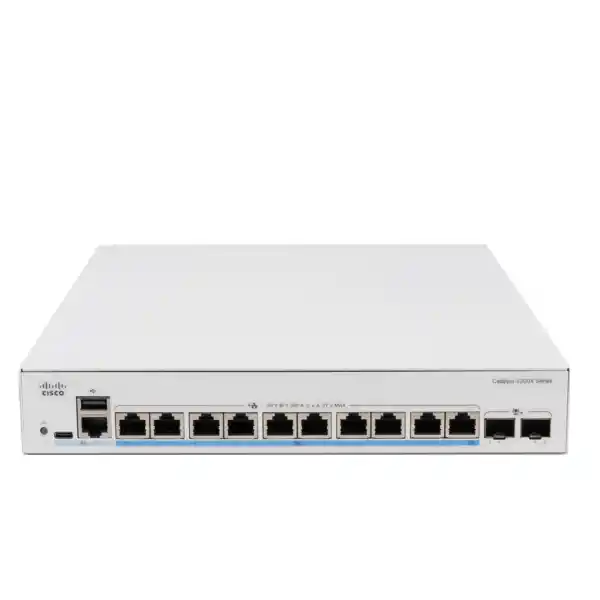
Build a compact access network for devices that need both faster Ethernet and higher PoE power. The Cisco Catalyst C1300X-10NU-2X suits buyers evaluating a small group of demanding wireless access points or other compatible powered endpoints. It combines ten 5Gbps multigigabit copper ports, up to 60W PoE++ per port within a shared 385W budget, and two SFP28 interfaces that provide 10Gbps network uplinks. Their 25Gbps capability is reserved for stacking.
For a Tanzania quotation, start with the endpoint list and intended uplink design. Ask FourTeck Tanzania for an itemised configuration covering the switch, suitable connection accessories, mounting requirements and any separately agreed support or implementation scope. This makes the purchasing decision about the complete installation rather than the chassis alone.
60W PoE++ per port
385W shared PoE budget
2 × 10G uplinks
The right fit: a small number of demanding connections
Consider this model when port capability matters more than a large socket count. A project might involve a new wireless area, a dedicated workgroup or a branch with a limited number of high-demand endpoints. The useful starting question is which devices actually need the proposed access speed and power. Buying faster switching for an endpoint that cannot use it may offer little immediate benefit, while overlooking a demanding endpoint can leave an otherwise well-planned installation constrained.
Separate the project into three requirements: how many copper connections are needed, how much power each powered device requires, and how traffic leaves the switch. These requirements are related but should be assessed independently. A design can have enough ports but insufficient aggregate power, or sufficient endpoint power but an upstream connection that becomes congested. Record current demand and credible expansion separately so that the purchase has a clear purpose.
Treat the ten access ports as a deliberate sizing decision. Count infrastructure connections as well as user devices, and identify any port reserved for testing or future moves. If the immediate list already fills every copper port, compare a larger model before committing. Expansion through another switch introduces additional equipment, connections and administration. It can be appropriate, but should be a planned choice with an owner and budget.
A useful fit statement is specific: a defined endpoint group, a documented power requirement and an upstream path sized for expected traffic. Avoid selecting on broad labels such as enterprise, Wi-Fi-ready or high performance alone. If the project requires a specialist feature, a particular management platform or a proven integration, include that requirement in the technical acceptance checklist before issuing the purchase order.
Verified model details at a glance
The following reference identifies the main hardware characteristics for this exact model. It is intended to help procurement and engineering discuss the same device. Accessories, local commercial terms and site-specific suitability still need to be confirmed in the quotation.
Hardware reference
| Manufacturer / model | Cisco / C1300X-10NU-2X |
|---|---|
| Copper access | 10 × 5Gbps multigigabit Ethernet ports |
| PoE capability | Up to 60W per port; 385W total PoE budget |
| Uplink interfaces | 2 × SFP28; 10Gbps for network uplinks |
| 25Gbps operation | Stacking only |
| Dimensions, W × D × H | 268 × 308 × 43.94mm |
| Unit weight | 3.03kg |
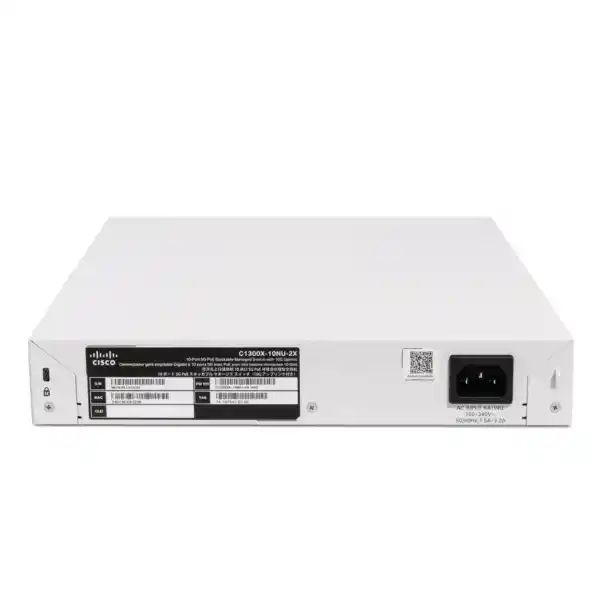
| Power input | Internal universal supply, 100–240V AC, 50–60Hz |
| Cooling | One fan; this model is not fanless |
Plan the full Ethernet path
If switching is part of a wireless refresh, use the Cisco wireless access-point planning guide to frame the endpoint assessment alongside this switch specification.
Multigigabit access should be evaluated as a complete path from endpoint to application. Identify the endpoint network interface, the installed cabling, the switch connection and the upstream destination. A fast access port cannot remove a limitation elsewhere in that path. For example, a user moving files to a busy server may encounter storage or server-interface limits before exhausting the access connection. Define the workload before attributing every performance issue to the switch.
For wireless projects, distinguish the radio’s advertised aggregate rate from the traffic that will reach the wired uplink. Client capabilities, airtime use, radio conditions and application behaviour all affect the result. Estimate busy-period traffic using a realistic mixture of applications rather than multiplying headline radio rates. This produces a more useful access-switch decision and avoids promising a particular wireless experience solely from the Ethernet specification.
Review the installed copper channels before deciding they can be retained. Capture cable type, approximate route length, patch-panel details, termination condition and any previous fault history. Where the proposed speed or power delivery is important to acceptance, arrange appropriate channel testing. Replacing a switch can expose a marginal cable that previously appeared adequate, particularly when the deployment also changes the endpoint or its operating mode.
During commissioning, record the negotiated link state and investigate unexpected results before moving on. A successful ping confirms only limited connectivity. Use representative application checks and sustained transfers where relevant, and observe errors while the system is busy. Keep the test method consistent across connections so that a weak cable, endpoint setting or upstream constraint can be isolated without repeatedly changing several variables at once.
Size PoE with a written power worksheet
The shared power limit is a purchasing constraint, not a minor footnote. Ten endpoints cannot all be allocated the maximum advertised per-port power simultaneously: ten times 60W is 600W, which exceeds the 385W budget. Use the switch-side power requirement or allocation for each exact device and its intended operating mode. Do not equate power available at a switch port with guaranteed power reaching an endpoint after cable losses.
Build a worksheet with one row per proposed connection. Include the endpoint model, quantity, required PoE standard, intended functions, expected allocation and any startup considerations. A basic arithmetic illustration is six allocations of 50W plus four of 15W, totalling 360W. That leaves 25W against the published budget before any additional design reserve. It is an illustration of budgeting, not a verified compatibility statement for a real set of devices.
Consider the operating state that matters to the business. An access point may have several power modes, and an endpoint can appear functional while limiting features. Ask the endpoint manufacturer which power mode is required for the chosen configuration. Then check the actual negotiated result during acceptance. A device lighting up is not enough evidence that its intended capabilities are available.
Cisco’s port-management interface provides power status, allocation information and configurable priorities. Agree which devices are operationally important before setting those priorities. Priority settings organise behaviour under constraint; they do not increase the available wattage. Reserve capacity for approved growth and review the worksheet whenever a powered device changes. This simple discipline helps prevent a later equipment swap from creating an unexpected power shortage.
Design uplinks around traffic and port use
Start an uplink discussion by identifying the upstream device and the services behind it. Record its available interfaces, supported connection method, intended redundancy and expected traffic. A connection to a local server network may have a different requirement from a connection carrying mainly internet-bound traffic. Estimate where traffic is concentrated and whether busy periods are brief bursts or sustained transfers.
The two front-panel high-speed interfaces require particular attention when stacking is proposed. Draw the physical design and label each interface with its purpose before ordering accessories. An interface assigned to a stack connection is not also a separate upstream network connection. On a small model, allocating both interfaces to a topology can materially change how the rest of the network is reached.
For optical links, collect the fiber type, connector details, installed distance and the equipment at both ends. For a short direct connection, identify whether a compatible direct-attach cable is appropriate. Confirm the exact accessory against the switch, the peer device and the intended operating mode. Physical fit alone is insufficient evidence of a supported or suitable connection.
Where link aggregation is proposed, review configuration and traffic distribution on both ends. A bundle can help share multiple flows and provide a link-failure path, but a single application flow should not be promised the sum of every member link’s speed. Agree the failure test, the expected remaining capacity and the workloads that must remain usable after a member connection is removed.
Standalone or stacked: choose the operating model
Cisco documents stacking within the C1300X family and excludes mixed stacking with the stacking-capable C1300 family. Treat a proposed stack as a defined system with a consistent software plan and approved interconnects. An existing switch being branded Catalyst does not establish stacking compatibility. Record the exact model of every intended member before requesting a combined configuration.
The operational reason for stacking should be explicit. It might be a shared management approach, an intended connection design or a planned expansion. Compare that benefit with the additional dependencies it introduces. A standalone switch can be easier to isolate during a small replacement, while a shared system requires the team to understand how member changes affect the whole installation.
Prepare a port drawing that includes the upstream connections and the endpoints on each member. Show what happens if an interconnect, a member or an upstream device fails. Ask whether the remaining topology still supports the important business services. Avoid reducing resilience to a single phrase in the quotation; an illustrated failure scenario is much easier for technical and purchasing teams to assess.
Document replacement and maintenance procedures before the stack is put into service. Assign responsibility for software consistency, configuration backups, member identification and spare equipment. Include the intended change window and the expected service impact of planned work. A manageable topology is one that the support team can explain and recover, as well as one that performs correctly during normal operation.
Organise VLANs around business roles
The C1300X administration guide covers VLAN creation, access-port membership, trunking and voice VLAN features. Use these capabilities to implement an agreed logical plan. The design should say which groups need to communicate, which need to remain separated and which device enforces the boundary. Do not let the physical order of patch cables become the only record of network organisation.
A practical planning sheet can list staff devices, guests, communications equipment, cameras and infrastructure management as separate roles. These are example categories, not a requirement to create all of them. For each role, record the address plan, gateway, required services and owner. Keeping the list tied to real use avoids creating unnecessary segments that later become difficult to support.
Wireless access-point connections deserve careful coordination. Record how each intended wireless network maps to the wired design, including management traffic. Match the tagged and untagged behaviour at both ends of every relevant link. When a change spans switching and wireless administration, nominate one person to verify the complete path instead of assuming that each team has used the same settings.
Test both permitted and prohibited communication after implementation. A guest device obtaining an address and reaching the internet is only part of the result; also check that it cannot reach an internal service it should not access. Keep the tests understandable to the business owner. Clear evidence of intended separation is more useful than a configuration export without an explanation.
Decide where routing belongs
Cisco documents OSPF support for the C1300X series, including OSPFv2 configuration when IP routing is enabled. That capability can be relevant where the switch participates in a routed design. It should follow the network architecture rather than determine it. Some installations are better served by keeping their gateway and policy functions in existing upstream equipment.
Before choosing the gateway location, map the traffic that crosses between groups. Identify which paths require security inspection and which are routine internal connections. Moving a gateway can change the path through the network even if the addresses stay familiar. Review the intended enforcement point whenever routing changes, particularly where administrators expect a firewall policy to control communication.
For a dynamic-routing design, prepare the addressing and neighbour plan together with the upstream administrator. Agree which networks should be advertised, which should remain local and how a withdrawal or failure should behave. Treat the expected route table as an acceptance item. A protocol relationship being established does not, by itself, prove that every advertised path is appropriate.
Keep the design no more complex than its purpose requires. Record why dynamic routing is needed and who will maintain it. If the project only requires access switching into an established network, assess that simpler role first. When advanced functions are mandatory, have the engineer confirm the exact release behaviour and platform limits rather than assuming equivalence with another Cisco product family.
Apply access controls with a recovery plan
The documented feature set includes 802.1X authentication and MAC-based authentication options. These features can contribute to a controlled access design when the required identity services and endpoint behaviour are understood. They require configuration and operational ownership. Installing a managed switch alone does not establish a complete access-control system or guarantee that unauthorised devices will be excluded.
Start with an endpoint inventory and identify devices that support the chosen authentication method. Define how infrastructure devices, printers and equipment without an interactive user will be handled. Name the owner of exceptions and the process for reviewing them. A policy that cannot accommodate a legitimate device through a controlled process often leads to undocumented workarounds.
Cisco also documents MAC and IP access-control lists. Write intended rules in plain language before implementing them: the source group, destination, required service and reason. Then check rule order and the action for traffic that matches no rule. Test a representative permitted connection and a representative denied connection so that both usefulness and restriction are demonstrated.
Schedule access-policy changes with an administrator recovery path available. Preserve a usable configuration backup and agree how a failed change will be reversed. Include the management connection in testing so that an otherwise correct endpoint policy does not lock the support team out. Review access rules after significant application changes, and remove exceptions when their documented purpose ends.
Treat voice and video as measurable workloads
Cisco’s quality-of-service documentation includes traffic classification and DSCP-to-queue mapping. These controls provide tools for a deliberate traffic policy. Their value depends on how the network identifies important traffic and handles it along the full path. A priority setting at one switch cannot guarantee call quality across every other device or service involved.
Begin with the problem to solve. If users report poor calls during file transfers, reproduce that situation and observe where congestion occurs. Record the application, approximate concurrency, traffic direction and timing. This helps distinguish a switching policy issue from an overloaded WAN connection, a wireless condition or an endpoint fault. Change one meaningful variable at a time when comparing results.
Define which markings the network will trust and where they are assigned. Avoid giving every device an unrestricted ability to declare its own traffic urgent. Agree the policy with the administrators responsible for upstream equipment so that the intended treatment remains coherent. A short policy with a clear owner is easier to maintain than a collection of inherited settings whose purpose is unknown.
During acceptance, run representative communications alongside a realistic competing workload. Record what was tested and the conditions under which it remained usable. Avoid turning a successful lab result into an unconditional performance promise. If the bottleneck lies elsewhere, include that finding in the project handover so that the switch purchase is judged against the role it can actually fulfil.
Management should match the support team
The series offers web-based administration, a command-line interface and Cisco Business Dashboard management options. Choose an approach that the team can use consistently. Local administration may suit a small installation, while an established management workflow may be preferable across several locations. Confirm the requirements of the intended management solution separately, including access, ownership and any commercial terms.
Decide who owns administrator identities and who may approve configuration changes. Document the management address, intended access path and the person responsible for recovery. Keep sensitive credentials in the organisation’s approved secure system rather than in a general project handover. A shared device with no clear administrative owner can become difficult to maintain even when its initial setup is straightforward.
Agree a naming convention before installation. Use names and port descriptions that make sense to someone diagnosing a fault without having attended the deployment. Label physical connections to match the records. A useful description identifies the destination and purpose; it should not depend on a temporary desk occupant or an unexplained abbreviation that only one installer understands.
Make configuration retention part of normal change practice. Keep a dated approved backup, a short explanation of major changes and an accessible recovery procedure. After commissioning, verify that the intended settings persist through the agreed restart test. Give the receiving administrator enough information to distinguish a current approved state from an old export saved during an earlier stage of the project.
Monitor the signals that matter
The C1300X dashboard exposes operational information including power utilisation, port utilisation, errors and recent logs. Cisco also documents SNMPv3 management. These facilities can support an ongoing monitoring approach, but useful monitoring starts with the response expected from the support team. Decide which event requires action, who receives it and what evidence they need.
For a power-focused installation, watch the relationship between the planned worksheet and the observed system. Investigate a persistent difference rather than immediately assuming that the lower figure proves additional safe capacity. A quiet period may not represent a busy period or every endpoint operating mode. Update the record after planned equipment changes and retain the reason for any revised allocation.
For performance, establish a baseline after acceptance. Capture normal utilisation and error behaviour during representative operation. This gives future fault investigation a comparison point. A percentage viewed in isolation can be misleading when the workload and link state are unknown. Keep measurements connected to the time, interface and user activity that produced them.
Give alerts a practical destination and test that destination. An event that appears in a dashboard but reaches nobody is unlikely to shorten an outage. Include escalation details and the basic information to gather before a support request: model, software version, affected ports, time of failure and recent changes. Keep operational notes current enough that another administrator can continue the investigation.
Check placement, power continuity and mounting
The hardware dimensions and fan cooling should inform placement. Measure the available space, including cable routing and access for maintenance. Do not evaluate fit solely from the height of an empty shelf. Leave the clearance required by the applicable installation instructions and consider how patch leads and power connections will be reached without disturbing other equipment.
For a cabinet installation, ask the quotation to identify the correct mounting arrangement and included accessories for this exact unit. Rack-mountable does not establish that every desired bracket is included in every order. Check cabinet compatibility before delivery and avoid improvising a mounting method during the change window. Record any separately required hardware in the bill of materials.
Plan backup power for the intended service, not just the switch by itself. If continued wireless or communications service is required, identify every powered dependency in that path. Include the switch’s own consumption as well as the expected endpoint load when sizing a UPS; the PoE budget is not a complete AC-input specification. Set a runtime objective and assess the equipment needed to meet it.
Assess the actual installation environment with the site team. Consider heat accumulation, dust exposure, moisture risk, access restrictions and the ability to inspect or clean the location appropriately. Select an alternative enclosure or deployment approach where the space is unsuitable. Any electrical work or environmental controls should be defined by the responsible qualified personnel rather than assumed to be included with the switch purchase.
Choose the model against the job
Compare alternatives using the same requirement sheet. If the endpoint list is large but most devices have modest demands, a higher-port-count access model may be a better starting point. If only a small group needs the proposed connection capabilities, this compact configuration may be easier to justify. The comparison should reflect installed cost and operating needs, not simply the lowest chassis price.
If the requirement is ordinary 25Gbps upstream network connectivity, select a platform explicitly supporting that use. Do not choose this model on the basis of the SFP28 connector name alone. Similarly, if endpoints require power beyond this model’s per-port capability or the complete group exceeds its shared budget, revise the design before ordering. Accessories cannot turn an undersized shared power budget into a larger one.
For replacement projects, gather the old model, configuration and connection inventory first. Cisco states that the 1300/X platform uses customised Linux software, so a Catalyst name should not be taken as proof of identical operating behaviour or configuration syntax across families. Treat an existing configuration as design input and validate the target implementation with the responsible engineer.
Compare management requirements as carefully as hardware. A project may mandate a particular controller, monitoring method, support process or standard configuration. Include those requirements in the evaluation and obtain explicit confirmation for any essential integration. Where the proposed model cannot be verified against a mandatory condition, resolve that condition before the purchasing decision rather than leaving it for commissioning.
A commissioning checklist with clear acceptance
Agree the acceptance plan before the installation date. Identify the services that must work, the people who can verify them and the evidence to retain. Separate a connectivity check from an application check. A link becoming active does not prove that addressing, access controls, power mode and business applications all meet the intended requirement.
At the physical stage, check the received model and ordered accessories, inspect mounting, label the connections and confirm the intended power arrangement. At the network stage, verify link state, VLAN membership and upstream reachability. For powered endpoints, compare negotiated power behaviour with the worksheet. Investigate unexplained differences before treating the installation as complete.
Test representative workloads during a realistic operating condition. Include the most important wireless, communications or data application in the project scope. Where resilience is part of the design, perform only the approved failure tests and record the result. Cisco documents spanning-tree controls including RSTP, but loop protection and recovery behaviour still need to match the deployed topology.
Finish with a handover that another administrator can use. Include a connection map, addressing and VLAN records, software details, configuration backup, test results and unresolved items with named owners. Record the agreed rollback or recovery procedure. A signed acceptance should describe what was demonstrated and any remaining action, providing a useful baseline for future changes or support.
Prepare a complete Tanzania quotation request
Give FourTeck Tanzania a clear description of the intended project and required quantity. State whether this is a new installation, an expansion or a replacement. Add the endpoint models and quantities, power worksheet, upstream equipment and preferred connection media. Share the installation location as a scoping detail without assuming a particular service coverage or delivery arrangement.
Ask for an itemised bill of materials that separates the switch from optics or direct-attach cables, stack interconnects, mounting accessories and any additional equipment. Where installation or configuration is wanted, request it as an explicit scope with deliverables. Identify who provides existing network information and who approves changes to upstream equipment so that responsibilities are clear.
Request current commercial confirmation for price, currency, availability, lead time, supplied order variant, warranty handling and any optional support. These terms should come from the actual offer. If several quotations are compared, use equivalent quantities, accessories and services. An apparently lower total may exclude an essential connection component or a service included elsewhere.
Keep a record of the approved configuration alongside the order. If a component is substituted, have the technical owner review the effect on compatibility and acceptance before approving it. The objective is a purchase package that can be installed and verified as planned, with any commercial or technical exclusions visible to the buyer.
Buyer questions
Can it power ten devices at 60W each?
No. That would require a 600W allocation, exceeding the shared 385W PoE budget. Check each device’s switch-side requirement, intended functions and negotiated allocation, then leave suitable project headroom.
Are these general-purpose 25Gbps uplinks?
No. Cisco specifies 10Gbps network uplinks on the two SFP28 interfaces. The 25Gbps capability is for stacking. A requirement for ordinary 25Gbps upstream networking needs a different verified platform.
Will it work with my access points?
Provide the exact access-point models and intended operating modes for assessment. Ethernet capability, PoE requirements, cabling and upstream design all matter. A wireless generation label alone does not establish compatibility or full functionality.
Can it join an existing C1300 stack?
Cisco documents C1300X-family stacking and states that C1300X switches cannot stack with stacking-capable C1300 switches. Supply every intended member’s exact model and review software and interconnect requirements.
Does it replace the network firewall?
Keep firewall requirements as a separate design item. Routing and switch access controls do not, by themselves, establish that an installation has the security inspection or policy enforcement required for its internet and internal boundaries.
What price and delivery time should I budget?
Request a current written quotation from FourTeck Tanzania. Confirm the complete accessory list and any agreed services with the commercial terms before ordering; this guide does not establish stock, a selling price or a delivery commitment.
Request a configuration-based quotation
Send FourTeck Tanzania your endpoint list, quantities, power requirements and proposed upstream connection for the Cisco Catalyst C1300X-10NU-2X. Include whether the switch will operate alone or in a planned C1300X stack. Ask for an itemised offer that identifies required accessories, current commercial terms and any separately agreed implementation or support scope.
Request your Tanzania switch quotation.




Reviews
There are no reviews yet.