
FOURTECK TANZANIA · ENTERPRISE ACCESS SWITCHING
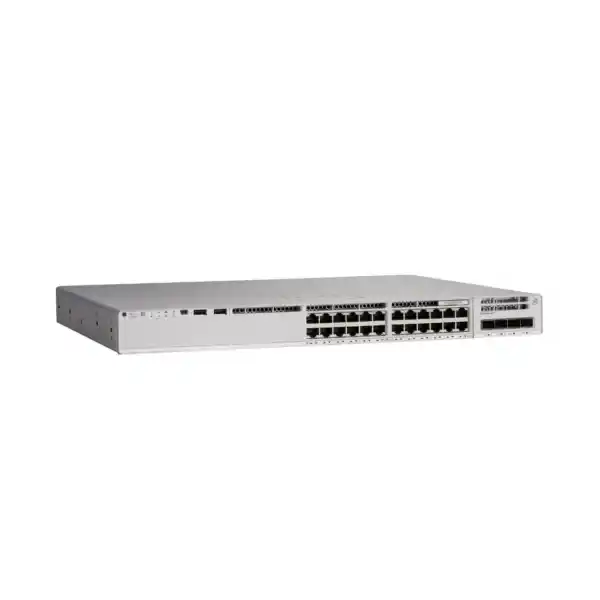
Cisco Catalyst C9200-24P Network Switch
Connect business users and compatible powered devices on a managed access network with room to plan uplink and resilience options. The C9200-24P provides 24 Gigabit Ethernet PoE+ access ports and a modular uplink design. It suits buyers who need to evaluate endpoint power, aggregation capacity and operational control together rather than choose a switch by port count alone.
Request a configuration-specific quotation from FourTeck Tanzania. Include your powered-device list, required uplink speed and preferred software tier so the proposed package can be reviewed against your deployment.
Is this the right access switch for your site?
Start with the devices that will connect to the cabinet. A mix of workstations, compatible IP phones, wireless access points and other Ethernet equipment can create very different requirements even when the total connection count looks similar. Record which devices require network power, which depend on local adapters, and which carry business-critical traffic. This gives the purchasing team a clear basis for judging the proposed configuration.
Consider the C9200-24P where Gigabit access meets the endpoint requirement and the ability to select an uplink module is useful. If your access points need faster copper connections, or a powered device requires more than PoE+, compare a suitable alternative before ordering. Faster aggregation does not increase the speed or power capability of an individual access port.
Define what success means for the project: enough connections for the planned users, sufficient power under the agreed failure conditions, manageable administration and an uplink design that suits application demand. Give each requirement an owner. A documented requirement is easier to verify at handover than a general request for a powerful business switch.
Technical snapshot and configuration boundaries
The following specifications identify the base platform and the options that need attention in a quotation. Optional components describe supported design choices; they do not establish what is included in a particular FourTeck offer.
Key specifications
| Access interfaces | 24 × 10/100/1000 Ethernet ports with PoE+ capability |
|---|---|
| AC PoE budget | 370W with one PWR-C6-600WAC; 740W with two, as listed by Cisco |
| Uplink choices | C9200-NM-4G: four 1G SFP slots; C9200-NM-4X: four 1G/10G slots |
| Stacking | StackWise-160; optional stacking hardware required |
| Switching / forwarding | 128 Gbps switching capacity; 95.23 Mpps forwarding rate, without stacking |
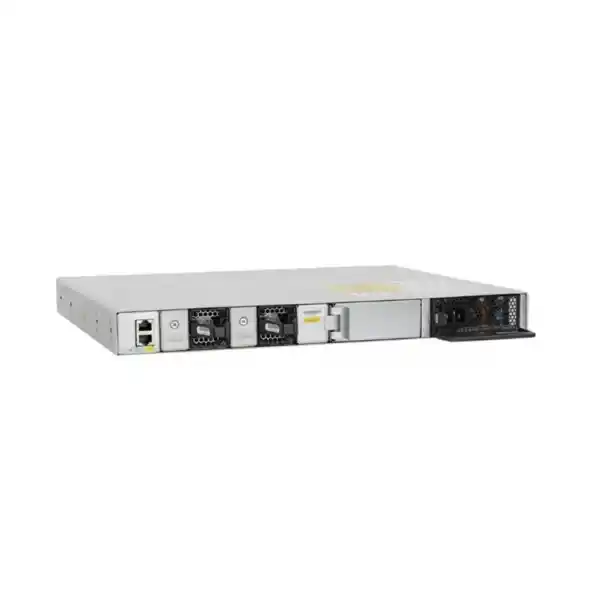
| Serviceable hardware | Dual power-supply slots and field-replaceable fans |
| Software identity | Confirm C9200-24P-E or C9200-24P-A and the associated licensing offer |
Read the product name before comparing quotations
The base model name does not identify a complete purchase package. Cisco lists Network Essentials and Network Advantage variants using the -E and -A suffixes. Ask the quotation to spell out the exact manufacturer part number and the software arrangement being offered. A short description containing only the family name can leave important commercial and technical choices unresolved.
Separate the switch chassis from the uplink module, transceivers, second power supply and stacking accessories. Two proposals can use the same base model while delivering different network capabilities on installation day. Compare matching configurations and require a written inclusions list before judging the difference in total cost.
Keep manufacturer identifiers separate from the seller’s stock-keeping reference in your procurement records. The model name identifies the platform, while the supplier’s listing reference identifies its own offer. For purchasing approval, attach the final bill of materials to the requisition so that the delivered equipment can be checked against a concrete configuration rather than a generic product heading.
Build the PoE budget from endpoint requirements
PoE planning starts with the powered devices, not the number of empty sockets. Collect the maximum required power and the supported PoE standard for every proposed endpoint. Include optional functions that may change its requirements, such as additional radios or attached accessories. Use the endpoint manufacturer’s installation guidance rather than treating a typical idle reading as its purchasing requirement.
The standard AC configuration listed by Cisco provides a shared power allowance across the switch. It should not be interpreted as permission to allocate the maximum per-port power to every socket simultaneously. Also distinguish the power-supply rating from the amount available for endpoints: the switch itself needs power to operate.
Keep a reserve for expected additions and for uncertainty in the initial device inventory. State whether the design must keep all endpoints powered after losing one supply. That requirement can change the correct configuration even when two proposals show the same normal operating budget. Ask for the power calculation to be included with the design so that future changes can be assessed without repeating the whole procurement exercise.
A practical power worksheet for procurement
Use a simple worksheet with five columns: device type, quantity, required switch-side allocation, total allocation and business priority. Multiply quantity by the agreed allocation for each row, then add the rows. Label any estimates clearly. This makes it possible to distinguish a verified requirement from an allowance that still needs confirmation.
For illustration only, ten endpoints allocated 15W each and six allocated 25W each require 300W in total. That is a planning calculation, not a tested device combination or a guarantee of negotiated power. Compare the result with the chosen power configuration and retain an allowance for growth. Replace the illustrative values with the actual equipment requirements before ordering.
Repeat the worksheet for the failure condition the business expects to tolerate. If capacity after a supply failure is insufficient, decide in advance whether to reduce the connected load, select another configuration or accept an agreed service reduction. Document which devices have priority and test the intended behavior during commissioning. Avoid discovering the power constraint only when a maintenance event affects phones or wireless coverage.
Choose uplinks around traffic and the receiving equipment
The C9200-NM-4G and C9200-NM-4X serve different aggregation requirements. The former provides 1G SFP slots; the latter supports 1G or 10G connections. Specify the module explicitly and confirm the required transceivers or cables at both ends. The presence of an uplink slot does not establish that the components needed to form a working link are included.
Look at where traffic goes during a busy period. A cabinet serving staff who mainly use internet applications has a different traffic pattern from one carrying local file transfers, camera streams or concentrated wireless traffic. Estimate simultaneous demand toward the upstream network and consider how that demand changes if one uplink is unavailable.
Record the upstream switch model, available interface type, distance and media before choosing optics. Keep the link specification consistent across both ends. Where multiple uplinks are proposed, have the network design explain their purpose and behavior rather than assuming every installed connection automatically adds usable capacity. A clear topology helps the purchasing and implementation teams agree on what the uplink package must deliver.
Match fibre, optics and cabling before installation
Treat each optical connection as a complete path. Document the installed fibre type, approximate route length, termination connectors, patch-panel arrangement and the receiving interface. Confirm transceiver compatibility with the exact switch module and software before purchase. Matching the headline speed alone does not resolve every compatibility question.
Ask the project team to identify whether patch leads, optics and any required cable-management accessories are included in the quotation. Check both directions of a link and label the termination points so that the installation team can connect the intended ports without tracing an undocumented path through the cabinet.
Inspect existing copper runs as part of the project, particularly when an endpoint will depend on the cable for both connectivity and power. Record test results and repair suspect outlets before moving critical devices. Keep spare patch leads and an accurate port schedule available during cutover. These small preparation steps make troubleshooting more focused because the team can distinguish an endpoint issue from a cabling or uplink problem.
Plan stacking as a deliberate design choice
StackWise allows compatible switches to operate as a unified system, but the stacking design needs its own bill of materials and change plan. Cisco supports up to eight members within the documented compatibility rules. The C9200 platform must not be mixed in a stack with C9200L switches, and the PB models have additional restrictions. Confirm model and license compatibility before adding equipment to an existing stack.
Specify the C9200 stacking hardware rather than treating similarly named accessories as interchangeable. Count adapters and cables for the proposed topology and check that cable lengths suit the actual rack arrangement. Include the complete connection plan in the installation documentation.
Decide whether the operational benefit justifies the shared management and maintenance scope. A stack can simplify administration, but the business still needs an agreed response to member failure, cable failure and software work. Identify the devices connected to each member, plan the preferred active and standby roles where applicable, and test the selected recovery behavior. Retain a diagram showing how the stack is physically connected.
Design resilience around the service you need to preserve
Begin by naming the failure the business wants to withstand. A failed power supply, loss of an upstream connection and complete cabinet power loss are different events. Each needs a different response. Adding one redundant component cannot cover every dependency between the endpoint and its application.
The platform supports serviceable power and fan hardware. For the offered package, confirm which components are fitted and which are optional. Ask how the proposed power arrangement affects both switch operation and the connected PoE load after a failure. Where independent power feeds are part of the design, verify the actual circuit arrangement rather than relying on separate sockets alone.
Trace a critical service from endpoint through switch, uplink, gateway and application. Mark any shared dependency and decide whether it is acceptable. Test recovery in a controlled maintenance window with named observers and a rollback plan. Record the observed interruption and restoration behavior against the business requirement. This creates evidence for the resilience decision instead of assuming that a list of redundant parts proves continuity.
Select the software offer against required functions
Licensing needs an explicit line in the purchase decision. Cisco’s current documentation describes multiple software purchasing arrangements, including subscription options alongside the established Network Essentials and Network Advantage tiers. The applicable features depend on the offer, platform, release and management environment. Request a written entitlement summary for the exact configuration being quoted.
List the functions your design actually requires before choosing a tier. Distinguish routine access switching from advanced routing, segmentation or centrally managed automation requirements. Ask for any dependency on an external management platform, identity service or additional license to be identified during design review.
Have the quotation state the license names, term where applicable, account allocation and included support. Assign an administrator to verify entitlement delivery and keep the records with the hardware asset information. If the organization already has an enterprise agreement or subscription arrangement, review the new equipment against that agreement before placing a separate order. Do not assume the base product name identifies every feature or establishes the future renewal obligation.
Decide where routing and security policy belong
An access-switch project should identify the device responsible for moving traffic between networks. Write down where user, voice, wireless and other subnets terminate, and which system enforces their permitted communication. Have the proposed routing features checked against the selected entitlement and software release before making them a dependency of the design.
Keep routing requirements specific. State whether the switch will provide only access connectivity, local subnet gateways or another defined role. Identify upstream routes, return paths and the behavior expected during a link failure. Where a firewall is responsible for inspection, ensure the traffic path actually passes through it as intended.
A managed switch does not by itself establish a complete security architecture. Ask the design to show the allowed flows between groups and the control that permits or blocks each flow. Include management access and infrastructure services in that review. A short, agreed traffic matrix is often easier to validate than a large configuration with no explanation of the business policy it implements.
Create a port and VLAN plan people can maintain
Build the port schedule before the cabinet is patched. Give each connection a location, endpoint role, network assignment and responsible owner. Keep the physical label consistent with the logical description so that an administrator can identify a port without visiting every desk. Include spare ports and explain how they should be treated until they are needed.
Separate user groups according to the organization’s operational and security requirements. Agree on how guest traffic, staff devices, voice systems and infrastructure will reach the services they need. Record the addressing and upstream dependencies for each network. A VLAN number alone does not describe the access policy or prove that groups are isolated.
Review the proposed trunk configuration with the upstream network owner before cutover. Confirm the intended networks on each path and the required behavior for native or untagged traffic. Keep unnecessary connectivity out of the design and document exceptions. This gives later support teams a useful starting point when an endpoint receives the wrong address or cannot reach its application.
Coordinate access authentication with endpoint onboarding
Cisco documents IEEE 802.1X access authentication for this platform. Its successful use depends on the surrounding identity design and endpoint behavior. Identify the authentication service, required client configuration and the treatment of devices that cannot use the chosen method. Verify the exact feature combination against the selected software and entitlement.
Pilot the policy with a small group containing different endpoint types before applying it across the office. Include a workstation, phone and any specialized device that the deployment will use. Define what should happen when credentials are rejected or the authentication service is unavailable. Have the business owner approve any fallback access that the design allows.
Keep an exception register with a reason, owner and review date. A device that needs a temporary workaround during migration should not silently become a permanent unrestricted connection. Prepare a support procedure that distinguishes authentication failure from DHCP, cabling and application issues. This helps the operations team restore access without weakening the intended policy whenever an unfamiliar endpoint is connected.
Prepare IP phones and voice traffic as a complete service
Cisco’s voice VLAN documentation describes separating supported phone voice traffic from connected data traffic on an access port. Confirm the behavior of the actual phone models and their provisioning method. A phone with a downstream workstation connection also needs appropriate speed, authentication and policy handling for both devices.
Map the service dependencies before the phones are moved. Check addressing, name resolution, provisioning, time synchronization and access to the call-control system. Agree where traffic priority is established and how it is handled across the rest of the network. A local switch setting cannot establish call quality across an otherwise congested or misconfigured path.
During acceptance, test incoming and outgoing calls, internal calls, transfers and any other business-required functions using the actual calling platform. Check representative phones after a controlled restart and after relevant network changes. Include a workstation behind a phone where that arrangement is planned. Record any disruption, incomplete registration or unexpected network assignment so that the complete service can be corrected before handover.
Check wireless access points beyond their Ethernet connector
Start wireless planning with the exact access-point models and their operating requirements. Compare their required power and copper-link speed with the proposed access connection. If a radio feature depends on a higher power mode or faster interface, have the wireless designer explain the consequence of connecting it to this switch configuration.
Keep coverage design separate from switch selection. Enough wired ports do not establish the number or placement of access points a building needs. Use the floor plan, construction materials, user density and application requirements to guide the wireless project, then provide the resulting access-point inventory to the switching team.
Check that the intended wireless networks can reach their gateways and management systems through the proposed wired design. Test access-point startup, client addressing and representative applications after migration. For the wider project, review FourTeck Tanzania’s Cisco wireless access-point guidance alongside the switching requirement. Any particular access-point pairing still needs verification; the product families alone do not establish compatibility.
Assess cameras and other powered endpoints individually
A powered Ethernet port may serve equipment outside the usual workstation and phone estate. For cameras, access-control devices and other proposed endpoints, collect the manufacturer model and installation requirements. Identify any functions that change power demand and whether the device needs a PoE standard beyond the capability of the selected access port.
Estimate traffic using the intended operating configuration. A camera’s recording settings, for example, should inform the planned path toward its recording system. Identify whether traffic remains local or traverses the cabinet uplink. Keep security and facilities stakeholders involved so that their systems are included in both the port count and the network policy.
Test representative endpoints with their intended functions enabled before approving a wider rollout. Confirm recovery after a controlled power interruption, access to the relevant server and the required administrative restrictions. Document vendor-specific exceptions rather than assuming all devices behave like office phones. This keeps the buying decision tied to the actual equipment and prevents a general PoE label from becoming an unsupported compatibility promise.
Prepare the rack, power and maintenance access
Review the cabinet as part of the purchase rather than after delivery. Check mounting suitability, usable space, cable routes and access to the serviceable components. Follow Cisco’s installation instructions for the exact equipment and rack arrangement. Where the site has a nonstandard cabinet, confirm the appropriate mounting accessories before installation is scheduled.
Have the responsible facilities team assess the power arrangement, protective measures and any UPS requirement. Size backup power for the intended operating load and required runtime, including the equipment that must remain available alongside the switch. A powered switch is useful only if the rest of the required service path also remains operational.
Plan patching so that labels stay readable and technicians can reach components without pulling unrelated connections. Keep ventilation paths clear and evaluate the installation environment against the manufacturer’s limits. Record who is permitted to access the cabinet and where the relevant isolation points are located. These details make routine maintenance more predictable and help avoid preventable disruption during later expansion.
Replace an existing switch with a controlled cutover
Begin with an inventory of the current environment. Save the existing configuration, identify every active port and record the upstream connections. Check which services have hidden dependencies, such as a device using a manually assigned address or an undocumented phone provisioning setting. Resolve unclear connections before the maintenance window.
Prepare the new configuration against the intended design and the selected software release. Review old settings individually rather than assuming a configuration from another platform can be transferred unchanged. Stage the switch and test management access, uplinks and representative endpoints before it becomes responsible for production users.
Write a cutover sequence with an owner, a communications plan, acceptance checks and a rollback point. Move and verify connections in manageable groups, particularly where the cabinet serves critical equipment. For broader legacy planning, see FourTeck Tanzania’s Catalyst 2960-X replacement guidance. An existing stack, optics set or license should still be assessed separately for the proposed new design.
Plan administration, monitoring and configuration records
Decide who will administer the switch after the installation team leaves. Name the organization responsible for accounts, configuration backups, software maintenance and incident response. Agree how authorized administrators will reach the equipment and how access will be removed when responsibilities change. Keep emergency recovery access documented and controlled.
Choose monitoring requirements around the services the cabinet supports. Useful observations can include uplink utilization, interface errors, device reachability and power-related events where the selected tools support them. Define who receives an alert and what action is expected; collecting information without an owner does little to improve operational response.
Keep an approved configuration baseline and a current diagram with the asset record. Record the software release, entitlement information, fitted modules, power configuration and connection schedule. Update those records when a port role or uplink changes. Schedule a review after initial operation to resolve unexpected behavior while the implementation details are still familiar to the project team.
Use acceptance checks that match the purchase requirement
Agree the acceptance checklist before the equipment is installed. Start with identity and completeness: verify the delivered model, selected modules, power components, accessories and entitlement records against the approved bill of materials. Record serial numbers and note any discrepancy while the delivery can still be reconciled.
Then test the actual business paths. Confirm that representative devices receive the intended network settings, reach their applications and remain subject to the agreed restrictions. Check management access from the approved location and verify that backup and monitoring arrangements work. Include powered endpoints under the planned operating load rather than checking only that an interface shows a link.
Where resilience is a requirement, perform the approved failure tests with a restoration plan. Record what stopped, how long recovery took and whether the result met the agreed objective. Retain test evidence with the handover pack. Passing a generic connectivity check should not substitute for verifying the particular services and failure conditions that justified the purchase.
Compare complete quotations for Tanzania procurement
Request a written proposal that separates equipment, software, support and any agreed implementation work. Ask the supplier to identify the exact configuration and the commercial conditions attached to it. Compare proposals on equivalent inclusions, documented responsibilities and the required delivery destination rather than the switch name alone.
Have the quotation state its validity, the offered equipment condition and the applicable warranty or support terms. Ask for pricing in the appropriate agreed currency and clarify the treatment of any delivery charges or other applicable costs. Product research does not establish a current local price, stock position or delivery date; these need confirmation for the actual order.
Consider the cost of maintaining the design as well as purchasing it. Include any subscription term, renewal responsibility, spare-parts approach and staff training requirement in the internal approval. If installation is requested, define its scope and acceptance criteria explicitly. This lets the purchasing team distinguish the price of the equipment from the responsibilities needed to put it into dependable service.
When to compare another configuration
Stay with this platform when the endpoint interfaces, power design and operational requirements fit the intended network. If the requirement changes, revisit the selection before the order is placed. Growth in connection count, higher endpoint power or a new wireless design may affect the right choice more than a small difference in purchase price.
Compare a higher-port-count design where the planned cabinet population leaves insufficient spare connections. Compare a suitable multigigabit platform when endpoints need faster copper links. Where devices require more power than PoE+ can provide, evaluate a switch that explicitly supports their required standard and allocation. Check the complete proposed model rather than transferring capabilities from another member of the same family.
If comparing C9200L, pay attention to its fixed uplink design and different stacking system. Decide whether the modular approach and serviceable components of the proposed C9200 configuration address a real operational need. The best fit is the configuration that satisfies the documented requirement with a manageable support plan, not necessarily the model with the longest feature list.
Frequently asked buying questions
Does every port provide PoE+ at the same time?
All 24 access ports are PoE+ capable, but simultaneous allocation is limited by the installed power configuration and connected-device requirements. Prepare an endpoint power worksheet and include the required failure condition. Port capability and the shared budget answer different parts of the sizing question.
Are 10G uplinks included with the base model?
The uplinks are modular. A working 10G connection requires the appropriate uplink module, compatible transceivers or cables and a suitable receiving port. Ask the quotation to identify each component. Do not assume that a base chassis description includes the complete uplink package.
Can I use the 25G or 40G uplink modules?
Cisco restricts C9200-NM-2Y and C9200-NM-2Q to the relevant multigigabit C9200 models. They should not be specified for this standard C9200-24P. For this product, assess the supported 1G or 1G/10G module options against the actual aggregation requirement.
Can it join an existing C9200L stack?
No. Cisco documents separate stacking systems and does not support mixing C9200 and C9200L in one stack. For an expansion project, provide the complete existing model list and software details so that a compatible topology and accessory package can be evaluated.
Which license should I request?
Provide the functions you need and ask for an entitlement mapping for the exact proposed offer. Include routing, access policy, management and automation requirements. Confirm the software tier, any subscription term and account allocation in writing rather than relying on the unsuffixed base model name.
Will it power my wireless access points or cameras?
Check each endpoint’s exact requirements. The connector alone does not confirm suitable power, link speed or operating mode. Ask for a compatibility review using the actual endpoint models and enabled functions, then test a representative set before deploying the complete estate.
What should I send for a quotation?
Send the required quantity, delivery destination, endpoint inventory, planned growth, upstream switch details and desired resilience. Add the existing network diagram where available. If software or support is already covered by an organizational agreement, identify that arrangement so the new proposal can be assessed against it.
Is a local price or delivery date confirmed here?
No current price, stock quantity or lead time is established by this product guide. Request those details for the exact configuration and destination. Confirm the equipment condition, inclusions, warranty and support scope in the final written quotation before approving the purchase.
Request a configuration-specific quotation
Share your connection count, powered-device models and uplink requirement with FourTeck Tanzania. Ask for a bill of materials covering the selected switch variant, uplink module, optics or cables, power arrangement, stacking accessories where needed, software and any requested support. This makes the proposal easier to compare, approve and verify on delivery.
For an existing-site refresh, include the current switch models and a simple topology. For a new site, provide the intended cabinet population and expected growth. Request written confirmation of price, availability, delivery terms and the agreed implementation scope for your actual order.
Next step: request a C9200-24P quotation with your endpoint and uplink requirements.




Reviews
There are no reviews yet.