
CISCO CATALYST • WIRED ACCESS • TANZANIA
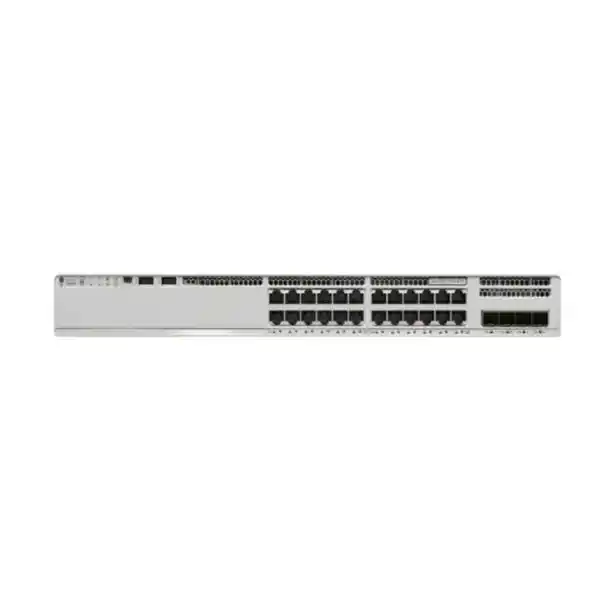
Cisco Catalyst C9200-24T Network Switch
Build a managed wired access network for desktops, printers and other independently powered Ethernet equipment. The Cisco Catalyst C9200-24T is a 24-port Gigabit data switch with modular uplink options and Cisco IOS XE software. It suits organizations in Tanzania that need controlled access connectivity and want to specify uplinks, licensing and resilience to match their network design.
Request a configuration-based quotation from FourTeck Tanzania. Include the required licence edition, uplink speed, optical connections and any stacking or backup power requirements so the proposed bill of materials can be checked before purchase.
The essentials at a glance
| Selection point | What to expect |
|---|---|
| Access connections | 24 copper 10/100/1000 Ethernet data ports. |
| Endpoint power | No Power over Ethernet. Connected devices require their own suitable power arrangements. |
| Uplink choices | C9200-NM-4G for four 1G SFP slots or C9200-NM-4X for four 1G/10G connections. Confirm the module and transceivers on the quotation. |
| Ordering editions | C9200-24T-E: Network Essentials. C9200-24T-A: Network Advantage. The supplied base model name does not select an edition. |
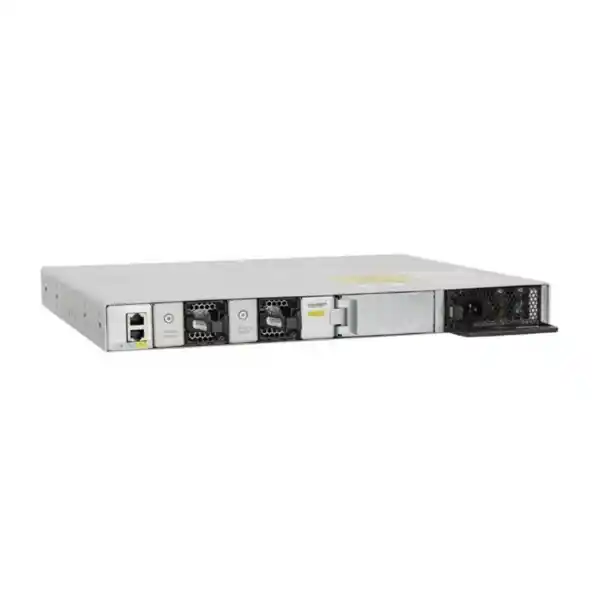
| Resilience hardware | Two power supply slots and two field-replaceable fans; verify installed components and optional additions. |
| Stacking | StackWise-160 capability; compatible switches, stack adapters, cables and software must be specified. |
| Commercial details | Price, stock, delivery, support entitlement and supplied accessories require confirmation for the exact offer. |
Use this summary as a starting point for specification. A model-family description is not a packing list, and an optional capability does not confirm that the necessary accessory or entitlement is included.
Is this the right access switch for your requirement?
A good match for powered workstations
Consider this model when most endpoints are desktop computers, printers, terminals or similar devices with separate power supplies. It provides a managed access layer without making endpoint power delivery part of the switch requirement. Count active network sockets and allow space for the equipment you expect to add.
A deliberate choice for modular uplinks
Choose the modular platform when you want uplink selection to be an explicit part of the design. A site connecting to an existing 1G distribution layer has different requirements from one moving access traffic onto 10G links. The installed module and optics determine the actual connection available.
Reconsider for powered or faster endpoints
If your plan depends on powering phones, cameras or wireless access points from the Ethernet cable, compare a suitable PoE model. If endpoints need speeds above 1 Gbps, compare a switch with the required multigigabit downlinks. An uplink upgrade does not change this model’s copper access-port speed.
Start with the application and endpoint inventory. Buying a familiar Cisco product name is only one part of a useful specification; the selected hardware, software and supporting infrastructure should also match the way your organization operates.
Understand the exact model before comparing quotations
The C9200-24T belongs to the modular-uplink Catalyst 9200 platform. The letter T identifies a data-port configuration in this model range. It is different from the C9200-24P PoE+ model and from similarly named C9200L switches with fixed uplink configurations. Those differences affect power delivery, uplink selection and the accessories required for deployment.
Two offers can share a shortened model name while describing different software editions or different accessory bundles. Ask for the full manufacturer part number and each separate component on the quotation. A comparison should show what is included today and what would need to be purchased before the planned configuration can operate.
The -E and -A ordering suffixes distinguish Network Essentials and Network Advantage respectively. Neither suffix should be inferred from the unsuffixed name supplied here. Treat the final licence choice as a design and procurement decision. Request confirmation against the functions you need rather than assuming every Catalyst feature is available under every offer.
Keep manufacturer model identifiers separate from a seller’s inventory SKU. Use the confirmed part number when checking technical compatibility, and use the actual seller SKU when processing an order. Where a quotation changes an edition, module or accessory, ask for the revised bill of materials before approving it.
Plan the 24 Gigabit access connections
Make a port schedule before selecting quantities. Record each desk, shared printer, terminal, local appliance and other wired device that will connect to the access switch. Distinguish a wall outlet from an active endpoint: several outlets in an office may be unused today, while one shared area may later need additional devices. This helps determine whether a single 24-port unit provides sensible capacity.
Include temporary needs such as troubleshooting equipment, visitor workstations or a department expansion. A spare-port allowance should follow your expected growth and operating practice rather than a universal percentage. If the current requirement already consumes nearly all available ports, compare the space, cabling and management implications of a larger switch or an additional access unit.
Check the endpoint network interface and the copper cabling path when investigating connection speeds. A Gigabit-capable switch port cannot make a damaged cable or slower endpoint operate at a higher rate. Label patch-panel connections and record the intended device and VLAN so later changes do not depend on tracing unmarked leads.
Think about the access layer separately from internet service. Local switching capacity, uplink capacity, firewall throughput, wireless performance and the internet connection are different parts of the path. A switch refresh should target a known access-layer requirement and should be assessed alongside any bottleneck elsewhere in the network.
Choose uplinks for the distribution layer
1G and 10G module options
The C9200-NM-4G provides four 1G SFP slots. The C9200-NM-4X provides four ports supporting 1G or 10G connections with compatible transceivers. Choose the module around the distribution switch, available interfaces, required bandwidth and intended growth. Confirm the exact module on the quotation; the base switch name alone does not establish which uplink option is supplied.
For an office where many users access centralized files, local applications or shared services, estimate how much traffic travels beyond this switch. The number of access ports is useful context, but simultaneous demand matters more than simply adding nominal endpoint speeds. Review traffic measurements where available and identify applications that create sustained transfers or time-sensitive traffic.
Avoid confusing uplink and endpoint speeds
A 10G uplink can provide more aggregate bandwidth toward the distribution layer while each copper access connection remains limited by its own supported speed. It does not create 10G desktop ports. Conversely, installing several uplinks does not automatically mean that every individual application flow can use their combined nominal bandwidth.
Where multiple connections are proposed, have the network designer confirm the topology, aggregation method and configuration on both ends. Document whether the intention is additional capacity, an alternate path or both. Separate physical routes can matter when cable damage is a concern, while multiple leads in one route may share the same exposure.
Do not transfer every uplink option advertised for the broader 9200 family onto this model. The 25G and 40G modules documented for multigigabit C9200 models should not be assumed compatible with the C9200-24T. If that uplink class is essential, review a different platform and the complete network requirement.
Check fibre, transceivers and the far-end connection
An uplink module provides interfaces; an operational optical link also needs compatible transceivers, suitable fibre and a matching connection at the other end. Give the quotation team the distribution switch model, interface type and any existing optic part numbers. Photographs or inventory records can help identify components, but the final compatibility check should use the exact identifiers.
For a fibre connection, record whether the installed cable is single-mode or multimode, its approximate route length, connector arrangement and patching path. Confirm the required optical standard at both ends. Connector appearance by itself is not enough to establish compatibility, and a spare transceiver should be checked before it is assigned to a new link.
Include fibre patch leads, couplers and cable management in the deployment plan when needed. A switch and uplink module can arrive ready for installation while a missing patch lead delays service. Keep a simple connection schedule showing source port, destination port, optic identifiers and fibre reference so acceptance testing has a clear baseline.
If reusing an existing link, inspect its condition and available records before cutover. Confirm the link comes up at the intended speed, check for errors under traffic and save a baseline after installation. Reuse can be practical, but it should follow compatibility and condition checks rather than an assumption that all SFP or SFP+ components are interchangeable.
Design VLANs and traffic boundaries around business roles
A managed access network should reflect who uses it and which resources they need. Create a VLAN plan for the roles present at your site, such as general users, shared equipment, building systems or network management. Use only the groups that your organization actually needs; an unnecessarily complicated segmentation plan can become difficult to support.
Document the intended relationship between each access port, its endpoint and the upstream trunk. Where several VLANs cross an uplink, verify the allowed VLAN list and the configuration at the distribution layer. A mismatch can leave some devices working while others lose access, making a partial migration fault harder to recognize.
Segmentation and access permission are related decisions. Separating devices into VLANs does not by itself define every rule for communication between them. Identify where routing and enforcement will happen, which systems must communicate and who approves those flows. Include DNS, DHCP and other shared services in that review so essential dependencies are not overlooked.
For a practical handover, give the support team a readable port and VLAN map together with the configuration backup. Include a process for adding a new device or changing a department connection. The aim is consistent day-to-day operation, with enough documentation to understand the consequences of an access-port change.
Select software and routing functions by requirement
The switch runs Cisco IOS XE, while the exact functions available depend on the software release, hardware and purchased entitlements. Specify whether the access switch will primarily carry VLANs toward an upstream gateway or will participate in a routed design. That distinction helps the engineering team choose the appropriate edition and validate the intended configuration.
Give the designer a list of required protocols and functions rather than a general request for advanced networking. Include any dynamic routing, segmentation, policy integration or centralized management requirement that is material to the project. Each requirement should be checked against current Cisco documentation for the proposed software and licence combination.
Ask the quotation to identify the base network edition, any additional software subscription, its term and the relevant account or entitlement arrangements. Cisco offers several licensing structures, so the commercial proposal should state the selected option clearly. A chassis price without these details may be insufficient for comparing the total purchase.
Agree who will own the licensing account, maintain inventory records and manage renewals where applicable. Avoid treating an installed software image as proof of entitlement. Before acceptance, verify that the equipment and purchased rights are recorded appropriately and that the operations team understands the arrangements for software maintenance and support.
Apply access security with a tested policy
Identity and device access
IEEE 802.1X port-based authentication is documented for Catalyst 9200 switches. Its use requires an appropriate authentication design and supporting services. If your organization uses identity-based access, plan the endpoint configuration, authentication infrastructure and intended authorization result before enabling enforcement on production access ports.
Agree how unmanaged devices and exceptions will be handled. Shared printers, specialist equipment and maintenance devices may need different onboarding procedures from staff computers. Define the intended response when authentication services are unavailable and test that response with representative devices. Security settings should support an approved operating policy rather than being copied into the network without context.
Address assignment and trust boundaries
DHCP snooping can inspect DHCP traffic and distinguish trusted paths toward legitimate DHCP services from untrusted user-facing connections. Correct trust placement matters. An incorrect policy can interfere with address assignment, so map the DHCP path and validate the configuration in the actual topology before rollout.
Apply controls in stages, keep a recovery route and check logs for unintended failures. Record the expected behavior for a new endpoint, a moved endpoint and a device that fails authentication. These simple test cases make the difference between a feature being enabled and an access policy working as intended.
The access switch is one part of a broader security design. Review firewall policy, administrative permissions, endpoint protection and monitoring alongside switch configuration. No switch purchase on its own guarantees protection from every threat, and a working security design needs ongoing ownership after installation.
Make management and troubleshooting part of the purchase
Decide how administrators will reach the switch during normal operation and during an incident. Record the management addressing plan, authorized administrator roles and the intended monitoring path. Have the implementation team confirm the management method and any platform integration against the proposed software, licences and organizational standards.
A useful monitoring baseline should help distinguish an endpoint issue from an uplink, hardware or upstream service problem. Agree which interface counters, environmental events and system messages will be collected, who reviews them and how escalation works. Monitoring becomes more useful when interface descriptions and asset records identify the actual connected service.
Keep configuration backups in an approved location with access limited to the appropriate team. Record how to restore a known configuration and how changes will be reviewed. Administrative credentials and other sensitive configuration information should be handled through your organization’s established secure processes rather than placed in public purchase requests.
Before handover, verify that the support team can access the device using the approved route, obtain diagnostic information and find the current configuration. Include the switch name, rack location, serial number, software release and responsible owner in the asset record. These details reduce uncertainty when a fault occurs months after the original installation.
Specify stacking as a complete design
The modular C9200 platform supports StackWise-160. If stacking is part of your design, treat it as a planned configuration with compatible hardware, software, adapters and cables. Confirm the required accessories and cable lengths on the bill of materials rather than assuming that a stack-capable chassis arrives with every component needed for your chosen layout.
Inventory any existing stack before planning an expansion. Record the exact models, software releases, licence arrangements and available stack connections. Similar front-panel branding is not proof that two switch families can join the same stack. Have the proposed member combination checked before committing to the additional hardware.
Place stack members in the rack with cable routing and later maintenance in mind. Confirm the supported topology and the space needed behind the equipment. Cables should reach without strain and should remain identifiable after power leads, fibre and copper patching are installed. The physical layout needs to support the logical design.
Discuss the intended operating behavior during a member, cable or power failure and during software maintenance. Stacking can simplify some administrative tasks, but it does not remove every shared dependency. A stack connected through one upstream device or one power source still needs a wider resilience review.
Test the approved failure scenarios during commissioning when the change plan permits. Record the observed service behavior and recovery steps so the operations team understands the design’s practical limits. Define how a replacement member will be prepared and introduced; an undocumented expansion or replacement process can complicate a future incident.
Power continuity and serviceable hardware
This chassis has two power supply slots and field-replaceable fans. Cisco documents 125W AC power supply options for the C9200-24T. Confirm the exact compatible supply and the number installed in the offered configuration. A second slot is an expansion capability, not confirmation that a second supply is included.
Decide what continuity requirement the site needs. If redundant supplies are specified, review their upstream feeds and the equipment sharing those feeds. Two supplies connected to a single unprotected source may still be affected by the same outage. Include the distribution switch and other necessary services when assessing the complete connectivity path.
Size any UPS arrangement from the actual equipment inventory and required runtime. A power supply rating should not be treated as a measured constant load. Ask the responsible electrical or infrastructure team to check the rack power arrangement, suitable connections and monitoring, and to plan how batteries and other supporting equipment will be maintained.
Extra power capacity does not add PoE to this data-only switch. If the endpoint power requirement changes, revisit the switch selection or specify an appropriate separate solution. Keep replacement component identifiers and maintenance procedures with the asset documentation so future servicing follows the correct hardware guidance.
Prepare the rack and installation environment
Check the cabinet before delivery. The chassis needs suitable mounting space, clearance for connected leads and a physical arrangement consistent with Cisco’s installation guidance. Include the rear power and stack connections in the space assessment. A cabinet that accommodates the bare chassis may still be inconvenient once all cables are fitted.
Verify access for installation and later service. Equipment should be identifiable and reachable without disturbing unrelated connections. Plan patch-panel placement, cable guides and labels so front access ports remain manageable. Keep fibre bends and stack cable routing within the relevant component guidance instead of forcing leads into a crowded cabinet.
Confirm the site environment against the current hardware documentation, including temperature, ventilation and other applicable limits. Do not treat this enterprise access switch as outdoor or industrial equipment without a separate suitability assessment. If the proposed location has unusual heat, dust, moisture or access restrictions, disclose those conditions before a configuration is approved.
Coordinate installation with the people responsible for power, cabling, security and application availability. A useful installation plan identifies who can grant site access, who can authorize a network change and who will verify business services afterward. These arrangements belong in the project plan and should not be assumed from the product specification.
Practical deployment scenarios
An office with independently powered equipment
A department connecting workstations and shared printers can use the 24 data ports as a defined access block. Prepare a desk-to-port schedule, an uplink plan and the required separation between users and shared resources. If new wireless access points or phones are planned, identify their power requirements before assuming the same switch will meet the expanded scope.
A branch connecting to central services
For a branch whose users depend on applications elsewhere, inspect both the local access network and the upstream path. The switch may meet the wired access requirement, while the firewall, WAN connection or remote service still determines application response. Define local acceptance tests separately from tests that rely on external connectivity so the project can identify the source of a performance issue.
A structured network refresh
An organization replacing older switches may choose this platform for its modular uplink design and managed access role. Begin with the installed equipment inventory and required behavior. Preserve useful addressing and documentation where appropriate, but validate the new configuration rather than assuming an older platform’s commands, accessories and operational procedures transfer unchanged.
These scenarios illustrate selection questions rather than a promise of suitability for every site. The correct configuration depends on actual endpoints, cabling, traffic, security policies and operating requirements. For a Tanzania quotation, describe the site conditions and commercial requirements explicitly so both the engineering and procurement teams can review the same scope.
Build a migration plan with measurable acceptance
- Inventory: record the current switch model, port use, VLANs, uplinks, connected equipment, addressing dependencies and any specialist network functions.
- Prepare: agree the new part numbers, licence choice, software release, configuration, optics and rack layout before scheduling the change.
- Protect recovery: keep an approved backup and define how the previous service can be restored if acceptance checks fail.
- Cut over: move labelled connections under the change plan and keep a record of any deviation from the expected port map.
- Verify: test representative endpoints, required applications, management access and any approved resilience scenarios before closing the change.
Choose acceptance tests that reflect business use. A link light is helpful evidence of a physical connection, but it does not confirm address assignment, authentication, name resolution or application access. Select users and devices from each relevant network segment and record whether they can reach the resources they are intended to use.
If the installation changes uplink speed or topology, check the expected operating state at both ends and inspect for errors under representative traffic. Keep the result with the handover record. If a test fails, use the documented baseline to isolate the issue and follow the agreed recovery process rather than making unrelated changes during the cutover.
What a complete quotation should identify
| Item | Information to confirm |
|---|---|
| Switch and edition | Full C9200-24T ordering part number, quantity and selected Network Essentials or Network Advantage edition. |
| Software | Relevant subscriptions, terms, entitlement arrangements and software requirements for the intended functions. |
| Uplink hardware | Selected C9200-NM-4G or C9200-NM-4X, required optics and compatible connections at the far end. |
| Stacking components | Required adapters and cables, lengths, proposed member models and validated software compatibility. |
| Power and mounting | Installed power supply, optional additional supply, suitable cords, mounting parts and any site-specific requirements. |
| Services and support | Any requested preparation, migration, support coverage or assistance, with the exact scope and eligibility confirmed. |
| Commercial terms | Written price, taxes where applicable, availability, lead time, payment terms and any stated warranty or return arrangements. |
Compare offers line by line. If one quote includes optical modules, stacking parts or additional software and another excludes them, the totals describe different configurations. Ask for the differences to be resolved before choosing an offer. Retain the accepted bill of materials as the reference for delivery inspection and commissioning.
Do not assume service scope, local coverage or commercial entitlements from the hardware family name. Request written confirmation for the exact order. The product description provides technical selection guidance; current stock, delivery commitments and purchase terms must come from the actual quotation.
Buyer questions
Does the C9200-24T supply PoE?
No. This is the data-only model. Devices that depend on PoE need a suitable power arrangement or a different switch model. Before ordering for phones, cameras or wireless access points, check the endpoint’s required power standard and whether the proposed solution supplies it.
Are the uplinks fixed?
This C9200 model uses a modular uplink design. Confirm the selected network module and transceivers on the quotation. Do not substitute the fixed-uplink specifications of a C9200L variant simply because the model names look similar.
Which edition should I request?
Cisco lists C9200-24T-E with Network Essentials and C9200-24T-A with Network Advantage. Select the edition after checking your required functions against the intended IOS XE release and licensing arrangement. The shortened C9200-24T name does not establish the edition supplied.
Can it connect to a 10G distribution port?
A compatible C9200-NM-4X module supports 10G connections with appropriate transceivers and cabling. Verify the module, optic and far-end interface together. A 10G uplink does not change the speed supported by each copper access port.
Can I reuse my existing SFP modules?
Possibly, subject to an exact compatibility check. Supply the optic part numbers, installed fibre details and far-end device model. Check these against the selected network module and software rather than relying on the transceiver’s appearance or the fact that it worked in a different switch.
Is stacking included in the base product name?
The platform supports StackWise-160, but the required parts and validated configuration must be specified. Ask the quote to identify adapters, cable quantities and lengths. Existing stack membership and software should be reviewed before adding a switch.
Will a second power supply enable PoE?
No. Redundant power and endpoint power delivery are different capabilities. A compatible additional supply can form part of the chassis power design, but it does not convert this data-only model into a PoE switch.
What is the price in Tanzania?
Request a quotation for the complete configuration. The edition, uplink module, optics, stacking accessories, power options and support scope affect what is being purchased. Ask for current pricing and commercial terms in writing; no fixed price or availability is asserted here.
How do I check whether it meets my project?
Start with endpoint count, endpoint power, access speed, uplink needs, required software functions and resilience expectations. Add the physical site conditions and existing equipment details. These inputs allow the proposed configuration to be reviewed against your actual network requirement.
Request your C9200-24T configuration quote
Send FourTeck Tanzania your required quantity, endpoint list, selected licence edition if known, uplink speed and details of the equipment it will connect to. Include any stack expansion, additional power supply or migration requirement. Ask for a complete bill of materials and written confirmation of the commercial terms before placing an order.
If you are replacing older access switches, first review the Catalyst 2960-X replacement planning guidance to organize the existing inventory. Then request a proposal focused on the exact hardware, accessories and software your new access network needs.
Ask FourTeck Tanzania for a configuration-based quotation.




Reviews
There are no reviews yet.