
COMPACT ENTERPRISE ACCESS • TANZANIA
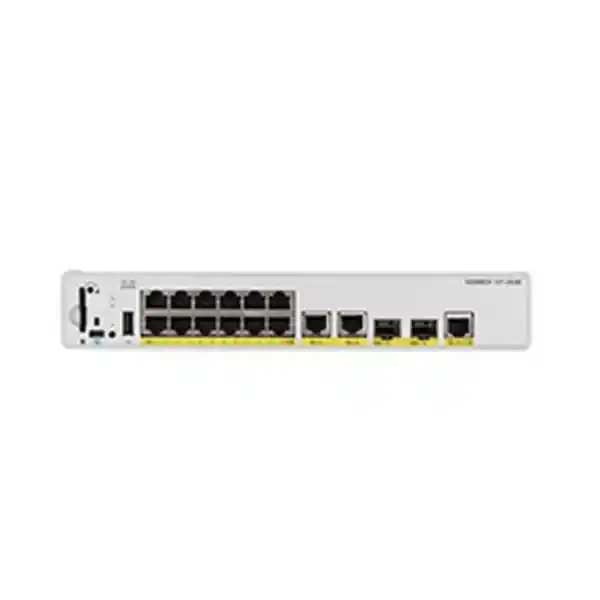
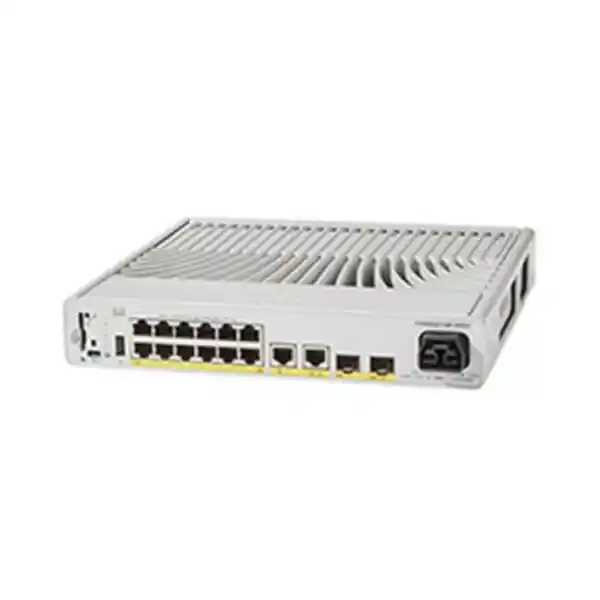
Cisco Catalyst C9200CX-12T-2X2G Network Switch
Bring managed wired connectivity closer to a small team, service counter or branch workspace when a full-size access switch is difficult to accommodate. This compact Cisco model suits data connections for independently powered equipment and a network team that wants a planned enterprise deployment. Request a FourTeck Tanzania quotation with your endpoint count, uplink requirements and preferred power arrangement so the complete configuration can be reviewed before purchase.
Verified hardware at a glance
| Item | Model-specific detail | Buying implication |
|---|---|---|
| Access connections | 12 × 10/100/1000 Ethernet data ports | Plan one physical connection for each required endpoint. |
| Fixed uplinks | 2 × 1G copper, 2 × 10G SFP+, plus 1 × 1G copper powered-device uplink | Separate the ordinary uplinks from the PD connection in the design. |
| Switching performance | 70 Gbps switching capacity; 52.08 Mpps forwarding rate | These are platform figures, not an internet-speed guarantee. |
| Cooling | Fanless | Keep the installation ventilated despite the absence of fans. |
| Power options | Class 6 PoE input or an optional compatible 80W external adapter | Confirm the actual power accessories on the quotation. |
| Software selection | Network Essentials or Network Advantage order variants | The base model name alone does not select a license tier. |
Use this summary to establish the hardware match, then assess the surrounding network. A fast uplink does not raise a workstation’s individual access-port speed, and a compact enclosure does not remove the need for cable management. The most useful specification is the one that answers a real deployment question: how the users connect, how their traffic reaches shared services, and how the equipment will be powered and supported.
Where this compact access switch fits
Consider this model when a modest cluster of wired devices needs an orderly connection into a larger network. A small administration area, reception team, departmental office or branch back office can be a sensible starting point. These are deployment examples rather than claims about a particular installation. The decision should come from the actual endpoint inventory, physical layout and operating responsibilities at your site.
Start with devices that already have their own power source. Desktop computers, many printers and other independently powered appliances can be assessed for Ethernet compatibility without creating an access-port PoE budget. If the room also contains equipment that expects power from the network cable, identify it separately before choosing a switch. A mixed room can still be designed successfully, but its power arrangement needs to be explicit.
Think about administration as well as size. Enterprise access equipment is most useful when someone owns the configuration, records changes and can respond to faults. For a distributed organization, the compact unit can be treated as a managed extension of an existing network design. For a new site, define who will maintain it, where configuration backups will live and how an authorized engineer will gain access during an incident.
Also test whether twelve access connections leave sensible room for growth. Count planned desks, printers and special-purpose equipment individually. An almost-full switch on opening day may lead to an awkward second purchase after the first office expansion. Choosing a larger platform can be more practical when the confirmed requirement already exceeds the intended scale of this model.
Read the port layout correctly
Treat access ports, ordinary uplinks and the powered-device uplink as different roles in your connection schedule. Cisco’s architecture documentation identifies the dedicated PD connection as GigabitEthernet1/1/5. Label that cable clearly if it supplies the switch’s operating power. Moving a cable during routine troubleshooting could otherwise interrupt the entire local group of connected users.
Prepare a simple port schedule before installation. Give every endpoint a description, outlet reference and intended network assignment. Record which upstream device each uplink reaches and which connector is reserved for the power source. A port schedule makes it easier to recognize an accidental patching change and helps a replacement engineer understand the site without relying on the original installer.
Avoid making the SFP+ sockets part of the user-port count when sizing normal desktop connectivity. They serve a different physical connection requirement and need compatible modules or cables. If a project brief simply asks for a sixteen-port switch, clarify whether that means sixteen workstation sockets, a mixture of access and uplink ports, or spare capacity across multiple rooms. Those requirements do not describe the same purchase.
The practical outcome is a connection plan that can be checked against the actual front panel. Procurement should be able to see that the number of user outlets is covered, and the network team should be able to trace the path from those outlets to shared services. Include spare-port policy in that plan so future additions do not consume connections already reserved for infrastructure.
Power planning: upstream PoE or an external adapter
There are two ways to supply operating power: a suitable upstream source through the PD uplink, or a compatible auxiliary adapter. Cisco’s ordering guidance states that this model does not include a power supply by default. Therefore, the quotation needs to identify how the unit will run at the destination; a hardware line alone should not be taken as evidence that a mains adapter is included.
For an upstream-powered design, ask the engineer to verify the power-sourcing port, the required Class 6 capability, the available budget and the cable path. A label saying PoE on an existing switch is insufficient to establish the necessary power class. Record the exact upstream hardware and port allocation before relying on it. Include other powered devices in that upstream budget review rather than assessing this connection in isolation.
For adapter operation, specify a Cisco-supported option for this model and confirm the associated mains or DC requirements with the proposed accessory. Identify the outlet position and cable route before mounting the unit. Include any required securing accessory in the bill of materials. This prevents a compact installation from depending on a loose adapter hanging from a rear connector or a cable stretched across a working area.
Backup power should follow the chosen supply path. If power arrives from an upstream switch, assess the continuity of that upstream device and its supply. If an adapter is used, assess the protected outlet and the equipment feeding it. Ask the project owner to define the desired operating time during a power interruption so the power arrangement can be sized around an actual business requirement.
Understand the power-source change limitation
Cisco’s installation guide describes a specific behavior when both auxiliary power and PD power are connected: the auxiliary source takes precedence and the PD port is disabled. If auxiliary power is then removed, the switch resets while PD detection and classification take place. Plan around that documented interruption; connecting both inputs should not be presented as seamless power failover.
For a staffed office, schedule any power-source change within an agreed maintenance window. Tell affected users that active network sessions may be interrupted. Record the intended source and check the unit’s recovery before declaring the work complete. An installation record should describe the tested behavior in terms the site team can understand, including what they should expect after someone disconnects the adapter.
For an unattended location, include source identification in the support instructions. The person looking at a dark unit needs to know whether to inspect a local outlet, the upstream PoE connection or both. A photograph of the final cable arrangement and clear labels can reduce avoidable disruption when someone has to assist remotely.
Separate link resilience from operating-power resilience in the acceptance plan. A spare data path cannot maintain service if the switch itself has no power. Likewise, a powered switch cannot reach applications through an unavailable upstream network. Review these dependencies together and ask which failures the proposed design is actually intended to tolerate.
Choose uplinks around traffic and media
Select the upstream connection from the workloads and available infrastructure. A small group using light applications has a different traffic pattern from a team moving large files to central storage. Ask where the busiest traffic goes and when it occurs. The answer helps determine whether the existing uplink is adequate or whether an optical connection should form part of the purchase.
For fiber, collect the fiber type, installed length, connector details and the equipment at the opposite end. Have the proposed transceivers checked for the exact switch and software combination. A matching connector shape alone does not prove compatibility. If the fiber is already in service, record its present optics and labeling so the replacement design can be checked against physical evidence.
Do the same for a direct-attach cable proposal: identify the two endpoints, the intended length and the supported cable part. Keep optical modules, patch leads and any required cleaning or testing work visible in the bill of materials. Confirm which items are included in the commercial offer, because a socket on the chassis does not establish that the material needed to use it is supplied.
When two upstream paths are requested, define the intended behavior before installing cables. Ask the designer to document loop prevention, the selected topology and the expected result of losing one path. Two connected uplinks do not by themselves demonstrate a resilient network. Validate the actual design with a controlled link interruption and a representative application test.
Performance expectations that match the application
Assess performance as an end-to-end property. The endpoint, access connection, upstream path, application server and any security device can each affect the experience. A switch specification does not establish how quickly a remote accounting application will respond. Use the hardware figures to compare platforms, then test the application paths that matter to the business.
Write down a small set of representative activities. Examples might include opening shared documents, printing a large report, synchronizing a business application and copying a typical project folder. Measure them from the intended location with the normal security policy in place. This produces a useful acceptance baseline without confusing an artificial traffic generator result with everyday user experience.
Do not add the advertised uplink speeds together and promise that rate to one desktop. Identify the actual path used by each workload and the network design that distributes traffic. Where a project depends on sustained throughput, have the engineer document the assumptions, the test method and the observed result rather than relying on headline numbers.
Record normal utilization after deployment. A short observation period that includes a busy operating window can help establish whether the chosen uplink has enough headroom. Keep an eye on errors as well as traffic volume. Growth decisions are easier when the organization has a baseline and can show whether a complaint started after an application change, an endpoint move or a new group of users.
Select the software edition and subscription deliberately
The orderable variants C9200CX-12T-2X2G-E and C9200CX-12T-2X2G-A identify Network Essentials and Network Advantage respectively. Cisco’s current ordering guide separates the included perpetual network license from the required term software selection. Confirm the complete order configuration and subscription term rather than interpreting the unsuffixed model name as a fully specified software package.
Give the network designer a feature requirement list before comparing quotations. Describe the intended switching role, routing responsibilities, authentication design and management tools. Ask for confirmation of the required capabilities on the exact hardware, chosen license and planned software release. This is more useful than buying a higher tier because its name sounds safer or accepting a lower tier without reviewing the design.
Keep entitlement ownership clear. Identify the organization that will hold the licenses and the people responsible for managing them. Procurement should retain the final part numbers and software terms alongside the hardware invoice. Operations should know where to check entitlements and who can resolve an account issue when maintenance work is planned.
A transparent quotation separates hardware, subscriptions, accessories, support and project work. Ask what each term covers, what happens when it ends and which services require renewal. This makes competing offers easier to compare and helps the organization budget for the equipment over its intended service life. Exact commercial terms should come from the final offer rather than assumptions attached to the product family.
Segmentation and controlled network access
Plan the network groups before patching endpoints. Decide which systems should share a local network and which should communicate through a controlled boundary. A staff computer, a visitor device and a facilities appliance may have different access needs even when they sit near each other. Document those needs as permitted application flows so the engineer can translate business requirements into an appropriate configuration.
Cisco documents IEEE 802.1X authentication for this exact compact model, including RADIUS-based VLAN assignment. Deploying it requires coordination between switch configuration, endpoint authentication and the authentication service. Determine which devices can participate and how exceptions will be handled. Check feature behavior against the selected software release and license before making it part of the acceptance requirements.
Start any authentication rollout with a controlled group. Include a typical managed computer and a device that cannot use the same authentication method. Test both a successful connection and the expected denial or restricted-access result. Also decide how the site should behave if the authentication service is unavailable. These are business decisions as well as configuration decisions, because an overly permissive or overly restrictive fallback can both cause problems.
Review administrative access separately from user traffic. Identify the authorized management systems and the people who may change configuration. Keep credentials in the organization’s approved system and provide an accountable recovery route. The objective is to make everyday support practical while ensuring that a cable plugged into an ordinary office outlet does not automatically become a route to unrestricted device administration.
Physical placement and cabling
Choose a location by considering access for maintenance, cable strain, physical security and the surrounding environment. The unit’s fanless design is useful where rotating-fan noise would be undesirable, but it still needs appropriate heat clearance. Have the installer follow the manufacturer’s mounting and environmental instructions for the exact unit and accessory combination.
Measure the available space with connectors and cable bends included. A chassis may fit on a shelf while its attached leads obstruct a door or leave no service clearance. Confirm the mounting hardware rather than assuming every compact-switch accessory is interchangeable. Place labels where they can be read after installation, and leave a practical way to reach the console and power connections.
Inspect the existing copper runs before moving service. Use the site’s cable test records where available and investigate damaged plugs, poor termination or intermittent links. A network refresh can expose an old cabling fault without being its cause. Keeping outlet labels, patch-panel labels and switch descriptions consistent makes those faults easier to isolate.
Consider how people use the room. Equipment below a desk may be knocked during cleaning; equipment on an open counter may invite accidental unplugging. Agree who can touch the cabling and where support instructions will be kept. Include secure placement and a tidy cable route in the job scope so the final result remains maintainable after the installation team leaves.
Common business scenarios
Small office workgroup
Assess a group of independently powered computers and printers that needs connection to central applications. Map every outlet and leave an agreed allowance for desk moves. Confirm that the upstream path reaches the necessary services and that someone will own the local port records. This scenario fits best when endpoint requirements remain within the chosen access capacity.
Reception or service area
Review a compact installation serving business terminals, a nearby printer and other wired equipment. Treat physical cable protection as part of service continuity because users and visitors may be close to the hardware. Confirm power for each terminal and document the essential applications to be tested after installation. Keep the unit accessible to authorized support staff.
Managed branch extension
Evaluate a small remote work area where the organization already has a network standard. Use a reviewed configuration template, identify the upstream power source if applicable and define a local recovery procedure. The key requirement is operational consistency: the central team should understand the device, while local staff should know which cables and indicators to report.
These scenarios are selection aids, not confirmation that this switch matches every site in those categories. A branch with many powered endpoints, a room requiring substantially more access ports or an application demanding faster individual copper connections should trigger a different hardware assessment.
When to compare another switch
| Requirement | Assessment for this model | Next decision |
|---|---|---|
| Power phones, cameras or access points from access ports | The downlinks are data-only. | Compare a PoE-output model and calculate the endpoint power budget. |
| More than twelve dedicated user connections | The planned device count exceeds its access-port count. | Compare a larger access switch and include growth allowance. |
| Multi-gigabit access for individual endpoints | The user connections are Gigabit Ethernet. | Assess a model with the required access-port speeds. |
| A physical StackWise deployment | Cisco excludes this model from switch stacking. | Choose a stacking-capable platform if that is a design requirement. |
| Uninterrupted change between auxiliary and PD power | The documented transition involves a reset. | Specify the required continuity behavior before choosing the power design. |
The C9200CX-12P-2X2G is a useful family comparison when access-port PoE is required. It is a different product with different power arrangements, so request a fresh bill of materials rather than editing one character in a purchase order. For higher device density or a standardized stack design, compare the exact larger platform and its accessories with the network engineer.
Use the requirement that changes the decision as the comparison point. Size, port count, endpoint power and management topology often matter more than a family-level performance headline. A documented comparison also helps procurement understand why two similarly named Cisco switches are not interchangeable in the same project.
Replacing an older compact Cisco switch
For an existing installation, collect the current product ID, configuration, interface map, license records and uplink module details before selecting a replacement. Photograph the patching and power arrangement while the old system is working. Record any local devices that behave differently from the standard office computer, especially systems that are difficult to interrupt or require a specialist to test.
Cisco’s compact-platform migration guide describes differences in operating software, interface naming and boot behavior between older 2960CX/3560CX platforms and the 9200CX family. Have the engineer review configuration intent rather than assume the old configuration can be transferred unchanged. Translate the port map carefully so the correct endpoints retain their intended network assignments.
Preserve the evidence needed for rollback. Keep a verified configuration backup, label old and new cables, and agree the point at which the team will stop troubleshooting and restore the previous arrangement. If the replacement changes endpoint power, uplink media or authentication, test those changes before the cutover rather than discovering their effects with users waiting.
For a wider estate refresh, use the Tanzania site’s Catalyst 2960-X replacement guidance as a separate planning resource. This compact product page addresses a smaller access requirement; each existing switch still needs its own fit assessment, including whether any stack or powered-endpoint role must be preserved.
Management, maintenance and support readiness
Make the operating model part of the purchase decision. Assign ownership of configuration backups, software review, event monitoring and license administration. Choose a naming convention and location record that makes sense across the organization. When a branch reports a fault, the support team should be able to identify the device and its upstream dependency without first asking someone to read an unfamiliar label.
Prepare a maintenance record with the installed software release, reviewed configuration, relevant support information and authorized contact roles. Keep account secrets and recovery credentials in an approved secure system. Separate those secrets from general handover documents that may be distributed more widely. The handover should explain where authorized staff can find the correct information without exposing it.
Agree what the team will monitor and how alerts will be acted on. Link changes, repeated errors and unexpected restarts are useful starting points for an operational review. A monitoring system has limited value if no one owns the response. Define which incidents can be handled remotely and which require someone at the site to inspect power, cabling or the upstream device.
Before any software change, review the exact model’s supported release information and relevant known issues. Save the current configuration and confirm the recovery plan. Schedule disruption according to the business rather than assuming every small switch can be restarted without notice. Include a short post-change application check so maintenance ends with evidence that users can still perform their essential work.
Commissioning and acceptance checklist
- Confirm the delivered configuration. Match the full product variant and commercial items to the approved order. Record serial information and verify that the intended accessories and software entitlements are accounted for.
- Check physical installation. Review mounting, cable strain, labeling, ventilation and access for service. Confirm the final position is acceptable to the site owner and does not obstruct normal work.
- Validate the power arrangement. Identify the active supply path and the protected equipment it depends on. Test any agreed power interruption only within an authorized maintenance plan.
- Test endpoint connectivity. Connect representative business devices and confirm addressing, application access and the intended network assignment. Include a device with an exception requirement if one exists.
- Validate policy outcomes. Test an allowed connection and an access attempt that should be denied or restricted. Record the result so segmentation is demonstrated rather than merely assumed.
- Check uplinks and recovery. Confirm the selected media, expected link speed and topology. Where alternate paths are designed, test their documented behavior and measure the resulting interruption.
- Complete the handover. Save the approved configuration and port schedule, document support ownership and obtain acceptance from the person responsible for the site’s business applications.
Keep the acceptance record concise enough for future use. Include the date, the tested configuration and any remaining limitations. If a required test could not be performed, describe what remains outstanding and who will resolve it. An explicit exception is more useful than a generic statement that the installation passed.
Build a complete Tanzania quotation
Ask for a quotation based on a written requirement rather than the chassis name alone. Provide the number of sites, the access devices at each site, available upstream connections and the intended operating-power source. Include any existing Cisco part numbers that the new equipment must connect to. Photos and a simple network sketch can help clarify the physical arrangement without replacing an engineering review.
| Quotation component | Information to confirm |
|---|---|
| Switch hardware | Quantity, complete -E or -A variant and intended location. |
| Software | Selected licensing package, term, entitlement owner and renewal responsibilities. |
| Power accessories | Verified upstream Class 6 source or the exact compatible auxiliary adapter and associated accessories. |
| Uplink materials | Supported modules or cables, fiber details, connector type and quantities. |
| Installation items | Required mounting parts, cable management, console access and labeling. |
| Services and support | Scope of configuration, migration, testing, documentation and any separately quoted support. |
| Commercial terms | Current price, applicable charges, availability, delivery arrangements and written warranty terms. |
Treat budget comparisons consistently. If one offer includes installation and another includes only hardware, the price difference does not describe the same scope. Ask for exclusions and assumptions in writing, especially where existing cabling, authentication services or backup power will be reused. Confirm current Tanzania commercial details with the final quotation; this page does not establish local stock, a delivery date or a fixed price.
Where wireless equipment is also being planned, review FourTeck Tanzania’s Cisco access point selection guidance. Assess its power and Ethernet requirements separately before allocating switch ports. For a project involving traffic-policy changes, the Cisco firewall configuration planning page provides related context for coordinating the network boundary.
Buyer questions
Does this model power connected phones or cameras?
No. Its access connections carry data and do not provide endpoint PoE. Check how every phone, camera or access point will receive power. If the requirement is to power those devices from the switch, compare a PoE-output model before ordering. This distinction matters even when the switch itself is powered through a network cable.
Can it run without a local mains adapter?
It can receive operating power through the dedicated PD uplink from a compatible IEEE 802.3bt Class 6 source. Verify the upstream port and budget for the exact installation. Do not assume an existing lower-power PoE port will meet the requirement merely because its connector looks the same.
Is an external power adapter included?
Cisco’s ordering guidance says this model does not come with a power supply by default. Review the exact quoted bundle. If upstream power will not be used, request the appropriate supported external adapter and associated installation items explicitly. The final bill of materials should show how the delivered switch will be powered.
Are all connections 10 Gigabit?
No. The access ports are Gigabit Ethernet; the SFP+ uplinks provide the higher-speed upstream option. Match access speed to each endpoint and select the upstream connection separately. A faster backbone can serve aggregate traffic while each workstation still operates within the capabilities of its own network interface and access link.
Can it join a physical Cisco switch stack?
Cisco’s stacking configuration guidance excludes this compact model. If the project depends on a physical StackWise system, ask for a platform that supports the required design. Do not order stacking hardware for this unit based on features advertised elsewhere in the broader Catalyst 9200 family.
Which software variant should I request?
Describe the network functions the installation needs and have them mapped to the full order variant, software entitlement and supported release. The -E and -A choices identify different network license tiers. A requirement-led review helps avoid both missing a necessary capability and paying for a tier without a defined operational reason.
Can I reuse existing optical modules?
Reuse should follow a compatibility review for the exact module, switch and software release. Provide the installed optic part numbers, fiber details and remote endpoint information with the quote request. Physical fit alone is insufficient. Confirm the reuse plan before treating new optical modules as unnecessary.
What determines the Tanzania price and delivery arrangement?
The complete configuration and current written offer determine the commercial terms. Quantity, software, power accessories, uplink materials, support and project work can change the scope. Request an itemized quotation and confirm availability, applicable charges, delivery and warranty terms for that order. No fixed local price or delivery promise is established here.
Request your configured switch quotation
Send FourTeck Tanzania your device count, site requirements, upstream switch details and preferred power method. Include the required software functions and any existing optics you want to reuse. Ask for an itemized proposal covering the hardware variant, licensing, power accessories, uplink materials and the services you require.
Before approving the order, review the complete connection and power plan with the responsible network engineer. Confirm current commercial terms in writing and agree the installation and acceptance scope. That gives procurement a clear configuration to purchase and gives operations a practical plan for bringing the equipment into service.




Reviews
There are no reviews yet.