
COMPACT CAMPUS ACCESS • TANZANIA
Cisco Catalyst C9200CX-8P-2XGH Network Switch
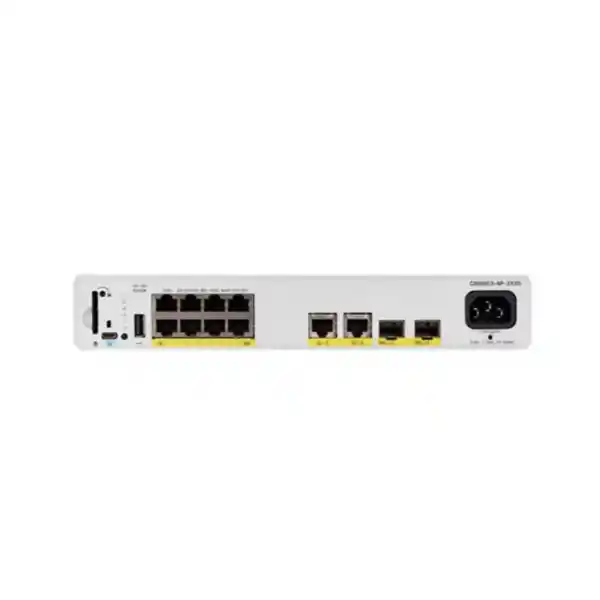
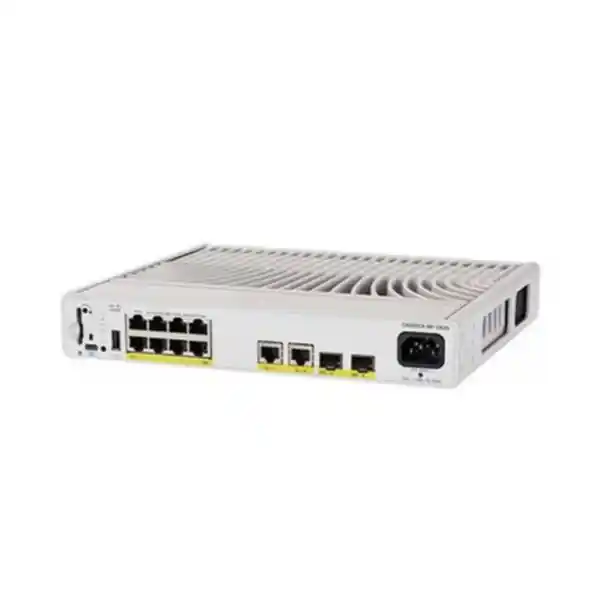
Connect a small group of powered business devices where space and noise matter. This compact Cisco switch brings eight Gigabit PoE+ access ports and fast fibre uplink options to an office edge, reception area or controlled equipment location. Choose this HVDC/AC variant when its power arrangement fits the site, and confirm the connector, cable and software package before ordering.
Next step: Request a FourTeck Tanzania quotation with your endpoint list, uplink distance, intended power source and required licence tier. Ask for the switch, compatible optics, power cable, mounting accessories and support terms to be itemised.
A compact access switch for a defined group of devices
An access switch should be selected around the devices it must serve. This model is a practical candidate when a department needs a modest number of wired connections, several endpoints need power over the network cable, and the uplink should have room for shared traffic. Start with a port schedule rather than a general request for a Cisco switch. That schedule should identify the equipment, its location and the service each connection supports.
The compact format is especially relevant when a full-size access installation would be disproportionate to the number of connections. However, a smaller chassis still needs planned power, ventilation, physical protection and administrator access. Treat the location as part of the network design. A switch placed near staff should remain reachable for maintenance while its cables and controls are protected from accidental disturbance.
Use this page to assess hardware fit and prepare a complete quotation. The final configuration should be checked against the actual endpoint models, the upstream switch and the selected Cisco software release. This avoids buying an appropriate chassis with an incomplete set of accessories.
Verified hardware at a glance
| Access interfaces | 8 × 10/100/1000 Ethernet PoE+ ports |
|---|---|
| Fixed uplinks | 2 × 10G SFP+ slots and 2 × 1G copper ports |
| PoE allowance | 240W total; up to 30W per PoE+ port at the switch |
| Internal power supply | 315W HVDC/AC |
| Power connection | Saf-D-Grid connector; confirm the appropriate cable for the site |
| Cooling | Fanless |
| Switching capacity | 60 Gbps |
| Forwarding rate | 44.64 Mpps, measured with 64-byte packets |
| Chassis size (H × W × D) | 4.4 × 26.9 × 24.4 cm |
| Weight | 2.99 kg |
| Hardware stacking | Not supported on C9200CX |
Uplink slots describe the interfaces provided by the switch. They do not establish that optical transceivers, fibre leads or direct-attach cables are included in an individual offer. Verify those items separately. Published switching figures are platform specifications, rather than a guarantee of application throughput across the entire network.
Read the model and licence suffix before approving an order
The base model identifies the hardware discussed here. Cisco lists C9200CX-8P-2XGH-E with Network Essentials and C9200CX-8P-2XGH-A with Network Advantage. A quotation should show the complete orderable part number and the associated software entitlements. Do not choose between them solely by comparing the hardware port count.
Prepare a short list of required network functions before selecting the licence. Explain whether the switch will act primarily as an access device, whether routing is expected locally and whether it must join an existing management environment. Ask the supplier to map each requested function to the exact release and licence combination. This is more useful than a broad statement that the switch supports enterprise features.
The quotation should also separate hardware, any required subscriptions and support. Record their respective terms and renewal obligations. Keeping these lines explicit helps procurement compare offers consistently and helps the network administrator understand which services are available after installation.
Plan the eight access connections
Build a numbered port plan that maps each intended endpoint to a physical connection. Include workstations, phones, printers, cameras and wireless access points as applicable. Record whether a device needs PoE, whether it carries more than one traffic type and whether the cabling already exists. This simple inventory often exposes missing outlets or unexpected power requirements before equipment arrives.
Keep the dedicated uplink role distinct in the design. Although the chassis has additional copper interfaces, do not describe it as having twelve PoE+ access ports. The eight powered access connections are the basis for endpoint capacity planning. Decide how many ports need to remain available for a replacement device, a temporary connection or an agreed expansion.
If the expected endpoint count already exceeds the planned capacity, compare a higher-density access switch before proceeding. A compact unit is most useful when its connection count matches a clearly bounded area. Avoid designing around an immediate need for extra desktop switches, because that adds separate power, management and fault locations.
Check PoE by device requirement and total allocation
Power over Ethernet requires two checks: the individual endpoint requirement and the total allocation across the switch. Verify the endpoint’s required PoE standard and its maximum requested power, including optional functions. An access point may have different needs when additional radios or peripherals are enabled. A camera may need more power when illumination or other accessories operate. Use manufacturer documentation for each exact device.
For an illustrative budget, four endpoints requesting 20W each and four requesting 15W each total 140W of planned switch-side allocation. This is a calculation example, not a recommendation for particular phones, access points or cameras. Replace those figures with the documented requirements of the actual equipment and include a sensible allowance for planned changes.
Keep the internal supply rating separate from the power available to endpoints. The 315W figure describes the supply; it does not mean that 315W can be distributed over PoE. Also distinguish switch-port output from power delivered at the remote device, because cable losses affect the latter. A compatible power standard matters even when the total wattage appears sufficient.
Choose the uplink around traffic and the cable route
An uplink carries the combined traffic of the connected area. Consider what will leave the switch at busy times: wireless users accessing shared resources, cameras sending video to a recorder, computers transferring files or phones carrying calls. A faster uplink can help preserve capacity between network layers, but it cannot increase the speed of an individual access interface.
Select an optical link by working through the complete path. Identify the upstream equipment, intended link speed, fibre type, connector arrangement, installed distance and any patch panels between the two ends. Then verify a supported transceiver combination for both devices and the software in use. The presence of an SFP+ slot alone does not validate every module with a similar shape.
If the connection will remain on copper, review the route and existing cabling condition before deciding that reuse is sufficient. Ask for cable test results where they are available. For either medium, include labels and a port map in the installation handover so that a later fault can be traced without reconstructing the original design.
Understand the HVDC/AC power arrangement
The 2XGH variant deserves particular attention during procurement because its power connector differs from the standard AC model. Cisco identifies a Saf-D-Grid connection on this chassis. Confirm the complete cable assembly, source-side connection and installation responsibility in the quotation. A photo or description of an ordinary equipment power lead is insufficient evidence that it will fit this switch.
Cisco’s technical specifications list 100–277 VAC nominal input and a 120–418 VDC input range for the relevant high-voltage supplies. These figures describe supported input, rather than permission to improvise a cable or connect to any available DC source. Have the installer verify the intended supply arrangement and follow the manufacturer’s electrical and grounding instructions.
For an office using an ordinary AC distribution arrangement, compare the C9200CX-8P-2X2G as part of model selection. Choose the HVDC/AC version because its power design meets a defined requirement. If there is no such requirement, resolve that choice before the order is placed rather than discovering a connector mismatch during commissioning.
Design power continuity around the complete service
Decide which business services must remain available during a power interruption, then trace every device required to deliver them. Keeping the access switch operating does not by itself preserve internet access, a remote phone platform or a video recording service. The upstream switch, router, firewall, service equipment and any necessary endpoints belong in the same continuity assessment.
Size a backup power arrangement using the real expected load and the required runtime. Include the switch’s own consumption and the connected PoE load, and have the power-system supplier confirm compatibility with the selected input connection. Record the assumptions so that adding more powered devices later triggers a review of the runtime estimate.
Plan a controlled recovery test as well as an outage test. Confirm that endpoints return to their intended services after power is restored, and that administrators can identify a failure without relying on someone watching the front panel. These are deployment acceptance tasks; they should be agreed with the installer rather than inferred from the switch’s supply rating.
Common business scenarios
Reception or administration area
Assess this switch for a small group of phones, staff devices and a compatible access point. Agree who may touch the equipment, where cables will run and how service staff will reach it without interrupting the reception workflow.
A teaching or meeting space
Build a connection plan for the room’s wired equipment and its wireless access requirement. Check each collaboration endpoint individually, because a PoE+ access port does not establish support for every display, room system or powered accessory.
A small camera group
Use the camera inventory to assess power, recording traffic and upstream reachability. Verify the requirements of each camera and its enabled features. Plan the recorder and backup power separately; the switch provides network connectivity rather than video storage.
A controlled branch edge
Consider a compact access location serving a limited area of a branch. Identify the upstream dependency and administration method before installation. An accessible local recovery plan is useful where the main network team works from another site.
These are design examples, subject to endpoint compatibility and site assessment. They do not establish local stock, installation coverage or a service commitment for a particular location in Tanzania.
Place a fanless switch with ventilation in mind
Fanless operation is useful where equipment sits near people, but the installation still needs space for heat to leave the chassis. Cisco’s preparation guidance recommends at least 7.6 cm of clearance around the switch and unrestricted ventilation. Verify the applicable environmental limits for the installation, including any restrictions introduced by the chosen transceivers.
Measure the intended location with the cable connections in place. Chassis depth alone does not account for power cable routing, fibre bend radius or access to the front panel. A location that looks suitable while empty may become difficult to maintain once every connection is fitted. Leave sufficient working room to identify and replace a lead.
Assess the site under normal operating conditions, not only when the room is empty or cooling has just started. Heat from adjacent equipment, direct sunlight and dust can affect placement decisions. Where the environment requires outdoor protection or industrial hardening, compare purpose-built equipment rather than assuming that a compact chassis meets those requirements.
Specify the mount and physical access
Cisco documents several mounting approaches for the compact series, including desk, shelf, wall, under-desk, rack and DIN-rail arrangements using the relevant hardware. Confirm which method is appropriate for this chassis and order the matching accessory. The existence of an optional mount does not mean it is included with every switch offer.
Have the installer select the orientation and fixing method from the exact mounting instructions. Under-desk and wall arrangements should not be treated as interchangeable. The chosen surface, mounting load and access to cables all matter. Identify the responsible installer before delivery so that the correct fixings and tools are available for the intended location.
Physical access is also an operational decision. Decide who can disconnect a port, reach the power connection or insert removable media. Keep asset details and the cable map accessible to authorised staff without leaving administrative credentials attached to the chassis. A neat installation should make maintenance easier while reducing accidental cable movement.
Separate user, voice, guest and device traffic deliberately
Before configuring the switch, write down which groups of devices need to communicate and which should remain separated. For example, staff computers may need business applications, phones may need their call platform and cameras may need a recorder. Guest traffic usually has a different destination and access policy. Treat these as requirements to be implemented and tested across the network.
Agree the VLAN assignments, addressing plan, uplink settings and policy enforcement location with the team managing the upstream equipment. A locally correct access-port configuration can still fail if the required network is missing farther along the path. Record any dependencies on DHCP, DNS, authentication services or firewall rules in the deployment plan.
Feature availability should be checked against the ordered licence and chosen release. Do not assume that buying a managed switch automatically produces a secure network. Define the intended policy, configure the relevant controls and test both permitted and prohibited communication. The useful result is a documented access design that operators can understand and maintain.
Check wireless access point requirements carefully
A wireless deployment should begin with the access point’s exact wired interface and power requirements. This switch’s endpoint ports operate at Gigabit Ethernet speeds and provide PoE+. If the planned access point needs a multigigabit connection or a higher power class for its intended operating mode, compare a different access platform before buying.
Check what happens when the access point receives less power or less wired bandwidth than its preferred specification. Some endpoint designs may change their available functions, but that behaviour must be established from the access point manufacturer’s documentation. Do not assume that a successful boot means every intended radio and accessory is operating.
Include the wireless management arrangement and SSID-to-network mapping in the installation brief. Agree who configures each side of the wired and wireless boundary, and test client access with the final policies applied. For broader planning, see the Cisco wireless access point guidance for Tanzania. Use the exact access point specification when making the final switch selection.
Plan management and software before the cutover
Name the team that will own the switch configuration and software maintenance. Give that team the proposed hardware and licence details early enough to review them. Agree management addressing, administrator access, configuration backup and the method of reaching the switch if the normal uplink is unavailable.
Choose software through a compatibility and maintenance review for the actual deployment. Check release notes, required functions, relevant advisories and integration needs rather than simply selecting the newest version number. If an existing management platform will be used, verify the exact model and software combination with its current support documentation.
Create a basic operating record before production use. It should contain the asset identity, installed software, configuration ownership, support arrangement and a reference to the saved configuration. Record subsequent changes against that baseline. This helps a replacement engineer understand the switch’s role without relying on undocumented knowledge held by the original installer.
Set realistic expectations for capacity and resilience
Published switching capacity and packet-forwarding figures describe aspects of the platform’s ability to move traffic. Application experience also depends on endpoint behaviour, uplink utilisation, upstream resources and policy processing elsewhere in the path. Assess the busiest expected traffic flows instead of treating a headline performance figure as an end-to-end service guarantee.
This compact series does not provide hardware stacking. If the requirement is a group of access switches operated as a physical stack, compare the appropriate stack-capable platform and its accessories. Connecting two switches through Ethernet should not be described as adding this chassis to a StackWise stack.
Resilience needs a separate design review. Decide what should happen if an uplink, power source or switch fails, and confirm which topology and recovery functions are supported by the selected configuration. Two uplink slots do not by themselves establish automatic failover or an outage-free application. Document the expected recovery behaviour and validate it during commissioning.
Compare closely related compact models
| Model to assess | Reason to compare |
|---|---|
| C9200CX-8P-2X2G | Similar eight-port PoE+ role with the standard AC power arrangement. |
| C9200CX-12P-2XGH | Twelve PoE+ access ports with HVDC/AC power; review the shared power budget. |
| C9200CX-8UXG-2XH | For a requirement involving multigigabit access and UPOE; verify endpoint and per-port power needs. |
Compare the complete configuration rather than choosing a similar-looking model name. More ports do not automatically mean a larger total PoE allowance, and a higher access speed is useful only when the endpoint and cabling can use it. Ask for an alternative only when it addresses a documented gap in the proposed design.
Prepare a complete bill of materials
A useful quotation should make the deployment understandable to both purchasing staff and the network team. List the switch with its full part number, the required software entitlement, each uplink module or cable, the intended power cable and the chosen mount. Identify optional items explicitly so that an omitted accessory is not mistaken for an included one.
Specify both ends of a fibre link and any patch leads needed between the switch and the installed cable route. Include an assessment of existing equipment that will be reused. A transceiver from an older switch should not be assumed compatible merely because it fits physically. Confirm the supported combination and its condition before assigning it to the new installation.
Ask for prices, currency, availability, delivery, warranty and support to be stated in the actual offer. These commercial details can vary by configuration and transaction. Compare quotations on an equivalent scope, including accessories and required subscriptions, so that the apparent hardware price does not obscure the cost of a working installation.
Move from an existing switch with a rollback plan
Begin a replacement by recording the current port map, network assignments, addressing dependencies and connected device behaviour. Back up the existing configuration and identify any functions that the replacement must preserve. Arrange a maintenance window that accounts for powered devices losing service while their cables are moved.
Prepare the proposed configuration before disconnecting the current equipment, then check it against the new platform and software. Avoid assuming that an older configuration can be reused unchanged. Label cables, agree the order of migration and keep a record of each endpoint as it moves. That makes an unexpected failure easier to isolate.
Define a rollback trigger and a practical way to restore service if acceptance checks fail. Keep the old equipment available until the agreed checks are complete, subject to the site’s change process. For a broader replacement project, the Catalyst 2960-X replacement planning guide provides additional context for a Tanzania migration brief.
Agree commissioning checks before installation
Acceptance should demonstrate the services the area needs, rather than stopping when link lights appear. Test each connected endpoint, its expected network assignment and any required access to upstream services. For powered equipment, confirm the intended operating mode and check the allocation after all planned devices are connected.
Exercise representative traffic during the agreed test period. A camera group should reach its recorder; a phone should reach its calling service; a wireless client should obtain the intended access. Use the actual applications and policies where practical. Also confirm that unwanted communication is blocked at the intended enforcement point.
Finish with management and recovery checks. Verify authorised administrator access, a saved configuration, monitoring visibility where configured and the agreed restart behaviour. Give the owner a port map, asset record, configuration reference and outstanding-issues list. If any requirement remains untested, record it clearly and agree who will resolve it before the project is accepted.
Plan maintenance and future changes
After handover, keep a short operational baseline: connected devices, normal power allocation, uplink use and the owner of each configuration component. Use that baseline when investigating changes in behaviour. A new endpoint, different transceiver or software update should be assessed against the original assumptions rather than added without review.
Schedule maintenance through the organisation’s change process. Confirm backups and access arrangements before a planned update, and review the applicable release documentation. Decide who will verify services afterwards and how staff will report an unexpected problem. A controlled routine reduces the need to troubleshoot changes during normal business activity.
Revisit the design when the area’s device count or power demand changes materially. A switch that fits a small reception may become unsuitable after additional cameras or higher-demand wireless equipment are introduced. Recognising that limit early makes expansion easier to budget and avoids turning a compact deployment into a collection of unmanaged exceptions.
Define ownership and support scope
A compact switch can sit at the boundary between several teams. Facilities may own the mounting location and power connection, the network team may own configuration, and another supplier may manage the phones, cameras or wireless system. Name an owner for each dependency in the purchase brief. That prevents a service issue from remaining unresolved because each party assumes the next team is responsible.
For support, distinguish hardware fault handling from configuration assistance and application troubleshooting. Ask what evidence is needed to open a case, how the equipment is identified and which contact route applies to the quoted service. Establish whether remote access, an on-site visit or a replacement process is included, and obtain the actual terms in writing. Do not infer these commitments from the manufacturer name or the presence of a support line on a quotation.
Keep the handover information where the authorised operations team can retrieve it during an incident. Include the asset reference, supplier details, agreed support scope and the current configuration backup location. Record who may approve a disruptive change and who must be told when the area loses connectivity. These details are particularly useful when the person who installed the switch is unavailable.
Agree how outstanding work will be closed. For example, an untested backup power arrangement or an unavailable endpoint should remain an explicit acceptance item with an owner. This gives procurement a practical completion record and gives operators a clear account of what the installation has demonstrated.
Buyer questions
Is this a 10G access switch?
Its eight endpoint interfaces are Gigabit Ethernet. The 10G capability refers to the SFP+ uplink interfaces. A faster uplink can carry shared traffic from several endpoints, but it does not give a single Gigabit-connected endpoint a 10G connection.
Can all eight ports supply PoE+?
Yes. Cisco specifies eight PoE+ access ports and a 240W total budget for this model. Check each endpoint’s required standard, maximum allocation and operating mode. The power reaching a device is different from the power supplied at the switch port because of the cable path.
Does the switch need a separate power cable assessment?
Yes. The HVDC/AC chassis uses a Saf-D-Grid connector. Confirm the suitable cable assembly and source connection before ordering. Have a qualified installer assess the intended power arrangement against the exact hardware instructions; do not assume that a standard equipment lead is suitable.
Are the optical modules and mount included?
Inclusion depends on the quotation. Ask for every required transceiver, uplink cable, mounting accessory and power item to appear as a separate line or an explicit included component. Port specifications and optional accessory listings are not a packing list for a particular offer.
Can it join a StackWise hardware stack?
No. Cisco states that stacking is unavailable on C9200CX switches. If a physical stack is required, request a comparison with an appropriate stack-capable platform. Define the operational and resilience requirements before selecting the replacement architecture.
Which software licence should be ordered?
Cisco lists Network Essentials and Network Advantage orderable versions. Provide the required functions and management arrangement so the licence can be checked against the chosen software release. The base model name alone does not identify the complete software and support package in an offer.
Will it power and connect my access points or cameras?
Compatibility requires the exact endpoint specification. Check the Ethernet speed, PoE standard, maximum requested power and any restrictions on the intended operating mode. Confirm the shared budget for the full device group, then test upstream services and application operation during commissioning.
What is the Tanzania price and availability?
Request a current quotation for the complete configuration. Price, stock, lead time, delivery, warranty and support must be confirmed for the actual offer. Include the licence tier, power arrangement, optics and mounting requirements so the response covers a usable installation rather than only the chassis.
Request a configuration-based Tanzania quotation
Send FourTeck Tanzania the required quantity, endpoint models, PoE requirements, upstream switch details, cable distance, intended power source and mounting location. Include the required network functions so the full part number and licence tier can be checked. If this is a replacement, provide the existing port map and identify any equipment you expect to reuse.
Ask for an itemised offer covering the switch, compatible uplink components, the correct Saf-D-Grid power cable arrangement, mounting accessories and any required software or support. Confirm commercial terms and installation scope before purchase. This gives your purchasing team a clear configuration to review and your network team a practical starting point for deployment.




Reviews
There are no reviews yet.