
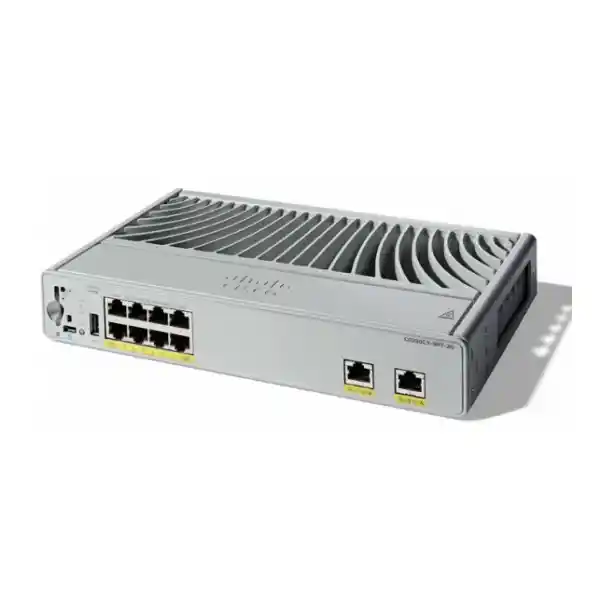
COMPACT ACCESS SWITCHING · TANZANIA
Cisco Catalyst C9200CX-8PT-2G Network Switch
Extend a managed business network to a small group of nearby devices with a compact switch that can receive power through its uplinks. This fanless Catalyst model brings eight Gigabit PoE+ access connections to spaces where a full-size access switch would be unnecessary. It is a practical candidate for a small office area, reception desk, meeting space, or distributed endpoint cluster when the port count, upstream capacity, and power arrangement match the installation.
For a Tanzania quotation, start with the devices you need to connect and the upstream equipment already available. Ask FourTeck Tanzania to specify the complete hardware and licensing configuration, including any auxiliary adapter and mounting accessories. The decisive buying question is how much usable power your selected inputs leave for the connected devices.
Technical snapshot
| Access interfaces | 8 × 10/100/1000 RJ-45, PoE+; up to 30W per port within the available budget |
|---|---|
| Upstream interfaces | 2 × 1G copper powered-device uplinks, IEEE 802.3bt Type 4 Class 8 |
| Power arrangement | PoE input through uplinks, optional 80W or 150W external adapter; budget depends on the combination |
| Maximum endpoint budget | 240W with a 150W adapter and two Class 8 inputs |
| Switching capacity | 20 Gbps |
| Software platform | Cisco IOS XE; confirm the ordered license tier and supported release |
| Stacking | No StackWise stacking on C9200CX |
| Size and weight | 4.4 × 26.9 × 16.5 cm (H × W × D); 1.95 kg |
Where this compact switch fits
Choose this design when the network needs a small, controlled extension close to users or powered endpoints. A suitable site might have several desk phones, a printer, and an access point in one area, with structured cabling back to an upstream switch. Bringing the access ports closer can make a localized expansion easier to organize, provided the additional switch becomes part of the normal management and support process.
Count the required connections before deciding that eight access ports are enough. Include equipment that is easy to overlook: room controllers, spare workstations, shared devices, and an eventual replacement access point. Reserve capacity according to the actual expansion plan. If the planned area already needs all available ports, compare a larger switch before committing to a compact installation.
The physical location also matters. A switch near occupied work areas needs secure placement, accessible cables, ventilation, and a clear way for support staff to identify it. Fanless operation removes fan noise, but the installation still needs an appropriate environment. Treat the compact form factor as a placement advantage within the limits of the hardware, rather than a reason to put networking equipment anywhere convenient.
Understand the two power roles
This pass-through design has two distinct responsibilities: receiving enough input power to operate, and supplying an additional budget to downstream endpoints. The upstream device acts as power sourcing equipment, or PSE. The compact switch receives that power as a powered device, or PD, while its access interfaces can in turn supply compatible endpoint equipment.
That distinction changes how a quotation should be assessed. A working data link does not prove that the upstream port can provide the intended power class. Likewise, a switch that has successfully started does not establish that the intended combination of phones, cameras, and access points can all receive their required power.
Ask the network team to record the exact upstream model, the selected upstream interfaces, their power capability, and the power available across that upstream chassis. A host may have individually capable ports while its total available allocation is already committed elsewhere. Record any configured port limits as well. The purchase decision should use the actual supply arrangement at the site, including other devices sharing the upstream switch.
Size the pass-through budget before ordering
Use a power worksheet with one row for every endpoint. Record its exact model, the required operating mode, and the power allocation needed at the switch port. Keep port-side allocations separate from the power measured inside an endpoint. Cable and conversion losses mean that adding numbers from different parts of the power path can produce a misleading result.
Cisco documents a single 30W PoE+ input as sufficient to run the switch without providing a downstream pass-through budget. The full eight-port, 30W-per-port arrangement requires the documented high-input combination shown in the technical snapshot. An adapter rating alone is therefore insufficient evidence of the downstream allocation.
For an initial demand example, four endpoints each allocated 15W create a 60W port-side requirement. That is a planning calculation, not a claim that every power-input combination can supply it. Compare the total with the documented budget for the chosen configuration, then consider the extra allocation needed for future equipment. Confirm the result on the actual switch during commissioning, including any endpoint startup requirements and power priority settings.
Choose uplink power, an adapter, or a combined design
An uplink-powered arrangement can be attractive when an appropriate power-sourcing switch is already available upstream. It can reduce dependence on a local outlet at the compact-switch position. The design remains dependent on the upstream power source and the copper path between the devices, so those dependencies belong in the installation plan.
A supported auxiliary adapter gives another power-input option. Before adding it to an order, determine where it will be installed, how its cable will be secured, what source will feed it, and whether that source needs backup power. Confirm the exact adapter and connector compatibility with the supplied switch; a similar-looking power accessory is not enough.
For a combined arrangement, describe every input explicitly on the bill of materials. Distinguish the adapter from the upstream PSE ports, and document the expected endpoint budget for that combination. Specify which accessories are included and which are optional. This makes it easier for procurement, installers, and the network administrator to check the same design without assuming that an accessory shown in product literature is supplied in the box.
Plan for a lost power source
Normal operation and operation after a supply failure are different acceptance conditions. A design may support all endpoints with every input present but have a smaller allocation after an uplink or adapter is removed. Decide which connected devices must remain available in that condition before treating multiple inputs as a continuity solution.
Prepare a failure worksheet that names the affected source, the intended surviving endpoints, and the expected recovery behavior. Include the business impact of losing each device. Reception telephony, access control, and guest wireless may have different priorities, and the people who use those services should agree on the intended order.
During an approved maintenance window, validate the selected scenarios against the exact hardware and software configuration. Observe the compact switch and its endpoints, rather than checking only a link indicator. Record whether devices remain powered, restart, or need intervention. A successful ordinary connectivity test does not establish how a power-constrained failure will behave. Where uninterrupted service is required, the architecture and acceptance criteria should be reviewed specifically for that requirement.
Check copper uplinks and shared traffic
The upstream connections on this exact model are Gigabit copper interfaces. It has no SFP or SFP+ cage for a direct fiber connection. If a project specification calls for fiber uplinks or 10G aggregation, select hardware with those interfaces instead of assuming that every Catalyst compact model shares the same uplink arrangement.
Estimate how much traffic leaves the local group of devices at busy times. A small set of office endpoints may have a very different traffic pattern from several wireless access points sending data toward centralized services. Separate ordinary application use from large file transfers, backups, video uploads, and other bursts that could compete for the same upstream capacity.
Two physical uplinks do not automatically give each endpoint a faster connection or prove that both links will forward simultaneously. Have the network designer define the intended link arrangement and confirm its software and topology requirements. Document the upstream ports, logical configuration, and loop-prevention behavior. Test the resulting traffic paths before connecting production users, especially when both uplinks reach the same broader network.
Match each powered endpoint individually
Begin compatibility checks with the endpoint’s own documentation. Confirm its Ethernet speed, accepted power standard, maximum requested allocation, and any reduced-function mode when less power is available. A connector that fits does not establish electrical or operational compatibility. This is especially important for devices sold under broad descriptions such as business access point, smart camera, or room system.
The access side of this switch is PoE+, so an endpoint that needs a higher power class must be evaluated carefully. Do not confuse the high-power receiving capability of the uplinks with the power delivered by each access port. The input capability exists to supply the compact switch and its overall downstream budget; it does not convert every access interface into a higher-power output.
Keep compatibility evidence with the project record. A short matrix showing endpoint model, port assignment, power requirement, network role, and validation result is more useful than a general statement that the switch supports office devices. Include adapters or injectors only after reviewing their suitability and whether a different switch would simplify the design.
Wireless access-point planning
For a wireless installation, work backward from the selected access point and the expected usage in that area. Check the AP’s wired interface requirement, full-function power requirement, controller or management dependencies, and the intended VLAN mapping. A switch purchase should support the wireless design rather than determine it accidentally after the equipment arrives.
A Gigabit port can suit an AP whose approved design uses that speed, but it should be reviewed when an AP is intended to use a faster wired connection. Also assess the traffic shared by multiple APs toward the upstream network. Strong radio coverage does not remove a bottleneck elsewhere in the path.
Test staff and guest services separately. Verify addressing, name resolution, permitted resources, and the intended separation from internal systems. Include peak occupancy assumptions and any business application that is sensitive to delay. For wider AP selection considerations, review FourTeck Tanzania’s Cisco wireless planning guide. Confirm the final AP and switch combination as part of the project quotation.
Voice, reception, and small office areas
A localized voice deployment should include more than a count of telephone handsets. Record any attached computers, shared printers, room equipment, and other endpoints that may use the same compact switch. Confirm how each phone receives its network settings and whether the design expects separate voice and data networks.
Map the complete calling path for testing: handset, access switch, upstream network, call-control system, and any external service involved. The switch supplies connectivity and compatible endpoint power within its configured limits. Call features and service availability depend on the wider voice system, so they should have their own acceptance checks.
Use representative calls during commissioning, including internal calls, external calls where applicable, and the business workflows used at reception. Check behavior during the agreed power and link scenarios. Keep an accessible port schedule so that a phone move does not accidentally change its network role. If business continuity depends on reception telephony, include the upstream equipment and call-control components in the backup-power review.
Cameras, room devices, and distributed equipment
A small endpoint cluster can be a useful compact-switch application when each device fits the access-port and power requirements. For surveillance, record the camera’s operating modes and any power increase associated with additional functions. For room equipment, identify which devices need network connectivity, which need PoE, and which require their own separate supplies.
Consider where data travels after it reaches the compact switch. Cameras recording to a central system can create sustained upstream traffic, while local room equipment may have different usage patterns. Estimate the combined demand rather than judging each endpoint in isolation. Include the recording, management, or control server in end-to-end tests.
Place the switch and cabling where they can be maintained without disrupting the room unnecessarily. Keep device labels consistent with the network diagram and the application system’s names. Outdoor, wet, dusty, or unusually hot positions require an environmental review; do not infer suitability from the enclosure’s small size. Choose equipment and mounting arrangements appropriate to the actual conditions.
Network separation and management access
Define the network roles before configuring ports. A project may need separate logical networks for staff devices, guest access, telephones, surveillance, and switch administration. Write down which systems need to communicate and which should be isolated. Use that policy as the starting point for VLAN, access-control, and upstream firewall configuration.
Cisco IOS XE provides a managed switching platform, including capabilities such as VLANs, access control lists, and quality of service. Exact feature use must be checked against the software release and purchased entitlement. A feature in a platform document is not evidence that a site’s intended policy has already been implemented.
Restrict administrative access to the approved management paths and authorized personnel. Define ownership of configuration backups, software updates, monitoring credentials, and incident response. Remove unnecessary access as part of the final configuration review. Document the recovery process so that support staff can reach the switch when normal remote management is unavailable, using the model’s supported service interfaces and the organization’s access procedures.
Confirm software and licensing on the quotation
The base hardware name in this request does not identify the final license selection. Cisco’s ordering guide distinguishes the -E Network Essentials and -A Network Advantage variants. Ask for the complete orderable product identifier and an explanation of how the quoted tier matches the site’s actual feature requirements.
Have the quotation identify the applicable software subscription, its term, account requirements, and any support option being purchased. Distinguish ongoing subscriptions from the network license included in the order. Record who owns the relevant account and who will track renewals or entitlement changes. Do not assume that every management service mentioned for the broader Catalyst family is included with this hardware.
Select the software release through a deliberate compatibility review. Check support for the exact hardware, required functions, management tools, and the organization’s operational standards. Include a supported upgrade or recovery approach in the implementation plan. If the switch will join an existing managed estate, verify the integration before ordering multiple units rather than making fleet-wide assumptions from a single model name.
Physical placement, ventilation, and maintenance
Measure the proposed position with cables and accessories included. Chassis dimensions alone do not describe the usable installation space. Allow room to connect and remove plugs, route cables without excessive strain, secure the power adapter if used, and reach indicators or service interfaces when troubleshooting is necessary.
Follow the installation guide for approved mounting arrangements, orientation, clearance, and electrical precautions. Confirm the required brackets and hardware against the quoted configuration. Avoid loose placement where an accidental movement can disconnect an uplink or put tension on a power lead. A compact switch near users still needs the same attention to physical security as equipment in a communications cabinet.
Fanless cooling depends on an appropriate environment and unobstructed heat dissipation. Check actual conditions at the installation position, including any enclosure around the switch. Consider nearby heat sources and access for periodic inspection. If the site has unusual temperature, humidity, dust, or altitude conditions, compare them with the exact hardware limits before choosing a location.
Choose by requirement, not by a similar model name
Small endpoint cluster
Consider this model when a defined local group fits eight Gigabit access ports and the selected inputs provide enough downstream power.
Fiber or faster aggregation
Compare a compact model with the required SFP or SFP+ uplinks when the building design needs fiber or more upstream bandwidth.
High-power or faster endpoints
Compare higher output-power or multigigabit access options when an endpoint’s approved operating mode exceeds this access-port design.
Larger managed access area
Compare a higher port-count switch when expansion would otherwise require several small switches and more management points.
Keep the comparison tied to the business requirement. The pass-through model is particularly relevant when the proposed power arrangement solves a real installation constraint. A different compact Catalyst with another suffix can have materially different ports and power inputs. Ask for a side-by-side bill of materials when evaluating alternatives, including the upstream changes and accessories needed for each design.
Example planning scenarios
Reception extension: identify the phones, workstations, printer, and wireless equipment serving the desk area. Confirm the number of physical access connections and which devices need power from the switch. Decide where the switch and optional adapter will be secured, and include the reception workflow in the cutover test. This is a planning example; endpoint compatibility depends on the selected models.
Small meeting area: list room controllers, desk phones, access points, and any presentation equipment that needs wired networking. Separate devices powered locally from those expecting PoE. Establish who manages the room network and how support staff can access the switch without disturbing a meeting. Review whether the room’s multimedia traffic changes the upstream bandwidth requirement.
Distributed camera group: total the camera port allocations and the expected recording traffic. Check each camera’s power needs in its intended operating mode, then validate the uplink path to the recording system. Keep environmental suitability and cable routes in the design review. These examples illustrate how to gather requirements; they do not establish a preapproved endpoint bundle.
Commissioning checks before handover
Agree on acceptance criteria before installation. This helps the customer and installer distinguish a device that simply starts from a system that performs the required business task. Keep the criteria measurable, tied to the chosen configuration, and practical enough to repeat after a future change.
- Inspect the supplied order. Match the complete hardware identifier, license selection, accessories, and support line items to the approved quotation.
- Validate the power design. Check the connected inputs, negotiated power information, available allocation, and endpoint requirements before accepting the downstream load.
- Verify physical links. Confirm intended speeds and inspect for errors, unstable connections, damaged patch leads, or cable labeling problems.
- Test network policy. Confirm addressing, necessary application access, intended isolation, and authorized switch administration.
- Exercise agreed failure conditions. Observe both the switch and critical endpoints under the planned supply or link changes.
- Capture the final state. Save configuration records and document ownership, escalation contacts, and the method for future recovery.
Use the real endpoint mix for acceptance whenever possible. A laptop-only test cannot demonstrate PoE behavior for a group of production devices. Keep a record of exceptions and resolve them before treating the deployment as complete.
Keep an operational record that survives staff changes
Create a concise handover pack with the switch location, hardware identity, software version, management address, uplink connections, endpoint port schedule, and power-input diagram. The diagram should identify the upstream PSE ports as well as any local adapter. This gives the next engineer a usable starting point without tracing every cable again.
Store configuration backups and access information through the organization’s approved systems. Record who can authorize a network change and who will respond when a device loses connectivity. A compact switch can serve a small area while still depending on central routing, authentication, power, or management systems; include those dependencies in the record.
Update the port and power schedule whenever an endpoint changes. Replacing one device with a higher-demand model can alter the available headroom even if the number of occupied ports stays the same. Revisit the failure worksheet when the load grows, and include the compact switch in routine asset review and software-maintenance planning.
Troubleshoot power and connectivity separately
When an endpoint fails, first establish whether the problem is power, link establishment, addressing, or application access. Check the device’s indicators and the switch’s reported state before changing configuration. A powered endpoint with no application access needs a different investigation from one that never starts.
If a new device causes a power-allocation problem, compare its required allocation with the documented worksheet and the current input arrangement. Check whether a source has been disconnected or an upstream power limit has changed. Avoid assuming that a new cable, a second uplink, or an adapter will solve the issue without examining the actual negotiated inputs.
For data problems, trace the connection from the endpoint through the intended logical network and upstream path. Review recent changes and use known-good components carefully to isolate faults. Record the observations before replacing hardware. Persistent errors, unexpected restarts, or unexplained endpoint power loss should be investigated against the exact software release, configuration, cabling, and support entitlement, with the appropriate support channel involved when needed.
Plan a controlled replacement or expansion
If this switch replaces an existing compact device, capture the current network configuration and physical connections before disconnecting anything. Compare interface roles, power inputs, endpoint allocations, and management dependencies. A similar number of ports does not establish that the old configuration can be used unchanged on the new platform.
Choose a cutover window that reflects the services attached to the switch. Make sure the responsible people can verify those services during the change. Prepare a rollback arrangement that includes physical cabling and power, not just a saved configuration. Confirm how users will report a problem after the initial test period.
For a multi-site expansion, validate one representative configuration before repeating the order. Keep any site-specific variations explicit: a location using a local adapter may have a different power dependency from one powered entirely upstream. Standardize the documentation and acceptance checks while preserving these real differences. This helps purchasing avoid ordering a single generic bundle for sites with incompatible requirements.
What to include in a Tanzania quote request
Send the required quantity, installation location, endpoint list, upstream switch model, and proposed power arrangement. Include existing cable information and the intended placement of each compact switch. If the installation is part of a larger project, describe the switching, wireless, voice, or surveillance work that must be coordinated.
Ask for an itemized quotation showing the complete switch variant, applicable licenses and subscription term, any power adapter, required mounting accessories, and the support option. Request explicit confirmation of what is included in the package. Keep any installation or configuration services as separately defined scope so that both the buyer and supplier understand the deliverables.
Confirm pricing, stock status, lead time, delivery arrangements, taxes, and warranty or support terms in the written quotation. Those details depend on the actual offer and destination. Include any tender documentation or acceptance requirements early enough for them to be addressed. A precise request helps FourTeck Tanzania review the configuration against the site’s needs without treating a product-family description as a complete order.
Buyer questions
Does this switch provide 10G or fiber uplinks?
No. The requested model has two Gigabit copper uplinks. A requirement for direct fiber or 10G upstream connections calls for a different interface configuration. Check the full product identifier when comparing compact Catalyst models because similar names can describe different uplink designs.
Can it run without a local power adapter?
It can receive power through its PD uplinks from suitable upstream equipment. Whether that arrangement also supports the connected PoE endpoints depends on the available input power and downstream allocation. Specify the upstream sources and endpoint load together when requesting a quotation.
Is the maximum PoE budget available in every installation?
No. The downstream budget depends on the combination of supplies. Use the documented power arrangement for the intended configuration, rather than assuming the maximum figure applies when only one input is present. Confirm the observed budget and the endpoint allocations during commissioning.
Can all connected devices require the highest port allocation?
Only when the complete input arrangement supports that demand. The technical snapshot describes the maximum-load configuration. For a different set of inputs, assess the available budget and power priorities before committing to the full endpoint mix. Include planned expansion in that assessment.
Is the high-power uplink rating also the access-port output rating?
No. Receiving power upstream and supplying it downstream are different roles. The output interfaces on this model are PoE+ access ports. Evaluate any device requiring more than that output capability against a suitably specified alternative or a separately reviewed powering arrangement.
Can I add it to an existing StackWise stack?
The compact C9200CX platform does not provide StackWise stacking. Plan it as a separate managed switch with its own upstream connectivity. If a common stacked control plane is a project requirement, select a stacking-capable platform and the matching components.
Which license edition should I request?
Ask for the edition that supports the required features and deployment model. The base model name supplied here leaves the final edition open. Request the full orderable identifier, license details, applicable subscription term, and management-account responsibilities in the quotation.
Are phones, cameras, and access points automatically compatible?
Compatibility must be checked for each exact device. Confirm its Ethernet requirements, PoE standard, requested allocation, and any operating-mode restrictions. Then validate the combined load and application path. Category labels alone do not establish that a particular endpoint will operate as intended.
What should procurement confirm before approving the order?
Confirm the complete switch variant, quantity, upstream power capability, endpoint budget, accessories, software entitlements, and support scope. Obtain the commercial terms in writing. The order should describe the installation that will actually be built, including optional items needed to make it work.
Request a configuration-matched quotation
Share your endpoint models, required quantity, upstream power sources, and intended installation arrangement with FourTeck Tanzania. Ask for a quotation that identifies the switch edition, software requirements, power accessories, and mounting items for your project.
Include the services that must remain available during a power-source or uplink failure. This allows the proposed configuration to be assessed against both ordinary use and the business continuity conditions that matter to your site. Confirm the final commercial terms and package contents before ordering.




Reviews
There are no reviews yet.