
CISCO CATALYST 9200CX · TANZANIA
Cisco Catalyst C9200CX-8UXG-2XH Network Switch
Compact access switching for a small group of demanding devices
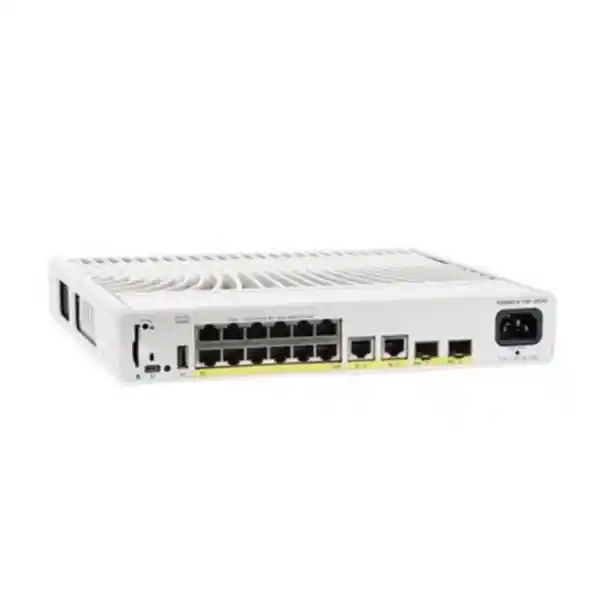
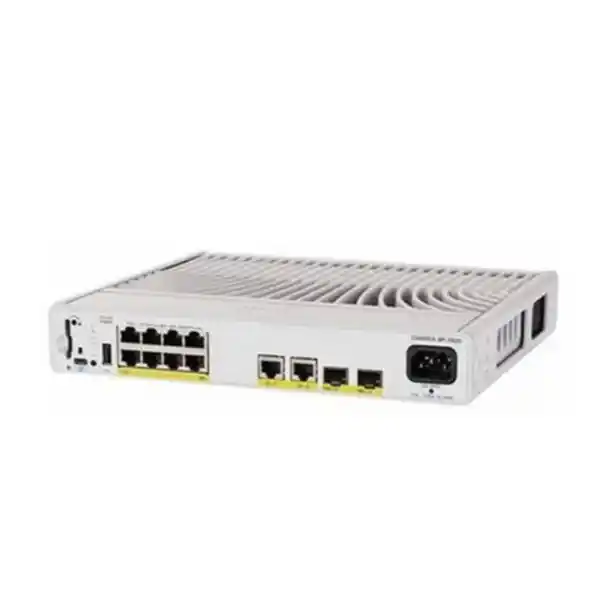
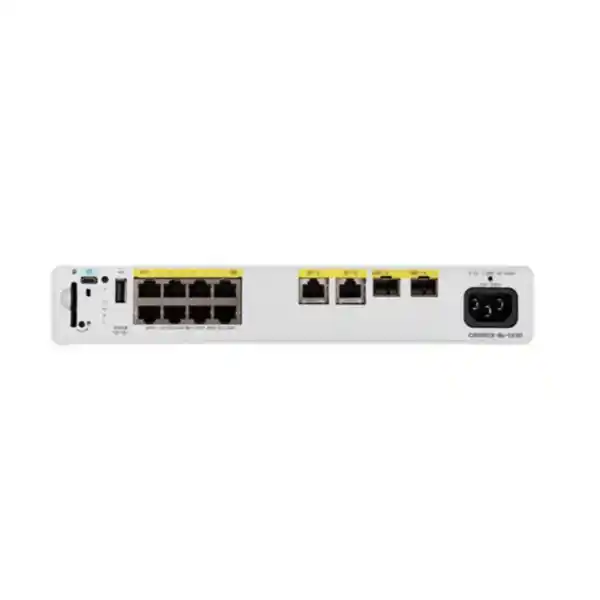
Choose the Cisco Catalyst C9200CX-8UXG-2XH when a small access area needs faster copper connections, higher-power Ethernet devices and a quiet switch close to users. It combines four multigigabit access ports with four Gigabit access ports and two fixed 10G SFP+ uplinks. Its compact, fanless construction suits locations where a full-size access switch would be difficult to accommodate. For a Tanzania quotation, start with your endpoint list, required uplink connection and intended power source so the configuration can be checked before purchase.
This is an eight-port access design for a defined cluster of equipment, rather than a substitute for a large floor switch. Its value comes from matching the right connections to the right devices: reserve faster ports for endpoints that can use them, and allocate the remaining connections to equipment with lower bandwidth requirements. Treat both the power budget and the upstream network as part of the selection.
The H variant has a 315W internal HVDC/AC power supply. Available PoE output is 240W across the switch, which is a separate figure from the power supply rating. The final order must identify the Network Essentials or Network Advantage version, associated subscription and any required optics or mounting accessories. Request a configuration-specific quotation from FourTeck Tanzania.
Where this switch fits
Consider this model for a small office equipment zone, a teaching room, a reception area, a meeting suite or a localized wireless deployment. These are suggested applications, not pre-approved designs: the equipment count, security policy, cabling and environmental conditions still determine suitability. A useful starting question is whether a compact switch near the endpoints simplifies the installation without creating an awkward new maintenance location.
An occupied room may benefit from avoiding fan noise, while a communications cupboard may benefit more from accessible cabling and clear labeling. In either case, decide who can physically reach the switch and whether that access is appropriate. A convenient installation point should also allow technicians to inspect indicators, disconnect a faulty device and replace a cable without disturbing unrelated equipment.
Choose a larger or different platform if the project needs substantially more access ports, more high-speed copper connections, a different uplink arrangement or a different resilience architecture. Do not select a compact device solely because the present equipment list happens to fit. Include the next likely additions, the practical cost of returning to site and the operational consequences of using every connection on day one.
Port layout and equipment allocation
The access-port mix is four 10/100/1000 Ethernet interfaces and four multigigabit interfaces supporting 10/100/1000, 2.5G, 5G and 10G. The separate uplink pair uses SFP+ cages. That distinction matters when preparing the port schedule: a copper endpoint connection and an optical uplink require different physical components, even when their advertised maximum speeds look similar.
Create a simple allocation sheet with a row for each endpoint. Record its room, device name, Ethernet capability, power requirement, cable identifier and planned switch port. Mark equipment that needs a faster connection before assigning the remaining devices. This reduces the chance that a fast-capable endpoint is connected to an unsuitable port while a lower-demand device occupies the preferred connection.
Evaluate the whole path before expecting an improvement. The device interface, installed cable, patching, negotiated link and upstream network all affect the useful result. If a device currently links below its intended speed, investigate the reason rather than assuming a switch replacement will resolve it. Retain cable test results and link observations with the installation record so future troubleshooting starts from evidence.
A concise specification reference
| Item | Specification |
|---|---|
| Access ports | 4 multigigabit + 4 Gigabit copper |
| Uplinks | 2 fixed 10G SFP+ |
| Power supply / PoE budget | 315W HVDC/AC internal / 240W shared output |
| Cooling | Fanless |
| Dimensions / weight | 4.4 × 26.9 × 24.4cm (H × W × D) / 3.18kg |
| Operating temperature | −5°C to 40°C; check transceiver restrictions |
Manufacturer: Cisco. Product family: Catalyst 9200CX. Base model: C9200CX-8UXG-2XH. Access connections: eight copper Ethernet ports, split between four multigigabit and four Gigabit interfaces. Uplinks: two fixed 10G SFP+ interfaces. Cooling: fanless. Power arrangement: fixed internal 315W HVDC/AC supply. Shared available PoE output: 240W.
Cisco lists the chassis at 4.4 × 26.9 × 24.4cm in height, width and depth, with a weight of 3.18kg. The hardware installation guide specifies a normal operating temperature range of −5°C to 40°C for this multigigabit model. Supported transceivers can introduce further temperature restrictions, so the installation review must consider the actual components rather than the chassis alone.
Use these values to screen the product, then confirm the complete bill of materials against the intended installation. Chassis dimensions do not include all the space needed for connectors, cable bends, service access or mounting hardware. Keep those allowances in the site drawing. The exact commercial offer should separately identify included accessories and support, since a base model name does not define everything supplied.
Understanding the PoE budget
Cisco specifies 802.3bt Type 3 Class 6 capability of up to 60W per access port for this model. That individual-port capability does not mean every port can provide its maximum simultaneously. The total available allocation is shared, so the endpoint combination must remain within the switch budget and comply with each device’s power-negotiation requirements.
Build the power worksheet from the endpoint manufacturer’s requirements, including any operating mode that changes demand. A wireless access point may have different functional behavior when insufficient power is available; other devices may need power for accessories or optional functions. Obtain the exact endpoint documentation and use its required input conditions rather than a product-family estimate.
An illustrative group allocating four devices at 45W and two at 20W totals 220W, leaving 20W below the published budget. This arithmetic is a planning example, not a compatibility approval or a recommended reserve. A proposed group of eight devices at 60W would total 480W and exceed the available output. Have the engineer check allocated power, startup behavior and expected additions before approving the device list.
Power delivered at the switch and usable power at an endpoint are not interchangeable specifications. Include cable losses and the relevant PoE standard in the compatibility review. Avoid designing to an optimistic measured idle draw when the device can demand more during normal operation.
Selecting a suitable uplink
Treat the uplink as a complete connection between two identified interfaces. Record the upstream switch model, available port, intended speed, cable medium and distance. For fiber, include the installed fiber type, connectors and patching route. For a direct-attach option, check both endpoints and the required length. Select components only after those facts are known.
The presence of an SFP+ cage does not establish that a particular module is included or supported. Ask for exact transceiver or cable part numbers in the quotation, with compatibility verified for the switch, software and peer. Keep a record of which component belongs at each end; mismatched optics can delay a deployment even when the switch itself is correctly specified.
Size the connection around traffic that actually leaves the access area. Local device count alone is a poor guide: file transfers, wireless traffic, backups and video streams can place very different demands on the same port count. Measure the existing load where practical and discuss the busiest realistic combination rather than relying only on a daily average.
If both uplinks will be used, agree the topology before connecting them. The design must explain how loops are prevented, where failover occurs and which peer arrangement is supported. Two cables do not by themselves establish a resilient or higher-capacity service.
Power-source planning for the H variant
The HVDC/AC capability is the distinguishing purchasing consideration for the H hardware variant. Confirm whether the project will use AC or a deliberately engineered high-voltage DC source, and identify the approved connection method. It must not be treated as a general low-voltage DC input or connected to an arbitrary battery arrangement.
An electrical review should document the source, protective arrangements, earthing, cable selection and isolation procedure using Cisco’s installation instructions and the site’s requirements. Keep responsibility clear between the network installer and the person authorized to assess the electrical supply. The product’s input capability does not establish that an existing circuit or connector is suitable.
Continuity planning should include the endpoints powered through the switch and the equipment upstream. A backed-up access switch cannot preserve a business application if its distribution connection, router or application server loses power. Define which services need to remain available, the desired operating period and the equipment that must share the continuity plan.
Compare the H variant with the AC C9200CX-8UXG-2X if the site only requires an AC source. Choose by the verified electrical design and complete offer, not by a similar-looking name. Do not infer a second power supply, a hot-swap capability or extra resilience from the broader Catalyst family.
Licenses and the exact orderable configuration
The base model supplied here does not select the software tier. Cisco identifies C9200CX-8UXG-2XH-E for Network Essentials and C9200CX-8UXG-2XH-A for Network Advantage. Ask for the full suffix in the quotation so purchasing and engineering can confirm that they are discussing the same configuration.
Cisco’s current ordering guide pairs a perpetual Network Stack entitlement with a mandatory aligned Cisco Catalyst or Cisco DNA term subscription for a normal new order. Confirm the chosen subscription, tier, duration and entitlement destination. Do not assume the bare hardware model includes every management capability or that an existing subscription automatically covers another switch.
Start the tier discussion with required functions, not a preference for the most expensive option. List the routing, segmentation, management and integration requirements that the design depends on. Have those mapped to the relevant platform feature documentation, software release and license. This is particularly important when a feature appears in family-level marketing but has platform-specific conditions.
Include the customer’s licensing owner in the purchasing process. Agree who will receive entitlement information and maintain renewal records. A clear handover should make it possible to distinguish hardware ownership, perpetual entitlement, term subscription and any separately purchased service without reconstructing the original quotation.
Management and operational ownership
The platform uses Cisco IOS XE. Choose the software release and management approach with the organization’s network team, checking support for the exact model and intended functions. A familiar vendor name does not remove the need to review release notes, known caveats and dependencies before a production rollout.
Assign a named operational owner for the device. That owner should know where the configuration backup is kept, how changes are approved and how an incident is escalated. Decide whether local staff only report symptoms or are expected to perform agreed checks. Clear boundaries help avoid well-intended resets that erase useful evidence or extend an outage.
Prepare a management access plan before installation. Define the approved management network, administrator authentication approach, monitoring destination and recovery access. Use the organization’s security standard rather than leaving access decisions to the final minutes of the cutover. Check that the chosen methods are supported and configured correctly for the selected software.
Keep the operational record short enough to use during a fault. It should identify the hostname, physical location, serial number, uplink peer, port allocation and support reference. Store sensitive information in the organization’s approved system, while keeping ordinary cable and asset labels readable to the staff who maintain the site.
Wireless access point deployments
A wireless project should select its switching connection from the exact access point’s wired interface and power needs. Compare the intended AP operating mode, radio configuration and accessories with the available connection. Do not infer full AP functionality from successful power-on or from a link indicator alone.
Use the faster access ports where the endpoint and traffic plan justify them. The radio experience also depends on placement, interference, client capability, channel planning and upstream resources. A switch upgrade can remove a wired constraint, but it does not by itself fix a weak radio design or make every user achieve the same throughput.
Separate installation acceptance into useful checks: correct negotiated Ethernet speed, correct power allocation, expected AP functions, management reachability and representative client access. Test a real business task from the intended location rather than considering a successful ping sufficient. Record any limitation that remains outside the switch’s role.
For a broader wireless procurement discussion, see the FourTeck Tanzania Cisco wireless access point guidance. Keep that wider design separate from the exact switch selection: access point choice and switch choice should meet the same project requirements, while each still needs its own compatibility and sizing review.
Mixed endpoints in offices and shared spaces
A small access area may connect collaboration equipment, phones, cameras, printers and ordinary workstations. Prepare the design around the actual mixture. Some endpoints need power, some need only data, and some require isolated access to a limited set of applications. Physical proximity is not a reason to give them identical network permissions.
Agree the traffic separation with the team responsible for the wider network. Identify which services each device must reach and which communication should be restricted. Any required VLAN, access control, authentication or quality-of-service configuration must be checked for the selected license and release, then tested as part of the deployment.
For voice and meetings, test the complete calling or conferencing path under realistic conditions. For cameras, test recording and retrieval through the intended system. For printers and specialist devices, verify discovery and application access from the correct user network. These checks catch policy or integration issues that basic Ethernet connectivity can miss.
Label endpoint cables in language that staff can understand, with a consistent reference to the port schedule. If a desk or room is rearranged, update the schedule rather than allowing the installation to drift. Good records are especially valuable when equipment from several departments shares one small switch.
Cabling checks before installation
Survey the installed cable routes before committing to the final port plan. Identify undocumented joins, damaged patch leads, uncertain terminations and cable runs that cannot be traced confidently. Use appropriate testing for the intended Ethernet service and preserve the results against the cable identifiers. Appearance and jacket markings alone do not prove the performance of a completed channel.
Check patching at both ends, including the space available for connectors and cable management. A neat-looking bundle can still impose strain or make the switch difficult to service. Arrange leads so that a technician can follow one connection without unplugging neighboring equipment. Keep power cabling and data routing consistent with the installation guidance and site practices.
If an existing connection is intermittent, capture symptoms before replacing equipment. Note whether errors follow a specific cable, endpoint or location. Where practical, compare against a known-good connection under controlled conditions. This separates a switch requirement from a cabling repair and helps prevent a new installation from inheriting the same fault.
Make cable verification part of acceptance rather than an optional later exercise. For each important endpoint, record the expected and observed link speed and confirm stable operation during a representative task. Resolve unexplained mismatches before declaring the new access area ready for normal use.
Placement, cooling and access
Plan placement around the environmental limits and Cisco’s model-specific mounting instructions. A fanless chassis still needs an appropriate path for heat to escape. Do not assume that a sealed cupboard, crowded shelf or surface covered by other equipment is acceptable simply because the unit has no moving fan.
Assess the intended location during realistic room conditions, including periods when air conditioning is reduced or surrounding equipment is heavily used. Keep the switch within its documented environmental limits and review any restrictions imposed by installed transceivers. If the site cannot provide suitable conditions, reconsider the location or product rather than treating temperature alarms as routine.
Select the mounting approach and accessories before purchasing. Confirm the supported orientation, structural attachment, clearances and access to connectors with the installation guide. Measure usable space after patching and power connection, not just the empty enclosure. Leave an arrangement that allows inspection and replacement without moving unrelated equipment.
Physical security also matters in an occupied area. Determine who can disconnect power, alter patching or reach a console connection. Use the organization’s normal access controls and asset protection practices. A compact switch placed close to users should remain maintainable while avoiding accidental interference with business equipment.
Resilience and service continuity
This compact platform does not provide the StackWise backplane stacking used by other Catalyst 9200 variants. Its power supply is fixed, and the published configuration does not offer a secondary internal supply. If the project requires those forms of chassis resilience, choose a platform and architecture that explicitly provide them.
Distinguish several failure cases during planning: loss of an uplink, loss of the upstream switch, loss of local power and failure of the access switch itself. Each affects a different part of the design. A redundant path can help only with the failure conditions it actually bypasses, and only when the configuration supports the intended recovery.
Agree a proportionate recovery plan. For a noncritical room, documented replacement steps may be sufficient. For a service with strict continuity requirements, engineering may need a different access arrangement, alternative endpoint connections or another hardware choice. Match the investment to the effect of an outage rather than using a generic redundancy label.
Test the agreed failure scenarios during an authorized maintenance window. Define the expected result and recovery process in advance, observe what happens, and record any interruption. Avoid discovering during a live incident that a second link was never configured or that essential upstream equipment shares the same failed power source.
A practical deployment sequence
Begin with a short requirements record approved by the people responsible for the applications and network. Confirm the endpoint inventory, power allocation, uplink peer, addressing, security rules and physical location. Resolve contradictions at this stage, such as an endpoint that needs a faster connection than the assigned port or a proposed location that cannot be maintained.
Next, prepare the device according to the organization’s deployment standard. Validate the selected software, entitlement arrangements and configuration before moving production cables. Keep a backup of relevant existing settings and a clear record of any assumptions that need confirmation on site. Avoid copying a previous switch configuration without reviewing how its commands apply to the new platform.
During cutover, move connections in a controlled order and check the result against the port schedule. Keep the rollback method accessible, including which equipment and cables would be restored if a critical test fails. Define who can authorize continuing, pausing or reversing the change.
Finish with acceptance and handover. Record the as-installed configuration, component identities, test results and outstanding actions. A successful installation is one that the operating team can understand and maintain after the installer leaves, with any limitations explicitly documented rather than passed on verbally.
Acceptance tests that reflect business use
Set acceptance criteria before delivery so the same checks can be used by purchasing, engineering and the business owner. Include physical installation, correct component identity, expected links, endpoint power behavior and application access. For important services, name a representative transaction and the person who will confirm that it works.
Test the busiest credible operating state where practical. A room may work during setup with one connected device but behave differently when wireless traffic, meetings and file transfers occur together. Use agreed measurements and representative workloads. Do not claim an application performance target unless the test method and the wider system can support that conclusion.
Check that monitoring and recovery arrangements work as intended. Verify that the operations team receives the information needed to distinguish a disconnected endpoint from an uplink or power problem. Confirm that a configuration backup can be located and understood, and that the handover identifies the approved recovery approach.
Document exceptions precisely. Instead of recording ‘network issue,’ identify the affected endpoint, observed behavior, test conditions and responsible follow-up owner. Decide whether an exception prevents acceptance or can be managed after handover. This keeps minor outstanding work from obscuring an unresolved business-critical fault.
Planning capacity beyond the first installation
Forecast additions by endpoint type and business purpose. A planned new room, access point or collaboration device may create a different constraint from adding another ordinary workstation. Track how each change affects available connections, allocated power, uplink traffic, physical space and maintenance effort.
Reserve resources deliberately rather than relying on an unspecified allowance. If the business expects expansion, identify which connections and how much power remain available for it. Review the equipment list again before any new device is approved. A change that fits the port count can still exceed the power plan or introduce a new security requirement.
Consider the operating cost of several small access locations against a more centralized design. Distributed placement can be useful, but it creates additional assets to document, power and maintain. Compare cable-route practicality, site access, fault isolation and recovery effort as part of the architecture discussion.
Keep a simple trigger for reassessment: when a proposed addition exceeds the agreed reserve, needs an unsupported function or changes the continuity requirement, return to design review. This makes growth decisions explicit and helps avoid a sequence of small purchases that eventually produces a fragile network.
Comparing related options
The closest hardware comparison is the C9200CX-8UXG-2X, the AC version with the same access-port pattern and uplink arrangement. Compare it with the H variant when deciding whether HVDC capability is relevant. Confirm the complete supplied configuration in either case rather than assuming accessories and commercial terms will match.
If the endpoint list consists mainly of ordinary Gigabit devices, examine whether a different compact model provides a more appropriate balance of connections, power and cost. If the project requires more than four multigigabit access connections or a larger device group, widen the comparison beyond this chassis.
An existing switch replacement should preserve required operational behavior as well as physical connectivity. Capture the present port use, uplink components, segmentation and recovery expectations. Review which functions are still needed and which were historical workarounds. Then compare candidate platforms against that record.
For a wider estate refresh, consult FourTeck Tanzania’s Catalyst 2960-X replacement guidance. That broader migration topic addresses a different purchasing question from this exact compact model. Keep the final selection tied to the access area’s requirements rather than assuming every older Catalyst should be replaced by the same product.
What to include in a Tanzania quotation request
Provide the base model and ask for the full orderable part number with its license suffix. Add the quantity, intended power source, endpoint list, maximum required power allocation, desired uplink type and upstream peer. If the design already specifies transceivers or direct-attach cables, include their exact part numbers for compatibility review.
Describe the installation location and preferred mounting method. Share relevant enclosure measurements, environmental conditions and access restrictions. State whether the project is a new installation, an expansion or a replacement, and identify the business services that depend on the access area.
Ask for an itemized offer covering hardware, required subscription, optics or cables, mounting accessories and any requested services. Request separate confirmation of warranty terms, support coverage, lead time and delivery arrangements for that offer. A generic product page cannot establish those commercial conditions for a particular order.
Where a Tanzania price is quoted, confirm the currency, what is included, the offer’s validity and any excluded project costs in writing. This page does not state a verified selling price or stock position. A complete quotation should be the reference for purchasing so that finance and technical teams approve the same scope.
Procurement and handover records
Keep manufacturer identifiers separate from your organization’s asset labels and the seller’s listing identifiers. The model identifies the hardware design; a serial number identifies an individual unit; an internal asset label helps your team track ownership and location. Do not use one field as a substitute for another in purchasing or maintenance records.
At receipt, compare the delivered items with the approved bill of materials. Verify the model suffix, quantities and separately ordered components before scheduling a cutover that depends on them. Record discrepancies promptly, while keeping the original packaging and supporting documents according to the organization’s receiving process.
Agree the service boundaries before commissioning. If configuration, installation, monitoring or training is requested, the quotation should explain the deliverables and responsibilities. Confirm how a hardware issue will be handled and which party owns application or cabling faults. Written scope makes the handover easier to operate.
Retain the final configuration, licensing references, warranty information and acceptance record in an accessible project folder or approved management system. Include the date and owner of the next review. These records support future changes and help a replacement engineer understand why the switch was selected.
Buyer questions answered
Are all eight access ports 10G?
No. Four are multigigabit ports reaching up to 10G; the other four reach up to 1G. Assign the fast-capable endpoints to the appropriate interfaces and confirm the installed cable channel supports the intended connection.
Does the 315W supply provide 315W of PoE output?
No. Cisco lists 240W available for connected powered devices. The supply rating and shared endpoint power budget describe different limits. Check the complete device combination before ordering.
Can this switch power every proposed access point or camera?
Compatibility depends on the exact endpoint’s standard, required power, functions and cable channel. Submit the actual device list for review. Brand names or a matching connector do not establish full compatibility.
Are SFP+ modules included?
Do not assume so. Require the offer to identify any included optics or cables by part number and confirm support at both ends. The fixed uplink interface specification does not define the supplied optical components.
Which license should be selected?
Choose the tier after mapping the required functions to platform and release support. The -E and -A options are distinct orderable configurations. Include the subscription and entitlement arrangements in the same purchasing review.
Can it replace a stacked access switch?
A replacement design must review the required resilience and management behavior. This compact model does not provide StackWise backplane stacking, so it should not be treated as a direct replacement for that architecture.
Is local availability or installation included?
Those details require an exact FourTeck Tanzania quotation. Confirm stock, delivery, installation scope and support separately before committing to a schedule.
Request a configuration-specific quotation
Send FourTeck Tanzania your endpoint schedule, preferred license tier, uplink details, installation location and power-source requirements for a Cisco Catalyst C9200CX-8UXG-2XH Network Switch quotation. If any of those details are undecided, identify the requirement rather than guessing a component.
Use the response to confirm the complete hardware and software package, the compatible connection components and the commercial terms. Agree any required design or installation work explicitly. The result should be a configuration that purchasing can identify precisely and the network team can validate against the intended deployment.




Reviews
There are no reviews yet.