
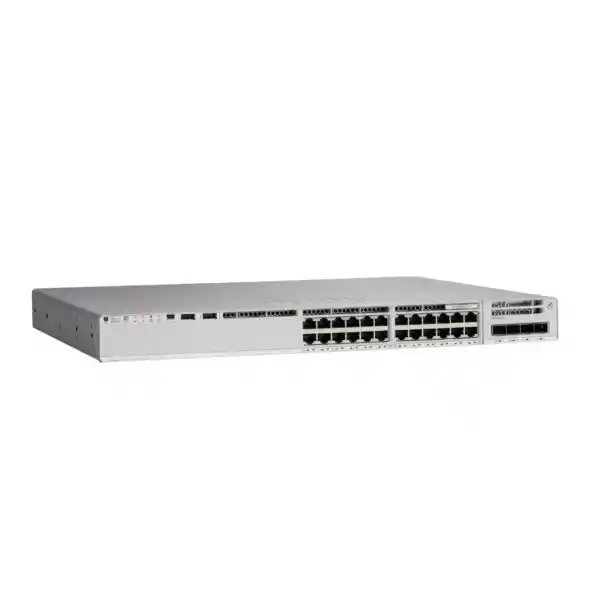
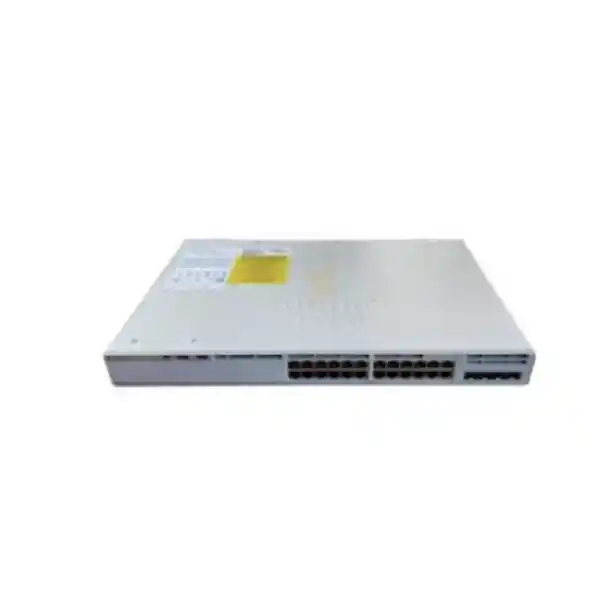
4 × 1G SFP fixed uplinks
StackWise-80 capable
Cisco IOS XE
Cisco Catalyst C9200L-24P-4G Network Switch
The Cisco Catalyst C9200L-24P-4G is an enterprise access switch for organizations that need dependable Gigabit Ethernet, PoE+ for edge devices, fixed fiber uplinks, and the option to build a resilient switch stack. It combines 24 PoE+ copper access ports with four fixed 1G SFP uplinks, making it a practical choice for branch offices, office floors, schools, hospitality networks, clinics, retail sites, warehouses, and other environments where most endpoint connections are 1 Gigabit and the upstream network can be served by 1G fiber links.
For buyers in Tanzania, the key question is not simply whether the switch has 24 PoE ports. A successful deployment depends on the actual PoE wattage required by phones, access points, cameras and other powered devices; the number and type of SFP optics needed; whether 1G uplinks are sufficient for the expected traffic; whether stacking is part of the design; and which Cisco software license level is required. The bare C9200L-24P-4G model family is sold under separate Network Essentials and Network Advantage orderable product numbers, so the exact PID should be confirmed on the final quotation.
What this switch gives you at a glance
Twenty-four 10/100/1000 Ethernet downlink ports can connect and power compatible edge devices. This reduces the need for separate electrical adapters at every endpoint and can simplify wiring-closet design.
The uplinks are designed for 1 Gigabit SFP connectivity. This is appropriate where aggregation bandwidth and WAN or core connectivity do not require 10 Gigabit uplinks.
With the default 600W AC power supply, the platform makes 370W available for PoE. A supported second supply can raise available PoE power to as much as 740W.
C9200L fixed-uplink switches support StackWise-80, allowing up to eight compatible switches to operate as a unified stack with a single control and management plane.
Technical specification summary
| Model family | Cisco Catalyst C9200L-24P-4G |
|---|---|
| Access ports | 24 × 10/100/1000BASE-T PoE+ ports |
| Uplinks | 4 × fixed 1G SFP uplink ports |
| Default power supply | PWR-C5-600WAC |
| Available PoE power with default AC supply | 370W |
| Available PoE power with supported additional AC supply | Up to 740W |
| Stacking | StackWise-80; up to eight compatible switches in a stack |
| Switching capacity | 56 Gbps standalone; 136 Gbps listed with stacking |
| Forwarding rate | 41.67 Mpps standalone; 101 Mpps listed with stacking |
| C9200L platform memory | 2 GB DRAM and 4 GB flash |
| C9200L MAC address scale | Up to 16,000 MAC addresses |
| Packet buffer | 6 MB for 1G C9200L models |
| Software | Cisco IOS XE; exact features depend on release and license |
| Orderable license variants | C9200L-24P-4G-E for Network Essentials and C9200L-24P-4G-A for Network Advantage |
Who should consider the C9200L-24P-4G?
This model is best suited to access-layer deployments where the majority of connected devices need 1 Gigabit Ethernet and a meaningful portion of those devices benefit from PoE+. Typical endpoints include IP phones, wireless access points, surveillance cameras, door controllers, time-and-attendance terminals, thin clients, small edge appliances and other standards-based powered devices. Because the access ports are Gigabit rather than multigigabit, it fits conventional wired-access designs and wireless deployments whose access points do not require multigigabit switch ports.
It is also a useful option for a branch or floor network that wants Cisco IOS XE, enterprise switching functions, stackability and optional power redundancy without moving to a higher-density 48-port chassis. Twenty-four ports can be easier to right-size for smaller wiring closets, satellite sites or departments that would otherwise leave many ports unused on a 48-port switch. The four SFP uplinks can support fiber connections to an aggregation switch, core, router or another network location, subject to compatible optics and link design.
The model is less attractive when upstream traffic is expected to exceed the practical limits of 1G uplinks, when Wi-Fi access points require 2.5G or higher access-port speeds, when more than 24 edge connections are required in a single switch, or when the deployment needs modular uplink choices. In those cases, compare the 4X uplink variants, multigigabit C9200L models, 48-port versions, or modular Catalyst 9200 platforms before settling on this unit.
PoE planning: calculate watts, not just ports
A 24-port PoE+ switch does not automatically mean that every connected endpoint can draw the maximum PoE+ power simultaneously from the default power supply. The C9200L-24P-4G ships with a 600W AC power supply configuration that provides 370W of available PoE power. Cisco specifies up to 740W of available PoE power when a supported additional AC power supply is installed. The correct design therefore starts with an endpoint power budget, not a port count.
List every intended powered device and its expected or negotiated power requirement. Separate the devices that must remain powered during normal operation from optional or future devices. Add reasonable growth margin rather than sizing to the exact current load. This is particularly important when a branch may later add wireless access points, IP cameras or phones. A deployment with twenty-four low-power handsets can have a very different power profile from a deployment with a mixture of cameras and access points even though both use twenty-four switch ports.
Cisco also supports Perpetual PoE and Fast PoE capabilities on the Catalyst 9200 family. Perpetual PoE is designed to keep supported powered devices energized through a switch software reload, while Fast PoE can restore endpoint power after switch power recovery without waiting for the entire operating system boot process. These features can reduce endpoint disruption, but they have configuration requirements and documented exceptions, including interruptions during some firmware upgrades. They should therefore be treated as operational capabilities to configure and test, not as a substitute for UPS planning or power-source redundancy.
For a Tanzania site where utility stability, generator transitions or UPS runtime are design concerns, include the switch, its power supplies and the powered endpoint load in the electrical plan. Verify rack power, UPS capacity, socket type, circuit protection and grounding for the actual installation. Do not assume that adding a second switch power supply alone provides complete site power resilience; the upstream electrical feeds and UPS architecture also matter.
Understand the four 1G SFP uplinks before buying
The “4G” in C9200L-24P-4G refers to four fixed 1 Gigabit SFP uplink ports. This distinction is important. The closely related C9200L-24P-4X provides four fixed 10 Gigabit-capable SFP+ uplinks, while the 4G model is intended for 1G uplink designs. If a branch uses one or two Gigabit fiber links and its aggregate traffic is moderate, the 4G version can be a cost-effective match. If the switch will carry heavy east-west traffic, high-volume backups, dense wireless traffic, video, storage workloads or many simultaneous users toward a centralized core, 10G uplinks may provide better headroom.
The uplink ports also mean that optical transceivers are a separate design decision. Select optics based on the fiber type, connector type, distance, wavelength and the equipment at the far end. Do not order optics purely because the physical module fits the SFP cage. The transceiver choice must be supported for the switch software and link partner, and the fiber plant must match the optic. For copper uplink use cases, confirm the supported Cisco transceiver options and distance requirements before procurement.
A useful rule for sizing is to compare expected aggregate access traffic with the planned uplink topology. Twenty-four 1G edge ports do not imply that all twenty-four will simultaneously send a full gigabit upstream, but the ratio between access capacity and uplink capacity should still be intentional. Consider user behavior, internet bandwidth, local servers, voice, video, surveillance recording, wireless traffic and future applications. If the business expects significant growth, choosing the 4X variant at the beginning may avoid a later switch replacement.
StackWise-80 for growth and operational simplicity
C9200L fixed-uplink models support Cisco StackWise-80. Cisco documents the ability to combine up to eight compatible switches in a physical ring to form one logical stack. The stack uses a centralized control plane while distributing forwarding across the member switches. For an IT team, this can simplify management compared with operating each access switch as a completely independent device, and it can provide a structured path from a single-switch deployment to a larger access block.
Stacking should be designed rather than treated as an automatic feature. Confirm that the exact switch models and software versions are compatible in the intended stack. Include the correct StackWise cables and physical rack arrangement. Plan member numbering, software consistency, power redundancy, uplink distribution and maintenance procedures. An eight-member theoretical maximum does not mean that every site should build an eight-switch stack; failure domains, rack layout, available power, uplink architecture and operational preferences should guide the final size.
The C9200L family has 80 Gbps stacking bandwidth. The C9200L-24P-4G itself has a listed 56 Gbps switching capacity and 41.67 Mpps forwarding rate when considered standalone, with higher listed capacity and forwarding figures when stacking is included. These values help describe the platform, but real design decisions should also consider traffic patterns, oversubscription, link aggregation, services enabled, packet sizes and the architecture of the upstream network.
For multi-floor offices or branch facilities in Tanzania, stacking can be especially useful when several access switches sit in one equipment room and the network team wants consistent configuration and a consolidated operational view. For switches distributed across different buildings or long physical distances, conventional routed or switched uplinks may be more appropriate than trying to stretch a physical stack beyond its intended cabling environment.
Performance and scale for an enterprise access layer
Cisco positions the Catalyst 9200 family as an enterprise-class access platform for smaller campus and branch deployments. The C9200L platform specifications include 16,000 MAC addresses, up to 11,000 total IPv4 routes when ARP and learned routes are counted under Cisco’s scale definition, 3,000 IPv4 routing entries, 1,500 IPv6 routing entries, 1,000 multicast routing entries, 1,000 QoS scale entries, 1,500 ACL scale entries and a 6 MB packet buffer on the 1G models. It also provides 2 GB DRAM and 4 GB flash at the C9200L platform level.
Those numbers should be interpreted as platform scale references, not a promise that every maximum can be reached simultaneously in every feature combination. Enterprise switch resources are shared among functions, and actual supported scale depends on software release, configuration, templates and the mix of services enabled. When the network design approaches a documented scale limit, validate the intended configuration against current Cisco release documentation rather than relying on a product-page summary.
For ordinary office and branch access use, the more important practical questions are often simpler: how many endpoints must connect, how many require power, what VLANs and security policies are needed, what uplink capacity is required, and how the switch will be monitored and backed up. The platform scale gives room for structured segmentation and routing, but good network design still matters more than the headline table values.
Network Essentials or Network Advantage?
The C9200L-24P-4G family is not one single orderable product number. Cisco lists C9200L-24P-4G-E with the Network Essentials level and C9200L-24P-4G-A with the Network Advantage level. That suffix matters during procurement because it identifies the default network license level associated with the ordered switch. A quotation should therefore show the complete PID rather than only the shortened family name.
Choose the license based on the functions the network actually needs, not on the assumption that the more expensive level is always necessary. Start by documenting Layer 2 and Layer 3 requirements, routing protocols, segmentation approach, automation and management tools, telemetry, security functions and any Cisco architecture integration. Then verify those requirements against Cisco’s current license matrix and the IOS XE release that will run in the environment. Features and packaging can evolve over time, so a current validation at quotation stage is more reliable than a generic historical feature list.
If the requirement is not yet fully defined, ask for the quote to state the selected hardware PID, network license level, any associated software subscription, subscription term if applicable, and support coverage as separate line items. This avoids a common purchasing problem where the physical switch is correctly identified but the software entitlement does not match the intended deployment.
Security and segmentation capabilities
At the access layer, security is not only about blocking unwanted traffic at the internet edge. It also means controlling who and what can connect to the LAN, separating device groups, protecting management access and applying policy close to endpoints. Cisco Catalyst 9200 switches provide the foundation for VLAN segmentation, access control lists, quality-of-service policy, authentication workflows and telemetry. The exact functions available to a specific deployment depend on license and IOS XE software release, so security requirements should be mapped before purchase.
Cisco documents 128-bit MACsec support on the Catalyst 9200 family. MACsec can protect supported Ethernet links by authenticating and encrypting frames between capable peers, and Cisco documentation includes both switch-to-switch and switch-to-host scenarios. However, MACsec has topology, protocol and configuration restrictions. It should be validated for the exact interface, link type, peer device and software release rather than assumed to work transparently everywhere.
For endpoint admission, consider how the switch will interact with the organization’s identity and policy systems. Define whether ports will use 802.1X, MAC Authentication Bypass, static access configuration, voice VLANs or other methods. For IP phones with attached PCs, cameras, printers and operational-technology devices, test the desired authentication sequence before mass rollout. Many real access networks contain devices with different authentication capabilities, so a practical policy needs both security and operational resilience.
Management security should receive equal attention. Use protected management protocols, restrict administrative access to trusted networks, centralize authentication where appropriate, back up configurations and maintain a planned software-update process. The value of an enterprise switch is not only the features it supports but the disciplined operating model built around those features.
Management, automation and visibility
Cisco IOS XE provides the operating environment for the Catalyst 9200 family and supports conventional CLI-based administration alongside programmable management approaches. Depending on the selected software level and release, network teams can use structured configuration, APIs, model-driven interfaces, telemetry and Cisco management platforms to improve consistency and troubleshooting. The best approach depends on the size and maturity of the network operations team.
For a smaller Tanzania branch, a carefully documented standard configuration with secure remote management, centralized logging, configuration backup and monitoring may be sufficient. For a larger multi-site network, automation becomes more valuable because it reduces manual differences between sites. Standardized templates can help maintain consistent VLANs, QoS policies, access controls, SNMP or telemetry settings, time configuration and administrative access.
Operational visibility should be planned before an incident. Decide where syslog, monitoring alerts, interface statistics, configuration archives and authentication events will be collected. Establish thresholds for uplink utilization, PoE consumption, temperature, power-supply state and interface errors. A switch with enterprise telemetry is most useful when someone is actually watching the relevant indicators and has a clear escalation process.
Tanzania deployment considerations
A switch specification is only one part of a successful local deployment. Before installation in Tanzania, confirm the physical environment, rack depth, ventilation, ambient conditions, grounding, UPS capacity, cabling quality and the availability of the correct fiber optics and patch leads. Cisco lists the C9200L-24P-4G chassis at approximately 1.73 inches high, 17.5 inches wide and 11.3 inches deep before the additional rear projection associated with installed field-replaceable power components. Leave enough rack depth and service clearance for power connections, stacking cables and airflow.
Power planning should account for both the switch itself and the downstream PoE load. A UPS that was adequate for a non-PoE access switch may provide much shorter runtime once hundreds of watts of cameras, phones and access points are powered through the switch. If endpoint availability during outages is important, calculate runtime using realistic switch and PoE consumption, not only the maximum UPS VA rating. Also consider what happens upstream: a powered access switch provides little business value if the router, firewall, fiber termination, wireless controller or internet equipment loses power first.
Cabling and optics deserve similar attention. Verify the condition and category of copper cabling for Gigabit Ethernet, especially in older buildings. For fiber, confirm multimode versus single-mode, connector types, link distance and the optics at both ends. Label uplinks, stack members and patch-panel positions before handover. Good documentation reduces troubleshooting time when a site is supported remotely.
Finally, procure with a configuration list rather than a switch name alone. The bill of materials may need the selected -E or -A switch PID, a second power supply, stacking accessories, SFP optics, fiber patch cords, rack accessories, software subscriptions and support. Availability, lead time, pricing and warranty or support terms should be confirmed on the actual Tanzania quotation instead of assumed from a generic product description.
Common business scenarios
Branch office access
Connect staff PCs, IP phones, printers and several wireless access points while using SFP fiber uplinks back to the branch core or router. The 24-port size suits offices that need enterprise features without a 48-port footprint.
IP telephony
Use PoE+ to power compatible phones and apply voice VLAN and QoS policies. Size the power budget for the actual phone models and any pass-through devices rather than assuming an identical draw per desk.
Video surveillance edge
Aggregate IP cameras where Gigabit access and PoE+ are sufficient. Check camera power, recording traffic and uplink utilization carefully, because continuous video can create a heavier upstream load than typical office endpoints.
School or training facility
Serve classrooms, administration, phones, access points and shared devices with VLAN segmentation. Consider whether newer wireless access points require multigigabit ports before standardizing on a 1G access model.
Retail or hospitality site
Support point-of-sale systems, phones, cameras, wireless and back-office devices with centralized switching. Use segmentation to separate business systems, guest services, surveillance and management networks.
Stacked wiring closet
Combine compatible C9200L switches with StackWise-80 where more ports are required in one equipment room. Design stacking, power and uplinks together so the logical simplicity is matched by physical resilience.
C9200L-24P-4G versus nearby alternatives
| Model type | Best fit | Main reason to choose it | Watch point |
|---|---|---|---|
| C9200L-24P-4G | 24-port PoE+ access with 1G fiber uplinks | Balanced branch access when 1G uplinks are enough | Fixed uplinks are 1G |
| C9200L-24P-4X | 24-port PoE+ access with higher uplink headroom | Four fixed 10G-capable SFP+ uplinks | Confirm optics and upstream 10G support |
| C9200L-24T-4G | 24-port data-only access | Avoid paying for PoE where endpoints do not need it | No PoE for phones, cameras or APs |
| C9200L-48P-4G | Higher-density PoE+ access | 48 PoE+ ports in one switch | Larger power and port-density planning |
| Modular Catalyst 9200 | Access designs needing modular uplinks | Field-selectable uplink modules on supported models | Different hardware and stacking characteristics |
The most common comparison is between the 4G and 4X versions. If 1G fiber uplinks match the expected traffic profile, the C9200L-24P-4G is a sensible access-layer choice. If the network is being built for higher wireless density, centralized applications, large file movement, surveillance aggregation or long service life with growing traffic, assess the 10G-uplink model before ordering. The cost difference at procurement may be smaller than replacing the switch later because the uplinks became the bottleneck.
Buyer checklist before quotation
- Confirm the complete PID: choose the appropriate C9200L-24P-4G-E or C9200L-24P-4G-A variant after checking the required software capabilities.
- Count active and future ports: include phones, PCs, printers, cameras, access points, IoT devices and spare capacity.
- Calculate PoE watts: total realistic endpoint demand, then add growth margin. Decide whether the default 370W PoE budget is enough.
- Check uplink speed: verify that four 1G SFP uplinks are appropriate. If not, assess the 4X version with 10G uplinks.
- Select optics carefully: match single-mode or multimode fiber, distance, connector type, wavelength and the far-end equipment.
- Plan stacking: if stacking is required, include compatible StackWise accessories, rack layout and software consistency.
- Plan power resilience: determine whether a second switch PSU, UPS, generator-backed circuit or dual electrical feed is required.
- Define support: confirm the desired Cisco support coverage and replacement terms on the actual quote rather than assuming them.
- Validate software: decide the IOS XE train and verify required features, interoperability and lifecycle requirements.
- Document the bill of materials: switch, licenses, software subscription if applicable, power supply, stack cables, SFPs, patch cords, rack parts and support should be explicit.
Deployment design example
Consider a 35-person branch with twenty desk phones, fifteen wired PCs connected through those phones, four wireless access points, six cameras, two printers and several building-control devices. Port count alone may push the design toward more than one switch, but the first step is to map each physical connection. Some PCs may share a switch port through a phone while cameras and access points require dedicated ports. The next step is power: add the maximum or expected PoE requirement for every powered endpoint. If the total is comfortably below 370W with growth allowance, the default power configuration may be sufficient. If the total approaches or exceeds that value, a second supported supply or a different switch design should be considered.
Then examine the traffic. Office applications and voice may produce modest upstream load, while cameras can create continuous flows and wireless access points can aggregate many client sessions. If all traffic is destined for a central firewall or data center over one 1G fiber uplink, the uplink could become the limiting factor long before the access ports are saturated. Link aggregation or multiple uplinks can help in suitable topologies, but if the expected aggregate traffic is high, the 4X model’s 10G uplinks may be a cleaner choice.
Finally, define failure behavior. If the switch reboots, which devices need uninterrupted PoE? If a power supply fails, is reduced PoE capacity acceptable? If an uplink fails, is there an alternate path? If a stack member fails, how are critical endpoints distributed? Answering these questions turns a hardware purchase into a network design. The C9200L-24P-4G provides useful tools for resilience, but those tools only deliver business value when the cabling, power, software and topology are designed around them.
This method is appropriate whether the site is in Dar es Salaam, Arusha, Mwanza, Dodoma or another Tanzanian location, but local service coverage, delivery, installation support and stock should be confirmed separately for the actual project. The product specification itself does not establish those commercial details.
Implementation and handover recommendations
Before the switch goes into production, record the serial number, installed power supplies, optics, stack role, software version, license level and management addressing. Use an approved baseline configuration that covers hostname standards, management access, time synchronization, logging, authentication, VLANs, trunking, spanning tree, loop protection, QoS, endpoint security and monitoring. Store a protected copy of the configuration outside the switch.
For PoE endpoints, test representative device types. Confirm that phones boot correctly, access points negotiate the expected power and link speed, cameras remain stable, and any LLDP or discovery requirements are met. If Perpetual PoE or Fast PoE is part of the design, configure and test it under controlled conditions before relying on it. Cisco documentation notes specific restrictions, so the commissioning test should include the operational events the organization actually expects, such as a software reload or restoration after an electrical interruption.
For uplinks, verify optical power levels where appropriate, interface error counters, VLAN or routed-link configuration, link aggregation and failover. Avoid declaring the installation complete just because interfaces show an up state. Run practical traffic tests, confirm monitoring visibility and verify that administrators can reach the switch through the intended secure management path without exposing management services unnecessarily.
A good handover package should include the physical port map, VLAN list, IP addressing, uplink topology, stack diagram if applicable, power design, optic part numbers, support entitlement details, configuration backup location and escalation contacts. This information is especially valuable for distributed organizations where the person troubleshooting a future incident may not be the engineer who installed the switch.
Frequently asked questions
Is the C9200L-24P-4G a PoE switch?
Yes. It has 24 Gigabit Ethernet PoE+ access ports. With the default PWR-C5-600WAC power supply, Cisco specifies 370W of available PoE power. With a supported additional AC power supply, available PoE power can increase to as much as 740W. Always size the total wattage of connected devices rather than relying only on the number of PoE-capable ports.
Does it have 10G uplinks?
No. The C9200L-24P-4G has four fixed 1G SFP uplinks. Buyers who need four fixed 10G-capable SFP+ uplinks should compare the C9200L-24P-4X. The access-port count and PoE role are similar, but the uplink capability is a major design difference.
Can C9200L switches be stacked?
Yes. Cisco documents StackWise-80 for C9200L fixed-uplink models and supports up to eight compatible switches in a physical stack. Stacking requires appropriate accessories and a compatible design. Confirm exact model interoperability, software versions, cable requirements and stack topology before ordering the complete bill of materials.
What is the difference between the -E and -A versions?
Cisco lists C9200L-24P-4G-E with Network Essentials and C9200L-24P-4G-A with Network Advantage. The physical port arrangement is the same model family, but the default network license level differs. Select the version by mapping required network functions to Cisco’s current licensing documentation and the intended IOS XE release.
Is 370W enough for 24 PoE devices?
It depends on the devices. Twenty-four low-power endpoints can fit comfortably within 370W, while a mixture of higher-power access points or cameras may not. Add the expected power draw of each endpoint, include margin for growth, and decide whether the default supply is adequate or a second supported supply is required.
Does the switch support Layer 3 networking?
The Catalyst 9200 family is an enterprise Layer 2 and Layer 3 switching platform, but the exact routing and advanced feature set available to a deployment depends on the selected license and software release. Define the required routing protocols and scale first, then verify them against the current Cisco feature and licensing documentation.
Can it power wireless access points?
Yes, when the access point’s Ethernet speed and PoE requirement are compatible with the switch. The C9200L-24P-4G provides 1G access ports with PoE+. If a newer access point requires multigigabit Ethernet or more power than the port platform provides, a multigigabit or higher-power switch model may be more suitable.
What optics should be ordered with the switch?
The answer depends on the fiber plant and link requirements. Confirm whether the cable is single-mode or multimode, the link distance, connector type and the transceiver at the far end. Then select a Cisco-supported 1G SFP option that matches the design and software. Do not assume that every SFP-form-factor module is supported or interoperable.
Is a second power supply required?
Not for basic operation with the default supported supply, but a second supply can be important for PoE capacity and resilience. The correct choice depends on endpoint wattage, desired failure behavior and the site’s electrical design. Remember that redundant switch PSUs do not by themselves create redundant utility power unless the upstream feeds are also designed appropriately.
What should I provide when requesting a quote in Tanzania?
Provide the required port count, estimated PoE load, desired uplink speed, fiber type and distance, whether stacking is required, preferred Network Essentials or Network Advantage level if already known, power-redundancy requirement, software or subscription requirements, support expectations and the number of switches. This makes it easier to build a complete bill of materials without missing optics, power supplies or stacking accessories.
Request the right C9200L-24P-4G configuration
Use the Cisco Catalyst C9200L-24P-4G when you need 24 PoE+ Gigabit access ports, four fixed 1G SFP uplinks and StackWise-80 in an enterprise access switch. Before quotation, confirm the complete -E or -A PID, PoE wattage, optics, stack accessories, second power supply requirement, software level and support coverage.
Request a configuration review and Tanzania quotation based on your endpoint count, PoE load, uplink design and licensing requirements.




Reviews
There are no reviews yet.