
Cisco Catalyst 9200L Series
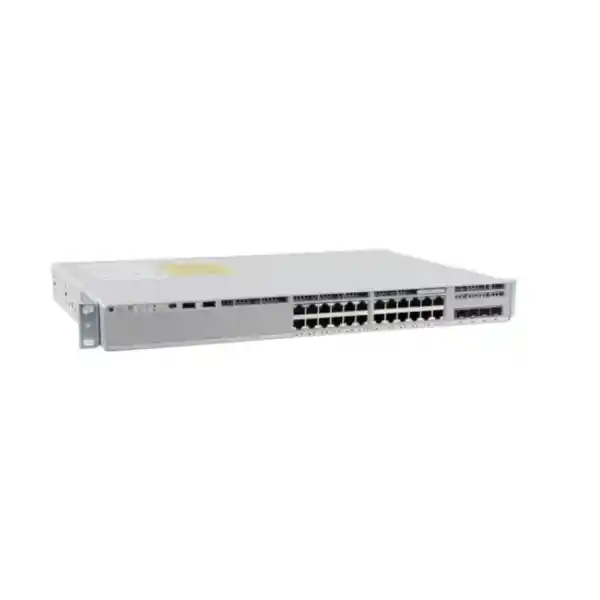
Cisco Catalyst C9200L-24P-4X Network Switch
For organisations planning a dependable wired access layer, the Cisco Catalyst C9200L-24P-4X combines 24 Gigabit Ethernet PoE+ access ports with four fixed 1/10 Gigabit uplinks in a stackable enterprise switch. It is aimed at branch offices, small and medium campus environments, distributed business sites, education networks, hospitality properties and other deployments where users, IP phones, wireless access points, cameras and other Ethernet devices need to share a managed switching platform with room for resilient uplinks and future growth.
A practical access switch for PoE devices and high-speed uplinks
The C9200L-24P-4X is designed for the part of the network where end devices connect. Its 24 copper downlink ports operate at 10/100/1000 Mbps and support PoE+, allowing compatible powered devices to receive data and electrical power over the same Ethernet cabling. That can simplify deployment for IP telephony, ceiling-mounted wireless access points, surveillance cameras and other standards-based PoE endpoints because separate local power adapters may not be required at every device location. Power planning still matters: the amount available to connected endpoints is determined by the installed power supplies and the per-port requirements of the devices being powered.
The “4X” portion of the model name is important when comparing Catalyst 9200L variants. This model has four fixed uplink interfaces that support 1 Gigabit or 10 Gigabit Ethernet through supported SFP or SFP+ transceivers. In a typical design, those uplinks can be used for fibre connections toward a distribution switch, a collapsed core, another wiring closet or a server-side aggregation point. The higher uplink speed is useful when multiple access ports may be active at the same time and a 1 Gigabit uplink could become a bottleneck.
For buyers in Tanzania, the most useful purchasing question is not simply whether a switch has 24 ports, but whether the access-port power budget, uplink type, licensing level, optics, stacking accessories and power redundancy match the actual site design. A correctly specified unit can support a clean, manageable access layer; an incomplete bill of materials can leave the network without the transceivers, stack kit, software entitlement or secondary power supply needed for the intended deployment. The quotation should therefore identify the complete Cisco order configuration rather than only the base family name.
Verified hardware highlights
Specifications above describe the Cisco platform and model family. The exact ordered software tier, subscription term, power-supply population, optics and accessories must be confirmed on the quotation or Cisco configuration.
PoE+ planning: calculate endpoint demand before purchase
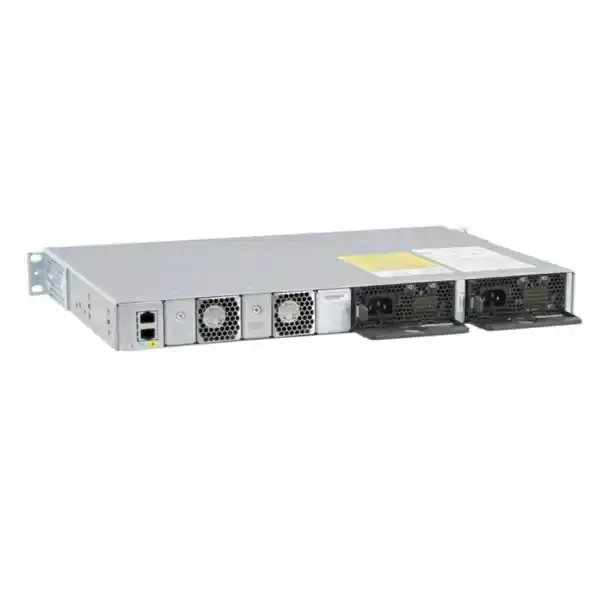
PoE capability is one of the main reasons to choose the C9200L-24P-4X over a data-only switch, but the port count and the PoE budget are separate design limits. Each of the 24 access ports is PoE+ capable, yet the total power that can be delivered at one time depends on the power supplies installed in the chassis. With the default 600 W AC power supply, Cisco specifies up to 370 W of available PoE power. A supported redundant AC power configuration can raise the available PoE budget to as much as 740 W, although the practical maximum is also constrained by what the 24 ports can deliver and what connected devices request.
A good design starts with an endpoint inventory. List every access point, IP phone, camera, door controller or other powered device expected on the switch, record its maximum or planned PoE requirement, and include spare capacity for growth. Some devices draw far less than the maximum supported by a PoE+ port, while others can approach their class limit. The objective is not to multiply 24 by an assumed wattage and stop there; it is to understand the real mix of endpoints, their startup and operating needs, and which devices are operationally critical if power availability becomes constrained.
For wireless deployments, power requirements should be checked against the exact access-point model. For CCTV deployments, include environmental accessories such as heaters or infrared illumination where they affect the powered-device requirement. For voice deployments, remember that phone models and attached expansion modules can differ. Where a site uses a single switch to support several business-critical systems, a secondary supported power supply may be valuable both for additional PoE headroom and for power-system resiliency. That decision should be made together with the site’s UPS capacity and electrical design.
Ask for the expected PoE load in watts, the number and type of powered endpoints, whether redundant power is required, and whether the quote includes one or two supported power supplies.
Four 10G-capable uplinks for aggregation and fibre connectivity
The four fixed uplink ports are a major differentiator for this model. They support 1 Gigabit or 10 Gigabit Ethernet using compatible Cisco-supported transceivers and cabling. This gives network designers flexibility to connect the access switch to an upstream distribution layer without consuming one of the 24 user-facing copper ports. It also allows a site to begin with a lower-speed optical link where appropriate and move to 10 Gigabit uplinks when traffic demand, server access, wireless density or inter-switch aggregation requires more capacity.
Uplink design should consider both bandwidth and resilience. A single 10 Gigabit uplink may be sufficient for a modest branch, while larger sites may use multiple links in a resilient topology or logical bundle when supported by the network design and software configuration. The switch should not be evaluated only by its aggregate switching capacity; the upstream topology, oversubscription ratio, application traffic, backup windows, surveillance streams, voice traffic and wireless backhaul all influence whether one or more uplinks should be active.
Optics are another line item that should be confirmed explicitly. “SFP/SFP+ uplink” describes the interface type, not the fibre transceiver that will necessarily be supplied in the box. The correct transceiver depends on link speed, fibre type, wavelength, distance and the device at the far end. Single-mode and multimode fibre deployments use different optical modules, and short copper direct-attach connections have their own compatibility considerations. Buyers should therefore provide the required link distance and medium when requesting a quotation so the bill of materials can be checked against the actual topology.
For a new Tanzania deployment, it is also worth documenting patch-panel interfaces, existing fibre termination, rack position and the upstream switch model. These practical details reduce the risk of receiving a technically capable access switch without the correct optical components to connect it into the live network.
StackWise-80 for a unified access-layer stack
Cisco’s fixed-uplink Catalyst 9200L models support StackWise-80. With the appropriate C9200L stacking hardware, up to eight compatible switches can operate as a single logical stack with an 80 Gbps stacking bandwidth. This can simplify management in a wiring closet because the stack uses a unified control and management plane rather than requiring every member to be treated as an unrelated standalone switch. It can also make it easier to expand port density over time by adding another compatible member to the stack, subject to Cisco’s stacking and licensing rules.
Compatibility is important. Cisco distinguishes fixed C9200L models from modular C9200 models: they are not mixed in the same physical stack. Cisco also specifies that C9200L members in a stack use the same licence level. A buyer planning to add this unit to an existing stack should therefore identify the exact model numbers, software versions and licensing of the installed members before ordering. “Catalyst 9200” is not specific enough to guarantee stack compatibility.
The stack kit is an accessory rather than something that should be assumed from the switch name alone. Cisco identifies the C9200L-STACK-KIT for fixed C9200L models, with stack cable options for different rack layouts. Before installation, confirm whether the required adapters and cable length are included in the intended purchase. Rack arrangement matters because switches placed far apart vertically may need a different stacking cable length from units mounted directly above one another.
Stacking is particularly useful where a site expects to grow from 24 to 48, 72 or more access ports while retaining one operational management construct. However, it is not automatically the right topology for every environment. Separate standalone switches may be preferred where physical separation, failure-domain requirements, cabling constraints or existing network standards dictate a different design. The key is to choose deliberately rather than buying a stackable switch without a plan for how stacking will be used.
Performance and scale for enterprise access networks
Cisco specifies 128 Gbps of switching capacity and a forwarding rate of 95.23 million packets per second for the C9200L-24P-4X. Those platform figures provide useful context when comparing similar models, but they should be interpreted as part of a complete network design. The switch’s role is normally to aggregate many edge devices and forward their traffic toward local resources or upstream network services. Real application experience depends on uplink design, congestion management, traffic patterns, quality-of-service configuration and the performance of other network components.
For the broader C9200L family, Cisco lists scaling figures including up to 16,000 MAC addresses, 11,000 total IPv4 routes including ARP and learned routes, 3,000 IPv4 routing entries, 1,500 IPv6 routing entries, 512 switched virtual interfaces, 4094 VLAN IDs and a 6 MB packet buffer on 24- and 48-port Gigabit Ethernet models. These values illustrate why the platform fits managed enterprise access networks rather than unmanaged desktop switching. The switch can participate in structured Layer 2 and Layer 3 designs, with available functionality depending on the selected licence tier and software release.
The platform also supports features used for traffic classification, monitoring and policy enforcement. Cisco’s current documentation lists capabilities such as quality of service, access control, 802.1X, telemetry and NetFlow-related visibility within the Catalyst 9200 family. Exact feature availability varies by licensing and software, so a design that depends on a specific routing protocol, segmentation method or assurance function should be checked against Cisco’s feature matrix before purchase.
In practice, this model is a strong fit when the access layer needs enterprise controls and 10 Gigabit uplink options but does not require the higher stack bandwidth, modular uplinks or broader feature headroom of larger Catalyst families. Buyers comparing it with Catalyst 9300 or other platforms should define the routing, segmentation, automation, scale and lifecycle requirements first, then select the platform rather than assuming that a higher series number is always necessary.
Cisco IOS XE, security controls and operational visibility
The Catalyst 9200 Series runs Cisco IOS XE, giving network teams a familiar enterprise switching operating environment with programmable management interfaces, structured telemetry and policy features. For organisations standardising on Cisco campus infrastructure, that common operating model can reduce the gap between branch and campus operations because configuration, monitoring, software management and troubleshooting use the same broad platform family rather than a separate small-business switching interface.
Security at the access layer is not limited to blocking unwanted traffic at a firewall. The switch can participate in endpoint authentication and access policy, helping control which devices are allowed onto the network and how their traffic is handled. Cisco documents 802.1X and first-hop security capabilities in the Network Essentials feature set, while advanced segmentation capabilities are associated with higher licensing tiers. This distinction matters when a project specification calls for a particular segmentation architecture, identity-based policy or routing feature: the hardware model may be suitable, but the software tier must also match the requirement.
Cisco Catalyst 9200 Series switches support 128-bit MACsec encryption, with implementation details and restrictions varying by topology and software. MACsec can be relevant when protecting Ethernet links between compatible devices, but it should not be described as a universal encryption layer for every traffic path. Projects that require MACsec should verify supported interfaces, key-management behaviour and the software release before relying on it in the design.
Operational visibility is equally important. A managed access switch should help administrators identify link problems, traffic anomalies, endpoint changes and capacity trends. The Catalyst platform’s telemetry and flow-monitoring capabilities can support those workflows when deployed with suitable management tools and licensing. For organisations without a central Cisco management platform, the switch can still be operated through supported local management methods, but the final management experience depends on the software and subscription package that is ordered.
Licensing: confirm Essentials or Advantage before you approve the quote
The base name C9200L-24P-4X does not by itself describe the complete software entitlement. Cisco offers orderable variants associated with Network Essentials and Network Advantage, and current ordering guidance also includes subscription licensing choices. A quotation should therefore show the complete orderable part number or configuration, not just the shortened chassis family name.
Network Essentials provides the foundational switching capabilities required for many access-layer deployments. Cisco documents Layer 2 functions, static and routed-access capabilities, quality of service, 802.1X, MACsec-128, automation interfaces and telemetry-related functions within the Essentials tier. Network Advantage adds more advanced routing, segmentation, multicast, scale and security capabilities. The exact feature set should always be checked against the Cisco software release and the current licensing matrix because platform capabilities and subscription packaging evolve over time.
This distinction is especially important for tenders and technical specifications. A request that says only “Cisco Catalyst C9200L-24P-4X” can be ambiguous if the project also expects a particular routing protocol, advanced segmentation, a management platform, assurance features or a defined subscription term. The buyer should state those requirements explicitly so the proposed license tier can be validated. Conversely, an organisation that only needs standard access switching should not assume it requires the highest licence tier without reviewing the actual features in use.
When adding the unit to an existing Cisco estate, record the current licence level of nearby Catalyst switches, the organisation’s Smart Account arrangements, management platform and preferred software train. Doing this before procurement reduces avoidable mismatches and helps the network team plan activation, software standardisation and stack membership correctly.
Where this 24-port PoE+ model fits well
The common thread across these scenarios is that the switch is not simply being used to add Ethernet sockets. It acts as a policy, power and aggregation point at the network edge. That makes planning more important than it would be with an unmanaged switch. Administrators should define VLANs, addressing, authentication, uplink redundancy, monitoring, PoE priorities and software-management procedures before the installation window.
The 24-port density is particularly useful where a location does not justify a 48-port chassis or where the rack design intentionally limits the number of endpoints per access switch. It can also fit phased deployments in which port capacity is expanded by adding compatible stack members later. If a site already needs substantially more than 24 powered endpoints, compare the total design against 48-port C9200L variants rather than assuming multiple 24-port units will always be the most efficient choice.
When another Catalyst model may be a better fit
A well-written product page should also make the limits clear. The C9200L-24P-4X uses fixed uplink ports rather than modular uplink network modules. That is an advantage when the required uplink format is already known because the platform is straightforward and compact, but a design that expects future changes in uplink module type may be better served by a modular-uplink Catalyst model. Likewise, C9200L supports StackWise-80, while modular C9200 models use a different stack architecture and higher stacking bandwidth. They should not be treated as interchangeable stack members.
The 24 copper access ports are standard Gigabit Ethernet rather than multigigabit access ports. If the project requires 2.5G, 5G or 10G connectivity to newer high-throughput wireless access points or specialised endpoints, a multigigabit Catalyst variant should be evaluated. The C9200L-24P-4X can still provide strong 1G access and 10G uplinks, but it should not be purchased under the assumption that every downlink is multigigabit.
Similarly, advanced campus designs may require greater scale, higher stacking bandwidth, more extensive SD-Access capabilities, modularity or other features found further up the Catalyst portfolio. Cisco positions the 9200 family as an entry-level enterprise-class access platform, so it is a strong match for many branch and straightforward campus access deployments but not a universal substitute for Catalyst 9300, 9400 or higher-end platforms.
Finally, the model should not be selected only because it supports PoE+. If the site has no powered endpoints and is unlikely to add them, a data-only model could be more appropriate. Good procurement aligns the switch with the endpoint count, power requirement, uplink plan, licence features, management model and expected growth, rather than buying unused capabilities or discovering missing capabilities after installation.
Deployment checklist for Tanzania projects
Before a new switch arrives on site, document the environment in which it will operate. Cisco specifies an operating range of -5°C to 45°C for the switch, with a 0°C minimum ambient temperature for cold start, along with non-condensing humidity limits and altitude guidance. Network rooms in hot climates should be designed around the equipment manufacturer’s environmental limits rather than relying on the fact that a switch continues to run in an uncomfortable room. Rack ventilation, dust management, cooling, UPS design and reliable earthing are practical parts of network availability.
Power design deserves the same attention. If the switch will supply phones, access points or cameras, an outage at the access switch can remove both network connectivity and endpoint power. UPS runtime should therefore be calculated using the actual switch load plus expected PoE consumption, not just the chassis nameplate. Where two power supplies are used, confirm how they will be fed and whether the electrical design provides meaningful redundancy rather than connecting both supplies to the same single point of failure.
Cabling should be surveyed before installation. Confirm the category and condition of copper runs, rack patch panels, labelling, fibre type, connector format, optical distance and the model at the far end of each uplink. For 10 Gigabit optical links, the selected transceiver and fibre plant must support the intended reach. If stacking is planned, confirm the stack kit and cable length against the physical rack arrangement.
Operational preparation should include an IP addressing plan, management VLAN, hostname convention, time synchronisation, administrator authentication, logging destination, monitoring integration, configuration-backup process and approved software version. If the network uses 802.1X, AAA, Cisco management platforms or automated provisioning, validate the prerequisites before the cutover window. A clear rollback plan is also useful when replacing an existing production switch.
These checks are not Tanzania-specific technical restrictions; they are practical deployment disciplines that are especially valuable where site access, replacement logistics or maintenance windows may be constrained. The product should be procured as part of an installation-ready design, not as an isolated box.
What to include in a quotation request
A complete request for quotation should identify the switch model and the operational requirements that affect the final bill of materials. Start with the number of access ports and powered endpoints, then provide the estimated PoE wattage, uplink speed, fibre type and distance, number of uplinks, stacking requirement, desired software tier and any redundancy requirement. If the unit is joining an existing Catalyst stack, include the exact model numbers and licence levels of the installed members.
Ask the supplier to state the complete Cisco product code for the proposed configuration, not just “C9200L-24P-4X.” Cisco publishes both Essentials and Advantage orderable variants, and the selected tier influences the software features available. The quote should also identify the relevant subscription component where required, the power supplies being supplied, any stacking kit and cables, and the exact optical transceivers or direct-attach cables included for the uplinks.
If rack installation accessories, console connectivity, patch leads or other implementation items are required, list them rather than assuming they accompany every configuration. Likewise, do not assume a quoted switch includes the fibre optics needed for the site unless the quote explicitly identifies them. This is one of the most common sources of avoidable delays during network deployment.
For organisations purchasing through formal procurement, the technical schedule can separate mandatory hardware characteristics from desired operational features. That makes it easier to verify that an offered licence tier and accessory set satisfy the requirement. It also protects against comparisons based only on headline port count when one proposal may include redundant power, optics and stacking components while another includes only the base chassis configuration.
Frequently asked questions
Does the C9200L-24P-4X provide PoE on all 24 access ports?
The 24 copper access ports are PoE+ capable. However, the total simultaneous power available to connected devices depends on the installed power supplies and the PoE budget. Cisco specifies up to 370 W with the default 600 W AC supply and up to 740 W with a supported redundant AC configuration, subject to platform and port limits. Always calculate the planned endpoint load rather than assuming every port can draw its maximum at once.
Are the four uplinks 10 Gigabit?
Yes. The model provides four fixed uplink interfaces that support 1 Gigabit or 10 Gigabit Ethernet with compatible SFP/SFP+ optics or supported cabling. The transceivers required for a specific fibre type and distance should be confirmed separately on the bill of materials.
Can C9200L switches be stacked?
Yes. Fixed C9200L models support StackWise-80 and Cisco documents up to eight compatible C9200L members in a stack. The appropriate C9200L stack kit is required. C9200L and modular C9200 models are not mixed in the same physical stack, and stack members should meet Cisco’s licence compatibility requirements.
What is the difference between the “4G” and “4X” versions?
In this part of the Catalyst 9200L range, the 4G versions use four fixed 1 Gigabit uplinks, while the 4X versions provide four fixed uplinks capable of 1 or 10 Gigabit operation. A site expecting higher aggregation traffic or 10 Gigabit fibre connectivity should normally evaluate the 4X model.
Does the switch include Network Essentials or Network Advantage?
Cisco offers orderable variants associated with both licensing tiers. The shortened model name does not confirm which one is being quoted. Ask for the complete Cisco product code and software/subscription configuration, then check that the included tier supports the routing, segmentation, automation and management features required by the project.
Is this a multigigabit access switch?
No. The 24 copper access ports on this model are 10/100/1000 Ethernet. The higher speeds are on the four fixed uplink interfaces. If endpoints require 2.5G, 5G or 10G copper access, compare Cisco’s multigigabit Catalyst variants instead.
What should I provide when requesting a quote?
Provide the endpoint count, estimated PoE load, required licence tier or features, uplink speed, fibre type and distance, number of uplinks, stacking requirement, need for redundant power and details of any existing Catalyst stack. This allows the proposed switch, optics, stack kit, power supplies and software entitlements to be matched to the deployment.
Request the correct C9200L-24P-4X configuration
Use the Cisco Catalyst C9200L-24P-4X when your design needs 24 managed Gigabit PoE+ access ports, four 10G-capable fixed uplinks and the option to build a StackWise-80 access stack. Before ordering, confirm the complete licence tier, subscription requirement, PoE load, optics, stacking accessories and power-supply configuration so the delivered system matches the network design.
For a quotation, share the site’s port count, powered-device list, uplink distances and fibre type, required network features and redundancy goals. A configuration review can then focus on the exact Cisco orderable variant and accessories required, rather than treating the chassis model alone as the finished solution.




Reviews
There are no reviews yet.