
FOURTECK TANZANIA · BUSINESS ACCESS SWITCHING
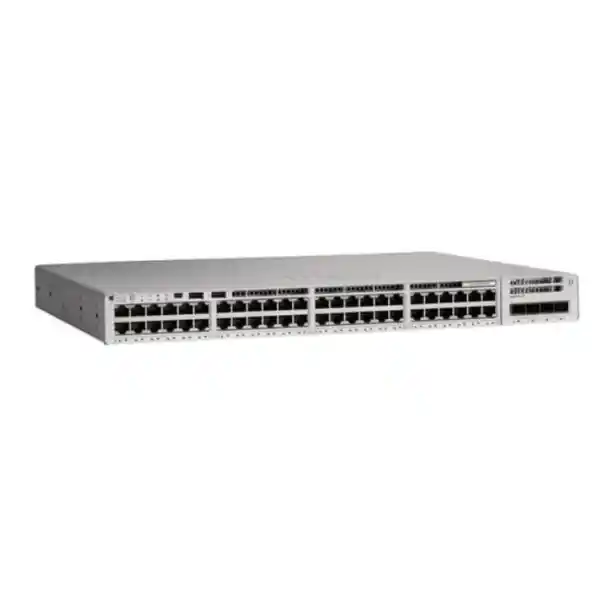
Cisco Catalyst C9200L-48PL-4G Network Switch
Connect a mixed business network with 48 Gigabit access ports, measured PoE+ capacity and four 1G uplinks. This Catalyst 9200L model is a candidate for Tanzania organizations that need managed wired access for computers alongside compatible powered endpoints, with a configuration selected around the actual workload.
Start with a configuration quote: provide the endpoint list, uplink requirements and intended software functions. The key buying checks are the shared power budget, the fixed uplink speed and the complete licensed ordering variant.
At a glance: the specifications that shape your decision
| Item | Verified model detail | What to check |
|---|---|---|
| Access connections | 48 × 10/100/1000 Ethernet ports | Count active outlets and allow space for planned additions. |
| Uplinks | 4 × fixed 1G SFP ports | Check upstream speed, fiber type and compatible optics. |
| Power to endpoints | PoE / PoE+, subject to the shared budget | Match each device’s standard and maximum requested power. |
| Standard AC power configuration | PWR-C5-600WAC; 370W available PoE | Confirm the power supply actually included in the quotation. |
| Additional matching AC supply | 740W available PoE with two supplies | Assess the required endpoint load after a supply failure. |
| Stacking | StackWise-80; optional C9200L stacking hardware | Specify compatible members, adapters and cable lengths. |
| Software ordering variants | -E: Network Essentials; -A: Network Advantage | Confirm the full ordering code and required subscription. |
| Cooling | Two fixed chassis fans | Choose an appropriate equipment cabinet and access arrangements. |
This page covers the base model requested. The final bill of materials should identify the exact software variant and accessories. A product photograph, family name or abbreviated quotation is insufficient to establish what will be supplied. Prices, stock, delivery arrangements and support coverage should be confirmed in a written quotation for your order.
Is this the right access switch for your site?
Choose this platform when you need a substantial number of wired connections in one equipment location, while only part of the connected estate needs switch-delivered power. A typical requirement might combine employee computers, printers, meeting-room equipment and a measured number of powered endpoints. The useful starting point is an inventory of what connects today and what is expected during the next expansion, rather than the number of employees alone.
A strong candidate
Consider it for a managed office or branch access layer where Gigabit connections and 1G upstream links satisfy measured demand. Match the powered-device mix to the proposed supplies and leave a documented allowance for additions.
Compare another configuration
Review alternatives when the design requires faster uplinks, multigigabit copper connections or power beyond PoE+. Establish those requirements before comparing quotations so the apparent saving on one component does not create another replacement project.
For a Tanzania procurement team, the practical objective is a configuration that fits the building network, the operational team and the purchasing budget together. Ask the network engineer to approve the endpoint and uplink schedule before purchase. Ask purchasing to retain the exact approved configuration alongside the quotation, so later substitutions receive the same technical review.
Understand partial PoE+ before counting powered devices
Partial PoE+ describes the power configuration and aggregate allocation; it should not be read as a promise that all connected devices can receive their maximum power at the same time. Cisco describes this model as having 48 PoE+ access ports with partial PoE support. The distinction is important when a cabinet contains many unused data ports but only a modest power allowance for devices that will be added later.
For the AC configuration discussed here, one standard supply provides a shared 370W PoE budget, while two matching supplies provide 740W. These numbers describe power available to powered devices, not the switch’s total consumption at the wall. The 600W rating on the supply is also not a statement that 600W is available for connected endpoints. Keep these three quantities separate when reviewing a quotation or sizing supporting electrical equipment.
Prepare a power schedule with one line per endpoint type: exact model, quantity, supported PoE standard, maximum required allocation and any operating restrictions. Use the manufacturer’s maximum relevant requirement rather than a low idle reading. Cameras with additional functions and access points operating with different radio or accessory settings may need different allocations. Resolve these details for the actual devices in the project instead of applying one assumed wattage to every port.
A sensible review considers both current operation and future additions. Reserve some capacity for the devices already planned, record what that reserve is intended to cover, and update the schedule whenever the mix changes. If an endpoint requires a higher power standard than this switch provides, adding unused budget elsewhere does not solve that individual compatibility requirement.
Worked power example: turn a device list into a requirement
The following calculation is an illustrative planning exercise. It does not describe the power draw of any particular phone, camera or access point, and it is not an approved configuration. Replace every assumed value with the documented allocation for your own equipment. Keep a copy of the completed calculation with the project design so future changes can be reviewed consistently.
| Illustrative device group | Assumed quantity and allocation | Subtotal |
|---|---|---|
| Desk phones | 20 devices × 7W | 140W |
| Wireless access points | 6 devices × 20W | 120W |
| Cameras | 8 devices × 10W | 80W |
| Combined illustrative demand | 34 powered devices | 340W |
| Remainder against a 370W budget | 370W − 340W | 30W before any additional design allowance |
On the assumptions above, the arithmetic leaves 30W. That remainder should not automatically become permission to add another device. Check how the actual endpoints negotiate and reserve power, whether the intended operating mode changes their requirements, and what allowance the business requires for expansion. A nominally available port can still be unsuitable for the next endpoint if either the individual standard or the aggregate allocation is wrong.
Repeat the calculation for the failure condition you intend to tolerate. A design that uses the combined output of two supplies may need to shed endpoint load if one supply is lost. Identify which endpoints are essential and whether the remaining supply can support them. If the business requires all powered devices to remain operational, approve the design against that requirement explicitly.
Four 1G uplinks: plan traffic paths as well as port numbers
The four SFP uplinks are fixed at 1G on this model. The “4G” suffix identifies this uplink configuration; it does not describe a mobile-network connection. An SFP connector alone also does not establish the speed or reach of the entire link. The switch interface, supported transceiver, fiber plant and device at the other end all have to match the planned connection.
Consider what will cross the uplink during a busy period. Internet access, remote file services, backups, camera recording and wireless traffic may share upstream capacity. Some traffic may remain within the local switching environment, while other traffic must pass through a distribution switch or firewall. Draw those paths and estimate the simultaneous demand relevant to the application rather than adding every endpoint’s port speed and treating that total as normal usage.
Multiple uplinks can support an engineered design, but they should not be described as one faster connection for every application. A link aggregation arrangement distributes traffic according to its configuration and capabilities at both ends. A single flow does not automatically gain the total capacity of all member links. Agree the design with whoever manages the upstream network, including the failure state and the treatment of redundant paths.
If your existing cabinet already relies on 10G connections, verify that the proposed replacement preserves the needed throughput. The C9200L-48PL-4X is the related partial-PoE+ alternative with four 1/10G uplinks. Compare it when that requirement exists, while keeping the endpoint power and software requirements in the same review.
Select optics and cabling from the actual route
For each uplink, record the distance, fiber type, connector presentation, patch-panel route and upstream interface. Ask for supported transceivers on both ends and appropriate patch leads in the bill of materials. A fiber description such as “existing cable to the next building” leaves too many unanswered questions to confirm a link. Include the installed route and any test records where available.
Inspect copper cabling as part of the access-layer assessment. Identify damaged patch leads, inconsistent outlet labels and links that negotiate unexpectedly slowly. A new switch will not repair a poor cable termination or a misidentified outlet. Keep a mapping between cabinet ports, patch-panel positions and room outlets so faults can be traced without disconnecting unrelated users.
For buildings with separate cabinets, agree where the network boundary sits and who owns each part of the route. Procurement should distinguish the switch from optical modules, patching, structured cabling work and any specialist installation. Request itemized pricing for those requirements instead of assuming that everything needed to make a working link is included with the chassis.
StackWise planning for a larger access layer
StackWise-80 allows supported C9200L switches to be arranged as a managed stack using the appropriate hardware. Cisco lists up to eight members at the same license level and identifies C9200L-STACK-KIT as the stacking hardware. C9200L fixed-uplink models cannot form a mixed stack with modular C9200 models or a Catalyst 2960-X. Existing stacking accessories should therefore be checked rather than carried forward by assumption.
For a planned stack, document the member models, intended positions, cable routes and available rear access. Include the required adapters and cables explicitly in the quotation. Cable length should be selected from the installed arrangement, with enough practical clearance for maintenance and without obstructing ventilation or power connections. A rack drawing makes these requirements easier for both the installer and the reviewer to assess.
Think about the operational consequences as well as management convenience. Decide how members will be numbered, where uplinks and essential endpoints connect, and how an engineer will identify the correct unit during maintenance. Test the failure conditions that matter to the business rather than treating a stack as an assurance of uninterrupted service. Keep the approved topology and recovery procedure with the network documentation.
Stacking does not replace an endpoint power calculation or a complete availability design. Evaluate the load on each member and the consequences of losing that member, its supply or its upstream route. If separate switches would better match the business’s maintenance boundaries, compare that layout before committing to one shared management arrangement.
Confirm the complete software and licensing configuration
The supplied base name does not select a software tier. Cisco lists C9200L-48PL-4G-E with Network Essentials and C9200L-48PL-4G-A with Network Advantage. Request the complete ordering code and make the selection against the required functions. Hardware with the right port count can still be the wrong purchase if the approved design depends on capabilities outside the ordered entitlement.
Cisco’s ordering guide distinguishes the perpetual Network Stack entitlement from term subscription choices and states that new hardware orders require the applicable subscription. It also identifies a Smart Account requirement. Ask for the subscription product, tier, term, account assignment and included support to be itemized. Do not infer the complete license package from a short product title or a chassis-only comparison.
Before purchase, have the technical owner produce a feature requirement list covering the planned switching, routing, management and access-control design. Validate those requirements against the exact model, entitlement and intended software release. Where another management platform or identity system is involved, include its own licenses and integration requirements in the review rather than treating it as an automatic component of this switch.
Keep ownership and renewal responsibilities clear. Record who administers the account, receives entitlement notifications and approves future software or subscription changes. Ask for written clarification of the offered support and service terms, including any exclusions relevant to the purchase. This makes the quotation easier to compare and gives the operations team a usable record after the equipment is installed.
Organize users, voice and devices around a clear network policy
A manageable access layer begins with an agreed network plan. Identify the groups that need distinct treatment: staff computers, voice devices, guests, building systems and management interfaces. Record the addressing and VLAN assignments, the location of the default gateways, and the policy enforcement points. That plan lets the installer configure ports consistently and gives the support team a reference when an endpoint is moved.
VLAN separation should be designed together with the rules controlling traffic between those networks. Write down which applications and destinations each group needs, including DNS, addressing services, time services and management systems where relevant. Avoid broad access simply because two groups share the same cabinet. Equally, avoid blocking a necessary supporting service without testing the effect on the endpoint.
For organizations using identity-based access, Cisco documents 802.1X and related authentication methods for the Catalyst 9200 platform. The deployed design still needs compatible endpoints, an authentication service and tested policies. Start with a controlled pilot and define what should happen when authentication fails or an endpoint lacks the expected capabilities. Review supported combinations and restrictions for the chosen software release.
DHCP snooping is another documented platform function that needs a deliberate trust design. Identify the legitimate server paths and validate behavior before applying restrictions widely. Configuration choices intended to improve security can interrupt service when the actual topology is undocumented. Have the network owner approve the policy and a recovery method before rollout.
Voice, wireless and cameras: check each endpoint class separately
IP telephony
For phones, confirm both power compatibility and the voice-network design. Include the phone model, any attached accessories and whether a computer connects through the phone. Test a representative desk arrangement for registration, calls and access to required business applications. Keep a record of the port configuration used for the successful test so the rollout does not depend on repeated manual interpretation.
Wireless access points
Confirm the access point’s Ethernet speed, power standard and requirements for the intended radio configuration. A device that can operate on a Gigabit link may still have a faster design target, and a powered link alone does not prove that every intended function is available. For broader planning, review FourTeck Tanzania’s Cisco wireless access point guidance alongside the exact access point documentation.
Video surveillance
For cameras, include the recording destination, intended stream settings and maximum power requirement. Test the operating conditions relevant to the actual camera, rather than relying only on a daytime image or a brief link test. If recordings pass through the cabinet uplink, include that sustained traffic in the capacity review. Keep camera network access consistent with the organization’s security policy and maintenance process.
These checks are deployment guidance, not a blanket compatibility statement for every device in those categories. Provide the exact endpoint models when requesting a configuration review. A practical acceptance test should demonstrate the required application behavior as well as link status and power delivery.
Use QoS to support a measured application requirement
Cisco provides quality-of-service configuration options for the Catalyst 9200 platform, including traffic classification and Auto-QoS. Their value depends on a policy that matches the applications and the rest of the network. Identify where traffic is classified, which markings are trusted and how traffic is treated when a link becomes congested. Validate the selected commands and behavior for the deployed software.
For a voice deployment, assess calls while other relevant traffic is present. For a cabinet supporting wireless users, consider busy-period conditions instead of testing only with an empty network. Keep before-and-after observations so any change in behavior can be attributed to the configuration. A functioning priority policy does not remove the need for sufficient upstream bandwidth or correct endpoint settings.
Agree who owns the policy beyond the switch. If traffic crosses a firewall, WAN or provider network, the treatment at those boundaries also matters. Define acceptance criteria in application terms that the business can recognize, and investigate the full path if those criteria are not met.
Power continuity and cabinet readiness
A second power supply can be part of a resilience plan, but the surrounding electrical arrangement determines how useful it is. Document the intended supply paths, available outlets and supporting UPS equipment. If both supplies depend on the same unprotected source, the overall arrangement still has that dependency. Ask the responsible electrical or facilities professional to approve the installation where appropriate.
Size backup power against the actual equipment load and required runtime. Include connected-device power, other cabinet equipment and the operating condition the business needs to preserve. A PoE allocation is not a complete UPS sizing figure. Obtain the relevant electrical data for the final bill of materials and follow the equipment and UPS manufacturers’ installation guidance.
Check cabinet access, ventilation, mounting arrangements and the space needed for power and stacking cables. The fixed chassis fans make equipment-room placement and maintenance access part of the purchase decision. Avoid assuming that unused rack space automatically means the cabinet is ready. Look at how the installed equipment will be serviced without disturbing adjacent connections.
For a site in Tanzania, provide the actual installation address and site conditions when requesting a quotation. Delivery arrangements, electrical work, installation scope and any support visit should be agreed for that location. Do not treat a general product listing as confirmation that those services or a particular delivery schedule are included.
Replace an existing switch with a controlled migration
Begin with a current inventory and configuration backup. Identify which ports are active, which endpoints are essential, how uplinks connect, and where services such as routing and address assignment are provided. Review the current configuration with the engineer responsible for the new platform. A migration is an opportunity to remove obsolete entries, but only after confirming that they are no longer needed.
Prepare a port migration sheet with the old interface, new interface, outlet label, endpoint role and required settings. Schedule a maintenance window that reflects how the site uses the network. Keep the old arrangement recoverable until the agreed acceptance checks are complete, and identify who can authorize rollback if a critical application fails.
If the project replaces a Catalyst 2960-X estate, review the broader Catalyst 2960-X replacement planning guidance. For this particular model, concentrate on whether the proposed uplinks, powered-device allowance and software package match the existing role. Similar-looking front panels do not establish equivalence between generations.
After the move, verify the services users actually depend on, including representative calls, printing, application access, wireless operation and any recording paths. Record exceptions with owners and resolution steps. Save the final working configuration and update the cabinet documentation so future troubleshooting starts from the installed state.
A practical commissioning checklist
- Inspect the delivered model and included components against the approved quotation before the installation window.
- Confirm the software entitlement, account assignment and agreed release with the person responsible for ongoing administration.
- Validate access-port labels, uplink paths, compatible optics and the intended network segmentation.
- Check representative powered devices and compare the recorded allocation with the approved power schedule.
- Test authentication, addressing and access to essential services for each endpoint class.
- Exercise the agreed resilience scenarios in a controlled window and record which services remain available.
- Verify the management access, monitoring destinations, configuration backup and recovery information.
- Obtain acceptance from the technical owner and give the support team the final port and topology records.
The purpose of commissioning is to demonstrate that the installed network meets the agreed requirement. A power light and a successful ping are useful observations, but they do not cover every business dependency. Define the test set before rollout and retain the results with the project records. Where a test cannot be completed, record the outstanding dependency and who will resolve it.
Keep the installed configuration useful after handover
Agree what the operations team should monitor and what action each alert requires. Useful records include interface errors, unexpected link changes, available endpoint power and the condition of installed power supplies. Choose thresholds from the approved design and normal observed operation. An alert without an owner or response procedure is less useful than a smaller set of observations that someone reviews consistently.
Keep a baseline after commissioning so future troubleshooting has a comparison point. Record the final software version, configuration backup location, uplink arrangement and endpoint allocation. When an application becomes slow or a device stops receiving power, compare the changed conditions with that baseline before making broad configuration changes. Document any successful repair so the same investigation does not have to be repeated at the next incident.
Treat additions as small design changes. Before connecting another group of phones, access points or cameras, check available ports, the remaining power allowance and the traffic route. Update the cabinet labels and inventory after the change. This is especially useful when different teams procure building systems separately, because each team may otherwise assume that network capacity has already been reserved for its equipment.
Plan software maintenance with a named technical owner. Review the relevant release documentation, required features and recovery arrangements before scheduling an update. Keep management credentials in the organization’s approved secure system and restrict administrative access according to its policy. Include a process for updating account ownership when staff or service providers change. Clear operational ownership makes the equipment easier to maintain throughout its working life.
Compare the nearby models by the requirement that changes
| Requirement | Candidate to review | Decision point |
|---|---|---|
| 48 Gigabit ports with partial PoE+ and 1G uplinks | C9200L-48PL-4G | The model covered here; approve the complete power and software configuration. |
| Similar partial-PoE+ access with faster uplinks | C9200L-48PL-4X | Four 1/10G fixed uplinks; check the complete quoted configuration. |
| Greater AC PoE allowance on a 1G-uplink model | C9200L-48P-4G | Cisco lists a standard 1000W AC supply and 740W PoE, with 1440W using two matching supplies. |
| Copper links above Gigabit or endpoints needing more power | A suitable multigigabit or higher-power platform | Select against the exact endpoint interfaces, standards and simultaneous demand. |
These comparisons identify design differences rather than declaring one model universally better. Keep the same endpoint inventory and acceptance criteria when reviewing alternatives. Include the licenses, power components, uplink modules or optics, stacking accessories and service scope needed for each design. That produces a fairer cost comparison than looking at the chassis line alone.
If the requirement is likely to change, identify the specific change and when it is expected. A planned increase in powered cameras is different from a planned upgrade to faster wireless uplinks. Price the relevant future configuration, then decide whether ordering it now offers a useful benefit for your project.
Frequently asked buying questions
Does this switch provide 10G uplinks?
This model has four fixed 1G SFP uplinks. If your network requires 10G, compare a suitable 4X model and validate the optics and upstream equipment. Do not order on the assumption that a faster transceiver will change the fixed uplink capability.
Can every port supply 30W at the same time?
No. Port capability and shared available power are separate limits. A 48 × 30W calculation is 1440W, above the AC PoE budgets described for this partial-PoE+ model. Use the actual device schedule and the installed power configuration to establish how many endpoints can operate together.
Are stacking components and SFP modules included?
Do not assume they are included. Ask for an itemized bill of materials covering the required stacking hardware, cable lengths and compatible uplink transceivers. Check that list against the physical design and the upstream interfaces before approving the order.
Which license should be requested?
Specify the required network functions first, then confirm the appropriate Essentials or Advantage ordering variant and subscription. The correct selection depends on the approved design. Ask for entitlement, term, account requirements and support scope to appear clearly on the quotation.
Can it replace any older 48-port switch?
Replacement suitability depends on the old switch’s role, uplinks, power allocation, configuration and required software functions. Review those items and prepare a migration plan. An identical number of access ports does not establish that the new configuration meets every existing requirement.
What are the Tanzania price and delivery time?
Request a current written quotation for the exact configuration and destination. This page does not establish a price, stock position or delivery commitment. Include the intended installation date so any proposed schedule can be assessed against the complete order.
What information makes a quotation more useful?
Send the quantity required, endpoint models and counts, uplink speed and distance, fiber details, stacking plan and necessary network functions. Include the destination and requested service scope. This gives the reviewer enough information to identify missing components before a purchasing decision.
Request your Cisco switch configuration quote
Ask FourTeck Tanzania for a quotation for the C9200L-48PL-4G based on your endpoint inventory, uplink plan and software requirements. Request the complete ordering code, power configuration, subscriptions and accessories as separate identifiable items. Have the technical owner check the proposed configuration before purchase.
Include your installation location, required quantity and target project date, together with any installation or support services you want quoted. Confirm pricing, availability, delivery arrangements and commercial terms in writing for the final configuration. A clear requirement at this stage helps the delivered equipment match the network you intend to operate.




Reviews
There are no reviews yet.