
Modular uplinks
StackWise-480
715W AC default PSU
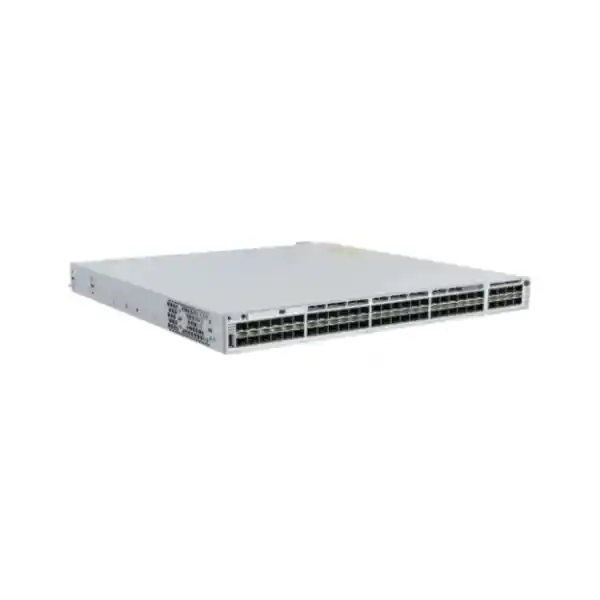
Cisco Catalyst C9300-48S Network Switch for High-Density Fiber Access
The Cisco Catalyst C9300-48S is designed for organisations that need a dense, manageable Gigabit Ethernet fiber access layer rather than a conventional copper access switch. It provides 48 1G SFP access ports, a modular uplink slot, enterprise stacking, Cisco IOS XE software, and a platform that can be aligned with different Cisco licensing choices. For Tanzanian enterprises, campuses, service environments, hospitality properties, education networks, healthcare facilities, industrial sites and distributed organisations, it is especially relevant where fiber is used to extend Ethernet beyond copper distance limits, connect buildings, aggregate remote cabinets, or separate electrically noisy environments.
Because “C9300-48S” identifies the hardware family rather than one complete commercial bundle, buyers should confirm the exact suffix, software tier, uplink network module, SFP optics, stacking accessories, secondary power supply and support requirements before ordering. FourTeck Tanzania can help translate the intended topology into a bill of materials so the switch, optics and software options match the deployment instead of treating the chassis as a stand-alone part.
organisations that need many 1G fiber-facing access ports with resilient stacking and flexible higher-speed uplinks, and that are prepared to select the correct optics and software tier for the network design.
Quick Technical Summary
48 × 1G SFP ports for fiber-oriented access or other supported SFP-based media.
Modular uplink slot with supported Cisco network-module choices for different uplink speeds and media.
StackWise-480 support, with up to eight compatible C9300-class stack members subject to Cisco stacking rules and aligned licensing.
715W AC power supply is the default for C9300-48S; the chassis provides two power-supply slots and supports StackPower.
Cisco lists 256 Gbps switching capacity and 190.47 Mpps forwarding rate for the C9300-48S in standalone operation.
Cisco IOS XE with licensing variants that include Network Essentials, Network Advantage and cloud-managed ordering options.
What Problem Does the C9300-48S Solve?
Many enterprise switches are built around RJ45 copper access. That is ideal when users, IP phones, wireless access points and endpoints are located within standard copper cabling distances and often need Power over Ethernet. The C9300-48S addresses a different requirement: a high concentration of SFP-based Gigabit Ethernet interfaces in a stackable campus switching platform. This makes it useful when the access layer itself is fiber-heavy, when remote equipment is connected over optical runs, or when a network design needs electrical isolation between buildings and cabinets.
A 48-port SFP access switch can simplify designs that would otherwise require several smaller fiber switches or a mixture of copper switches and media converters. It can provide a cleaner operational model, consistent IOS XE management, central policy enforcement and a common stacking architecture. The practical benefit is not simply “more ports.” It is the ability to consolidate many fiber Ethernet links into an enterprise-class switching layer with predictable management, monitoring and redundancy options.
The C9300-48S should not be selected merely because it belongs to the Catalyst 9300 family. It is the right model when the endpoint-facing requirement is primarily 1G SFP. If the project needs PoE for phones, cameras or wireless access points, a copper PoE/UPOE Catalyst 9300 model may be more suitable. If the project needs 10G or 25G on many access ports, a higher-speed C9300X model may fit better. This distinction matters during procurement because the wrong port type can create avoidable costs in optics, media conversion and redesign.
Why 48 × 1G SFP Ports Matter in a Fiber-Centric Network
Fiber is often chosen because the cable run is longer than copper Ethernet is intended to support, because buildings need galvanic isolation, because electromagnetic interference is a concern, or because the physical cable plant already uses single-mode or multimode optical fiber. The C9300-48S lets those fiber links terminate directly on an enterprise access switch through compatible SFP transceivers rather than passing through a separate media-conversion layer.
In a Tanzanian campus or multi-building environment, this can be useful for links between administration blocks, teaching buildings, production areas, warehouses, security posts, remote network cabinets, accommodation blocks or other facilities where copper distance and grounding considerations make optical fiber preferable. The same principle applies to organisations with remote network enclosures or distributed operational areas. The precise optical design still depends on distance, fiber type, connector type, link budget and the supported transceiver matrix.
The access ports are 1G SFP ports. They should not be treated as 10G SFP+ access ports. The faster-speed flexibility is concentrated in the modular uplink slot, where a supported uplink network module can be chosen for aggregation toward a core, distribution layer, server segment or other upstream switch. This separation of dense 1G access and faster modular uplinks is central to understanding where the C9300-48S belongs in a network.
Performance and Stack Design
Cisco lists the C9300-48S with 256 Gbps of switching capacity and a forwarding rate of 190.47 million packets per second in standalone operation. In Cisco’s specification table, figures increase to 736 Gbps switching capacity and 547.62 Mpps when stacking is included in the platform calculation. These figures show that the switch is designed to forward at line rate for its intended access role rather than acting as a low-end fiber media concentrator.
StackWise-480 is one of the important reasons to choose the modular-uplink Catalyst 9300 family over a collection of independent access switches. Cisco supports up to eight compatible stack members in a StackWise-480 system. A stack can provide a single logical switching system and management plane, simplifying configuration and giving network designers options for resilient uplinks distributed across stack members. Exact stack combinations must follow Cisco’s compatibility and software-license rules; fixed-uplink C9300L units, for example, do not simply join a C9300 modular-uplink StackWise-480 stack.
Stacking should be designed rather than added as an afterthought. The bill of materials needs the appropriate StackWise cables, suitable cable lengths and a physical rack layout that allows those cables to be installed without excessive strain. If two switches are purchased for redundancy, confirm whether they will operate as a stack, as independent Layer 3 devices, or as another resilient topology. Those architectures have different operational and failure characteristics.
Cisco also supports StackPower on C9300 modular-uplink models. StackPower can pool power-supply resources among connected switches, offering an additional power-resiliency design option. The desired redundancy mode, power budget and secondary power supplies should be specified in the project design. For the C9300-48S itself, there is no PoE load to budget because the SFP access model is a non-PoE switch.
Modular Uplinks: Match the Network Module to the Core
The C9300-48S does not lock the buyer into one fixed uplink format. Cisco offers supported C9300 uplink network modules that cover different speeds. This is valuable where an organisation may need to aggregate many 1G fiber links into 10G, 25G or 40G upstream connectivity, or where the current core has a particular optical interface that the access switch must match.
| Module | Cisco description | Typical planning question |
|---|---|---|
| C9300-NM-4G | Four 1G SFP uplink slots | Is 1G uplink capacity sufficient for the expected aggregate traffic? |
| C9300-NM-8X | Eight 10G SFP+ slots; ports can support 1G or 10G connections | Do you need multiple 10G uplinks, port channels or connections to separate upstream systems? |
| C9300-NM-2Y | Two 25G SFP28 slots with support for appropriate SFP/SFP+/SFP28 modules | Does the distribution/core layer support 25G and is 25G justified by the traffic profile? |
| C9300-NM-2Q | Two 40G QSFP+ slots | Is the upstream architecture based on 40G links or compatible breakout designs? |
| C9300-NM-4M | Four multigigabit Ethernet module slots | Is a copper multigigabit uplink requirement part of the design? |
The uplink module is an ordering decision and should be verified in the quote. The switch must have a supported network module or the required blank module fitted for correct airflow. The upstream optics, patching and port configuration also need to be included in the deployment plan.
Software and Licensing: Do Not Order by Chassis Name Alone
Cisco currently identifies multiple commercial variants around the same C9300-48S hardware. C9300-48S-E maps to Network Essentials, C9300-48S-A maps to Network Advantage, and Cisco also lists a C9300-48S-M option associated with Meraki Advanced or Enterprise cloud-managed ordering. These suffixes matter because they affect how the switch is licensed and which feature set is intended.
Network Essentials provides the core switching feature set and includes functions such as Layer 2 switching, routed access, QoS, 802.1X, first-hop security, MACsec-128 and basic routing capabilities defined by Cisco’s current feature matrix. Network Advantage extends the platform with advanced routing and segmentation functions such as BGP, IS-IS, broader OSPF capability, VRF, VXLAN, LISP, Cisco TrustSec and advanced high-availability functions. Cisco’s licensing framework can evolve, so the required feature set should be mapped to the current ordering guide when the quotation is prepared.
The practical purchasing question is therefore: what must the switch do after installation? A straightforward Layer 2 fiber access design may not need the same software tier as a routed campus design using advanced routing protocols, segmentation and policy automation. Likewise, an organisation standardised on local CLI/WebUI operations has different management expectations from one adopting Cisco Catalyst Center or Meraki cloud management.
Cisco Smart Account requirements and software subscriptions should be planned before deployment. Confirm the organisation’s licensing account, subscription term where applicable, desired management platform and software level as part of the purchase. This avoids a common procurement problem in which the physical switch arrives but the operational team discovers that the intended management or routing capability was not included in the selected license tier.
Cisco IOS XE, Automation and Visibility
The Catalyst 9300 family runs Cisco IOS XE, which gives network teams a familiar enterprise operating environment while also supporting modern programmability. Cisco documents standards-based APIs including NETCONF, RESTCONF and gNMI with YANG data models, as well as model-driven telemetry and zero-touch provisioning capabilities. These functions can reduce repetitive configuration work when they are integrated into a controlled network-automation process.
For a single switch, programmability may seem secondary. For a campus, multi-site enterprise or growing access layer, it becomes more valuable. Consistent templates, automated onboarding, telemetry streaming and central inventory can make it easier to maintain standards across many access switches. The operational benefit is strongest when the organisation already has configuration management, monitoring or orchestration processes that can consume the APIs.
Licensing still matters. Not every advanced automation, analytics or management capability belongs to every software tier. The page therefore treats automation as a platform capability that must be mapped to the selected Cisco license and management architecture rather than promising every listed feature in every configuration.
Security Capabilities and Segmentation
A modern access switch is part of the security architecture, not just a port concentrator. Cisco’s Catalyst 9300 platform includes secure-boot and hardware-authenticity mechanisms, 802.1X access control support, MACsec capabilities, control-plane protection and integration options for policy-based segmentation. These features can help organisations enforce identity, protect links and reduce the blast radius of compromised devices when they are correctly designed and licensed.
Cisco documents both 128-bit and 256-bit MACsec support on the Catalyst 9300 platform, but its feature matrix places MACsec-256 in Network Advantage while MACsec-128 is included in the fundamentals set. Advanced segmentation technologies such as VRF, VXLAN, LISP, Cisco TrustSec and Security Group Tags are also associated with Network Advantage in Cisco’s current matrix. Encrypted Traffic Analytics and other higher-level security functions may depend on subscription packages and management components.
For a buyer, the important point is to define the security requirement before choosing the license. If the switch will simply provide isolated VLANs and standard authenticated access, the required package may differ from a fabric-based architecture using TrustSec, software-defined access and advanced telemetry. If link encryption is required between network nodes, verify both the desired MACsec capability and the optics/topology involved.
Security also depends on lifecycle practices: using a supported IOS XE release, reviewing Cisco security advisories, maintaining configuration backups, controlling administrative access, using AAA, disabling unnecessary services and validating changes. A powerful switch cannot compensate for weak operational controls.
Power, Redundancy and Physical Deployment
Cisco specifies a 715W AC power supply as the default for the C9300-48S, and the switch has two power-supply slots. The SFP model does not provide PoE to access ports, so the power supply is supporting the switch itself rather than a large endpoint PoE budget. A second compatible power supply can be included where the design requires power-supply redundancy. StackPower is also supported for suitable stacked configurations.
The current Platinum-rated 715W AC supply specification supports 100 to 240 VAC at 47 to 63 Hz. This is useful for normal enterprise power environments, but it does not remove the need for proper local power engineering. In Tanzania, installation teams should check the rack power distribution, earthing, surge protection, UPS capacity, generator transition behaviour where applicable, and whether redundant feeds are genuinely independent. A second power supply connected to the same unprotected source does not provide the same resilience as properly separated power paths.
The C9300-48S is approximately 1.73 inches high and 17.5 inches wide. Cisco lists chassis depth that varies with installed components, reaching roughly 20.7 inches in the deepest stated configuration, and lists the C9300-48S at about 17.32 lb (7.86 kg). Rack depth, cable management and rear clearance should therefore be checked before installation. Dense fiber cabling also needs careful front-of-rack management to avoid blocked airflow, tight bend radii and difficult service access.
Cisco’s normal operating-temperature guidance for this class of Catalyst 9300 includes up to 45°C at lower altitude, with lower maximum temperatures at higher altitude. In hot communications rooms, cabinet ventilation, dust control, cooling and air-path clearance become important. Do not design to the exceptional short-term temperature limits as though they were normal operating targets.
Scale and Network Capacity
Cisco’s current Catalyst 9300 modular-uplink platform scale table provides context for larger enterprise designs. It lists up to 32,000 MAC addresses, 32,000 IPv4 routes in the stated platform scale, 16,000 IPv6 routing entries, 4,094 VLAN IDs, 1,000 switched virtual interfaces and 9,198-byte jumbo frames for the standard Catalyst 9300 modular-uplink class. These are platform-scale figures, not a promise that every combination is simultaneously available under every feature set, template or software release.
For many access-layer deployments, those scale limits are far above the immediate requirement. Their value is headroom and architectural flexibility. A switch that starts as a fiber access node can still participate in routed access, segmentation and more sophisticated campus designs if the software tier and configuration are chosen appropriately.
Capacity planning should focus on the actual design: number of connected fiber endpoints, traffic per link, oversubscription ratio, uplink speed, number of VLANs, multicast use, routing table size, policy features and expected growth. The switch’s headline switching capacity does not automatically mean a pair of 1G uplinks is sufficient; the uplink module must be sized to the traffic being aggregated.
Common Deployment Scenarios in Tanzania
Multi-building campus
Terminate many 1G fiber runs from remote buildings or network closets into a central enterprise access/distribution layer, then use faster modular uplinks toward the core.
Industrial or electrically noisy environment
Use fiber where electrical isolation and resistance to electromagnetic interference are more suitable than long copper runs, while keeping enterprise switching policy at the aggregation point.
Distributed security or operational cabinets
Aggregate Ethernet links from remote equipment areas over supported optical links. Endpoint power must be provided separately because C9300-48S access ports are not PoE.
Hospitality, education or healthcare campus
Build a structured fiber backbone between blocks, departments or floors where high port density, standardised Cisco operations and resilient stacking are priorities.
Service-provider handoff concentration
Where the organisation receives or distributes multiple Ethernet handoffs over fiber, the switch can provide dense SFP connectivity, subject to exact provider interface, VLAN, optical and routing requirements.
Migration from scattered media converters
Consolidate supported fiber Ethernet links onto managed switching ports to improve monitoring, policy consistency and fault isolation, while validating every optical link before migration.
C9300-48S vs Other Catalyst 9300 Port Types
| Model family | Primary access-port type | Choose it when | Watch for |
|---|---|---|---|
| C9300-48S | 48 × 1G SFP | You need dense 1G fiber-facing access with modular uplinks. | No PoE; optics and uplink module must be selected. |
| C9300-24S | 24 × 1G SFP | Fiber requirement is similar but 24 ports are enough. | Lower port density may increase chassis count as the network grows. |
| C9300-48T | 48 × 1G copper data | Most endpoint connections are RJ45 copper and do not need PoE. | Not a substitute for dense fiber access. |
| C9300-48P | 48 × 1G copper PoE+ | Endpoints such as phones, cameras or APs need copper Ethernet plus PoE. | PoE budget and power-supply design become key buying factors. |
The comparison shows why “48-port Catalyst 9300” is not specific enough for procurement. Port medium, PoE requirement, uplink design and licensing all change the correct orderable configuration.
Important Buying Considerations Before Requesting a Quote
- Confirm the exact software variant. Decide whether Network Essentials, Network Advantage or another current Cisco ordering model matches the operational requirement.
- Count the actual fiber links. Include active links, near-term growth and spare ports so the 48-port density is justified.
- Identify fiber type and distance. Record single-mode or multimode fiber, connector types, approximate distance and any existing optical standards.
- Select compatible optics. Match each link to Cisco-supported transceivers and verify both ends of the link.
- Choose the uplink module. Size the uplink speed and port count to expected traffic, resiliency and core-switch interfaces.
- Plan stacking explicitly. Include StackWise cables and confirm compatible members and license levels if multiple switches will form one stack.
- Decide on power redundancy. Determine whether a second PSU, StackPower cabling, separate PDU feeds and UPS protection are required.
- Check rack depth and cooling. Allow space for power supplies, uplink modules, fiber bend radius, cable management and front-to-back airflow.
- Confirm management architecture. Define CLI/WebUI, Catalyst Center, Meraki cloud management or automation-tool requirements before licensing is finalised.
- Verify current Cisco support and lead-time details in the quotation. Product availability, software subscriptions, optics availability and support terms should be confirmed for the exact bill of materials rather than assumed from the chassis family name.
Fiber and Optics Planning Checklist
The switch can only deliver a reliable fiber network when the optics and cable plant are correct. Start by documenting every link: source switch port, destination equipment, fiber type, strand count, connector type, patch-panel path, estimated distance and required speed. For an existing network, record the optics already installed at the far end and validate whether they can interoperate with the proposed Cisco optics.
Do not select an SFP only because the connector fits. Optical transceivers differ in wavelength, reach, fiber type, launch power, receive sensitivity and standards. A single-mode optic connected to the wrong plant, or incompatible wavelengths at opposite ends, will not create a working link. Long-distance links may also require link-budget calculations that include patch panels, connectors, splices and aging margin.
For multimode fiber, check the installed fiber grade and the supported reach for the selected optic. For single-mode links, identify the actual route distance and whether standard, extended-reach or bidirectional optics are being considered. Bidirectional designs have additional wavelength-pair requirements. If third-party optics are proposed, confirm the organisation’s support policy and Cisco compatibility expectations before procurement.
Fiber cleanliness and inspection are equally important during commissioning. Dirty connectors are a common source of high loss and intermittent faults. A professional deployment should include inspection and cleaning, appropriate optical power testing where needed, clear port labels and documentation of the installed transceiver part numbers.
Designing Uplink Capacity Without Creating a Bottleneck
Forty-eight 1G access ports do not mean that all 48 ports will transmit at full rate at the same moment, but the uplink still needs to reflect realistic aggregate demand. A low-utilisation building-aggregation switch may perform well with modest uplink capacity, while a switch concentrating servers, storage-related traffic, high-resolution surveillance, large file transfers or many busy remote networks may justify multiple 10G, 25G or 40G uplinks.
Redundancy also affects port count. Two uplinks in a port channel, or separate links to redundant distribution switches, consume more module ports than a single uplink. The C9300-NM-8X can be attractive where several 10G paths are required, while the 25G or 40G modules can provide fewer but faster interfaces when the upstream architecture supports them. The best choice depends on the core switch capabilities and failure-domain design, not only on raw bandwidth.
Before ordering, compare current and expected traffic, identify peak periods, and understand which access links carry business-critical services. If the switch is part of a stack, design uplinks across stack members so a single member failure does not remove all upstream connectivity. This is where the platform’s stacking architecture can translate into practical resilience when paired with a correctly designed core.
Operational Readiness for IT Teams
Buying the switch is only one part of a successful deployment. The operational team should define a standard IOS XE baseline, management VLAN, AAA method, NTP, DNS, syslog, SNMP or telemetry, configuration backup, software-update process and change-control procedure. If automation is being used, test templates against a representative device before broad rollout.
For stacked deployments, document stack member numbering, priorities, stack cable layout and power design. Label each chassis and fiber port according to a site standard. A clear physical and logical inventory makes fault handling easier, especially when many SFP links terminate in the same rack.
Monitoring should include interface errors, optical receive/transmit levels where supported, link flaps, CPU and memory trends, temperature, fan and power-supply status, stack health, spanning-tree events, routing adjacency status where used, and software alarms. Monitoring only whether the switch responds to ping misses many early indicators of fiber or hardware problems.
Finally, keep the design documentation current. A fiber-heavy network can become difficult to troubleshoot when patch-panel records, optic types and remote endpoints are not documented. The investment in an enterprise switch is more valuable when the operational records are maintained with the same discipline as the configuration.
Frequently Asked Questions
Is the Cisco C9300-48S a copper or fiber switch?
It is the 48-port 1G SFP model in the Catalyst 9300 family. The access interfaces are SFP slots rather than 48 fixed RJ45 copper access ports. The actual media used depends on the compatible SFP transceiver installed.
Does the C9300-48S provide PoE?
No. Cisco lists the C9300-48S as a non-PoE SFP access model. If powered endpoints such as IP phones, cameras or wireless access points require PoE over copper, a different Catalyst 9300 PoE/UPOE model is usually more appropriate.
Are SFP transceivers included?
Do not assume so. The required optics depend on fiber type, wavelength, distance and the equipment at the far end. A quotation should explicitly list each required transceiver and any uplink optics.
What uplink speeds can be used?
Cisco offers supported C9300 network modules that provide options including 1G SFP, 10G SFP+, 25G SFP28 and 40G QSFP+ uplinks, as well as a multigigabit module. The correct module must be selected and ordered for the target topology.
Can multiple C9300-48S switches be stacked?
Yes. C9300 modular-uplink models support StackWise-480, and Cisco documents stacks of up to eight compatible members. Stack compatibility, license levels, software versions and stack cables should be validated before installation.
What is the difference between C9300-48S-E and C9300-48S-A?
The hardware port layout is the same basic 48-port SFP platform, but the suffix identifies the software licensing level. Cisco maps -E to Network Essentials and -A to Network Advantage. Network Advantage includes additional advanced routing, segmentation, automation and high-availability features in Cisco’s current matrix.
Can the switch be managed from the cloud?
Cisco lists a C9300-48S-M cloud-managed ordering option and supports cloud-management modes for relevant Catalyst 9300 configurations. The exact management experience, license and migration path should be confirmed for the intended deployment.
What power supply does the C9300-48S use?
Cisco lists a 715W AC supply as the default for C9300-48S and provides two power-supply slots in the chassis. Projects requiring redundancy should specify the appropriate secondary supply and power-feed design.
Is the C9300-48S suitable for inter-building links?
It can be a strong fit when the design needs many 1G fiber links between buildings or remote cabinets, but the optics, fiber route, distance, grounding strategy, link budget and upstream capacity still need engineering validation.
What should I provide when requesting a quotation?
Provide the required number of switches, software feature needs, number and type of 1G fiber links, fiber type and approximate distances, required uplink speed, core-switch interface type, stacking requirement, power-redundancy requirement, rack constraints and any current Cisco Smart Account or management-platform requirements that affect licensing.
Request a C9300-48S Configuration Review
For an accurate Cisco Catalyst C9300-48S quotation in Tanzania, the most useful next step is to define the complete configuration rather than requesting only the chassis. Share your fiber count, distances, uplink requirements, redundancy goals, software features and management preference. FourTeck Tanzania can then prepare the requested solution for review with the appropriate switch variant, uplink module, optics, stacking and power components clearly identified.
CTA: Request a Cisco Catalyst C9300-48S quote and bill-of-materials review for your Tanzania deployment.




Reviews
There are no reviews yet.