
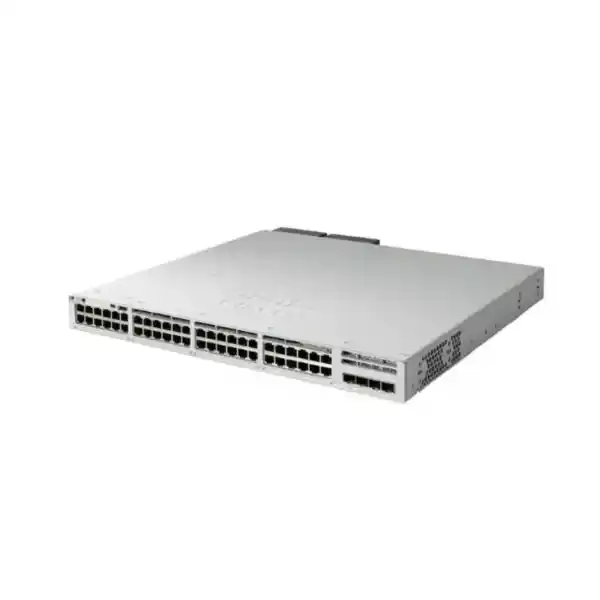
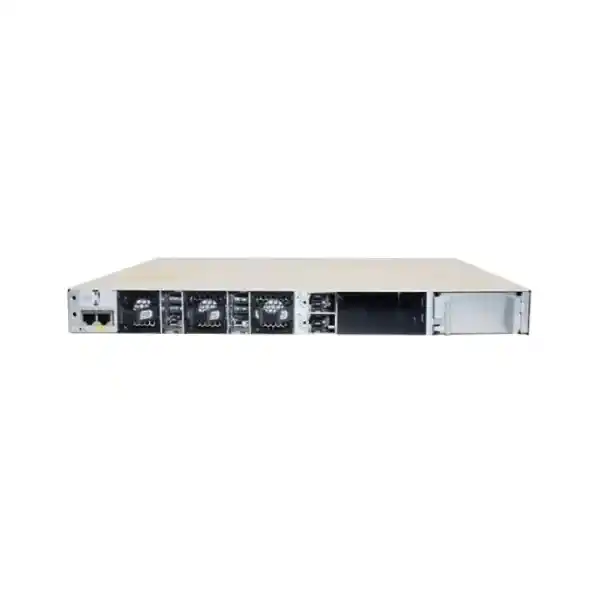
Cisco Catalyst 9300L fixed-uplink access switching
Cisco Catalyst C9300L-48P-4X Network Switch
The Cisco Catalyst C9300L-48P-4X is designed for organizations that need a dense, manageable access layer with 48 Gigabit Ethernet PoE+ ports, four fixed 10G/1G SFP+ uplinks and a clear path to resilient stacking. For a Tanzanian office, campus, school, hospital, hotel, branch aggregation point or multi-floor building, it can consolidate user connectivity and power delivery for devices such as IP phones, wireless access points and network cameras while keeping high-speed fiber uplinks available for distribution or core connectivity.
This is not a “full PoE on every port at once” model with its default power supply, and its uplink interfaces are fixed rather than modular. Those details matter when sizing a project. The standard 715W AC supply provides a 505W PoE budget, so device power demand, uplink media, software edition, stack design and redundancy should be confirmed before purchase.
Who this switch is for
The C9300L-48P-4X is most relevant when the access layer needs many copper user ports, PoE+ power and 10 Gigabit fiber uplinks without the complexity of choosing an interchangeable network module. It fits networks where endpoints are predominantly 1 Gigabit Ethernet but the uplink from the wiring closet should have substantially more headroom. That is a common requirement when many users, phones, access points and cameras share the same access switch and their aggregate traffic must move upstream without forcing the network to rely on a single 1 Gigabit uplink.
The switch is also appropriate where operational consistency matters. Cisco positions Catalyst 9300L as a stackable enterprise access platform, and the fixed-uplink design can simplify standardization across multiple wiring closets when the same four SFP+ uplinks are acceptable everywhere. With an optional StackWise-320 kit, multiple compatible units can operate as a stack, helping network teams scale port count and manage a group of access switches as a coordinated system. Cisco states that up to eight compatible Catalyst 9300L and 9300LM switches with the same license level can be configured in a StackWise-320 stack.
It is less suitable when the project needs multigigabit copper access, Cisco UPOE/UPOE+ power levels, replaceable uplink modules, or a guaranteed 30W PoE allocation to all 48 access ports simultaneously from the default configuration. In those cases, another Catalyst 9300 family model may be a better match. Matching the switch to the actual port, power and uplink requirement avoids paying for capacity that is unnecessary or, more importantly, discovering after installation that the selected model does not provide the required physical interface or PoE budget.
Key specifications at a glance
Specifications above describe the C9300L-48P-4X hardware platform and current Cisco family documentation. Software capabilities can depend on the exact orderable licensing variant and software release. Optics, stack kits and a second power supply are not implied unless they are specifically included in the quotation.
48 Gigabit PoE+ ports: what the power budget means
All 48 access interfaces on this model are Gigabit Ethernet PoE+ ports. PoE+ is valuable because a single copper cable can carry network data and electrical power to supported endpoints, reducing the need for a separate local power adapter at each device. Typical examples include IP telephones, wireless access points, surveillance cameras, door controllers and other networked edge devices. The practical design limit, however, is not simply the number of PoE-capable ports. The available wattage across the switch determines how many devices can be powered simultaneously and at what power class.
With the standard 715W power supply, Cisco lists 505W of available PoE for the C9300L-48P-4X. That means the switch can power many endpoints, but the total allocation must remain within the available budget. Forty-eight devices drawing 10W each would represent roughly 480W before allowing for design margin, while forty-eight devices drawing the maximum associated with 30W PoE+ would require far more than the default budget. Therefore, a 48-port PoE+ label should never be interpreted as a promise that every port can deliver its maximum PoE+ power at the same time in the standard configuration.
List every powered device, note its expected and worst-case power requirement, add suitable headroom, then compare the total to the switch PoE budget. This is particularly important when an installation mixes phones, access points and cameras because their power profiles can differ substantially.
Cisco documents higher total PoE availability when a second power supply is installed. For this model, the published figures are 855W with a 350W secondary supply, 1220W with a 715W secondary supply and up to 1440W with an 1100W secondary supply, subject to the port count and per-port power rating. A project that expects a high density of power-hungry endpoints should therefore include power-supply sizing as part of the bill of materials rather than treating redundant power as an afterthought.
For procurement in Tanzania, it is also sensible to consider the power environment around the switch. A correctly sized UPS, appropriate surge protection, reliable earthing, rack ventilation and a power continuity plan may be as important as the switch specification itself. These are deployment considerations rather than features of the product, but they directly affect uptime and should be included when the switch is supporting critical phones, wireless coverage, security systems or business applications.
Four fixed 10G SFP+ uplinks
The “4X” in the model name identifies four fixed 10G/1G SFP+ uplink ports. These interfaces are intended to connect the access switch to upstream switches or other compatible network infrastructure using appropriate SFP/SFP+ transceivers and cabling. Four uplinks provide useful design flexibility: they can support separate upstream paths, link aggregation where the network design allows it, connections to redundant distribution switches, or combinations of uplink and service connectivity.
The most important word is fixed. Unlike the modular-uplink Catalyst 9300 models, the C9300L-48P-4X does not accept a replaceable Catalyst 9300 network uplink module for changing the uplink type later. The four 10G/1G SFP+ interfaces are part of the platform design. This can be an advantage when the required uplink speed is already known because it reduces configuration choices and can simplify standardization, but it should be treated as a long-term design decision.
Before ordering optics, confirm the fiber type, distance, connector and the transceiver compatibility for the intended Cisco software release and peer equipment. Do not assume that an arbitrary SFP+ module will be supported simply because it fits physically. The switch listing should also be separated from the optics bill of materials unless the quotation explicitly includes transceivers or direct-attach cables. A complete deployment plan should identify each uplink path and its media rather than leaving those choices until installation day.
StackWise-320 for scalable access switching
A single 48-port switch may be enough for one communications room, but larger sites often need to add ports over time or operate multiple access switches as one coordinated block. Cisco’s StackWise-320 capability addresses that need for the fixed-uplink Catalyst 9300L family. Cisco specifies 320 Gbps of stacking bandwidth and supports up to eight compatible Catalyst 9300L and 9300LM switches in a stack when the license level matches.
Stacking can simplify operational workflows because the network team can design around a logical stack rather than managing every device as an entirely separate island. It can also make port expansion more structured: additional compatible units can be incorporated into a planned stack as capacity grows. The exact resiliency behavior, software requirements, version compatibility and change procedure should still be checked against the intended Cisco IOS XE release and deployment design.
The stacking hardware is optional. Cisco documents dedicated C9300L stack kits that include stack adapters and a stack cable. A buyer who needs stacking should therefore make sure the stack kit and suitable cable lengths are part of the quotation. The switch should not be presented as though the necessary adapters and cables are automatically included with the base unit. This matters especially when a project is purchasing several switches for different floors and expects them to be installed in the same rack or adjacent racks.
There are also family compatibility boundaries. Cisco states that fixed-uplink C9300L models cannot be stacked with the modular-uplink C9300 models. For mixed C9300L and C9300LM stacking, the exact model combination and license level should be validated. If an existing site already uses another Catalyst family, confirm compatibility before assuming the new switch can join the current stack.
Enterprise switching performance and scale
Cisco lists the C9300L-48P-4X at 176 Gbps of standalone switching capacity and 130.95 million packets per second forwarding rate, measured with 64-byte IPv4 packets. Cisco also lists 496 Gbps switching capacity and 369.05 Mpps forwarding rate with stacking. These figures help describe the internal platform capacity, but they should not be confused with application throughput guarantees. Real network performance depends on traffic patterns, uplink design, features enabled, topology, endpoint behavior and the rest of the network.
For the Catalyst 9300L/9300LM fixed-uplink platform class, Cisco documents scale values including 32,000 MAC addresses, 32,000 total IPv4 routes when combining direct and indirect routes, 16,000 IPv6 routing entries, 8,000 multicast routing entries, 5,120 QoS scale entries and 5,120 ACL scale entries. The platform also supports 4094 VLAN IDs, up to 1000 switched virtual interfaces and jumbo frames up to 9198 bytes. These numbers are most relevant to network architects who need to confirm that an access-layer design remains within documented scale.
The same fixed-uplink platform class is listed with 8 GB of DRAM, 16 GB of flash memory and a 16 MB packet buffer for the 24- and 48-port Gigabit Ethernet models. These hardware resources support the switching platform and Cisco IOS XE feature set, but they are not user-upgrade targets in the same way that server memory is. The important purchasing question is whether the model and software tier support the intended features and scale for the planned network.
For most buyers, the practical interpretation is straightforward: the model is designed as an enterprise access switch rather than a small unmanaged or lightly managed edge device. Its value comes from combining dense wired access, PoE+, 10G uplinks, stackability and Cisco’s enterprise network operating environment. The detailed scale figures become more important when the switch is expected to carry many VLANs, extensive policy, routing, telemetry or segmentation functions.
Resiliency: power and cooling considerations
Cisco Catalyst 9300 Series switches support dual redundant power supplies. The platform ships with one power supply by default, while a second can be ordered initially or added later. For the C9300L-48P-4X, the normal primary supply listed by Cisco is the 715W AC unit. Adding a second compatible supply can improve power resiliency and, depending on the selected secondary supply, increase the total PoE budget available to powered devices.
Power redundancy should be designed end to end. Installing a second switch power supply provides limited value if both power cords ultimately depend on the same single point of failure without an appropriate upstream electrical design. Where the site provides separate protected circuits, UPS systems or other resilient power sources, the network design can take advantage of those arrangements. The appropriate electrical architecture depends on the building and business continuity requirement, so it should be treated as part of the installation plan rather than assumed from the switch alone.
Cisco also specifies three field-replaceable fans for Catalyst 9300 Series switches and describes N+1 fan redundancy. This supports serviceability, but rack airflow must still be respected. A communications cabinet should have enough space, ventilation and temperature control for the total equipment load. In compact racks where multiple PoE switches, UPS units and patch panels are installed together, heat and cable management can become limiting factors even when every individual component is operating within specification.
Physical planning should include rack depth and weight. Cisco lists the C9300L-48P-4X at approximately 7.03 kg with its default power supply. The chassis height is approximately 4.4 cm, while depth varies with the power-supply configuration shown in Cisco’s dimensional tables. Confirm rack clearance, rear cabling space and the actual power-supply combination before deployment, particularly in shallow wall cabinets.
Software and licensing: confirm the exact orderable variant
The hardware label C9300L-48P-4X does not by itself identify the complete software licensing choice. Cisco’s current ordering information lists variants including C9300L-48P-4X-E for Network Essentials, C9300L-48P-4X-A for Network Advantage, and C9300L-48P-4X-M for a Meraki cloud-management experience with the relevant Meraki licensing choice. The exact option affects how the switch is purchased and which software capabilities and management model apply.
For that reason, a quotation should not stop at the base model name. The network requirement should first identify features such as routing, segmentation, automation, telemetry, policy, high availability and the preferred management approach. The correct licensing tier can then be selected against current Cisco documentation and the software release planned for deployment. Where a tender or bill of quantities specifies only “C9300L-48P-4X,” the technical team should clarify the required orderable part number before purchase.
The same principle applies to subscriptions and support. Cisco licensing and support programs change over time, and entitlement details can depend on the purchase route, software model and service selected. Buyers should request a quotation that clearly lists the hardware part number, software or subscription line items, support coverage if required, optics, stacking accessories and extra power supplies. This makes commercial comparison more meaningful than comparing a bare switch price against another quote that includes several necessary components.
If the intended network is already standardized on Cisco enterprise switching, the configuration should also be checked against the organization’s existing software release, management tooling and operational policy. Standardizing on compatible software trains and feature sets can reduce deployment risk and make ongoing support easier for the internal IT team or implementation partner.
Typical deployment scenarios in Tanzania
Office and multi-floor buildings
Use the switch in a wiring closet where employee computers, IP phones, printers, access points and building systems need reliable Gigabit access. The four 10G uplinks can provide higher-capacity paths toward the distribution layer.
Education and campus networks
A 48-port PoE+ access switch can serve classrooms, administration areas, wireless access points and IP endpoints. StackWise-320 can help when a communications room requires more than one switch and the design calls for compatible stacked units.
Hospitality and guest environments
Hotels and similar sites may need many edge ports for staff systems, access points, cameras and IP phones. PoE planning is essential because the aggregate endpoint power requirement can be high across a densely connected property.
Healthcare and service facilities
Where business operations depend on stable wired and wireless access, redundant power options, carefully planned uplinks and a protected electrical environment can improve resilience at the network edge.
Surveillance-rich deployments
The switch can combine data and PoE for compatible IP cameras, but camera quantity alone is not enough for sizing. Calculate wattage, video traffic, VLAN design, uplink capacity and retention-system connectivity before finalizing the switch count.
Branch and departmental aggregation
A branch with many wired users can use the platform as its primary access switch while using SFP+ uplinks for high-speed connectivity to local routing, distribution or data-center infrastructure according to the network architecture.
How to size the C9300L-48P-4X for your project
Good switch selection starts with endpoint inventory rather than model preference. Count the number of active copper devices today, identify how many ports are needed during the expected life of the installation, and reserve reasonable room for growth. A 48-port switch is often selected because it gives a practical density for a standard access rack, but unused ports are not automatically wasted if they avoid premature replacement or the need to add an extra switch shortly after deployment.
Next, separate endpoints into powered and non-powered categories. For each powered device, identify its expected PoE draw and its maximum requirement. This is especially important with newer wireless access points and cameras, because equipment that looks similar from a port-count perspective may have very different electrical demand. Sum the expected load and test it against the 505W default PoE budget. If the design is close to the limit, include operating headroom and consider a suitable secondary power supply or a different switch model.
Then plan uplinks. Determine whether one or more 10G links are required, whether the upstream equipment supports the same optical or direct-attach technology, and whether redundant physical paths are part of the design. Confirm transceiver models, fiber type and distance. The “4X” model provides four SFP+ uplinks, but the choice of compatible optics remains a separate design task.
Finally, decide whether the switch will operate standalone or as part of a stack. A stack design requires compatible members, matching licensing levels, stack kits and the correct cable lengths. It also affects rack layout and maintenance planning. Documenting the intended stack before procurement helps ensure that every accessory arrives with the hardware rather than being discovered as a missing item during installation.
These steps create a bill of materials that reflects the actual deployment: switch hardware, software licensing, support if required, optics, patching, stacking components, primary and secondary power supplies, UPS capacity and rack accessories. That complete view is more useful than choosing a switch based only on the number of Ethernet ports.
C9300L-48P-4X versus nearby Catalyst 9300L options
The Catalyst 9300L family includes models that can look similar at first glance, so a model-to-requirement comparison helps prevent ordering errors. The C9300L-48P-4X combines 48 PoE+ access ports with four 10G/1G fixed uplinks. The C9300L-48P-4G keeps the same general 48-port PoE+ access role but uses four 1G fixed uplinks, which may be sufficient for smaller or lower-throughput networks but offers less uplink bandwidth.
The C9300L-48PF-4X also offers 48 PoE+ ports and four 10G/1G fixed uplinks, but Cisco lists it with a higher default power supply and a larger available PoE budget than the non-PF model. That distinction matters when a design needs much more simultaneous endpoint power. If full high-density PoE is a central requirement, comparing the 48P and 48PF power budgets can be more important than comparing their Ethernet port counts.
The C9300L-48T-4X is the data-only alternative with 48 copper access ports and four 10G/1G uplinks. It may make sense when endpoints are independently powered and there is no need to budget for PoE. Multigigabit C9300L variants address a different requirement: they provide faster copper access on selected ports and higher-power Cisco UPOE capabilities, which may be relevant for demanding wireless or specialized edge equipment.
The important decision is not which model has the longest specification list, but which model matches endpoint speed, endpoint power, uplink speed and software requirements. The C9300L-48P-4X is a balanced choice when 1G copper access, PoE+ and four 10G fiber uplinks are the intended design, while alternatives should be considered when the power or access-speed profile is materially different.
Network design considerations before installation
VLAN and segmentation plan
Access switches frequently carry multiple traffic types. User computers, voice, wireless infrastructure, cameras, printers and building systems may each require different VLANs, security policy and quality-of-service treatment. Define the logical design before ports are patched so that interface configuration, DHCP services, routing and security controls are consistent. The hardware supports large VLAN and forwarding scales, but the practical configuration should remain as simple as the business requirement allows.
Uplink resilience and oversubscription
Forty-eight 1G access ports can theoretically generate far more aggregate traffic than one 10G uplink. That does not automatically create a problem because user traffic is normally bursty and not every device transmits at line rate simultaneously. Still, the expected application mix should guide whether a single 10G uplink is sufficient, whether multiple links should be aggregated, or whether redundant upstream switches are required. High-volume video, backup, storage or wireless traffic can materially change the design.
PoE startup and peak load
Do not size PoE from average power alone. Some devices draw more during startup or when features such as radios, heaters, infrared illumination or USB peripherals are active. The deployment should account for the supported power class and worst-case load. Where many critical devices depend on the switch for power, the UPS and generator plan should include both the switch electronics and the delivered PoE load.
Management and software consistency
Confirm the management method and software lifecycle policy before rollout. The Cisco ordering variant, entitlement and IOS XE release influence which capabilities are available and how the switch fits into an existing environment. Standard templates for management access, logging, NTP, SNMP or telemetry, AAA, backups and configuration control can make multi-site operations more predictable.
Physical rack and cable design
Allow room for copper patch leads, SFP+ fiber or DAC cabling, console access, power cords and stack cables. Label both ends of critical links and document uplink paths. Dense 48-port patching can quickly become difficult to service if cable management is not planned. A neat rack is not only cosmetic; it reduces the chance that maintenance on one circuit disrupts another and helps technicians identify faults faster.
What to include in a quotation request
A useful quotation request should describe the solution rather than naming only the chassis. Start with the number of C9300L-48P-4X switches and state whether the required licensing is Network Essentials, Network Advantage or a Meraki-managed option, based on the intended architecture. If the software choice has not yet been made, describe the features and management approach required so that the correct orderable variant can be identified.
List SFP/SFP+ optics separately with the required speed, fiber type and reach. Include stacking kits and cable lengths for every planned stack, and specify whether a second power supply is required for redundancy, higher PoE capacity or both. If the installation includes many powered devices, provide the approximate PoE load so the power-supply design can be checked.
If support services are required, ask for the exact service level and term to be shown as a separate line item. Also indicate whether installation, configuration, migration or testing is in scope. Those services should not be assumed to be included with the hardware unless the quotation states them explicitly.
- Number of switches and access ports required now and for growth.
- Powered-device count and approximate PoE wattage.
- Required 10G uplink media, distance and redundancy.
- Standalone or StackWise-320 deployment.
- Required Cisco software/licensing tier and management method.
- Need for redundant power, support and implementation services.
Procurement checks that prevent common mistakes
First, verify the complete orderable part number. The base model is useful for identifying the hardware, but Cisco’s current ordering structure adds a suffix associated with the software or management option. A purchase order should clearly identify the intended variant so that the delivered licensing model matches the design.
Second, check the PoE calculation rather than assuming 48 PoE+ ports means 48 ports at maximum power. The default 505W budget is the key figure for the standard power-supply configuration. If the project requires more, validate the secondary power-supply combination or consider a higher-PoE model. A power worksheet is particularly useful for surveillance and wireless projects where endpoint demand can be substantial.
Third, confirm uplink transceivers and fiber. The switch has SFP+ cages, not permanently attached optical interfaces. The required transceiver is determined by speed, fiber or copper medium, distance, connector and compatibility. If the project includes existing optics, verify Cisco support for the exact part and software combination before reuse.
Fourth, check stacking accessories. StackWise-320 capability is a platform feature, but the necessary stack adapters and cables are separate hardware. Match cable lengths to the physical rack layout. If members are located too far apart for the selected cable, the stack plan may need to change.
Fifth, clarify what is and is not included commercially. Hardware price, software subscription, support, transceivers, rack accessories, installation, configuration and shipping can be separate items. A clear quotation makes it easier to compare suppliers and reduces the chance of unexpected additions after procurement approval.
Finally, confirm that the switch meets the intended lifecycle and organizational standards at the time of order. Network hardware often remains in service for years, so compatibility with the existing architecture, software policy, support strategy and future bandwidth plan should be assessed before purchase rather than after deployment.
Frequently asked questions
Does the C9300L-48P-4X have 48 PoE+ ports?
Yes. Cisco lists the model with 48 10/100/1000 Mbps PoE+ access ports. The available PoE budget with the default 715W AC supply is 505W, so the total power required by all connected devices must be calculated rather than assuming maximum PoE+ power on every port simultaneously.
How many 10G uplinks does it provide?
It provides four fixed 10G/1G SFP+ uplink ports. Compatible transceivers or cables are selected separately according to the media and distance required. Because these uplinks are fixed, the platform does not use the replaceable network modules found on modular-uplink Catalyst 9300 models.
Can the switch be stacked?
Yes. Catalyst 9300L supports optional StackWise-320. Cisco documents up to eight compatible Catalyst 9300L/9300LM members with the same license level in a stack. The appropriate stack kit and cables are separate accessories and should be included in the bill of materials when stacking is required.
What is the default PoE power budget?
Cisco lists 505W of available PoE with the default 715W AC power supply. Additional compatible power-supply configurations can increase the available PoE. The correct design depends on the number and power class of the connected devices and whether redundant power is required.
Is this the same as the C9300L-48PF-4X?
No. Both have 48 PoE+ access ports and four 10G/1G fixed uplinks, but Cisco lists the 48PF model with a higher default power supply and a larger default PoE budget. If the deployment has a high powered-device density, compare the required PoE total before choosing between them.
Does the model name include the Cisco software edition?
The base name C9300L-48P-4X identifies the hardware configuration, but current Cisco ordering information lists separate orderable variants for Network Essentials, Network Advantage and a Meraki cloud-management experience. Confirm the full part number and associated licensing in the quotation.
Are SFP+ modules included?
Do not assume so. The switch provides SFP+ uplink cages, while the required optical transceivers or compatible cables should be specified separately unless a quotation explicitly includes them. Match each optic to the required distance, medium, connector and Cisco compatibility requirements.
Is it suitable for wireless access points and IP phones?
It can be, because its 48 access ports support PoE+. Suitability depends on the actual endpoint power requirement, port count, network design and software configuration. Calculate total PoE demand and confirm that the connected device requirements fit within the selected power configuration.
Can it be used as a Layer 3 switch?
Catalyst 9300L is an enterprise switching platform with Layer 2 and Layer 3 capabilities, but the exact routing, policy and automation features available depend on software licensing and release. Define the required features and verify them against the intended orderable license variant before purchase.
What should a Tanzania buyer confirm before ordering?
Confirm the full Cisco part number and software tier, total PoE requirement, optics and fiber specification, stacking accessories, secondary power supply if required, support options, rack and UPS requirements, and whether installation or configuration services are needed. Pricing, stock, lead time, warranty and service coverage should be confirmed in the current quotation rather than assumed from a generic product page.
Request a Cisco C9300L-48P-4X quotation for Tanzania
For an accurate quotation, provide the number of switches required, the powered-device count and estimated PoE load, the preferred software or management option, uplink media and distance, whether StackWise-320 is required, and any redundant power or support requirements. This allows the bill of materials to be built around the complete network requirement rather than the chassis alone.
Ask for the exact orderable Cisco part number and all included components to be shown clearly. Price, stock, delivery, warranty, support and installation availability should be confirmed for the specific quotation and project location in Tanzania.




Reviews
There are no reviews yet.