
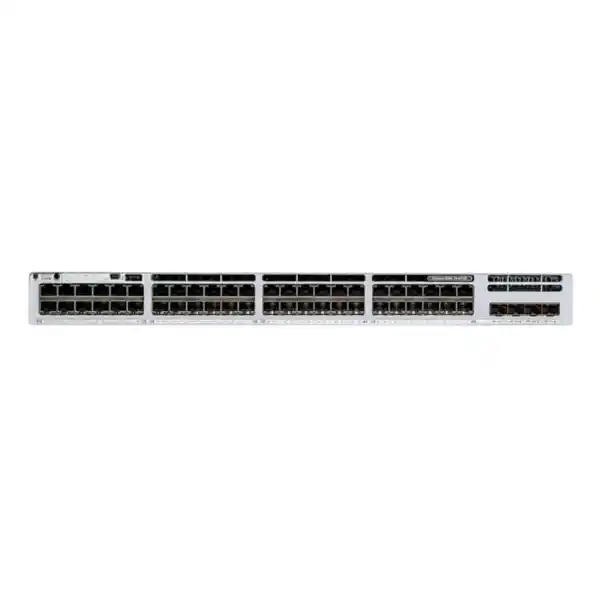
8 × 10G Multigigabit
4 × Fixed Fiber Uplinks
StackWise-320
Shallow-Depth 1RU
Cisco Catalyst C9300LM-48UX-4Y Network Switch
The Cisco Catalyst C9300LM-48UX-4Y is designed for enterprise access networks that need more than basic Gigabit switching. It combines 48 powered copper access ports, eight multigigabit interfaces capable of reaching 10 Gigabit Ethernet, four fixed fiber uplinks, with Cisco ordering documentation distinguishing uplink speed by the selected -E or -A software SKU, and a compact shallow-depth chassis. For Tanzanian organizations modernizing campus, office, branch, education, healthcare, hospitality, retail or public-sector networks, this combination can reduce the compromise between rack depth, edge-device power, high-speed wireless connectivity and uplink capacity.
This is a platform for planned enterprise deployments rather than a simple plug-and-play unmanaged switch. Buyers should confirm the required Cisco software license tier, subscription term, uplink optics or DACs, stacking accessories, power-supply configuration and PoE load before ordering. FourTeck Tanzania can use the deployment requirement as the starting point for a configuration and quotation instead of treating the switch as a single isolated hardware item.
At a glance: what this switch provides
| Access ports | 48 Cisco UPOE copper ports: 40 × 10/100/1000 and 8 × multigigabit 100M/1G/2.5G/5G/10G |
|---|---|
| Uplinks | 4 × fixed fiber uplink ports; current Cisco ordering guide lists 4 × 10G SFP+ for the -E SKU and 4 × 25G SFP28 for the -A SKU |
| Default power supply | PWR-C6-1KWAC, 1000W AC |
| Available PoE power | Up to 790W with the default 1000W AC power supply |
| Switching capacity | 440 Gbps standalone; 760 Gbps with stacking |
| Forwarding rate | 327.36 Mpps standalone; 565.44 Mpps with stacking |
| Stacking | StackWise-320, up to eight compatible switches with the required C9300L-STACK-KIT2 accessories |
| Memory | 8 GB DRAM and 16 GB flash for Catalyst 9300L/LM fixed-uplink models |
| Dimensions | Approximately 4.3 × 44.4 × 33.1 cm with the default AC power configuration |
| Weight | Approximately 5.45 kg with the default power supply |
Who should consider the C9300LM-48UX-4Y?
This model fits networks where the access layer is expected to power and connect a mixed estate of endpoints for several years. A conventional 48-port Gigabit switch may be adequate for desktops and many phones, but it can become a bottleneck when new wireless access points, high-performance workstations, edge appliances or other devices require more than 1 Gbps. The C9300LM-48UX-4Y addresses that transition by making eight access ports multigigabit while retaining forty standard Gigabit ports for equipment that does not need higher speed.
It is particularly useful when rack depth matters. The approximately 33 cm chassis depth is substantially shallower than many traditional enterprise access switches, which can be important in branch closets, wall-mounted enclosures and communications rooms where a full-depth rack is impractical. The fixed uplink design can also support faster access-to-distribution connectivity without adding a separate uplink module; confirm whether the final -E or -A SKU provides the required 10G or 25G uplink speed.
The switch is not automatically the best choice for every 48-port requirement. If all devices are 1G and need no PoE, a data-only model can be more appropriate. If nearly every port needs multigigabit speed, a different Catalyst 9300 configuration may provide a better port mix. A correct selection starts with endpoint count, per-device power, expected wireless growth, uplink design, licensing and rack constraints.
48 UPOE access ports for powered edge devices
All 48 copper access ports on the C9300LM-48UX-4Y support Cisco UPOE. Cisco positions UPOE on this platform for power delivery up to 60W per supported port, subject to the available power budget and the requirements of the connected device. That makes the switch suitable for a broad mix of powered endpoints such as enterprise wireless access points, IP phones, video-surveillance cameras, access-control devices, selected thin clients, building systems and other Ethernet-powered equipment.
The practical design limit is not simply “48 powered ports.” The default 1000W AC power supply provides up to 790W of available PoE power according to Cisco. Network designers should therefore calculate the expected draw of every powered device, reserve reasonable headroom, and determine whether a secondary power supply is required for additional PoE capacity or power resilience. A site with forty low-power phones has a very different electrical profile from a site with high-power wireless access points, PTZ cameras and other 802.3bt-class devices.
Power planning should also include upstream electrical capacity and continuity. In Tanzania, a deployment may use UPS systems, generators or other backup power arrangements depending on the facility. The switch specification alone does not determine runtime or resilience. The final design should consider the switch power supplies, actual PoE load, other rack equipment and the chosen backup-power system together.
Eight multigigabit ports for higher-speed Wi-Fi and edge devices
Eight ports support 100 Mbps, 1 Gbps, 2.5 Gbps, 5 Gbps and 10 Gbps Ethernet over copper. Multigigabit capability is valuable where existing structured cabling can support more than Gigabit throughput and the endpoint can negotiate a higher link rate. A common example is a modern wireless access point whose aggregate radio capacity can exceed 1 Gbps. Connecting such an access point to a 1G switch port can impose a wired bottleneck even though the wireless device itself is capable of more.
The mixed port design is also cost-efficient for many real networks. Most user devices do not need a dedicated 10G copper interface, while selected access points, workstations or edge systems can benefit from additional bandwidth. By providing eight multigigabit ports rather than converting every port to 10G, the C9300LM-48UX-4Y targets the transition period in which organizations are upgrading high-demand endpoints gradually.
Actual negotiated speed depends on the endpoint, cable category and quality, cable length, patching, electromagnetic conditions and configuration. The switch cannot turn unsuitable cabling into a reliable 10G channel. Before committing to 5G or 10G copper operation, validate the installed cabling plant and the endpoint interface specifications. Where cabling is old or undocumented, testing the intended links before a large rollout can avoid performance surprises.
Four fixed high-speed fiber uplinks
Cisco’s generic platform data sheet describes four fixed 25 Gigabit Ethernet SFP28 uplink ports. However, Cisco’s current ordering guide differentiates the commercial variants: C9300LM-48UX-4Y-E is listed with four 10G SFP+ fixed uplinks, while C9300LM-48UX-4Y-A is listed with four 25G SFP28 fixed uplinks. This difference should be confirmed against the exact ordered SKU. These interfaces are intended to connect the access switch toward aggregation, distribution or core infrastructure with higher bandwidth than a traditional 1G uplink design.
Fixed uplinks simplify the physical platform because an additional uplink module is not needed for the stated interface set. At the same time, buyers must choose compatible optics or direct-attach connectivity for the actual link distance, fiber type and peer device. The switch hardware does not by itself include every transceiver needed for a deployment, and compatibility should be validated against current Cisco guidance and the specific software release.
A 25G uplink is most useful when the rest of the network can support it. Confirm the port capabilities on the upstream switch, the desired redundancy model, link aggregation design, optic type and fiber infrastructure. Where the distribution layer is still 10G, the migration plan should establish how and when 25G will be used rather than buying capacity that cannot yet be connected as intended.
Enterprise switching performance and scale
Cisco rates the C9300LM-48UX-4Y at 440 Gbps of switching capacity and 327.36 million packets per second of forwarding performance in standalone operation. With the stacking figures included, Cisco lists 760 Gbps of switching capacity and 565.44 Mpps of forwarding. These numbers provide a useful platform-level reference when comparing the model with lower-capacity access switches, especially in environments using multigigabit downlinks and high-speed uplinks.
For the Catalyst 9300L/LM fixed-uplink family, Cisco specifies up to 32,000 MAC addresses, 32,000 IPv4 routes consisting of direct and indirect entries, 16,000 IPv6 routing entries, 8,000 multicast routes, 5,120 QoS scale entries, 5,120 ACL scale entries, 4,094 VLAN IDs and up to 1,000 switched virtual interfaces. The platform also supports jumbo frames up to 9,198 bytes. These are platform scale figures, not a promise that every feature combination can simultaneously consume its maximum table size.
The switch is based on Cisco’s UADP 2.0 ASIC architecture and runs Cisco IOS XE. That combination enables enterprise switching, routing, policy, telemetry and automation features according to the selected software license. The exact features available to a buyer depend on whether the ordered system uses Network Essentials or Network Advantage and on the associated Cisco Catalyst or Cisco DNA software subscription.
StackWise-320 for a unified access stack
The C9300LM family supports Cisco StackWise-320. With the required C9300L-STACK-KIT2 components and compatible models, up to eight switches can be configured into a stack with 320 Gbps of stacking bandwidth. A stack allows multiple physical switches to operate with a common management and control approach, which can simplify operations compared with managing every access switch independently.
Stacking can also support resilient access designs. Links can be distributed across stack members, maintenance can be planned around multiple units, and the overall access block can scale as port requirements grow. However, stack design should not be reduced to simply connecting cables between every switch. The chosen models, software license levels, stack kit, cable lengths, software versions, power design and physical rack layout should be checked as one system.
Cisco states that C9300LM models can stack with Catalyst 9300L and 9300LM models using StackWise-320 when compatibility conditions are met, including license-level requirements. Fixed-uplink C9300L/LM models are not the same stacking domain as modular-uplink C9300 models. For expansion of an existing stack, verify the existing member models and licensing before ordering an additional C9300LM-48UX-4Y.
Important licensing choice: Essentials or Advantage
C9300LM-48UX-4Y is the hardware family designation, but Cisco ordering distinguishes software options. Cisco lists C9300LM-48UX-4Y-E for Network Essentials and C9300LM-48UX-4Y-A for Network Advantage. The correct suffix matters because the feature set is not identical. Network Essentials covers fundamental switching functions and selected routed-access, security, QoS and visibility capabilities, while Network Advantage adds advanced routing, segmentation, automation, high-availability and additional security functions.
Cisco’s current ordering guidance also requires a Cisco Catalyst or Cisco DNA software subscription selection during purchase for Catalyst 9300 Series systems, with Essentials and Advantage subscription tiers offered for specified terms. A Cisco Smart Account is part of the ordering and entitlement workflow. The commercial configuration therefore needs to include both the hardware/license level and the required software subscription rather than treating the bare model name as a complete bill of materials.
For a simple access layer, Essentials may be sufficient. If the design requires features such as broader dynamic routing, VRF/VXLAN/LISP segmentation, advanced programmability or specific Catalyst Center capabilities, Advantage may be appropriate. The safest purchasing method is to list the network features that are actually required and map them to the current Cisco feature matrix before the quote is finalized.
Cisco IOS XE, programmability and operational visibility
Cisco IOS XE provides the operating environment for Catalyst 9300 switches. Cisco documents model-driven programmability capabilities such as NETCONF, RESTCONF, YANG data models, streaming telemetry and on-box scripting across the platform, with availability of particular functions influenced by licensing. This matters for organizations moving from device-by-device configuration toward repeatable automation, centralized monitoring and policy-based operations.
The platform supports Flexible NetFlow capabilities, telemetry, SPAN/RSPAN monitoring and enterprise QoS functions. For operations teams, these tools can help answer questions that basic unmanaged switching cannot: which applications are generating traffic, where congestion appears, how links are utilized, whether a specific client is reachable, and how policy should be applied. Full use of visibility and analytics functions depends on the configured feature set, collectors and software tier.
Automation should be introduced with the same discipline as manual configuration. Standardize software versions, configuration templates, change control, backups, authentication, logging and monitoring. A switch capable of API-driven configuration is most valuable when the organization has a controlled operational process around it.
Security and segmentation at the access layer
The access switch is often the first managed infrastructure device connected to users, phones, cameras, printers and wireless access points, so it plays a central role in network segmentation and access policy. Catalyst 9300 capabilities can include 802.1X-based access control, first-hop security, ACLs, QoS classification, MACsec and policy functions depending on the software license and design. These controls can help separate business systems, voice, guest access, cameras, building systems and administrative traffic instead of placing every endpoint on one flat LAN.
Segmentation is a design process, not a feature checkbox. Decide which device groups require separate VLANs or VRFs, how DHCP and DNS are delivered, where inter-VLAN policy is enforced, how users authenticate and what happens to unmanaged devices. If Cisco ISE, Catalyst Center or an SD-Access architecture is part of the plan, confirm the required Advantage-level licenses and integration components before purchase.
The switch should also be incorporated into normal infrastructure security practices: secure management access, role-based administration, centralized authentication where appropriate, configuration backups, software maintenance, logging, NTP, monitoring and documented recovery procedures. Advanced hardware features provide little value if default credentials, unmanaged software versions or weak operational controls remain in place.
Common deployment scenarios in Tanzania
Enterprise office
Use Gigabit ports for desks and phones while reserving multigigabit ports for newer wireless access points or high-demand endpoints. UPOE can consolidate power delivery into the wiring closet.
Education campus
Support dense Wi-Fi, staff systems, IP phones, cameras and lab devices with a mix of powered Gigabit and multigigabit access connectivity.
Hospitality
Provide powered access for wireless APs, phones, cameras and operational endpoints while using high-speed uplinks to aggregate traffic from guest and business networks.
Healthcare
Segment clinical, administrative, voice, wireless and surveillance traffic with a managed access platform, subject to the organization’s security and compliance design.
Branch or compact rack
The shallow-depth chassis can fit locations where a traditional deep access switch is difficult to accommodate, provided cooling and service clearances are still respected.
High-density surveillance
Power IP cameras from the access layer and separate surveillance traffic from business networks. Total camera power and uplink traffic must be calculated before deployment.
Why shallow depth can matter
Cisco lists the C9300LM-48UX-4Y at approximately 4.3 cm high, 44.4 cm wide and 33.1 cm deep with the default AC configuration, with a weight of about 5.45 kg. The 1RU height is standard for enterprise access switching, but the relatively short depth is the distinctive characteristic of the 9300LM line. This can make the model easier to deploy in space-constrained communications rooms, shallow cabinets and branch installations.
Shallow equipment does not remove the need for physical planning. Confirm usable rack depth, rail or mounting requirements, front and rear clearance, cable bend radius, airflow, access to power supplies, stacking cables and maintenance space. A rack that technically accommodates the chassis can still become difficult to service if power cords, fiber jumpers and copper bundles are packed tightly behind the switch.
Environmental design remains important in warm climates. Cisco publishes operating temperature and altitude limits for the Catalyst 9300 family, and those limits should be checked against the exact installation. Use adequate room cooling, dust management and monitoring rather than assuming enterprise switches can operate indefinitely in an unconditioned cabinet. Where facilities experience power variations or outages, incorporate suitable power protection into the rack design.
Power-supply and PoE planning
The default supply for this model is the PWR-C6-1KWAC 1000W AC unit, with Cisco specifying 790W of PoE power available in the default configuration. Cisco’s published table also shows higher aggregate PoE budgets when supported secondary power supplies are installed. That can be valuable in access closets with many powered endpoints, but the secondary-supply choice should be driven by a documented load calculation and redundancy objective.
A practical PoE worksheet should record every powered device, its expected power class or maximum draw, which switch port it will use, and whether the device is business-critical. Add reasonable growth for new access points, cameras or phones. Compare the total against the switch’s available PoE budget rather than against the power-supply wattage alone, because part of the input power is consumed by the switch itself.
For resilient sites, distinguish between “enough power during normal operation” and “enough power after a power-supply failure.” A system can be correctly sized for full load with two supplies but shed powered devices if one supply fails, depending on the configured budget. Critical voice, wireless or security devices may justify additional power headroom. The final configuration should be reviewed against Cisco’s current power-supply compatibility tables.
Designing the uplink and fiber path
The four fixed fiber uplinks give the access switch substantial upstream capacity, but the right design depends on the topology. A small deployment may use two uplinks for redundancy, while a stacked access block may distribute uplinks across members and use link aggregation toward a redundant distribution layer. The physical media could be optical fiber or supported direct-attach connectivity depending on distance and peer equipment.
Before ordering transceivers, confirm four facts: the interface supported by the upstream device, the required distance, the installed fiber type and connector plan, and Cisco compatibility for the intended software release. Do not select an optic from speed alone. A 25G link that uses the wrong fiber or optic type can fail to establish or perform unreliably, and compatibility policies may affect support.
If the existing backbone is 10G, the switch can still be part of a staged modernization, but document the transition. Determine whether current uplinks will operate at a supported lower rate, whether the distribution switch needs upgrades, and when the fiber plant will support the intended final speed. Building a clear migration path is often more valuable than simply choosing the highest port speed available.
Wi-Fi access layer considerations
Modern Wi-Fi access points are one of the strongest reasons to choose a multigigabit UPOE switch. Newer APs can require more power than legacy PoE and can generate more than 1 Gbps of aggregate traffic under suitable radio conditions. The C9300LM-48UX-4Y offers eight 10G-capable multigigabit access ports, allowing selected APs to operate above Gigabit Ethernet without forcing a complete replacement of the remaining 40 access interfaces.
To size the switch for Wi-Fi, count APs per closet, map each model’s Ethernet speed and power requirements, and reserve the multigigabit ports for devices that can use them. A switch may have enough PoE power but too few multigigabit interfaces for the planned AP density, or enough high-speed ports but insufficient power headroom. Both constraints must be checked together.
Wireless performance is also dependent on RF design, channel planning, client capabilities, cabling and internet or application capacity. A 10G switch port does not guarantee 10G wireless throughput. The value of the multigigabit port is that it removes one potential wired bottleneck when the rest of the wireless design can use the additional capacity.
Voice, video, cameras and converged access
A single enterprise access switch often carries business data, IP voice, surveillance video and wireless traffic. Catalyst 9300 QoS and segmentation features help administrators classify and separate these services so that latency-sensitive voice and video are not treated identically to bulk data transfers. VLANs, QoS marking, access policies and monitoring should be planned consistently across the switching and routing environment.
For IP surveillance, calculate both PoE draw and sustained traffic. Camera bitrates vary greatly by resolution, frame rate, codec, scene complexity and recording mode. If dozens of cameras are concentrated on one access switch, their aggregate traffic may influence uplink design even when each camera uses only a 1G physical port. Critical camera networks may also require UPS-backed power, redundant recording paths and controlled access from user networks.
For IP phones, the switch can provide both Ethernet connectivity and power, reducing the need for individual power adapters. Voice VLAN configuration, QoS, DHCP options, call-control reachability and emergency-calling requirements remain separate design tasks. The switch supplies the access foundation; a complete voice solution still depends on the telephony platform and site policy.
Comparing nearby Catalyst 9300LM choices
| Model | Access ports | PoE | Uplinks | Best fit |
|---|---|---|---|---|
| C9300LM-48UX-4Y | 40 × 1G + 8 × up to 10G mGig | UPOE | 4 × fixed fiber uplinks | Mixed Gigabit and multigigabit powered access |
| C9300LM-48U-4Y | 48 × 1G | UPOE | 4 × fixed fiber uplinks | Powered access where multigigabit ports are not required |
| C9300LM-24U-4Y | 24 × 1G | UPOE | 4 × fixed fiber uplinks | Smaller powered access closets |
| C9300LM-48T-4Y | 48 × 1G | No PoE | 4 × fixed fiber uplinks | Data-only access where endpoint power is unnecessary |
The key reason to choose the 48UX model over the 48U is the set of eight multigigabit downlink ports. If those ports will not be used, the 48U may satisfy the requirement with a simpler access profile. If endpoint power is not required, the 48T is the more direct comparison. Selecting the model based on actual endpoint and growth requirements can avoid paying for capabilities that remain unused.
Migration from older access switches
Replacing an older access switch is a chance to correct design debt rather than copying every legacy configuration. Start by inventorying active ports, VLANs, trunks, EtherChannels, port-security settings, QoS policies, access-control lists, authentication, DHCP snooping, spanning-tree settings, monitoring and management addresses. Identify abandoned or undocumented configuration before migrating it to the new platform.
Then map the physical layer. Check copper cable category and certification, fiber type, uplink optics, patch-panel labeling, rack depth, available power and UPS capacity. New multigigabit interfaces and higher-speed uplinks may expose limitations in infrastructure that was acceptable for older Gigabit switches. Testing those links before the change window reduces risk.
Finally, plan software and management. Choose a supported Cisco IOS XE release, verify feature licensing, define the Smart Account and software subscription workflow, prepare standard configuration templates, and establish rollback procedures. If the new switch will join an existing StackWise-320 stack, compatibility and software alignment should be resolved before installation day.
Operational resilience and maintenance
Enterprise switching resilience comes from several layers: physical power, redundant uplinks, stack design, software features and operational discipline. The C9300LM-48UX-4Y can participate in a StackWise-320 design, use multiple uplinks and accept supported power configurations, but the final availability level depends on how those capabilities are implemented.
For maintenance, retain configuration backups, document cable mappings, monitor power and temperature, keep software within a supported lifecycle and maintain spare parts according to business criticality. Firmware upgrades should be tested and scheduled with awareness of stack behavior, feature compatibility and dependent systems. A resilient network is not one that never changes; it is one where change is controlled and recovery is predictable.
Monitoring should cover more than port up/down state. Track uplink utilization, interface errors, PoE consumption, CPU and memory, environmental alarms, stack health, routing adjacencies, authentication failures and critical syslog events. These measurements help reveal capacity or reliability problems before users experience a complete outage.
What to confirm before requesting a quote
- Software tier: confirm whether Network Essentials or Network Advantage is required.
- Subscription: identify the required Cisco Catalyst or Cisco DNA software subscription tier and term according to current Cisco ordering rules.
- PoE load: list powered devices and total expected wattage, including growth and resilience headroom.
- Multigigabit demand: count endpoints that need 2.5G, 5G or 10G copper rather than 1G.
- Uplinks: define link speed, distance, fiber type, transceivers or DACs, and the upstream switch interfaces.
- Stacking: confirm whether the switch will run standalone or use C9300L-STACK-KIT2 in a compatible StackWise-320 design.
- Power resilience: decide whether a secondary supply and UPS-backed power are required.
- Rack dimensions: verify usable depth, airflow and rear clearance, not just nominal rack size.
- Smart Account: ensure the organization has the Cisco licensing account information required for the order.
- Support requirement: define the needed support coverage separately from the switch hardware specification.
Buying considerations for Tanzania deployments
For organizations in Tanzania, the technical bill of materials should be finalized before commercial assumptions are made. The exact ordering SKU can vary with license level, subscription and included options, and the user-supplied base model does not by itself specify a complete Cisco order. Stock status, delivery time, local price, warranty handling and support eligibility should therefore be confirmed in the actual quotation rather than assumed from the generic product family.
The site survey should also consider local facility conditions. Confirm stable rack power, grounding, UPS capacity, cooling and internet or WAN resilience where cloud-managed or remote operations are part of the design. If the switch is installed outside a main data room, verify the communications cabinet can support the heat load and can be serviced safely.
For multi-site organizations, standardizing the access design can simplify spares, templates, monitoring and support, but not every branch needs the same hardware. A smaller site may require fewer ports or no multigigabit access. Use C9300LM-48UX-4Y where its particular combination of 48 powered ports, eight mGig interfaces, fixed high-speed fiber uplinks and shallow depth solves a real requirement.
Frequently asked questions
How many ports does the C9300LM-48UX-4Y have?
It has 48 powered copper access ports: forty 10/100/1000 ports and eight multigigabit ports supporting 100M, 1G, 2.5G, 5G and 10G. It also has four fixed high-speed fiber uplink ports. Cisco’s generic data sheet identifies the platform as 25G-capable, while the current ordering guide lists 10G SFP+ uplinks for the -E SKU and 25G SFP28 uplinks for the -A SKU, so the exact commercial configuration should be confirmed.
Does it support PoE?
Yes. Cisco lists the access ports as UPOE-capable, with the platform supporting up to 60W per supported port subject to the available power budget. With the default 1000W AC supply, Cisco specifies up to 790W of available PoE power.
Can all eight multigigabit ports run at 10G?
The eight multigigabit interfaces support up to 10G link speed. Actual operation depends on the connected device, cabling, negotiated speed and configuration. Validate the cabling plant and endpoint requirements before planning 10G copper on every mGig link.
What uplink ports are included?
The base platform has four fixed high-speed fiber uplink interfaces. Cisco’s current ordering guide lists four 10G SFP+ fixed uplinks for C9300LM-48UX-4Y-E and four 25G SFP28 fixed uplinks for C9300LM-48UX-4Y-A. Confirm the exact ordered SKU before selecting optics.
Does the switch support stacking?
Yes. C9300LM models support StackWise-320 and can form a stack of up to eight compatible C9300L/LM switches when the required C9300L-STACK-KIT2 accessories and compatible license/software conditions are met.
What is the difference between C9300LM-48UX-4Y-E and C9300LM-48UX-4Y-A?
The suffix identifies the Network Stack software tier. “-E” is Network Essentials and “-A” is Network Advantage. Advantage enables a broader set of advanced routing, segmentation, automation, high-availability and security capabilities. Cisco’s current ordering guide also differentiates the stated fixed uplink speed between these SKUs, so the exact requirement should be confirmed before ordering.
Is a Cisco software subscription required?
Cisco’s current Catalyst 9300 ordering guide states that a Cisco Catalyst or Cisco DNA software subscription must be selected at the time of purchase along with the Network Stack license. Available terms and licensing details should be verified when the quote is prepared.
Is this switch suitable for Wi-Fi access points?
Yes, particularly where selected APs need more than 1G Ethernet and UPOE power. The eight mGig ports can support higher wired speeds, but AP power, cabling and expected throughput should be checked for the specific wireless model.
Is it a good replacement for any 48-port Cisco switch?
Not automatically. Port type, PoE load, uplink media, stacking compatibility, license features, rack depth and software migration all need review. It is a strong candidate when a deployment specifically benefits from UPOE, eight multigigabit access ports, fixed high-speed uplinks and the shallow chassis.
Does the base model name include optics, stack kits or support?
Do not assume so. The required transceivers, stack kit, secondary power supply, software subscription and support coverage should be itemized in the quotation. The exact ordered configuration determines what is included.
Request a deployment-based Cisco switch quotation
For a C9300LM-48UX-4Y quote in Tanzania, provide the number and type of powered endpoints, expected multigigabit devices, uplink distance and fiber type, whether stacking is required, and the needed Cisco software tier. This allows the quotation to account for the switch, licensing, subscription, optics, stack accessories and power configuration instead of pricing an incomplete base model.
Next step: Request a FourTeck Tanzania configuration review and quotation for your access-layer deployment. Stock, pricing, delivery, warranty and support details should be confirmed in the final commercial offer.




Reviews
There are no reviews yet.