
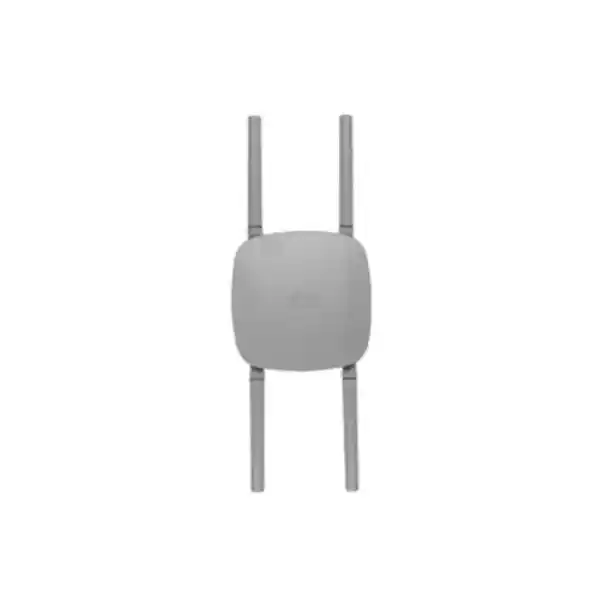
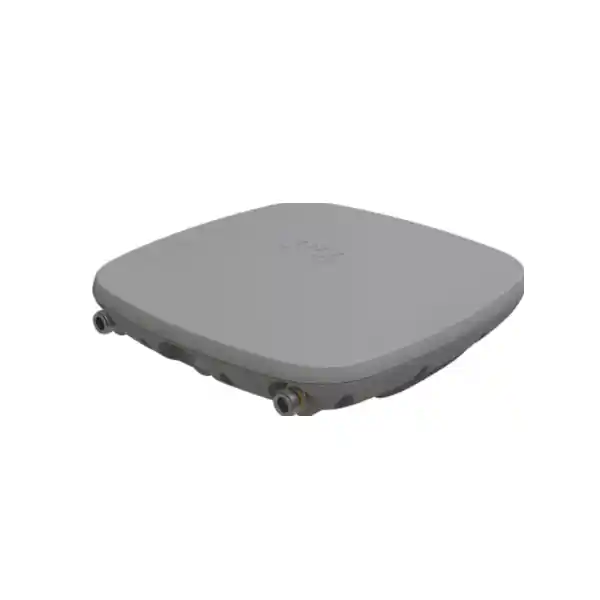
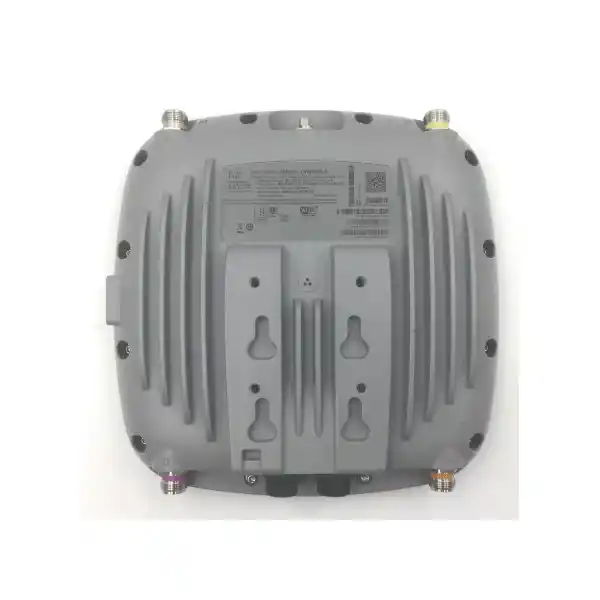
Cisco Catalyst CW9163E Outdoor Wi-Fi 6E Access Point
The Cisco Catalyst CW9163E is built for organizations that need enterprise-grade wireless coverage beyond the walls of an office. It combines three client-serving 2×2 radios for 2.4 GHz, 5 GHz and 6 GHz, a dedicated IoT radio, a tri-band scanning radio, external antenna flexibility, rugged IP67 construction and a 2.5 Gigabit Ethernet uplink. It is designed for outdoor campus areas, yards, public-facing spaces, industrial compounds, transport environments and other deployments where indoor access points are not suitable.
For Tanzanian deployments, the strongest buying approach is to treat the CW9163E as a professionally planned outdoor platform rather than a simple “mount and power” access point. Antenna choice, regulatory domain, local 6 GHz permissions, PoE budget, mounting location, lightning and surge planning, controller or cloud-management choice, RF design and backhaul capacity all affect the result. The 6 GHz radio should only be enabled where the selected regulatory domain, Cisco software support and local regulatory conditions permit it.
2×2:2 tri-band client radios
2.5G multigigabit Ethernet
IP67 outdoor enclosure
Catalyst 9800 or Meraki management
Who should consider the CW9163E?
This access point is a strong fit when the wireless requirement is genuinely outdoors and the network team needs enterprise control, external-antenna design options and a clear path between on-premises and cloud-based operations. It is particularly useful where coverage must extend across open or semi-open spaces while preserving centralized policy, security, monitoring and operational visibility.
Key technical specifications at a glance
| Wireless architecture | Three client-serving 2×2 radios across 2.4 GHz, 5 GHz and 6 GHz, plus an IoT radio and tri-band scanning radio |
|---|---|
| 802.11ax capability | 2×2 MU-MIMO, uplink/downlink OFDMA, BSS coloring, TWT, beamforming, 1024-QAM; up to 160 MHz channels on 6 GHz |
| Aggregate PHY data rate | Up to 3.9 Gbps across the client-serving radios under supported configurations |
| Ethernet | 1 × 100M/1G/2.5G multigigabit RJ-45 plus management console |
| External antenna interfaces | 4 × N-Type Wi-Fi antenna connectors plus RP-SMA active GPS/GNSS connector |
| Power | 802.3at PoE+ recommended for full 2×2 operation; 802.3af PoE supported with reduced radio/link capability |
| Maximum PoE draw | 25.5 W on 802.3at PoE+; 14.0 W on 802.3af PoE |
| Outdoor protection | IP67 enclosure; operating temperature down to -40°C and up to 65°C without solar derating, or 55°C with solar derating |
| Dimensions | 245 × 245 × 63.5 mm without mounting brackets |
| Weight | 1.5 kg |
Important: antennas are not included with the access point. The regulatory-domain suffix must also be selected correctly for the intended country and deployment.
Why this platform is different from a basic outdoor access point
The value of the CW9163E is not simply that it can be mounted outdoors. Its design joins rugged hardware with enterprise radio management, security, monitoring and lifecycle choices. A small outdoor WLAN can use the same policy and operational model as a larger Cisco environment, while a growing organization can design for central visibility rather than managing isolated devices independently.
The three client-serving radios allow the access point to support current 2.4 GHz and 5 GHz devices while adding a 6 GHz radio for Wi-Fi 6E where that band is authorized and enabled. This is useful for mixed estates because organizations rarely replace every client device at the same time. Legacy and current clients can continue to use established bands while capable devices can move to the newer spectrum when conditions allow.
Cisco also includes a dedicated tri-band scanning function and IoT capability. In practical network design, that means the platform is intended not only to transmit and receive client traffic but also to contribute to RF awareness, security operations and connected-device use cases. Features such as CleanAir Pro, Cisco’s RF interference detection and classification, are part of the broader operational story and can help network teams understand the radio environment instead of troubleshooting only from end-user complaints.
The hardware can be managed with Cisco Catalyst 9800 Series Wireless Controllers or through the Meraki cloud platform, depending on licensing, software and deployment choice. That flexibility matters to organizations with existing Cisco architecture as well as to teams moving toward cloud-managed networking. The decision should be made as part of the overall network design because licensing, feature availability, controller software and operational workflows differ between management models.
Wireless performance: what the numbers mean in practice
Cisco specifies up to 3.9 Gbps of aggregate PHY data rate across the client-serving radios. That figure is a radio-layer maximum rather than a promise of application throughput to one user. Real performance depends on channel width, regulatory limits, signal level, interference, client capability, antenna choice, distance, airtime utilization, protocol overhead, uplink speed, controller or cloud path, and the capacity of the wider LAN and internet connection.
For 802.11ax operation, the CW9163E supports technologies such as OFDMA, MU-MIMO, BSS coloring, Target Wake Time and beamforming. These features are designed to improve how airtime and radio resources are used, especially when many clients share the same access point. Their practical benefit is best realized through good RF design: sensible cell sizes, appropriate channel plans, controlled transmit power and enough access points to match the expected client density.
The 6 GHz radio can use channel widths up to 160 MHz where supported. Wider channels can increase peak throughput but consume more spectrum and may not be the best choice in every deployment. In outdoor networks, especially across multiple access points, narrower channels can sometimes provide a more reusable and predictable channel plan. A professional design should therefore choose channel width according to capacity goals, client mix and local spectrum rules rather than assuming that the widest channel is always best.
The 2.5 Gigabit Ethernet uplink helps avoid a 1 Gigabit wired bottleneck when the radio system and client demand justify higher throughput. However, that benefit depends on the upstream switch port, cabling and PoE design. If the access point is powered by 802.3af rather than 802.3at, Cisco specifies reduced 1×1 radio operation and a 1 Gbps link state, so the power design directly affects wireless capability.
External antennas: a major reason to choose the CW9163E
Outdoor wireless rarely has one universal coverage pattern. A courtyard may need broad coverage around a mounting point, while a long lane, boundary, yard or specific work zone may benefit from energy being directed toward a defined area. The CW9163E provides four N-Type Wi-Fi antenna connectors, allowing the antenna system to be selected to suit the environment rather than forcing every installation into one integrated pattern.
Cisco lists the CW-ANT-O1-NS-00 omnidirectional dipole self-identifying antenna for 360-degree azimuth coverage, with published peak gain values of 4 dBi at 2.4 GHz and 8 dBi at both 5 GHz and 6 GHz. Cisco also lists the CW-ANT-D1-NS-00 four-port directional patch self-identifying antenna, with higher directional gain and a focused beam. These are examples of supported antenna options; the correct choice depends on the site survey, target coverage, mounting height, obstruction profile and local EIRP limits.
Self-identifying antenna support can simplify configuration because compatible Cisco antennas can provide antenna information to the access point. Even so, antenna selection should not be treated as an accessory decision made after the network is designed. In outdoor deployments, antenna pattern, orientation and mounting geometry often have as much influence on user experience as the access point itself.
Antennas are not included with the CW9163E. Buyers should budget for the required Wi-Fi antenna, mounting hardware and any approved accessories needed for the chosen design. Where Standard Power AFC operation is relevant and permitted, Cisco also documents integrated GPS/GNSS capability and an optional external active GNSS/GPS antenna. The exact requirement should be confirmed for the intended regulatory mode and software configuration before ordering.
Built for exposed environments
The CW9163E uses an IP67-rated enclosure and is specified for a broad operating temperature range. Cisco publishes operation from -40°C to 65°C without solar derating and up to 55°C with solar derating, together with 5% to 95% non-condensing operating humidity. The data sheet also lists wind, icing, corrosion, solar-radiation and vibration testing. These specifications make the platform suitable for demanding external environments when installed according to Cisco guidance.
Ruggedization does not remove the need for correct site engineering. Outdoor Ethernet runs, grounding, bonding, surge protection, cable routing, drip loops, connector weatherproofing, mounting hardware and safe service access all need to be designed for the physical location. The access point should not be installed simply because a wall or pole is convenient; the mount must also support the intended RF pattern, cable path, maintenance access and local safety requirements.
In Tanzanian conditions, heat load and direct sun exposure deserve particular attention. Cisco’s solar-derating specification should be considered when choosing the mounting position. Shade, airflow and the thermal behavior of the location can affect operating margin. The aim is not only to keep the access point within specification but also to create an installation that remains serviceable and reliable over time.
Tanzania 6 GHz planning: verify before you design around it
Wi-Fi 6E extends 802.11ax into the 6 GHz band, but 6 GHz availability is country- and regulatory-domain-specific. Cisco explicitly states that 6 GHz operation depends on local regulatory approval and that the 6 GHz radio can be disabled where use is not authorized or software support is not available. The CW9163E part number also carries a regulatory-domain suffix, so the exact orderable variant matters.
For Tanzania, do not assume that a generic Wi-Fi 6E specification automatically means outdoor 6 GHz operation is available in every mode. The current TCRA National Frequency Allocation Plan should be checked alongside Cisco’s Wireless LAN Compliance Lookup and the exact software release before deployment. Where regulatory confirmation is incomplete, the safe procurement position is to design the network so that 2.4 GHz and 5 GHz requirements are satisfied independently and treat 6 GHz capability as conditional until verified.
This is especially important for outdoor Standard Power operation because Cisco uses Automated Frequency Coordination and location information for supported 6 GHz deployments. A buyer should confirm the selected regulatory domain, allowed operating class, AFC requirements, software support and any TCRA conditions that apply to the exact deployment. FourTeck Tanzania can prepare a quotation around the required hardware, but regulatory suitability should be validated for the final site and configuration before commissioning.
Power and switching requirements
The CW9163E supports both IEEE 802.3at PoE+ and 802.3af PoE, but the two modes are not equivalent. Cisco specifies full 2×2 operation on the 2.4 GHz, 5 GHz and 6 GHz radios with a 2.5 Gbps link when powered by 802.3at PoE+, with a maximum PoE consumption of 25.5 W. Under 802.3af PoE, Cisco specifies 1×1 radio operation and a 1 Gbps link with a 14.0 W maximum PoE draw.
For a new installation, PoE+ should therefore be the planning baseline if the goal is to use the product at its intended radio capability. Check the switch’s per-port power, total PoE budget and multigigabit support, not only whether the port has a PoE logo. Large deployments can have enough power on each individual port but still exceed the switch’s total available PoE budget when many access points are connected.
Cisco recommends enabling LLDP or CDP so that power negotiation can operate correctly. The wired uplink also deserves the same attention as the radio plan. If the switch supports only 1 Gigabit Ethernet, the access point can still operate, but the network will not benefit from the 2.5 Gigabit uplink capability. Cabling quality, connector termination and outdoor cable protection are especially important where the run is exposed or passes between buildings.
Where existing switches cannot provide the required power, Cisco lists compatible power-injector options in the data sheet. The correct injector choice should be confirmed against the exact installation and regional power requirements. Do not assume that any generic PoE injector will deliver the same negotiation behavior, environmental suitability or support outcome.
Choose the management model deliberately
Catalyst 9800 on-premises management
Cisco supports the CW9163E with Catalyst 9800 Series Wireless Controllers. This model suits organizations standardizing on Catalyst enterprise WLAN operations, controller-based policy and Cisco DNA/Catalyst Center workflows. Software release, controller compatibility and required licenses should be verified as part of the bill of materials.
Meraki cloud management
The CW9163E is also available for Meraki cloud-managed operation. This approach provides centralized dashboard-based visibility and policy without requiring an on-premises wireless controller. Subscription licensing, cloud connectivity and the desired Meraki feature set should be considered before ordering.
Cisco positions the platform so organizations can change management mode over time where supported, which can reduce hardware replacement pressure during an operational transition. However, migration planning is still required. Licensing, software, feature support, configuration conversion and maintenance procedures should be reviewed before moving an installed estate between management models.
Security and operational visibility
Enterprise outdoor Wi-Fi must be secured as part of the same identity and policy framework as the rest of the network. Cisco documents WPA2 and WPA3 options, 802.1X enterprise authentication support, Enhanced Open, multiple EAP methods and secure-boot-related Trust Anchor capabilities for the CW9163E platform. The appropriate configuration depends on the organization’s identity infrastructure, client capability and security policy.
The dedicated scanning capabilities are also relevant to security and troubleshooting. A network team needs to know whether poor experience is caused by weak signal, contention, non-Wi-Fi interference, unauthorized devices, an upstream LAN problem or an internet bottleneck. Cisco’s RF and assurance ecosystem can provide deeper visibility when the access point is deployed with the relevant management and licensing components.
Security design should include SSID purpose, user and device authentication, guest isolation, VLAN and segmentation policy, management-plane access, firmware lifecycle, administrator roles, logging and incident response. Outdoor coverage can reach beyond the organization’s physical boundary, so RF design and access control must be considered together. Strong signal is not a substitute for strong authentication and segmentation.
A practical deployment workflow
- Define the business requirement. Record the outdoor areas that need service, expected users and devices, important applications, guest or staff access needs, roaming expectations and target availability. Avoid designing from a product count alone.
- Survey the site. Review mounting locations, obstructions, building materials, trees, vehicles, terrain, neighboring RF activity, cable paths, switch locations and environmental exposure. Outdoor coverage predictions should be validated against the actual site.
- Confirm the regulatory domain. Match the exact CW9163E regulatory-domain part number to the country and intended radio operation. Verify 6 GHz support and any AFC requirement before assuming that band will be used.
- Select antennas from the coverage objective. Use omnidirectional coverage where users surround the mounting point, or directional coverage where energy should be focused. Validate gain, EIRP, orientation and mounting requirements.
- Engineer the wired edge. Confirm PoE+ power, total switch budget, 2.5G port capability, cable category and route, surge-protection approach, grounding and safe maintenance access.
- Choose management and licensing. Decide between Catalyst 9800-based operations and Meraki cloud management based on the wider network, feature requirements, support model and lifecycle strategy.
- Plan channels and capacity. Set channel widths, channel reuse, transmit power and minimum data-rate policy according to client density and RF conditions. Do not use maximum transmit power everywhere by default.
- Install and weatherproof correctly. Follow Cisco mounting guidance, use approved accessories, protect connectors and cable entries, and ensure the final orientation matches the RF design.
- Validate after installation. Test coverage, roaming, throughput, application behavior, PoE state, uplink speed and management visibility. Compare the results with the original design goals and tune where necessary.
Common deployment scenarios
What to confirm before requesting a quotation
A complete CW9163E quotation is more useful when it reflects the full deployment rather than only the access point body. The exact requirement may include antennas, brackets, PoE switching or injectors, licensing, controller capacity, cloud subscriptions, outdoor cabling, surge-protection components and installation services. Providing the site and network context helps prevent a quotation that is technically incomplete.
- Number of outdoor areas and approximate coverage dimensions.
- Expected concurrent users and key device types.
- Existing Cisco controller, Catalyst Center or Meraki environment, if any.
- Existing switch model, available PoE budget and whether multigigabit ports are available.
- Preferred antenna pattern or enough site detail to recommend omnidirectional versus directional coverage.
- Mounting surface or pole details and approximate mounting height.
- Need for 6 GHz capability and whether local regulatory confirmation has already been completed.
- Required licensing term, support expectation and management model.
- Whether installation, site survey, configuration or validation assistance is required.
Buying considerations and limitations
The CW9163E is a specialized outdoor enterprise access point. It may be more capability than a small site needs if the requirement is only a single low-density indoor room or a simple home-style wireless extension. It is most compelling where weatherization, external antennas, centralized enterprise management and controlled outdoor coverage justify the additional planning.
Antennas must be ordered separately, and the antenna decision affects the final RF design. Licensing and management dependencies also need to be included in the solution. The access point itself is not the entire WLAN: controller or cloud licensing, switching, authentication, IP addressing, VLAN design, internet capacity and operations all contribute to the delivered service.
The 6 GHz radio is also subject to local authorization, regulatory-domain support and software conditions. Buyers should avoid making coverage or capacity commitments that depend on 6 GHz until those conditions are verified for Tanzania and for the exact product variant. The network can still deliver strong 2.4 GHz and 5 GHz service when designed properly, but that design should be intentional rather than a fallback discovered after installation.
Finally, outdoor wireless performance is highly site-specific. Quoted radio rates do not equal guaranteed user throughput or coverage distance. A site survey and post-install validation are the correct way to set and confirm realistic expectations.
Technical design notes for network teams
A successful CW9163E deployment starts by separating three questions that are often mixed together: coverage, capacity and mobility. Coverage asks whether a client can establish a usable link in the required area. Capacity asks whether the radio system has enough airtime and backhaul to serve the expected users and applications at busy times. Mobility asks whether clients can move between cells without unacceptable interruption. A design that solves only the first question can still produce a poor user experience during peak activity.
Client capability should also influence the RF plan. The access point may transmit at a higher effective level than a battery-powered handset can return, so designing purely from access-point transmit power can create an asymmetric link. The same principle applies to 6 GHz: capable clients, channel width, regulatory power limits and attenuation characteristics all affect the usable cell. For mixed fleets, the 2.4 GHz and 5 GHz layers usually remain important even when the project is preparing for Wi-Fi 6E.
Roaming behavior is largely client-driven, which means good cell overlap and consistent WLAN configuration matter more than simply increasing power. Excessively large cells can keep clients attached to a distant access point and increase contention. In a multi-AP outdoor design, the target should be predictable coverage with enough overlap for the applications in use, not maximum signal everywhere. Voice, real-time collaboration, scanners and operational mobile devices may require more careful roaming validation than ordinary web browsing.
Backhaul and upstream services should be tested at the same time as RF. A fast wireless link cannot compensate for congested internet access, an undersized firewall, overloaded DHCP or DNS services, poor VLAN design, a 1 Gbps bottleneck where more capacity is expected, or insufficient PoE headroom. For larger sites, document the complete path from the client through the access point, switch, controller or cloud-management architecture, security stack and WAN edge. This makes troubleshooting faster and reduces the risk of blaming the radio for problems elsewhere.
Outdoor installations also benefit from a clear maintenance plan. Record the access-point serial number and regulatory-domain suffix, switch port, cable route, antenna model and orientation, mounting height, software release, license assignment and photographs of the completed installation. Label both ends of the cable and keep the RF design with the network documentation. If a unit is later replaced, this information helps the team reproduce the intended configuration instead of rebuilding it from memory.
Finally, validate the deployment after real users and devices are present. Predictive planning and an installation-day survey are valuable, but production behavior can reveal usage patterns that were not visible during design. Monitor channel utilization, client distribution, retries, roaming behavior, uplink state and application performance, then tune the system using measured evidence. Enterprise Wi-Fi is an operational service, not a one-time hardware installation.
Frequently asked questions
Is the Cisco CW9163E an outdoor access point?
Yes. Cisco designed the CW9163E as a weatherized outdoor enterprise access point and specifies an IP67 ingress-protection rating. Correct mounting, cabling, connector weatherproofing, grounding and surge planning are still required for a complete outdoor installation.
Does it support Wi-Fi 6E?
Yes. The platform includes a 6 GHz 802.11ax radio in addition to 2.4 GHz and 5 GHz. Actual 6 GHz operation depends on local regulatory authorization, the correct regulatory-domain model and supported software. In Tanzania, verify the applicable TCRA and Cisco conditions before designing around 6 GHz.
Are antennas included?
No. Cisco states that antennas are not included with the CW9163E. Supported external antenna options include self-identifying omnidirectional and directional designs. The correct antenna should be selected from the required coverage pattern and site survey.
Can it be powered from a PoE switch?
Yes. It supports 802.3at PoE+ and 802.3af PoE. PoE+ is the preferred design point for full 2×2 radio operation and a 2.5 Gbps link. Under 802.3af, Cisco specifies reduced 1×1 radio operation and a 1 Gbps link.
Does it require a Cisco wireless controller?
Not in every management model. Cisco supports on-premises management with Catalyst 9800 Series Wireless Controllers and cloud management through the Meraki platform. The required licenses and software depend on the selected operating model.
What is the Ethernet speed?
The access point includes one 100M/1G/2.5G multigigabit RJ-45 Ethernet interface. To use 2.5G, the connected switch port and cabling must support that speed, and the access point must have the appropriate power state.
Can it cover a large outdoor area with one unit?
Coverage distance cannot be responsibly promised from the product name or antenna gain alone. Terrain, obstacles, mounting height, interference, client transmit power, antenna pattern, regulatory limits and required data rate all affect usable coverage. A site survey should determine the number and placement of access points.
What is the benefit of a directional antenna?
A directional antenna concentrates RF energy toward a target sector rather than distributing it evenly around the mounting point. This can be useful for lanes, yards, boundaries or specific work zones. The design still needs to respect EIRP limits and site conditions.
Is a 2.5G switch mandatory?
No, but a 2.5G-capable switch allows the wired uplink to exceed 1 Gbps when the rest of the design can use that capacity. A 1G switch can still connect the access point, but it becomes the wired uplink ceiling. PoE capability must be checked separately from port speed.
What information should I send for a Tanzania quote?
Share the number of coverage areas, approximate dimensions, user and device counts, existing Cisco or Meraki infrastructure, switch model and PoE budget, mounting conditions, preferred management model and whether 6 GHz is a requirement. Site photos or a simple plan can also help determine the antenna and mounting approach.
Request a CW9163E solution quote for Tanzania
For the most useful quotation, include your outdoor coverage area, expected user density, existing switch or controller platform, preferred antenna pattern and whether you need site survey, installation or configuration support. FourTeck Tanzania can then prepare the bill of materials around the access point, antennas, power, licensing and management requirements without assuming unverified stock, pricing or local 6 GHz operation.
Ask for the Cisco Catalyst CW9163E outdoor wireless solution and provide your site details for review.




Reviews
There are no reviews yet.