
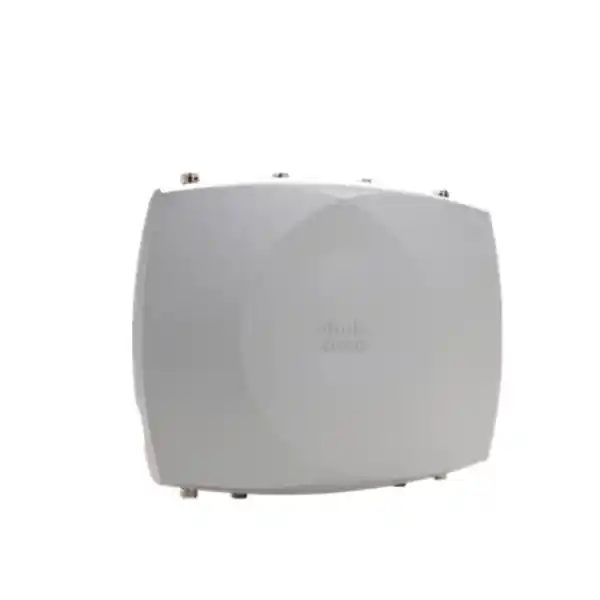
Cisco Wireless CW9177D Wi-Fi 7 Access Point
For organizations that need enterprise wireless beyond the building perimeter, the Cisco Wireless CW9177D combines Wi-Fi 7 capacity with an integrated directional antenna system designed to put coverage where it is needed. Instead of radiating equally in every direction, the CW9177D shapes a focused beam, making it a strong fit for planned outdoor zones such as stadium seating blocks, campus walkways, loading areas, industrial yards, transport facilities, perimeter workspaces and long outdoor corridors. The design is especially useful when RF containment, predictable coverage boundaries and high-density outdoor service matter more than broad 360-degree coverage.
The CW9177D is part of Cisco’s 9177 outdoor family and supports tri-radio Wi-Fi 7 operation using 2.4 GHz, 5 GHz and 6 GHz, with up to 12 spatial streams across three 4×4 radios. Cisco also supports a dual-5-GHz operating option where permitted. The access point can be managed with Cisco Catalyst 9800 Series wireless controllers or through the Meraki cloud platform, allowing the same hardware family to fit different operational models. Cisco’s current channel and compliance lookup lists the CW9177D for outdoor use in Tanzania for both on-premises and cloud-managed deployments; individual band use remains subject to current country regulations and software support.
Integrated directional antennas
Outdoor IP66/IP67
10G mGig + 1/10G SFP/SFP+
Quick fit: when the CW9177D makes sense
What the Cisco CW9177D is designed to solve
Outdoor wireless projects are often difficult because the coverage objective is more specific than “provide Wi-Fi outside.” A stadium bowl may need signal directed into seating while reducing spill behind the access point. A campus may need connectivity along a pedestrian route without over-covering adjacent buildings. An industrial yard may need reliable service across loading lanes, equipment areas or a defined work zone. The CW9177D addresses this type of requirement with an integrated directional antenna array rather than an omnidirectional pattern. Cisco specifies an approximately 70° × 70° beamwidth for the client-serving radios, with peak antenna gain of 8 dBi at 2.4 GHz, 6 dBi at 5 GHz and 8 dBi at 6 GHz.
That antenna choice is the central buying decision. Directional gain can improve RF efficiency toward the intended service area, but it also means the unit must be aimed and mounted with the coverage geometry in mind. A CW9177D placed simply because “directional is stronger” may underperform if the target area sits outside the main beam or if the mounting height and downtilt are poorly planned. For broad plaza or courtyard coverage, the CW9177I omnidirectional model may be more appropriate. For installations that require a specialized antenna pattern, antenna separation from the radio, or a custom high-gain design, the CW9177E with external antenna connectors may be the better design choice.
The CW9177D is therefore best treated as an RF design component, not just a faster replacement for an older outdoor AP. Wi-Fi 7 can raise capacity and efficiency, but the practical result still depends on channel planning, client mix, interference, mounting position, power delivery, backhaul capacity and the regulatory channels available at the site. A proper survey and predictive design help determine how many units are needed, where each one should point and whether directional coverage is actually the right strategy.
Wi-Fi 7 radio architecture and client capacity
Cisco describes the 9177 Series as a tri-radio, tri-band outdoor Wi-Fi 7 platform. In tri-band operation the access point can serve 2.4 GHz, 5 GHz and 6 GHz simultaneously, with a 4×4:4 radio on each band when full power is available. That provides up to 12 spatial streams across the three client-serving radios. The hardware can also operate in a 2.4 GHz plus dual-5-GHz configuration where regulations and deployment settings allow it. This flexibility matters in environments where the client population is still concentrated in 5 GHz or where a second 5-GHz cell is more useful than 6 GHz for a particular coverage design.
Wi-Fi 7 features include 4096-QAM, Multi-Link Operation, uplink and downlink OFDMA, preamble puncturing, Target Wake Time, BSS coloring and multi-user MIMO. In the most capable tri-radio mode, Cisco lists aggregate PHY data rates up to 18 Gbps under the specific channel-width and modulation conditions described in its data sheet. That number is a theoretical PHY aggregate, not an expected application throughput figure. Real client throughput is lower because of protocol overhead, shared airtime, signal quality, client radio design, channel availability and upstream network constraints. Buyers should use the headline PHY rate as a platform capability indicator rather than a promise of internet speed.
Channel width also affects real deployments. The platform supports up to 320-MHz channels in 6 GHz and up to 160-MHz channels in 5 GHz, while 2.4 GHz uses 20-MHz channels. Very wide channels can provide high peak throughput, but they consume more spectrum and may not be the best choice in dense environments. In a stadium, campus or industrial deployment, narrower channels can sometimes deliver more total system capacity by allowing greater channel reuse. The correct design balances peak client speed against the number of non-overlapping cells the site requires.
The access point remains compatible with earlier Wi-Fi generations supported by Cisco, including 802.11ax and legacy client standards. This is important because most outdoor enterprise networks support a mixed population of laptops, phones, scanners, handheld terminals, cameras and IoT devices. Wi-Fi 7 clients can use newer capabilities where supported, while older clients continue to connect using their own supported standard. Feature availability always depends on both the infrastructure and client side, so a Wi-Fi 7 AP does not automatically make every device operate as a Wi-Fi 7 device.
Directional antenna design: the main reason to choose the D model
The “D” in CW9177D identifies the integrated directional version of the 9177 family. Cisco specifies a 70° × 70° beamwidth across the 2.4 GHz, 5 GHz and 6 GHz client-serving antennas. Peak gains are listed as 8 dBi on 2.4 GHz, 6 dBi on 5 GHz and 8 dBi on 6 GHz. The IoT and GNSS antennas are omnidirectional because their functions are different from the main client-coverage objective. For the wireless designer, the key point is that the client radios are intended to concentrate energy into a defined sector rather than form a broad all-around cell.
A directional pattern can be useful when users are physically located in front of the access point and the area behind it should receive less signal. Stadium sections are a classic example, but the same principle applies to long campus edges, warehouse yards, outdoor production lines, transport bays, gated areas, ports, rail environments and building-to-open-area transitions. Directionality can also make cell boundaries easier to control in high-density designs because the RF pattern itself helps separate adjacent service zones. That can improve reuse when combined with careful channel and transmit-power planning.
Mounting accuracy matters more with this model than with a general omnidirectional unit. The installer should confirm azimuth, tilt, height, obstruction clearance and the actual target footprint. Metal structures, vehicles, containers, glass façades, wet foliage and moving equipment can all alter propagation. A predictive model should be validated with an onsite survey, particularly where the network supports operational workflows rather than casual guest access. The best location is not always the highest pole; excessive height can widen the distance to clients and create difficult vertical angles.
Cisco lists several compatible mounting approaches for the CW9177D, including horizontal, articulating and vertical options depending on the selected kit. Exact mounting hardware should be confirmed during the bill-of-materials stage because the mechanical orientation determines whether the integrated antenna pattern points toward the intended service zone. Buyers should also plan grounding, weatherproof cable routing, strain relief and safe installation access rather than treating the AP as a standalone box.
Power planning is critical: PoE level changes performance
The CW9177D can accept several power methods, but the available radio and uplink capability changes with the power source. For full-featured operation, Cisco lists IEEE 802.3bt Class 6 / UPOE+ / PoE++ with maximum PoE consumption of approximately 45.1 W. In this mode the platform can run 4×4 operation on the client-serving radios and use a 10-Gbps uplink over either multigigabit copper or SFP+. This is the preferred design point when the goal is to use the hardware’s full radio capability.
With IEEE 802.3at PoE+, Cisco documents reduced operating modes. A tri-band PoE+ configuration uses 2×2 operation on 2.4 GHz, 5 GHz and the third radio, with a 2.5-Gbps copper uplink and up to 30 W. A dual-band PoE+ option can provide 2×2 on 2.4 GHz and 4×4 on 5 GHz while the third client-serving radio is unavailable, again with a 2.5-Gbps copper uplink. IEEE 802.3af PoE is intended only for staging or limited operation; Cisco’s data lists 1×1 radio operation and a 1-Gbps copper uplink at the 15.4-W class. For production design, do not assume that “the AP powers on” means it is operating at the intended capability.
This makes the upstream switch a major part of the purchase decision. Confirm that the selected switch ports support the required PoE class, that the switch has enough total PoE budget for all connected APs, and that the cabling can support the desired multigigabit link rate over the installed distance. Cisco recommends enabling LLDP or Cisco Discovery Protocol so the access point and switch can negotiate power correctly. In brownfield upgrades, an existing outdoor cable run may be adequate for basic connectivity but may not deliver the target multigigabit performance or power class.
A DC power option is also supported, which can be useful in specialized outdoor infrastructure designs, but the complete installation should be engineered as a system. Consider surge protection, grounding, local electrical practices, enclosure requirements for ancillary power equipment and maintenance access. Where power continuity is important, include upstream UPS capacity for both the AP power source and the switching or fiber equipment that provides network connectivity.
10G copper and SFP+ uplink flexibility
The CW9177D includes one multigigabit RJ-45 Ethernet interface supporting 100 Mbps, 1 Gbps, 2.5 Gbps, 5 Gbps and 10 Gbps, plus a separate 1/10-Gbps SFP/SFP+ interface. This is valuable outdoors because the preferred transport medium differs by site. Copper can simplify PoE and data delivery over one cable when the distance, electrical environment and switch placement are suitable. Fiber can be attractive where cable runs are longer, electromagnetic conditions are difficult, lightning exposure is a concern or network designers want optical isolation between outdoor infrastructure and the core network.
The two uplink choices do not remove the need for capacity planning. An access point capable of high aggregate PHY rates can still be constrained by a 1-Gbps or 2.5-Gbps backhaul, and a 10-Gbps backhaul does not guarantee equivalent user throughput. The engineer should estimate expected active clients, application mix, airtime efficiency and upstream traffic patterns. For many sites, the key value of a faster uplink is headroom and reduced risk of the wired side becoming the bottleneck as newer clients and wider channels are introduced.
Fiber designs also require the correct supported SFP/SFP+ optics, power arrangement and environmental protection around the connection. Copper designs require appropriate category cabling, grounding and surge considerations. The access point also provides a management console port for service access. Cisco’s hardware guide identifies additional physical items including a DC power jack, external GNSS connector, reset button, grounding pad and status LED. These interfaces should be incorporated into the installation method rather than discovered after the unit is already mounted.
Built for outdoor and harsh-environment deployments
Cisco specifies the 9177 Series enclosure for IEC 60529 IP66/IP67 ingress protection. IP ratings help describe resistance to dust and water exposure under defined test conditions, but they do not replace correct installation practices. Cable glands, connectors, grounding hardware, mounting hardware and any accessory enclosures must also be installed according to the vendor guidance. A weather-rated AP with poorly protected cable connections can still become a reliability problem.
The documented operating temperature range extends from -40°C to 65°C without solar load, with a lower upper limit when solar load is included. Cisco’s data sheet also specifies operating humidity of 10% to 90% noncondensing, wind resistance up to 161 km/h sustained winds and 266 km/h gusts, plus tests for icing, corrosion and solar radiation. These figures show that the product is intended for serious outdoor infrastructure, but the local mounting structure and installation materials must be rated appropriately as well.
For Tanzania deployments, heat and solar loading deserve particular attention. A specification that looks comfortable in ambient air can become more demanding when equipment is mounted on a sun-exposed pole, rooftop edge or metal structure. The design should account for the actual mounting position, airflow, shade conditions and cable exposure. Coastal and industrial environments may also require extra attention to corrosion-resistant hardware and maintenance intervals. The AP rating applies to the product; it should not be treated as a blanket guarantee for every supporting component in the installation.
The CW9177D measures approximately 352.2 mm × 270 mm × 76.2 mm without brackets and weighs about 4.11 kg. Those dimensions matter for pole loading, bracket selection and safe maintenance access. The mounting surface needs adequate mechanical strength, especially in high-wind locations. When an AP is installed above public or work areas, use the manufacturer-supported mounting method and appropriate safety practices rather than improvised brackets.
Cloud-managed Meraki or on-premises Catalyst control
A notable feature of the Cisco 9177 family is the unified hardware approach. Cisco positions the same access point hardware for management through Catalyst wireless infrastructure or the Meraki cloud platform. For organizations standardizing on Cisco Catalyst, the CW9177D supports Catalyst 9800 Series Wireless Controllers, including physical and virtual controller options identified by Cisco. It also supports Cisco Catalyst 9000 switching with embedded wireless controller functionality in appropriate SD-Access designs. For cloud-led operations, the hardware can run with Meraki management using supported software releases.
This flexibility can reduce hardware fragmentation, but the management choice still affects licensing, operating processes and feature workflows. A Catalyst-based environment may fit organizations with established Cisco IOS XE operations, advanced campus integration and controller-led policy architecture. A Meraki-managed environment may appeal to teams that prioritize cloud-based configuration, monitoring and multi-site operational simplicity. The best choice is the one that aligns with the broader network architecture rather than the AP alone.
Software compatibility should be checked as part of procurement. Cisco’s current 9177 data sheet lists Cisco IOS XE 26.2.1 or 26.1.3 or later, and Meraki MR 32.2.x or later, for the series. Release requirements can change as new versions are published, so the deployment team should validate the current compatibility matrix immediately before rollout, especially if existing controllers or templates are running an older release. An AP purchase should be paired with a software-readiness review, not scheduled independently of the controller upgrade plan.
Where centralized policy is required, the CW9177D integrates into the wider Cisco wireless ecosystem. Cisco documents support for Catalyst Center and Cisco Spaces-related workflows, Cisco Identity Services Engine for network access control, Software-Defined Access segmentation and monitoring functions such as Intelligent Capture. These capabilities can be important in large campuses and operational environments, but each depends on the wider Cisco architecture and licensing in use; the AP should not be described as delivering every management feature by itself.
CleanAir Pro, dedicated scanning and Wi-Fi assurance
Outdoor environments can have unpredictable interference from neighboring networks, point-to-point links, industrial systems and temporary events. The 9177 Series includes a dedicated auxiliary scanning radio for spectrum monitoring and Cisco CleanAir Pro functions. Because scanning is handled by a dedicated radio, the system can collect spectrum intelligence without relying entirely on the client-serving radios to stop normal service for monitoring tasks. This is useful in environments where RF conditions change over time and operational teams need visibility into non-Wi-Fi interference sources.
Cisco also lists Intelligent Capture capabilities for deep diagnostics. In practice, troubleshooting a busy outdoor network requires more than checking signal strength. Engineers may need to distinguish congestion from interference, identify channel-utilization problems, examine roaming behavior and understand whether latency comes from the wireless edge or another part of the path. Integrated telemetry and capture tools can shorten troubleshooting cycles when they are configured as part of the management platform.
Wi-Fi 7’s preamble puncturing can improve spectrum use when part of a wide channel is affected by interference, while OFDMA schedules smaller resource units to make airtime use more efficient among multiple clients. These technologies are valuable, but they do not eliminate RF planning. A high-density deployment still needs sensible channel reuse, transmit-power settings and cell sizing. Directional antennas help define the RF footprint, while scanning and analytics help the operations team observe what happens after the network goes live.
Integrated IoT radio for more than client Wi-Fi
The CW9177 Series includes an integrated IoT radio based on the Silicon Labs EFR32MG24 platform. Cisco documents support for Bluetooth/BLE 6.0+, Thread, Zigbee and Matter-related use cases. This can make the AP part of a broader location and IoT architecture rather than a device that only serves laptops and phones. Potential applications include location-aware services, asset visibility, sensors and smart-building or smart-campus integrations, depending on the software platform and endpoints in use.
The IoT capability should be evaluated as an ecosystem function. The presence of a radio does not automatically create an asset-tracking or sensor solution. Buyers should confirm which application, licenses, gateways, tags, device profiles and integrations are required for the intended use case. In outdoor environments, endpoint battery life, enclosure rating, radio propagation and mounting location also matter. The AP can provide a useful infrastructure foundation, but the business solution depends on the complete system design.
An integrated GNSS/GPS receiver supports location-related functions and assists regulatory features such as Automated Frequency Coordination where applicable. Cisco also uses location awareness in its global regulatory-domain approach. For buyers, the practical message is that the product is designed for globally deployable enterprise infrastructure, but every country can still have its own allowed channels, transmit-power limits and 6-GHz conditions. Deployment software must honor those local rules.
Security and segmentation considerations
Cisco lists WPA3 support for 802.11be operation and WPA2/WPA3 support for earlier 802.11ax operation on the platform. Modern wireless security is a strong reason to refresh old outdoor infrastructure, but the effective security posture depends on how authentication, network access control and segmentation are implemented. Enterprise networks should determine whether the outdoor SSIDs are for employees, guests, contractors, operational devices or IoT endpoints, because those groups often need different authentication and policy.
Integration with Cisco Identity Services Engine can support identity-aware access control in environments already using ISE. SD-Access capabilities can also help extend segmentation policy across the campus architecture. These are network-level designs, not settings that should be enabled casually on a single AP. Before deployment, define VLAN or fabric requirements, RADIUS dependencies, certificate processes, guest access flows and what should happen if the WAN or controller path is unavailable.
Outdoor APs also create physical-security considerations. Equipment mounted at accessible heights should be protected against tampering where feasible, and console, reset and cabling access should be controlled. Fiber or copper runs should enter secure network spaces, and management interfaces should follow the organization’s administrative access policy. Wireless encryption is only one layer; secure installation and operational controls remain essential.
Tanzania deployment planning
Cisco’s current AP channel lookup includes the CW9177D for outdoor deployments in Tanzania under both on-premises and cloud management categories. That is useful confirmation that the model is present in Cisco’s country support data. It should not, however, be interpreted as permission to assume every radio channel, transmit power or 6-GHz feature is available in every software state. Cisco explicitly notes that the 6-GHz radio may be disabled in countries where use is not allowed or where current software support is not available, and may become available later when certification and software conditions are met.
For a Tanzania project, the safe design process is to confirm the current country and regulatory settings during final configuration, validate the controller or Meraki firmware release, and use Cisco’s current compliance/channel tools when assigning the device. This is particularly important for outdoor 6-GHz operation, where regulatory conditions can be more specific than indoor Wi-Fi. Avoid building a capacity plan that depends on 6 GHz until its availability for the exact deployment mode is verified at the time of installation.
The physical network design should account for the realities of the site: reliable upstream connectivity, protected outdoor cabling, suitable grounding, power continuity and maintenance access. If the service area supports business-critical operations, the design should also consider redundant uplinks or alternative coverage paths where an AP or switch outage would stop work. A directional AP can create a very efficient cell, but a tightly focused cell can also leave a clear coverage gap if that one AP fails and there is no overlap plan.
FourTeck Tanzania buyers evaluating the CW9177D should define the target area before requesting a bill of materials. Useful inputs include a site plan, mounting heights, expected client count, client device types, throughput requirements, existing switch model, available PoE class, fiber or copper preference, and whether the environment will use Catalyst or Meraki management. Those details are more valuable than simply asking how many metres the AP will cover, because real coverage is shaped by RF conditions, antenna orientation, channel width and client capabilities.
Common business scenarios
The CW9177D is strongest when the physical service area naturally matches a sector-shaped RF pattern. The following scenarios illustrate where that matters. They are design examples rather than guaranteed coverage claims; a survey is still required for the final layout.
Aim coverage toward a seating block or concourse zone while controlling spill into adjacent cells. Directionality can support tighter frequency reuse in dense designs.
Provide focused service along an outdoor route or toward a defined gathering area without relying on a broad omnidirectional footprint.
Support handheld terminals, tablets and operational devices across loading or production zones where a rugged outdoor platform and planned RF sector are valuable.
Direct wireless service toward platforms, bays, gates or staging lanes while using fiber or multigigabit copper according to the site infrastructure.
Cover pool decks, terraces, event lawns or defined guest zones when directional coverage is preferred over an all-around cell.
Combine client Wi-Fi with scanning, GNSS and IoT capabilities as part of a wider managed platform, subject to the applications and licenses in use.
A less suitable scenario is a single AP placed in the centre of an open area where users surround the mounting point in all directions. In that case, the directional pattern can leave users behind the unit poorly served; the CW9177I may provide a more natural RF fit. Similarly, if the project needs a very narrow beam, unusual polarization, very high gain or a remote antenna location, the external-antenna CW9177E may provide greater design freedom.
CW9177D vs CW9177I vs CW9177E
| Model | Antenna approach | Best fit | Design implication |
|---|---|---|---|
| CW9177I | Integrated omnidirectional | Broad outdoor coverage around the AP | Simpler all-around cell shape |
| CW9177D | Integrated directional, about 70° × 70° | Focused sectors, seating, corridors and defined zones | Requires accurate aiming and mounting |
| CW9177E | External antenna connectors | Custom RF patterns and specialized antenna designs | Adds antenna selection, cable and connector design |
All three models share the same broader 9177 platform architecture, so the antenna choice should be driven by coverage geometry rather than an assumption that one version is universally superior. The CW9177D offers a useful middle ground: it provides a purpose-built directional pattern without requiring the installer to select and cable external client antennas. For many sectorized outdoor designs, that can reduce RF component complexity while preserving the control that a directional cell provides.
When replacing an older Cisco outdoor AP, do not choose the equivalent-looking antenna model solely from the product suffix. Compare the existing antenna pattern, mounting orientation, supported bands, available PoE and uplink infrastructure. Wi-Fi 7 can introduce wider channels and additional spectrum, which may justify redesigning cell boundaries rather than duplicating the old layout exactly.
Verified technical highlights
| Product ID | CW9177D |
|---|---|
| Wireless standard | Wi-Fi 7 / IEEE 802.11be, with backward support for earlier client standards documented by Cisco |
| Client-serving radios | Tri-radio, up to 4×4:4 on 2.4 GHz, 5 GHz and 6 GHz with full-power operation; dual-5-GHz mode also supported where permitted |
| Spatial streams | Up to 12 total across three 4×4 client-serving radios |
| Integrated antenna | Directional; approximately 70° × 70° beamwidth on 2.4/5/6 GHz |
| Peak antenna gain | 8 dBi (2.4 GHz), 6 dBi (5 GHz), 8 dBi (6 GHz) |
| Copper uplink | 1 × 100M/1G/2.5G/5G/10G multigigabit Ethernet RJ-45 |
| Fiber uplink | 1 × 1/10G SFP/SFP+ |
| Power | 802.3bt Class 6/UPOE+/PoE++, 802.3at PoE+ with reduced radio capability, 802.3af for staging/limited mode, or supported DC power option |
| Maximum PoE consumption | Approximately 45.1 W in full-power Class 6 mode |
| Ingress protection | IEC 60529 IP66/IP67 |
| Dimensions | Approx. 352.2 × 270 × 76.2 mm without mounting brackets |
| Weight | Approx. 4.11 kg |
| Management | Cisco Catalyst 9800 Series wireless controllers or Meraki cloud management on supported software |
| Integrated services | Dedicated scanning radio, CleanAir Pro, IoT radio, GNSS/GPS and Cisco ecosystem integrations |
Specifications should be checked against the current Cisco data sheet and deployment guide at the time of ordering because software requirements, regulatory availability and supported features can change. Accessory requirements such as mounting kits, power supplies, optics and licenses depend on the chosen design and are not assumed to be included merely because the AP supports them.
What to confirm before ordering
1. Coverage geometry
Define the exact outdoor area and decide whether a 70° × 70° directional beam is appropriate. Provide maps, dimensions and mounting possibilities. If users need coverage on all sides of the AP, consider whether an omnidirectional model is a better fit.
2. Power budget
Confirm whether the access switch can deliver 802.3bt Class 6 / PoE++ at every intended AP port and whether its total PoE budget is sufficient. If only PoE+ is available, understand the reduced radio and uplink modes before approving the design.
3. Wired transport
Decide whether multigigabit copper or SFP/SFP+ fiber better suits distance, electrical conditions and network architecture. Verify cable quality, optic compatibility and switch interfaces rather than adding them after the AP purchase.
4. Management platform and software
Choose Catalyst or Meraki based on the existing architecture and confirm the required software release, licenses and controller readiness. Existing environments may need an upgrade before the CW9177D can join production.
5. Tanzania regulatory state
Confirm the current Cisco country profile and allowed channels, particularly for 6-GHz operation outdoors. The model is listed for Tanzania in Cisco’s current lookup, but exact spectrum operation remains subject to current regulatory and software conditions.
6. Mounting and environmental design
Select a supported mounting kit and plan orientation, grounding, surge protection, cable weatherproofing, structural strength and safe service access. Directional AP performance depends directly on correct physical aiming.
7. Client and application requirements
Document the expected device mix and business applications. A network for guest browsing has different capacity, roaming and availability requirements from one supporting warehouse terminals, voice, real-time operational applications or location services.
Deployment and lifecycle guidance
A successful outdoor Wi-Fi 7 deployment begins with design evidence. Start with a predictive RF model using accurate site dimensions and material assumptions. Identify candidate AP locations, antenna direction, expected cell edge, channel reuse and estimated client load. Then validate the assumptions onsite. Outdoor propagation can look easy because there are fewer walls, yet reflections from metal structures, vehicles, containers and building façades can create unexpected coverage and interference patterns.
During staging, update the management platform to a supported release, apply the correct country settings, validate power negotiation and confirm the intended uplink speed. Verify that the AP is receiving the power class required for the desired radio configuration. A configuration that silently falls back to a reduced-power mode can create confusing performance differences after installation. Record the AP serial information, switch port, mounting location and azimuth so future troubleshooting does not depend on memory.
After installation, measure real coverage and capacity rather than relying only on controller dashboards. Validate signal, SNR, channel utilization, retries, roaming and application performance from representative client devices. Check the target service area and also inspect areas where coverage should be weaker; directional containment is part of the design goal. If the RF footprint is larger or smaller than expected, adjust orientation, transmit power or channel plan rather than immediately adding more APs.
Operationally, monitor the network as the client population changes. Wi-Fi 7 adoption will grow over time, and 6-GHz use may evolve with regulations and software. The CW9177D’s dedicated scanning and management ecosystem can support long-term visibility, but the organization still needs processes for firmware maintenance, security updates, configuration backups and periodic RF review. Outdoor sites change: new buildings, racking, containers, vegetation or event structures can alter RF conditions long after commissioning.
Cisco states that the Wireless 9177 Series includes a one-year limited hardware warranty covering defects in materials and workmanship under normal use, subject to Cisco’s warranty terms. Buyers should distinguish the manufacturer hardware warranty from any separately purchased support service, replacement entitlement or local service arrangement. Do not assume that a specific support response time or onsite replacement service is included unless it is explicitly part of the quotation.
Frequently asked questions
Is the Cisco CW9177D an outdoor Wi-Fi 7 access point?
Yes. Cisco positions the CW9177D as an outdoor Wi-Fi 7 access point in the 9177 Series. It uses an integrated directional antenna design and is specified with IP66/IP67 ingress protection for outdoor environments.
What is the difference between CW9177D and CW9177I?
The main difference is the antenna pattern. CW9177D uses integrated directional antennas with an approximately 70° × 70° beam, while CW9177I uses integrated omnidirectional antennas for broader all-around coverage. The better choice depends on the shape of the service area.
Does the CW9177D support 6 GHz?
The hardware supports a 6-GHz client-serving radio as part of its tri-band Wi-Fi 7 architecture. Actual 6-GHz operation depends on the country’s permitted spectrum, regulatory conditions and current software support. Cisco notes that the 6-GHz radio can be disabled where use is not allowed or not yet supported.
Can it run from normal PoE+?
Yes, Cisco documents PoE+ operating modes, but they reduce radio capability and wired uplink speed compared with full 802.3bt Class 6 operation. If the project expects 4×4 tri-radio performance and a 10-Gbps uplink, design for the higher power class.
Can I connect it with fiber?
Yes. The AP includes a 1/10-Gbps SFP/SFP+ interface in addition to the multigigabit copper Ethernet interface. The correct optic, switching interface and power method must be selected for the final design.
Can the same hardware use Cisco Catalyst or Meraki management?
Cisco’s unified 9177 platform supports on-premises management with Catalyst 9800 Series wireless controllers and cloud management through Meraki on supported software. Licensing and operational workflows differ, so select the management model as part of the network architecture.
Is the CW9177D suitable for Tanzania?
Cisco’s current channel lookup lists CW9177D for outdoor use in Tanzania under both on-premises and cloud categories. Final deployment should still use current country settings and verify channel availability at installation time, especially for 6 GHz.
How far does the CW9177D cover?
There is no single reliable distance figure for enterprise Wi-Fi coverage. Range depends on mounting height, antenna orientation, transmit power, allowed channels, client radio capability, interference, obstructions and the minimum signal level required by the application. A survey is the correct way to determine coverage.
Is the CW9177D a good replacement for any older outdoor Cisco AP?
Not automatically. A replacement project should compare antenna pattern, mount position, PoE capability, switch uplinks, controller software, client mix and regulatory bands. Wi-Fi 7 may justify changing the RF layout rather than copying the old AP positions one for one.
Plan the CW9177D around your actual outdoor coverage zone
For a useful quotation and design discussion, provide the target site area, preferred mounting points, expected client count, existing switch model, available PoE class, copper or fiber preference, and whether the wireless network will use Catalyst or Meraki management. These details help determine whether the CW9177D directional model is the right fit and what accessories or upstream upgrades are required.
Request a FourTeck Tanzania quotation and deployment review for the Cisco Wireless CW9177D Wi-Fi 7 Access Point.




Reviews
There are no reviews yet.