
NETWORK SECURITY • TANZANIA
Cisco Firepower 1120 Firewall
Plan your purchase around inspected traffic, software licensing and ongoing administration. Request a configuration quote from FourTeck Tanzania that makes the complete scope clear.
Choose a firewall around the way your business works
The Cisco Firepower 1120 Firewall is a rack-mount security appliance for organisations assessing branch or business network protection. For a Tanzania deployment, the right purchase starts with your traffic, security requirements and operating plan. Ask FourTeck Tanzania for a configuration review covering the appliance, software image, subscriptions, management and any required accessories before approving a bill of materials.
This model deserves consideration when you need a dedicated firewall with both copper and fibre connectivity and want to evaluate Cisco security software. Hardware alone does not define the finished solution. Inspection features, remote access, management arrangements and support must be matched to the quoted configuration. A useful proposal should explain what is included, what needs a separate entitlement and what your team will manage after installation.
Start with a network diagram, current internet capacity, expected growth and the applications you cannot afford to interrupt. Those details make a product discussion more productive than selecting a firewall from a headline throughput number. Request a suitability assessment before treating this model as the final choice.
At a glance: verified platform facts
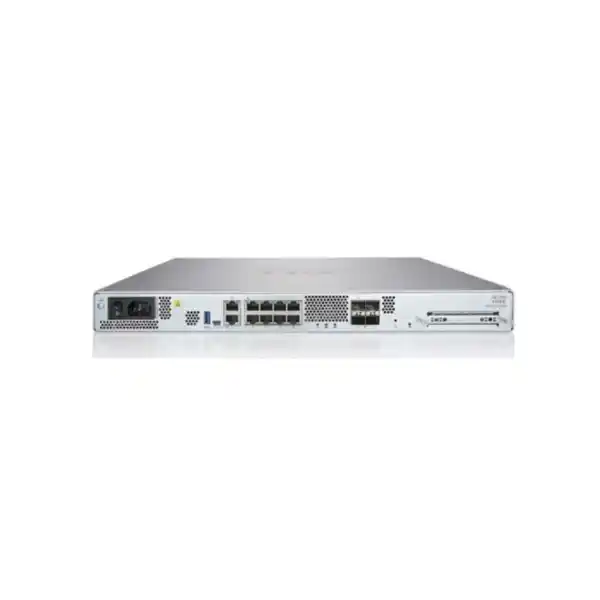
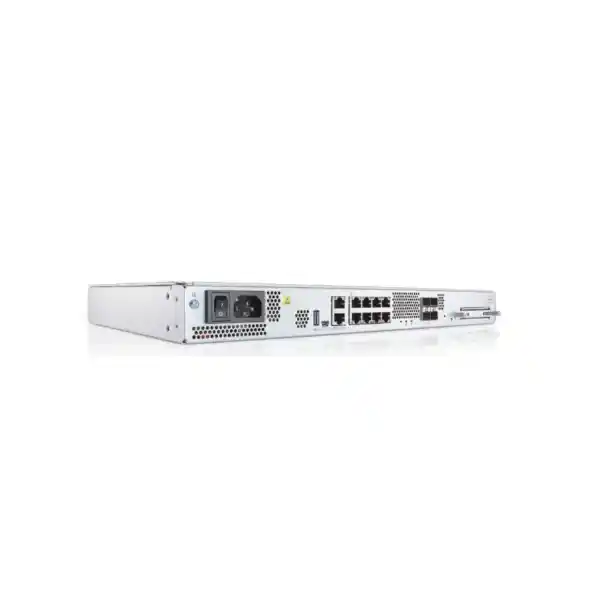
Cisco identifies the 1120 within its Firepower 1000 family. The hardware installation documentation describes a 1 RU appliance with eight 10/100/1000 RJ-45 network interfaces and four 1-Gbps SFP interfaces. A separate Gigabit Ethernet management port is reserved for management access. These distinctions matter when counting usable network connections.
The platform supports Cisco Secure Firewall Threat Defense or Cisco Secure Firewall ASA software. Treat these as software choices for a deployment, rather than assuming that buying the chassis gives you every capability of both environments. Confirm the installed image and intended management method in the proposal.
The manufacturer identifies FPR1120-NGFW-K9 as a product identifier for the NGFW appliance. This manufacturer identifier does not establish the seller’s SKU or the contents of a particular bundle. Ask for the complete order description, including software, subscriptions, accessories and support. The model name on its own is insufficient for comparing two quotations fairly.
Who should evaluate this appliance?
A business with a defined network boundary, an equipment rack and a team or service provider responsible for security operations can use this model as a starting point for assessment. Suitable requirements to discuss include controlling office internet access, separating network areas and connecting a branch to wider business services. Each scenario still requires a validated design.
A branch with predictable traffic may have very different needs from an office hosting public applications or a site handling large encrypted transfers. Explain whether most users work locally, connect remotely or depend on applications in another location. Include the impact of a firewall outage on sales, administration and customer service.
Avoid using employee count as the only sizing measure. A small technical team moving large datasets can generate a heavier workload than a larger office using light applications. Review application behaviour, connection rates, encryption and inspection requirements together. Where the requirement exceeds the validated design, request an alternative platform instead of reducing essential protection to fit the appliance.
Understand the performance figures before sizing
Cisco’s published Threat Defense table lists 2.3 Gbps for firewall plus Application Visibility and Control, and 2.3 Gbps for firewall plus AVC plus IPS, using the stated 1024-byte test profile. The same table lists 850 Mbps for TLS performance. These are different tests, not interchangeable promises for business internet speed.
Do not interpret a laboratory figure as a guaranteed result with your rules, applications and encrypted traffic. Ask the proposed designer to account for the services you intend to enable and the workload they create. A quotation should distinguish a published benchmark from an estimate for your environment.
For procurement, record the traffic assumptions used in sizing. Include the proportion of inspected encrypted sessions, busy periods and expected growth. If the business depends on a particular application response time, make it part of acceptance testing. A firewall can appear adequate on a specification sheet while a specific inspection workload requires a different capacity class.
Build a useful traffic profile
Before requesting a final recommendation, gather representative measurements from normal working days and unusually busy periods. Record utilisation in both directions, the largest transfers and the times when users report slow service. Describe any seasonal or month-end activity that could make a short measurement window misleading.
Separate internet use from traffic between internal network areas. Backups, server replication and local application access can add work if the planned design sends them through the firewall. Include those flows in the assessment rather than counting only the internet connection. Identify which paths require inspection and which remain outside the firewall’s scope.
Also explain the next planned changes. Additional users, a second site, a new hosted application or a faster internet service can change the purchase decision. Agree an appropriate growth allowance with the designer. The goal is a documented capacity assumption that the business can revisit, not an unsupported promise that one appliance will handle any future workload.
Plan copper and fibre connections carefully
The 1120’s combination of copper network ports and SFP interfaces gives buyers more than one physical connection type to evaluate. However, available sockets are only part of the design. Port allocation, switching arrangements and the intended separation of services should be agreed before cables are moved.
List each planned connection: internet handoff, internal switch uplink, isolated service network and any other required path. For fibre, confirm the supported transceiver, fibre type, connector and distance against the exact installation. Do not assume that an optical module is included or that a module already owned by the business is supported.
Keep a clear distinction between management access and production traffic. Document interface labels in both the network diagram and the installation record so another engineer can understand the arrangement later. Where spare connections are important for future changes, state that requirement explicitly. A complete port plan helps prevent an otherwise suitable hardware choice from producing an awkward deployment.
Choose Threat Defense or ASA deliberately
Software selection should follow the security and operational requirement. Cisco documents support for Threat Defense and ASA on this hardware, but a buyer should not assume identical functions, interfaces or administration workflows. Ask which image the proposed solution uses and why it fits your environment.
For a Threat Defense proposal, discuss the intended inspection services, policy management and subscription dependencies. For an ASA proposal, request a separate explanation of the required firewall and VPN behaviour. Avoid transferring feature claims from one software environment into the other without checking the exact release and configuration.
Existing configurations also need review. If you are replacing a different Cisco firewall, familiar terminology does not mean every rule can be moved unchanged. Request a migration assessment addressing routing, address translation, objects, remote access and any unsupported configuration. Confirm software compatibility before scheduling the change. The purchase decision should include a practical route from the current environment to the intended operating state.
Make licensing visible in the quotation
Ask for separate line items for the hardware, software entitlements, security subscriptions, remote-access requirements, management and support. This makes it easier to understand both the initial purchase and future operating costs. A low appliance-only price does not establish the cost of the finished security solution.
Cisco distinguishes IPS, URL Filtering and Malware Defense licensing. Its ordering guidance identifies Threat/IPS as a prerequisite for the Malware and URL features described there. Ask the supplier to map each requested capability to the appropriate entitlement, dependency and subscription term for the proposed software version.
Check dates as carefully as feature names. Record when subscriptions begin, which account owns them and who is responsible for renewal. Request clarity on what happens at expiry under the applicable licence terms. Avoid assuming that a demonstration, evaluation licence or existing entitlement will cover production use. The final proposal should make inclusion and responsibility explicit enough for both IT and procurement to approve.
Define the security outcomes you actually need
Turn broad requests such as “protect the office” into specific outcomes. Examples to discuss include restricting unnecessary inbound access, controlling communication between network areas and investigating suspicious connections. Set priorities based on business impact and the staff available to operate the solution.
For every requested inspection service, ask what traffic it will see and how the policy will be maintained. An inspection feature cannot replace a clear understanding of the application paths. Decide who can approve exceptions when a legitimate service is affected, and how those exceptions will be reviewed later.
Treat endpoint protection, identity controls, backups and user access management as separate responsibilities within the wider security plan. A network firewall is one component of that plan. Define how its alerts will reach the people who can act on them. Buying additional capability is useful only when the organisation can configure it appropriately, observe its results and maintain the policy as business needs change.
Encrypted traffic needs its own discussion
Many business applications use encryption, so an assessment based only on unencrypted traffic can miss an important design constraint. Describe which applications are critical, which must be inspected and which may require exclusions. Review the operational implications before enabling broad decryption policies.
Ask the designer to explain certificate deployment, application compatibility and how exceptions will be authorised. Some services may behave differently when inspection is introduced. Test the applications that matter to the business using the proposed policy rather than relying on a generic browsing demonstration.
Include privacy and organisational requirements in the design discussion. Decide who may inspect relevant records, how sensitive data will be handled and how users will receive any required information. Obtain appropriate internal advice for those decisions. Keep the capacity estimate tied to the actual inspection policy, because the amount and type of encrypted traffic can materially change the workload that the appliance must process.
Decide how administrators will manage the firewall
Management is an operational choice with cost and support consequences. Cisco provides Firepower 1100 getting-started documentation for Device Manager, local or central Management Center arrangements and cloud-delivered Management Center. Confirm which option is supported for your chosen software and required features.
For a single appliance, assess the available administration skills and how frequently policies change. For multiple locations, ask whether a shared management approach would make policy review and reporting easier. Include any management licences, hosting resources and connectivity requirements in the proposal rather than treating them as incidental details.
Agree who owns administrator accounts, backups and recovery information. Restrict access according to role and establish a way to remove access when staff or contractors change. The business should know how to regain control if the usual administrator is unavailable. A management plan should explain everyday operation, emergency access and responsibility for changes in language that the service owner can understand.
Prepare a network separation plan
A firewall purchase is a useful opportunity to review which devices and applications should communicate. Start by identifying business services and the users or systems that need them. Distinguish ordinary office devices, administrative systems, guest access and any public-facing services where those groups exist.
Write down permitted flows before turning them into rules. For each flow, identify the source, destination, service, business purpose and owner. This makes the proposed policy easier to review and provides a basis for removing access that no longer has a purpose.
Do not assume that connecting several networks to the same chassis automatically creates the intended protection. The architecture, routing and policy must work together. Ask for the separation design to be checked against the chosen software and switching environment. During acceptance, test both allowed and prohibited paths. A successful test should show that required work continues while the agreed boundaries behave as intended.
Plan VPN requirements separately from internet access
If staff or other locations need secure connectivity, describe those requirements early. Separate site-to-site connections from individual remote users. State the number of expected simultaneous users, the applications they need and the identity controls the business expects.
Request verification of the intended VPN design, software version, client compatibility and licensing. Do not infer the supported remote-access arrangement from the appliance name. Ask whether additional client entitlements, authentication services, certificates or configuration work belong in the bill of materials.
Test realistic use before accepting the deployment. A user should be able to reach the necessary applications without receiving broader access than agreed. Include sign-in failure, account removal and a lost-device scenario in the operating discussion. For site connections, define who manages the equipment at each end and how faults will be investigated. These details help turn a connectivity feature into a service that the business can operate reliably.
Consider resilience across the whole network
First establish what downtime would cost and how long the organisation can tolerate an interruption. That answer should guide the resilience design. A spare device, a paired design or a documented recovery procedure may address different needs, but each requires a separate technical and commercial assessment.
If a high-availability arrangement is proposed, ask the designer to verify support, software alignment, interface requirements, licensing and failover behaviour for the exact configuration. Do not assume that buying two appliances alone produces a resilient service. Include testing and responsibility for maintaining both units.
Look beyond the firewall. Power distribution, upstream internet, switches and management access can still interrupt the service. Document dependencies and agree which failures are in scope for the project. Test recovery using the business applications that matter, including whether sessions need to reconnect. A meaningful resilience plan states the expected behaviour and its limitations rather than promising uninterrupted operation under every failure condition.
Check the rack, power and installation environment
This is a rack-mount appliance, so confirm the intended cabinet and installation accessories before ordering. Check physical access, cable routing and the space needed to service the equipment. Ask the installer to follow the manufacturer’s mounting, airflow and environmental instructions for the exact hardware.
Review power continuity as part of the site assessment. Identify the power source, any UPS arrangement and who will respond when a power alarm occurs. A firewall cannot maintain connectivity when the supporting network equipment loses power. Consider the complete path from the internet handoff to the internal systems.
Avoid placing the appliance in an improvised location simply because it fits. Heat, blocked ventilation and difficult cable access can complicate ongoing operation. Record the location, cable labels and asset details in the handover information. Confirm accessory and power-cord requirements in the order so installation does not depend on assumptions about what is inside the package.
Tanzania procurement: request a complete commercial answer
For a Tanzania purchase, request a written quotation that identifies the exact configuration and the commercial terms that apply to that offer. Ask for the quoted currency, applicable charges, delivery arrangement and validity period. Obtain confirmation of availability rather than treating a product description as a stock statement.
Clarify the condition of the equipment and the support arrangements being offered. If a project requires new hardware, specific entitlement ownership or a defined support term, put those requirements in writing. The response should state what can be supplied and which items remain subject to verification.
For projects with purchasing deadlines, separate the required delivery date from the intended installation date. Allow time for configuration review and acceptance. Ask for any exclusions that could affect the project budget, such as optics, management resources or migration work. FourTeck Tanzania can be asked to quote against those requirements; service scope, pricing and delivery commitments must be confirmed in the actual proposal.
Compare total ownership cost
Compare quotations using the same scope and time period. Include hardware, subscriptions, management, support, accessories, configuration work and renewal responsibilities. This avoids comparing a complete proposal with a bare appliance price and drawing the wrong conclusion.
Ask procurement and IT to review the proposal together. Procurement can check commercial terms and renewal dates, while IT checks the technical dependencies and operating requirements. Both teams should understand which costs recur and what approvals are needed when the term ends.
Also consider the internal effort required to run the solution. Policy changes, monitoring, software maintenance and incident investigation need assigned people and time. Request an explanation of any optional service and its deliverables before including it. The most useful comparison shows what the business receives over the chosen period, which assumptions underlie the price and what additional work would still be needed after the equipment arrives.
Replacing an existing firewall
Start a migration with an inventory of the existing configuration and business dependencies. Record internet services, routes, translated addresses, published applications, VPNs and access rules. Ask application owners which services are essential and how they will confirm that the change has succeeded.
Review rules before carrying them forward. Old exceptions and unexplained access should be investigated rather than copied automatically. At the same time, preserve a reliable record of the current state so the team can identify why a service behaves differently after migration.
Agree a change window, communications plan and rollback criteria. Identify who may decide to stop the migration and how the previous arrangement will be restored if needed. Keep administrative access available during the change through a suitable approved method. The objective is a controlled transition with observable results, rather than assuming that a new appliance will reproduce every behaviour of the old configuration without preparation.
What a sensible deployment sequence includes
Begin with a reviewed design and an approved bill of materials. Confirm the software image, supported version, licences and management arrangement before connecting the appliance into production. Cisco’s getting-started material specifically treats version checks, licensing, connectivity and manager registration as preparation tasks.
Next, establish the required interfaces, routing, address translation and security policy using the documentation for the selected release. Keep a record of decisions and have another responsible person review important changes where practical. Use a staged approach that lets the team distinguish basic connectivity faults from policy or inspection issues.
Finally, validate the business services and capture the accepted configuration. Record outstanding items instead of allowing them to disappear into informal handover messages. A deployment is ready for operational ownership when the business understands what has been installed, how it was tested, who maintains it and how changes will be requested. Agree those deliverables before work begins.
Acceptance tests that reflect business use
Define success before installation. List the applications that staff must access, the published services that customers depend on and the network paths that should be blocked. Give each test an expected result and an owner who can confirm it.
Use realistic transactions where possible. A successful ping or a loaded home page does not prove that a complete business workflow functions correctly. Test sign-in, relevant application actions and any connections to other business systems. Include the effect of the agreed inspection policy and remote-access arrangement.
Record the result, time and configuration context of each test. If a problem is accepted temporarily, document the workaround, risk owner and resolution plan. Where performance is important, test under a representative workload and distinguish internet-provider limitations from firewall behaviour. Acceptance should provide evidence for the agreed scope; it should not become a blanket assurance that every possible application and future traffic pattern has been validated.
Logging, monitoring and response ownership
Decide what events the organisation needs to retain and who will review them. Useful questions include whether the team needs to investigate blocked connections, follow policy changes or identify recurring application problems. Align the logging plan with available storage and investigation capacity.
Ask how the proposed management arrangement will present relevant events and whether any external log destination belongs in the design. Confirm compatibility and integration requirements for any system the business already uses. Avoid assuming that a firewall purchase automatically includes an operational monitoring service.
Give alerts a clear destination and an escalation path. Record who can make urgent policy changes and who can approve them. Set review intervals appropriate to the business rather than generating more information than anyone can assess. Logging has practical value when it supports a defined action: checking a suspected issue, explaining an outage or verifying that an agreed policy is behaving as intended.
Maintain the solution after installation
Create an operating calendar covering software review, subscription renewal, backup checks and policy review. Assign an owner to each task and identify the records that should be retained. Maintenance is easier when it is planned before the first urgent incident.
Review Cisco advisories and release guidance for the installed software, then evaluate changes against the organisation’s requirements. Do not select a release solely because it has the highest version number. Confirm hardware and management compatibility, known issues and the appropriate upgrade path before scheduling work.
Keep recovery information current. Store configuration backups and access records in the organisation’s approved systems, with access restricted appropriately. Test the recovery procedure at a level suitable for the business. When applications or network connections change, update the diagram and policy documentation. The firewall should remain understandable to the next responsible administrator, not depend entirely on the memory of the person who first installed it.
When to compare another platform
Request alternatives if the proposed workload, interface requirement or operating model cannot be validated for the 1120. Examples include a need for different port speeds, greater inspection capacity or a longer-term architecture that the proposed configuration does not address.
Compare alternatives against the same traffic profile and security requirements. A larger headline number does not by itself explain how another platform behaves with your applications and policy. Ask the supplier to show why each option meets the requirement and what changes in licensing, management and migration effort.
Check lifecycle information for the exact hardware and software included in any proposal at the time of ordering. Do not treat a notice for a similarly named product, subscription or older firewall as proof of the status of this appliance. A practical recommendation should consider current orderability, support planning and the business’s intended ownership period, with any uncertainty resolved before purchase approval.
Common buying questions
Does the appliance include every security feature? The finished capability depends on the software, entitlements, subscriptions and configuration. Ask for each required feature to be identified in the quotation, including dependencies and term dates.
Are fibre modules included? Do not assume so. Request the exact supported optical modules and accessories as named line items where the design needs them.
Is it suitable for a particular internet connection speed? Suitability depends on the complete traffic and inspection profile. Request sizing against the services you will enable and validate important application behaviour during acceptance.
Can an existing configuration be transferred? Request a migration review for the current platform and the chosen target software. Rules, objects, VPNs, routing and translation need assessment.
What is the price in Tanzania? Request a current quote for the complete configuration. This description does not establish price, stock, delivery time or support terms.
Who will manage renewals? Agree the account owner, responsible person and reminder process before the initial subscription term starts.
Use a comparison checklist before approval
Ask each bidder to respond to the same requirements document. Mark every requirement as included, excluded or requiring clarification. This gives the business a practical way to identify gaps without relying on product names that may hide different bundles.
For hardware, compare the exact appliance description and required accessories. For software, compare the selected image, feature entitlements and management arrangement. For implementation, compare the proposed deliverables, testing responsibilities and handover records. For ongoing operation, compare the renewal terms and the work your own team will still perform.
Resolve ambiguous wording before approving the order. Phrases such as complete security or full setup should be replaced with named features and deliverables. If a service is optional, ask what changes when it is excluded. If an existing licence is expected to cover part of the project, request verification of that assumption.
Keep the final requirements response with the quotation and acceptance record. These documents help the business check that the delivered configuration matches the agreed purchase. They also give future administrators useful context when the network changes. A clear record supports a better buying decision now and reduces uncertainty when the organisation next reviews its security infrastructure.
Prepare your request for a configuration quote
Send FourTeck Tanzania a concise requirements summary covering the current network, internet capacity, users, essential applications and expected growth. Include whether you need remote access, inter-site connectivity, additional inspection or separation between business systems. A simple network diagram can make those requirements easier to assess.
State your preferred management approach if one already exists, or ask for the options to be explained. Describe the rack and power environment, the planned change window and the person who will own ongoing administration. If replacing equipment, identify the existing platform and any services that must remain available during the change.
Request a written proposal that separates appliance hardware, software, subscriptions, management, support, accessories and implementation scope. Ask for sizing assumptions and acceptance criteria to be included. With those details agreed, you can decide whether the Cisco model meets the business requirement and compare the proposed configuration on a clear and consistent basis.
Request your firewall configuration quote
Share your network diagram, traffic requirements and preferred deployment schedule with FourTeck Tanzania. Ask for a verified configuration, itemised commercial scope and a clear acceptance plan before placing your order.




Reviews
There are no reviews yet.