
Cisco Meraki MS150-48FP-4X Tanzania
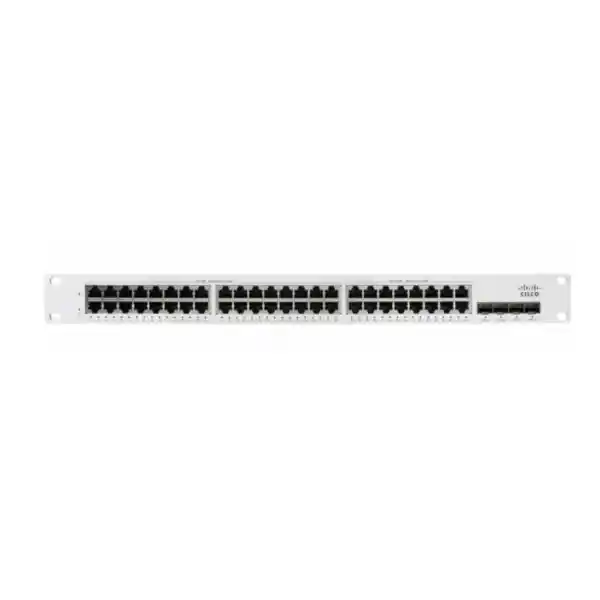
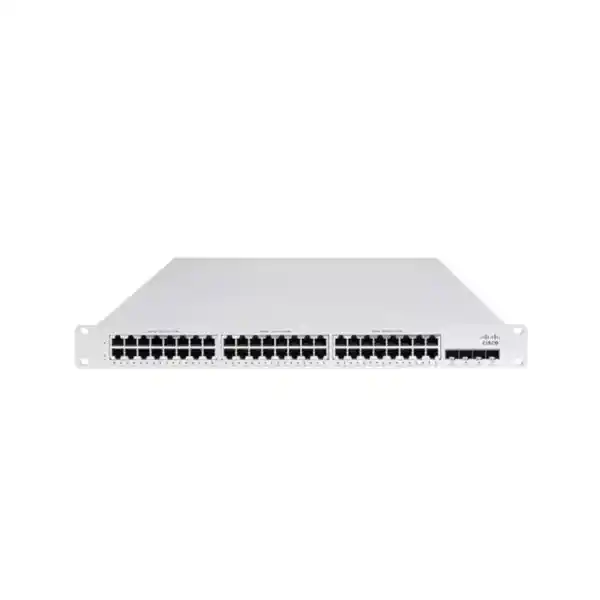
The Cisco Meraki MS150-48FP-4X is a cloud-managed 48-port access switch designed for branch and campus networks that need substantial Power over Ethernet capacity, high-speed fiber uplinks, physical stacking and centralized administration. Cisco documents 48 Gigabit Ethernet RJ45 access ports, four 10GbE SFP+ uplinks, a 740W switch PoE budget, two dedicated stack ports delivering 80Gbps stacking bandwidth, and static routing. For Tanzanian organisations building office, education, healthcare, hospitality, retail, surveillance or multi-site networks, the model can provide a dense access layer for powered endpoints while retaining 10GbE uplink capacity for distribution, servers or upstream switching.
Cisco Meraki MS150-48FP-4X Overview
The MS150 family sits in Cisco Meraki’s cost-effective access switching portfolio for branch and campus deployments. The MS150-48FP-4X combines a full 48-port Gigabit access layer with four 10 Gigabit SFP+ uplinks and the higher 740W PoE power budget used by the full-power 48-port model. In practical network design, this combination is useful when a rack must support many access devices while also leaving headroom for powered wireless access points, IP phones, cameras, sensors or other compatible PoE endpoints. The switch is managed through the Cisco Meraki Dashboard, supporting a cloud-centered operational model for configuration, monitoring and troubleshooting.
Cisco lists features across the MS150 family that include automatic firmware upgrades, SNMP and syslog integration, IPv4/IPv6 access control lists, 802.1Q VLAN tagging, 802.1X authentication, broadcast storm control, Dynamic ARP Inspection, DHCP snooping, Adaptive Policy capability, remote packet capture tools and static routing. The exact value of these capabilities depends on the architecture around the switch. A good procurement process therefore considers not only the chassis but also licensing, uplink optics or DAC cables, stacking cables, rack space, UPS capacity, cooling, VLAN design, endpoint power demand and the way the Meraki organisation will be administered.
Access Density
Forty-eight 10/100/1000 Mbps RJ45 ports provide the copper access density needed for user endpoints, phones, cameras, printers and compatible powered devices.
10G Uplinks
Four 10GbE SFP+ ports allow higher-speed fiber or direct-attach uplink designs when connecting to distribution switching, aggregation, servers or other supported infrastructure.
PoE Capacity
A 740W switch PoE budget gives designers more room for a large number of powered endpoints than lower-power variants, provided per-port and total power requirements are checked.
Stacking
Two dedicated stack ports provide 80Gbps physical stacking bandwidth, helping larger access-layer designs operate and scale as a coordinated stack.
Verified Technical Highlights
| Model | Cisco Meraki MS150-48FP-4X |
| Access Ports | 48 × 1GbE RJ45 |
| Uplinks | 4 × 10GbE SFP+ |
| PoE | 802.3bt family support; up to 30W per port on this model, 740W switch PoE budget |
| Stacking | 2 dedicated stack ports, 80Gbps stacking bandwidth |
| Switching Capacity | 176Gbps |
| Routing | Static routing |
| Management | Cisco Meraki Dashboard |
| Mounting | Integrated 1U rack mount |
Licensing, Optics and Accessories
MS150 procurement should include licensing planning. Cisco documents Enterprise and Advanced license tiers for MS150 switches with term options, and also documents subscription licensing choices. In co-term organisations, Cisco notes that MS150 Enterprise and Advanced licensing cannot simply be mixed without considering the organisation’s licensing rules. For an existing Meraki environment, buyers should therefore confirm the current organisation licensing model before requesting a quote. This is particularly important when the switch is being added to an established estate rather than deployed into a new organisation.
Supported 10G SFP+ options documented for MS150 4X models include Meraki 10G SR, LR, ER and ZR optics as well as selected direct-attach cables. Cisco also lists dedicated stacking cables in several lengths for MS150 stackable models. The switch package includes the switch and rack-mount screw kit, while region-specific power cords may need to be ordered separately depending on order region. A complete bill of materials should therefore be prepared from the physical topology: uplink media and distance, number of stacked units, rack arrangement, power socket type, UPS capacity, spare optics policy and licensing term.
Cisco Meraki MS150-48FP-4X Tanzania
For organisations searching for Cisco Meraki MS150-48FP-4X in Tanzania, the main decision is whether this exact port, PoE and uplink profile fits the site. A 48-port switch is often selected for an access cabinet serving many desks, access points, phones, cameras and infrastructure devices, but port count alone should not drive the purchase. The network team should build a port schedule that identifies active endpoints, planned growth, devices requiring PoE, devices requiring reserved VLANs and any links that need fiber. This makes it easier to determine whether one MS150-48FP-4X is sufficient, whether a stack is appropriate, or whether several cabinets should be used to avoid excessive copper runs and concentration of risk.
Power planning matters in Tanzania because a high PoE budget can shift a significant amount of endpoint power into the network cabinet. The 740W PoE budget is a capacity figure, not a recommendation to load every installation to its maximum. The actual design should total the expected wattage of access points, IP phones, cameras and other powered endpoints, then review switch consumption, UPS output, battery runtime and cooling. Where network uptime is important, the cabinet should be treated as a complete system that includes power protection, airflow, labeling and documented patching. A well-organised rack improves maintenance and reduces mistakes when technicians need to move or troubleshoot connections.
The four 10GbE SFP+ uplinks make the model attractive for sites where the access switch must connect to upstream switching at more than 1Gbps. Fiber selection should be based on distance, installed fiber type and supported transceivers rather than buying optics separately without a link plan. Organisations running high-density wireless, IP surveillance, large file transfers, virtualization traffic or centralized applications may benefit from the additional uplink headroom. At the same time, a 10GbE uplink only provides value if the upstream equipment, fiber path and network design can use it.
Meraki Dashboard management can simplify administration for distributed organisations by centralising configuration, monitoring and troubleshooting. That benefit is strongest when naming standards, network templates, administrator roles, alerting and change control are defined before deployment. Buyers expanding an existing Meraki organisation should confirm licensing compatibility and organisation policy. New deployments should decide who will own the Meraki account, how administrators will authenticate and how configuration responsibilities will be handed over. FourTeck can help prepare a quotation around the exact switch, licence tier and term, optics, stacking accessories and project destination. For wider switching and network planning, review FourTeck Tanzania integrated IT and networking solutions, which helps buyers consider switching together with firewalls, Wi-Fi, cabling, servers and power protection rather than as an isolated hardware purchase.
Cisco Meraki MS150-48FP-4X Dar es Salaam
Businesses in Dar es Salaam evaluating the Cisco Meraki MS150-48FP-4X commonly need an access switch that can support dense office networks, retail environments, hospitality properties, warehouses, logistics operations, professional services and multi-floor buildings. A useful design begins by mapping how many endpoints are present in each communication room and how many of them require power. IP phones and wireless access points can consume PoE across an entire office floor, while surveillance cameras may add a second group of continuously powered devices. With 48 access ports and a 740W PoE budget, the MS150-48FP-4X can serve as a consolidated access-layer platform where the total endpoint profile fits the available power and port capacity.
Dar es Salaam projects can also involve fiber uplinks between floors, buildings or distribution points. The four 10GbE SFP+ interfaces provide flexibility for higher-bandwidth uplink design, but the transceiver choice should match installed fiber type and distance. When replacing an older switch, the existing patch panel and fiber termination should be inspected so that new hardware does not reveal undocumented cabling limitations after installation. If the project includes high-throughput Wi-Fi, the switching architecture should be reviewed end to end, including access-point Ethernet requirements, upstream bottlenecks, internet capacity and firewall throughput.
For organisations with several Dar es Salaam locations, Meraki Dashboard can help standardise switching configuration and make remote visibility easier. VLAN definitions, port profiles, naming conventions and alerting can be made consistent across sites, reducing variation when branches are added. Central management does not eliminate the need for good local preparation; every site still needs stable power, suitable UPS support, secure rack access, clean cabling and accurate documentation. Network administrators should decide which changes can be made centrally and which changes require on-site verification.
Before requesting pricing, buyers should state quantity, license tier and term preference, current Meraki organisation status, uplink media, number of stack members, required optics and any existing accessories they expect to reuse. They should also identify whether the switch will power phones, cameras or access points, because PoE consumption affects both switch loading and UPS sizing. FourTeck Tanzania’s verified contact and quotation page can be used to submit the model, quantity, deployment location and integration details so the request is reviewed as a complete network requirement rather than only a price enquiry.
Cisco Meraki MS150-48FP-4X Mwanza
In Mwanza, the Cisco Meraki MS150-48FP-4X can fit organisations that are expanding structured networks in offices, education, healthcare, hospitality, retail and operational facilities. The model’s 48 Gigabit ports allow a single access switch to consolidate many wired devices, while the 740W PoE budget supports projects where a meaningful share of those endpoints draw power from the Ethernet infrastructure. The correct design starts with a room-by-room endpoint inventory. Separate users, phones, access points, cameras, printers and building devices into categories, then reserve capacity for growth rather than filling every port on day one.
Where camera networks are connected to the same access layer, bandwidth and power should both be reviewed. Cameras can operate continuously and may generate sustained traffic to an NVR or video management platform. Wireless access points can produce bursty traffic and may depend heavily on uplink performance during busy periods. The MS150-48FP-4X’s 10GbE SFP+ uplinks provide options for higher-capacity paths to aggregation or server infrastructure, but successful deployment depends on upstream switching, optics and fiber paths being compatible. Network segmentation should also be planned so that cameras, guest access, voice and business data do not simply share a flat LAN.
Meraki Dashboard management is particularly useful when an organisation has a main IT team responsible for a remote Mwanza site. Administrators can monitor switch state and use cloud-based tools without being physically next to the switch for every task. This should be supported by clear local escalation procedures. Someone on site should know how to identify the correct rack, confirm power status and follow basic instructions when physical intervention is required. Documentation should include patch-panel mappings, uplink labels, switch names, VLAN assignments and UPS details.
For procurement, request the hardware together with the appropriate MS150 license and any required SFP+ or stacking accessories. Do not assume optics or regional power accessories are automatically included in the configuration. If the Mwanza site is part of a larger East African network, standardising on a known Meraki template can simplify expansion, but licensing and topology should be checked for each organisation. Related regional planning can also be reviewed through FourTeck Cisco networking solutions for Africa, which covers broader Cisco and Meraki selection considerations for distributed business environments.
Cisco Meraki MS150-48FP-4X Arusha
Arusha organisations planning business networks can use the Cisco Meraki MS150-48FP-4X as a high-density access switch when 48 Gigabit ports, strong PoE capacity and 10GbE uplinks align with the site. Hotels, offices, education environments, healthcare facilities, tour and travel operations and multi-building organisations may connect a mix of phones, cameras, access points and wired user devices. The advantage of the full-power model is not simply that it has PoE; it provides a 740W switch budget that gives designers more room to support many powered endpoints. Every endpoint still needs to be checked against per-port power capability and total switch consumption.
Hospitality and guest-focused environments often need network segmentation to keep operational systems separate from guest access and security devices. The MS150 family supports VLAN-based design and access controls that can be incorporated into a broader architecture. Before deployment, the IT team should document which ports belong to guest infrastructure, staff devices, voice, surveillance and management. A consistent port-profile approach in Meraki Dashboard can make this easier to operate, especially when several switches or sites are managed by the same team.
The uplink strategy should consider physical distance and traffic concentration. A switch serving a busy floor or building may aggregate traffic from dozens of endpoints, so 10GbE SFP+ uplinks can provide useful capacity to a distribution layer. Where fiber already exists, confirm its type, termination and tested condition. Where new fiber is planned, choose optics and cabling together. The rack should include adequate cable management and power protection, and ventilation should be planned around the full equipment load rather than only the switch.
For Arusha quotations, provide the exact model, quantity, license preference, stack count, uplink distance, fiber type and anticipated PoE devices. If the site already uses Meraki, include the organisation licensing model and current switch family so compatibility and licensing implications can be reviewed. FourTeck can also help frame related requirements such as Wi-Fi, firewalling and structured cabling when the switch is one element of a larger refresh. The goal is a complete bill of materials and a deployment plan, not an isolated chassis that later requires unplanned accessories or network redesign.
Cisco Meraki MS150-48FP-4X Dodoma
For organisations in Dodoma, the Cisco Meraki MS150-48FP-4X can support access-layer designs that need centralized cloud management and substantial endpoint power. Government-related offices, educational institutions, professional services, healthcare sites, commercial buildings and expanding business networks may have several endpoint classes sharing the same communications room. With 48 Gigabit access ports, the switch can consolidate user devices and infrastructure, while the 740W PoE budget can support a large powered-device footprint when properly planned. Designers should still calculate actual wattage and reserve margin for future growth or endpoint replacement.
A major planning question is whether one switch should serve an entire floor or whether the network should be divided across multiple cabinets. Copper distance, building layout, redundancy requirements and maintenance boundaries all influence the answer. Where several switches are placed together, the MS150’s dedicated stacking capability can simplify coordinated operation. Cisco specifies two dedicated stack ports and 80Gbps stacking bandwidth. Stacking cables must be selected according to physical rack arrangement, and the network design should account for uplink paths from the stack to upstream equipment.
Dodoma deployments that use IP cameras, VoIP and enterprise Wi-Fi should define VLANs and security controls before endpoints are connected. A structured address plan and clear port naming reduce troubleshooting time. Meraki Dashboard can provide central visibility, but good outcomes depend on accurate configuration and ownership. Administrative access should be assigned to appropriate staff, multifactor and account security practices should be applied according to organisation policy, and change records should be maintained for significant network modifications.
Procurement teams should request the correct MS150 licensing tier and term together with the hardware. They should also confirm whether the project requires SFP+ optics, direct-attach cables, stack cables, power cords, rack accessories and UPS changes. A quotation can be more accurate when it includes the existing network diagram, number of PoE endpoints and uplink distances. FourTeck’s Tanzania contact workflow specifically asks networking customers to provide users, devices, internet speed, PoE requirements and existing infrastructure, which helps turn a simple model request into a practical implementation discussion.
Cisco Meraki MS150-48FP-4X UAE
UAE buyers evaluating the Cisco Meraki MS150-48FP-4X may be supporting headquarters, branch offices, retail groups, hotels, logistics operations, schools, healthcare environments or multi-site organisations that want cloud-managed switching. The model’s 48 Gigabit ports and 740W PoE budget are well suited to dense access layers where many endpoints require both connectivity and power. Four 10GbE SFP+ uplinks give designers options for connecting access switching to higher-capacity aggregation, while dedicated physical stacking can support scalable switch groups in larger racks.
For UAE projects, procurement commonly needs a clear bill of materials that separates hardware, licenses, optics, cables and support requirements. MS150 licensing should be reviewed before purchase, particularly where the new switch will join an existing Meraki organisation. The organisation’s current licensing model and edition can affect the correct order. Buyers should also confirm regional power cord requirements and any accessories required for stacking. If the deployment uses structured fiber between floors or buildings, select SFP+ modules according to fiber type and distance rather than choosing optics only by interface speed.
High-density office and hospitality environments can place significant load on wireless infrastructure, and the switch should be sized as part of that wireless design. Access points may require PoE, while uplinks need enough capacity to carry aggregate client traffic. IP phones and cameras add additional power and VLAN requirements. A well-designed configuration maps port roles in advance and uses consistent Dashboard profiles so that moves, additions and changes can be managed cleanly.
Organisations coordinating UAE and African branches can benefit from standardised Meraki configuration, but they should avoid assuming that a single hardware configuration suits every site. Local rack space, fiber, UPS, endpoint density and growth vary. For UAE-specific switch and infrastructure guidance, FourTeck network switch solutions in Dubai and the UAE provides broader planning around access, aggregation, PoE and fiber-linked switching. Use the exact MS150-48FP-4X requirement together with quantity, license term and accessories when requesting a commercial offer.
Cisco Meraki MS150-48FP-4X Uganda
Ugandan organisations considering the Cisco Meraki MS150-48FP-4X should start by defining the role of the switch in the wider network. In an office or campus access layer, 48 Gigabit ports can support a large group of wired endpoints, and the 740W PoE budget can power many compatible devices such as phones, cameras and wireless access points. The four 10GbE SFP+ uplinks can connect the access layer to aggregation or server infrastructure at higher speed. This makes the model attractive for growing sites, but the actual configuration must still account for port reserve, PoE reserve, uplink design and licensing.
A practical Uganda deployment should document existing cabling and rack conditions before equipment is ordered. If the switch replaces a legacy unit, the IT team should identify which ports are active, which VLANs exist and whether any endpoints depend on special settings. If it is part of a new build, patch panel numbering and switch-port naming should be created together. This reduces errors during commissioning and makes future support easier. The power design should include UPS capacity for the switch and all powered endpoints because PoE moves device power demand into the network rack.
Meraki Dashboard can simplify administration across multiple Ugandan branches by providing central configuration and visibility. This is useful when IT resources are concentrated in a central office. However, remote management works best when the local physical environment is reliable: stable power, secure rack access, adequate cooling and documented uplinks. Alerts should be routed to staff who are responsible for action, and configuration standards should be consistent across sites.
Licensing must be included in procurement. For an existing organisation, confirm whether Enterprise or Advanced licensing is already used and which licensing model applies. Also specify any SFP+ optics, DAC cables or stack cables required. FourTeck’s Uganda technology solutions site can support regional enquiries, while Tanzania-focused buyers can coordinate cross-border standards through the broader FourTeck network. Final availability, price and delivery should be confirmed against the exact bill of materials rather than assumed from a general product listing.
Cisco Meraki MS150-48FP-4X Kampala
Kampala businesses often operate mixed networks that combine wired users, enterprise Wi-Fi, IP phones, surveillance and cloud applications. The Cisco Meraki MS150-48FP-4X can serve as a dense access switch in these environments when its 48 Gigabit ports and 740W PoE budget align with endpoint requirements. A port plan should identify current usage and planned growth. Keeping spare ports available can make future additions easier and avoids forcing immediate switch expansion when a department adds users or when new cameras and access points are installed.
The four 10GbE SFP+ uplinks can be used to connect the switch to a distribution layer or other high-speed equipment. For multi-floor buildings, fiber uplinks can reduce copper distance constraints and provide a clean hierarchy between access and core areas. Optics should be selected from supported models and matched to the fiber plant. Network teams should test existing fiber before a cutover and confirm whether link distances and connector types align with the chosen SFP+ modules.
PoE planning deserves particular attention in a 48-port full-power switch. The available 740W gives substantial capacity, but device demand can vary widely. Wireless access points, PTZ cameras, video devices and other endpoints may draw more power than basic IP phones. Create a power budget from real endpoint specifications, then include margin. UPS sizing should consider both the switch and powered endpoints because a power outage at the rack can simultaneously affect network connectivity and all PoE devices.
For Meraki operations, define administrator access, organisation ownership, site naming and alerting before the switch goes live. If the Kampala site is one of many branches, templates and standard port profiles can improve consistency. Procurement should include licensing and any accessories required for the final topology. A good quote request states whether the switch is standalone or stacked, which uplink media will be used, whether cameras and wireless are present, and how long the licensing term should be. This information reduces the risk of incomplete orders and makes comparison between commercial offers more meaningful.
Cisco Meraki MS150-48FP-4X Arua
For Arua offices and institutions, the Cisco Meraki MS150-48FP-4X can be considered when a central IT team needs a cloud-managed access layer with substantial PoE and 10GbE uplink options. A single 48-port switch can connect many endpoints, which is useful in consolidated communications rooms, but network resilience should be considered alongside density. If too many critical services depend on one cabinet, power, UPS and environmental planning become especially important. The design should document what happens to phones, Wi-Fi and cameras if the switch or its power source becomes unavailable.
Cloud management can reduce the need for frequent specialist visits by giving administrators remote visibility and troubleshooting tools. The local site still benefits from simple physical documentation: labelled patch panels, rack elevations, uplink identification and a clear switch name. These details allow local staff to follow support instructions without guessing which cable or device is involved. For organisations with multiple branches, a consistent documentation template across all locations improves service quality.
The switch’s four 10GbE SFP+ interfaces can support higher-capacity uplinks where fiber infrastructure exists. Before ordering optics, check fiber type, distance and the equipment at the opposite end of each link. When no existing fiber is available, the project should include proper cabling design rather than treating transceivers as standalone accessories. If the switch will be stacked, confirm stacking cable length according to rack layout.
Arua procurement should also include Meraki licensing. Buyers adding the switch to an existing organisation should verify license tier compatibility before issuing a purchase order. Endpoint counts, PoE demand and expected growth should be provided with the RFQ. If the exact model is larger than required, a smaller MS150 configuration may be more economical; if higher-speed multigigabit access is needed, another MS150 variant may be more appropriate. The decision should be based on the site requirement, not solely on a preference for the highest port or power specification.
Cisco Meraki MS150-48FP-4X Mbarara
Mbarara organisations planning new or upgraded networks can evaluate the Cisco Meraki MS150-48FP-4X for access cabinets serving many connected and powered devices. The model is particularly relevant when a project combines user workstations with IP phones, wireless access points and cameras. Its 48 Gigabit ports give room for a dense access layer, while the 740W PoE budget provides capacity for powered endpoints. Network designers should create an endpoint schedule that records device type, expected wattage, VLAN and physical location so that the switch configuration follows the real environment.
For facilities with multiple buildings or floors, the 10GbE SFP+ uplinks can be used to build high-speed fiber paths to aggregation. The value of 10GbE depends on a compatible upstream design. Existing core switches, fiber type and transceivers should be checked before purchase. If a new upstream switch is also part of the project, design both layers together and confirm whether redundancy or link aggregation is required. Clear uplink labeling helps later troubleshooting.
The Meraki Dashboard management model can help organisations with limited on-site IT resources because configuration and status can be reviewed centrally. For reliable support, administrators should establish naming conventions and keep records of physical port mappings. Remote tools work best when they are paired with local processes for checking power, cables and environmental conditions. A simple handover document can record rack location, UPS details, uplink destinations and escalation contacts.
Commercial evaluation should cover hardware, license, optics, stacking accessories and power requirements. The MS150 family offers several variants, so the 48FP-4X should be selected specifically when its full 740W PoE budget and 10GbE uplinks are needed. If the site only requires lower power, another variant may fit. Conversely, if multigigabit access ports or higher per-port PoE are essential, an MP model may be more appropriate. A requirement-based comparison protects the budget and gives the deployment team a clearer technical basis for approval.
Cisco Meraki MS150-48FP-4X Gulu
In Gulu, the Cisco Meraki MS150-48FP-4X can support branch, campus and institutional networks that need centrally managed switching and a large PoE pool. Schools, healthcare environments, NGOs, offices, hospitality facilities and operational sites may use the same access layer for user connectivity, Wi-Fi, surveillance and voice. The switch’s 48 Gigabit ports create a practical consolidation point, and the 740W PoE budget can power a broad endpoint mix when calculated correctly. Designers should avoid assuming equal power consumption across all ports because actual devices vary.
Where internet or WAN capacity is limited compared with LAN capacity, local switching still needs to be designed for internal traffic. Cameras may send data to local recording systems, file transfers may stay inside the site, and wireless traffic can move between local resources. The four 10GbE SFP+ uplinks can provide strong internal capacity between access and aggregation layers. This should be paired with VLAN design to control broadcast domains and separate operational systems.
A cloud-managed switch depends on reliable reachability to the Meraki cloud for management functions. The underlying LAN should therefore be configured with appropriate addressing and gateway connectivity during installation. Cisco documentation also provides a local status page for troubleshooting connectivity when a device is not checking in. Deployment teams should include basic commissioning steps that verify IP addressing, internet reachability, Dashboard claim status, firmware state, uplinks and endpoint connectivity before handover.
For a Gulu quotation, specify license edition and term, switch quantity and whether physical stacking will be used. Include SFP+ requirements, fiber distance and any known DAC needs. Provide the PoE device list and approximate total power so that the switch and UPS can be assessed together. A project that is documented this way is easier to deploy and easier to maintain because commercial and technical teams are working from the same bill of materials and assumptions.
Cisco Meraki MS150-48FP-4X Kenya
Kenyan enterprises considering the Cisco Meraki MS150-48FP-4X may be standardising switching across corporate offices, education, healthcare, retail, hospitality and distributed branch networks. The model gives 48 Gigabit access ports, four 10GbE SFP+ uplinks and a 740W PoE budget, creating a strong profile for access closets that support many devices. Because Meraki is cloud managed, organisations with several sites can apply consistent operating practices across locations, but the design should still reflect each site’s physical cabling, power and endpoint mix.
Port density should be planned from a detailed device inventory. Count workstations, printers, phones, access points, cameras, building systems and uplinks, then reserve space for growth. PoE should be calculated separately using endpoint power requirements. A full-power switch provides flexibility, but unnecessary oversizing can increase project cost. Conversely, selecting a lower-power model without calculating endpoint demand can create limitations during expansion.
For buildings with fiber distribution, the four 10GbE SFP+ uplinks allow the access layer to connect at higher speed. Optics and cabling need to match. When switches are stacked, dedicated stacking ports provide 80Gbps bandwidth within the stack, giving designers another way to scale access capacity. The physical rack plan should determine stacking cable lengths and make sure that the arrangement can be serviced without unnecessary recabling.
Meraki licensing should be included from the start. Existing organisations need to check their licensing model and tier before adding MS150 hardware. New deployments should decide license term based on procurement policy and planned lifecycle. Kenya-focused organisations can also use FourTeck Kenya for regional technology enquiries. When comparing quotations, verify that each offer includes the same hardware, license duration, optics and accessories; otherwise a lower headline price may simply reflect an incomplete bill of materials.
Cisco Meraki MS150-48FP-4X Kuwait
Kuwait organisations evaluating the Cisco Meraki MS150-48FP-4X can consider it for branch and campus access networks that require dense Gigabit connectivity and strong PoE capacity. Corporate offices, education facilities, clinics, hospitality, retail and operational sites can use a full-power 48-port switch to consolidate access points, phones, cameras and wired users. The model’s 740W PoE budget is especially relevant where many ports will supply power. A PoE spreadsheet should be prepared before purchase so the design reflects real endpoint consumption.
The four 10GbE SFP+ uplinks are useful for high-capacity connections from the access layer to distribution or core infrastructure. Fiber designs should include transceiver selection, distance, connector type and upstream port compatibility. Where switches are installed in the same rack, physical stacking can provide coordinated capacity using the dedicated stack ports. Cabling, stack order and uplink placement should be documented in the rack design.
For cloud-managed operation, the IT team should establish how the Meraki organisation is structured and who is responsible for administration. Licensing is not an afterthought. Enterprise and Advanced options exist for the MS150 family, and the selected tier should fit the organisation’s current setup and required features. When adding to an existing estate, licensing rules must be checked before procurement so the new switch does not create an unexpected organisation-level issue.
Kuwait procurement teams should request a complete commercial configuration with exact hardware model, license term, optics, stack cables and regional power requirements. If the deployment is part of a cross-regional standard, document the intended port profiles and VLANs so that implementation remains consistent. The same chassis can serve very different environments depending on configuration; a structured deployment template turns the purchase into a repeatable network design rather than a one-time hardware installation.
Cisco Meraki MS150-48FP-4X Ghana
Ghanaian businesses and institutions considering the Cisco Meraki MS150-48FP-4X can use it as a cloud-managed access switch where 48 Gigabit ports, 740W of PoE capacity and 10GbE uplinks fit the network. This profile can be valuable in offices with extensive IP telephony, wireless and surveillance because one access switch can provide connectivity and power to a broad group of endpoints. The design should map physical devices to ports, VLANs and expected power draw before configuration begins.
For larger sites, uplink design is important. Four 10GbE SFP+ ports provide options for connecting the access layer to aggregation or redundant upstream equipment. The selected optics must match the fiber medium and distance. If the project is replacing older 1GbE uplinks, confirm that upstream switching and fiber paths can actually support 10GbE. A planned migration can reduce downtime by testing new fiber and optics before moving user ports.
Meraki cloud management can help central IT teams operate multiple Ghana locations with common visibility and configuration practices. Standard port profiles, VLAN names and switch naming can make support easier. Remote troubleshooting should be complemented by local documentation and basic site procedures. A labelled rack and clear patching schedule can save significant time when physical intervention is required.
Procurement should include the license, because MS150 operation is tied to Meraki licensing. Confirm edition, term and organisation compatibility. Also list stacking cables, SFP+ modules and power accessories. If the switch is expected to power cameras, phones and access points, include those quantities in the RFQ so that the 740W budget and UPS design can be reviewed together. Buyers should compare complete configurations, not just hardware-only prices, and should confirm current commercial availability for the exact destination before issuing final approval.
Cisco Meraki MS150-48FP-4X Nigeria
Nigeria’s large commercial environments often combine high user counts, IP telephony, enterprise Wi-Fi, CCTV and cloud applications, making access switching a critical part of the network. The Cisco Meraki MS150-48FP-4X provides 48 Gigabit ports and a 740W PoE budget, giving designers a dense access layer for many powered and non-powered endpoints. Four 10GbE SFP+ uplinks allow connection to higher-speed distribution infrastructure, while dedicated physical stacking supports larger switch groups.
For offices, campuses, retail groups and distributed branches, central Meraki Dashboard administration can help create consistent configuration standards. VLANs, port roles and monitoring can be managed from one operational platform, which is valuable when the network spans several cities or business units. The architecture should still be documented at site level. Each rack needs a record of uplinks, switch position, patch panels, UPS and the endpoints served. This makes central troubleshooting more effective because remote administrators can refer to accurate physical information.
Power design is particularly important where the switch will run many cameras or wireless access points. The 740W PoE budget should be treated as a design ceiling, while the actual endpoint load should include margin. UPS systems need to support the combined switch and endpoint load for the required runtime. If generator or inverter systems are part of site power, network cabinets should be integrated into the broader continuity plan rather than left on unprotected circuits.
When preparing a Nigerian quotation, include the MS150-48FP-4X hardware, appropriate license tier and duration, stacking accessories and SFP+ requirements. Existing Meraki customers should provide organisation licensing details so the new unit can be aligned correctly. If the project spans several locations, provide quantities by site and identify whether each site uses the same topology. Consistent hardware can simplify operations, but differences in local cabling and endpoint density may justify a mix of switch variants rather than using the full-power 48-port model everywhere.
Cisco Meraki MS150-48FP-4X Seychelles
Seychelles organisations in hospitality, professional services, education, healthcare and multi-property operations can consider the Cisco Meraki MS150-48FP-4X for access networks that combine wired users, Wi-Fi, phones and surveillance. The 48-port density can suit communications rooms serving many guest, staff and operational endpoints, while the 740W PoE budget supports a large powered-device footprint. In hospitality environments, segmentation should be designed carefully so guest networks, staff devices, building systems, voice and cameras do not share an undifferentiated LAN.
The four 10GbE SFP+ uplinks can be useful where fiber connects buildings, floors or equipment rooms. Island and multi-building environments should place particular emphasis on cabling documentation and spare planning. If replacement parts or specialist support may need coordination, having labelled fiber paths, known optic types and documented switch configurations makes recovery easier. The Meraki Dashboard can support remote visibility, but the physical layer remains critical.
A full-power switch also concentrates endpoint power in the rack, so UPS runtime and electrical resilience should be assessed. If the switch powers dozens of access points, cameras and phones, a rack power outage can affect a wide area. The continuity plan should consider the importance of those services and decide whether redundancy or separate switching groups are required. Environmental conditions around the rack should remain within vendor specifications, with airflow and secure access maintained.
For Seychelles procurement, request a complete bill of materials including Meraki licensing, SFP+ optics, stacking cables and power accessories as required. Confirm fiber distances and endpoint power demand before finalising the configuration. If several properties or branches are managed centrally, define a common Dashboard structure and naming standard. This creates consistency for administrators while allowing each site to retain its own VLANs, uplink design and operational requirements. Final price and delivery should be confirmed for the specific project rather than inferred from another region’s listing.
Deployment and Integration Guidance
A successful MS150-48FP-4X deployment starts before the switch is mounted. Prepare a logical network plan showing VLANs, IP ranges, upstream gateways and required access policies. Prepare a physical plan showing rack position, patch panels, uplink routes, stack layout, UPS and cable management. Claim the device into the correct Meraki organisation and network, confirm licensing, configure management reachability and then apply port profiles. During commissioning, verify each uplink, confirm endpoint power, test VLAN access, check spanning-tree behaviour, verify DHCP and DNS paths and document any deviations from the design.
When powering wireless access points, confirm both PoE requirement and Ethernet capability of the AP. The MS150-48FP-4X uses Gigabit access ports, so organisations deploying higher-throughput multigigabit APs should confirm whether the access-port speed is sufficient. The MS150 family includes MP variants with multigigabit ports for designs that need faster wired AP connectivity. The 48FP-4X remains attractive when Gigabit edge ports are adequate and the priority is a large 740W PoE budget with 10GbE uplinks.
For camera networks, consider continuous traffic, recording destinations and fault domains. Avoid putting all high-bandwidth video traffic through an undersized upstream path. Separate camera VLANs and restrict unnecessary access. For IP telephony, use appropriate VLAN and QoS design in the broader network. For general users, define access policies that suit security requirements. These design tasks are not features that should be improvised after the hardware is installed; they should be agreed during the network planning phase.
Who Should Choose the MS150-48FP-4X?
The model is a strong candidate for organisations that specifically need forty-eight Gigabit access ports, a high 740W PoE budget, four 10GbE SFP+ uplinks, physical stacking and Meraki cloud management. It can fit access closets supporting many PoE phones, cameras or access points, particularly where uplink capacity and central operations matter. Buyers should consider a lower-power model if their powered-device requirement is modest, because unused PoE capacity may not justify a higher configuration. They should consider an MS150 MP variant if multigigabit access or higher per-port PoE is needed for selected devices.
The best procurement outcome comes from matching model capabilities to a documented requirement. FourTeck can review the requested switch together with the wider network, including firewalls, wireless, fiber, racks and power. For broader access-switch category comparisons, the FourTeck Africa network switches category provides context on alternative switching approaches when the exact Meraki model is not the only option under consideration.
Quotation Checklist
Hardware and Licensing
Specify Cisco Meraki MS150-48FP-4X quantity, required license tier and term, current Meraki organisation licensing model, and whether the order is for a new deployment or expansion.
Uplinks and Stacking
Provide fiber type, approximate distance, required SFP+ optics or DAC cables, number of switches in each stack and preferred stacking cable lengths.
PoE Endpoints
List access points, IP phones, cameras and other powered devices with quantities and, where available, expected power requirements. Include expected growth.
Site Infrastructure
State rack size, UPS capacity, available power, existing patch panels, fiber routes and any planned cabling work so accessories and deployment scope can be checked.
Frequently Asked Questions
How many Ethernet ports does the Cisco Meraki MS150-48FP-4X have?
Cisco documents 48 1GbE RJ45 access ports on the MS150-48FP-4X. The model also provides four 10GbE SFP+ uplink ports and one dedicated management interface.
What is the PoE budget?
The MS150-48FP-4X has a 740W switch PoE budget. Project planning should calculate actual endpoint demand and leave appropriate operating margin rather than assuming every port will draw the same power.
Does the MS150-48FP-4X support 10GbE uplinks?
Yes. Cisco lists four 10GbE SFP+ uplinks for this model. Supported optics and direct-attach choices should be matched to the fiber type, distance and upstream equipment.
Does the switch require a Meraki license?
MS150 licensing is part of the platform. Cisco documents Enterprise and Advanced license options and subscription licensing. Existing Meraki customers should verify their organisation’s licensing model and tier before adding the switch.
Can the MS150-48FP-4X be stacked?
Yes. Cisco lists two dedicated stack ports and 80Gbps physical stacking bandwidth for MS150 models. Supported stacking cables should be selected according to the rack layout.
Is it suitable for Wi-Fi access points and IP cameras?
It can be suitable when endpoint Ethernet and PoE requirements fit the switch. Designers should verify each device’s required link speed and power, total PoE budget, VLAN design and uplink capacity.
What should be included in a Tanzania quotation?
Include the exact model, quantity, license edition and duration, required SFP+ optics, stack cables, site location, endpoint count, PoE device list, existing Meraki organisation status, rack and UPS information, and desired project schedule.
Decision Recap
Choose the Cisco Meraki MS150-48FP-4X when you need a 48-port Gigabit Meraki-managed access switch with a 740W PoE budget, four 10GbE SFP+ uplinks, physical stacking and static routing. Confirm licensing, optics, stacking accessories, UPS and endpoint power before ordering. If your design requires multigigabit access ports or higher per-port power for selected devices, compare the MS150 MP variants before final approval. If your PoE requirement is much lower, a lower-power model may provide a better fit. FourTeck can help turn the model request into a complete bill of materials aligned with the actual site.
Consult FourTeck Tanzania
Share your switch quantity, Meraki license preference, current network, uplink requirements, PoE endpoint count and deployment location. FourTeck can review the MS150-48FP-4X configuration and identify the accessories and integration details that should appear in the quotation. Current price, stock and delivery are project-dependent and should be confirmed at the time of enquiry.




Reviews
There are no reviews yet.